


LouRevue's stats
- Review count360
- Helpfulness votes844
- First reviewMay 20, 2011
- Last reviewJune 30, 2026
- Featured reviews0
- Average rating4.3
- Review comment count1
- Helpfulness votes1
- First review commentJanuary 17, 2017
- Last review commentJanuary 17, 2017
- Featured review comments0
Questions
- Question count0
- Helpfulness votes0
- First questionNone
- Last questionNone
- Featured questions0
- Answer count2
- Helpfulness votes5
- First answerDecember 10, 2017
- Last answerJune 12, 2018
- Featured answers0
- Best answers1
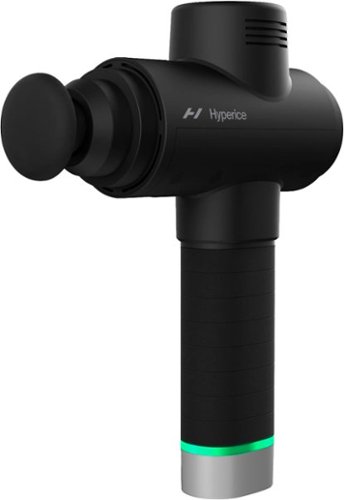
Get the same powerful percussion massage therapy that the world's best athletes have~right in the palm of your hand. Now with more power, and variable speeds, the Hypervolt 2 Pro Premium helps you recover faster so you can get back to doing more of what you love.
Customer Rating

4
Pretty much a “must have” for anyone
on October 29, 2021
Posted by: LouRevue
from Washington, DC
I’m a huge fan of these massagers for both after workout activities as well general muscle pains. I have some lower leg pains every once in awhile and this massager works great for relieving pain and stiffness. I’ve been using a Theragun however this Hyperice massager works really nice compared to my older massage gun. The Hyperice massager works great compared to the Theragun.
In terms of feel, I think the Theragun wins here. While it’s a weird looking shape, it feels a bit better in the hand. Especially when trying to use the massager on your back, the Theragun design seems to workout better in that sense. Overall though, the Hyperice feels great in the hand too. The grip on it is smooth and provides ample stability when using it.
Probably the biggest improvement here is the noise. The Theragun sounds like an old motor clacking away. Decibel-wise, the Theragun is around 80 decibels. The Hyperice, is significantly quieter at around 60-70 decibels. The motor in the Hyperice seems to run a lot smoother compared to the Theragun. It does get a little jittery when you use it on max settings but I usually use it on the 1 or 2 setting so it’s really not an issue for me.
The Hyperice comes with the AC adapter, 5 massage heads along with a small case to carry them in, as well as international charging plugs which is nice. I really wish the Hyperice came with a carrying case like the Theragun does. I almost would’ve preferred a case over the plugs but that’s my opinion.
The Hyperice is rechargeable but the Theragun came with 2 batteries and a charger which worked better for me. It was nice to have a spare battery on hand to quickly resume use whereas, with the Hyperice, you have to wait until it’s charged before using it.
For now though, I’ll use the Theragun until it ceases working. But this Hyperice is a really nice upgrade to it It’s lacking a carrying case and battery options but the performance of this, I think, it far superior to the Theragun. It simply works just as good, if not better, and is MUCH quieter than the Theragun which is a huge bonus IMO.
Mobile Submission: False
I would recommend this to a friend!


Share this review:


-3points
5of 13voted this as helpful.
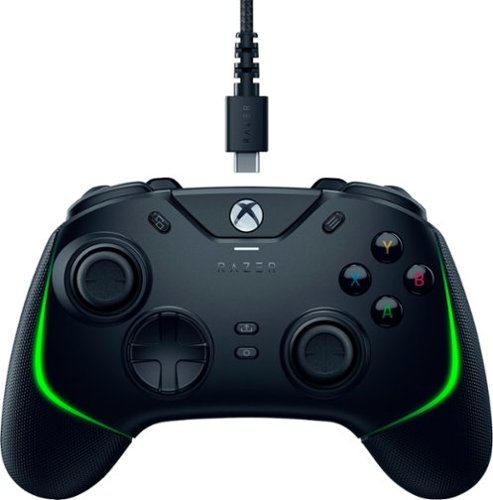
Where~s the fun in winning if you can~t do it your way? With the Razer Wolverine V2 Chroma, next-gen customizability is now. Armed with extra remappable buttons, Razer Chroma RGB, swappable thumbsticks and more, you~ll always be spoiled for choice when it comes to tearing up the competition.
Customer Rating

5
Great XBOX/PC controller
on October 22, 2021
Posted by: LouRevue
from Washington, DC
A great controller can really improve your gameplay as well as make it more enjoyable. The Razer Wolverine is my first high-end gaming controller and I'm really digging.
I'm currently using this for my PC and it's quite nice. I'm not a keyboard/mouse player so using a controller is how I roll. I previously used my old PS4 controller however that seemed to have quite a few issues with connectivity. This being a wired controller, it resolved those issues as well as added a few benefits.
The controller feels good in the hands. The RGB on it is subtle and adds a nice touch to the controller; especially for my PC. There are the normal buttons on this controller as well as 2 additional bumper buttons as well as 4 paddle buttons under the controller.
Having never had a controller with these underside paddle buttons, it's taking me a bit to get used to. I guess my hand placement is wrong since the buttons don't quite line up with my fingers however, after some practice, I'm sure I'll get the hang of it. There are also additional thumbpads included with this controller so you can mix and match ones that fit your playstyle. The cable is braided so it's pretty heavy duty and I don't expect any issues here with the cable.
With this controller, there is software you can download to change the RGB lights as well as setup different profiles and map the extra buttons. Pretty intuitive software and works great
I've only been using the controller for a week or so now playing GTA V and it's pretty sweet. It installed easily with my laptop and was ready to play right out of the box.
Mobile Submission: False
I would recommend this to a friend!


Share this review:


0points
0of 0voted this as helpful.
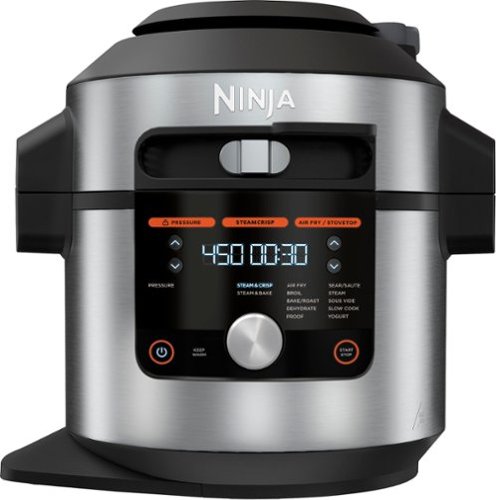
Meet the Ninja Foodi 14-in-1 8qt. XL Pressure Cooker Steam Fryer with SmartLid. The pressure cooker that steams and crisps. SmartLid slider unlocks pressure cooking, air frying, and Steamcrisping - all under one SmartLid. SteamCrisp Technology steams and crisps at the same time for faster, juicier, crispier results*. 14 one-touch programs unlock even more versatility. (*Vs. Ninja Foodi OL601 in dry mode only)
Customer Rating
5
Good step towards healthier eating
on October 20, 2021
Posted by: LouRevue
from Washington, DC
So I'm not the greatest when it comes to cooking so I'm always intrigued by anything that will help me out in the cooking department.
I have your normal kitchen appliances however they're either for cooking fried food or freeze dried food. I was quite surprised at how versatile this machine is. You can cook, bake, crisp, steam, sous vide (not sure what this is) and other methods as well. I figured the easiest thing to try out first was chicken, right? I mean, how bad can you screw up chicken?
I found a recipe online and gave it a shot. Initially, it took me a bit to get used to all the buttons, settings and what not since I've never had something like this before. One thing you'll need to pay attention to is the sliding mechanism on the lid. Unlike other sliders, this thing isn't meant to lock the lid down as you would normally expect it to. There are three positions on the slider so you'll need to pay attention to what it's set to prior to cooking. After finally selecting, what I thought, was the right settings, I turned on the machine and let it rip. Now, normally when I cook chicken, it's always burnt and almost like eating cardboard. The cooking this machine did actually made the chicken pretty soft and tasty. So the first run turned out well and I made some decent tasting chicken pasta. With numerous other methods of cooking with this machine, looks like I'll be busy trying out new recipes in the future.
The machine itself is sorta big aat around 15" tall and 15" wide. It will take up some counterspace if you live in a smaller place like I do. That said, it'll probably be the only kitchen you'll need (aside from a microwave and toaster) in your kitchen. Fortunately, it comes with a mini cookbook to help you get started on your cooking adventures. Like other people during this pandenmic, I relied A LOT on fast food/delivery and really am looking to make a healthier change in my eating habits. While this machine may not be the solution, I think it will definitely help me getting to eat healither and more frugaly in the future.
Mobile Submission: False
I would recommend this to a friend!
Share this review:


+1point
1of 1voted this as helpful.
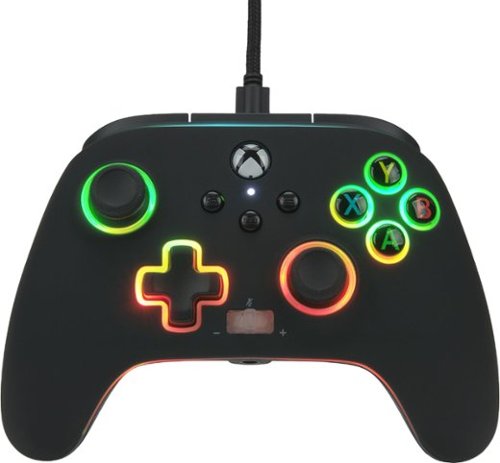
Spectra Infinity is a mind-bending light-up controller, with three distinct color-zones that you control. Dial in the exact hue and brightness for each zone. You can also activate "breathing Mode" for a mesmerizing pulsating effect. Plus, this all-new enhanced controller for Xbox Series X|S also offers great gaming features like 3-way Trigger Locks and two mappable Advanced Gaming Buttons. This officially licensed Xbox controller includes a Share Button, immersive Dual Rumble Motors, and a Headset Dial with one-touch Mic Mute to enhance your gaming experience. Also onboard, precision-tuned analog sticks, plus-shaped D-Pad, and an intuitive button/bumper/trigger configuration. And, of course, the Spectra Infinity is backed by the PowerA two year warranty, so you can trust this beauty to perform brilliantly.
Customer Rating
4
An OK controller for PC/XBOX
on October 20, 2021
Posted by: LouRevue
from Washington, DC
This is a fun little controller if you're in the market for a new one. The price point is just a bit under a normal XBOX controller however this one has some additional benefits.
Most notably, the RGB lights on this are pretty cool. You get three zones of RGB lighting. The "top" is the left joystick and button. the "middle" are the D-Pad and right joystick and then there is the perimeter of the controller. I'm using this on my PC at the moment and setting up the lights is a bit different for me. Normally, anything RGB related has some software that controls it. This being an XBOX controller, you have to manually change the RGB lighting by pushing the LED button on the bottom of the controller and then using the D-PAD and buttons to cycle through the different zones and color schemes. There is also an option to have the lights solid or "breathing" which I thought was kind of cool.
There is also trigger adjustment switches on the bottom of the controller. There are three positions to the switch and this basically limits how far the button travels when you push it. Kind of cool however one small limitation with this. For FPS games, this is a really nice adjustment you can make however, for driving games or any game where the trigger pressure is used, this feature is useless. For example, in GTA V, if you have the switch set to short, if you're driving a car, you won't be able to speed up since the trigger pressure has been limited by this switch. The switch is useful for some games but worthless for others.
Comfort-wise, it's a very nice feeling controller. There are two programmable buttons on the bottom that line up perfectly with my middle finger placement on the controller. The joysticks have a knurled texture to them which makes them a bit more tactile which is great also. The included cable is more than long enough for most people and it has a quick detach on it as well.
Overall, this is a nifty controller if you're in the market for a new one or a replacement. While it's not a full fledged gaming controller like some other manufacturers have, this is certainly a nice controller none the less.
See the RGB lights in action;
https://www.youtube.com/watch?v=T_jFBHRiIJ4
https://www.youtube.com/watch?v=T_jFBHRiIJ4
Mobile Submission: False
I would recommend this to a friend!


Share this review:


+1point
1of 1voted this as helpful.

The new Alienware x17 is super thin, extremely light laptop . Now~s your chance to game with gear that knows no boundaries. The Alienware x17 gaming laptops with advanced Alienware Cryo-Tech~ cooling defy boundaries. Introducing Element 31 thermal interface material and a Quad-Fan Design. We are incorporating more fan blades, more copper materials, and vapor chambers to deliver ample power while dissipating the heat more efficiently and allowing the fans to run less resulting in reduced noise. The x17 features five tailored power states, and grants access to thousands of games with Windows. Alienware laptops will bring your favorite games into hyper-reality with Windows DirectX 12 Ultimate. Constructed with magnesium alloy and aluminum parts gamers can experience the evolved Legend Industrial Design that reimagines the way you game. The Alienware x17 is equipped with 11th Gen Intel processors, has more storage options with dual drives featuring SSD and includes powerful NVIDIA~ GeForce~ RTX 30-series discrete graphics.
Customer Rating
4
Top tier gaming laptop
on October 13, 2021
Posted by: LouRevue
from Washington, DC
Alienware is well known for its gaming PCs and laptops and this one more than lives up to the brand.
The 17” screen on this is just plain wonderful. The 360Hz refresh rate is super nice and crisp. Good colors and not issues so far. I know that some people complained about light bleed on their units but I’ve not experienced anything like that fortunately.
The i7 and RTX 3070 pair wonderfully together and deliver power/performance to run any AAA game out there. There are different modes/profiles you can set for either performance or power saving as with any other gaming PC. I’m currently playing Destiny 2/RDR2 on High and there’s been no hiccups with either game. The 1TB NVME drive is super fast and fine, for now, however I’ll probably upgrade to a larger drive in the future. There is another slot for another drive as well.
Even with these high end components, the cooling on this laptop is quite surprising. I set my mode to performance and even after hours long gaming sessions, the laptop remains right around the 40c-44c temps. Keyboard gets a tad warm but nothing out of the ordinary.
The RGB on this laptop is subtle but still good. The keyboard has per-key lighting but the most noticeable is the tron ring on the back. Very nice touch and adds a bit of pizazz along with the logo on the lid.
The weight of this laptop is good. It’s a bit heavier than your typical laptop however it’s a good heavy. It feels super sturdy and just feels like a quality build. The matte coating on the keyboard tends to get a bit of a fingerprint magnet so just be aware of that. You’ll probably need to bring along a microfiber cloth with this thing wherever you go. The keyboard feels very nice and the keys have a pleasant touch to them and provide good feedback when typing.
I updated the RAM on mine to 64GB and was pleasantly surprised by the layout of the internals. The case comes off pretty easily unlike other laptops I’ve had where I had to, literally, pry the bottom off the latptop. This shows this laptop was well engineered and it shows.
There were two minor, but irritating, issues I had with the laptop and both were wth the keyboard. While the fit and finish of the keyboard is well done, two things prevent it from being perfect IMO.
Even though there’s RGB on the keys, the secondary characters are not lit up....why? Aesthetics aside, I can’t understand why the secondary characters aren’t lit up on this laptop and really just....sigh....just irritating.
This is a 17” laptop and there’s no number pad on it. I realize it’s probably due to the fan layout on this laptop but, c’mon, a number pad should be standard on a laptop this size.
That said, this is a fantastic laptop. For any advanced gamer, they’d be proud to have one of these to play on. I’m really digging this laptop and hope it’ll work for years to come.
Mobile Submission: False
I would recommend this to a friend!


Share this review:


+7points
10of 13voted this as helpful.
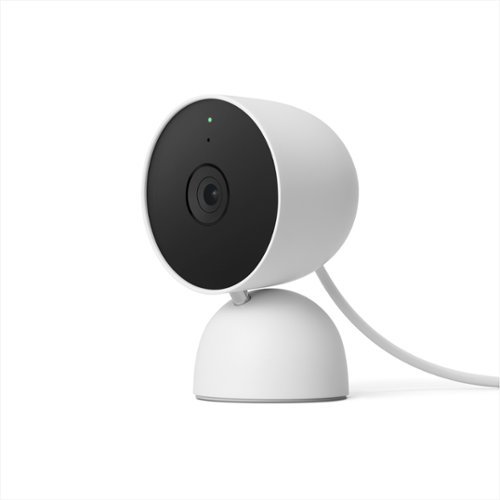
The indoor Nest Cam knows the difference between a person, pet, and vehicle, and alerts you about the things that matter to you, instead of the things that don't. 24/7 live view shows you what~s happening from anywhere.* With 3 hours of free event video history, you can go back and see what you missed. And it comes in different colors to fit your style. The indoor Nest Camera requires the Google Home app and a Google Account ~ it~s not compatible with the Nest app or the home.nest.com site.
Customer Rating
5
Easy setup and great video quality
on October 10, 2021
Posted by: LouRevue
from Washington, DC
Really dig the Nest family of cameras as they're easy to setup and just plain work great.
I have a Nest doorbell cam and really like the way it works and integrated with Google Home. This indoor cam has great build quality and works great alongside my other indoor cameras.
What I found odd was that, even though this is a Nest product, it doesn't work with the Nest app. It will work with the Google Home app which is how you setup this camera however it's not all that intuitive to have a separate app for my doorbell and then another for this camera. You can easily view both cameras in the Google Home app so I'm not sure if the Nest app is going away or what. Not a huge thing but just something weird about this camera.
The setup time for this camera took all of about 10 minutes. I spent more time waiting for this to setup than actually setting it up. I have it mounted on the stand for now however, I'm probably going to wall mount it and replace an older indoor camera I have.
You get 3 hours free recording on this camera so you don't have to sigh up for any subscription or service to view videos. There are plans where you can get more recording time however, for my needs, I didn't think this was necessary.
When away, I'm easily able to view the camera live whenever I need to. Some of the other indoor cameras I have always seem to have an issue connecting through my app so this one seems to work a lot better/quicker than those (yay)
That said, I'm really liking this camera both for its ease of use and setup.
Mobile Submission: False
I would recommend this to a friend!
Share this review:


+3points
3of 3voted this as helpful.
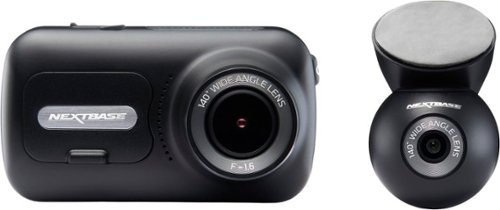
The Nextbase 320XR and Rear Window Camera is the ideal solution for all-around protection on the roads in full HD quality. The front cam captures every detail in 1080p full HD at 30fps, with the aid of a 140~ wide viewing angle. It utilizes the latest 2.5" screen with IPS technology for easy menu selection and playback. The 320XR uses the exclusive Click&Go PRO mount with integrated neodymium magnetic power connectors for easy installation and removal using just one hand. The 320XR Rear Window Camera connects to your front facing Dash Cam via a supplied 6.5m cable. It fits directly to your rear window with an easy to install self-adhesive pad. The magnetic, adjustable fixture means that it's suitable for angled windows in cars or more vertical van windows. The Rear Window Camera records in full 1080p HD with a wide 140 degree viewing angle to guard against everything from hit-and-run impacts to knocks and bumps in a car park. The 320XR also includes Intelligent Parking, which automatically starts recording when motion is detected, keeping your car safe when parked. For this feature, we recommend hardwiring in the Dash Cam using the Nextbase Hardwire Kit. Footage must be played back on a PC/Mac using Mynextbase Player or online using the free MyNextbase Cloud service (minimum requirements: Windows 10/OSX 10.9). The 320XR is not Bluetooth, and will NOT sync directly with the MyNextbase cell phone application.
Customer Rating
4
Good quality front/rear view dash cam
on October 10, 2021
Posted by: LouRevue
from Washington, DC
Overall, I thought this was a pretty good dash cam setup. For those in need of dash cams for your ride, this is a pretty good set to pick up.
The video quality of this camera is quite good. I never understood the need/want for 4k resolution video from a dash cam so this 1080p is just fine for me. You will need to pay attention to the type of memory card you use in this. With other dash cams I've had, you could pretty much use whatever micro SD card you had and it would be fine. This one is somewhat finicky in that it NEEDS a card with U3 speed or higher. Apparently, all my cards were only U1 so I had to get a new card for this dash cam. Not a huge deal but something you will need to keep in mind when picking this up.
Installation is pretty straightforward. Front cam is mounted with double sided tape as is the rear camera. Only "issue" during installation is trying to fish the rear camera cable throughout your interior. The camera does come with a small plastic, panel removal tool to help you out with this part.
My only issue with this setup was with the rear camera. I have a F150 with sliding rear window and that's where I mounted the rear camera. Unlike the front camera which pivots on a plastic ball mount, the rear camera is held on to its mount via a magnet. As such, it tends to move around quite easily especially when opening/closing my rear window. For passenger cars, this won't be an issue however for truck users, this is somewhat of an irritation. I'll probably move the camera to the left/right side of my rear window to resolve this issue however, it just won't look as nice IMO.
Also, there is no mobile app for this camera. Seeing as this camera has a parking cam feature, it would be nice to have a companion app where you could view the camera if motion or something was detected by them.
Mobile Submission: False
I would recommend this to a friend!
Share this review:


-2points
0of 2voted this as helpful.

Skip the coffee shop! With its convenient 3-in-1 functionality~frozen, iced, and hot coffee~the Mr. Coffee Single-Serve Frappe + Iced + Hot Coffee Maker & Blender makes it easy to create your favorite coffee drinks right at home.
Customer Rating
5
Interesting little kitchen tool
on September 22, 2021
Posted by: LouRevue
from Washington, DC
My initial thought was that this was some sort of gimmicky coffee brewer. I mean, you can get frozen and iced coffee from the same machine you get normal coffee out of? Much to my surprise, this is actually pretty good.
After you clean everything on the coffee maker, simply put in some of your choice coffee and select the appropriate brew button. Just like any other coffee maker, you get coffee after a bit. But with the built in blender, you can have frozen coffee right off the bat which is pretty cool. I've been tinkering around with this for a couple days now but it's pretty cool to be honest and I'm digging it.
I don't have a lot of syrups or flavored coffee so I'm going to need a shopping trip here soon. But now I have the ability to get iced/frozen coffee in record time and without the $7/cup price tag or whatever it is these days.
This also serves as a normal coffee maker too but I'm leaning more and more each day to making this my go-to for iced coffee. Really cool device that's found a nice place in my kitchen
Mobile Submission: False
I would recommend this to a friend!
Share this review:


+4points
4of 4voted this as helpful.
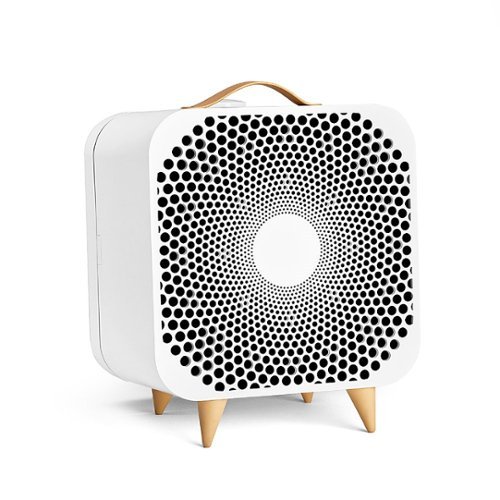
Designed in Sweden for expert removal of airborne allergens. Unlike a standard fan, Pure Fan Auto cleans the air of pollutants as it cools. Customizable to fit your needs, the fan features a colorful fabric pre-filter and Auto mode setting to auto-adjust to your real-time room conditions. Pure Fan Auto delivers more clean air than Dyson purifying fans~ and removes over 99%~ of airborne allergens like dust and pollen with Blueair's signature HEPASilent~ filtration technology. The unique combination of electrostatic and mechanical filtration effectively removes airborne allergens like dust, pollen, and pet dander with low noise and energy consumption. The fan works by pulling in dirty room air from the back through a pre-filter and particle filter using patented fan technology to deliver a gentle stream of clean, cooling air back into your room. Provides cool comfort by distributing air into the room at a 90-degree angle, so there's no need for oscillation. Upgraded features from the original Pure Fan offer simple air quality management. Set to Auto mode, the fan will automatically increase speed when particle pollution levels rise in your indoor environment and return to a lower rate once the air is clean. The air quality indicator (AQI) located on the top left of the fan keeps you up to date on the current status of your air. The LED displays one of three colors to indicate that room conditions are good, moderate, or polluted based on real-time measurements of fine particle (PM2.5) concentrations. Customize to your space with unique machine-washable fabric pre-filters available in five colors. Designed to catch larger particles to extend the primary filter's life, pre-filters in Arctic Trail and Night Waves come standard with the Pure Fan Auto. ENERGY STAR~ certified for energy efficiency, Pure Fan Auto uses less energy than a light bulb.~ The fan utilizes HEPASilent~ filtration technology to clean the air as it cools with noise levels quieter than a whisper on low (25 dB) and less noise than a normal conversation on high (54 dB).~ Minimalist features are a breath of fresh air. Use the fan's two buttons to turn on/off, cycle through three-speed settings, set Auto and Night mode. Plus, the filter indicator light alerts you when it's time to replace the filter. Filter replacement is recommended about every six months. The Pure Fan Auto fits in well on a tabletop or directly on the floor in any area of your home. The balanced design is light enough to move easily, yet the low center of gravity makes it difficult to knock over. As an added benefit, unlike standard fans that use blades that get covered with dust and require disassembly to clean, Pure Fan Auto captures airborne dust before it has a chance to stick to the fan blades, using pre-filters that can be cleaned with a quick vacuum. At Blueair, our Swedish heritage inspires sustainability and quality at the heart of everything we do. Like our air purifiers, Pure Fan Auto is AHAM Verifide for Clean Air Delivery Rate (CADR), certified by ENERGY STAR for energy efficiency, and certified by the California EPA Air Resources Board (CARB) for safe ozone emissions. ~ Comparing dust and pollen CADR (AHAM AC-1) on high to Dyson purifying fans (TP01, TP02, TP04, HP01, HP04, DP04) ~ Based on third-party testing of removal rate of particles, pollen particles (5-11~m) in less than 20 minutes and dust particles (0.5-3~m) in 30 minutes according to AHAM AC-1-2019 standard. ~ On lowest speed, according to GB/T18801-2015 standard. "Light bulb" is defined as an LED light bulb with 40 W energy consumption. ~ Sound pressure according to GB/T18801. A whisper is about 30 dB; normal conversation is about 60 dB.
Customer Rating
4
Retro looking air circulator
on September 22, 2021
Posted by: LouRevue
from Washington, DC
At first glance, this thing has a very retro vibe to it which is nice. After finding out that it's made in Sweden, my first thought was, yeah, this looks like something that was made in Sweden.
I call this an air circulator and not a fan since it kind of is and isn't. This isn't the type of fan that you'd necessarily have in your garage or attic. Nor is it the type of fan you want to plop down in front of after a hot day. Stuff like that is more geared towards your typical box fan you get for $20.
This is more of an air circulator in that it has a two ply filter on the back of it to filter out most of the nasties in the air. It looks much like the filter you put into your car. There is a mesh sleeve that goes over the filter to further filter the air flowing through.
On low and med, the sound level of this is pretty good. The low setting is almost silent so great to simply move around stale air in your place. The high setting is really loud. Granted, it does move a lot of air but it's not the setting you'd necessarily want to use at night.
I picture this being used in your baby/kids room to help them get cleaner air. Or maybe at your parents house to use in the living room. Someone with allergies would also probably benefit from this as well.
Overall, it's great at what it does and looks pretty cool too.
Mobile Submission: False
I would recommend this to a friend!


Share this review:


+1point
1of 1voted this as helpful.
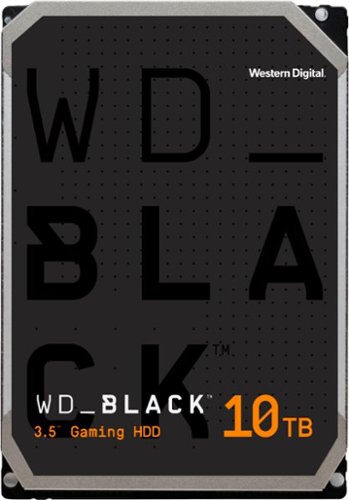
Offer your customers the latest generation of the WD_BLACK Gaming Hard Drives to give them the capacity they need and the performance they want. With up to 256 MiB of DRAM cache and storage capacities of up to 10TB, the WD_BLACK Gaming Hard Drive maximizes drive and system performance, allowing your customers to spend more time playing the games they love most. Combine the WD_BLACK Gaming Hard Drive with a WD_BLACK SSD for a dual-drive configuration, enabling additional caching of the operating system onto the SSD for even greater PC gaming performance. All together, the WD_BLACK Gaming Hard Drive gives your customer performance, capacity, and an industry-leading 5-year limited warranty for an inspiring three-in-one storage solution.
Customer Rating
5
How can you not love a 10TB drive?
on August 10, 2021
Posted by: LouRevue
from Washington, DC
This is what any gaming PC, or any desktop, should have. I have an HP Omen 30L with i9 chip and RTX 3090 graphics card. It's a pretty stout machine to say the least and perfect for high end gaming. Hard drive wise, I have a 1TB NVME and 2TB SSD as the main/secondary drives. Still though, with games these days pushing upwards of 100GB in size, you run out of room pretty fast with these smaller speedy drives. Enter this WD 10TB drive and, voila, problems solved.
Speed wise, this WD drive is the slowest of all my drives. Can't really compare a spindle drive to a NVME/SSD honestly. That said, the 7200RPM drive is speedy enough for my games. I installed Sniper Ghost Warrior 3 on this drive as well as some older games and there was no issue with speeds. For such a large capacity drive, it functions quite well in terms of speed so that's really nice for this drive.
All in all, it's just really pleasant to look at in Explorer and see 10TB for my drive size. In addition to game, I also plan on moving all my media/music on this drive as well. Having been used to smaller drives, and with use of the occasional external drive, its really nice to have all my data consolidated in my desktop. Only issue/concern is longevity so we'll see how this drive holds up over time. But, in all honesty, just get the drive.
Mobile Submission: False
I would recommend this to a friend!
Share this review:


+4points
4of 4voted this as helpful.
LouRevue's Review Comments

Only at Best Buy Acer Aspire R 15 Convertible 2-in-1 Laptop: Combine performance and versatility with this Acer Aspire laptop. It has a huge 1TB hard drive to meet your storage needs, and the Intel Core i5 processor makes light work of multitasking. This Acer Aspire laptop has a 15.6-inch display for a great viewing experience, and the 360-degree hinged screen provide flexibility for work and play.
Overall5 out of 5
5 out of 5Excellent laptop for everyday use
By LouRevue
from Washington, DC
Having had the chance to use this laptop, I must say it’s quite an impressive model for almostn any use. With an abundance of features housed in a sleek, stylish body, it’s a solid laptop for anyone in the market for a new/replacement laptop.
Using a 7th gen i5 dual core processor, the laptop functions on par with just about any laptop in its price range. With 8GB of RAM (12GB max) and a 1TB hard drive, it offers plenty of speed and room for all your files and enough power/speed to perform almost any task.
As far as the aesthetics go, this is an impressive looking laptop with clean lines, brushed aluminum cover and beveled edges. It’s a very nice looking laptop no doubt and the design, overall, is quite appealing. It comes with a full size keyboard as well as backlit keys which is a nice touch. Only gripe with the keyboard are the arrow buttons as the Up/Down buttons are smaller due to keyboard layout. The power button is on the right side of the laptop which is a bit unique as well as a dedicated volume button. There are 2 USB 3.0 ports as well as 1 USB 2.0 port, HDMI, SD Card and USB-C port. There is no CD drive for anyone wondering. The laptop (closed) is only about ¾ inch tall however it’s a bit wider than most due to the full size keyboard.
Power/performance. Using a dual-core processor I was under the impression this would be relatively slow and have choppy performance when opening multiple programs. Being this is the latest gen processor from Intel, this is not the case. Opening 2-3 programs at once was done with relative ease and switching between them was pretty flawless. The 8GB RAM comes in quite handy here and even with a 5400 RPM HDD, this laptop was able to perform tasks with very good speed. Battery life is pretty good. Using it “normally” and leaving it on for about 5-6 hours, there was about 50% battery left. Also, one very noteworthy benefit to this laptop, it doesn’t get that hot when left on for long periods of time which is VERY nice.
The display is probably the most impressive feature on here. A full 1080p display is quite vibrant and displays bright and dark colors extremely well. Those wanting to watch Netflix/Hulu will have no issues with the display. In addition to visuals, the sound from this laptop is equally impressive. For watching movies or just playing music, the speakers on this laptop deliver quite nicely without too much reverberation or distorted sound.
One of my initial thoughts of this being a 2-in-1 was that the tablet was an afterthought/gimmick. Having used previous 2-in-1 laptops, I was expecting the tablet functionality to be quite lackluster. Again, this was not the case. In this unit, you have, both, a well built laptop as well as tablet on-the-go device. Once in tablet mode, the screen orients itself to that of a normal tablet using Windows Tiles. Touch sensitivity is surprisingly smooth and using paint programs worked well without any lag or drops in sensitivity. Using the tablet form works really well when you want to sit back and watch videos or movies. Very nice.
A couple concerns with this laptop were;
The hard drive. While it’s a large 1TB drive, I would’ve expected something, at least, in the 7200 RPM range. Being fast enough for normal business related tasks, anyone wanting to use this laptop for video editing or other processor intensive jobs might find it to be a bit slow. This can easily be remedied by replacing the HD for a faster spindle drive or a SSD. However it would’ve been nice to have a tad faster hard drive here.
The keyboard, for me, took a bit getting used to since I have previously used standard laptop keyboards without the number pad. This is a personal preference so nothing against the design. Just noting that those of you used to that type of laptop keyboard, there will be a bit of learning curve involved however I think the addition of the number pad is great thing and should be standard on all laptops.
While the brushed aluminum case is aesthetically appealing, I’m a little concerned about it getting scratched/dinged from normal use or if when you’re changing it to be used as a tablet. This is the case with some laptops that use this metal casing so just something to be aware of.
The keyboard, for me, took a bit getting used to since I have previously used standard laptop keyboards without the number pad. This is a personal preference so nothing against the design. Just noting that those of you used to that type of laptop keyboard, there will be a bit of learning curve involved however I think the addition of the number pad is great thing and should be standard on all laptops.
While the brushed aluminum case is aesthetically appealing, I’m a little concerned about it getting scratched/dinged from normal use or if when you’re changing it to be used as a tablet. This is the case with some laptops that use this metal casing so just something to be aware of.
Overall, this is an impressive laptop, reasonably priced with enough up-to-date technology that will last you for several years to come. Being that it’s a 2-in-1, it’s an added bonus which allows you to use this device in ways you should be able to do and with relative ease.There is some bloatware included (this should be no surprise) so make sure to uninstall/delete the stuff you don’t need. Aside from a somewhat slow hard drive, the other features on this laptop more than make up for it. Very nice buy for a new work laptop or student.

LouRevue
Washington, DC
Bloatware?
January 17, 2017
It took a bit of time to setup my laptop as well. Have you tried uninstalling the bloatware on this laptop? I did and I don't have any issues with boot speed or anything else on my laptop.
+1point
1of 1voted this comment as helpful.
LouRevue's Questions
LouRevue has not submitted any questions.
LouRevue's Answers
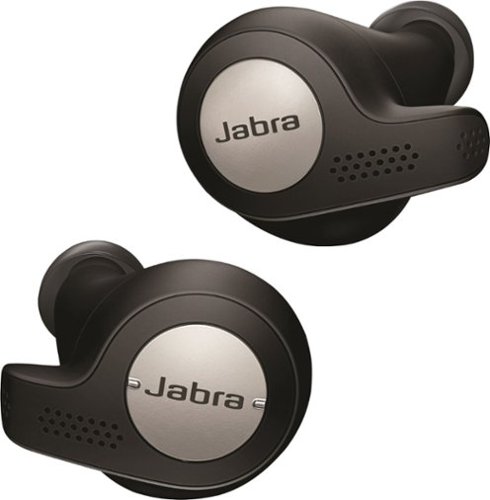
Only @ Best BuyListen to music with this sweat- and dust-resistant wireless Jabra Elite headset. It connects via USB, mini-jack or Bluetooth, and a powerful microphone lets you use voice commands with your mobile device. This Jabra Elite headset reduces background noise and has a built-in motion sensor that lets you track fitness efforts.
Can an owner of the original non active 65t comment on the fit and stability difference with the active version? Curious if that and the extra IP rating is worth a look, or negligible.
I own both the active and regular 65T's and I don't see any noticeable difference between them. Aside from the IP rating, there's really not much difference. Both fit exactly the same and fit pretty snugly in the ear.
8 years, 1 month ago
by
LouRevue
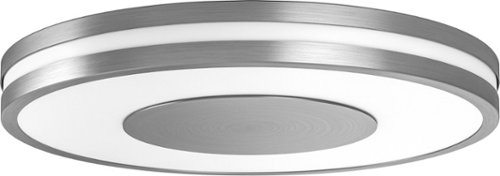
Brighten your day and night with this Philips Being Hue ceiling light. The dimming function lets you set an ambience for different moods, and it works with the Philips Hue dimmer switch and mobile app for versatile control. The ZigBee technology of this 32W Philips Being Hue ceiling lamp provides smooth, efficient interoperability with multiple Hue lighting units.
Can this light be controlled by a existing wired wall switch? I plan to replace the light that is already there with this one, but I would prefer to use the wired switch.
Yes you can...that's what I did. One thing to note is that the light won't come on immediately like your current light fixture does. There's a second or two delay after you flip the switch. I'm planning on replacing the switch with a dimmer switch so maybe that will correct the delay.
8 years, 7 months ago
by
LouRevue