


nickcal's stats
- Review count355
- Helpfulness votes1,301
- First reviewApril 12, 2014
- Last reviewSeptember 5, 2026
- Featured reviews0
- Average rating4.7
Reviews comments
- Review comment count0
- Helpfulness votes0
- First review commentNone
- Last review commentNone
- Featured review comments0
Questions
- Question count0
- Helpfulness votes0
- First questionNone
- Last questionNone
- Featured questions0
- Answer count4
- Helpfulness votes0
- First answerMay 23, 2016
- Last answerSeptember 7, 2020
- Featured answers0
- Best answers0
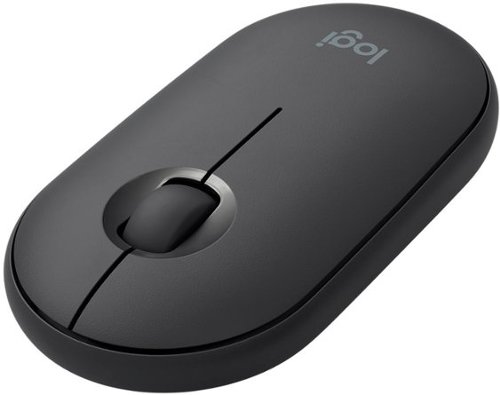
Meet the Logitech Pebble i345. It takes your iPad to higher places with a level of precision and control you can~t get with a tablet alone. Use it to click, scroll, and control your workflow like never before. It~s small, portable, and comfortable~so you can keep exploring, wherever you go.
Customer Rating

5
A good sidekick for the iPad
on May 9, 2020
Posted by: nickcal
from Evansville, IN
I’m pretty big on staying productive. That’s why I love my mobile devices and ability to connect remotely to my work computer from home. Apple has done a great job providing mobile devices that keep us all productive. I’ve been continually impressed with how they adapt and upgrade their devices like the iPad. As wonderful as the mobile computing device has been over the years, it has lacked some pretty standard performance options like mouse support. Thankfully, this year, Apple included mouse support with a software update bring the iPad into the next phase of its life.
As it turns out, not all Bluetooth mouses are created equal and it can be hard to find one that works well with the iPad. The only requirements are that you have to have an iPad running iPadOS 13.4 and a Bluetooth mouse that complements the iPad — like the Logitech Pebble i345.
The Logitech Pebble i345 is a compact Bluetooth mouse that is specifically designed to work with the iPad and its mouse support system. I’ve been using Logitech mouses for years and have found them to be the most reliable mouses by far when it comes to connectivity and use. Connecting the Pebble to the iPad is very simple. The mouse runs off of 1-AA battery that is preinstalled. In order to activate it, you have to pull a battery tab that is sticking out of the side of the mouse. I noticed that my Pebble was turned ‘on’ so before I pulled the tab out I switched it off. When it’s time to change the battery, the top panel of the mouse — the one that your fingers actually rest on — pops off the body of the mouse to reveal the battery slot. When you are done replacing the battery, the top panel clicks back into place.
As far as using the mouse goes, I connected it to an iPad Air and thought it worked beautifully. With regular navigation of the mobile device, I found the mouse to be responsive and comfortable to use. The mouse functions seem to go very well with the system that is set up within iPadOS for mouse control. I used the mouse to navigate through several menus and apps, scroll through a news feed or two, and play a card game. I didn’t have any problems with it.
The mouse has a very slim profile and I could see my hand having some cramping issues if I used it for an extended period of time. That said, I was playing the aforementioned card game for about an hour and didn’t seem to have any discomfort while playing it. The button clicks and scroll wheel all have a soft, gentle feel to them. The mouse seems to be very well-made and I could see it traveling well if thrown into a laptop bag or carrying case for an iPad.
For the purchase price of $29, I feel like this is a good investment. The only thing that would be great is if the mouse was chargeable or if you could even recharge it from the iPad. Other than that, it’s a very nice sidekick for the iPad.
Mobile Submission: False
I would recommend this to a friend!


Share this review:


+3points
3of 3voted this as helpful.
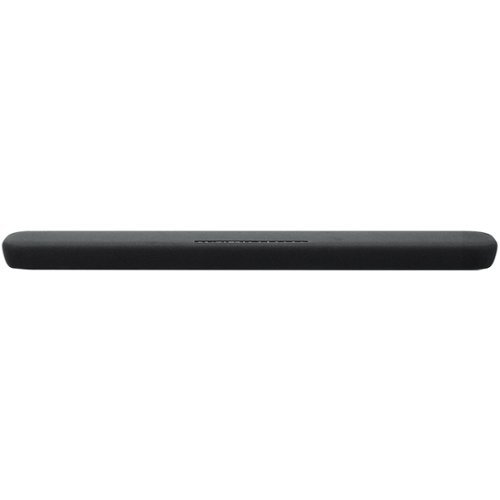
Stream your favorite tunes from media servers, PCs and smart devices with this Yamaha sound bar. The built-in Alexa voice control lets you decide how your favorite content should play, and the preset modes provide different surround sound effects for your listening pleasure. Featuring clear voice technology, this Yamaha sound bar ensures clear dialog so you can keep up with critical scenes or plot twists.
Customer Rating

4
Good option for mid-size room
on April 7, 2020
Posted by: nickcal
from Evansville, IN
I’m hard of hearing and it’s hard for me to enjoy conversations, tv programs, or video games because I’m constantly missing some sort of sound that enriches the activity. When we set-up our house a number of years ago, we installed a 7.1 surround sound set-up in our living room simply for the purpose of enhancing my ability to hear simple dialogue in TV shows. It helps, but unfortunately, I can’t have that large of a set-up in every room of my house. That’s where this Yamaha sound bar comes into play.
The sound bar is compact in size (only 3-feet in length) and it can be wall-mounted or set-up in front of your TV screen. Even though it’s only provides 2.1 channels of audio, the sound bar produces quite a powerful sound and it’s perfect for medium-sized rooms. The sound bar also supports most major audio codecs. The sound bar has a super quick set-up, but does not include an HDMI cable. It does support connection through an HDMI-ARC port on TVs and if you don’t have that port on your TV, you can use the included optical cable for audio.
One downside to this particular sound bar is that it only works on a 2.4Ghz network. This isn’t that big of a problem for me because I have a dual-band wireless router in my home, but I feel like we are in a time that devices shouldn’t be limited to only 2.4GHz networks. Another weird outdated piece of technology that this sound bar has is that it utilizes Bluetooth 4.2 and Bluetooth 5.0 is the ‘new’ standard.
One of the biggest features of this sound bar is that it is compatible with Amazon Alexa. Even though Alexa isn’t my virtual assistant of choice (Apple’s HomeKit is my primary virtual assistant ecosystem), I do have a couple of Alexa-compatible devices in my home. So, I connected it to Alexa and didn’t have any issues with using Alexa through the sound bar.
This is a great option for a 2.1 sound bar. It’s moderately priced and has a lot of nice built-in features. People who want extra sound for their TVs will love adding this sound bar to their set-up because it’s so easy to install and it has a lot of extras with it.
Mobile Submission: False
I would recommend this to a friend!


Share this review:


+4points
4of 4voted this as helpful.
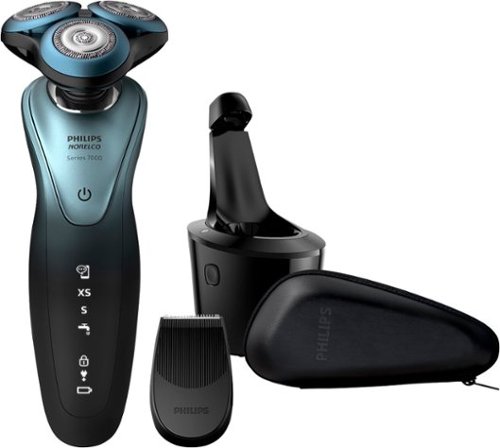
Get a close, comfortable shave with this Philips Shaver Series electric shaver. The multidirectional flex heads make it easy to shave around the contours of your face, and the Aquatec technology lets you shave with or without water. This Philips Shaver Series electric shaver includes a SmartClick attachment for precisely trimming and sculpting facial hair.
Customer Rating
5
A great shaver for a close, smooth shave
on January 24, 2020
Posted by: nickcal
from Evansville, IN
I have a hard time getting a good, close shave. My skin is sensitive and so I inevitably end up with razor burn along with unsightly nicks and cuts all over. I’ve tried many different types of razors throughout my life (handheld, electric, and even a single-bladed straight razor) and none of them seem to work ‘just right’ for me. I love the convenience of an electric shaver but hate having to clean them and sometimes they just don’t do as good of a job as handheld razors. Fortunately, I’ve had the chance to try out this amazing electric shaver from Philips Norelco — the 7900 SmartClick and SmartClean Wet/Dry Electric Shaver.
The 7900 SmartClick and SmartClean Wet/Dry Electric Shaver does a great job of providing a smooth, close shave without leaving behind bumps, redness, or discomfort. I’ve been using it consistently (at least once every other day) for about a week now and I can really tell a difference between the quality of the shave it gives me versus other shavers I’ve used. I just attended a three-day conference out of town and I depended heavily on the 7900 shaver to keep me looking professional instead of scruffy. The handle of the shaver is designed to be ergonomic. It’s easy to hold and has a soft grip covering that ensures that I can keep a firm grip on it while I shave — even if it gets wet.
I also really like that the shaver is a wet/dry shaver which means that I have the option of shaving with it in the shower or simply over the sink. One of the benefits of using this shaver over a handheld one is that I don’t end up using shaving cream with it. So, there is less of a mess involved at shaving time. In the past, when I’ve attempted dry shaving with electric razors, I’ve ended up with razor burn. With the 7900 SmartClick and SmartClean Wet/Dry Electric Shaver, I’ve not had that issue. I think it is due to two things, one the shaver and two the iOS app that I have been using to monitor how I shave. The app has given me advice and has told me to slow down while shaving and make smaller circles, thus helping me with my redness.
This shaver also comes with a very useful cleaning stand. For me, this is a big selling point since I hate having to clean out shavers and this one is self-cleaning. You simply place the shaver in the stand and it is charged and cleaned. The cleaning cartridge that comes with it is designed to last a very long time, too. And, while I’m on the subject, it’s easy to reorder said cartridge from Philips (or other online stores). In the past, I’ve had trouble finding a cleaning solution for electric shavers so it was really nice to be able to find the replacements for the cleaner right away.
One of the most unique features of this shaver is the GroomTribe app. The app tracks your progress — much like a Bluetooth-connected toothbrush — and adjusts advice to ensure users get the best skin results. It is a nice tool that has been added to this shaver package. Also included is a SmartClick attachment for grooming. I used this the first day I received the shaver to cut my hair down enough so I would not experience any pulling of long hairs.
I’ve really enjoyed using this shaver so far. It provides a really nice shave and has a lot of great features to it.
Mobile Submission: False
I would recommend this to a friend!


Share this review:


+4points
4of 4voted this as helpful.
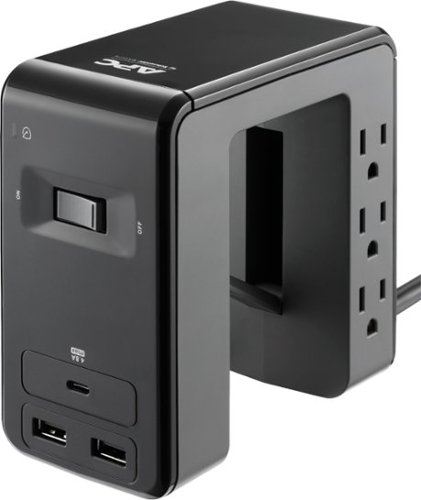
Run and organize your computer system safely with this six-outlet APC SurgeArrest Essential desk-mount power station. Lightning and surge protection and a fail-safe mode prevent your electronics from getting damaged during current spikes, and the powered USB-A and USB-C ports let you charge three gadgets simultaneously. This APC SurgeArrest Essential desk-mount power station has an LED indicator for circuit issues for added precaution.
Customer Rating
5
Unique design provides easy access to power.
on December 24, 2019
Posted by: nickcal
from Evansville, IN
My desk set-up is based around a smart-standing desk. It’s open on the bottom and sides so cable management is very carefully planned. There is a main powerstrip hidden underneath the desk that powers the main components of my set-up, but there are a lot of times when I need very quick, easy access to a power strip to charge my camera batteries, iPad, or other tech devices. For a time, I had a charging tower on my desktop. This vertical power strip didn’t seem to meet my charging needs as it wasn’t efficiently charging my more power-intensive devices (iPad Pro, etc.). So, I turned to the APC SurgeArrest 6-Outlet Surge Protector Strip for a next-generation powerstrip design.
The APC SurgeArrest is designed to provide users with a powerful charging station while maximizing desk space at the same time. It features lightning and surge protection as well as provides a fail-safe mode that protects connected devices during a power spike. The USB ports (Type-A and Type-C) allow for simultaneous charging (up to three devices). The power station has a 6-foot long cable, which is perfect for me because I can route the extension cable to a power outlet without messing up the aesthetic of the smart desk.
While some people might be turned off by the fact that there are only 3 USB ports included on this charging station, I found it ideal for my purposes. Most of the time, I’m only charging one or two devices at a time anyway, and if I really need extra USB ports, I can always plug a power adapter into an outlet on the SurgeArrest. One of the things I really like about this charging station is its unique design. For me, I am able to attach it to the side of my desk, which provides additional hidden power outlets for a small lamp I have on my desk that until now has been connected to the main power strip under the desk.
Even though I have my SurgeArrest attached to the side of the desk, users do have the option to have it freestanding, too. It is balanced enough to do so. I do wish that the mechanism on the bottom that secures the unit to the desk was stronger. I feel like it only provides pressure at one point and that makes the entire thing able to twist if it’s pulled or pushed too much. Aside from that, I’ve been very happy with the power station’s performance. The design may not work for everyone, but for someone who needs easy access to power ports on a desktop (workbench, etc.), this is a wonderful option.
Mobile Submission: False
I would recommend this to a friend!


Share this review:


+3points
3of 3voted this as helpful.
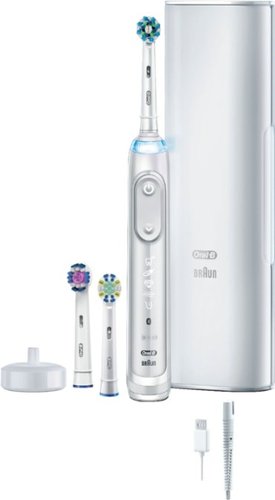
Improve your dental hygiene with this Oral-B Genius X 10000 electric toothbrush. Integrated artificial intelligence identifies your brushing style and helps coach you to improve your form for better results and dental health. This Oral-B Genius X 10000 electric toothbrush connects to your smartphone via Bluetooth so you can track your progress and optimize your hygiene.
Customer Rating
4
A sensible upgrade to a great smart toothbrush
on December 15, 2019
Posted by: nickcal
from Evansville, IN
There is no doubt that an electric toothbrush can do wonders for your dental health. A few years ago, I made the switch over to a smart toothbrush and while I’ve been very happy with the results, I know there is always room for improvement. That’s why I was excited to have the opportunity to test out the Oral-B Genius X, which is a really nice updated smart toothbrush from the Oral-B Pro 6000 that I had before.
One thing that struck me as odd was the very subtle differences in the Smart Toothbrush models. For example, the Pro 6000 and Genius X both have a 2-week battery life while the Pro 7000 does not. It’s strange to me that the Pro 6000 is actually more feature-rich than the model above it. I also found it strange that the only real difference between the Pro 6000 and the Genius X is that the Genius X has an AI-driven smart coach. The “smart coach” is actually built into the app so if you don’t have the toothbrush connected, it’s really the same product as the Pro 6000.
That said, the brush feels really good in the hand. The handle is robust and makes it really easy to control the product. It’s easy to use. You simply turn it on and start using it. You have the option to activate the timer on the handle of the toothbrush. The toothbrush does do a great job of cleaning your mouth, but I feel as though this model isn’t worth the fifty dollar increase in price between the Pro 6000 and the Genius X.
If you want the advanced features, you can connect the toothbrush to the app. It’s not 100% essential for the operation of the toothbrush, but it does provide virtual coaching for the user to ensure they are brushing properly and getting the most out of the toothbrush. Oral-B refers to the app as a ‘digital coach’ and states that it’s designed to help users brush the way dental professional recommends. The A.I. brushing recognition is part of the app (as mentioned above) and it’s meant to make sure that you cover every area - every time you brush. The app is available to use with Genius 8000, 9000, and X brushes - so it’s not exclusive to the Genius X. Some of the features of the app include the personalized coaching, pressure control, and brushing activity achievements.
Again, I feel like while the app provides a lot of added value, I’m not sure it warrants the extra expense of the brush handle itself. If you haven’t ever owned an electric toothbrush, this wouldn’t be a bad one to start with, but if you already have one of the Oral-B brushes, I’m not sure about upgrading.
Again, I feel like while the app provides a lot of added value, I’m not sure it warrants the extra expense of the brush handle itself. If you haven’t ever owned an electric toothbrush, this wouldn’t be a bad one to start with, but if you already have one of the Oral-B brushes, I’m not sure about upgrading.
Mobile Submission: False
I would recommend this to a friend!


Share this review:


+3points
3of 3voted this as helpful.
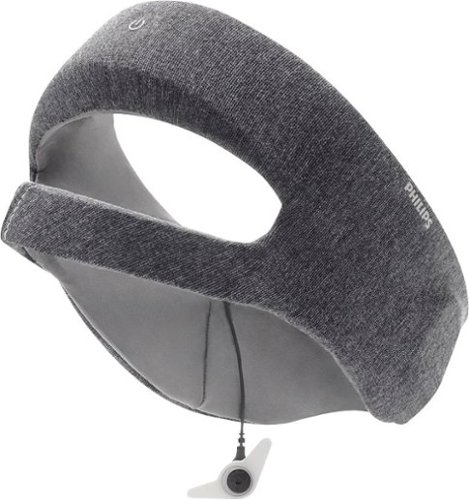
Philips SmartSleep Deep Sleep Headband: Improve the quality of your sleep with this Philips SmartSleep Deep Sleep headband. The clinically tested technology helps improve energy, increase alertness and reduce daytime sleepiness to help you through the day. Pairing this Philips SmartSleep Deep Sleep headband with the SleepMapper app provides you with detailed analytics to help understand your sleep patterns.
Customer Rating
4
Device Works, but is a large investment
on November 12, 2019
Posted by: nickcal
from Evansville, IN
My fiancé doesn’t get enough sleep. She works long hours and then spends her evenings taking care of our family. She’s the first one up in the morning and the last one to bed at night. So, there is a lot that rests on her shoulders. As a result, she doesn’t get the most amount or the best quality of sleep. When I heard about this device, I thought it might be able to help her with sleeping deeper, longer so that she was more rested throughout the day.
There were several observations I made about the headband as we tested it. First of all, it requires that the user wear it overnight. Therefore, you have to be comfortable with having something on your head while you sleep. My fiancé was a bit worried about this requirement at first, but when she tried on the headband she said it was actually quite comfortable. The fabric that is used is really soft and it ended up being a really nice fit for her head. It has some cushioning in a few places which make it feel like an extension of your pillow.
The next observation we made was that the headband charges using Micro USB. Even though this option provides a less expensive connection, I sort of feel that it’s an older technology and I would much rather see USB-C used on newer devices. That said, Philips does include a Micro USB to USB-A cable and a power adapter that plugs into a standard outlet along with the headband. The cable is woven and flat to help prevent tangling. The instructions note that even though the headband has some charge out of the box that the user will need to charge it for a few hours in order for it to have enough battery life to make it through the night. This made for a small speed bump in our user experience. At it turns out the headband has just enough battery life for one night’s use. Therefore, you have to charge it every single day in order to use it at night. It would be nice if this device had at least two nights worth of charge available in my opinion.
The next thing we noticed was that you have to manually sync the data from the headband to the app on the phone. It’s a quick and easy process, but it’s something you have to remember to do every day in order to get the greatest benefit from the device. When we synced the data from the headband and found that my fiancé had earned a high sleep score of 95 out of 100. This was calculated by the time asleep, any deductions for sleep stages, and any sleep boost she might have received from the headband. We happen to have a smart bed that also helps to track sleep data so we compared her score from the night she used the headband to the night directly following and found that her score was only a couple of points different. She actually experienced more restless sleep on the night she used the headband than the night she didn’t. On a few additional occasions, she reported that a reading wasn’t recorded or the headband slipped off of her head.
One unfortunate side effect of using the headband for deeper sleep was oversleeping the next morning. My fiancé ended up sleeping right through her alarm. She did wake up just in time to get ready for work and get my daughter to school on time, but it was a rushed morning. As a result, she has been nervous about using the headband on nights when she has work the next morning.
She said she felt a little better rested than normal, but it wasn’t a huge difference. We’ve only had the headband for a couple of weeks so it’s hard for my fiancé to make a full determination of how it’s helping (or not helping) her throughout the day yet. While I like the concept of this device, and so does my fiancé, but the expense is quite high and since some of the steps are ones you have to complete manually, so it’s a little bit of an inconvenient device to work with.
Mobile Submission: False
I would recommend this to a friend!


Share this review:


+15points
21of 27voted this as helpful.
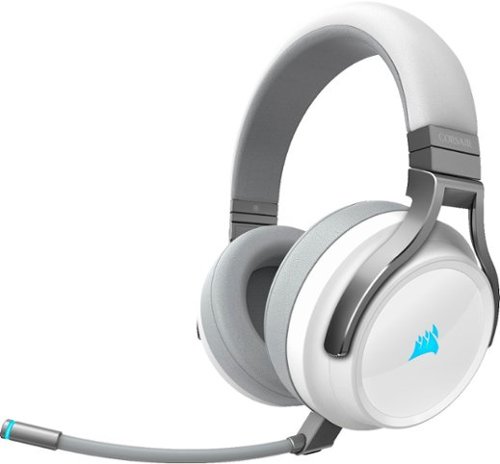
Enjoy crisp, powerful audio while gaming with this white CORSAIR Virtuoso RGB wireless headset. The memory foam earpads and lightweight aluminum headband add comfort for all-day use, while the detachable omnidirectional microphone offers clear sound pickup. This CORSAIR Virtuoso RGB wireless headset has a rechargeable lithium-ion battery, providing up to 20 hours of uptime when fully charged.
Customer Rating
5
Premium headphones with great sound
on October 30, 2019
Posted by: nickcal
from Evansville, IN
This set of headphones is remarkable. They are lightweight, in my opinion, and at around $180, they are budget-friendly in comparison to other wireless gaming headphones in the market. When I started using them I actually used them with my iPhone. I connected to my iPhone using a Lighting to Stereo cable and I was really impressed with how basic music sounded through them. This was a good test for me of both sound quality and comfort. I was working on a project and used the headphones for approximately 3 hours straight. I also use the headphones for gaming on my PC. The version I have is meant for use with PCs and the Playstation 4. I actually don’t have a PS4, but I do have a couple of PC laptops that I was able to use the headphones with. I played through several rounds of Call of Duty and was able to hear all of the game audio clearly.
The headphones, which are built incredibly well, have a nice, thick foam around the ear cups and the headband. This makes the headphones very easy to wear for long periods of time. While I enjoyed the sound quality of the headphones, I would say that they are lacking in heavy bass, there is a nice balance between the highs and lows.
The microphone provides high-quality audio and while it’s not ‘broadcast’ quality. It is very good. I’ve used it for both video conferences and gaming sessions and the people on the other ends of the conversations have said they could hear me with no issues. I like that the headphones feature RGB LEDs on the earpieces. It adds a bit of style to them. It’s one of the features that you can customize using the iCue software. Using the iCue system, you can also customize your EQ settings and update device firmware.
The headphones charge with USB-C and can connect wirelessly via a USB dongle. Corsair also includes a 3.5mm stereo aux cable, which ensures you get 24-bit 96khz audio through a direct wired connection. I like that there is a variety of connections, but wish that I could also connect to them using a standard Bluetooth connection without having to use the dongle.
I have no problem recommending these to other users. I think they are a high-quality set of headphones with a variety of uses.
Mobile Submission: False
I would recommend this to a friend!


Share this review:


-23points
3of 29voted this as helpful.
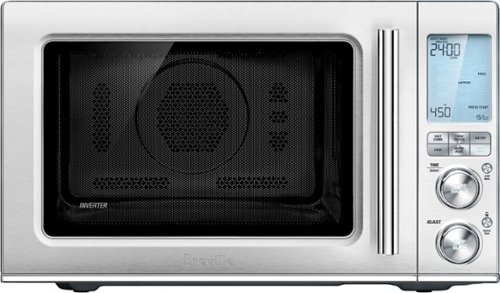
Ensure meals are cooked evenly with this Breville the Combi Wave 3-in-1e microwave. The grill, convection oven and microwave functions provide a variety of cooking options, while the Element IQ technology precisely delivers the right cooking temperature for optimal results. This Breville the Combi Wave 3-in-1 microwave features a Power Smoothing inverter for automatic adjustment of power to enable even heat distribution.
Customer Rating
5
Super nice looking and a great cooking companion
on October 28, 2019
Posted by: nickcal
from Evansville, IN
Over the past couple of years, we have amassed several new kitchen appliances. We are slaves to trends in our house and have three crockpots, two air fryers, and two electric griddles. It’s a mess. So, when I saw the Combi Wave 3-in-1 as an option to replace my gigantic microwave and have a better option for air frying, I took the leap. I have to admit that I was skeptical at first. I thought there was no way that this ‘microwave’ could make crispy food items in the same way that our air fryer could. And it couldn’t possibly bake a cake…could it?
Getting the Combi Wave set-up isn’t a lengthy process, but understanding everything it does, is. For basic functions, you simply select the mode you want the device to cook with — for example, if you want to use the microwave, press the microwave button. After selecting the mode, you turn the top dial to indicate the length of time you want something to cook and then you press ‘start’. If you need to adjust the temperature or cooking power you turn the bottom dial. That pretty much covers the ‘basic’ functions of the Combi Wave. To be honest, I still haven’t covered all of the advanced settings on the cooker yet. I do, however, keep the manual close at hand so that I can refer to it often.
As a microwave, the Combi Wave does a great job. Since we’ve had it we’ve used it for some smaller cooking jobs like warming up leftovers and cups of coffee. My grandmother has been very happy with how well it reheats her coffee and also loved how evenly it seems to reheat food. The most surprising feature of this device is the Air Fryer mode. We have used it to make chicken quesadillas many times. We have been shocked at how well it heats the food inside the tortilla shell and how toasted the outside of the shell was. Finally, I used the convection oven to bake some potatoes. It takes approximately the same amount of time to cook them in the Combi Wave as it does in the standard oven, but it’s much more convenient when you need to use the oven for something else. It’s been a remarkable kitchen appliance to add to our collection.
The look of the Combi Wave is top-notch. It has a stainless steel finish and looks professional. The door has a soft-close feature that makes the door softly latch closed. The device is quite powerful and has a lot of customizable cooking options if you are willing to take the time to figure it out. Even though there is a steep initial investment, this does combine several kitchen appliances into one. I can recommend this to all types of users, but be prepared to study a lot to get the most out of it.
Mobile Submission: False
I would recommend this to a friend!


Share this review:


-2points
12of 26voted this as helpful.
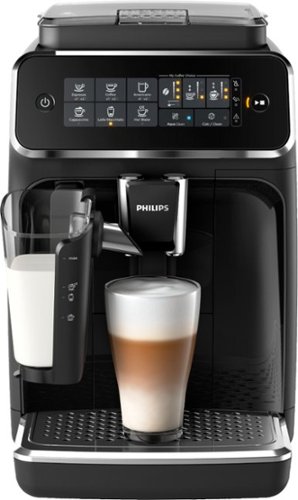
Philips 3200 Series Fully Automatic Espresso Machine w/ LatteGo, Black
Customer Rating
4
A advanced coffee machine that could use some upda
on October 16, 2019
Posted by: nickcal
from Evansville, IN
My grandmother lives for her daily coffee. She gets up early and has it with toast, then later in the morning she has another cup, and she continues getting it late into the evening. It’s a comfort to her that she has it when she wants it everyday. Last Christmas, I gave her what I thought was a high-quality coffee maker, but here we are not even a year later and it started leaking from the bottom and she only gets a partial cup of coffee. That’s when I thought upgrading to this advanced coffee making system might be a smart move.
The Philips Espresso Machine does a lot more than make espresso. It can make six different kinds of coffee beverages including plain old coffee. There is minimal assembly required to get started. I think it only took me about 10 minutes to have it ready to make its first cup. One of the most appealing features about this coffee maker it that it also grinds its own beans. You have the option to add coffee grounds if you like, but to me there’s nothing like freshly ground coffee beans.
There are a lot of options with this coffee maker. For example, you have the option of setting how hard or soft your water is so the machine will compensate for that. That said, it’s not difficult to set-up -- it just takes some patience. Once it was set-up, I showed my grandmother how to use it. It threw her a little bit when she found out she didn’t have to put water or coffee in every single time she used it, but she loves the quality of the coffee that is dispensed.
The machine is quite loud when it operates, but clean-up is very easy. I love the milk frother and while we don’t use it often, it’s great to have that feature available because it keeps my fiance from spending $5 per cup on Starbucks lattes.
I do have a couple of complaints about this coffee maker. First, the adjustable spot doesn’t allow for a tall travel mug to be used. I use one nearly every day and now I have to make the coffee in one cup and transfer it to the travel mug. It’s an extra step that I eliminated several years ago when I switched to a single-serve coffee machine that accommodate for that. Second, the amount of coffee that is dispensed is regulated strangely. I realize that the ‘cups’ we used these days are not the ‘standard’ size for a coffee cup. Many regular coffee mugs are around 8 ounces. I typically use a mug that holds 12-16 ounces. We’ve found that even when we set the quantity button on the machine to maximum, it doesn’t fill a standard cup. I would love to see Philips change how coffee is dispensed to be measured by ounces. That seems like it would be a lot more logical and easier for consumers to judge where to set the machine.
I love the options that this machine provides and the quality of the product it makes, but I was disappointed that it wasn’t the ‘perfect’ solution for my grandmother to use (because it doesn’t dispense right the first time). It’s not a deal-breaker but it comes pretty close.
Mobile Submission: False
I would recommend this to a friend!


Share this review:


+8points
9of 10voted this as helpful.
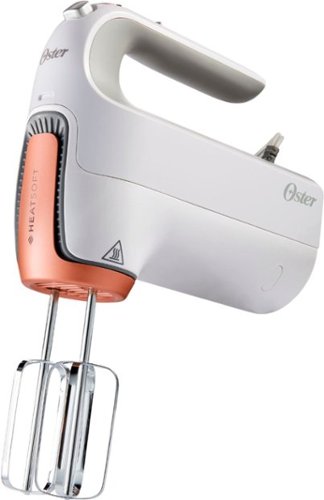
Whisk or beat ingredients with ease during meal prep by using this 270W Oster five-speed hand mixer. The HeatSoft technology delivers a gentle burst of heat to soften cold items quickly, while turbo boost adds more power to your selected speed setting. This Oster five-speed hand mixer features full-size beaters for faster mixing results.
Customer Rating
5
A nice upgrade from older mixers
on October 16, 2019
Posted by: nickcal
from Evansville, IN
My grandmother loves to bake. She makes cake a couple of times a week and even though she uses box mixes, she uses a hand mixer every single time. We’ve had the same hand mixer for years and I thought it was time to upgrade to something that might make her baking adventures a little bit easier.
What makes this mixer stand out to me is the butter-softening feature. Grandma has used it once since we got this mixer and loves it. Yes, you can pre-soften the butter, but for someone who gets around a little slower and it’s an effort for her to move from one side of the kitchen to the other, being able to soften and mix in one swoop is much preferred. She loves the convenience of it.
The design is great. Even though it’s a little heavier than our old mixer, it’s easy to handle. The only criticism I have with the design is the beaters. They seem a little weak and they are a little disproportionate to the size of the blender’s body. I haven’t seen any operational issues with the length or strength of the beaters, but it’s a visual observation that I made when unboxing it.
The mixer is a little loud. It’s not necessarily louder than other mixers, but I did notice it was audibly loud. Grandma was making a cake early one morning and it woke me up. Not a dealbreaker, but something to be aware of when you are using it.
This 5-speed blender is a really nice feature-rich upgrade from our old mixer. Grandma was thrilled when I gave it to her and she has really been enjoying using it.
Mobile Submission: False
I would recommend this to a friend!


Share this review:


+1point
1of 1voted this as helpful.
nickcal's Review Comments
nickcal has not submitted comments on any reviews.
nickcal's Questions
nickcal has not submitted any questions.
nickcal's Answers
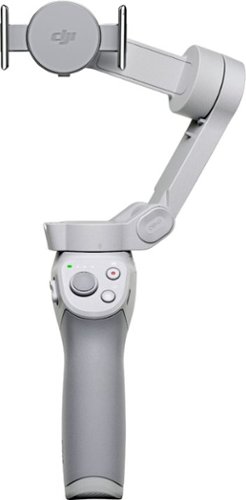
Life~s extraordinary moments deserve to be captured with smooth video. DJI OM 4 is a magnetic gimbal designed to complement your smartphone, allowing you to start recording right away. Ultra-compact, easy to use, and bursting with intelligent features, OM 4 is the ultimate solution for capturing and sharing your world.
Does the magnetic sticker phone attachment interfere with wireless phone charging?
Ensure meals are cooked evenly with this Breville the Combi Wave 3-in-1e microwave. The grill, convection oven and microwave functions provide a variety of cooking options, while the Element IQ technology precisely delivers the right cooking temperature for optimal results. This Breville the Combi Wave 3-in-1 microwave features a Power Smoothing inverter for automatic adjustment of power to enable even heat distribution.
Is this an air fryer, microwave and convection oven
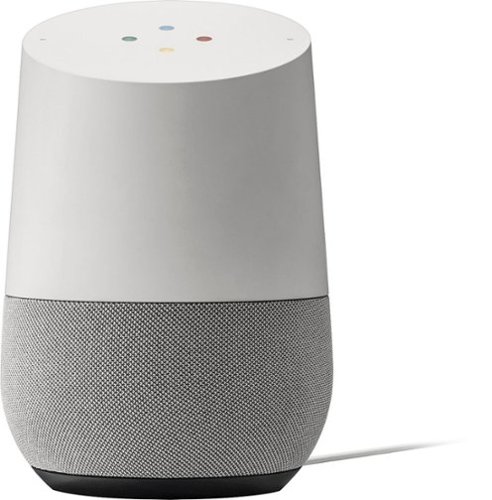
Simplify your everyday life with the Google Home, a voice-activated speaker powered by the Google Assistant. Use voice commands to enjoy music, get answers from Google and manage everyday tasks. Google Home is compatible with Android and iOS operating systems, and can control compatible smart devices such as Chromecast or Nest."
Will Google Home work with ECOBEE Thermostat?
No. Unfortunately, Google has limited functionality to only the Nest thermostat. At this time, I don't see them opening up support for third parties as they are probably trying to push it with their own hardware, but that could always change.
9 years, 10 months ago
by
nickcal
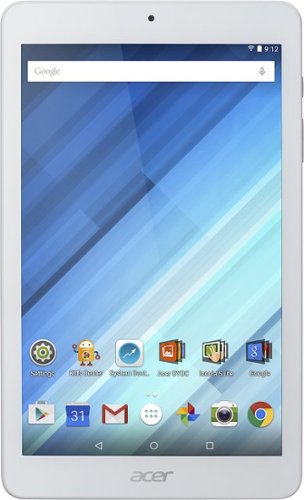
Enjoy a compact tablet that fits neatly in your pocket with this Acer Iconia One 8-inch tablet. It includes a quad-core processor and 1GB of RAM that deliver powerful processing to play all your games and apps, and the 16GB of flash memory ensure this Acer Iconia One 8-inch tablet and store your files.
can i download skype
Depends on the Google Play store. If Microsoft has a version of Skype for Android then yes.
10 years, 4 months ago
by
nickcal