


nickcal's stats
- Review count355
- Helpfulness votes1,301
- First reviewApril 12, 2014
- Last reviewSeptember 5, 2026
- Featured reviews0
- Average rating4.7
Reviews comments
- Review comment count0
- Helpfulness votes0
- First review commentNone
- Last review commentNone
- Featured review comments0
Questions
- Question count0
- Helpfulness votes0
- First questionNone
- Last questionNone
- Featured questions0
- Answer count4
- Helpfulness votes0
- First answerMay 23, 2016
- Last answerSeptember 7, 2020
- Featured answers0
- Best answers0
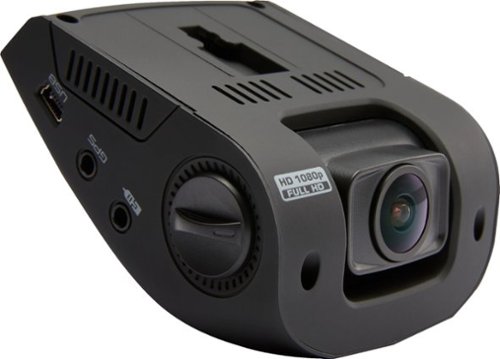
Only at Best BuyRecord everything you encounter on the road with this Rexing V1 dash camera. The low-profile design makes it unobtrusive to drivers and casual observers, and the wide 170-degree angle catches all the details you need. This Rexing V1 dash camera has a collision detector to ensure vital recordings don't get overwritten.
Customer Rating

4
Simple, unique camera
on May 15, 2018
Posted by: nickcal
from Evansville, IN
You can never be too careful these days when you are on the road. People sort of have their own agendas and many times they don’t even pay attention to the world around them. With those drivers in mind, it becomes more and more important to protect yourself with devices like dash cameras. I’ve had the fortunate experience of being able to test out several different types of cameras and most recently, I’ve tried the Rexing DashCam V1.
The Rexing DashCam V1 arrives in a colorful, but somewhat generic package. It’s well-labeled with the ‘Rexing’ brand name stamped on it. Some very basic details are listed on the outside wrap of the box and it comes with a 12ft car charger, 3M adhesive mount, USB cable, and a user manual. When you open the box, you will find the camera assembly wrapped with some protective foam and then all the remaining accessories beneath a layer of cardboard.
I have to admit that I was a bit perplexed by the DashCam V1 because of its shape. It’s unlike anything I’ve used before and it’s mounting method is out of the ordinary. It is meant to be mounted to your windshield with adhesive instead of a suction cup. The set-up of it pretty easy despite it being different than others I’ve used. Once you have selected the location for the DashCam, you can place it using the mount and provided adhesive strips. It sticks easily and well on glass and even though I haven’t had it very long, I believe it will last for a while there because the camera is very lightweight.
When you plug it into your car’s power outlet, the camera automatically powers on. If you don’t have an SD Card inserted, you will get a warning on the screen letting you know that you need one. There are knobs on the sides of the camera that allow you to move it up and down to cover different angles. The knobs are a little stiff to move, but they do work.
The camera uses Mini USB, which is a little outdated in my opinion. I feel like it should at least be Micro USB if not something else. I do like that it’s an extra long 12-foot cable because it makes it easy to mount/route the cable and camera. The camera does have a rechargeable battery built-in, but it’s primarily used to save files in the event of an emergency. The buttons are also very tactile and there is a definite ‘click’ when you press them. The hardware part of the camera seems to be quite stout and I personally think it will last daily use quite well.
Even though this camera has an easy set up and unique design, there are a few things I am not a big fan of like the angle of the screen. The video quality is pretty good. It’s clear and records easily. This unique little camera gets the job done easily and efficiently.
My Best Buy number: 2677435109
Mobile Submission: False
I would recommend this to a friend!


Share this review:


+4points
7of 10voted this as helpful.
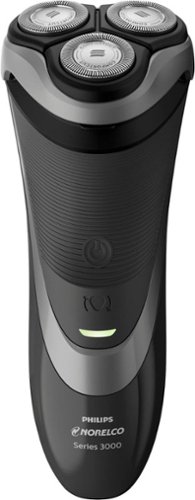
Match your look to the occasion with this 2-in-1 Philips Norelco shaver. Its ComfortCut blade system lets you achieve a smooth, clean shave, and its click-on plastic guard provides a casual three-day stubble look. The multidirectional flex heads of this Philips Norelco shaver ensure consistent trimming on every contour of your face and neck.
Customer Rating

5
Close shave at an affordable price
on April 21, 2018
Posted by: nickcal
from Evansville, IN
For the past few years, I’ve been trying to find the ideal electric shaver. I really want something rechargeable and that gives me a smooth shave without leaving any skin irritations. This has been a difficult combination to find because my skin is quite sensitive. I’ve had good luck with the Philips Norelco line of products, so I thought I would give their Shaver 3600 a try.
To start, the shaver is simple in operation. Out of the box, the device has some charge to it and I was able to get 2-3 solid shaves out of this initial charge. It is suggested that you charge the shaver before its first use, but I was able to get a few shaves out of it before needing to charge it. The shaver does not come with a charging stand. This would probably be my only complaint about this device. It does have a charging cable, but I would like to be able to set it in a stand without having a cable hanging out on my bathroom counter.
As far as performance goes, I’ve been very happy with the Shaver 3600. It performs just as well, if not better than, some other electric shavers I’ve tried that are much higher priced. It provides a close shave without any razor burn and the pop-out trimmer does a remarkable job with thicker hair like my sideburns. The shaver is easy to clean and very lightweight. It travels well and comes with a protective guard and stubble guard. For a very minimal, reasonable price (around $65) you can have a complete shaving system.
I’ve not used it in the shower, but do usually wash my face before shaving so I did get to take advantage of the using it in wet and dry environments. For the most part I did just use it as a dry shaver and didn’t have many issues with my skin getting irritated. The Shaver 3600 provides a close shave and is very affordable. I would recommend this to anyone looking for an electric shaver.
My Best Buy number: 2677435109
Mobile Submission: False
I would recommend this to a friend!


Share this review:


+13points
13of 13voted this as helpful.
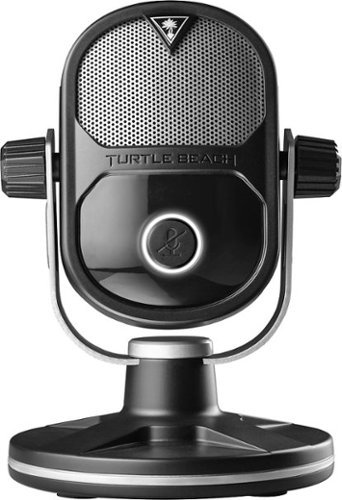
The Turtle Beach Stream Mic is the first professional desktop microphone created for gamers streaming directly from their Xbox One and PlayStation 4, as well as from a PC or Mac. The Stream Mic features Adaptive Mic Patterns, customizable software, a dual-capsule mic array with advanced digital processing, and a zero-latency headphone output so anyone can stream like a pro.
Customer Rating
5
Elevate your live streams with this compact mic
on April 20, 2018
Posted by: nickcal
from Evansville, IN
With the advent of online gaming, technology and electronic devices took an interesting turn. At first, gaming was limited to the system you were playing on and its controller. Now there are a wide variety of products you can use to make your gaming experience customized and functional for you. One of the essential parts of a gaming setup these days is a microphone. You can easily connect with others online unless you can talk with them. So, you need a microphone. Many people use a headset with a built-in microphone but gamers who are heavy into live streaming take that piece of their gaming puzzle the next level with an external mic. This small but powerful microphone from Turtle Beach is perfect just this type of task.
User Experience
The microphone and its stand come disassembled inside a nicely designed box. A picture of the product is shown on the exterior of the box along with basic details of the device. When you unpackage the contents, you will find the main microphone and the parts to its stand. An extra long Mini USB cable is provided and so is a quick reference guide. In addition to the standard desktop stand, the Stream Mic also comes with a Mic Book Adapter in case you want to attach it to a boom arm. The microphone itself is very lightweight, but the stand is well-weighted and has silicone feet on its base to prevent the microphone from moving unnecessarily.
The microphone and its stand come disassembled inside a nicely designed box. A picture of the product is shown on the exterior of the box along with basic details of the device. When you unpackage the contents, you will find the main microphone and the parts to its stand. An extra long Mini USB cable is provided and so is a quick reference guide. In addition to the standard desktop stand, the Stream Mic also comes with a Mic Book Adapter in case you want to attach it to a boom arm. The microphone itself is very lightweight, but the stand is well-weighted and has silicone feet on its base to prevent the microphone from moving unnecessarily.
Getting started with the Stream Mic was very easy. Turtle Beach designed this microphone so it could be easily used on many platforms so all I had to do was plug in a USB cable. For me, this also requires the use of a USB-C adapter since I was using my 2016 MacBook Pro for testing. As with most external audio sources, I had to visit my System Preferences in order to activate the Stream Mic as my external input audio source. Once I did, I was able to adjust the input volume on the mic from the System Preferences panel and then I could start using it. There is a Console Mode switch on the back of the microphone. You need to make sure it’s set to the correct mode before it will work with your system. I do love the design of this microphone. It has a very retro/classic radio microphone feel to it and it has an adjustable tilt when it’s mounted. If you are using the mic with an Xbox, you will flip the switch to the left. If you are using it with anything else, you will flip the switch to the right.
With it sitting so low on my desk, I wondered how well it would record my voice if I were sitting naturally in my desk chair. So, I did a test recording of myself reading Green Eggs and Ham by Dr. Seuss. I read excerpts of the book various distances away from the microphone (6 inches, 12 inches, and approximately 4 feet). I tried my best to keep my voice at a steady, even level and just adjust my personal distance away from the microphone. I felt like the Stream Mic did a very good job filtering out background noise (air handling was on in my office at the time of recording) and keeping my voice at a balanced volume. You can hear a difference between 6 inches and 4 feet, but I am still audible from 4 feet away. It is important to note that when I was testing this out, I was in a fairly isolated environment with only some air handling noise in the background. Other noises, like keyboard clicks, might be picked up by the mic.
Conclusions
While I didn’t specifically use this for live streaming, I find it to be a very nice, lightweight microphone. It’s small enough to transport easily from place to place and it has a fool-proof setup method. I love that it has a mute button on the front and that it has a colored LED indicator that lights up green (if in use) or red (if muted). This is a very easy to use microphone that is competitively priced with other USB microphones. Because it’s made by Turtle Beach it’s been optimized to work specifically for gamers, but it can be used for a wide-variety of tasks. I am a big fan of this little microphone and plan on giving it a permanent spot in my minimalist desk setup.
While I didn’t specifically use this for live streaming, I find it to be a very nice, lightweight microphone. It’s small enough to transport easily from place to place and it has a fool-proof setup method. I love that it has a mute button on the front and that it has a colored LED indicator that lights up green (if in use) or red (if muted). This is a very easy to use microphone that is competitively priced with other USB microphones. Because it’s made by Turtle Beach it’s been optimized to work specifically for gamers, but it can be used for a wide-variety of tasks. I am a big fan of this little microphone and plan on giving it a permanent spot in my minimalist desk setup.
My Best Buy number: 2677435109
Mobile Submission: False
I would recommend this to a friend!


Share this review:


+2points
2of 2voted this as helpful.
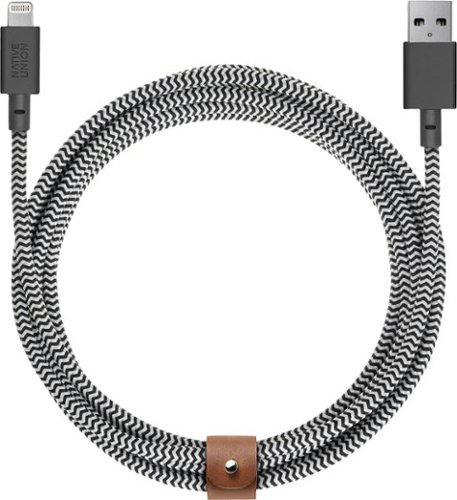
Charge your Apple devices away from the wall outlet with this Native Union BELT cable. Its 10-foot length lets you move around with the device while it charges, and its braided cord provides durability. This Native Union BELT is a durable Lightning to USB Charging Cable and includes an integrated leather strap with a snap for tidy storage.
Customer Rating
5
Perfect Lightning Cable
on April 17, 2018
Posted by: nickcal
from Evansville, IN
Verified Purchase:Yes
I had a very specific reason for this cable. I needed it to run behind my trucks dashboard so I needed a cable with a lifetime warranty. One that was braided so it would last without falling apart like the way Apple cables do after lots of use. I had a car stereo installed and the people told me they needed a longer cable than the one that came with the radio so instead of using the female USB cable provided I picked up this one because I know the company really does make some quality products. It's ten feet long and maybe a bit longer than I really needed but better safe than sorry. The rubber around the USB is very first and the braiding of the cable is very tight. I have not seen anything unraveling at all. I need a second one for inside my house because this cable is nice.
My Best Buy number: 2677435109
My Best Buy number: 2677435109
Mobile Submission: False
I would recommend this to a friend!
Share this review:


0points
0of 0voted this as helpful.
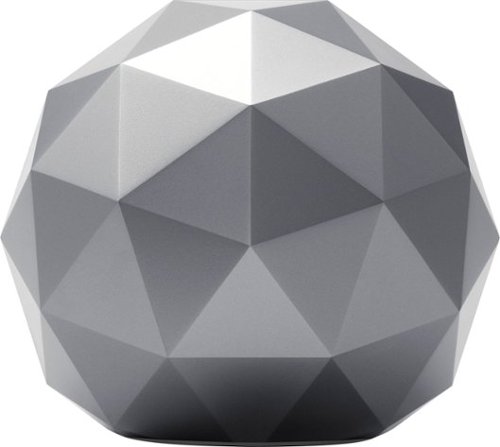
Without you knowing it, cybercriminals can infiltrate your Wi-Fi network and steal your identity or invade your privacy by accessing your connected devices. Password protection isn't enough anymore.Engineered with multi-layered security, Norton Core~ intelligently protects your Wi-Fi network and an unlimited number of connected IoT devices such as smart TVs, baby monitors, Wi-Fi thermostats as well as your personal devices like laptops, desktops, smartphones and tablets against malware, spyware, ransomware, viruses and more.
Customer Rating
4
Good option for security, but it comes at a price
on April 3, 2018
Posted by: nickcal
from Evansville, IN
These days you can never be too careful when it comes to securing your data. I like to think that security begins at home. Most people these days have wireless networks at home and because of that, they are susceptible to attacks from outside their home. It’s easy for people outside your network to tap into it and because of that, you have to take steps to make sure that your network is not easily accessible. One way you can do that is to install a secure WiFi Router like the Norton Core.
This secure WiFi Router is ‘smart’ and designed to ward off cybercriminals by protecting your network against things like malware, viruses, and hackers. Norton is well-known for providing software solutions for computer systems around the world. I remember it being the first anti-virus name I trusted. So, when I learned of the Norton Core, I was intrigued and loved the idea that they took what they know about safety and security of computers and applied it to a really cool looking piece of hardware.
The Core looks more like a piece of art than a router. It is a round device that you will want to display rather than hide. The router provides more than just firewall protection. It helps safeguard your identity and online transactions as well as provide on-the-go device protection. It has comprehensive parental controls incorporated and IoT device protection.
One of the things I like about Norton Core is that it’s easy to set up and once it is, you have a one-stop shop - so to speak - of internet control of your home. Before the Core, we had both a router and the Disney Circle installed to help manage internet traffic and parental controls. While this system worked, it was a little cumbersome and it’s great to have it all in one place with Norton’s Core Menu (mobile app). On the app, you can view your home’s security score, which will give you an idea of where you might need to make improvements. You also get a great snapshot of the devices that are connected to your network.
Set up was very easy. The Core plugs into your modem and then you have the option to connect to one of the three LAN ports available. The Core also has two USB 3.0 ports included. I didn’t have any issues getting the Core up and running and it’s been a stable system since.
The only issue I really have with the Norton Core system is that after paying the $200 price for the hardware, you then have a $10 per month subscription to the Norton Core Security Plus service. A 1-year subscription is included with the purchase of the Core hardware, but after that, it’s a subscription-based service. If you don’t renew it, the Norton Core will continue to function as a router, but the network, IoT and device-level security, as well as parental controls, will no longer be available. To me, this is what really makes the Norton Core stand out as an exceptional router so if those things aren’t available, the cost of this router just isn’t justifiable.
My Best Buy number: 2677435109
Mobile Submission: False
I would recommend this to a friend!


Share this review:


+3points
3of 3voted this as helpful.
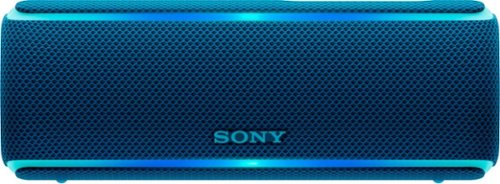
Take your tunes along with this Sony portable speaker. Wireless Bluetooth connectivity lets you pair it with smartphones, tablets and laptops, and up to 12 hours of battery life ensures long-lasting sound. The Extra Bass feature on the Live Sound mode and built-in sound effects make this Sony portable speaker the life of the party.
Customer Rating
5
Powerful, all-around speaker
on March 27, 2018
Posted by: nickcal
from Evansville, IN
Summertime is the perfect time for get-togethers. When the weather gets nice, it’s just time for cookouts and tailgates and there is no better setting for portable music. In the past couple of years, I’ve seen an influx of portable Bluetooth speakers that are meant for the outdoors. They are waterproof, dustproof, and ready for action. I was very excited to learn about this particular lineup of speakers from Sony — the Extra Bass speakers.
Sony worked to design headphones and speakers that were specifically meant to provide more bass than other products. The Extra Bass series feature the Electro Bass Booster technology which brings bass into focus no matter what tracks you are listening to. This battery-powered enhancer digitally increases low-frequencies in the music and maximizes the deep, punchy sound and rhythmic feel that bass-lovers dream of. The Extra Bass function is built into these products as an active button on the device. That way you can turn it on and off at will.
One of these speakers is the SRS-XB21 — a petite Bluetooth speaker that can easily fill a room with its powerful 42mm (dual) speaker unit. The speaker is compact and will easily fit in any travel bag. It’s got the right shape to fit in the bottle-holder of most backpacks.
The speaker comes in a Sony-branded box with a nice image of the speaker on the cover. The SRS-XB21 comes in four different colors - red, blue, white, and black — and the box reflects which color is inside. The front of the box depicts the different features via icons on the bottom left-hand corner. One of the sides describes the app functionality of the speaker that allows you to customize your listening experience. The Sony Music Center app is available for either iOS or Android users.
The back of the box provides the user with a bit more information about the features of the speaker. Some of the features include LIVE SOUND mode, Party Booster, and Wireless Party Chain (up to 100 speakers). It is within these features that I feel like the SRS-XB21 really stands out from the crowd — well, that and the incredible sound it pushes out.
I love the feel of this speaker. It just feels like a ‘premium’ speaker. The SRS-XB21 pairs with my iPhone quite easily. When you turn it on for the first time, it goes into pairing mode and appears within your Bluetooth menu. After that, you will have to press/hold the power button for approximately 5 seconds in order to enter pairing mode. There is an indicator light to show that the speaker is powered up and paired/in pairing mode. There are also +/- buttons to advance songs or increase/decrease volume and a play/pause button that serves as an answer/hang-up button, too. The buttons are very tactile even though they are covered in silicone.
There is a trapdoor on the back of the speaker that includes an aux point, Micro USB port for charging, reset button, and three other buttons for added functionality.
The SRS-XB21 is ready for any advances. It is rated IP67, which means it’s waterproof and dustproof. The speaker can even be immersed in water. The fabric that covers the speaker is exclusively made in Japan and it’s very easy to clean.
I found the speaker to be very easy to work with and loved the sound from it. I have tried some speakers that are the same style as this one that have a hollow sound and they lack any sort of depth. This Sony speaker delivers a deep, powerful sound that doesn’t disappoint.
My Best Buy number: 2677435109
Mobile Submission: False
I would recommend this to a friend!


Share this review:


-1point
2of 5voted this as helpful.
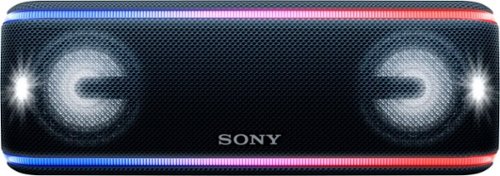
Enjoy an immersive audio experience with this Sony portable wireless speaker. Its Live Sound mode optimizes the direction of the music for a three-dimensional party sound, and its Extra Bass technology, built-in effects and flashing lights enhance the atmosphere. This Sony portable wireless speaker's battery provides up to 24 hours of playback for reliable all-day use.
Customer Rating
5
First-class listening experience
on March 27, 2018
Posted by: nickcal
from Evansville, IN
Sony worked to design headphones and speakers that were specifically meant to provide more bass than other products. The Extra Bass series feature the Electro Bass Booster technology which brings bass into focus no matter what tracks you are listening to. This battery-powered enhancer digitally increases low-frequencies in the music and maximizes the deep, punchy sound and rhythmic feel that bass-lovers dream of. The Extra Bass function is built into these products as an active button on the device. That way you can turn it on and off at will.
One of the speakers in Sony’s EXTRA BASS product line is the SRS-XB41. This moderately-sized speaker provides enough sound to fill an auditorium with music. The XB41 features an impressive 58mm (dual) speaker unit inside its case. Much like the XB21, the XB41 is waterproof, dustproof, and features exclusive Japanese-made fabric. This speaker quickly became a favorite of mine when I saw the impressive light show it put out. The XB21 features a little dancing LED around the border of the front face of the speaker, but the XB41's speakers light up and so does its face. This light show can be customized in the Music Center app.
The XB41 boasts a powerful sound and 24-hour battery life. One other feature that comes in quite handy is the built-in battery. You can charge your phone (or another device) directly from a USB-A port on the rear of the device. Other than that, the two speakers share quite a lot.
I loved the sound that came from this speaker and the light show was an impressive bonus. The Sony Music Center app (available for Android or iOS devices) really makes the EXTRA BASS speakers shine. It controls the light effects and provides a way for you to be able to connect multiple speakers together. I was actually able to test this feature out with the smaller Bluetooth speaker — the XB21. While it took a few attempts to get the two speakers to talk to one another, the feature did work very well.
This is a first class speaker and it provides a premium listening experience.
My Best Buy number: 2677435109
Mobile Submission: False
I would recommend this to a friend!


Share this review:


-1point
0of 1voted this as helpful.
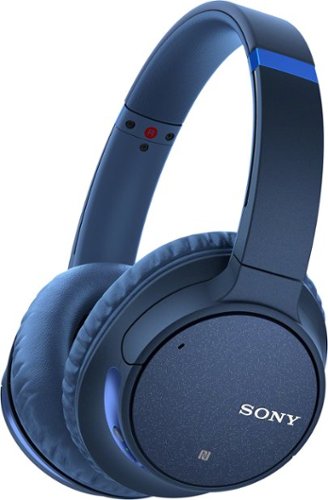
Tune out the world with these Sony headphones. Their Wireless Noise Cancellation feature minimizes ambient noise, so you can fully enjoy your content, and the integrated microphone allows you take calls and use your smartphone's voice assistant. These Sony headphones have a swivel design that makes them easy to store in tight spaces.
Customer Rating
5
Headphones will change the way you listen to music
on March 23, 2018
Posted by: nickcal
from Evansville, IN
From the moment that I slipped the CH700N headphones on, I knew they were something special. They are lightweight (under 9 oz.) and because of the padded earpads, they are super comfortable to wear even for extended periods of time. As wonderful as this first impression was, nothing could compare to the experience I had when I turned on some music. I typically listen to music through streaming services like Pandora or Spotify. So, when I began testing these headphones, I pulled up Pandora on my phone (after connecting via Bluetooth) and was blown away by what I heard. It was almost like having the speaker system from the movie theater on my head. I turned on my station based on No Diggity by Blackstreet and quickly discovered just how much depth these headphones provide to the tracks you are listening to. I believe that this might be due to the DSEE feature of the headphones. Since I’ve not encountered it before, I can’t say that with 100% certainty, but there is certainly a difference between these headphones and other premium brands.
As if the natural sound of the headphones wasn’t enough, the companion apps for these headphones have a built-in equalizer with specialized presets. While I was on my 90s hip-hop station, I turned on the bass boost option in the EQ. Suddenly I had a subwoofer attached to my ears. You might think that I’m exaggerating, but there was so much bass pushed through the headphones that it honestly felt like that. One of the things I like the most about the headphones is that you can change that setting as needed. Even though the natural sound provided by the headphones is fantastic, you can customize it to your personal tastes by using the EQ and that takes your listening experience to a whole new level.
In addition to a variety of music tracks, I also pulled up Netflix and with the EQ set to ‘none’ I watched the first few minutes of Guardians of the Galaxy 2, which includes two classic tracks of music that I’m quite familiar with — Brandy (You’re a Fine Girl) and Mr. Blue Sky. The remarkable thing about the opening sequence to this movie isn’t that it has this music included, but that it has an awesome sound mix/design. There is overlaying vocals and sound effects. It was when I ran this particular test that I really felt like I was back int he movie theater. The mix was PERFECT. In addition to that, the surround sound worked wonderfully, too.
These headphones also support phone calls with its built-in microphone. I made a couple of calls using the headphones and both people I called stated that they could hear an echo of themselves. I sounded fine (a bit of a tunnel sound to one of the call recipients, but not the other) but the echo of themselves was so distracting while we were talking that I had to switch to my iPhone instead of the headphones. From my end, I could hear them just find and didn’t detect any echoes.
Because these are over-the-ear headphones, there is a fair amount of noise isolation that they provide even when the noise canceling feature is not enabled. Most ambient noises were blocked while I was wearing them, but I was still able to hear our intercom at work. With noise canceling turned on, there are gentle room noises — like hums and air handling — that were completely blocked out and I could not really hear any ambient noise.
As far as the apps are concerned, there are two of them and they work in tandem. I sort of wish that the two apps were combined into one because it would just be easier to navigate through. The Music Center app is sort of a dashboard for the where you might be getting music from. In my case, iTunes Music, Pandora, and Spotify are included. The cool thing about this is that Sony has provided a simple solution for people who bounce around between apps (like me). You can select any of the options set before you and you are taken to that app. There are a lot of headphone apps out there that lock you into specific services rather than letting it be listener’s choice. The other app — Headphones Connect — is where you find all the controls for the headphones and the EQ. One of the really cool things I like about this app is that you can actually turn the Noise Cancelling feature of the headphones on and off from this app and in the Music Center app, you can power the headphones down. This is one of the reasons it would be nice if the apps were combined.
These headphones have honestly changed the way that I watch videos and listen to music. No sounds have been muddied and they amplify sounds beautifully. Sony already has future plans for these headphones, too. According to their product page, the CH700N will be optimized for Google Assistant with an update. I can recommend these to any audiophile and think that they are well-worth the investment.
As if the natural sound of the headphones wasn’t enough, the companion apps for these headphones have a built-in equalizer with specialized presets. While I was on my 90s hip-hop station, I turned on the bass boost option in the EQ. Suddenly I had a subwoofer attached to my ears. You might think that I’m exaggerating, but there was so much bass pushed through the headphones that it honestly felt like that. One of the things I like the most about the headphones is that you can change that setting as needed. Even though the natural sound provided by the headphones is fantastic, you can customize it to your personal tastes by using the EQ and that takes your listening experience to a whole new level.
In addition to a variety of music tracks, I also pulled up Netflix and with the EQ set to ‘none’ I watched the first few minutes of Guardians of the Galaxy 2, which includes two classic tracks of music that I’m quite familiar with — Brandy (You’re a Fine Girl) and Mr. Blue Sky. The remarkable thing about the opening sequence to this movie isn’t that it has this music included, but that it has an awesome sound mix/design. There is overlaying vocals and sound effects. It was when I ran this particular test that I really felt like I was back int he movie theater. The mix was PERFECT. In addition to that, the surround sound worked wonderfully, too.
These headphones also support phone calls with its built-in microphone. I made a couple of calls using the headphones and both people I called stated that they could hear an echo of themselves. I sounded fine (a bit of a tunnel sound to one of the call recipients, but not the other) but the echo of themselves was so distracting while we were talking that I had to switch to my iPhone instead of the headphones. From my end, I could hear them just find and didn’t detect any echoes.
Because these are over-the-ear headphones, there is a fair amount of noise isolation that they provide even when the noise canceling feature is not enabled. Most ambient noises were blocked while I was wearing them, but I was still able to hear our intercom at work. With noise canceling turned on, there are gentle room noises — like hums and air handling — that were completely blocked out and I could not really hear any ambient noise.
As far as the apps are concerned, there are two of them and they work in tandem. I sort of wish that the two apps were combined into one because it would just be easier to navigate through. The Music Center app is sort of a dashboard for the where you might be getting music from. In my case, iTunes Music, Pandora, and Spotify are included. The cool thing about this is that Sony has provided a simple solution for people who bounce around between apps (like me). You can select any of the options set before you and you are taken to that app. There are a lot of headphone apps out there that lock you into specific services rather than letting it be listener’s choice. The other app — Headphones Connect — is where you find all the controls for the headphones and the EQ. One of the really cool things I like about this app is that you can actually turn the Noise Cancelling feature of the headphones on and off from this app and in the Music Center app, you can power the headphones down. This is one of the reasons it would be nice if the apps were combined.
These headphones have honestly changed the way that I watch videos and listen to music. No sounds have been muddied and they amplify sounds beautifully. Sony already has future plans for these headphones, too. According to their product page, the CH700N will be optimized for Google Assistant with an update. I can recommend these to any audiophile and think that they are well-worth the investment.
My Best Buy number: 2677435109
Mobile Submission: False
I would recommend this to a friend!


Share this review:


-4points
4of 12voted this as helpful.
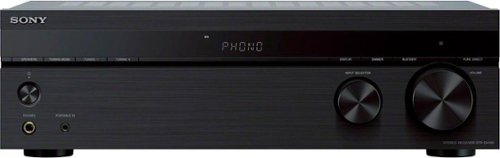
Bring together your analog and digital music collection with this 2-channel Sony receiver. Its phono input lets you hook up a record player directly, and its Bluetooth capability allows convenient wireless streaming from compatible devices. This Sony receiver has a built-in power amplifier for clear, distortion-free sound, and the rigid chassis minimizes vibration.
Customer Rating
5
A nice way to upgrade your analog audio sources
on March 9, 2018
Posted by: nickcal
from Evansville, IN
Even though the world has gone digital, sometimes it’s really nice to get back to basics. That’s especially true when it comes to audio. There are quite a few input devices that are still analog in nature and it can be difficult to connect them to quality speakers in this day and age. Sony has a high-quality receiver that does just that.
The Sony STR-DH190 is a stereo receiver with phono input and Bluetooth® connectivity. It provides the user with the ability to connect up to 6 analog input devices to stereo speakers. Sony designed this receiver specifically for bringing together vinyl and digital music sources. With it, you can switch between analog and digital sources effortlessly. You can connect devices through phono/RCA inputs or Bluetooth.
The receiver is a substantial piece of equipment. First of all, it looks great. It has a sleek, futuristic design and an LCD screen that displays the selected input and a variety of other information. The Bluetooth connection is considered ‘smarter’ than other Bluetooth inputs based off of the fact that you have the option to turn on the receiver straight from your paired smartphone or tablet when the receiver is in standby mode.
In the box, you will find the receiver with built-in power cable, an instruction manual, remote, batteries, and an antennae wire for the FM receiver (built-in). The receiver is easy to set up. You simply plug in your selected inputs into the back of the receiver and then connect your output speakers through standard speaker wire. Then you power it on. The receiver works very well with a standard set up and music sounds amazing when you use it (I connected an old turntable to it). I thought the receiver was easy to set up and has been just as easy to use. Connecting through Bluetooth was pretty easy, too.
I recommend this for anyone who is looking to improve up their audio system or listen to older formats in a new way. It’s a very handy product that can provide different ways of listening to various formats.
My Best Buy number: 2677435109
Mobile Submission: False
I would recommend this to a friend!


Share this review:


-3points
22of 47voted this as helpful.
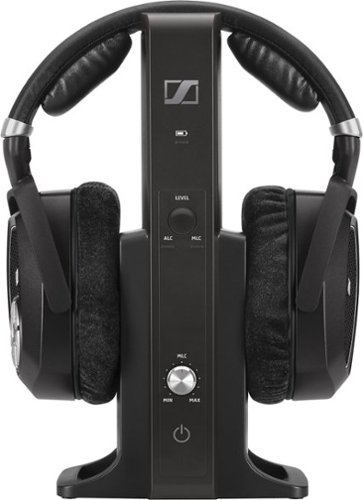
Listen to your music wherever you're most comfortable with these Sennheiser RS 185 RF over-the-ear headphones, which offer a wireless range up to 328' that lets you move about freely. The ergonomic design ensures a comfortable fit.
Customer Rating
5
Elegant Headphones System with Specific Purpose
on March 9, 2018
Posted by: nickcal
from Evansville, IN
Over the past few years I have become somewhat of a connoisseur of over-ear headphones. When the Sennheiser RS 185 Wireless Over Ear Headphones came across my desk, I found they stood out from the pack because they are provide wireless audio when ‘wireless’ shouldn’t be possible. This headphone system makes it possible for users to be able to connect to analog input devices with a wireless set of headphones. The headphones come packaged with a transmitter stand, which doubles as a charging dock. With the dock you can plug in analog signals from phono sources, the headphone jack, or the digital optical cable. There are wired headphones out there that make it possible for you to plug directly into these type of sources, but when it comes to wireless options, you have to pick and choose carefully.
The RS 185 headphone system is packaged in a branded Sennheiser box. It comes with a user manual, 6.6’ RCA audio cable, 4.9’ optical cable, rechargeable batteries, the wireless headphones, and the TR transmitter/power supply with 4 adapters. Out of the box, the setup is quite impressive. The headphones, while hefty, are lightweight and very comfortable. The ear pieces have a fabric covering that is similar to velvet so my ears did get a bit warm after prolonged use. The headphones actually have balance controls located on the ear cups so that you can customize your listening experience from the comfort of your current location rather than having to move back to the source.
Even though the main purpose of these headphones was to provide a way for audiophiles to continue listening their older formats in a new way, I am a little disappointed that the headphones aren’t available for Bluetooth connections. To me, that would have really made these headphones special.
We just upgraded our entertainment system to include a 4K television. And, at times, I want to continue watching television long after others in the house have gone to bed. These headphones make it possible for me to continue watching my favorite show or playing my favorite video game without disturbing others because I can plug the transmitter into the TV using the Digital Optical cable and leave the stand tucked away behind the TV. This keeps them ready at a moment’s notice.
Overall, the headphones have a great sound. The bass lacks at times during TV shows, but it really depends on what I am watching. Music comes through loud and clear and sounds a very well-defined. Aside from the lack of Bluetooth, the only issue I really have with them is that they don’t isolate very much ambient noise. I know that they aren’t intended to be noise cancelling headphones, but with them being over-ear style, I thought they might block out sound just a bit better than they do.
These are a unique set of headphones with a specific purpose. If you are searching for a way to connect wirelessly to your television, media system, or older turntable, this might be a good system for you. As long as you go into this product knowing that they weren’t meant for mobile device compatibility, you won’t be disappointed with the listening experience they provide.
My Best Buy number: 2677435109
Mobile Submission: False
I would recommend this to a friend!


Share this review:


+4points
4of 4voted this as helpful.
nickcal's Review Comments
nickcal has not submitted comments on any reviews.
nickcal's Questions
nickcal has not submitted any questions.
nickcal's Answers
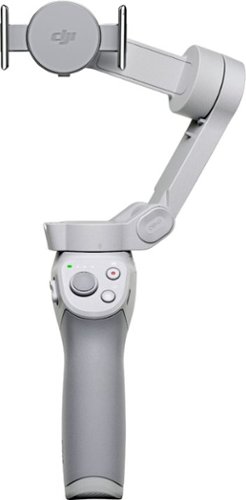
Life~s extraordinary moments deserve to be captured with smooth video. DJI OM 4 is a magnetic gimbal designed to complement your smartphone, allowing you to start recording right away. Ultra-compact, easy to use, and bursting with intelligent features, OM 4 is the ultimate solution for capturing and sharing your world.
Does the magnetic sticker phone attachment interfere with wireless phone charging?
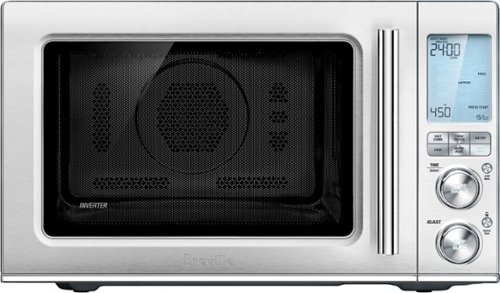
Ensure meals are cooked evenly with this Breville the Combi Wave 3-in-1e microwave. The grill, convection oven and microwave functions provide a variety of cooking options, while the Element IQ technology precisely delivers the right cooking temperature for optimal results. This Breville the Combi Wave 3-in-1 microwave features a Power Smoothing inverter for automatic adjustment of power to enable even heat distribution.
Is this an air fryer, microwave and convection oven
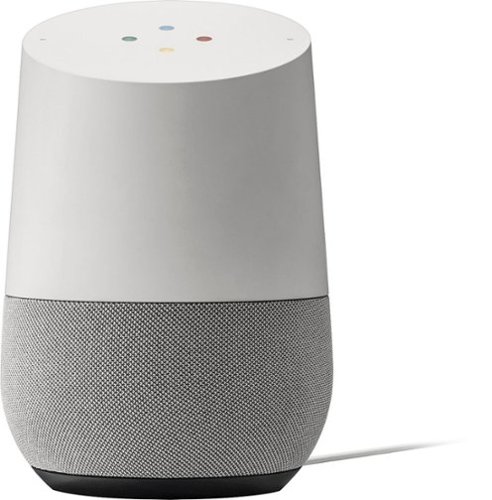
Simplify your everyday life with the Google Home, a voice-activated speaker powered by the Google Assistant. Use voice commands to enjoy music, get answers from Google and manage everyday tasks. Google Home is compatible with Android and iOS operating systems, and can control compatible smart devices such as Chromecast or Nest."
Will Google Home work with ECOBEE Thermostat?
No. Unfortunately, Google has limited functionality to only the Nest thermostat. At this time, I don't see them opening up support for third parties as they are probably trying to push it with their own hardware, but that could always change.
9 years, 10 months ago
by
nickcal
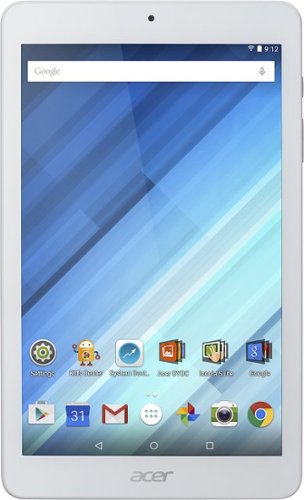
Enjoy a compact tablet that fits neatly in your pocket with this Acer Iconia One 8-inch tablet. It includes a quad-core processor and 1GB of RAM that deliver powerful processing to play all your games and apps, and the 16GB of flash memory ensure this Acer Iconia One 8-inch tablet and store your files.
can i download skype
Depends on the Google Play store. If Microsoft has a version of Skype for Android then yes.
10 years, 4 months ago
by
nickcal