


nickcal's stats
- Review count355
- Helpfulness votes1,301
- First reviewApril 12, 2014
- Last reviewSeptember 5, 2026
- Featured reviews0
- Average rating4.7
Reviews comments
- Review comment count0
- Helpfulness votes0
- First review commentNone
- Last review commentNone
- Featured review comments0
Questions
- Question count0
- Helpfulness votes0
- First questionNone
- Last questionNone
- Featured questions0
- Answer count4
- Helpfulness votes0
- First answerMay 23, 2016
- Last answerSeptember 7, 2020
- Featured answers0
- Best answers0
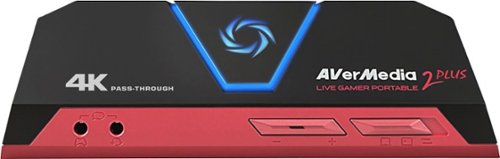
Only at Best BuyRecord your Ultra HD gameplay with this AVerMedia Live Gamer Portable 2 Plus capture card. It has HDMI 2.0 pass-through for lag-free performance in 4K and 1080p resolutions, and the PC-free mode supports game console and smartphone connections. Include live commentary and party chat recording by connecting a headset to this AVerMedia Live Gamer Portable 2 Plus capture card.
Customer Rating

4
An affordable recording solution
on November 4, 2018
Posted by: nickcal
from Evansville, IN
Capturing video gameplay has become a popular activity in recent days. A lot of gamers like to record their games and broadcast it to followers on channels like YouTube and even though console systems like the Xbox have a way of recording clips, it’s not the same as recording an entire gaming session. For that, you need a device like the Live Gamer Portable 2 Plus from AVerMedia. This unit makes it possible for you to record your gameplay as Ultra HD video through HDMI 2.0. It features a pass-through, lag-free performance. With the Live Gamer, you have the ability to include live commentary and party chat by connecting a headset. The capture card comes with a stout package that includes one HDMI cable, one 4-pole 3.5mm audio cable, one USB cable, and a quick start guide.
At first look, the Live Gamer appears to be an easy to use, plug-n-play recording device for gamers. It seems that all you have to do is plug your console into the device, then plug the output signal into your computer to manage the recording. Unfortunately, it’s not quite so easy. You do need to download specialty software to work with your recordings and the quick start guide doesn’t provide a lot of instruction on how to get started. You actually have to download the full user guide in order to learn how to make the system work. The full user manual is hard to follow even for someone like me, who works with technical devices all the time. And, when you go to the webpage to download the software, there are multiple versions to choose from. The most recent version is v4.3.0.34 (beta).
There are three capture modes that can be selected on the front of the unit. There is a slider switch that allows you to go between each mode. Even though there are small icons below the switch the modes are not labeled. From left to right, the modes are PC recording, PC-free recording, and Card reader. LED indicators help communicate to the user the current status of the card. Again, this isn’t something that the user guide really describes or defines.
This system can do more than just record video game play. It’s designed to be able to record any video that is showing on the input signal. You are supposed to avoid copyright materials, but it is capable of recording any video signal that is pushed through the set-up. Once you get it set-up, it’s fairly easy to use, but the set-up is a little tricky based on the poor instructions. If you are getting this for a kid, you will need to help them with the set-up.
This does seem to be a functional option for recording gameplay or any other streaming content. It’s affordable and as long as you have the set-up (PC computer, console, and TV) available, you should be able to get some good use out of this device.
Mobile Submission: False
I would recommend this to a friend!


Share this review:


+4points
4of 4voted this as helpful.
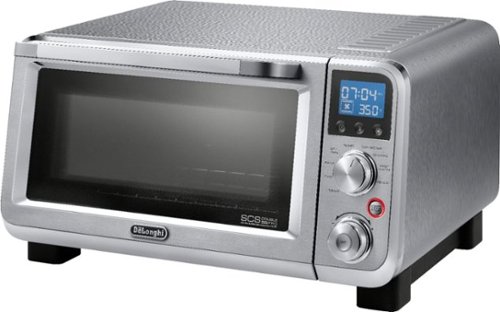
Grill, bake, roast or broil with this Delonghi Livenza 0.5 cu. ft. digital compact convection oven. This compact oven saves space while providing enough capacity to save the hassle, heat and cost of using your full-size oven. This Delonghi Livenza 0.5 cu. ft. digital compact convection oven has toasting _and warming functions for maximum flexibility.
Customer Rating

5
Great cooking companion
on October 29, 2018
Posted by: nickcal
from Evansville, IN
I’ve always liked having an alternate option for cooking. Traditional ovens and stove tops are great, but having a smaller, more compact way to heat up food (that isn’t the microwave) is really great. That’s why I enjoy having a toaster oven in addition to our traditional kitchen appliances. For a while I had a small toaster oven that took care of most of my needs, but it wasn’t quite big enough for items like pizza. And sometimes, you just don’t want to use the big oven for a quick job. That’s why I like our new Livenza Convection Toaster/Pizza Oven from DeLonghi.
I have to admit that when it arrived I wasn’t sure how much different this oven would be from our other one. I’d never had a DeLonghi brand kitchen appliance and I wasn’t really familiar with the brand. From the beginning, I was impressed with it. For starters, it looks like a professional piece of kitchen equipment. The exterior is stainless steel, which matches our stove/oven, dishwasher and a few other appliances in our kitchen. Second, this oven is much larger than our older one. The older one could how a few slices of bread. This one can cook a 10-inch pizza. With that in mind, you need to plan a place for your toaster oven to reside because it does take up a lot of counter space.
This oven is powerful enough to broil, bake, or even grill food items. Getting started with it is very easy. Once you unbox it, you need to install the drip pan and the wire rack. The wire rack is meant to be moved depending on what you are cooking. For example, the manual says to use it in position 1 (the lowest placement) for cooking frozen pizza. After you install those two accessories, you will turn the oven to ‘bake’ and set the temp to 450º. Set the timer to 30 minutes. This will cook off any residue the oven has from being a ‘new’ product. It is likely to smell like something is burning (ours smelled a bit like plastic) but this is normal and expected. The manual suggests allowing 30 minutes after this initial cooking cycle for the oven to cool down completely before cooking something. This timing might vary slightly. Our oven cooled down in about 20-25 minutes.
The first thing we decided to cook in the oven was a small frozen pizza. We had never had the opportunity to cook a pizza in a toaster oven before so this was a novelty. The oven actually has a notch designed in the back of the oven so that round pizza will fit into it. The oven comes with a pizza pan that you can use for cooking. It fits 10-inch pizzas perfectly. Once you place the pizza in the oven you will tap on the snowflake button to indicate that it’s a frozen item and then select ‘pizza’ on the top knob. The oven has an automatic timer set for that specific item so all you have to do is tap the start/stop button to get cooking!
I ran into a small issue when I first started trying to use the oven. I had it plugged into a power strip and it kept overloading the surge protector. I eventually plugged it directly into the wall and didn’t have any issues with the oven staying on. I would recommend that you plug this directly into the wall rather than other methods of power.
This is a very impressive kitchen device. I really fell in love with it after the pizza came out perfect. I’m eager to use the oven as the holiday season approaches. I think it will come in very handy.
Mobile Submission: False
I would recommend this to a friend!


Share this review:


+10points
10of 10voted this as helpful.
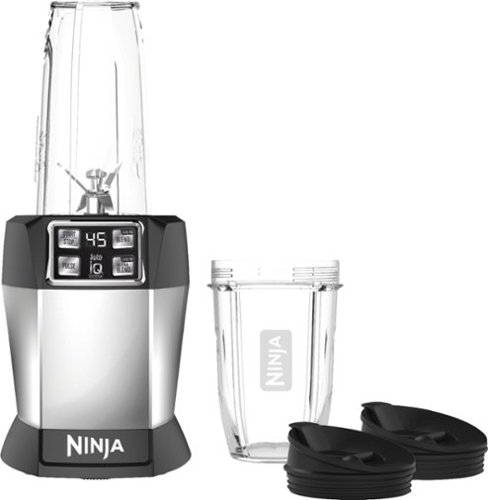
Concoct fresh, healthy smoothies with this Nutri Ninja Auto-iQ single-serve blender. Pro Extractor Blades and a powerful 1000W motor provide efficient performance, and it comes with 18-oz. and 24-oz. Tritan cups with spout lids for travel-friendly drinking. This intelligent Nutri Ninja Auto-iQ single-serve blender has preprogrammed settings for easy, quick operation.
Customer Rating
5
Great personal blender
on October 27, 2018
Posted by: nickcal
from Evansville, IN
Several years ago, I started drinking protein smoothies for my breakfast. I had a shaker bottle that would mix up the ingredients ok, but the powder wouldn’t completely dissolve. I started using an individual shake blender. It worked well, but I still had problems with the powder completely being mixed in. So, I have finally upgraded to a more powerful blender — the Nutri Ninja With Auto-iQ Blender.
The blender comes in a Ninja branded box and is packaged securely. It comes with two canisters for blending and storing drinks, two lids for the canisters, and the blade attachment for the blender. The two canisters are different sizes, which I prefer because sometimes you don’t want a large smoothie. One of the main reasons I was excited to work with this blender was because we recently found out we were going to have our first child. Even though I’m sure that we will have to supplement with store-bought baby food, it will be nice to have a quick and easy way to mix up our own baby foods when necessary. The previous blenders we had were insufficiently powered to be able to blend/puree foods like the Ninja can.
Getting started with the Nutra Ninja is really easy. Once you have all the parts unboxed, you simply add your ingredients and then blend. If you hit ‘start’ it will start blending continuously until you press the start/stop button again to stop it. There are multiple settings on the blender including Pulse, Auto-iQ Blend, and Auto-iQ Ultra Blend. The Ultra Blend setting is perfect for harder ingredients. The Nutra Ninja does a great job of blending evenly. I really like that the blender is preprogrammed so that you can lock the canister down and then do other things while your mixture mixes.
My main test was to make a morning breakfast smoothie. My smoothie usually just consist of milk and the protein powder mix. Sometimes I’ll add in some peanut butter, but I decided to try just the simple mix first. I put the ingredients into the canister and then blended the mix. I used the standard automatic blending option and it only took about 10 seconds to blend thoroughly. This is a great personal blender and I think the equipment will last for a long time.
Mobile Submission: False
I would recommend this to a friend!


Share this review:


+4points
4of 4voted this as helpful.
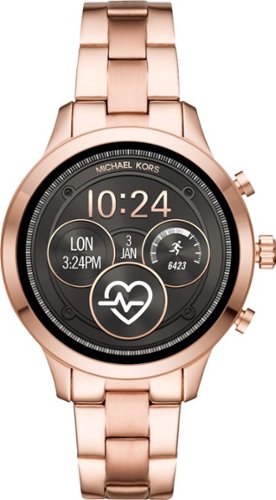
Track time and activities with this women's Michael Kors smart watch. The rose gold finish on the sturdy stainless steel bracelet adds a dressy touch to outfits, and the programmable options like tracking goals and taking selfies work with Android and iPhone devices. This Michael Kors smart watch records the number of calories burned exercising.
Customer Rating
4
Stylish but with limited functionality on iOS
on October 21, 2018
Posted by: nickcal
from Evansville, IN
When I was first introduced to the world of smart watches, I was intrigued and impressed that all my communications could be managed from such a tiny device. It was like I was in an episode of Star Trek or some other Sci-Fi show. Being an Apple fan, I was of course drawn to the Apple Watch and at first, I thought some of the other smartwatches were really behind technology-wise. I feel like other systems like WearOS by Google have come a long way and when I was given the opportunity to check out this gorgeous smartwatch by Michael Kors, I didn’t let the fact that it wasn’t an Apple Watch keep me from using it.
I actually got this watch for my grandmother. She is 85 years old and this summer, she got very sick with an infection. The infection cleared up thankfully, but she had a lot of extended care at home with physical and occupational therapy. They would check her vitals every time they came to visit and we began to think that it would be a good idea to have a smartwatch on her to monitor her heart rate and other activities more often then their visits. As it would happen, her simple wristwatch needed a battery. Since she was due for a new watch, we just replaced it with this beautiful smartwatch.
The band of the watch is a standard link-based band. The watch does come with the clasp-style closure pre-installed but you can swap it out for a buckle-style closure, which is included in the box.. And the links can be removed, but a tool isn’t included. Since we did not have a link watch adjustment tool available, we visited a local jeweler and had several links removed from the band so that it would fit my grandmother’s wrist. This was a delicate balance because the watch features the heart rate sensor on the back of the watch face, which needs to have a solid connection to the wearer’s skin, but she likes her watches a little loose. We ended up finding a good balance between her comfort and what the watch needed for connectivity.
One of the main things that the watch needs is a smart phone or tablet to connect to. My grandmother doesn’t have a smartphone, but she does use her iPad quite a bit. So, we connected the watch to the WearOS app for Apple devices. The app is not optimized for use on an iPad so the screen is. viewable in portrait mode only. The data does transfer over as it should but there is limited functionality between the WearOS and iOS systems. For example, you will get a notification of an incoming call (if you have the watch connected to a phone), but you can’t answer it on the watch. The call will be answered on the phone. Another limitation has to do with the Calendar. If you use Google Calendar, you won’t have any issues, but if you use Apple Calendar, the translation is a little funny. For my purposes — being able to track health stats on my grandmother — it works great. But if you are looking for a fully functional smartwatch, you might want to pair this one with an Android device rather than an Apple one.
As far as style goes, this watch really steps up the game. It looks like a high-end wrist watch. The detail work is phenomenal and it really shines. I don’t think there is any other watch out there that can stand up to it as far as style goes.
I can recommend this smartwatch based on its ease of use and style. I would, however, caution users about the limited functionality with iOS smartphones and tablets as that might be cause for a below-average user experience.
I can recommend this smartwatch based on its ease of use and style. I would, however, caution users about the limited functionality with iOS smartphones and tablets as that might be cause for a below-average user experience.
Mobile Submission: False
I would recommend this to a friend!


Share this review:


-2points
2of 6voted this as helpful.
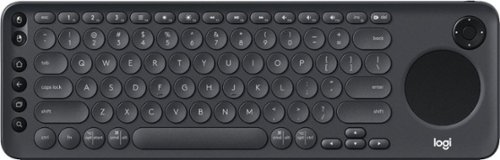
Enjoy smart TV navigation with this Logitech K600 TV keyboard. Its precision touch pad makes browsing the web and searching for your favorite movies more user-friendly. This Logitech K600 TV keyboard connects wirelessly to smart TVs from up to 15m away, so you can relax comfortably in your recliner while selecting shows.
Customer Rating
5
Great keyboard for multiple purposes
on October 21, 2018
Posted by: nickcal
from Evansville, IN
As someone who works remotely a lot and has a laptop as a primary computer, I take a lot of pride in the accessories I choose. At home, I have a workstation that includes a keyboard, mouse, and secondary monitor, but when I’m on the go, I usually just take my laptop. It would be nice to have the flexibility of a small, wireless keyboard, but I have a lot of trouble finding a keyboard that is easily transportable and that I like typing on. I finally found that with the Logitech K600 TV Keyboard.
This keyboard is primarily designed for people who need a Bluetooth keyboard to work with their smart TVs and streaming devices like Apple TV. That said, it is a Bluetooth keyboard so any input device that is compatible with Bluetooth connections can use it. The K600 has a built-in touchpad and D-pad so that you can maneuver the cursor on your screen without needing an external mouse. If you are like me though and decided to use the keyboard with a set-up that already has a mouse added on, the K600 will still work just fine with that system.
The keyboard has a standard layout without the 10-key number pad. The keys are rounded, which can throw you off if you aren’t used to it, but they are spaced out well enough that it feels natural. I had a mechanical keyboard at one point that had round keys and it was dreadful to type on. It just wasn’t easy to get used to. I didn’t find that to be the same case for this keyboard. I started using it and the soft feedback from the keys made it very easy to work with.
The K600 has an impressive 49-foot range. (I tested this Ange by typing this sentence from the other end of our house.) I left my laptop in our home office located on the front side of our house and walked to our living room which is at the back of the house. I left the sentence exactly as it was captured from my keystrokes. It was supposed to read, “I tested this range by typing this sentence from the other end of our house.” It looks as though only one keystroke was missed. I even made a mistake toward the end of the sentence and the keyboard was able to transmit the correction properly. The distance from where my computer was sitting and to where I typed the message was probably about 35 feet, but there were several walls in between the two devices so I am very impressed by the performance of the keyboard at that distance.
In addition to my laptop, I connected the keyboard to our LG Smart TV. It’s important to note here that the LG Smart TV is not Bluetooth compatible. So, you will have to plug in the provided USB dongle in order to connect the keyboard to the TV. I was able to switch back and forth between the two connected devices in the room with no issues. I was actually quite surprised at how seamless the process of swapping the connection was. I would tap the #1 function button to connect to my laptop and the #2 function button to access the TV. Navigation with the smart TV was easy and the only thing I really couldn’t adjust was powering the TV off and on. I still needed the remote for that.
The only downside to this keyboard is that it’s not rechargeable. It uses 2 AAA batteries for power. There is a on/off switch on the top right hand corner of the keyboard and I would recommend when it’s not in use that you switch it off to conserve battery power. Since I’ve only been using the keyboard for a short time, I can’t comment on how long the AAA batteries will last but so far, I’ve not noticed any connection issues due to power loss.
Bluetooth keyboards can be very hit and miss these days. Sometimes they are difficult to connect to devices, not have a great distance, or only be able to connect to a single device at a time. The Logitech K600 is a fantastic example of what you hope a Bluetooth keyboard should be. It connects to devices quickly and easily and it’s very easy to type on. I really enjoy using it with my laptop and love that I can switch back and forth between the TV and the computer when I need to. This is a great keyboard and a wonderful companion for any Bluetooth compatible device.
Mobile Submission: False
I would recommend this to a friend!


Share this review:


+1point
1of 1voted this as helpful.
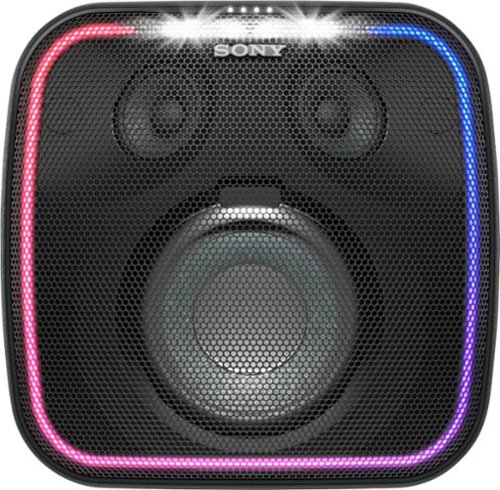
Send voice-activated commands via the built-in Google Assistant of this Sony Bluetooth portable speaker. Its EXTRA BASS and LIVE SOUND modes deliver powerful audio, and the multicolored lights and flashing strobe create a party ambiance. This Sony Bluetooth portable speaker resists splashes and dust for durable outdoor use, and the 16-hour battery life provides extended listening time.
Customer Rating
4
An impressive speaker with some questionable desig
on October 16, 2018
Posted by: nickcal
from Evansville, IN
I don’t remember my first Bluetooth speaker, but I do know that since I was introduced to them, I’ve been obsessed. I love having the ability to essentially have a boombox with you everywhere you go. Some speakers are much more advanced than others and can act as charging docks and some even have built-in digital voice assistants like the more recent one I’ve tested, the Sony SRS-XB501G Wireless Speaker.
The packaging of the speaker was well designed. It’s brightly colored and represents the product well. Some basic details are included on the box and there are quite a bit of styrofoam pieces made to form around the speaker. The speaker is shipped with a power cable and manuals. It’s a fairly self-contained system and very easily transported.
Setting up the speaker is very easy, but it does require that you set up the Google Assistant before you use the other features of the speaker like connecting to it via Bluetooth. I found this to be a little off-putting because I’d like to have been able to just connect via Bluetooth without the hassle of connecting the speaker to my Google account. I like having that option, but I think that the speaker’s standard features should be autonomous from the Google Assistant. (Instructions read: After the Wi-Fi setup is complete, press and hold the (BLUETOOTH)/ PAIRING button for about 3 seconds.)
Aside from the Google Assistant getting in the way of basic functionality, the Sony SRS-XB501G Wireless Speaker is a great speaker. I love the size of i, especially for group events. It’s really easy to carry from place to place thanks to the hefty handle on the back of the speaker. The buttons on the top of the speaker include the power button, play/pause button, Link indicator, Charge indicator, volume buttons, microphone button, battery button, lighting button, and various other indicator lights. After you complete the initial set-up, the speaker connects automatically when it’s powered on.
The sound quality of the speaker is incredible. The EXTRA BASS really makes everything punchy and deep. I listened to several different styles of music and thought it was also improved by pushing it through the Sony Speaker. I also watched some movies and TV shows to get a feel for how the dialogue would come through and found that everything sounded right. The mix was even and no sound effects were lost by using the speaker.
In order to get full use of this speaker you have to download not one, but two apps — the Google Home app and the Sony Music Center app. The Google Home app gives you connection to the Google Assistant while the Sony Music Center app gives you control over the fine tuning features of the speaker. I would love to see them condensed into one app. That said, I really like the Sony Music App. You have control of the lighting effects and can actually power down the speaker from the app. This is a great feature to have with this type of speaker.
The Sony SRS-XB501G Wireless Speaker is a pricey investment at $300 but worth it since it provides such a high-quality sound and includes a built-in Google Assistant. I do wish that Sony could find a way to include the Google Home app into their Music Center app and I wish they could also find a way to make the Google Assistant feature separate from the other speaker functions. That said, I think the sound quality that the speaker provides outweighs all the unfortunate features that I disagreed with.
Mobile Submission: False
I would recommend this to a friend!


Share this review:


+2points
3of 4voted this as helpful.
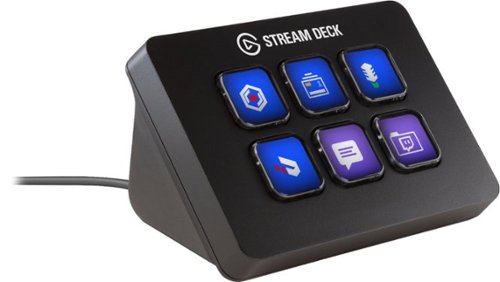
Personalize your video game streaming workflow with this Elgato Stream Deck mini interface. Six programmable one-touch LCD keys provide quick access to your favorite apps and functions, and its Multi Actions feature lets you program multiple tasks to a single key. Assign ready-made icons or design your own to further customize this Elgato Stream Deck mini interface.
Customer Rating
5
Not just for gamers, but a gamers best friend
on October 8, 2018
Posted by: nickcal
from Evansville, IN
I’m always trying to find ways to make my workflow more functional. Not too long ago, Elgato introduced the Stream Deck programmable broadcasting tool. It’s a panel of buttons that are completely customizable. The full-size Stream Deck has 15 buttons on it, which was a bit much for my set-up. I like to keep things on the minimal size to conserve desk space. Fortunately for me, Elgato released the Stream Deck Mini recently which is perfect for my set-up.
I have a love—hate relationship with the packaging for the Stream Deck Mini. First, it is branded well and you can easily see what the product is supposed to be. There is quite a bit of information includes on the box so many questions will be answered right from the writing on the box. That said, it’s a lot of box for such a little device. The box is about 10 inches tall and the Stream Deck Mini device is only 3.3 x 2.4 x 2.3 inches in size. The only items in the box are the Stream Deck Mini with its attached cable and a quick start guide. Even though I’m not what I would consider an ‘environmentalist’, I do appreciate packing that is minimal and not wasteful. I would love to see Elgato rethink their packaging for this product.
Moving on, the Stream Deck Mini is an incredible little device. The first step to its set-up process is to download the Stream Deck app for your operating system. For me, it is for Mac and it appears as a menu bar utility. After you’ve downloaded the app, you can connect the Stream Deck Mini to your computer using the attached USB cable. At this point, you can launch the app and start customizing the buttons. To get started, you simply drag actions from the panel on the right side of the screen to the desired keys on the left. The LCD within the buttons can be programmed in any way you wish. You can choose to create your own icons or configure graphics using Elgato’s web interface. One thing I was a little concerned about was the amount of customization I could achieve with this smaller interface. As it turns out, there are limitless possibilities with the Stream Deck Mini since you can create folders for keys. You can literally nest folders inside folders and have a huge library of commands on the tiny deck of buttons.
So far, the Stream Deck Mini has performed flawlessly. I love being able to tap a single button and have these locations open with no other interaction. The only downside is that the programming is tied to the computer it’s connected to. If I move the Stream Deck to a different machine, I will have to reprogram it there. I do wish that the deck had onboard storage to accommodate for saved preferences, but that is really the only issue I have with the device.
I absolutely love having the Stream Deck Mini be apart of my work ecosystem. It’s a magical little device that makes my life a lot easier. I’m looking forward to using it more and more as time goes on and can’t wait to see what it does for my productivity. I can recommend it to anyone looking to make their workflow more concise or for broadcasters who want a simple way to add a switcher to their system. It is well worth the cost in my opinion.
Mobile Submission: False
I would recommend this to a friend!


Share this review:


-1point
0of 1voted this as helpful.
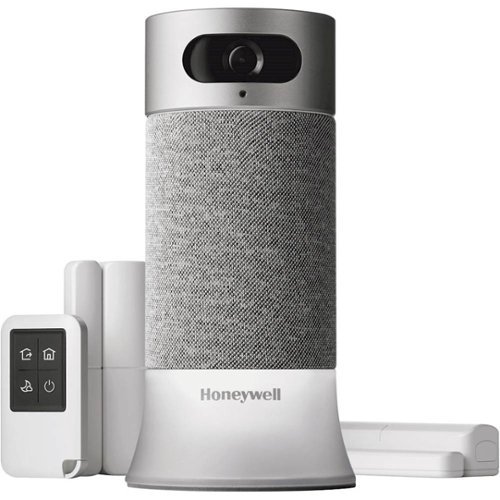
Master your domain with this Honeywell smart home security starter kit. Motion sensors facilitate automatic recording when activity is detected at your chosen point of entry, and built-in Amazon Alexa functionality ensures convenient voice controls. This Honeywell smart home security starter kit has 24-hour cloud storage so you can review footage from anywhere.
Customer Rating
4
a nice DIY security system
on September 18, 2018
Posted by: nickcal
from Evansville, IN
I’ve had the opportunity to work with lots of different home security set-ups. Some of them are just simple cameras and other include motion sensors for windows. I’ve tried to make my home as secure as possible with the aide of smart devices and connected apps. Since I’ve had a lot of experience with home security systems, I was excited to test out the new Honeywell Smart Home Security Starter Kit. The starter kit is made up of: a camera base station with Amazon Alexa built-in, remote control key fob, two access sensors for windows and doors, mobile app with video and alerts.
The Camera Base Station features a 2MP HD camera with 1080p image sensor, 147º wide-angle view, night vision, and motion detection. Audio is captured using a 5W omnidirectional speaker and 3 microphone arrays and 2-way audio and an 85dB alarm are also included on the camera base station. The base station is the brain for the rest of the system. Any motion detected from the sensors are filtered through the base station, which sends the notifications to your phone. It connects to devices through Z-Wave.
One of the unique features of the Honeywell system is facial recognition and scheduling. You can program the camera to recognize certain faces and when they should be appearing. For example, if your child gets home from school the same time every day, you can tell the camera to notice that time and face as ‘safe’. That way when they arrive at home when you are gone, the system doesn’t alert you to potential invaders. On the other hand, if your child comes home from school with a friend, the camera will see that person as a foreign face and send an alert to your phone.
Setting up the system is pretty painless. First you download the Honeywell Home app. One of the things I noticed right away was that the app will ask for access to your HomeKit data if you are using an iOs device. This is because the app controls all of Honeywell’s smart home products — some of which are HomeKit compatible. The Smart Home Security Starter Kit is not compatible with HomeKit, but it will connect with Amazon Alexa and Google Assistant.
Once you have the app downloaded and your account set-up, you connect the camera base by showing it a QR code generated in the app. This is the easiest way I’ve experienced to connect a smart device to an app. This process took a total of about 2 minutes. The door/window sensors are installed with the help of 3M tape. These are quite a bit larger than some other sensors I’ve used, but their battery is supposed to last up to 4 years without needing to change the batteries. The key fob can set the alarm system to one of its four modes — Home, Away, Night, and Off. This is a big convenience when you don’t want to pull your phone out of your bag or pocket when you’ve already got your keys out.
Once I had the system set-up, I found that it worked pretty well. I had the camera set up in my living room and I was constantly getting notifications for movement. The door/window sensors also worked well although I did notice that when the door sensor was tripped, I had approximately 30 seconds to disarm the system, while the window sensor caused the alarm to immediately sound. I also thought that the camera provided a very clear image and video captured from the motion that was caught by the camera. I love being able arm the system by telling the voice assistant to do it. It’s a very easy way to make sure your system is ready for any unwelcome guests.
My final opinion is that it’s a great do-it-yourself security system but it’s a bit pricey at $450 for the starter kit. I can recommend the system based on its ease of use and successful testing.
Mobile Submission: False
I would recommend this to a friend!


Share this review:


0points
0of 0voted this as helpful.
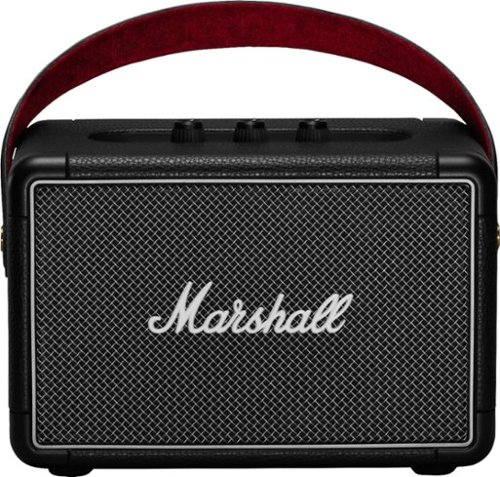
Take music wherever you go with this Marshall Kilburn II Bluetooth speaker. It produces clear midrange sound with deep, powerful bass, and it provides 20 hours of playtime on a single charge, so you can listen to playlists all day. This Marshall Kilburn II Bluetooth speaker has a solid metal grille for durability.
Customer Rating
5
Totally impressive speaker
on September 3, 2018
Posted by: nickcal
from Evansville, IN
These days, Bluetooth speakers come in all shapes and sizes. I recently had the chance to try out the Marshall Kilburn II Portable Stereo Loudspeaker, which is an exceptional option for music and other audio listening. The speaker has the look and feel of a small amplifier and in a sense, that’s what it is. Out of the box, it will have some charge (mine was at 75% battery capacity) and will be ready to use. Pairing the speaker is very easy, but unlike some other Bluetooth speakers, the Kilburn II has to be put into pairing mode rather than automatically being able to pair with a device. There are three knobs on the top of the speaker that control the power for the speaker, adjust the volume, as well as the treble and bass. When you turn the speaker on for the first time, you will need to press/hold the Bluetooth button to enter pairing mode. I was able to connect within a few seconds using an iPhone 7. The speaker comes in a really nice package. The speaker itself sits between two pieces of cardboard cushion and has a quick start guide and power cord accompanying it. In addition to Bluetooth, you can also connect to the speaker with a 3.5mm auxiliary cable.
It takes a lot to impress me when it comes to Bluetooth speakers. I’ve used so many of them at this point, that sometimes they just blend together. The Kilburn II is definitely a stand out to me. While it may not be quite a portable as some other speakers, it is easy to carry around because of its leather handle. The speaker is incredibly loud and I was very happy to find that it’s a ‘true’ amplifier speaker for connected devices. What I mean by this is you can turn the volume up on the connected device and then the volume from the speaker adds to it. I also love that you have the ability to adjust bass and treble from the speaker as well. One of the only drawbacks to the Kilburn II is that there are no local playback controls. This would be a major con for some people, but it doesn’t bother me too much.
I tested the quality and volume of this speaker out with many different types of music. I chose tracks with the specific purpose of testing different types of sounds. One of the tracks that was most surprising was “Believe” by Yellowcard. The beginning of the song starts with a violin solo. Depending on how I listen to the track, that part can sound muddled. The Marshall Kilburn II has such gorgeous sound quality that it made the violin solo sound crisp and clean. Bass depth was also very impressive.
Given the superior sound quality, impressive max volume, long battery life, and portability, this speaker is ideal for outdoor gatherings. I can recommend this for any type of user.
Mobile Submission: False
I would recommend this to a friend!


Share this review:


+1point
5of 9voted this as helpful.
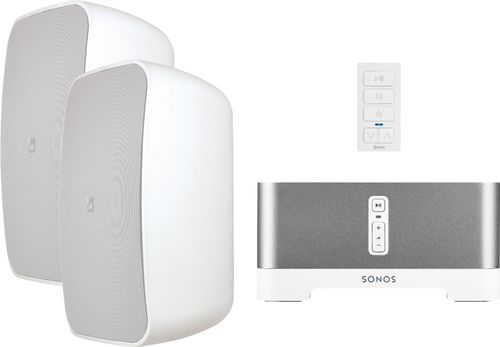
Bring vibrant sound to your outdoor entertainment area with this Sonance outdoor streaming music system. A magnetic-mount audio keypad gives you a central command station for controlling playlists and volume, while Wi-Fi connectivity means you can use your home's internet connection to stream content. Featuring powerful speakers, this Sonance outdoor streaming music system delivers clear audio quality for your listening enjoyment.
Customer Rating
4
A definite upgrade for home entertainment
on August 20, 2018
Posted by: nickcal
from Evansville, IN
A few years back, we invested a lot of time and energy in sprucing up our back patio area. We added a pergola, some inviting furniture, and a shiny new grill. Over the summer months, we usually have at least one get together with family and friends and we wanted a comfortable place for everyone to enjoy. As nice as our patio has become, we have been missing one valuable piece of technology — a speaker system. In the past, we would take single Bluetooth speakers outdoors for entertainment, but as our gatherings have grown, those just aren’t a viable option because the crowd overpowers the single speaker. So, we decided to add in a streaming system from Sonos and Sonance.
WHAT’S IN THE BOX
This was my first experience with being a Sonos system owner and prior to this system, I had not been aware of Sonance as a brand. But, as I researched them and discovered that the entire system is part of the premium Magnolia brand family from Best Buy, I knew I was going to be happy with the quality that the system added to our home.
The first overall impression of the system was good. The Sonos/Sonance Outdoor System comes well packaged in a single box with each part individually boxed inside. The system consists of the Sonos Connect: Amp, Two (2) Sonance Mag O6 Outdoor Speakers, xPress Audio Keypad, mounting equipment for the speakers, a power cord for amp, and a flat ethernet cable should you want to directly connect your Connect:Amp to your internet modem, router, or switch. If you read carefully through that list, one thing you will notice is the absence of speaker wire, which is required to connect the speakers to the Sonos amp. You will have to provide that outside of this packaged kit.
SET-UP
Overall, the system is not difficult to set-up. Getting started, you will want to select the places you want to mount the speakers paying close attention to their proximity to the amp and your selected length of speaker wire. You want to keep in mind that while the speakers are weather resistant, the Sonos Connect:Amp is not. It will need to be placed somewhere out of harm’s way. Once you’ve selected the proper location for your speakers and amp, you can mount the brackets provided with the speakers. For me, I mounted them into our wooden siding with little problems.
After they are secured, you can snap the speakers into place, but you will want to make sure to run the speaker wire through the speaker first. The speakers have a spring clamp located on the front of the speaker. You attached the wire to the clamps and then run it through a channel at the bottom of the speaker and out the back through a rubber grommet. This seal keeps the speakers weather resistant. Hanging the speakers isn’t difficult, but they aren’t particularly light so it can be a bit awkward. I was able to use my shoulder to brace the speaker while I slid it into the bracket. When I heard the ‘click’, I knew they were locked in. At this point, you will run the speaker wire to your amp. You may choose to tack the wire up against your house (this was my choice) or run it through a wall. Again, this step isn’t ‘hard’ per se, but it’s time-consuming.
The Sonos Connect:Amp is the ‘brain’ of the entire system. To get started, you will connect the speaker wire to the back of the unit and plug it into power. You need to download the Sonos app and follow the in-app set-up steps provided. The amp should automatically connect to WiFi (if available) during the app set-up. Sonos includes connection to a variety of streaming services (Pandora, Slacker, Rhapsody, Spotify, SiriusXM, etc.) so that you don’t have to connect your mobile phone or computer in order to have those services. The final step in the set-up is connecting to the remote. The xPlay Audio Keypad is connected to the system through WiFi and will allow you to pause, play, and skip songs as well as adjust the volume remotely. The xPlay app for the keypad is separate from the Sonos app. So, you will be downloading two apps for one system. One thing to note here - the keypad that accompanies the system can only be controlled with an app that is only available for iOS devices. Since Apple is the main brand I use for mobile devices, this wasn’t a big problem for me. Both Android and iOS users can enjoy the Sonos app and control your music, but only iOS users can use the remote.
SOUND QUALITY
I’ve been incredibly impressed with the quality of the sound this system produces. It has a wonderful even tone for music that is rich with highs and lows and even those who are hard of hearing thought all the audio was crisp and clear coming from the speakers. Even though I don’t consider myself an ‘audiophile’, I do appreciate good quality sound and the Sonance speakers push it out well. While the bass was nice and smooth, the addition of a subwoofer to this set-up might provide extra depth, but if you are using them outside, that might be difficult to add in. I didn’t notice and distortion even when we cranked up the volume quite high. While we didn’t receive any complaints from the neighbors, the speakers are LOUD. Our backyard is about 25 yards deep and someone at the back of the yard had no problems hearing the music played on the patio.
I’ve been incredibly impressed with the quality of the sound this system produces. It has a wonderful even tone for music that is rich with highs and lows and even those who are hard of hearing thought all the audio was crisp and clear coming from the speakers. Even though I don’t consider myself an ‘audiophile’, I do appreciate good quality sound and the Sonance speakers push it out well. While the bass was nice and smooth, the addition of a subwoofer to this set-up might provide extra depth, but if you are using them outside, that might be difficult to add in. I didn’t notice and distortion even when we cranked up the volume quite high. While we didn’t receive any complaints from the neighbors, the speakers are LOUD. Our backyard is about 25 yards deep and someone at the back of the yard had no problems hearing the music played on the patio.
NOT A WIRELESS SYSTEM
As I mentioned above, the kit is devoid of speaker wire. This is an essential part of this system as it’s NOT a wireless system. Even though the description of the product does not spell out ‘Bluetooth’ or ‘Wireless’ system, it does describe the set as “Sonos & Sonance - Outdoor Speaker Streaming Audio Bundle with xPress Audio Keypad”. The ‘streaming’ part is misleading somewhat to anyone who doesn’t pay close enough attention to the rest of the specs of the system. Even though I had done my research, I was surprised to find that speaker wire was required and not included. When you look over the description of the product, it does not state that speaker wire is included with the bundle and the word ‘wired’ is no where to be found. So, at first glance with the product name indicating a streaming system, I could see how someone might think it’s a wireless system. The only wireless part to this system is the WiFi connection from the Sonos Connect: Amp, but even then you could hard wire it to your internet using the provided ethernet cable. Honestly, I was disappointed to find that so much wiring was involved in a system like this.
MISSING WIRING
Another thing I didn’t like about this system is that speaker wire isn’t included. I feel that with any product if a part is essential to its operation, it should be included with the product. Without the speaker wire, this system doesn’t work. In addition to that, it’s an annoyance to bring home this system to find you have to go back to the store for a lot of wiring to run from outside to inside where the amp will be located. You do have the option of setting these up indoors, but since we specifically wanted them for our patio, it was a disappointment to find a part missing from the installation kit.
CONCLUSION
The quality of the pieces of this system is undeniable, I just question the missing speaker wire and product description. We are very happy with the ease of set-up (once we had all the essential parts) and how the system sounds. If you go into this system with the knowledge that you will have time and additional money invested, then you will be happy with it. Audiophiles won’t be disappointed with the quality of sound produced and it’s definitely an upgrade for home entertaining.
Mobile Submission: False
I would recommend this to a friend!


Share this review:


+45points
52of 59voted this as helpful.
nickcal's Review Comments
nickcal has not submitted comments on any reviews.
nickcal's Questions
nickcal has not submitted any questions.
nickcal's Answers
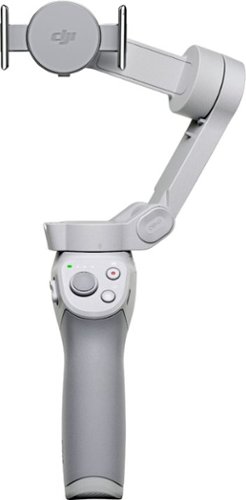
Life~s extraordinary moments deserve to be captured with smooth video. DJI OM 4 is a magnetic gimbal designed to complement your smartphone, allowing you to start recording right away. Ultra-compact, easy to use, and bursting with intelligent features, OM 4 is the ultimate solution for capturing and sharing your world.
Does the magnetic sticker phone attachment interfere with wireless phone charging?
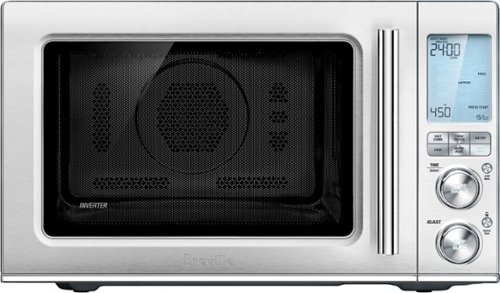
Ensure meals are cooked evenly with this Breville the Combi Wave 3-in-1e microwave. The grill, convection oven and microwave functions provide a variety of cooking options, while the Element IQ technology precisely delivers the right cooking temperature for optimal results. This Breville the Combi Wave 3-in-1 microwave features a Power Smoothing inverter for automatic adjustment of power to enable even heat distribution.
Is this an air fryer, microwave and convection oven
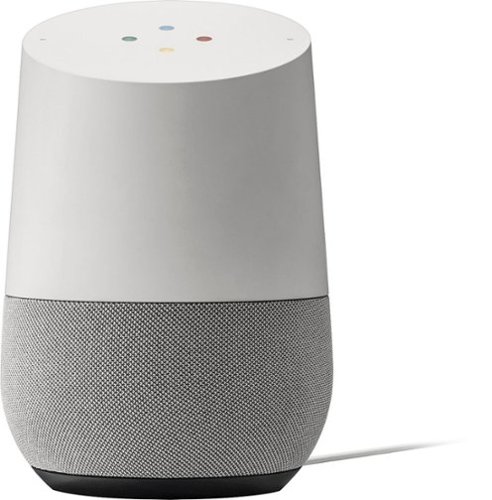
Simplify your everyday life with the Google Home, a voice-activated speaker powered by the Google Assistant. Use voice commands to enjoy music, get answers from Google and manage everyday tasks. Google Home is compatible with Android and iOS operating systems, and can control compatible smart devices such as Chromecast or Nest."
Will Google Home work with ECOBEE Thermostat?
No. Unfortunately, Google has limited functionality to only the Nest thermostat. At this time, I don't see them opening up support for third parties as they are probably trying to push it with their own hardware, but that could always change.
9 years, 10 months ago
by
nickcal
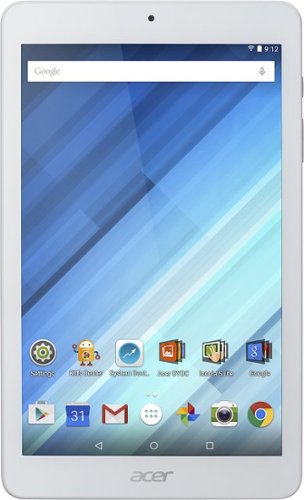
Enjoy a compact tablet that fits neatly in your pocket with this Acer Iconia One 8-inch tablet. It includes a quad-core processor and 1GB of RAM that deliver powerful processing to play all your games and apps, and the 16GB of flash memory ensure this Acer Iconia One 8-inch tablet and store your files.
can i download skype
Depends on the Google Play store. If Microsoft has a version of Skype for Android then yes.
10 years, 4 months ago
by
nickcal