


codeblue's stats
- Review count196
- Helpfulness votes234
- First reviewMarch 3, 2015
- Last reviewOctober 1, 2026
- Featured reviews0
- Average rating4.8
Reviews comments
- Review comment count0
- Helpfulness votes0
- First review commentNone
- Last review commentNone
- Featured review comments0
Questions
- Question count0
- Helpfulness votes0
- First questionNone
- Last questionNone
- Featured questions0
Answers
- Answer count0
- Helpfulness votes0
- First answerNone
- Last answerNone
- Featured answers0
- Best answers0

Flip your day, your way. More than just a laptop~it~s your all-day, anywhere companion with 4 flexible modes. Power and performance for AI acceleration, it keeps pace with your most creative ideas and demanding workloads. With fast charging and a design that~s both sleek and durable, the OmniBook X Flip moves as effortlessly~and stylishly~as you do.
Customer Rating

5
Lightweight, strong battery, good hybrid device
on May 20, 2026
Posted by: codeblue
HP OmniBook X 2-in-1 14” — A Dad’s Take
I’ll be honest — I wasn’t sure I needed a 2-in-1. My old laptop worked fine, and between school runs and everything else going on at home, I don’t exactly have time to research tech purchases the way I used to. But I’ve had this machine for a few weeks now and I’m glad I made the switch.
The build quality was the first thing I noticed out of the box. It’s solid in a way that actually surprised me. Our youngest has already grabbed the screen at an angle that made me wince, and the thing didn’t budge. The hinge feels deliberate — no wobble, no creeping — and flipping it into tent mode to prop up on the kitchen counter has become a genuine part of how I use it. It’s a little heavier than I expected given how thin it is, but that’s a minor point.
The screen is something else. I wasn’t expecting to care that much about a display, but the OLED panel genuinely stopped me the first time I opened it up. Colors look rich without being oversaturated, and watching anything on it in the evenings after the kids are down is a real pleasure. Scrolling feels smooth in a way I can’t fully explain, but once you notice it, cheaper screens start to feel almost broken by comparison.
Day to day, the performance has been completely seamless. I’m typically running a work call, downloading something, and keeping half a dozen tabs open simultaneously, and I haven’t hit a wall yet. The RAM is soldered, meaning you can’t upgrade it in the future.
Battery life has been the most practically useful thing about it. I’ve gone full days without digging out the charger, and for someone who’s rarely near an outlet when things are busy, that matters more than almost any spec on paper.
If I had to complain about something, it would be the keyboard. It gets the job done, but after long stretches of typing it doesn’t feel particularly satisfying. Not a dealbreaker, just noticeable because there’s a little bit of flex in the keyboard which feels just a bit flimsy. The screen also picks up reflections in brighter rooms, which is worth knowing.
Overall though, despite not having the “best” specs out of all of my e-devices to include big name tablets, gaming laptops, and my phone, I reach for the Omnibook X 99% of the time which is a testament to how well it works beyond its specs on paper.
I would recommend this to a friend!
Share this review:


0points
0of 0voted this as helpful.

ASUS ZenScreen MB16FC is a 16-inch portable IPS monitor with a 16:10 WUXGA resolution that expands your workspace anywhere. Featuring dual USB~C with power pass-through, mini-HDMI, auto-rotation support, and T~V-certified eye care, it~s a lightweight, versatile second screen for hybrid work and travel, with sleek design and simple one-cable connectivity
Customer Rating
5
Light, solid kickstand, perfect portable monitor
on May 5, 2026
Posted by: codeblue
The ASUS Zenscreen 16” comes packaged with a nice soft case with a large open front kangaroo pocket. Including a case was nice, but I would have preferred a more secure pocket to prevent cables from sliding out of the bag. At least the main compartment for the monitor is zippered with decent soft padding to protect it in my bag during commutes.
The screen itself, which is the most important, is a nice 16” FHD panel. Large enough to be a viable second screen to boost productivity, with a smooth kickstand that will support the screen at a nice angle.
Porte include 2x USB-C, 1 mini-HDMI. The Zenscreen comes with a USB-C to USB-C cable as well as a mini-HDMI to mini-HDMI cable for connectivity. One of the USB-C ports provides pass through power for one cable functionality if your device has sufficient power. Set up was as simple as simply plugging in the screen. Testing out the screen with my iPhone, it worked flawlessly. The Zenscreen auto-rotates between landscape and portrait mode, so it can easily fit your workflow needs.
The monitor is made of plastic, so it is very light and portable. The downside is that it does not feel super substantial/stiff like a magnesium chassis would, however, the price would subsequently be significantly increased.
Overall, this is a great second screen to either boost productivity for people working off laptops, or as a larger viewing screen for phones for entertainment.
I would recommend this to a friend!
Share this review:


0points
0of 0voted this as helpful.
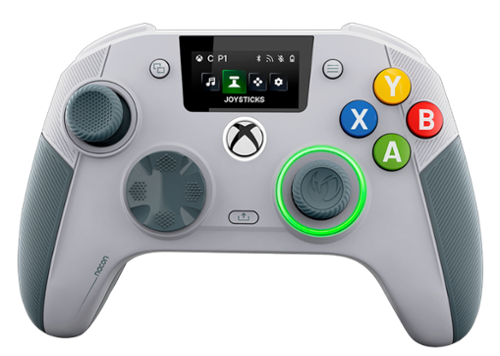
The REVOLUTION X UNLIMITED wireless controller by NACON, officially licensed for Xbox, is compatible with Xbox One, Xbox Series S, Xbox Series X, Windows PC, and Android. Precise, high-performance, and customizable, it will allow you to stay in control of your game, whatever your playing style. Ergonomic and wireless, it frees your movements and offers you total gaming comfort. Eliminate your opponents thanks to increased responsiveness and formidable precision. Chain victories in your favorite battle royale or FPS/TPS shooter, thanks to an arsenal of fully customizable features and settings, even in the middle of the game, via the integrated control screen. Discover the ultra-high-performance PC mode with very low latency, with a gyroscopic aiming function to stay one step ahead. Designed by and for competitive players, and adapting to all your video games, the REVOLUTION X UNLIMITED will allow you to dominate the competition!
Customer Rating
5
Hall effect sticks and convenient LCD screen
on April 14, 2026
Posted by: codeblue
First off, spending extra for a controller when your Xbox comes with fairly solid (in my opinion) controllers means the extra needs to offer something more. For PC, even more so since you can easily just connect your Xbox controllers for use.
What the Revolution X Unlimited brings to the table are mainly 1) Hall effect sticks 2) user configurable weights to balance the controller as desired 3) button and stick mapping
The LCD screen is clean and doesn’t clutter the face as much as one might imagine. Actually, it shows the button mapping, audio settings, and pairing, so it is more useful than it initially sounds.
Gyro aiming is available, but I’ve never been a fan so it’s not a feature I can attest to.
The main and primary negative/con that I can identify with this controller is the battery life only lasts about 10 hours. The incuded dock makes things easy, but I guess if you’re a marathon gamer then the time cap could be an issue. Thankfully (or maybe not, depending how you look at it) as an adult with kids, I’m never going to come close to running out of battery during a single gaming session.
I would recommend this to a friend!
Share this review:


0points
0of 0voted this as helpful.

With Shark FlexStyle, you can easily transform between a powerful, fast, hair dryer, and an ultra-versatile multi-styler with no-heat-damage. One twist is all it takes to flex from one to the other. Attach different stylers and unlock the ability to curl, volumize, smooth, and dry~the choice is yours. Lightweight & powerful, FlexStyle is the answer to fast, easy styling.
Customer Rating
5
Versatile and effective
on December 16, 2025
Posted by: codeblue
The Shark FlexStyle Air Styling and Drying System positions itself as a versatile, all-in-one alternative to higher-priced competitors, and overall it follows through.
The FlexStyle combines a hair dryer with multiple styling attachments, including auto-wrap curlers, oval and paddle brushes, and a concentrator. The standout feature that differentiates it from competing brands Is the rotating design. With a simple twist, the device converts from a traditional dryer into a styling wand, which makes switching between drying and styling feel intuitive rather than gimmicky. Airflow is strong, drying time is quick, and heat feels well controlled. Even on higher settings, it avoids the overly hot sensation that can lead to damage or discomfort.
The auto-wrap curlers work particularly well once you get the hang of them. The airflow pulls hair smoothly around the barrel, creating consistent curls with less effort than a traditional curling iron. Results are polished and natural-looking, especially for loose waves and everyday styles. The brushes add versatility, making it easy to smooth, add volume, or shape ends without juggling multiple tools.
Build quality is solid, and is a situation of “you get what you pay for.” Doesn’t feel as “nice” but that’s understandable that shark had to make some sacrifices to keep the price lower. Still, attachments snap on securely and feel durable enough without being flims. Noise levels are noticeable but reasonable for a high-powered dryer.
Where the FlexStyle, like all Shark products, really stands out is value. It offers a wide range of styling features that work solidly, at a price point that is cheaper than other brands.
Overall, the Shark FlexStyle does everything it advertised itself to. One small wish would be a case or something to help keep all the attachments organized, but that would likely drive the cost up.
I would recommend this to a friend!
Share this review:


0points
0of 0voted this as helpful.

TUF Gaming VG32VQM5B is a 31.5-inch Full HD(1920 x 1080) 1500R curved gaming monitor with overclock to 250 Hz refresh rate and 0.5ms response time (minimum) for extremely immersive gameplay. It features exclusive Extreme Low Motion Blur technology and AMD FreeSync Premium~ to eliminate ghosting and tearing. In addition, it also covering 120% sRGB color gamut for great contrast and lifelike colors.
Customer Rating
5
Big(!) screen, make sure you have the space
on December 13, 2025
Posted by: codeblue
I haven’t used a curved screen for anything since I bought a curved screen TV 9 years ago when they were all the hype. But I could see the rationale for a curved monitor so gave this a try.
First off, 31.5 inches with a curved VA panel, it fills up a good chunk of desk space. Period. The curve isn’t over the top, but it draws you in a bit more than a flat panel, which is exactly what I anticipated/expected.
One of the first things I noticed was how fluid motion feels. The panel can hit refresh rates up to 250Hz when overclocked and has a super-fast 0.5ms response time on paper. In practice, that translates into really smooth gameplay in fast-paced titles. Tearing and stuttering are almost gone if you run games with adaptive sync turned on. For shooters or any action titles where every frame counts, this monitor keeps up without the lag or blur you see on slower screens.
Color and contrast are better than I expected for a Full HD panel at this size. The VA panel gives solid blacks and decent color pop, especially with the HDR mode enabled. It’s definitely not 4K, and that’s made more noticeable by the sheer size of the screen and the closer viewing angle of using this as a monitor rather than a TV mounted farther away.
There are a few rough nitpicks to be aware of. Off-angle views can look a bit washed out compared to an IPS screen, and from close up you can see the limits of a 1080p resolution at this size if you’re used to sharper QHD or UHD displays. The built-in stand only tilts, so if you want height or swivel adjustment, you’ll need a VESA mount. Those physical buttons on the back also take some getting used to.
Setup was quick and painless. ASUS even includes a little screwdriver and screws for the stand, which sounds small but makes a difference when you’re fumbling with a new monitor. Once it was up and running, I appreciated having both DisplayPort and dual HDMI ports for easy connection to multiple devices.
Overall, this monitor checked off the right boxes for my needs. It’s not the most premium, but the price point seems very fair for the things you get.
I would recommend this to a friend!
Share this review:


0points
0of 0voted this as helpful.
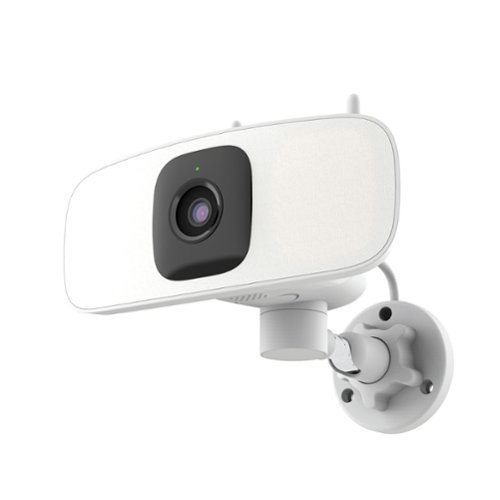
Protect your home effortlessly with this plug-and-play 2K Wi-Fi Floodlight Camera. No hardwiring needed~just plug in and control the horizontal pan via app for the perfect view. It lights up your space exactly when you need it.
Customer Rating

4
no required subscription, mechanical pan
on November 28, 2025
Posted by: codeblue
I'll start with my biggest, and persistent, gripe with this latest Lorex camera. The app still remains very very finicky. I've had Lorex cameras for over 6 years now, and my complaint basically hasn't changed. The app layout, while not the shiniest compared to competitors, is pretty straightforward. Cataloging and reviewing saved footage is clunky but doable, but the settings themselves are still not ideal. Over multiple generations of Lorex cameras, I still find you basically have 0-60 mph with nothing in between. Either I get so many false positive notifications for movement that the inevitable alert fatigue kicks in and I just start ignoring them altogether - or, you turn down the sensitivity and you basically get nothing recorded.
Which is a shame, because the hardware seems fantastic. Setup is very simple and well thought out with an included sticker to drill holes accurately, scan a QR code to link to your app, done. Being able to use the app to pan the camera let's you basically have no blind spots as long as you picked a good spot to set up your camera. 2K is good enough, 4K would have been better given this is a wired model, but I'm sure 4K model options are on the way.
Overall, great on paper, but still hamstrung by the inefficient/ineffective motion sensor. If you want to just spot check your yard, this would be great since you don't need to use a subscription, but if you're planning on using this for home security and being alerted in realtime, not the most reliable. Higher level AI functions are locked behind higher tier paid subscription levels, which I don't subscribe to, so that could possibly explain the rudimentary sensing, but I don't know. Again, my main selling point was not having to pay for a monthly subscription to use a device I paid for.
No, I would not recommend this to a friend.
Share this review:


0points
0of 0voted this as helpful.
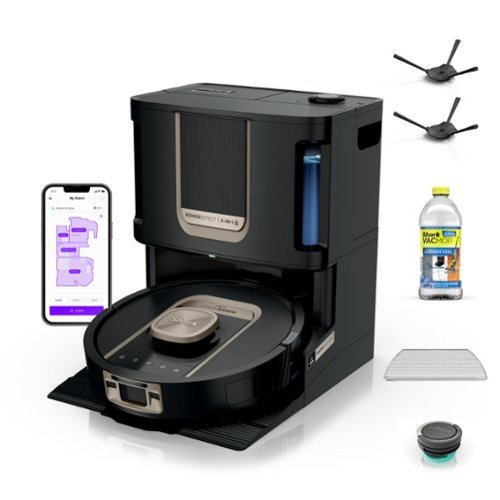
Experience up to a month of hands-free cleaning with the Shark PowerDetect ThermaCharged 2-in 1 Robot vacuum and Mop. Its NeverTouch Pro Base washes the mop with 185~F water, dries with 175~F air, and empties debris automatically. With Dirt Detect, edge-to-edge cleaning, Neverstuck charged technology, and DryGuard protection, it delivers nonstop, deep-cleaning performance.
Customer Rating
5
easy to clean, super quiet, super effective
on November 28, 2025
Posted by: codeblue
The Shark PowerDetect ThermaCharged Vacuum and Mop is my top addition of 2025, according to my wife. Bottom line up front, the main selling point and differentiator that sets this combo vacuum/mop from competitors is the 185°F thermal mop cleaning and 175°F drying. It eliminated the single biggest hygiene concern with combo robots: the stench of a perpetually damp, filthy cleaning pad. Aside from the heated dry function, however, the unit itself is beautifully designed from an engineer's perspective. The bins have single piece handles that slide out, but don't telescope into themselves - this is genius because there's no chance of the handle pieces getting stuck/bent, but still help reduce footprint. On top of that, the clean water has a blue handle (visual cue!) while the dirty bin has a black handle. The vacuum container is bagless, so you just empty the bin out.
The vacuuming performance itself is excellent, especially on mixed surfaces. The PowerDetect technology is noticeable, as the unit seems to sense areas with more concentrated debris and automatically ramps up the suction. I watched (and heard) the vacuum gear up over an area where my kids spilled some crumbs, and the vacuum literally made an extra 2 passes over the area in quick succession. Hair management is advertised, but we don't have any indoor pets so I can't comment.
Mopping integration is seamless. The Shark vacuums first, then mops, and the "NeverStuck" technology works as advertised. The robot actually lifts the mop high enough to clear thresholds and, more importantly, keeps the damp pad off carpets and rugs.
If your goal is truly set-it-and-forget-it maintenance, the Shark PowerDetect ThermaCharged is amazing for the job
I would recommend this to a friend!
Share this review:


0points
0of 0voted this as helpful.
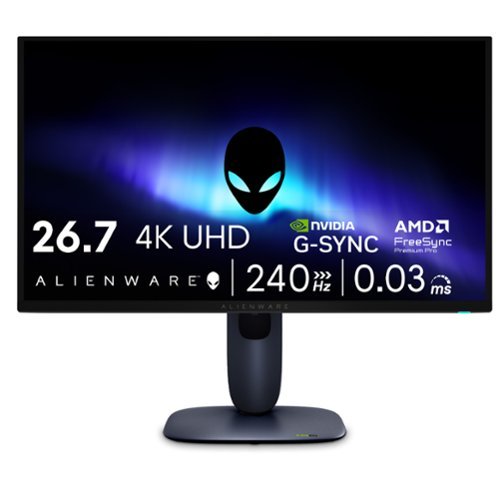
Meet our first 27" 4K QD-OLED Gaming Monitor. Experience ultimate visual fidelity and peak QD-OLED performance in a sleek 27" panel. Immerse yourself in new worlds with the world's highest pixel density in a QD-OLED monitor at 166 PPI* with 4K resolution, incredible color accuracy and Dolby Vision HDR.
Customer Rating
5
27”, 4K QD-OLED, 240 Hz
on November 23, 2025
Posted by: codeblue
At 27 inches with a 4K QD-OLED panel, the picture looks ridiculously sharp. The colors pop in a way that makes even older games feel fresh, and the blacks are so deep that dark scenes finally look like they’re supposed to.
Running bf6, the 240 Hz refresh rate and 0.03 ms response time are the standard for gaming monitors. In real world use, they meant that I didn’t notice any lag to my eyes while playing unless my ping was high but that’s not a hardware issue.
Alienware used an anti-burn in AI with a 3 year burn in warranty given the known risks with any OLED screens. One other potential weakness of OLED screens is fuzzy text, but all the menu text and usual email stuff looked crisp to me.
From a practical standpoint, the stand is great. I can adjust it without wrestling it, and it fits cleanly on a normal-size desk. Ports are generous, with HDMI 2.1 and displayports. Nobuilt-in speakers, which is fine for me since I use a headset anyway. But would have been nice given the price point.
Overall, this monitor has been a big upgrade for my late-night gaming sessions. It’s sharp, fast, and genuinely fun to look at. As long as you’re aware of the usual OLED quirks, this is a great value for performance.
I would recommend this to a friend!
Share this review:


0points
0of 0voted this as helpful.
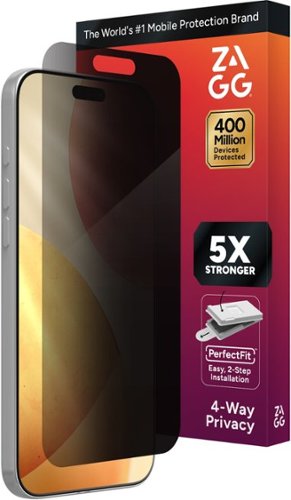
Protect your screen from cracks, scratches, and prying eyes. Privacy XTR gives you advanced impact and scratch protection with a 4-way privacy filter that blocks the views of others from either side as well as above, and below.
Customer Rating
5
Highest protection from all angles of view
on November 13, 2025
Posted by: codeblue
To summarize my review, I just wish there were a way to accurately photograph. My phone screen with the screen protector on. That image would speak more than 1000 words as far as demonstrating the effectiveness of the privacy screen.
Some people might ask why would anyone need a privacy screen protector. Some people deal with sensitive data, but others, including myself, just don’t like when people next to us on the bus or in public places, are looking over our shoulders.
Installation is a breeze. The box contains the usual alcohol, wipe and dust tape to catch any stragglers. The despite the case type mold to install the screen, I would still recommend running a hot shower to steam up the bathroom and effectively eliminate dust in the air. If you don’t care too much about any bubbles, then that’s likely overkill, but I tend to be OCD, especially with my phone screens, so seeing tiny bubbles will drive me insane.
The other important part about selecting a screen protector is the warranty length and process. Zagg is hands down one of the best in this aspect. I owned several zagg screen protectors for other devices like my switch, and previous fund. If you are screen, protector gets cracked or damaged in anyway, you literally just pay shipping and get a new replacement. I have never once run into any pushback or issues with the simple process to request a warranty replacement.
The only drawback I can highlight, which is not unique to Zagg, is that any privacy screen will naturally make the screen darker. In bright sunlight, it can be challenging to see your screen, but in all other situations, I haven’t had any perceived difficulties.
I would recommend this to a friend!
Share this review:


0points
0of 0voted this as helpful.
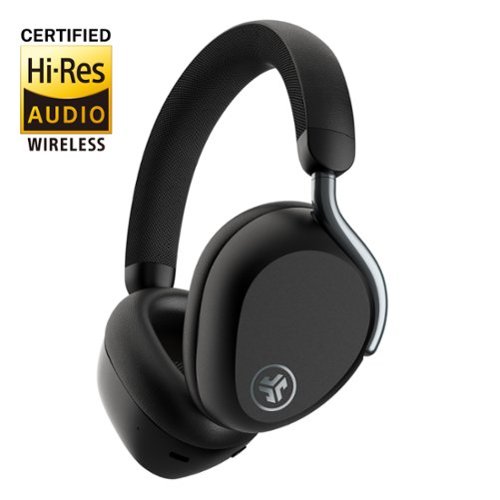
Experience luxurious sound with Epic Lux ANC Headphones~a new legacy in JLab audio excellence. Seamlessly blending innovation and Lab-quality sound, these sleek headphones guarantee an elevated listening experience. Whether in a bustling commute or unwinding, revel in uninterrupted music bliss with Smart Active Noise Canceling and personalized sound via the JLab App. Embrace your favorite tunes or podcasts in ultimate comfort and style with Cloud Foam earcups and headband, ensuring an unparalleled listening experience.
Customer Rating
5
Solid ANC and sound, great for travel
on October 20, 2025
Posted by: codeblue
Contents:
The package includes the headphones, a wireless charging dock, a USB-C to USB-C cable, a USB-C to 3.5 mm audio cable, and a carrying case
The package includes the headphones, a wireless charging dock, a USB-C to USB-C cable, a USB-C to 3.5 mm audio cable, and a carrying case
Design:
The earcups are oval, foldable, and have “Cloud Foam” cushioning, which is pretty soft. Living in the South, however, the cups get a little hot if walking outside.
The earcups are oval, foldable, and have “Cloud Foam” cushioning, which is pretty soft. Living in the South, however, the cups get a little hot if walking outside.
Touch and swipe controls are integrated on the right earcup. Swiping lets you adjust volume, change tracks, and tap to play/pause. I personally like that there is a separate physical button to manage ANC so I don’t accidentally switch on/off transparency
Additional features:
Like most headphones nowadays, you use a JLab app to manage EQ presets and custom EQ settings, as well as tweaking how the ANC works or tracks.
Like most headphones nowadays, you use a JLab app to manage EQ presets and custom EQ settings, as well as tweaking how the ANC works or tracks.
Speaking of noise cancellation, the ANC does reduce airplane noise really well.
Battery life:
Battery life was really good, lasting several days without requiring a recharge. Fast charging is supported, so you can get a modest recharge with just 5 minutes of charging.
Battery life was really good, lasting several days without requiring a recharge. Fast charging is supported, so you can get a modest recharge with just 5 minutes of charging.
Overall:
Good feature set and good sound quality for my tastes. The folding ear cups help with transport but they won’t be as packable as ear buds, if you’re looking for maximum portability.
Good feature set and good sound quality for my tastes. The folding ear cups help with transport but they won’t be as packable as ear buds, if you’re looking for maximum portability.
I would recommend this to a friend!
Share this review:


0points
0of 0voted this as helpful.
codeblue's Review Comments
codeblue has not submitted comments on any reviews.
codeblue's Questions
codeblue has not submitted any questions.
codeblue's Answers
codeblue has not submitted any answers.