


codeblue's stats
- Review count196
- Helpfulness votes234
- First reviewMarch 3, 2015
- Last reviewOctober 1, 2026
- Featured reviews0
- Average rating4.8
Reviews comments
- Review comment count0
- Helpfulness votes0
- First review commentNone
- Last review commentNone
- Featured review comments0
Questions
- Question count0
- Helpfulness votes0
- First questionNone
- Last questionNone
- Featured questions0
Answers
- Answer count0
- Helpfulness votes0
- First answerNone
- Last answerNone
- Featured answers0
- Best answers0
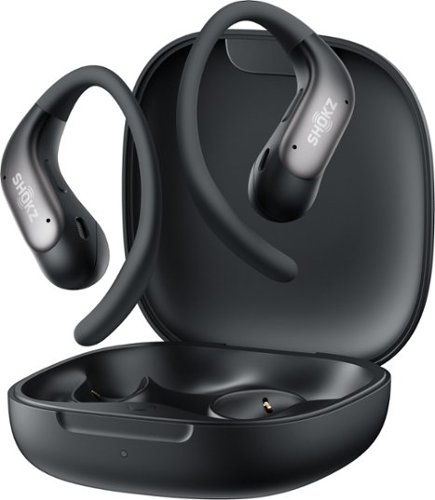
Lighter. Smaller. No compromise. OpenFit Air 2 features a compact, featherlight build with a refined ear-hook curve for a secure, comfortable fit that holds all day. Like all Shokz open earbuds, it keeps you aware of your surroundings while your music plays on ~ whether you're mid-hike, mid-commute, or mid-anything.
Customer Rating

5
Secure fit with hook design for gym and runs
on October 1, 2026
Posted by: codeblue
The design is aimed squarely at the gym. Nothing enters the ear canal, so pressure and heat do not build up over a long session. The hook is shaped to stay put through rows, burpees, and interval work, and the low weight means the buds do not pull on the ear. Running adds constant impact, and the alloy frame is the feature that addresses it. Outdoors, the open design keeps traffic, cyclists, and other runners audible. The pressure-sensitive controls replace the earlier touch controls and are designed to ignore sweat and stray hair.
Sound follows the usual open-ear trade-off. The dual-driver Bassphere system and OpenBass 2.0 processing add low-end weight over the previous generation. A sealed earbud still delivers more bass, and a loud gym or busy road thins the sound further. Battery life runs up to eight hours per charge and 36 hours with the case, and ten minutes on the charger returns three hours of playback. IP55 protection covers sweat and rain, but not swimming.
The OpenFit Air 2 suits runners and gym-goers who want an earbud they barely notice and who value awareness over isolation. Listeners who prioritize bass and immersion are better served by a sealed design.
I would recommend this to a friend!
Share this review:


0points
0of 0voted this as helpful.

Customer Rating
5
Spa-quality skincare at home
on September 24, 2026
Posted by: codeblue
Instead of cluttering the counter with multiple different cords and gadgets, having a single handheld tool that seamlessly transitions between tension relief, deep cleansing, and light therapy makes self-care feel effortless and organized.
The absolute standout feature is the gentle percussive massage. After a long day of running around and carrying tension in my face and neck, running the massage attachment along my jawline and temples melts away the day's stress in minutes. It runs whisper-quiet, so there is never any worry about disturbing anyone sleeping nearby.
The modular design adapts easily to whatever energy is left at the end of the day. The soft silicone brush makes washing off the day feel like an elevated treatment, leaving skin remarkably fresh and smooth in under two minutes.
Being able to run the soothing red light ring at the same time as the percussive massage is brilliant. It delivers a comprehensive, restorative session in half the time, making it perfect for enjoying while reading or catching up on a show in bed.
When there is time for a slightly more intentional pampering session, the gentle toning attachment works wonders for softening tired lines and bringing back a rested, lifted glow.
While it represents a thoughtful investment in quality self-care, the durability and versatility easily replace multiple standalone tools. The included storage pouch keeps all the magnetic attachments neatly tucked together, making it simple to stow safely out of reach in a drawer. There are also optional add-ons available, like targeted temperature attachments, available separately to increase the versatility.
The multiple attachments can be a potential pain point as they equate to more things that can get lost, but they work well and serve their purposes. The one big downside is the unit only covers a small area, and it’s completely handheld, which means you can’t multitask. As long as you understand the possible limitations, the skinspa pro works so well
I would recommend this to a friend!
Share this review:


0points
0of 0voted this as helpful.
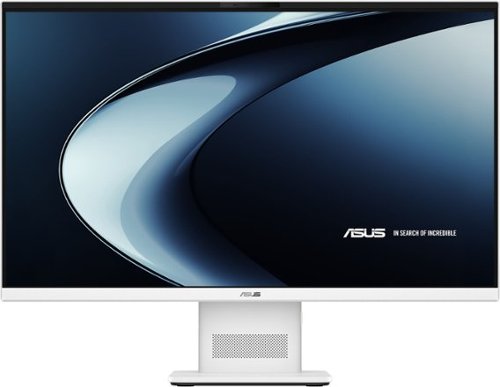
Meet the next wave of everyday computing with the first ASUS All-in-One powered by Snapdragon X Series. Built for fast, responsive performance and AI-enhanced experiences, this sleek 27~ touch-screen PC keeps everything you need in one streamlined design. From work tasks and video calls to streaming and browsing, the Snapdragon X platform delivers smooth performance with impressive power efficiency. The vibrant Full HD display with ultra-slim bezels gives you more screen and less distraction, while built-in AI capabilities help optimize performance, enhance video calls, and keep your workflow moving without slowdowns. With a clean white finish, wireless keyboard and mouse, and a clutter-free setup, this all-in-one is designed to fit naturally into any space, whether it~s your home office, dorm, or shared workspace.
Customer Rating
5
Sleek all in one for everyday tasks
on September 24, 2026
Posted by: codeblue
The ASUS VM471 27” FHD with touchscreen is an interesting machine, mainly because ASUS decided to drop a Snapdragon ARM chip inside an all-in-one desktop instead of the usual Intel or AMD processor. For anyone who keeps up with tech, that alone makes it worth a closer look.
Visually, it looks great on a desk. Because ARM chips are more power efficient, they run cooler than standard chips. This means the back of the machine doesn’t need any thick heat sinks or loud fans. The chassis is nice and thin, and it stays practically dead silent even when multitasking. The only shortcoming with the design I found is the stand: it tilts up and down but no height adjustment, so you have to physically elevate the entire unit with a riser if you need it higher.
The screen itself is a bit of a mixed bag. On one hand, 27 inches is plenty of room to work with, the colors look solid, and the touchscreen is snappy and responsive. On the other hand, sticking with a 1080p resolution on a panel this large means the pixel density is pretty low. Anyone sitting fairly close will notice that small text and window borders look a little soft around the edges. A 1440p panel would have looked noticeably sharper here. As for the touchscreen, it works well enough but I personally just feel weird putting my hands on a screen this big.
Where it genuinely impresses is everyday speed. Day-to-day work—browsing with a bunch of tabs open, streaming video, running Office, and hopping between apps—feels fast and responsive. The 16GB of RAM and 1TB SSD give it plenty of breathing room, and the onboard NPU handles local AI features and background blur without breaking a sweat.
The software side, however, depends entirely on what the machine is used for. Native ARM apps run great, and the built-in emulator handles basic older programs fine. But this is not the right box for specialized work like legacy engineering software, weird hardware drivers, or PC gaming. The integrated graphics can’t handle much beyond lightweight casual titles, and anti-cheat software often refuses to run on ARM Windows.
The rest of the hardware covers the basics nicely. The webcam is sharp enough for video calls and supports Windows Hello face unlock, which makes sitting down and getting right to work effortless. The built-in speakers get loud and clear enough for podcasts and video chats, though music sounds a little flat. There’s also a decent mix of USB ports, HDMI, and Wi-Fi 6E, though the bundled white wireless keyboard and mouse feel like cheap pack-ins that most people will want to swap out.
Overall, the VM471 makes a lot of sense as a sleek, quiet family hub or an everyday home office desktop. It looks modern and handles routine tasks while staying nice and quiet.
I would recommend this to a friend!
Share this review:


0points
0of 0voted this as helpful.
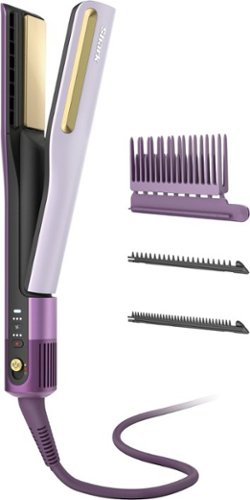
Say goodbye to long styling routines and hello to salon-quality results at home with the Shark SilkiPro Straight Wet to Dry Straightener + Rapid Blow Dryer. Designed for a silky smooth finish in half the time*, SilkiPro Straight combines high-velocity airflow with HeatSense Ceramic Plates for fast styling without the heat damage**. With three interchangeable combs, you can straighten, smooth, or shape hair effortlessly while protecting it from heat damage**. Whether your hair is wet or dry, straight, wavy, curly, or coily, SilkiPro Straight delivers silky, shiny results that last all day. Perfect for every texture, this tool simplifies your routine while keeping hair looking healthy and its best. *vs. air drying **In wet to dry mode
Customer Rating
5
Combo dryer and straightener for all hair types
on September 19, 2026
Posted by: codeblue
Ease of use is where this tool really shines. It combines a dryer and a straightener into one handheld device, so there's no switching back and forth or waiting around between steps. Three interchangeable combs come included, each suited to a different job: one for rough-drying and stretching thick or curly roots, one for a softer natural finish, and one for a sleeker, more controlled result. Swapping between them is simple enough that even a first-time user should feel comfortable within a session or two, and the learning curve is much gentler than mastering a traditional blowout with a round brush and separate iron.
The drying performance is the standout feature. High-velocity airflow works through the plates as they pass over the hair, so drying and smoothing happen simultaneously rather than in sequence. That single-step process noticeably cuts down on total styling time compared to air-drying and then straightening separately. On heat safety, the tool uses a built-in sensor system that checks temperature many times per second and automatically adjusts to avoid scorching, which is reassuring for anyone who has been burned (literally) by inconsistent flat irons in the past. Results tend to hold up well, with a smooth finish that lasts through the day without feeling overly stiff or damaged.
If there's a tradeoff, it's that a tool doing two jobs at once will always ask a little more patience on very thick or very curly hair, where multiple passes may still be needed to get a fully dry, fully smooth result. But overall, this is a genuinely useful all-in-one option for anyone who wants less time under heat and less hassle in their routine, without sacrificing a polished, salon-style finish.
I would recommend this to a friend!
Share this review:


0points
0of 0voted this as helpful.
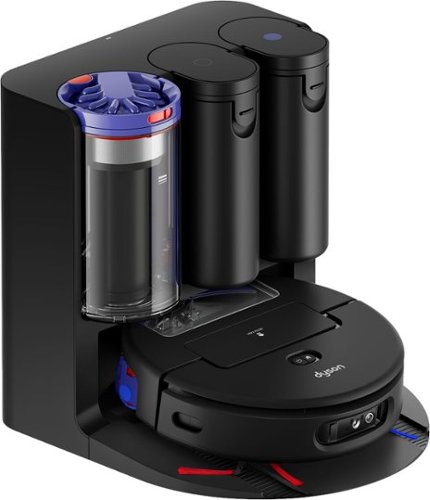
Dyson Spot+Scrub Ai wet and dry robot vacuum cleaner eliminates hidden stains using advanced Ai.~ Hygienically. The HD camera + Ai intelligence identify spills and stains, adapt power to clear the mess, and returns again and again to ensure a proper clean.~ Unlike robot vacuums with spinning pads that can spread grime because they scrub without fully lifting debris, the Dyson Spot+Scrub Ai robot' self-cleaning roller washes itself as it goes ~ washing with clean water from start to finish. On every rotation, dirt is extracted before the roller is evenly hydrated. For a better, smear free finish. Dyson~s hygienic cyclonic dock self-empties, self-cleans, refills and recharges. Control and customize your clean with the MyDyson app.
Customer Rating
5
Legendary dyson quality vacuuming in a robot
on July 30, 2026
Posted by: codeblue
Dyson has a strong reputation with their stick vacuums, and it's clear that reputation carried over here in terms of engineering. The spec sheet alone is impressive, including 18,000 Pa of suction, an AI-powered camera for stain detection, LiDAR mapping, and a self-washing microfiber roller that uses heated water to clean itself as it goes. The dock handles emptying, washing, and drying without me needing to lift a finger, and that hands-off convenience is the future.
The vacuuming performance has been a real highlight. The suction ramps up automatically the moment it moves from hardwood onto carpet, and also kicks into high gear when there’s a lot of crumbs. Battery life has been fine for our home, although I only stick to “auto” strength for cleaning instead of defaulting to max.
The mopping function is clutch for our largest area of the house because we have laminate flooring. The wash-and-dry cycle after each run is a bit noisier than I expected, so I just had to adjust my initial plans to run the robot overnight. Now, I just set the schedule to run in the early afternoon. Which, I’m nitpicking because the warm water roller cleaning means I don’t have to clean it myself.
What really stands out to me is the self-emptying dock and the app. Not having to buy bags is a great long-term convenience, and being able to direct a spot clean to a specific area after a spill has come in handy more than once. The app itself is intuitive and easy to select an area to focus on.
I would recommend this to a friend!
Share this review:


0points
0of 0voted this as helpful.
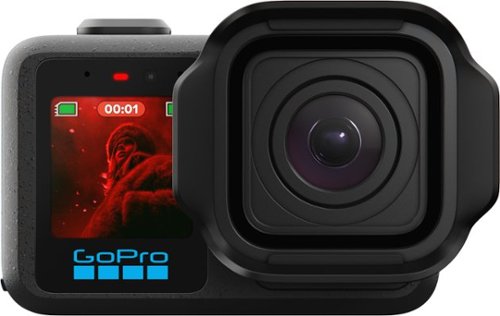
MISSION 1 is the compact camera system that takes your content to the next level with professional tools and image quality. Its 1~ sensor helps you capture the shots you need with more light and detail for incredibly sharp images with less noise~even in low light and after dark. Our latest GP3 processor delivers pro-quality 8K video, while enhanced image tuning intelligently adjusts settings for the best footage possible. Made for long shoots, its new battery can power through over 3 hours of 4K30 recording or 5 hours at 1080p30.1 With GoPro durability, award-winning HyperSmooth video stabilization, 4K video at 4x slo-mo and more, MISSION 1 is an all-in-one creative powerhouse.
Customer Rating
5
Known video quality, but adds high photo IQ
on July 21, 2026
Posted by: codeblue
By this point most people know or recognize GoPro and can instantly identify them by their form factor. The Mission 1 Pro has a noticeably bigger camera bump on the front which stood out to me. After using this for a week on a hiking trip to Banff I have to say I’ve been quite impressed by not just the video quality that GoPro is known for but the still image quality as well.
The big deal here is the 1-inch sensor. It's noticeably larger than what GoPro has used before, and you can tell the moment you shoot anything at dusk or indoors. Noise that would've been ugly and blotchy on my Hero 13 looks clean and usable here. Colors also feel more natural straight out of camera, less of that oversaturated "action cam" look.
8K60 is there if you want it, but honestly I shoot most of my stuff in 4K just to keep file sizes sane. Where this camera really shines for me is the reframing workflow — shoot wide in 8K, then punch in during editing without losing quality. I used this on a mountain bike descent and got three different "angles" out of one take, which saved me from having to strap on multiple cameras like I used to.
Battery life is a real upgrade. GoPro claims around 3 hours of continuous 4K30, and in practice I got close to that on a cool day (heat still eats into runtime a bit, as with any action cam). The new Enduro 2 battery also charges noticeably faster than my old ones.
Build quality is solid, if a little bigger and heavier than the Hero line — you feel the extra weight when hand-holding it, though it's not uncomfortable. The two-button layout is unchanged, which I appreciate since muscle memory carries over. Being waterproof to 20m without a housing is genuinely convenient for anyone who does water sports casually.
My gripes: it's pricier than the standard Hero cameras, and if you're not shooting in tricky light or editing footage seriously, you may not notice enough of a difference to justify the jump. The companion app (Quik) is still a little clunky for offloading and organizing 8K files — my phone storage filled up embarrassingly fast.
Bottom line: if you're an enthusiast who cares about image quality and flexibility in post, not just point-and-shoot convenience, this is the best GoPro I've used. If you just want something to strap to a helmet and forget about, the regular Hero is still probably the smarter buy.
I would recommend this to a friend!
Share this review:


0points
0of 0voted this as helpful.

Claim the power. Own the speed. The new HyperX OMEN MAX 16 has the latest and best components and we've also added a high polling rate keyboard, faster OLED display options, and one-click FPS maximization with OMEN AI to ensure you always feel overpowered.
Customer Rating
5
Beastly machine, OLED screen, but heavy
on June 24, 2026
Posted by: codeblue
The Omen Max is definitely maxed out on everything: 5070 Ti, 16 in OLED screen, 1 TB SSD.
The OLED panel is beautiful. Colors are deep and contrast is excellent, with true blacks that make a real difference in darker games. At 2K resolution it's sharp without being so demanding that the GPU struggles to keep frame rates up, and the high refresh rate keeps fast paced titles feeling smooth. Coming from a standard IPS panel, this was a noticeable upgrade for both gaming and general media use.
Performance wise, the 290HX handles CPU heavy workloads without much fuss, and the RTX 5070 Ti is plenty capable for 1440p gaming at high settings, with DLSS giving extra headroom in newer, more demanding titles. HP's cooling setup, with the vapor chamber and liquid metal on the CPU, does a solid job keeping thermals in check even during longer sessions. Fan noise does ramp up once you push into Unleashed Mode for extra performance, so a headset is recommended if you're gaming in a quiet room.
Build quality feels sturdy, and the Shadow Black finish looks understated rather than flashy, which I appreciate since I’m not in college any more. At 16 inches it's not a small laptop, and battery life is what you'd expect from a gaming rig in this class, meaning you'll want the charger nearby for anything beyond light use unplugged. Important to mention, the power brick is quite substantial, so take into consideration not just the weight of the laptop but the brick as well if you’re planning to lug this around.
One nice touch worth mentioning is the Instant Pair feature for HyperX peripherals. If you already own a HyperX headset, mouse, or keyboard, pairing them to the laptop is quick and doesn't require digging through Bluetooth menus or installing extra software, which is a small thing but a genuinely convenient one if you're already in that ecosystem.
Overall this is a strong pick if you want a high end gaming laptop with a great display and enough power to handle modern titles comfortably, just go in expecting the size, fan noise under load, and price that match the high end specs and components.
I would recommend this to a friend!
Share this review:


0points
0of 0voted this as helpful.
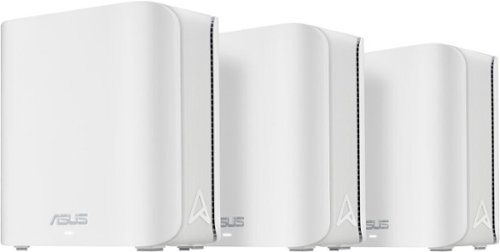
ASUS ZenWiFi BE5000 Pro is built for the next generation of smart homes, delivering seamless connectivity for entertainment, work, and connected devices. Powered by Wi-Fi 7, it unlocks dual-band speeds up to 5 Gbps with enhanced efficiency for smoother streaming, gaming, and cloud applications. With next-gen AiMesh technology and dual 2.5G ports, the ZenWiFi BE5000 Pro provides reliable whole-home coverage and high-speed performance in every corner of your space.
Posted by: codeblue
This replaced a very old mesh system, so my perceived gains may be a bit exaggerated due to simply jumping to WiFi 7.
Setup: This part was genuinely painless. Plug in the main unit, download the ASUS Router app, and it walks you through pairing the two satellite nodes step by step. I had all three units online and a usable network within about 20 minutes, then just had to walk around the house finding good spots for the satellites.
Speed and coverage: This is a dual-band system (2.4GHz and 5GHz), not tri-band with a dedicated 6GHz lane, which is worth knowing going in if you're comparing it against pricier WiFi 7 mesh kits. That said, with MLO (Multi-Link Operation) combining both bands intelligently and 4K-QAM packed in, throughput on 5GHz-capable devices is noticeably snappier than my old setup, and roaming between nodes as I walk through the house has been seamless. ASUS rates the 3-pack for up to 6,800 sq ft, and for my house that's more coverage than I actually need, so dead zones are a non-issue.
Wired backhaul: Each node has dual 2.5Gbps WAN/LAN ports, and running a wired backhaul between nodes (instead of relying purely on wireless mesh) made a real difference in consistency for the units further from the router. If your walls allow running Ethernet, it's worth the extra effort, especially for gaming.
Security and extras: AiProtection runs in the background flagging malicious sites and blocking trackers without me having to think about it, and Instant Guard gives you a one-tap VPN when you're out and need to reach home network devices securely. Parental controls and guest network setup are also handled cleanly through the app rather than a clunky web interface.
Bottom line: Solid future-proofing pick if you want WiFi 7 hardware without paying tri-band prices, and the AiMesh setup process is about as straightforward as mesh systems get. Just go in knowing it's dual-band, not tri-band, so manage expectations there if max-band-segregation is your priority.
I would recommend this to a friend!
Share this review:


0points
0of 0voted this as helpful.

The Hisense U6 brings Mini-LED picture quality to everyday viewing, with bright color, solid contrast, and a clear, easy-to-watch picture across your favorite content. Hi-QLED MiniLED makes shows, sports, and movies look more vibrant, while smooth motion with a Native 144Hz Refresh Rate keeps fast action easy to follow. The AI Picture automatically adjusts the picture based on what you~re watching and your room~s lighting, so everything looks natural without extra setup. Dolby Vision, Dolby Atmos, and a full range of HDR formats add more detail and immersive sound, making movie nights and streaming feel more engaging. With AI 4K Upscaler, gaming features like AMD FreeSync Premium, and built-in Fire TV with Alexa voice control, the U6 is a simple, all-in-one way to enjoy a reliable, great-looking picture every day.
Customer Rating
5
Surprisingly good image quality, Amazon connected
on June 23, 2026
Posted by: codeblue
To start off with a BLUF: the main draw for this Hisense TV is the Amazon seamless connectivity. If you’re already a Prime user, read on. If you aren’t interested in jumping into Amazon, then the value may not be as big.
Picture quality: The Mini-LED backlighting actually makes a real difference, not just marketing fluff. Dark scenes have noticeably deeper black levels compared to standard LED panels I've owned, and the QLED color layer makes things look punchy without going cartoonish. HDR10+ and Dolby Vision IQ both kick in automatically depending on content, and I haven't had to mess with picture settings to get something that looks good out of the box.
With a native 144Hz panel, fast-moving sports and action scenes stay clean — no obvious smearing or judder during World Cup games on Fox. Gamers will appreciate the low-latency Game Mode Pro and ALLM support too, even though this isn't marketed as a flagship gaming display.
Fire TV integration: This is where the TV really earns points for convenience. Since it runs Fire TV natively, signing in just meant entering my existing Amazon credentials — same Prime account I already use on my phone and tablet. Within a couple minutes, my Prime Video library, watch history, and even my Alexa voice settings were all pulled in automatically. No separate app downloads, no re-subscribing to anything, no fumbling with a second remote app. If you're already in the Amazon ecosystem, onboarding this TV is about as plug-and-play as it gets.
Sound: The Dolby Atmos support helps, but like most thin-panel TVs, the built-in speakers are just okay. I'd still recommend a soundbar if audio quality matters to you.
Bottom line: For the price point, this is a genuinely good TV. The picture quality outperforms what I expected from a mid-range Mini-LED set, and if you're already an Amazon/Prime household, the setup experience alone makes it worth considering over competitors that require more manual account linking.
I would recommend this to a friend!
Share this review:


0points
0of 0voted this as helpful.
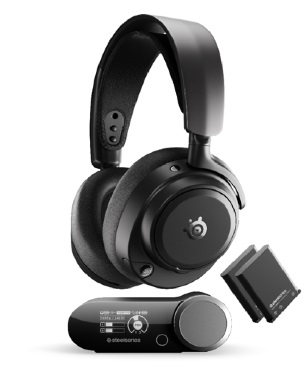
This is a Gaming Headset for PC/XB/PS. Experience the SteelSeries Arctis Nova Pro Omni—the ultimate universal gaming and entertainment headset. Experience true Hi Res 96kHz/24 bit wireless audio over 2.4GHz and Bluetooth LE, with OmniPlay letting you connect up to five devices and mix up to four audio sources at once. Enjoy simultaneous PC and console audio unique to SteelSeries, and broadcast quality voice with the ClearCast Pro high bandwidth omnidirectional microphone with advanced AI noise rejection built-in. Hybrid ANC and Transparency Mode keep you in control, while dual hot swap batteries deliver uninterrupted play. Fine tune everything instantly using the Arctis Mobile App, GG/Sonar PC Software, or the GameHub’s OLED display. One headset for all your systems, all at once.
Customer Rating
5
Best for users with multiple systems
on May 24, 2026
Posted by: codeblue
Here’s the revised version:
SteelSeries Arctis Nova Pro Omni — Review
At $400, this is the kind of purchase that needs to pull its weight around the house, and after spending a good amount of time with it, the Arctis Nova Pro Omni mostly does — with a few caveats worth knowing about before you commit.
The build won’t surprise anyone familiar with the Arctis line. It’s the same suspension strap and leatherette earcups SteelSeries has been refining for years, and that’s not a criticism. It’s comfortable for long evening sessions, doesn’t leave your ears sore after a few hours, and is sturdy enough that you’re not treating it like something fragile. It sits on a desk without taking up much presence and comes in three colorways — navy, black, and white — none of which look out of place in a home setup.
The connectivity is where it earns the most of its money. The base station connects to three USB-C devices simultaneously alongside a Bluetooth source, so a PC, a console, and a phone can all be live at the same time. In a home where you might jump between a gaming session and needing to hear the front door, or where you’re running Discord on the PC while something plays on a console, that flexibility is genuinely practical rather than just a spec to point at. It removes the kind of low-level friction that you don’t fully appreciate until it’s gone.
Sound quality is good. The soundstage feels wider than most closed-back headsets at this price, voices and mid-range detail come through cleanly, and positional audio in games holds up well. The one consistent shortcoming is the low end, as bass sounds thin, and if that matters to you in the games or music you spend time with, it’s worth factoring in. It’s not a dealbreaker, but it’s noticeable.
Noise cancellation is effective enough for a typical home environment. It handles a TV running in another room or general background noise without much effort, which in practice is probably all most people need from it.
The SteelSeries GG app on PC is genuinely impressive and worth talking about separately. Through the Sonar suite you get a parametric EQ with deep per-frequency control, hundreds of game-specific audio presets, separate profiles for your wireless and Bluetooth connections, and two distinct spatial audio modes depending on whether you’re playing competitively or just sitting back with something more cinematic. For people who like to tune their audio it’s the best software of its kind available. For people who just want to put the headset on and play, the depth of it can feel like more than necessary, and it does add some background load to the PC. Neither extreme is a flaw exactly, just worth knowing which kind of user you are.
Taken as a whole, the Omni makes the most sense for someone running multiple devices at home who wants one headset to handle all of it without compromise. As a purely PC-focused purchase, the price is harder to justify against capable alternatives that cost significantly less. But if the connectivity genuinely applies to how you use it day to day, it’s a well-built, capable headset with software that nothing else at this price really matches.
Let me know if you’d like any further changes.
I would recommend this to a friend!
Share this review:


0points
0of 0voted this as helpful.
codeblue's Review Comments
codeblue has not submitted comments on any reviews.
codeblue's Questions
codeblue has not submitted any questions.
codeblue's Answers
codeblue has not submitted any answers.