


Batlacit's stats
- Review count272
- Helpfulness votes935
- First reviewFebruary 13, 2016
- Last reviewSeptember 29, 2026
- Featured reviews0
- Average rating4.5
Reviews comments
- Review comment count0
- Helpfulness votes0
- First review commentNone
- Last review commentNone
- Featured review comments0
Questions
- Question count0
- Helpfulness votes0
- First questionNone
- Last questionNone
- Featured questions0
- Answer count55
- Helpfulness votes101
- First answerSeptember 21, 2016
- Last answerJanuary 21, 2022
- Featured answers0
- Best answers11
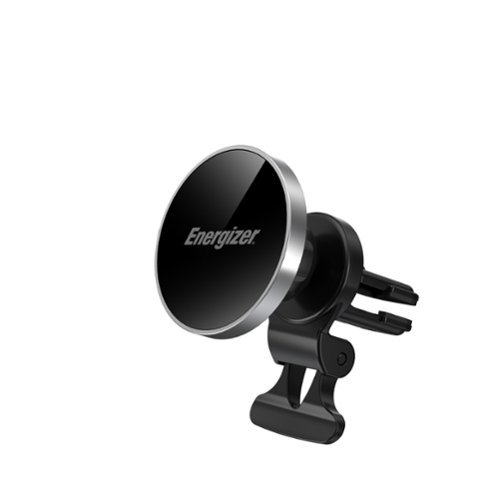
The Energizer MagSafe wireless car charging dash mount provides wireless fast charging at up to 15W for your device. A Dash, Vent, and Windshield mount are included in the box to cover all placement needs. Works with all MagSafe and magnetic iPhones and Androids with compatible magnetic cases. The magnet provides a secure attachment and prevents any risk of slipping or accidental detachment, ensuring an uninterrupted and efficient wireless charging experience. Place your phone horizontally or vertically on the mount based on your preference. Charging will also work with both horizontal and vertical placement. An integrated LED light indicator provides a quick and convenient glance at the charging status. With Energizer's PowerSafe Management, your devices are protected against short circuits, overcurrent, overcharging, and overdischarging, ensuring a safe and reliable charging solution. USB-C charging cable included. CAR CHARGER NOT INCLUDED.
Customer Rating

5
Versatile magnetic charger for the car
on September 29, 2026
Posted by: Batlacit
If you haven't tried one yet, you should really know that magnetic chargers really are a game changer for in-car phone charging. With so many cars offering built in charging pads that charge at a snail's pace, frequently lose connectivity, or just straight up don't work it's hard to beat something that holds the phone exactly where it needs to be in order to charge and doesn't require any fiddling with clips or brackets. Only catch is that you do have to find a good magnetic charger to take advantage. This is one of them.
The three included mounting options mean you should have no difficulty finding a way to secure it to your car. Two of the mounts, the adhesive/suction cup for the window and the vent clip, are easily removable while the third (the dash mount) attaches with high strength adhesive. Personally I opted for the vent clip, as I really didn't want to add anything permanent to my car's dash and there wasn't a great place to put the window mount that didn't impact my forward visibility. The vent clip is a little on the large side, but I was still able to get it into the vent on my Prius and it held very well. Particularly with the addition of a stabilizer to make sure the vent didn't just droop when I snapped my phone onto the thing.
Charging performance is good when hooked into a 12v fast charger. Fifteen watts is admittedly not all that fast by today's standards, but for wireless charging I think it strikes a pretty good balance between charging performance and heat management. And it is definitely more than enough to play some music and provide GPS directions while you're driving, which is really all I need from it. The magnets held firm when needed and let go without much fuss (and, crucially, without ripping the charger out of the vent.) All in all, it's a solid piece of kit from a respected brand and a very safe way to update the QOL of your driving experience.
I would recommend this to a friend!
Share this review:


0points
0of 0voted this as helpful.

One button summons infinite control. The NIGHTSWORD v2 WIRELESS SD is the first gaming mouse with a dedicated Stream Deck Launch Button, bringing your Virtual Stream Deck instantly to your screen. Summon a personalized on-screen shortcut panel built around whatever you play, create or get done, and extend that same control across 8 programmable buttons. Up to 8,000Hz hyper-polling, a 33K DPI CORSAIR MARKSMAN S sensor and optical switches rated for 100 million clicks keep every input sharp and precise. Up to 170 hours of battery life and three ways to connect keep you in the game, your way.
Customer Rating
5
Everything's a Stream Deck Now
on September 4, 2026
Posted by: Batlacit
Ever since Corsair acquired the company that makes the Stream Deck they've been slowly incorporating it into more and more peripherals. Every time they do it, I think they've done it, and there's no way they can put it into anything else.
Now I guess I'm just going to wait for the Stream Deck earphones to come out.
As a gaming mouse, the Nightsword is quite good. It's reasonably lightweight but still more comfortable than most of the e-sports focused gear on the market, and offers a true abundance of programmable buttons. Some take a little getting used to, particularly the two side mounted ones at the top, but once you adapt it's honestly a little hard to go back. RGB effects are present but somewhat understated, and battery life is quite good.
The party trick, of course, is the built in Stream Deck. When I first heard of this feature I imagined one of those MMO focused mice that has an entire numeric keypad slapped on the side, but Corsair has gone with something a little more understated and, IMO, usable. Using the button will bring up a virtual keypad on the screen which you can set up to run a variety of commands and macros with the flick of the wrist, then dismiss once you're done with it. It is better and worse than the traditional approach. Better in that you don't have to take your focus off the screen or pull your hands away from the controls. Worse in that it does effectively disable your mouse for a few seconds, and is harder to operate from pure muscle memory. From the perspective of someone trying to run a stream I think this probably wouldn't be the preferred option - but for someone looking to set up macros for productivity or to get an edge in games it might actually be a little better. Either way, I don't think you'd be going wrong trying this very solid mouse out for yourself.
I would recommend this to a friend!
Share this review:


0points
0of 0voted this as helpful.
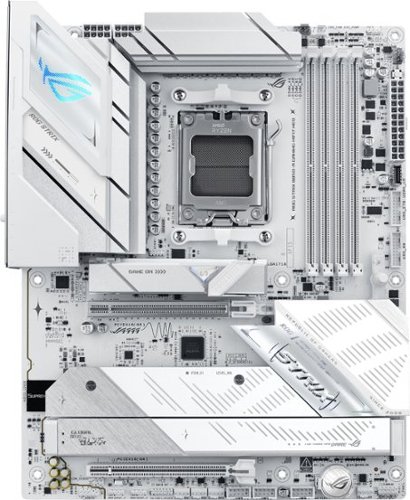
ASUS ROG STRIX B850-A GAMING WIFI7 NEO AM5 ATX motherboard with 14+2+2 power stages, DDR5 slots, PCIe 5.0 Ready, 4x M.2 slots, Wi-Fi 7, 3x USB 2.0 headers, USB-C 20Gbps, upgraded gaming audio solution, advanced AI tuning with AI Cache Boost and DIY-friendly Q-design with robust thermals.
Customer Rating
5
An absolute joy to build
on August 29, 2026
Posted by: Batlacit
There are very few outright bad motherboards on the market these days. Just about anything you find will likely be good for a few years of use. As such the only way for something like the ROG Strix to stand out is to be exceptional. And it definitely is. I've built more PCs than I can count in my days, well over a hundred. Asus has always stood out as one of my favorite brands to work with, and this particular board may be my new favorite among them.
The board itself is impressively provisioned - some might even say over-provisioned. With headers for a gratuitous number of USB ports, room for four NVMe drives, thunderbolt support, multiple fan headers, a dedicated AIO header, and two PCI-E x16 slots, you'll find everything you need for pretty much any showcase build you care to name. Wherever possible they've opted for toolless designs and big, chunky heat spreaders (which you should absolutely be aware of when selecting an SSD to go with it unless you enjoy prying off heat sinks.) Given current component shortages I wasn't able to go quite all out when selecting parts and ended up with a somewhat eclectic mix of high and mid-range parts, with the latter receiving a mild overclock to help them keep up. In my experience this can often be a recipe for system instability, but so far at least it's holding up extremely well.
My biggest recommendation for anyone thinking about using this in a build is to plan for how much bulk the built in heatsinks are going to add. They are well enough laid out that most coolers and AIO pumps shouldn't have issues, but it does stand taller at the top than a lot of less robust designs and as such will benefit from having lots of depth to work with. In my case I went with a compact Fractal Design tower and a 240mm AIO mounted overhead and found it had just enough room to fit everything.
I would recommend this to a friend!
Share this review:


0points
0of 0voted this as helpful.

Lighter. Smaller. No compromise. OpenFit Air 2 features a compact, featherlight build with a refined ear-hook curve for a secure, comfortable fit that holds all day. Like all Shokz open earbuds, it keeps you aware of your surroundings while your music plays on ~ whether you're mid-hike, mid-commute, or mid-anything.
Customer Rating

4
Open ear with decent bass is possible
on August 27, 2026
Posted by: Batlacit
My sister has sworn by her Shokz bone conducting headphones for a couple years now. She's tried to sell me on them a few times as well but while I found the increased situational awareness they offered tempting, the bulky design and somewhat tinny audio they provided was hard for me to get excited about. But when I heard that Shokz was coming out with a new offering that more like a conventional set of earbuds, curiosity won me over pretty quickly.
So first up: it turns out that the secret to the bass response is to abandon the bone conducting tech entirely. These are basically earbuds, though they don't entirely feel like them. Rather than obstructing your ear canal, they sit just outside of it. I've tried open earbuds like this before and generally found them to be deeply uncomfortable, but to their credit Shokz has clearly put a lot of thought into comfort here. The earbuds aren't putting a lot of weight on the sensitive spots of your ears, instead opting to support themselves at a few different points. It does take some experimentation to get the knack for putting them on properly, but once you know where to hook them taking them on and off is pretty effortless. You certainly won't forget you're wearing them, but they don't become painful. Which makes them a big step up over a few of the previous designs I've tried.
As for audio quality, it's good. The worst part of it is arguably still the bass response, unfortunately, but it is significantly improved over previous Shokz designs I've tried. And while there are certainly much better options out there when it comes to audio fidelity not many that can also let your hear a cashier at the supermarket. So overall I'd consider it an acceptable tradeoff. Interestingly it actually seems to do better with music than any spoken word content, which is the opposite of what I tend to expect, and I can't even begin to guess why that is.
The overall design is good as well. They are large for earbuds, a necessity given how they hook on your ears, but the case is still pocketable and the build quality feels fairly rugged. Controls are handled by squeezing pressure sensitive sections of the rubber ear hooks rather than buttons, so there aren't many places where you're likely to need to worry about fluids infiltrating the unit during a workout or surprise rain storm.
Unfortunately, this does bring us to the one area I feel the Shokz didn't quite live up to their promise. They leak audio - and they do it quite well. There is a "private" mode you can toggle in the app that helps with this to a degree, but in testing it out with my roommate we discovered that it's still pretty easy to pick out details when you're sitting next to someone wearing these. With bone conduction basically setting the gold standard for private listening I imagine this could end up being something of a deal breaker for existing customers. As such I'd limit my recommendation to anyone looking to maximize their situational awareness who isn't too concerned about the old lady sitting next to you on the bus judging you based on your playlists.
I would recommend this to a friend!
Share this review:


0points
0of 0voted this as helpful.
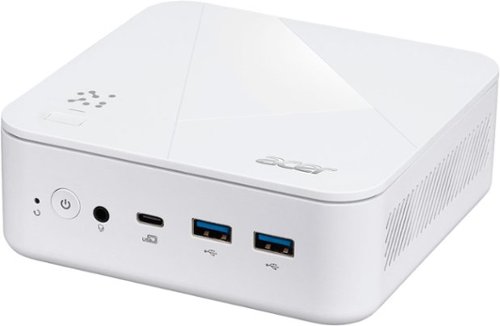
Acer Revo Box AI: Redefining High-Performance Computing - Redefine your workflow with the Acer Revo Box AI. Powered by the AMD Ryzen AI 7 processor with 50 TOPS of NPU performance, this ultra compact powerhouse handles heavy multitasking while unleashing creative potential. Acer~s exclusive Intelligence Space enhances productivity with AI driven media automation and smart note tools. Wrapped in a sleek, under 0.75L white chassis, it supports seamless triple monitor setups~transforming how you work, play, and create.
Posted by: Batlacit
The Revo Box isn't likely to turn many heads when it comes to specs - which is kind of the whole point. Mini PCs generally aren't chasing after benchmarks or high frame rates. Instead they're quietly running kiosks, point of sale terminals, or acting as a word processor. Or, in my case, hosting a VM for home automation and turning my 65" TV into a teleconferencing rig. And so far I have to say there's a lot to recommend it.
While the box may be small, it makes very good use of what space it has. There's a pretty good assortment of ports on the front and back, easily enough for all the basic peripherals plus some extra accessories. You also get dual NICs, WiFi, three display outputs, and an integrated fingerprint reader. Getting it set up in my ersatz server rack only took me a few minutes and resulted in a much more attractive final result than I'd been expecting. And as this version of the Revo Box is just a bit more beefy than most mini PCs I had no issue giving up some system resources for the VM without compromising performance in Windows. It runs quiet enough that it doesn't contribute to the noise level in the room, and seems to have no issues operating in a semi-enclosed space for prolonged periods either. Truthfully I could see a college or high school student in a budget daily driving this as their main computer. Really my only complaint is that the fingerprint reader is a nice touch, but may be a little too close to the power button for it's own good. If you plan to mount it behind a screen with the included VESA bracket I feel like you're just asking to end up accidentally rebooting the machine trying to log in.
I would recommend this to a friend!
Share this review:


0points
0of 0voted this as helpful.
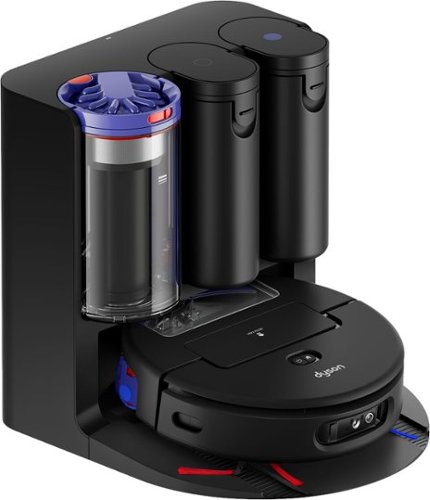
Dyson Spot+Scrub Ai wet and dry robot vacuum cleaner eliminates hidden stains using advanced Ai.~ Hygienically. The HD camera + Ai intelligence identify spills and stains, adapt power to clear the mess, and returns again and again to ensure a proper clean.~ Unlike robot vacuums with spinning pads that can spread grime because they scrub without fully lifting debris, the Dyson Spot+Scrub Ai robot' self-cleaning roller washes itself as it goes ~ washing with clean water from start to finish. On every rotation, dirt is extracted before the roller is evenly hydrated. For a better, smear free finish. Dyson~s hygienic cyclonic dock self-empties, self-cleans, refills and recharges. Control and customize your clean with the MyDyson app.
Customer Rating
5
Excellent, if showy, robovac
on July 21, 2026
Posted by: Batlacit
For years my floor care has been a combination of a conventional Dyson vacuum for big messes and a couple of robotic vacuums for daily maintenance, which has worked quite well. Recently though I have moved into a new place that features a lot more hard floors than my old one, which had me rethinking my choice of carpet-oriented robots. And with Dyson offering a brand new robot with an integrated mop, I was curious to see if maybe I could finally reduce myself to a one-vacuum household. So for a few weeks, I tried relying exclusively on the robot for my cleaning. And here's how it went.
The first thing I noticed, which I fully recognize might be a dealbreaker for some, is that this is a lot harder to ignore than any robotic vacuum I've used previously. Dyson's penchant for showmanship is on full display here with an abundance of eye-catching red and purple accents, a bright green "laser" scanning the floor in front of it to help highlight dust and grime, and motor noise. Lots of motor noise. Granted, I did start out with everything turned up as high as it can go, but even with it turned down somewhat I don't think this is ever something I'd be setting up to run at night or during nap times.
That said, it's definitely not loud without reason. The first run ended up dumping so much dust and pet hair into the bin that I had to empty it right away and left the wood floors spotless. It really did look like I'd broken out the more powerful upright vacuum. The mopping performance, which uses a large roller brush mounted on a track to scrub the floor in two dimensions as it goes, is equally as impressive. I was worried at first that it might be sitting low enough to rub against the thick carpeting in the bedrooms as it passed, but so far at least the floors have stayed dry. And if they don't, well, addressing the problem should be fairly simple. The app that manages the robot is admittedly a bit obtuse at first glance, but a lot of that is due to how much functionality they've packed in. In an age where far too many are chasing overly simplified interfaces and one-click operation Dyson has thankfully provided us with the means to program the robot with cleaning routines that are as complicated as we need them to be for our spaces, and once you get the hang of it adjustments are straightforward and painless.
At the end of my test, I did go in with my manual vacuum and clean everything the old fashioned way. And, sadly, I must report that I won't be retiring it any time soon. But it did show me that the Spot+Scrub was a notable improvement over what I'd been using before. Most of what I was picking up was coming from areas that robots have always struggled with, like baseboards, under cabinets, and anywhere else there just isn't enough clearance for them to bring their main brushes to bear. So assuming you can make your peace with the noise and bright lights, this is a pretty easy recommendation from me.
I would recommend this to a friend!
Share this review:


0points
0of 0voted this as helpful.
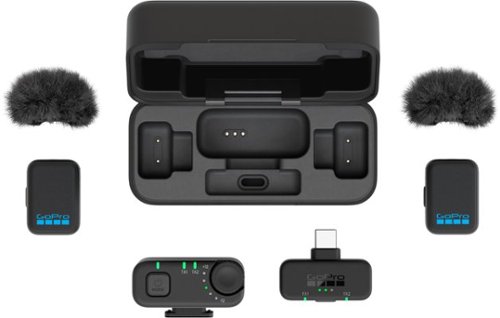
Add the convenience and creative flexibility of a wireless microphone to your phone vlogging setup. This kit comes with an ultra-compact wireless microphone transmitter that can be comfortably worn or hidden while clearly capturing every word of your interview or vlog narration. The included receiver connects to your phone~s USB-C port to deliver high-quality audio while letting you or your subject roam freely throughout your shot.
Customer Rating
5
Most portable and flexible mic kit I've used
on July 6, 2026
Posted by: Batlacit
The GoPro wireless mic kit is a surprisingly versatile and full-featured solution for wireless lapel mics that borrows some of the best features of modern earbuds to deliver a high quality, extremely portable solution for audio recording for just about any setup. In some ways it may actually be a little cooler than the camera it's meant to pair with.
The lav mics themselves are quite nice pieces of tech. They're small enough to hide and as one might expect offer a recording quality that's far better than what you might get with anything attached to a camera, particularly with the included baffles helping filter out any pops or wind noise. If that were all it did I'd be impressed enough, but they really went above and beyond in trying to make this a flexible recording solution for almost any scenario you might care to name. They can be attached either with a built in clip or using magnets for clothing where that might not be an option, and if you plan to be shooting with a GoPro camera they're really all you need. Both mics can be paired to the camera via Bluetooth and offer both a very good range and multiple channels to assist with editing. What impressed me more though is that they didn't stop there. You also have everything you might need to attach it to a more full featured camcorder via a mic-in port (cables are included for this) or recording direct to your phone with two dedicated receivers, both of which are pre-paired and come with independent volume control to help balance your audio. And all of it fits neatly into an oversized charging case that keeps the batteries topped up and all the necessary accessories in order. I've even used it for video conferences in a pinch.
I would recommend this to a friend!
Share this review:


0points
0of 0voted this as helpful.
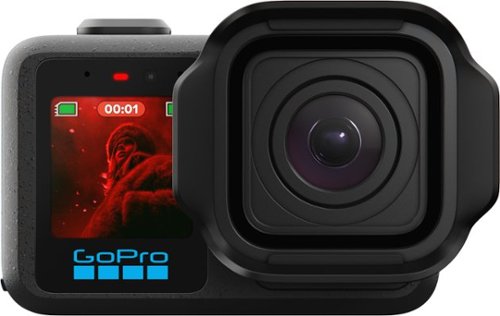
MISSION 1 is the compact camera system that takes your content to the next level with professional tools and image quality. Its 1~ sensor helps you capture the shots you need with more light and detail for incredibly sharp images with less noise~even in low light and after dark. Our latest GP3 processor delivers pro-quality 8K video, while enhanced image tuning intelligently adjusts settings for the best footage possible. Made for long shoots, its new battery can power through over 3 hours of 4K30 recording or 5 hours at 1080p30.1 With GoPro durability, award-winning HyperSmooth video stabilization, 4K video at 4x slo-mo and more, MISSION 1 is an all-in-one creative powerhouse.
Customer Rating
5
As a newbie, I'm very impressed.
on July 6, 2026
Posted by: Batlacit
As an avid biker, hiker, and pet owner, a GoPro or something like it has been on my wishlist for a few years. I'm honestly not sure if a Mission 1 would have been where I chose to start under normal circumstances, but I was nonetheless quite eager to try it out. And after spending a few weeks with it, I'm quite impressed. Not only is it a surprisingly capable action camera, it's a pretty good camera for every day use as well.
My first impression getting it out of the box and set up was that everything about it was very polished. The unit itself is well built and sturdy, the instructions are well laid out (including a warning about trying to pry open a microphone vent in the side that looked very much like an access door), and it was very easy to get the camera paired with the app. All in all I think I actually spent more time getting the accessories set up than the camera itself, and was ready to start shooting in under half an hour (not counting charging time.)
Since then, I have taken it on several adventures and only needed to charge it up once. I'll admit I have been babying it a bit so it's hard to get a good read on durability, but overall it seems to have held up well. I'm particularly impressed by the fold-out mount, which offers a very firm filming platform when paired with the included mounting arm that not even my hyperactive puppy was able to shake loose. Image quality is great - especially at 8k - and the image stabilization works miracles. It even does a reasonably good job in low light, probably helped along by the enlarged sensor.
It does have a few downsides that I feel should probably be noted. First up, when I went to look at accessories/lens protectors I found that most of what was available didn't actually fit this one. I imagine that's something that will be addressed in the near future, but for now it's definitely somewhat slim pickings for both first and third party offerings to enhance performance. Second, while it can be used as a more conventional point-and-shoot camera I found it to be less impressive than expected in that area. For stills, there isn't much control over the focus afforded you so you're limited in terms of what you can do with the image. It's not bad by any means, but I doubt it would be anyone's first choice unless they didn't have their phone with them. I found myself a bit more impressed with it when shooting video (particularly when shooting things where the higher framerate option was able to be put to use) but in that mode it was pretty hard to ignore how hot the case started getting after a few minutes of shooting. I don't think it was going to do anything to harm the camera itself but it did eventually make it hard for me to hold focus on the subject of the shot, and did explain why one of the accessories offered is a dedicated grip for it. And finally, the camera is definitely heavier than some of the other action cams I've seen. I didn't really notice it when it was attached to my bike helmet (and my dog seemed fine running around with it when it was strapped to a doggy harness) but I can imagine that potentially being a problem for some who like to use their GoPro for drone flights or the like, so be aware of it. But overall, I don't have any qualms recommending this to someone looking to get into action photography regardless of what their skill level may be.
I would recommend this to a friend!
Share this review:


0points
0of 0voted this as helpful.
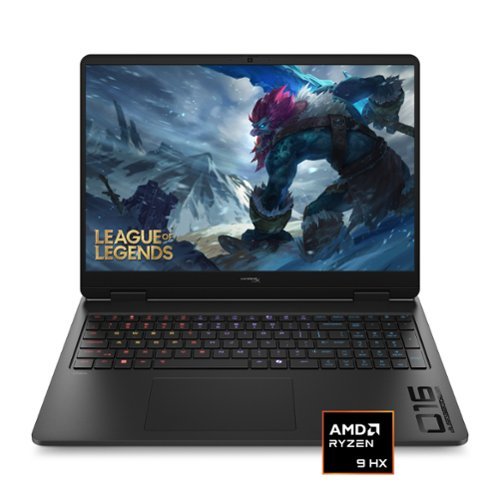
Quickness beyond power, victory beyond doubt. This HP gaming laptop, is engineered specifically to give gamers the competitive advantage. With the combined performance of a NVIDIA 50 series GPU and an AMD Ryzen processor, you're not only guaranteed the power, but also the speed to give you the upper hand in any situation.
Customer Rating
5
Desktop Replacements Haven't Died Off After All
on June 23, 2026
Posted by: Batlacit
As an owner of several Omen branded devices over the years, I've always been struck by their ability to strike a good balance between cost effectiveness and high end features. The HyperX Omen 16 upholds that tradition quite well. Offering a truly stunning display, impressive gaming performance, and not a bit of excess fat, it makes for an excellent option for anyone looking for a portable machine that can serve as a desktop replacement.
As with most Omen hardware, most of the resources seem to have gone into the features that have the biggest effects on performance. In this case that's primarily the screen and the GPU(s) driving it. While it's true that the 5060 is hardly a top performer, it's still got plenty of power to handle both synthetic loads and every game I threw at it, with AAA titles running at their highest settings without so much as a hiccup. Part of that likely comes from the Ryzen 9 backstopping it, which performs quite well at both gaming and productivity tasks. I did note a few slowdowns doing CAD work, which was likely down to the machine having only 16gb of RAM to work with, but as it's getting harder and harder to find laptops that ship with more than that I think it's likely something we're going to have to get used to for a while longer.
This does however offer a good segue into some of the machine's weaknesses. First is that while we may call this a laptop, it really does seem to be meant to spend most of its time on a desk. While it's far from the biggest laptop I've seen it's definitely on the chunky side. It also runs very hot, and as one would expect from that can exhaust its battery remarkably fast the moment you ask it to do something that requires some horsepower. The ability to switch to integrated graphics helps to be sure, but this is simply not a machine that you can expect to last you a full day of work. Given the overall build quality though, it's probably best not to encourage people to try and carry it everywhere. The case is almost entirely plastic, and not exceptionally stiff, so I don't think it would fare well spending every day in a backpack. You're also not going to find a lot of common productivity features like support for Windows Hello biometric log-in. And though this is a very minor issue IMO, the RGB lighting for the keyboard opts for a weird middle ground between having a single light channel and fully addressable per key lighting, splitting things up into four zones. It can be made to look rather interesting, but if you're expecting a full light show you may be disappointed.
I know that to some this lack of creature comforts and showmanship may be seen as a dealbreaker. But personally, I kinda like it. As contradictory as it is to say that a machine designed for play can be "no frills," I do think there is a real demand for performance-focused gaming gear at a slightly more reasonable price point, and that the Omen series fits within that niche by putting all its focus on the core experience. Which makes it an easy recommendation for anyone willing to work around those limitations.
I would recommend this to a friend!
Share this review:


0points
0of 0voted this as helpful.
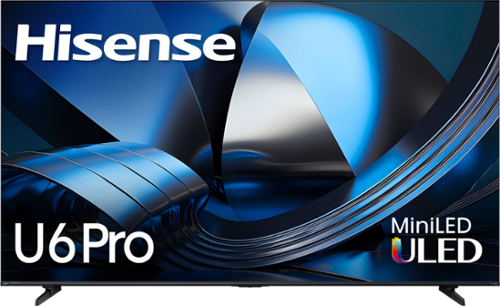
The Hisense U6 Pro delivers a more immersive Mini-LED experience that looks great in real life~not just in perfect lighting. Hi-QLED MiniLED brings vibrant color and strong contrast, while the screen minimizes reflections and glare so you can see clearly, whether you~re watching daytime sports with the lights on or streaming in a sunlit room. Fast, smooth motion with a Native 144Hz Refresh Rate keeps live games, fast-paced movies, and competitive gaming sharp and easy to follow, while the Built-in Subwoofer adds deeper, more powerful sound that pulls you into the action. The Hi-View AI Engine automatically fine-tunes picture settings and upscales content toward 4K for a more refined, consistently high-quality image. With Dolby Vision, Dolby Atmos, a full suite of HDR formats, and built-in Fire TV with Alexa voice control, it~s a premium, all-in-one way to enjoy a bigger, more immersive entertainment experience any time of day.
Customer Rating
5
Takes a little adjusting, but it's worth it.
on June 12, 2026
Posted by: Batlacit
Some TVs look great the moment you get them out of the box. Others require some tweaks to bring out their full potential. This is definitely one of the latter. My initial impressions after getting the TV set up was that that something wasn't right. Colors seemed a little drab, images seemed a little too dark, and everything just looked off in ways that I couldn't quite put my finger on. And I mention this not to scare you off, but rather assure you that first impressions can be deceiving. After spending a couple days experimenting with the different settings and playing a lot of different content on it I've come to recognize this is actually a very impressive LCD paired with some less than impressive default settings.
First up, let's talk color. the screen has both quantum dot tech and according to a badge on the Hisense website Pantone validation. This is a big part of what initially threw me off I think as I'm used to QD displays pumping up color saturation to show off how vibrant they can be. This does not do that - at least not unless you switch to one of the vivid color modes. It might be slightly heretical to admit that's exactly what I did (I've gotten used to it, it's hard to go back) but I do really appreciate having the option for when I'm watching something where having a more "accurate" look is preferred. What really impressed me though is how well the local dimming works. There are still a lot of screens which struggle with visible checkerboard patterns even in relatively bright scenes, but even with the local dimming turned up all the way I still struggled to see it outside of torture tests. We're still a long way from being able to make LCDs look as good as OLEDs, but I'm definitely fine with what they can do for now. And, in one of the most pleasant surprises I've had recently, it can game. With native support for variable refresh rate and a 144hz panel, it pairs exceptionally well with my gaming PC and consoles. You do lose a little bit of the "wow" factor, since game mode cuts down on latency by removing most of the post-processing, but the improved smoothness is a huge upgrade from the TV it replaced which could only really manage 60hz. Unfortunately I did find myself less impressed by most of the "AI" features the TV shipped with, most of which look like the same upscaling, color grading, and motion smoothing we've seen for ages with just a few new tweaks. And I don't think on a whole these tweaks actually represent improvements. IMO it really undersells how well this panel can actually perform - particularly when it comes to displaying fast motion - and I can't say I've missed any of them since turning them off.
Moving on, there are also plenty of secondary items to talk about. First one: they built a subwoofer into the back to try and make the TV speakers actually sound decent. Does it work? Sorta. It is a night and day difference when compared to TVs that don't have any bass response at all. But it also can't really do anything to address the problem that LCD panels really don't have enough room to include speakers that can address the rest of the range. Voices and music remain tinny, and the virtualized speakers are no replacement for an actual sound bar. But, since no one I know ever uses TV speakers anyway, I don't think that's reason enough to mark it down. The Fire TV software will also likely be a mixed bag for some. It does offer one of the simplest and most reliable setup experiences, which is very nice, but I do find the interface to be a bit busy and I do not like how it hides some of the more advanced settings behind multiple menu systems. But, with a little guidance, it's not too hard to track down what you're looking for and it does a pretty good job of remembering my more important preferences rather than making me re-enter them every time the input format changes, so I can definitely live with it. And if you can't, I'm pleased to say that it plays very nicely with a variety of alternative set-top boxes, even if you're passing audio through to a finnicky soundbar.
In summary, I probably wouldn't recommend this to everyone. The hardware is definitely capable, but given the amount of tinkering I had to do and the complexity of the UI I can easily see this being a nightmare for my less-tech savvy parents who really just want something they never need to mess with. But if you're okay reading a manual or two and spending a couple hours experimenting, I think this represents a really good bargain and a great upgrade to your home viewing experience.
I would recommend this to a friend!
Share this review:


0points
0of 0voted this as helpful.
Batlacit's Review Comments
Batlacit has not submitted comments on any reviews.
Batlacit's Questions
Batlacit has not submitted any questions.
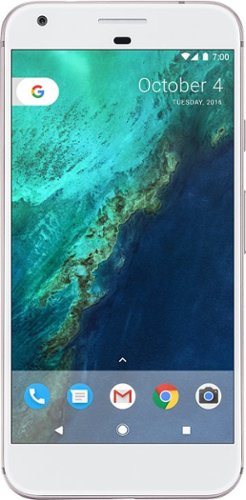
Add high-end performance to your everyday life with the Google Pixel XL. A quad-core processor, a 5.5-inch LED screen and 32GB of memory ensure this phone is able to handle daily life, and Corning Gorilla Glass 4 protects the screen. Easy cloud storage ensures you never run out of space on the Google Pixel XL.
Does your Best Buy Pixel phone have the Verizon crapware on it?
There are three verizon apps - but all are fully removable. Once they're gone, it's like they were never there to begin with.
9 years, 11 months ago
by
Batlacit
Add high-end performance to your everyday life with the Google Pixel XL. A quad-core processor, a 5.5-inch LED screen and 32GB of memory ensure this phone is able to handle daily life, and Corning Gorilla Glass 4 protects the screen. Easy cloud storage ensures you never run out of space on the Google Pixel XL.
Does this version of the phone have a locked bootloader?
Yes, the Verizon branded Pixel does come with a locked bootloader. Only ones bought directly from Google don't.
9 years, 11 months ago
by
Batlacit
Add high-end performance to your everyday life with the Google Pixel XL. A quad-core processor, a 5.5-inch LED screen and 32GB of memory ensure this phone is able to handle daily life, and Corning Gorilla Glass 4 protects the screen. Easy cloud storage ensures you never run out of space on the Google Pixel XL.
Is this water resistant?
I'm afraid not. But you may be able to find case options that can at least improve that.
9 years, 11 months ago
by
Batlacit

Orbi Whole Home WiFi System delivers up to 3.0Gbps high-performance WiFi. Sleek, modern design with high-gain internal antennas for up to 5,000 square feet of coverage. FastLane3 Technology creates a dedicated Tri-Band WiFi for seamless 4K streaming and gaming everywhere in your home. Keep a single WiFi name for uninterrupted connections as you move from room-to-room. Circle Smart Parental Controls runs on Orbi Routers for a smart way for families to manage content and time online, on any connected device. Provide internet access to guests without sharing your personal network password. Orbi is ready right out of the box and compatible with your ISP. Just use the Orbi app to get started with better WiFi, everywhere in minutes.
do you have to have an internet service before this will bring in the wi fi
You can use it to set up a local network, but if your goal is to watch netflix or look stuff up on google, yes, you need to have internet service.
10 years ago
by
Batlacit
Orbi Whole Home WiFi System delivers up to 3.0Gbps high-performance WiFi. Sleek, modern design with high-gain internal antennas for up to 5,000 square feet of coverage. FastLane3 Technology creates a dedicated Tri-Band WiFi for seamless 4K streaming and gaming everywhere in your home. Keep a single WiFi name for uninterrupted connections as you move from room-to-room. Circle Smart Parental Controls runs on Orbi Routers for a smart way for families to manage content and time online, on any connected device. Provide internet access to guests without sharing your personal network password. Orbi is ready right out of the box and compatible with your ISP. Just use the Orbi app to get started with better WiFi, everywhere in minutes.
Q I am looking for1 Orbi router and 3 Orbi satellites for my big home, since Netgear is not giving the option to buy satellites individually ,will I be able to order two boxes of Orbi and be able to use one of Orbi router as a satellite ,? interchange
From what I can tell, no, you can't get the same seamless integration with two routers in the system. The satellite and router look mostly identical, but there are some differences. You might be able to configure the second one as an access point... but that might defeat the point a bit.
That said, they've stated they are going to release individual satellites eventually.
That said, they've stated they are going to release individual satellites eventually.
10 years ago
by
Batlacit