


Aaronxx7's stats
- Review count185
- Helpfulness votes779
- First reviewDecember 16, 2015
- Last reviewAugust 28, 2026
- Featured reviews0
- Average rating4.8
Reviews comments
- Review comment count0
- Helpfulness votes0
- First review commentNone
- Last review commentNone
- Featured review comments0
Questions
- Question count0
- Helpfulness votes0
- First questionNone
- Last questionNone
- Featured questions0
- Answer count97
- Helpfulness votes133
- First answerMarch 10, 2018
- Last answerSeptember 28, 2021
- Featured answers0
- Best answers6

The HP OfficeJet Pro 9720 Wide-Format All-in-One Printer delivers fast color, fade-resistant prints, 250-sheet paper capacity, and scan and copy capabilities perfect for your office. Print up to 11 x 17 inches, and scan legal-size documents on the flatbed scanner. Navigate this printer with the 2.7" color touchscreen and phone-like user interface. It includes wireless and printer security features to keep your multifunction printer up to date and secure, and is made with more than 30% recycled plastic content. Optimize print formatting with HP AI, that easily removes unwanted content from emails and web pages so your prints are just the way you want~no wasted pages or unwanted content. Subscribe to Instant Ink delivery service and get 3 months of free ink delivered directly to the door of your office. The HP OfficeJet Pro 9720 Wide-Format All-in-One also lets you print from anywhere with the HP app.
Customer Rating

5
Excellent option for larger scale prints
on August 28, 2026
Posted by: Aaronxx7
The HP9720 is the world's first wide-format printer with P3 color. The P3 color system delivers an impressive true to screen color gamut with the widest spectrum of vibrant colors to date on any large format printer.
P3 printers offer 25% more colors than traditional sRGB printers.
Prints are supposed to match modern smartphone and laptop displays much more closely, reducing the surprise color shifts common with standard sRGB output.
Prints are supposed to match modern smartphone and laptop displays much more closely, reducing the surprise color shifts common with standard sRGB output.
I printed a few maps on 11 x 17 copy paper, and printed full border-less photos on 11 x 17 glossy photo paper. All the prints came out with impressive clarity, definition and color. I didn't use HP photo papers, because none of the local stores had 11 x 17 HP photo papers in stock, so I just got some 3rd party glossy photo paper. The prints came out pretty nice, but didn't match colors exactly to my original photos. My original pics were in the P3 color profile, however some of the color and contrast seem to have been lost. Again, this could be due to the fact that I am not using HP photo paper. Most printers do best with their own brands of media, because they have been tested and designed to work best with their hardware.
I am uploading 2 color photos and a couple maps I printed. While the colors were not exact in this test print, the pictures by themselves still look very good.
The high def photos took about 2 minutes to print, and the maps printed in just a few seconds on regular copy paper.
I originally wanted this printer for it's wide format capabilities, because I intended on printing maps for delivery applications. For this purpose, the printer will be perfect.
The printer does except all the standard paper sizes and envelopes for printing.
The flat bed scanner can handle up to 11 x 14 inch media. The auto document feeder can only handle 8.5 x 11 inch papers. The Auto doc feeder can scan double sided papers with the dual pass method.
The depth of the printer is pretty close to HP's other 8 x 10 Officejet printers. The paper tray sits at a normal position to the printer for 8 x 10 papers, but needs to be extended forward to accommodate any media that is
greater than 8 x 10 papers, like the 11 x 17. The extended paper tray is a little obtrusive, but not really noticed if you have the ouput tray extended anyway.
greater than 8 x 10 papers, like the 11 x 17. The extended paper tray is a little obtrusive, but not really noticed if you have the ouput tray extended anyway.
the 2.7" Color Touchscreen is big enough to easily read and make selections on. IT also tilts outward to give you a better view from higher angles while using the printer.
The width of the printer is about 23 inches wide, and about 32lbs, making it a bit bulkier than HPs other standard format printers which are about 17 inches wide and roughly 20lbs
The width of the printer is about 23 inches wide, and about 32lbs, making it a bit bulkier than HPs other standard format printers which are about 17 inches wide and roughly 20lbs
Regular prints and scans come out great as expected.
FYI after printing about 8 full size 11 x 17 photos my ink reserves were down to about half, so if your intent is large format photos, you might want
to make sure you have some additional ink cartridges on hand. Photo paper typically uses 2 to 4 times as much ink as plain paper.
to make sure you have some additional ink cartridges on hand. Photo paper typically uses 2 to 4 times as much ink as plain paper.
If you subscribe to HP's Instant Ink program you can utilize their mobile app to print from anywhere, as long as you have a data connection.
The same goes for their PC app. This is extremely useful if you travel a lot or have multiple locations that you work from. I subscribe to the
Instant Ink program specifically for this feature, and the FAX feature. I no longer have a FAX machine as I can send one from the HP app itself
without the need for additional hardware or accessories.
The same goes for their PC app. This is extremely useful if you travel a lot or have multiple locations that you work from. I subscribe to the
Instant Ink program specifically for this feature, and the FAX feature. I no longer have a FAX machine as I can send one from the HP app itself
without the need for additional hardware or accessories.
I printed a few larger scale images combining the prints to make larger posters. I taped the edges to join the sheets of paper. This is a great
way to create much larger projects, without spending a ton of extra money.
way to create much larger projects, without spending a ton of extra money.
Overall this printer works great, and is a great option for anyone looking to make larger than 8 x 10 prints. It prints great on photo paper as
well as plain paper. The colors were not as accurate as I would have expected on the photo prints, but that could also be because I was not
using HP papers. I still love all the features that this printer brings to the table, especially with the added option of remote prints.
well as plain paper. The colors were not as accurate as I would have expected on the photo prints, but that could also be because I was not
using HP papers. I still love all the features that this printer brings to the table, especially with the added option of remote prints.
I would recommend this to a friend!






Share this review:


0points
0of 0voted this as helpful.
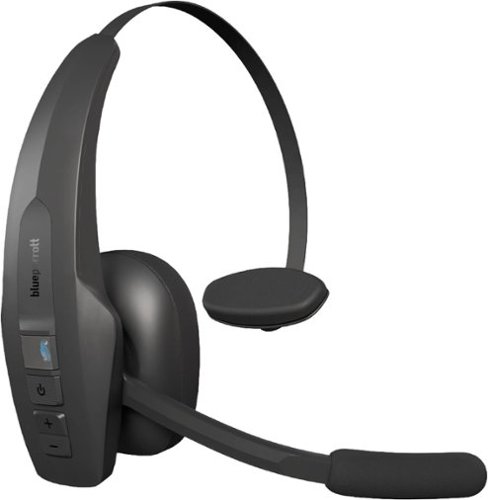
BlueParrott Pro B350 is a lightweight, comfort-first Bluetooth~ headset engineered for clear calls and easy communication throughout long, multi-stop driving days. Its industry-leading AI voice isolation microphones deliver 98% noise cancellation, while passive noise reduction in the earcup ensures clear calls on busy roads and around the vehicle. An ultra-light design with a soft ear cushion and T-bar pad reduces pressure for all-day comfort, plus up to 40 hours of talk time without interruption, Bluetooth~ connectivity and an extended, reliable wireless range help drivers stay connected in and out of the truck allowing you to leave your phone in the vehicle while dropping off orders or taking a break~ideal for long-haul truckers, food delivery drivers, regional drivers, ride-share drivers, farmers, landscapers, RV drivers, off-road enthusiasts, or anyone on the move. With simple voice control to answer and reject calls and the customizable BlueParrott Button~ for one-touch Push-to-Talk or mute, the Pro B350 enables quick, distraction-free communication that keeps attention on the road. Rugged IP54-rated protection ensures dependable performance for everyday driving conditions.
Customer Rating
5
Incredible Clarity and Battery Life
on June 26, 2026
Posted by: Aaronxx7
The BlueParrott Pro B350 has one of the best noise cancelling technologies that I have ever seen.
It is only a mono speaker headset, so it leaves one ear open so you can stay on top of what's going on around you.which makes it perfect for an office setting as well as on the road.
It is only a mono speaker headset, so it leaves one ear open so you can stay on top of what's going on around you.which makes it perfect for an office setting as well as on the road.
The 36mm speaker is just large enough to cover your ear. The fabric speaker ear cover works great for creating a breathable cover, which I find more comfortable for longer periods of use.The included leatherette cushion adds a small touch of noise cancellation to your surroundings and is comfortable,but I prefer the fabric cover for extended use.
The BlueParrot App does add some customization, primarily in the ability to change the function of the "BlueParrot" button.There are only 4 buttons on the headset, the BlueParrot button, the power button, and the two volume buttons.The headset can easily be muted by raising the mic, aligning it with the headband, or by changing the option of thecustomizable BlueParrot button to the mute function.You do have the option to change the custom button to use with your assistant app, push to talk apps, or just make it a regular function button.
The USB C port offers easy charging from practically anywhere, as USB C is the standard for most portable devices.The headset will charge from practically any watt charger. Different wattages might affect how fast the device charges.Once charged you get about 40 hours of talk time.
The Bluetooth connection is pretty strong. I was able to easily walk 50+ feet with no degradation on the call.The latest Bluetooth stats are up to 100ft outdoors. Which makes this headset very convenient for deliveryjobs where you have to keep hoping in and out of a vehicle.
The noise cancellation is insane with just how good it is. The AI feature virtually blocks everything out that is nota voice. I left my window open driving at over 65mph and the caller only heard my voice, none of the road noisesor wind could be heard over the call. I even tested these while mowing the grass, the caller had no idea because allthey heard was my voice. The radio on the other hand can be heard through the headset, depending on what you arelistening to, as it is designed to let voices through. All other noises are blocked, I was even crunching on chips whileon the phone, and the caller couldn't hear it. Obviously if you are going to talk with your mouth full, that's a different situation, but taking bites while I wasn't talking were not detected.
The only thing that I would complain about with this headset is that it is built for voice clarity on both ends, so the speaker outputis very clear, but a little too high on the treble side. My ears are very sensitive to noise and after long times of use, my ear starts to hurt from the higher tones. I try dropping the volume, and that helps some, but then makes it harder to hear the caller.Again, this is something specific to myself and most people probably would not have this issue. I have similar issues with allheadsets and earbuds. I just can't wear them as long as everyone else I know.
Overall this headset is really pretty great, it has exceeded my expectations with call clarity, especially on the outgoing part of the conversation. It's lightweight and very easy to use. The headband is adjustable, but the allowed angle of the mic only lets you use the headband over your head. Some headphones I would put the headband behind my neck, so that it doesn't mess up the hair, and honestly I find that pretty comfortable. The headband is fairly thin so it's not too obtrusive sitting across the top of your head, and this can easily be used over a baseball cap if preferred.
I would recommend this to a friend!
Share this review:


0points
0of 0voted this as helpful.
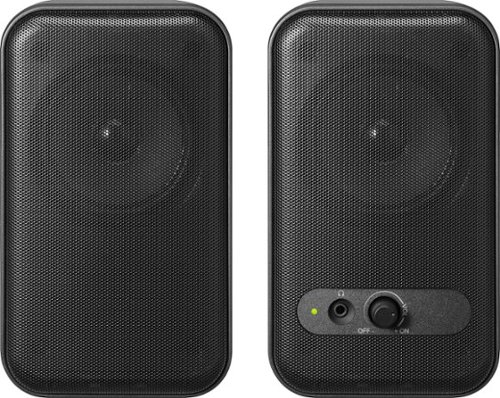
Improve your desktop listening experience with the versatile Insignia Computer Speakers. The minimalistic design makes setup a breeze with built-in 3.5 mm AUX and USB cables. The speakers can play audio aloud or connect to your wired headphones with a 3.5 mm headphone jack for private listening. The 2.0-channel setup delivers stereo sound for your work video calls, music enjoyment, or video games.
Posted by: Aaronxx7
For the price these speakers put out some very clear audio.
At between 2.5 to 5 watts per speaker these little stereo speakers put out a lot of sound.
At between 2.5 to 5 watts per speaker these little stereo speakers put out a lot of sound.
These are plug and play speakers, meaning that you could connect these to anything
with a 3.5mm audio jack, as long as you can provide power to the USB cable.
Power can be through a powered standard USB port on your device, or through a
stadalone USB charger, like one for a phone.
with a 3.5mm audio jack, as long as you can provide power to the USB cable.
Power can be through a powered standard USB port on your device, or through a
stadalone USB charger, like one for a phone.
The speakers come with an USB to USB-C adapter giving you more versatility
on how you power the speakers.
on how you power the speakers.
When connecting to most modern computers the system automatically switches to the new output device
for the all it's sound. On some older computers you might need to enter the audio or speaker settings and select the newly plugged in device.
for the all it's sound. On some older computers you might need to enter the audio or speaker settings and select the newly plugged in device.
There is no proprietary way to alter the sound profiles of anything you are listening to through these speakers. However, you can download any audio equalizer and adjust the audio ranges to your liking.
I was able to increase the bass output to a better level using a third party EQ. Keep in mind these are not subwoofers, or a full featured home theater system, so don't expect to be blown away by the experience.
But you can expect to be impressed with the sound clarity and loudness for the price.
I had the volume jacked up to max capacity on my laptop and these speakers. All the audio was surprisingly still very clear and not at all garbled. With a sound meter, the speakers reached 103 decibels
all while retaining a decent sound quality. I was even able to still hear the music from a couple rooms away.
all while retaining a decent sound quality. I was even able to still hear the music from a couple rooms away.
The size is a bit bulky for the wattage, but at least they are well built and the mesh in the front
is a very sturdy metal. So these shouldn't get damaged from being tossed around a bit, or accidental drops from your desk.
is a very sturdy metal. So these shouldn't get damaged from being tossed around a bit, or accidental drops from your desk.
There is one master volume control on one of the speakers, as well as a seperate headphones jack for private listening. The volume control on the speaker does not control the volume from the source device or computer. So make sure the source volume is up high enough for the speakers to output something. Once the speakers have an audio signal, you can quickly adjust the outgoing sound with the volume knob on the speaker itself.
The connecting cable between the two speakers is about 3 feet in distance, and the USB and 3.5mm cables are about 5 feet long, giving you just enough room to connect any desktop or laptop computer.
There isn't much else to say about these speakers except that they are a great inexpensive wired option for any computer, and they have two seperate audio channels so they can provide real sereo sounds.
(fyi - they can not do surround sound, just stereo)
(fyi - they can not do surround sound, just stereo)
I would recommend this to a friend!
Share this review:


0points
0of 0voted this as helpful.
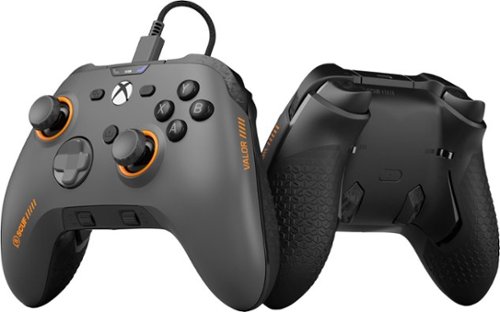
Valor Wired TMR pushes performance on Xbox with optimized ergonomics and game-changing features. Stop sacrificing your aim. Keep your thumbs on the thumbsticks while you jump, slide, reload, and more. Our new Endurance TMR thumbsticks are designed to feel familiar while still alleviating common symptoms of wear and tear. The wraparound bumpers are designed with more surface area allowing faster transitions between bumper and trigger. Elevate your audio controls by effortlessly managing all your sounds without taking your hands off the controller. A non-slip grip helps during those high intensity situations while the new shape fits naturally in your hands for comfort.
Posted by: Aaronxx7
Scuf has been around for about 15 years bringing high quality controller alternatives to the industry.
Scuf has even helped pave the way for 3rd party and OEM innovations with over 100 patents
all trying to give the player the edge they need.
Scuf has even helped pave the way for 3rd party and OEM innovations with over 100 patents
all trying to give the player the edge they need.
The Scuf Valor Pro is no exception to their good name or quality.
The Wired controller is much lighter than the OEM wireless versions, even though they are the same size.
The weight difference comes from the absence of the battery pack. The lighter controller is actually easier
to handle and use. The lighter controller even feels less fatiguing over extended hours of play.
The weight difference comes from the absence of the battery pack. The lighter controller is actually easier
to handle and use. The lighter controller even feels less fatiguing over extended hours of play.
Even though so many of the Valor Pro parts are meant to be removed easily for customization, the controller
still has a very solid feel to it. The face plate is held on with several high strength magnets, and never even
wiggles or moves a hair during play. Both the thumbsticks are easily removed after the faceplate is taken off
just by simply pulling up on them.
still has a very solid feel to it. The face plate is held on with several high strength magnets, and never even
wiggles or moves a hair during play. Both the thumbsticks are easily removed after the faceplate is taken off
just by simply pulling up on them.
The controller does come with alternate height and shaped sticks (concave and domed),
to be able to be customized for any type of gameplay and game. Keep in mind that replacing these sticks does not
replace the hard wired electronics that actually register the sticks movements. With most traditional controllers, stick drift
becomes a problem over time and with heavy use. So, even though you can not trade out those types of electronics
on this controller, Scuf is using a much better design than what current OEM controllers use.
This controller uses TMR (Tunnel Magnetoresistance) for the thumbstick inputs.
to be able to be customized for any type of gameplay and game. Keep in mind that replacing these sticks does not
replace the hard wired electronics that actually register the sticks movements. With most traditional controllers, stick drift
becomes a problem over time and with heavy use. So, even though you can not trade out those types of electronics
on this controller, Scuf is using a much better design than what current OEM controllers use.
This controller uses TMR (Tunnel Magnetoresistance) for the thumbstick inputs.
TMR , Hall Effect, and Potentiometer are the three primary sensor technologies used in gaming controllers today.
The technology differs in how they function and how much contact between the components.
Potentiometer is the traditional and most widely used technology, relying heavily on mechanical contact
to sense the directions and inputs from the thumbstick. This can be pretty accurate but suffers from what most would
consider early wear and malfunction typically seen as stick drift.
The technology differs in how they function and how much contact between the components.
Potentiometer is the traditional and most widely used technology, relying heavily on mechanical contact
to sense the directions and inputs from the thumbstick. This can be pretty accurate but suffers from what most would
consider early wear and malfunction typically seen as stick drift.
Hall Effect is a contactless magnetic system where moving the joystick shifts a magnet over a sensor, detecting positional
changes via shifts in voltage without any physical rubbing. Hall Effect controllers are typically immune to stick drift because
they simply lack the components that would cause the failure. While extremely durable, this design can be an issue if
power consumption is a concern.
changes via shifts in voltage without any physical rubbing. Hall Effect controllers are typically immune to stick drift because
they simply lack the components that would cause the failure. While extremely durable, this design can be an issue if
power consumption is a concern.
TMR is the latest contactless magnetic evolution. Similar to Hall Effect, but it measures resistance changes in a magnetic
tunnel junction rather than voltage. It offers the highest precision and resolution with incredible durability; and it's very power-efficient.
tunnel junction rather than voltage. It offers the highest precision and resolution with incredible durability; and it's very power-efficient.
Even though this model isn't wireless it does come with a 10 foot braided USB to USB-C cable to give you
ample distance from your console or PC.
ample distance from your console or PC.
Wired controllers are usually the first choice for competitive gamers because they don't suffer from any
form of wireless lag. The Valor Pro even offers a 1K polling feature for the fastest possible controller
responses and communication. Polling the controller 1000 times per second means all of your inputs
will be executed with lightning fast speeds.This feature is only possible on the PC, because the XBOX
only runs at and allows 125 Hz.
form of wireless lag. The Valor Pro even offers a 1K polling feature for the fastest possible controller
responses and communication. Polling the controller 1000 times per second means all of your inputs
will be executed with lightning fast speeds.This feature is only possible on the PC, because the XBOX
only runs at and allows 125 Hz.
The controller can be put into the 1K polling mode by
turning the controller on and simultaneously press and hold the share, menu, and A buttons.
To exit 1K Polling mode, simultaneously press and hold the share, menu, and B buttons.
The controller will reset itself going into and coming out of this mode.
You might also have to download the Valor Pro companion app from the Microsoft Windows store.
turning the controller on and simultaneously press and hold the share, menu, and A buttons.
To exit 1K Polling mode, simultaneously press and hold the share, menu, and B buttons.
The controller will reset itself going into and coming out of this mode.
You might also have to download the Valor Pro companion app from the Microsoft Windows store.
The controller can also quickly switch from analog full range triggers to instant short press triggers
with the slide switch located near the triggers.
with the slide switch located near the triggers.
One of my favorite features of this controller is the built-in audio control system. It has two volume
scroll wheels opposite the audio input jack. One wheel is for game volume and the other wheel is for
your chat volume. The reason I love this feature is because sometimes one of the people you are chatting with
can be too loud, while others in the group can be too soft spoken. It gets pretty annoying either not hearing
some of the people or going deaf hearing the louder people. Not to mention that sometimes all I want to
hear is the game audio. This design lets you adjust all this on the fly without having to open an app
or setting somewhere.
scroll wheels opposite the audio input jack. One wheel is for game volume and the other wheel is for
your chat volume. The reason I love this feature is because sometimes one of the people you are chatting with
can be too loud, while others in the group can be too soft spoken. It gets pretty annoying either not hearing
some of the people or going deaf hearing the louder people. Not to mention that sometimes all I want to
hear is the game audio. This design lets you adjust all this on the fly without having to open an app
or setting somewhere.
Another thing to mention is that the inner paddles on the underside of the controller can be removed if you
don't like or require them for a specific game. It is very easy to pop them back on at any point. You can choose
from the low profile inner paddle or the higher profile design.
don't like or require them for a specific game. It is very easy to pop them back on at any point. You can choose
from the low profile inner paddle or the higher profile design.
At the center of the underside of the controller is the quick profile swap button. There are three preset profiles
that can be easily identified at the top of the controller above the "X" button, by the color of the LED light directly
above the "Menu" button. It will cycle between red, blue and green to indicate the selected profile. The preset
profiles simply offer different button configurations for the undersided paddles.
that can be easily identified at the top of the controller above the "X" button, by the color of the LED light directly
above the "Menu" button. It will cycle between red, blue and green to indicate the selected profile. The preset
profiles simply offer different button configurations for the undersided paddles.
These profiles can be edited in the app to anyone's preference.
The companion app is very useful. You can swap any of the buttons and functions.
You can even adjust the "dead zones" (or no read spots) for the triggers and thumbsticks.
The controller can also be configured through the app if something ever seems off.
You can even adjust the "dead zones" (or no read spots) for the triggers and thumbsticks.
The controller can also be configured through the app if something ever seems off.
In the companion app, you can also adjust how the triggers and thumbsticks read the inputs,
as far as it being more of a linear scale or a more aggressive arching scale to even something in between.
as far as it being more of a linear scale or a more aggressive arching scale to even something in between.
Overall this controller has been great to use, it's at a very reasonable price for what you get
and it has been very reliable. The textured rubber grip on the underside feels great and helps to keep
the controller from sliding in your hands. All the buttons are very responsive and have a slightly
better feel to them than the OEM controller. The D-pad design is a little more pronounced than
the OEM controller, but still feels comfortable and to be honest it makes finding the direction
a little easier. All the main directions of the D-pad seem very precise and don't accidentally
blend with the other directions as much as with some other controllers. The triggers are even at
a comfortable angle so as not to cause too much strain on your fingers from heavy repeated use.
The additional paddles on the underside can be removed and shut off (in the app)if you are not interested in
having the additional inputs.
and it has been very reliable. The textured rubber grip on the underside feels great and helps to keep
the controller from sliding in your hands. All the buttons are very responsive and have a slightly
better feel to them than the OEM controller. The D-pad design is a little more pronounced than
the OEM controller, but still feels comfortable and to be honest it makes finding the direction
a little easier. All the main directions of the D-pad seem very precise and don't accidentally
blend with the other directions as much as with some other controllers. The triggers are even at
a comfortable angle so as not to cause too much strain on your fingers from heavy repeated use.
The additional paddles on the underside can be removed and shut off (in the app)if you are not interested in
having the additional inputs.
Scuf has pretty much included everything anyone would want into this controller for the best competitive
edge possible.
edge possible.
I would recommend this to a friend!






Share this review:


0points
0of 0voted this as helpful.

Future-proof your home theater setup with the Rocketfish 2-Output Ultra HD HDMI Splitter. Designed to connect a single media device to two displays, extending your display. The splitter supports 8K at 60Hz and is compatible with HDR10 and Dolby Vision HDR for superior on-screen visuals.
Posted by: Aaronxx7
Rocketfish is one of Best Buy's own brands.The brand was released a little over 20 years ago ,and has positioned itself as one of the highend brand names in electronic accessories. This HDMI splitter is no exception to that reputation.
It offers up to 8K resolution at 60Hz with HDR10 and Dolby Vision.
Keep in mind that those specs are only acheivable if your connected devices support that reolution and features. You also have to use at least HDMI 2.1 cables in the appropriate lengths to achieve this.
Keep in mind that those specs are only acheivable if your connected devices support that reolution and features. You also have to use at least HDMI 2.1 cables in the appropriate lengths to achieve this.
For max resolution at 8K a cable of 9.82ft or less is needed.
For 4K resolutions you can use up to a 16.4ft cable.
For 4K resolutions you can use up to a 16.4ft cable.
When hooking up the splitter, I would suggest plugging in the power before making your HDMI connections.
Then plugging in your source device. When it comes to the output devices, I would plug in the highest capable resolution device first, and then your other device.
I noticed that when plugging in my lower resolution TV and then the 8K TV, that I was not getting a signal to
my 8K TV. I just unplugged everything and then connected in the highest res to lowest res order and everything worked fine.
Then plugging in your source device. When it comes to the output devices, I would plug in the highest capable resolution device first, and then your other device.
I noticed that when plugging in my lower resolution TV and then the 8K TV, that I was not getting a signal to
my 8K TV. I just unplugged everything and then connected in the highest res to lowest res order and everything worked fine.
This device is a plug and play device, so there are no settings or anything on the splitter that needs adjusting.
If anyone is curious the device puts off very little heat.
To control the outputing video signals you would just adjust the settings on your source device as needed, and then your output devices.
The splitter itself is very light, but feels sturdy and can be mounted to a wall or placed just about anywhere.
Double sided tape is included to help keep it in place.
Double sided tape is included to help keep it in place.
The picture quality to the connected devices looks just as good as the original, so absolutely no complaints on the quality or performance.
I checked the resolution on the connected devices and the device capable, showed 8k at 60Hz with HDR 10.
I have not experienced any disruptions in the signal since installing, nor have I experienced any delay in the signal or start up lag. While visually this does not appear to have any lag, I would not reccomend spitting video signals for competitive gaming. For general video gaming purposes this should work fine.
Competitive video gamers might suffer at the max resolution because this is limited to 60Hz, where as most gaming monitors can reach much higher speeds to reduce lag.
Competitive video gamers might suffer at the max resolution because this is limited to 60Hz, where as most gaming monitors can reach much higher speeds to reduce lag.
Overall this splitter works great for what it is intended for. Both the video quality and audio quality are excellent.
I would recommend this to a friend!
Share this review:


0points
0of 0voted this as helpful.
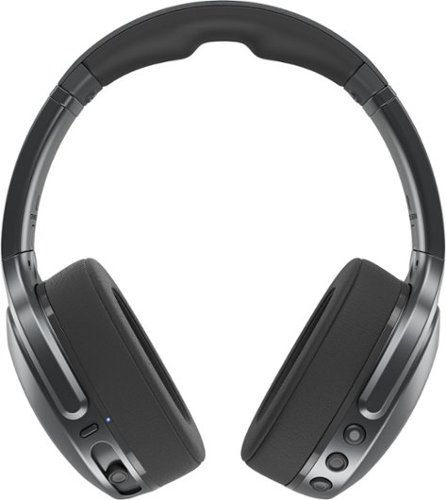
CRUSH THE ACTION WITH MIND-BENDING BASS. Meet your ultimate workout buddy. Crusher 540 Active is packing the power of Crusher Bass to fuel your most intense sessions. Our premium active headphone keeps you cool with breathable fabric ear cushions and makes post-workout wipe-downs effortless with its sweat- and water-resistant nano-coating. It~s Crusher for the gym ~ feel the bass, feel the burn.
Customer Rating
5
Most Impressive Crusher Bass So Far
on June 20, 2025
Posted by: Aaronxx7
The 540 Actives have a nice solid feel to them. The metal in the headband not only creates a nice firm clamp around your ears, but also adds a layer of ruggedness to them. The cushion at the top has a thick feeling rubber that mimics memory foam. It’s very soft, and smooth, making it very comfortable and easy to clean. The plastic feels light, but still seems pretty solid. All the buttons are very pronounced and easy to find with just your fingers, as the locations and shapes make them very distinguishable.
The Volume buttons can also be used to skip through tracks by holding them down for one full second. The button between the volume buttons can be used to activate your assistant with a double press, or play and pause audio with a single click. The Single click can also answer and end calls. A three second hold seems to disconnect or reconnect your devices even though the product guide says that this action should activate Spotify Tap.
Because these are designed to be worn while working out. The design and features are pretty straight forward and simple with real buttons. It does not have any touch sensitive features like some other high end headphones.
The ear cuffs are a nice breathable fabric, to help keep your ears cooler while working out, or for just listening for extended periods of time. If the ear cuffs become soaked or get too dirty for any reason, they can be removed by placing each of your thumbs inside the ear cuff and pushing outward against the edges of the ear cuff. The cuff will stretch out and the separate from the headset. The cuffs can be put back on by lining up the plastic lip on the cuffs with the ridge on the headphones, and stretching them back into place.
Great sounding hepatic bass. The hepatic bass can be easily adjusted with the slide lever, the amount of bass and the impact can be changed on the fly. On other headsets you would either need to stop what you are doing and adjust the EQ settings or crank up the volume to hear more bass. Increasing the volume, runs the risk of causing damage to the eardrums. The huge advantage here is that you can still feel heavy hitting bass without blasting out your ear drums.
I have owned earlier Skullcandy Crusher models with the hepatic bass feature, and this one is the best with creating the most natural sounding bass to date. The previous models had more of a mechanical vibration feeling mixed with the audio. The Active 540s just sound like real bass audio at any level.
The sound in general is very nice. All the different frequencies are easy to hear without distortion, even with the bass set at max. The max volume is way to high for my ears. I was able to set the headphones down on my table (at max volume) and still hear them clearly from across the room. The singing still sounded good without distortion. I am not suggesting you use these as a Bluetooth speaker, because some instruments were too low frequency to carry across the room like this. But it does show the impressive amount of audio and power these headphones can put out. I typically only listen to these on the lower volume settings. Everything sounds good between 15% to 25% on the volume meter. Anything around 25% and higher starts to feel uncomfortable for my ears.
I listened to audio books, and several different kinds of music including rap, hip hop and various types of rock. Everything sounded great, and it was super easy to adjust the amounts of bass needed for each type of audio. Even though these headphones are not noise cancelling, they are noise isolating. Which basically means that while wearing these, you can still hear outside sounds at lower volumes, but they will be muffled a bit. Cranking up the volume really makes it difficult to hear anything else around you.
I would also like to add that while the audio might sound pretty loud in your ears, no one around you will be able to hear anything at all until you reach a volume of 50% or higher.
The other thing I would like to note is that these headphones do not have any directional audio features like surround sound, Adobe or otherwise. They do have great stereo features with left and right, but that’s it.
Using these for calls works pretty well. I had no problem at all hearing any of the incoming voices or audio. On the outgoing audio, the callers on the other end could hear me pretty good as well, but the microphones seem to pick up a good portion of the background audio as well. So, trying to use these for calls around a lot of other noises could be a bit problematic.
Overall, if you enjoy loud audio, and bass that you can feel at any volume, then these are the right headphones for you. The clamping feature works great with keeping the headphones in place while working out and even jogging. The fabric ear cuffs help to dissipate heat and provide some noise dampening, and are easy to remove and clean. The Bluetooth range is great. The buttons are real and easy to find and use, as opposed to the flat touch sensitive ones on some other headphones.
The Volume buttons can also be used to skip through tracks by holding them down for one full second. The button between the volume buttons can be used to activate your assistant with a double press, or play and pause audio with a single click. The Single click can also answer and end calls. A three second hold seems to disconnect or reconnect your devices even though the product guide says that this action should activate Spotify Tap.
Because these are designed to be worn while working out. The design and features are pretty straight forward and simple with real buttons. It does not have any touch sensitive features like some other high end headphones.
The ear cuffs are a nice breathable fabric, to help keep your ears cooler while working out, or for just listening for extended periods of time. If the ear cuffs become soaked or get too dirty for any reason, they can be removed by placing each of your thumbs inside the ear cuff and pushing outward against the edges of the ear cuff. The cuff will stretch out and the separate from the headset. The cuffs can be put back on by lining up the plastic lip on the cuffs with the ridge on the headphones, and stretching them back into place.
Great sounding hepatic bass. The hepatic bass can be easily adjusted with the slide lever, the amount of bass and the impact can be changed on the fly. On other headsets you would either need to stop what you are doing and adjust the EQ settings or crank up the volume to hear more bass. Increasing the volume, runs the risk of causing damage to the eardrums. The huge advantage here is that you can still feel heavy hitting bass without blasting out your ear drums.
I have owned earlier Skullcandy Crusher models with the hepatic bass feature, and this one is the best with creating the most natural sounding bass to date. The previous models had more of a mechanical vibration feeling mixed with the audio. The Active 540s just sound like real bass audio at any level.
The sound in general is very nice. All the different frequencies are easy to hear without distortion, even with the bass set at max. The max volume is way to high for my ears. I was able to set the headphones down on my table (at max volume) and still hear them clearly from across the room. The singing still sounded good without distortion. I am not suggesting you use these as a Bluetooth speaker, because some instruments were too low frequency to carry across the room like this. But it does show the impressive amount of audio and power these headphones can put out. I typically only listen to these on the lower volume settings. Everything sounds good between 15% to 25% on the volume meter. Anything around 25% and higher starts to feel uncomfortable for my ears.
I listened to audio books, and several different kinds of music including rap, hip hop and various types of rock. Everything sounded great, and it was super easy to adjust the amounts of bass needed for each type of audio. Even though these headphones are not noise cancelling, they are noise isolating. Which basically means that while wearing these, you can still hear outside sounds at lower volumes, but they will be muffled a bit. Cranking up the volume really makes it difficult to hear anything else around you.
I would also like to add that while the audio might sound pretty loud in your ears, no one around you will be able to hear anything at all until you reach a volume of 50% or higher.
The other thing I would like to note is that these headphones do not have any directional audio features like surround sound, Adobe or otherwise. They do have great stereo features with left and right, but that’s it.
Using these for calls works pretty well. I had no problem at all hearing any of the incoming voices or audio. On the outgoing audio, the callers on the other end could hear me pretty good as well, but the microphones seem to pick up a good portion of the background audio as well. So, trying to use these for calls around a lot of other noises could be a bit problematic.
Overall, if you enjoy loud audio, and bass that you can feel at any volume, then these are the right headphones for you. The clamping feature works great with keeping the headphones in place while working out and even jogging. The fabric ear cuffs help to dissipate heat and provide some noise dampening, and are easy to remove and clean. The Bluetooth range is great. The buttons are real and easy to find and use, as opposed to the flat touch sensitive ones on some other headphones.
I would recommend this to a friend!
Share this review:


0points
0of 0voted this as helpful.
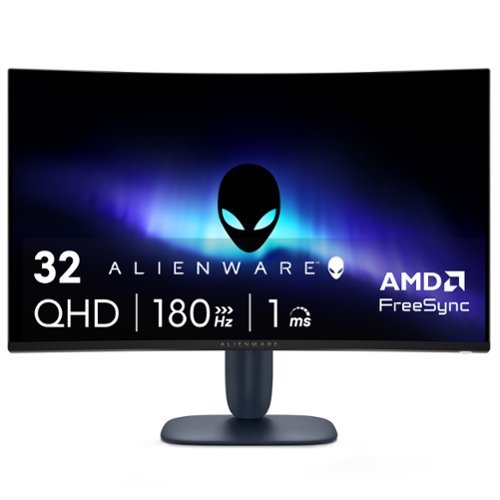
Alienware 32 Gaming Monitor - AW3225DM. Bring the action to life on a curved 32~ QHD gaming monitor featuring vivid colors and smooth visuals.
Customer Rating
5
Crisp Visuals and Immersive Views
on June 12, 2025
Posted by: Aaronxx7
Most Monitors and HDTVs have a response time of 10ms to 5ms, while most monitors have a response time of 5ms to 1ms. The lower the number the smoother the color transitions are.
This monitor is capable of response time between 4ms and 1ms, depending on the setting chosen. The response time is different from “refresh rate” and indicates how quickly a pixel can change color. The refresh rate determines how many times the screen is updated per second.
Typically measured in Hertz (Hz). A 144Hz refresh rate means the screen is refreshed 144 times per second. These two characteristics are independent, and the screen’s response time will still change colors at the set interval, regardless of the refresh rates.
This monitor is capable of response time between 4ms and 1ms, depending on the setting chosen. The response time is different from “refresh rate” and indicates how quickly a pixel can change color. The refresh rate determines how many times the screen is updated per second.
Typically measured in Hertz (Hz). A 144Hz refresh rate means the screen is refreshed 144 times per second. These two characteristics are independent, and the screen’s response time will still change colors at the set interval, regardless of the refresh rates.
So, if your monitor has a high refresh rate (like 144Hz or 240Hz) but a sluggish response time (say 10ms), you’ll still see some blurring, trailing or ghosting images. But if the response time is 4ms or quicker than you’re getting each of those refreshed frames much sharper and clearer.
Response times control clarity, while refresh rates control smoothness. When both of these features are optimal the picture as well as the action on the screen will look flawless. When it comes to gaming, optimal times for the refresh rate and response times will give you the best advantage on staying ahead of the competition, providing your gaming hardware and internet connection are up to par as well.
Response times control clarity, while refresh rates control smoothness. When both of these features are optimal the picture as well as the action on the screen will look flawless. When it comes to gaming, optimal times for the refresh rate and response times will give you the best advantage on staying ahead of the competition, providing your gaming hardware and internet connection are up to par as well.
This monitor is capable of handling refresh rates up to 180Hz with the display port, and 144Hz through the HDMI ports. Display Port cables can handle high bandwidths versus HDMI, so on most devices the Display Port will be favored when searching for the best quality.
The monitor does have setting for AMD FreeSync and VESA Adaptive Sync technology. These technologies let your hardware and monitor automatically sync up at optimal times to prevent tearing, stuttering and input lag, so that you don’t have to waist time manually adjusting both devices’ settings.
While the monitor is considered plug and play, you should set up one of the Sync options or adjust the monitor and hardware settings to get the most out of your viewing or gaming experience.
As with most computer monitors, there are no AUDIO ports on the device.
If you are going to use this monitor for a console or device that does not have a separate audio port for external speakers, there are small splitter boxes that can be bought separately and placed in line with the HDMI cable to extract the audio from HDMI cable, provided your connected hardware is transmitting audio and video through the cable. Just make sure that you get a splitter box that carries through the desired resolution/output you want on the monitor from your source device.
If you are going to use this monitor for a console or device that does not have a separate audio port for external speakers, there are small splitter boxes that can be bought separately and placed in line with the HDMI cable to extract the audio from HDMI cable, provided your connected hardware is transmitting audio and video through the cable. Just make sure that you get a splitter box that carries through the desired resolution/output you want on the monitor from your source device.
This monitor is capable of QHD, or Quad High Definition, 2560 x 1440 pixels. Which is also known as 1440p or 2K. Not all inputs and devices are capable of mixing the highest resolutions with the highest refresh rates and color options. So, try to match up the desired display output with the best outcome for your application. On the PS5, I had to drop the resolution down to 1080p, using the HDMI cable, so that I could reach a refresh rate of 144Hz, otherwise my game would have ran at only 60Hz at the higher resolution.
Some hardware devices will help you pick the best option, either directly with one of the standardized Sync features, or by actually showing your options in the settings.
For example, if the monitor was connected to the PS5, you would navigate through the settings to the “information for the connected HDMI device”. From here you can look at the possible video settings between the PS5 and the connected monitor. Here you can choose which setting you prefer. With this monitor you can either choose the 2K resolution, HDR and 60Hz refresh rate( through the HDMI), or you can drop the resolution to 1080P and get 120Hz refresh rate. If you are playing an online shooter then you would probably want to go for 120Hz for the quickest refresh rates and best possible outcome for your own response times. If you are playing a game like Ghost of Tsushima, then you would probably want to pick the 2K resolution for the most stunning visuals.
The monitor is also capable of vibrant colors with DCI-P3 95% color coverage and VESA DisplayHDR 400 certification. Most average monitors will have a DCI-P3 range of 90% to 98%, with 98% and higher usually included in the higher professional grade displays. 95% is actually pretty good, and will work well for most gaming and creative needs. VESA DisplayHDR 400 is considered the entry level for Display Ports, offering at least 400 cd/m2 and 900 million colors.
This monitor can produce 400cd/m2 and 1.07 Billion Colors, so it is a bit above the designated standard.
This monitor can produce 400cd/m2 and 1.07 Billion Colors, so it is a bit above the designated standard.
After many hours of viewing the intense colors and brightness your eyes can start to suffer. Blue Lights and bright lights can cause eye fatigue and even headaches in some individuals, so you might want to activate the monitors’ blue light solutions to reduce eye strain while preserving as much color as possible for longer viewing sessions.
Another feature of this monitor is the ability to do PIP. In the settings you can select one of the many different formats for the PIP windows.
Curved monitors typically offer a more immersive view, pulling you deeper into the game or movie, but can also offer a closer or easier view for multitasking multiple windows. A 1500R curve on a monitor refers to the radius of curvature, with 1500R meaning the monitor's curve is shaped like a section of a circle with a 1500 millimeter or 1.5 meter radius. This type of curvature is considered a good balance between immersion and practicality for various uses.
The 178 viewing angle lets you get a full view of the screen in various positions, but dead center is always going to be the best.
The 178 viewing angle lets you get a full view of the screen in various positions, but dead center is always going to be the best.
Typically curved monitors suffer from glare issues because of their shape and multiple angled design, however this model comes with an Anti-Glare screen to help reduce that issue.
There is a USB-B port on the monitor which serves as the upstream port for communication from your computer to the monitor's USB hub. It is essential for using the monitor's USB-A or USB-C ports to connect devices like flash drives, keyboards, mice, or other peripherals. Without a USB-B connection, the monitor's USB ports will only provide power and wouldn’t allow data transfer back to your PC
The monitor stand does let the monitor tilt and change heights. It lets you raise the monitor to a bottom clearance of 6.5inches or lower the monitor to a bottom edge clearance of 2.25 inches.
For the price and tier of this monitor it is a pretty good choice. The high resolution visuals look very crisp and the refresh rates offer a competitive edge over some of the alternatives. I played a few different games on the monitor with favorable results. I experienced very little to no input lag while playing Call of Duty, and had a positive KDR in all the matches played, although I did experience some glitching and internet lag in one of the matches, but I was still able to get some kills. Marvel Rivals ran pretty smooth, but as typical, when teamed up with a friend we experienced some connection lag, my accuracy was still pretty decent, but I did feel a little bit cheated on some of my shots. I tried the monitor with my Alienware laptop and PS5. While it did work fine on the PS5, I thought it worked it’s best on the PC.
I would recommend this to a friend!
Share this review:


0points
0of 0voted this as helpful.

Feel light. Feel free. Feel unlimited. Just under 2.5 lb, Zenbook A14 is born to go places. Discover new ways to create and communicate with its Snapdragon X Plus processor. Find total freedom with a multi-day battery life. Made completely with Ceraluminum in Zabriskie Beige, this minimalist laptop effortlessly fits into your routine.
Customer Rating
5
feather light, long lasting AI productivity
on June 5, 2025
Posted by: Aaronxx7
AI and ASUS are the next gen answer to productivity. ASUS has several different laptop models with Microsoft Copilot installed as the focus of its infrastructure. You just need to figure out which model best suits your needs. Something focused on performance for gaming, intense productivity or in-depth creativity, with limited battery life or something a little less intense with a much greater battery life.
I have the Zenbook A14 with the Qualcomm Snapdragon X Plus processor. Some of the other current models include the Intel Core Ultra 9 processor for more demanding needs.
The Snapdragon X Plus processor is an ARM based processor. Unlike the x86 processors, this Qualcomm processor offers a good balance of power and efficiency, with the bulk of its attributes leaning more towards efficiency with the best battery lasting times in the current 14” Zenbook line up.
This model’s battery life can provide up to 32 hours of use in certain situations. Obviously, more demanding tasks can shorten this expectation. I will tell you that most of my uses were very close to that expectation. I could easily go for several days before needing to charge the battery again. My primary uses would entail working through emails, using Excel spreadsheets, Word docs, PDF editing and some picture editing. The built in AI makes the workload not only go smoother but a lot quicker.
Because of the low draw cpu and gpu the laptop never seems to actually get too warm like older laptops or high performance laptops would. Some of my other laptops would actually get almost too hot to touch but this stays virtually cool almost all the time
The only time I saw it get a little bit warm was while I was using it when it was plugged in and charging. The heat pipe and dual lightweight aluminum fans with ASUS’s advanced cooling system keeps everything pretty cool for hours.
I cannot believe how light and thin this laptop is at less than three pounds it barely feels like you're carrying anything at all, And the 14 inch screen makes this laptop small enough to fit in any backpack or carry bag. This feels more like a chromebook than a laptop.
It seems crazy at this point in time that computers can virtually think for themselves. Today's AIs are leaps ahead of the digital personal assistants that most of us were familiar with using on our phones and computers. Copilot is very intuitive, and has a nice set of narratives to keep everything clean, respectful, safe and extremely helpful.
I was easily able to use Copilot to summarize information needed to write a document advising employees of upcoming changes. Copilot not only includes the facts but can create the document in an empathetic way if desired, or keep it precise and to the point with just the facts.
The options seem to be endless, and with Zenbook’s NPU working at Up to 45 TOPS, most everything seems to happen with the blink of an eye. Obviously more tasking operations will take a bit more time, depending on the amount of data needing to be processed.
NPUs typically work in conjunction with CPUs and GPUs, not as replacements.
The NPUs can then accelerate AI-specific computations, as that is their primary goal, freeing up the CPU and GPU for other tasks.
The NPUs can then accelerate AI-specific computations, as that is their primary goal, freeing up the CPU and GPU for other tasks.
NPU- Neural Processing Unit
a specialized processor designed to accelerate neural network computations and AI-related tasks
Unlike CPUs and GPUs, NPUs are optimized for parallel processing, making them efficient for tasks like image recognition, natural language processing, and other AI-intensive workloads. They are increasingly common in devices like smartphones, laptops, and even PCs, where they help offload AI tasks from the main CPU and GPU, improving performance and power efficiency
a specialized processor designed to accelerate neural network computations and AI-related tasks
Unlike CPUs and GPUs, NPUs are optimized for parallel processing, making them efficient for tasks like image recognition, natural language processing, and other AI-intensive workloads. They are increasingly common in devices like smartphones, laptops, and even PCs, where they help offload AI tasks from the main CPU and GPU, improving performance and power efficiency
They say that a good NPU for general AI use should be able to handle 40 TOPS.
TOPS= Tera Operations Per Second
(Which is how many trillions of operations a processor can perform in a single second)
TOPS= Tera Operations Per Second
(Which is how many trillions of operations a processor can perform in a single second)
45 TOPS should be sufficient for most AI photo editing and image generation. I did try out Copilot in the Paint app, to enhance some sketches. You can alter the amount of the AI “creativity” with a slide bar, for a little enhancement, or full on liberties.
You can also edit photos in the Paint app, and remove objects and backgrounds or insert something created by AI. Super resolution in photos, enhances the resolution of any picture
to increase the photo size and clarity.
to increase the photo size and clarity.
On a side note , if Microsoft's Copilot is not your preferred AI, there are other Windows based options out there.
Also, the microphone must have excellent gain on it, because the room needs to be completely silent in order for me to get a non interrupted conversation with the AI. If you have the TV or radio on, it will respond to anything being said through those speakers. Even with the TV muted, I have a fan in the background, and the AI stutters as it picks up the noise from the fan or any other background sound. (There should be a way to adjust the sensitivity on what the AI is listening to)
I tried benchmarking the laptop, but because it has an ARM processor, most of the benchmark software I have wouldn’t work with it. I was able to get a rating with Cinemark and it received a 520 for the multi core test putting it in the 4th tier, with 1625 being the top score. In the single core test, it received a 108, with the top contender getting a 113. The Passmark rating was 2842.5 I would also like to point out, that the scores received were pretty much the same on battery power or plugged in.
While this laptop doesn’t score in the top tiers, it did manage to handle all the productivity apps and multitasking I threw at it without issues. I had a secondary monitor plugged in and was running Excel, Chrome, Citrix, Word, and a PDF editor all with no issues.
Separately I was able to run some video editing software like Davinci without issues.
I did try to run some games just to see how they would work. Fortnite wouldn’t run because of a 430 error (which was not a capability issue), but either way it wouldn’t start. I was able to run Marvel Rivals, but not very well. It was very laggy with the standard setting, and was only able to reach an average of 8FPS. After adjusting the display setting to the lowest, the game ran at 11FPS, but still extremely laggy. So, gaming on this laptop is probably going to be limited to web based games and stuff like solitaire.
The 14-inch WUXGA OLED Display is pretty stunning with full HD, 1920 x 1200 resolution (16:10) and a 600-nit peak HDR brightness and brilliant Pantone®-validated colors even outdoors and a smooth 60Hz refresh rate.
The screen is just big enough, and bright enough to make streaming your favorite videos, weekly shows, and the latest movies most enjoyable. The audio is pretty loud and very clear with the dual super-linear speakers.
Windows Hello Infrared (IR) camera allows you to unlock your laptop quickly and securely
Enhance your video calls with improved lighting, background blur and video effects.
Live Captions - offer real time translations as you talk
Enhance your video calls with improved lighting, background blur and video effects.
Live Captions - offer real time translations as you talk
MyASUS provides a collection of handy apps and tools that help you get more out of your laptop, while GlideX enables you to get more done by sharing screens across devices. Plus, ScreenXpert helps you manage app windows across all connected displays
GlideX is a cross-device screen-sharing solution, with Mirror and Extend features that give you a bigger and better space for work and play. The Unify Control feature lets you use a single mouse and keyboard set to control different devices from one PC, across different OSes, so you don’t need to switch between devices
The recall feature is pretty nice although you have to have either a fingerprint or face recognition active. To Start it and use it. Although If you are the type of person that does not like to use the camera on laptops and such you can tape over the camera while attempting to use this as it will just ask you for your pin or password.
You can select any text on the screen while viewing the pictures taken from the recall app. You can also copy images and edit the pictures for sharing.
Once you are in the recall app You can either slide the scroll bar left or right to review the screenshots recorded while you have been using the laptop. You can also use the arrow keys left and right to navigate the same screenshots.
The oversized touch pad is nice, It makes using it a lot easier the shortcuts to adjust the brightness and volume on the touchpad are a nice convenient feature. There's even a shortcut on the touch pad to open up the ScreenXpert menu, In which you can set up items for task grouping and quick toggles of some features.
One of my favorite things about this laptop is the fact that it has virtually all the ports of a full sized laptop, and it comes with a scratch resistant exterior and shock resistant features with
US Military-Grade laptop durability MIL-STD 810H. It is also resistant to high and low temperature ranges.
US Military-Grade laptop durability MIL-STD 810H. It is also resistant to high and low temperature ranges.
Overall, this isn’t the most powerful laptop, but it has all the necessary features to get your work done. The NPU and embedded AI work great, helping to enhance and simplify any task. The laptop and webcam are good enough for content creators and streamers. It is also perfect for watching and listening to your favorite types of media. All this coupled with a light-weight design and low-power consumption architecture, makes for an extremely portable laptop with an incredible battery life.
I would recommend this to a friend!
Share this review:


0points
0of 0voted this as helpful.

Boost your productivity with the essential offline solution for all your PDF needs. With Adobe Acrobat Pro 2024, you can easily create, edit, convert, and protect your documents on Windows and Mac without connecting to the cloud. Manage your documents efficiently with new features including enhanced accessibility tools, star a document, and create a new form from scratch. The updated Acrobat interface also means that you~ll be able to easily find the tools you need to complete PDF tasks faster than ever. You can own this software for a full three years, no subscription required.
Customer Rating
5
Desktop Only / Non-Subscription / No Web or Mobile
on December 11, 2024
Posted by: Aaronxx7
Back to the basics.
Adobe Acrobat Classic is designed to be used offline. There are no subscription based features or fees. It has all the "latest" features and capabilities at release, but will not be receiving feature updates moving forward and does not offer web-based features like e-signing, sharing for review, and AI capabilities. If these lacking items are important to you, then you will have to go with the subscription based version. However, if you are looking for more of that "classic" feel of being able to install a program on your laptop and use it anywhere you take it, regardless of internet access or not, then this is the right app for you.
Adobe Acrobat Classic can be installed on as many devices as you want, BUT you can only have it active on two computers with an individual plan. This also limits you to only being able to use it on just one device at a time. You can activate or deactivate other versions of your app as needed through the app itself or your online account, but you can only have 2 devices " active" and only one of those in use at any time.
Adobe Acrobat Classic is based off of the Acrobat Standard 2020 version but with some new enhancements. They have updated the UI to make it easier to find and use the PDF tools. They have improved "tagging" for better accessibility for people with disabilities, and added a way to star documents as favorites or tag them for future follow ups. Plus, you can now create a form from a blank page.
They have also updated the crop and editing tools, and even made it simpler to protect and redact items, as well as remove or extract specific pages from your PDF, and they improved the handling of objects in Word and PowerPoint.
All of the original features are still there for editing PDFs as well as exporting, converting to different formats and compressing files. There are features to scan and extract or recognize text in any PDF. You can combine several individual PDFs to make one larger file, fill and sign PDFs as well as set permissions and protect your files.
I happen to use the conversion feature a lot as I am constantly needing to take data from our PDFs and insert that into my excel forms. It's pretty easy to convert the files to a new excel sheet, and then copy the items needed out of the new converted sheet and paste them over to my other workbooks.
Overall this works great as all Adobe products do , I just love not having to pay a fee every month for the next 3 years!
I would recommend this to a friend!
Share this review:


0points
0of 0voted this as helpful.
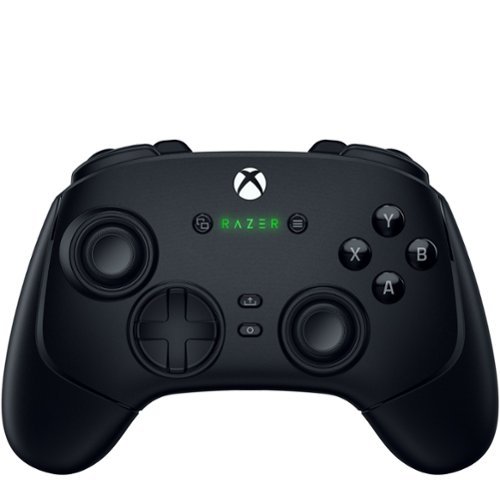
Stay one step, one shot, and one level above the competition with the Razer Wolverine V3 Pro~the definitive wireless esports controller. Officially licensed by Xbox, perform like the pros on console and PC with speed, control, and precision that helps you clutch for the win.
Customer Rating
5
Perfect Precision and Quality with Customization
on November 21, 2024
Posted by: Aaronxx7
Razer established in 2005, is designed by gamers for gamers.
They have invested heavily into bringing the best and most
reliable technology to their gaming accessories and the Wolverine
Pro 3 is proof of that.
They have invested heavily into bringing the best and most
reliable technology to their gaming accessories and the Wolverine
Pro 3 is proof of that.
The shape of the Wolverine Pro 3 is pretty much the same as the
OEM Xbox controller. The weight distribution is a little different.
The OEM controller feels heavier in the handles, were as the
Wolverine's weight feels a little more evenly distributed.
OEM Xbox controller. The weight distribution is a little different.
The OEM controller feels heavier in the handles, were as the
Wolverine's weight feels a little more evenly distributed.
The shape of the two controllers is basically the only common feature between them.
As soon as you start to press the buttons on the Pro 3, you can feel the difference and even hear it. The OEM buttons feel clunky and slightly wobbly. The Razer buttons actually feel more precise and have a more predictable sound and press. The thumbsticks feel more stable and even rotate smoother. The D-Pad feels much tighter than the OEM, and shares the same type of Ultra fast actuators as the action buttons on the Pro 3.
As soon as you start to press the buttons on the Pro 3, you can feel the difference and even hear it. The OEM buttons feel clunky and slightly wobbly. The Razer buttons actually feel more precise and have a more predictable sound and press. The thumbsticks feel more stable and even rotate smoother. The D-Pad feels much tighter than the OEM, and shares the same type of Ultra fast actuators as the action buttons on the Pro 3.
The number one issue with most console OEM controllers is
thumbstick drift. After a few good couple months of gaming, traditional analog
thumbsticks tend to take a beating and can start to cause
unwanted movements when the thumbsticks are in the zero position.
thumbstick drift. After a few good couple months of gaming, traditional analog
thumbsticks tend to take a beating and can start to cause
unwanted movements when the thumbsticks are in the zero position.
The Wolverine Pro 3 thumbsticks use Hall Effect technology to eliminate the
possibility of thumbstick drift. Hall effect joysticks are contactless, so there's no physical
contact between the moving parts, which means the sensors don't wear out.
They also have increased precision, improved accuracy, and reduced latency.
Which makes them the best option for any serious gamer.
possibility of thumbstick drift. Hall effect joysticks are contactless, so there's no physical
contact between the moving parts, which means the sensors don't wear out.
They also have increased precision, improved accuracy, and reduced latency.
Which makes them the best option for any serious gamer.
The OEM controller use analog thumbsticks with potentiometers,
in which a ring of resistive wire slides over a wiper that measures how
far you push or pull the stick. These mechanical pieces can wear out
quickly with a lot of intense gaming, and then start to become inaccurate
or slightly stick in a position of constant input, which causes drift.
in which a ring of resistive wire slides over a wiper that measures how
far you push or pull the stick. These mechanical pieces can wear out
quickly with a lot of intense gaming, and then start to become inaccurate
or slightly stick in a position of constant input, which causes drift.
The Pro 3 action buttons and inputs use Razer's Mecha-Tactile actuators.
where as traditional action buttons use a rubber or membrane form that when pressed down
creates the connection against the circuit board. The Mecha-Tactile actuators
have a shorter travel distance and are much faster to use and process.
where as traditional action buttons use a rubber or membrane form that when pressed down
creates the connection against the circuit board. The Mecha-Tactile actuators
have a shorter travel distance and are much faster to use and process.
Not only are the buttons and triggers ultra fast but so is the connection.
The wireless dongle uses an ultra-low-latency 2.4 GHz connection on
pc and the Xbox. Although for the best possible speeds the USB cable
can reach polling speeds up to 1000Hz on a PC.
The wireless dongle uses an ultra-low-latency 2.4 GHz connection on
pc and the Xbox. Although for the best possible speeds the USB cable
can reach polling speeds up to 1000Hz on a PC.
As if the high quality, ultra fast inputs and reliability weren't enough
the controller also comes with 6 additional remappable buttons.
As well as 2 additional snap-on joysticks for increased height, if desired.
Although if you decide the 6 additional buttons are not your style, you
can turn them off in the app.
the controller also comes with 6 additional remappable buttons.
As well as 2 additional snap-on joysticks for increased height, if desired.
Although if you decide the 6 additional buttons are not your style, you
can turn them off in the app.
Basically all of the buttons on the Pro 3 can be remapped
in the Razor companion app on the PC and Xbox.
Through the app, you can also adjust the sensitivity of the Thumbsticks
and triggers. You can even save your preferences into different profiles
for different games.
in the Razor companion app on the PC and Xbox.
Through the app, you can also adjust the sensitivity of the Thumbsticks
and triggers. You can even save your preferences into different profiles
for different games.
The triggers can be used in the traditional analog fashion with the variable distance and resistance
or you can flip the switches on the bottom of the controller to make these like the other action
buttons for instant action.
or you can flip the switches on the bottom of the controller to make these like the other action
buttons for instant action.
There is so much you can do with this controller, with it's adaptability of customization
and uses, that it's hard to pass up. This is so much better than an OEM controller in
every way, not to mention that it should last a good 5 times or more than an OEM
controller.
and uses, that it's hard to pass up. This is so much better than an OEM controller in
every way, not to mention that it should last a good 5 times or more than an OEM
controller.
Overall this controller is just as fast and precise as advertised. It has worked great
on every game I played for racing, shooting, fighting and general action games.
on every game I played for racing, shooting, fighting and general action games.
It's super easy to transition between the Xbox and PC, just by adding the dongle
or USB cable.
or USB cable.
The only negative thing I can say about it, is that the during some of the fighting
games, trying to pull of some intense combos caused me to pop off the higher
thumbsticks. So maybe if they had a better way to lock on it would be perfect,
or maybe I could just calm down a bit during matches.
games, trying to pull of some intense combos caused me to pop off the higher
thumbsticks. So maybe if they had a better way to lock on it would be perfect,
or maybe I could just calm down a bit during matches.
I would recommend this to a friend!
Share this review:


0points
0of 0voted this as helpful.
Aaronxx7's Review Comments
Aaronxx7 has not submitted comments on any reviews.
Aaronxx7's Questions
Aaronxx7 has not submitted any questions.
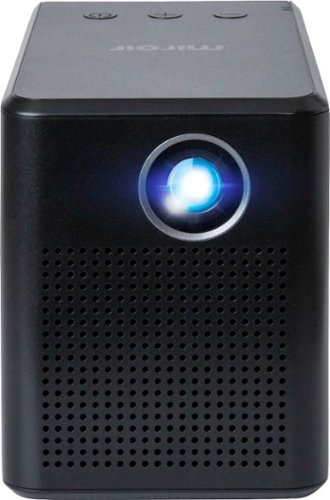
Stream HD content anywhere with this Miroir SYNQ mini projector. The powerful LED lamp projects bright, detailed images in native 720p resolution, and a 5W speaker adds accurate audio to your viewing experience. This Miroir SYNQ mini projector offers up to 3 hours of use per charge and includes an AC adapter for battery-free streaming.
How do you stream videos to your projector?
the only input is a HDMI port, which can be used to plug pretty much any streaming device like Roku, Firestick, Chromecast, etc.. into.
There is a USB power input right next to the HDMI port to be used with the streaming sticks, to make this more convenient and portable.
From here you can use the streaming functions of whichever device you plugged in.
There is a USB power input right next to the HDMI port to be used with the streaming sticks, to make this more convenient and portable.
From here you can use the streaming functions of whichever device you plugged in.
6 years, 8 months ago
by
Aaronxx7
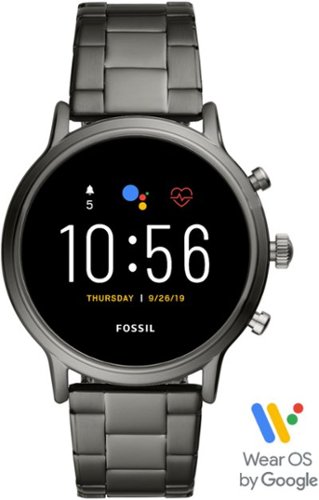
Train like a pro with this 44mm Fossil Carlyle HR smartwatch. Bluetooth functionality enables syncing with your smartphone, while the internal storage lets you work out with your favorite tunes. This swimproof Fossil Carlyle HR smartwatch features GPS to track your activity outdoors, and the heart monitor keeps tabs on your cardiac rate.
I am just starting to look at smartwatches and this caught my eye. I have a Samsung android smartphone and I would like to be able to download my iTunes library from my computer or ipod to it. Is this possible? Then can I sync it to my wireless beats?
Actually you can easily transfer media from your pc to Samsung by dragging and dropping files into the phone storage.
You must first connect the phone to your pc with the included charging cable, and wait for all the drivers to finish loading.
Then open a file location on your phone and start transferring the music.
Alternatively, if you have all your music in itunes, you could download the "Apple Music" app, from the google play store directly to your Samsung phone, and get all your music that way.
You should be able to listen through your wireless beats, and control the music through the smartwatch or your phone
You must first connect the phone to your pc with the included charging cable, and wait for all the drivers to finish loading.
Then open a file location on your phone and start transferring the music.
Alternatively, if you have all your music in itunes, you could download the "Apple Music" app, from the google play store directly to your Samsung phone, and get all your music that way.
You should be able to listen through your wireless beats, and control the music through the smartwatch or your phone
6 years, 9 months ago
by
Aaronxx7
Record high-definition road footage with this Rexing dual-channel rearview mirror camera system. The 1296p front mirror and 720p HD rear cameras capture traffic incidents at different perspectives, and the 10" touch-screen display provides simple control. The G-sensor on this Rexing dual-channel rearview mirror camera system ensures that videos recorded during detected collisions are locked.
Do you install mirror front and rear dash cams
the mirror dash cam fits over your existing mirror with rubber straps, so there is no real installation for this part.
the rear camera actual needs to be installed by mounting the camera to a spot on the back of the vehicle (usually near the license plate), and running wires along your baseboards and interior to reach the front rear view mirror. There is also a red wire by the rear camera that needs to be spliced into your reverse light wires.
So yes, there is a certain amount of installation that needs to be done, maybe 30 minutes to an hour time frame
the rear camera actual needs to be installed by mounting the camera to a spot on the back of the vehicle (usually near the license plate), and running wires along your baseboards and interior to reach the front rear view mirror. There is also a red wire by the rear camera that needs to be spliced into your reverse light wires.
So yes, there is a certain amount of installation that needs to be done, maybe 30 minutes to an hour time frame
6 years, 10 months ago
by
Aaronxx7
Type on your Chromebook or smartphone for effortless multitasking with this Logitech slim wireless keyboard. The built-in easy switch lets you pair and alternate multiple devices quickly, while the slim keys offer a comfortable, quiet typing experience. This Bluetooth-enabled Logitech slim wireless keyboard includes an auto-sleep feature that is activated when you're not typing to ensure long battery life.
Is this keyboard backlit at all?
no, there is no backlight, probably because it has a very low power usage.
With 2 standard AAA batteries you can get 24 months of use.
With 2 standard AAA batteries you can get 24 months of use.
6 years, 10 months ago
by
Aaronxx7
Set up a gaming station with this LG 24-inch Full HD monitor. AMD Radeon FreeSync technology eliminates screen tearing and stuttering, letting you play AAA titles smoothly, while the IPS display with a wide viewing angle delivers bright, vivid visuals from almost any direction. This LG 24-inch Full HD monitor has an antiglare coating for minimizing reflections.
Best buy shows this monitor as having 2 HDMI inputs, but the LG webpage for model number 24ML44B-B states it has only 1 HDMI and also shows only 1 in their pictures. Can someone clarify if this monitor has 1 or 2 HDMI inputs?
the LG - 24" IPS LED FHD FreeSync Monitor - Black
Model:24ML44B-B
does in fact have 2 HDMI inputs, as well as 1 VGA
Model:24ML44B-B
does in fact have 2 HDMI inputs, as well as 1 VGA
6 years, 11 months ago
by
Aaronxx7
The reliable Brother HL-L3210CW compact digital color printer is a great choice for the busy home or small office. Quick print speeds of up to 19 pages per minute~ plus manual feed slot accommodates varied printing needs and can handle a variety of paper types and sizes including card stock, envelopes and more. Connect with versatile options including built-in wireless or USB interfaces and print wirelessly from mobile devices. The 250-sheet capacity adjustable paper tray helps improve efficiency with fewer refills and handles letter or legal sized paper. Brother Genuine high-yield replacement toner cartridges help lower printing costs. Comes with a 1-year limited warranty and free online, call or live chat support for the life of your product. Prints up to 19 ppm~ in black and up to 19 ppm~ in color.
Does this printer have two trays, one letter and one legal?
no, there is only one tray with adjustable levers to accommodate the different types of media
6 years, 11 months ago
by
Aaronxx7
Exercise equip.
Do you no longer stock exercise equipment? Website only shows DVDs.
yes, Best Buy still offers a variety of exercise equipment :
https://www.bestbuy.com/site/health-fitness-sports/exercise-equipment/pcmcat243800050005.c?id=pcmcat243800050005
you can even type "exercise equipment" into the search bar, if the link doesn't work
https://www.bestbuy.com/site/health-fitness-sports/exercise-equipment/pcmcat243800050005.c?id=pcmcat243800050005
you can even type "exercise equipment" into the search bar, if the link doesn't work
7 years ago
by
Aaronxx7
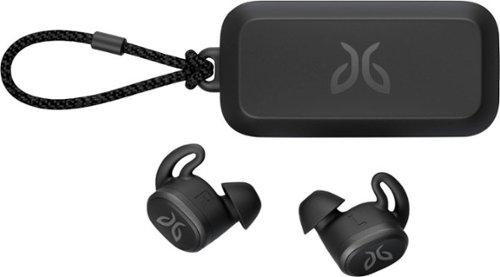
Pair your workout with these black Jaybird Vista wireless headphones. The rechargeable lithium-ion battery provides up to 6 hours of listening time, while the waterproof, sweatproof design helps prevent fluid damage. These Jaybird Vista wireless headphones have ear hooks and three pairs of soft interchangeable eartips for a secure fit and added comfort during extended periods of use.
Not only do I like to workout in my earbuds, but also use them for mowing. Are these loud enough to hear over the mower engine?
They are loud enough, but to protect your hearing, and make the music sound better, I always use a cheap pair of noise cancelling ear muffs with the ear buds, while mowing.
( you can get cheap noise cancelling ear muffs for around 5 dollars )
( you can get cheap noise cancelling ear muffs for around 5 dollars )
7 years, 1 month ago
by
Aaronxx7
Pair your workout with these black Jaybird Vista wireless headphones. The rechargeable lithium-ion battery provides up to 6 hours of listening time, while the waterproof, sweatproof design helps prevent fluid damage. These Jaybird Vista wireless headphones have ear hooks and three pairs of soft interchangeable eartips for a secure fit and added comfort during extended periods of use.
What is the play time on a full charge.
6 hours for each bud. so if you are using them simultaneously then its a total of 6 hours.
The buds can be used individually, so if you are just using one at a time, then you could get 12 hours total, before needing any type of recharging.
The buds can be used individually, so if you are just using one at a time, then you could get 12 hours total, before needing any type of recharging.
7 years, 1 month ago
by
Aaronxx7
Pair your workout with these black Jaybird Vista wireless headphones. The rechargeable lithium-ion battery provides up to 6 hours of listening time, while the waterproof, sweatproof design helps prevent fluid damage. These Jaybird Vista wireless headphones have ear hooks and three pairs of soft interchangeable eartips for a secure fit and added comfort during extended periods of use.
When I receive calls they sound far away. I even raised the volume all the way up. They also said they can't hear me well. Is there a setting in the app that I need to adjust that I can't find?
Try just using one bud for calls. These buds do not have an ambient noise pass through, because they are more used for cancelling out ambient noises while working out, so it's easier to enjoy your music.
If you use just one bud during a call it will sound more natural to you, and you will be speaking at a normal level, making it easier for others to hear you.
If you use just one bud during a call it will sound more natural to you, and you will be speaking at a normal level, making it easier for others to hear you.
7 years, 1 month ago
by
Aaronxx7