


Aaronxx7's stats
- Review count185
- Helpfulness votes779
- First reviewDecember 16, 2015
- Last reviewAugust 28, 2026
- Featured reviews0
- Average rating4.8
Reviews comments
- Review comment count0
- Helpfulness votes0
- First review commentNone
- Last review commentNone
- Featured review comments0
Questions
- Question count0
- Helpfulness votes0
- First questionNone
- Last questionNone
- Featured questions0
- Answer count97
- Helpfulness votes133
- First answerMarch 10, 2018
- Last answerSeptember 28, 2021
- Featured answers0
- Best answers6
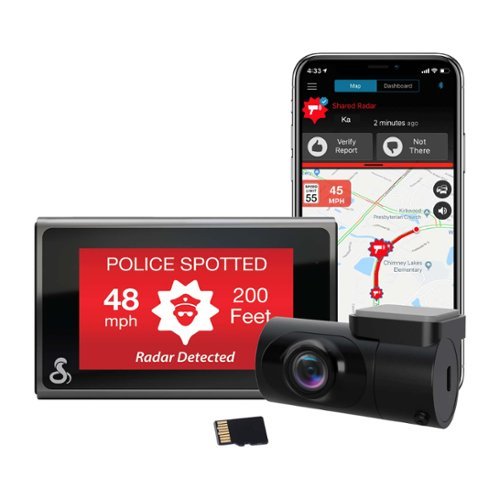
SC 400D - The ultimate solution to all of life's blindspots. Whether you're on the road or parked, a commercial driver or commuter, hauling cargo or chauffeuring kids - you're covered from all angles in all situations with a Cobra smart dash cam. With stunning, easily-sharable 4K UHD resolution, heads-up navigation, and live police alerts, there's no better way to protect the vehicles, drivers, passengers, and cargo you value most. See just how much peace of mind the award-winning Cobra SC 400D dash cam can provide.
Customer Rating

5
Awesome Videos and Features
on November 27, 2021
Posted by: Aaronxx7
from central new york
The Cobra SC 400D comes with most everything you would need for video protection of your vehicle and drive. The front camera has a 140 degree wide angle polarized lenses, and the rear camera has a 120 degree lens. Both are very good in low light settings, and have excellent clarity and color. I have had minimal difficulty reading license plates or street signs in the videos or snapshots, with items under 30ft from the vehicle. Words might still be readable at greater distances, but that depends on motion blurring and lighting. The clarity is much better than the HD dash cam I had previously installed. Unlike a lot of other dash cams this camera has the ability to simultaneously record up to 3 cameras. With the optional interior camera, you can record everything inside and out of your vehicle, giving you complete coverage. The optional interior camera(FV-CV1) comes with infrared night vision, and simply plugs directly into the side of the SC 400D. The rear view camera that comes with the SC 400D is an internal camera, it is not waterproof and comes with a sticker mount. It is to be installed very similarly to the front camera. There is an optional external camera that can be ordered for external mounting, the FV-EV1. The external camera is waterproof and comes with a screw mountable bracket.
The SC 400D has built-in Alexa capabilities. It is very easy to set up, simply add the new "skill" in the Alexa app on your phone, and it's good to go. Just a word of caution, there is a mute button on the bottom of the Dash Cam, when the mute button is pressed there is a red line that stretches across the screen of the display. None of the Alexa features will work while the mic is muted. When the mic is unmuted you can access all the typical Alexa features. If Alexa is not connected from the camera to a supporting phone, then a yellow line will appear. When Alexa is connected, it can be accessed by speaking "Alexa" or hitting the on screen button for Alexa.
The 3" touchscreen has on screen buttons for record /stop recording, snapshot, audio recording on/off, lock video/ emergency recording, and Alexa.
The Camera has an optional, but necessary voice command feature. The voice command "screen off" is actually the only way to completely turn the camera's display off. The SC 400D has a screensaver feature built in, that can switch the live stream off and show a darkened screen with the current mph and info, but it will not turn the display 100% off while driving. I tried pressing the power button at different lengths to simply turn the screen off, but it only resulted in powering off the device. I spoke with Cobra's tech support and they were unable to offer any solutions for turning the display off while driving. During the day the always on display is not an issue, but at night I do not like the constant distraction of light coming from my windshield. Luckily I was able to find the answer in the voice command features. I am hoping Cobra will offer an automatic screen off feature to the screen saver options, as an update some day. At least for now I can just tell the camera to turn the screen off.
The voice commands are actually extremely helpful while driving to activate some key features like snapshots, and locking important videos. These are currently the available voice commands; "screen on/off", "rear video on", "front video on", "record video", "lock video", and "take photo". Using the voice commands is a lot easier while driving than trying to touch the screen or camera in the right spot to activate a feature.
The SC 400D does come with several alert and emergency features. The most impressive feature is the "Mayday" feature. This feature automatically contacts a designated person of your choosing, with an emergency notification, alerting them of your emergency and location. The Mayday feature can be manually activated or automatically triggered by sensing a 5g impact. With the Drive Smarter Services you can choose to have incident reports automatically uploaded to the cloud or sent to your insurance company. The "Real Time Driver Alerts" is another feature that works through the Drive Smarter app and the connected community, here you can get live audible or visual alerts for; red light cameras, police, caution areas, speed cameras, and speed traps.
Just as a note, the emergency record feature will automatically grab the adjacent video , either before or after the selected video if the the button or action was initiated too closely to the beginning or end of the selected video.
As another note, the parking mode will only work if the camera can have a constant source or power, most auxiliary power ports in cars automatically turn off after a few minutes of the keys being removed, so you might need to install an another auxiliary port that has constant power or get a direct wire accessory kit from Cobra's website.
Watermarks can also be displayed on all videos, if selected, with the following information; GPS coordinates, speed, date, time, and driver ID stamp.All videos are recorded at 30fps with the available resolutions (4k)3840 x 2160, (QHD)2560 x 1440 , and (FHD)1920 x 1080p.The recorded videos have excellent definition and color clarity even in the evening. Some definition is lost in extremely low light situations, but the videos still look good and should be able to be used for any situation.
With the polarized lens and manual contrast adjustments you can have a clear and clean looking video in any bright lighting situation, but to be honest I did not need to adjust anything in the settings to get a clear video with the polarized lens in the morning while the sun was rising and still at a low angle. I personally was virtually blinded, but looking at the video, the solar flare and extremely bright sun were very well controlled and the video looked great considering the sun was shining in my path.
The main camera has a 140degree wide angle to capture more of your field of view. 140 to 149 degrees are actually the preferred angles for these types of cameras because it gives you increased field of view, without overly distorting the definition in the video. Typically with wide angle lens a warping effect can be seen in the corners and edges of the image, but most good cameras come with distortion correction built into the device and videos. The clarity and definition even in the corners of the videos is excellent with the Cobra Dash Cam.
I was also recently caught in a snow storm that was virtually a white out, everyone was driving 10mph or less due to the conditions and visibility at night. There was so much snow coming down that it was extremely difficult to see, however the SC400D was able to record a near normal looking video without the overexposed snow flakes blocking out it's vision.
Videos and snapshots can be viewed directly from the camera, or through the Driver Smarter app, available on Android and iOS. The Drive Smarter app adds a lot of extra functionality and options, so definitely install it. When you first launch the app it will automatically try to set up the connection between your phone and dash cam. You can access all of the camera's settings directly through the app, and activate all the extra alert and notification features, mentioned above.When the app is open, while driving, you will get a GPS map of your current location and some surroundings, the map follows your location with an icon on the screen, representing your vehicle, just like a regular GPS display.The second tab will simply display your speed, and direction, but also has additional tabs on this screen to show "threats", "notifications", and "incidents". The threats are the alerts put out by the community about speed traps, accidents in the road, cops or street cameras.
The app typically connects your phone and dash cam via Bluetooth, but will automatically switch to a WIFI connection when viewing or downloading recorded videos and images. You can also view a live stream feed directly from the camera over the WIFI connection. The WIFI is done all through the app by itself, there is no need to open your settings and search for a connection and enter a password and such. You might however, get prompted by your phone to allow the connection to the dash cam, so keep an eye out for that, otherwise you wont be able to view anything.
The dash cam comes with a 64gb microSD card which I filled with approximately 260 2-minute videos, equaling out to be about 520-minutes of HD recording. If you would like to fit more recordings you can either reduce the video resolution or buy another microSD card. The max size allowed for use is 256gb. There are a lot of different grade microSD cards out there, make sure you get one with high data transfer speeds, so that your dash cam will continue to be quick at its features. Slower cards can bog down high data devices. Currently, some of the top speed cards are performing at 100 megabyte per second (MB/s) read and 90MB/s write. The included card was a SDXC, V30, UHS class 3. Which should put that card in the 30MB/s write speed class. I would still recommend getting a faster speed card for the improved performance.
I have been extremely impressed with the video quality from the SC400D, it has managed to record great videos in all kinds of situations. The features are great and I am constantly getting alerts about speed traps, and caution areas up ahead. The Alexa feature works great too, and now that Alexa has a driving mode they have included hands free calling, so even if your vehicle doesn't offer it, you can still get it through Alexa. The dash cam voice commands are also a welcome addition to dash cams, I can't tell you how many times I used to fumble around trying to press a button on my old dash cam, just to take a snapshot, or lock a video while I was driving. Overall this dashcam is great, I am very pleased with it's performance.
Mobile Submission: False
I would recommend this to a friend!


Share this review:


+13points
13of 13voted this as helpful.
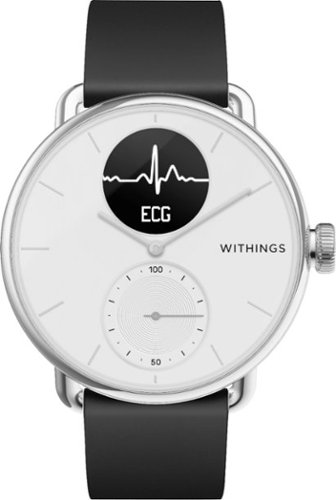
Discover ScanWatch, a hybrid smartwatch that detects heart health conditions and helps improve overall fitness. Nested in a high-end watch, state-of-the-art technology has been carefully selected to create Withings most health-oriented watch to date. Developed with cardiologists, this clinically validated hybrid smartwatch can alert a user to a possible case of atrial fibrillation (Afib). ScanWatch also offers in-depth activity and sleep tracking, water resistance to 5 ATM (165 ft), and an exceptional battery life of up to 30 days before it needs to be charged.
Customer Rating
5
Excellent Health & Fitness tracker w/30day battery
on November 20, 2021
Posted by: Aaronxx7
from central new york
Withings Scanwatch has hidden some pretty impressive technology behind the face of a traditional looking watch. The tech most people will be interested in is the ECG, heart monitoring abilities and SpO2 readings, plus the watch only needs to be charged once a month! The watch is also a fitness tracker, helping to keep track of your heart rate, physical activities, sleep quality, irregular heart beats(if any), breathing disturbances, calories burned and of course the time and date. In conjunction with the app you can also track (with manual entries); weight, blood pressure, calories consumed, temperature, fat mass, and workouts done without the watch. The app also offers general health tips, as well as displaying specific data collected directly from the watch for the day, or over a period of time. The watch is also water resistant for up to 165 feet, so no worries about sweat, spills or even taking it off to go swimming.
Scanwatch gives a very accurate ECG in relation to Atrial Fibrillation. The results from Withings concerning this data and claims have been extensively tested and compared to the industry's gold standard 12-lead ECG machines, and has been found to be just as accurate as the 12-lead machines within a 0.01% difference.
AFib is believed to be responsible for about 30% of strokes, and 90% of these events could have been avoided if AFib was detected at an early stage. AFib does not always present itself at a doctors office, so this watch is an extra level of protection for those concerned about this issue.
ScanWatch is an OTC device, however, its ECG feature has been tested and cleared under Rx by the FDA, and because of that, the ECG use in the app requires a healthcare professional to review and validate your data for a prescription and continued use. The data is sent from your phone to "Heartbeat Health", who is currently partnered with Withings to deliver these prescriptions free of charge to the user. It is all part of the process for using the ECG feature and is all automatic, there is no need for the user to do anything different or complicated for this to happen.
Keep in mind that this ECG is solely prescribed and should be used to detect and track atrial fibrillation. The EKG you receive in a doctor's office can also detect blockages, narrowing of the arteries, past heart attacks and enlargement of the heart. So this does not mean you can skip your regular EKG appointments with your doctor, but if you have heart concerns this watch is an excellent tool to help you keep track of your health in between doctor's visits.
ScanWatch includes three electrodes to measure the ECG. Two electrodes are inside the main body of the watch, and the third electrode is in the stainless steel upper ring, around the face of the watch. Users simply need to touch both sides of the upper ring to start recording an ECG, after activating the feature.
The SpO2 feature in ScanWatch uses a multi-wavelength sensor called PPG (photoplethysmography) sensor that emits and measures red and infrared reflections on the blood vessels in the wrist. The algorithm then compares the reflection at each wavelength to compute the SpO2 value.
In addition to all the amazing health tracking abilities, the watch also has a built in timer, stopwatch, and alarm functions. Through the app, the watch can also notify you of new messages (i.e., texts, emails, etc.) and selected phone apps notifications with a typed preview of the message and a gentle vibration.
The settings on the watch itself lets you check the battery life, enter the do not disturb mode, and enable quick look( turns on the screen when you turn your wrist).
All of the other settings like the app notifications and such can be accessed through the app on your phone.
There is even a "long press" shortcut option for quickly activating the ECG, Workout or O2 saturation feature.
You can set your goals in the app for weight loss, and daily activities tracked.
All of the other settings like the app notifications and such can be accessed through the app on your phone.
There is even a "long press" shortcut option for quickly activating the ECG, Workout or O2 saturation feature.
You can set your goals in the app for weight loss, and daily activities tracked.
You can even keep track of what you are eating, and your calories consumed and calories left for the day through the associated "myfitnesspal" app.
This app really helps out with dieting, as they have all the nutritional facts on practically everything there is to eat, all you have to do is enter the name and quantity of what you ate, or scan the barcode of packaged items and the app does the rest. The watch can display calories burned for the day, if selected.
This app really helps out with dieting, as they have all the nutritional facts on practically everything there is to eat, all you have to do is enter the name and quantity of what you ate, or scan the barcode of packaged items and the app does the rest. The watch can display calories burned for the day, if selected.
So far the watch has worked great for me. The battery life is no exaggeration, this thing lasts forever without a charge, and only takes 2 hours to reach another full charge. It has worked great at helping me keep my fitness goals, the watch has a smaller dial and hand on the face that gives you a quick constant look at your activity percentage for the day, so you can easily see if you need to take another walk around around the office or block to stay on track for the day. The ECG is a feature I use 3 or 4 times a month, as it always comes up normal, and I have never had a doctor diagnosed issue relating to this. The SpO2 feature works great as well, I usually check that during or after any exercise. The sleep tracker works pretty good too, it alerts me of poor nights of sleep and how many disturbances I had, which seems to be pretty accurate, because I always feel way more tired during those days with poor readings. The automatic fitness tracker seems to be pretty accurate at telling what kind of activity I am doing, so that it's one less thing I need to stop and manually enter. The heart rate tracking is actually pretty neat, here I can go into the app and look at my daily rates and see where my highs are, and what my average is for each day, this is a great tool to tell if your heart is typically working too hard. The watch actually becomes a necessity that you never knew you needed , it's not too big or heavy on your wrist. The look is simple yet elegant enough to go with any atire or situation. Even though it's sleek enough to forget you are wearing it, at a quick glance it's like having that workout buddy by your side saying, "your almost there" or "put the lead out, you got a long way to go". Then at the end of the day it's like you just stopped by the nurse's office and reviewed how you did, as you flip through the app and check your stats or do one last reading before bed.
Mobile Submission: False
I would recommend this to a friend!
Share this review:


+1point
1of 1voted this as helpful.
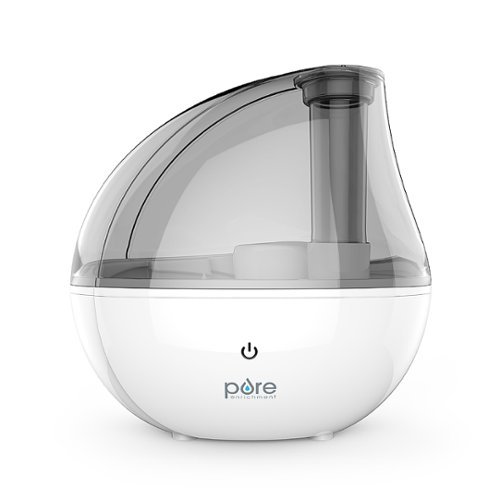
Moisturize the dry air in your home or office in minutes with the MistAire Silver Ultrasonic Cool Mist Humidifier from Pure Enrichment. This powerful and aesthetically pleasing tabletop humidifier is packed with smart features that make it the perfect solution for improving the air quality in any room.
Customer Rating
5
Whisper Quiet with impressive output
on November 18, 2021
Posted by: Aaronxx7
from central new york
This tiny humidifier will definitely surprise you with how efficient and quiet it is. To be honest, I can barely hear it at all. As soon as you touch the power button, it starts shooting out mist. The mist is dense enough to look more like a small amount of fog, and when it's on the "high" setting you might think you just bought a little fog machine.
It does not project the mist a great distance, it shoots up about 2 feet, and then drops about 2 to 3 feet from the device.Which is why this is advertised as a tabletop humidifier, it needs the manual height to help it circulate the mist better.
It's got a nice modern design to it, and is light enough and compact enough to fit on most desks, counters or stands.
Although this humidifier is best suited for a small room, it does work well in larger areas or offices by positioning it close to yourself, so that you can still feel the benefits of the mist in your direct area.
The mist nozzle at the top of the unit can be pivoted 360 degrees to easily redirect the mist to your liking.
The difference in air quality is definitely noticeable right away. The mist is very soothing compared to the typical dry winter air. I also suffer from dry eyes, so having this in the room is an even bigger benefit to me. The dryer my sinuses, the dryer I have noticed my eyes are especially while sleeping.
Keep in mind that humidifiers need to be cleaned on a regular basis to prevent scale and bacteria. There are several types of cartridges or additives available to aid in this. It is also recommended to clean the ultrasonic disk with only the included brush.
My only critique is that I think It would be nice if there was some indicator on the device to show you which setting you are on.There is only one button and a night light, and neither display anything specific enough to determine the high or low setting. Although the volume of mist is probably a simple enough indicator.
Overall, I love how portable this unit is, I can take it from room to room, wherever I go. I never thought such a small humidifier could make such a big difference. It really is worth the purchase.
Mobile Submission: False
I would recommend this to a friend!
Share this review:


0points
0of 0voted this as helpful.
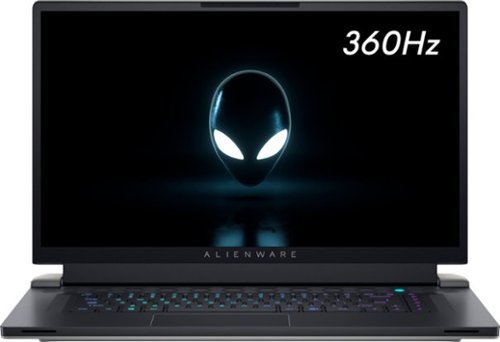
The new Alienware x17 is super thin, extremely light laptop . Now~s your chance to game with gear that knows no boundaries. The Alienware x17 gaming laptops with advanced Alienware Cryo-Tech~ cooling defy boundaries. Introducing Element 31 thermal interface material and a Quad-Fan Design. We are incorporating more fan blades, more copper materials, and vapor chambers to deliver ample power while dissipating the heat more efficiently and allowing the fans to run less resulting in reduced noise. The x17 features five tailored power states, and grants access to thousands of games with Windows. Alienware laptops will bring your favorite games into hyper-reality with Windows DirectX 12 Ultimate. Constructed with magnesium alloy and aluminum parts gamers can experience the evolved Legend Industrial Design that reimagines the way you game. The Alienware x17 is equipped with 11th Gen Intel processors, has more storage options with dual drives featuring SSD and includes powerful NVIDIA~ GeForce~ RTX 30-series discrete graphics.
Customer Rating
5
Great for extended gaming sessions!
on October 26, 2021
Posted by: Aaronxx7
from central new york
To date the X17 R1 is the thinnest 17" gaming laptop from Alienware. The exterior has kind of a simplistic yet elegant look to it, with dozens of inconspicuous air vents laid out across the machine.
The air vents are almost hidden due to the dark core design feature. The interior architecture is actually pretty impressive with a new independent quad fan system, a newly designed heat distribution panel system with a newly engineered thermal paste, new hyper efficient voltage regulator, a Cherry mechanical keyboard (that was co-developed with Dell to be their thinnest latest design), Advanced Optimus, and a "Comfortview plus" display with G-Sync. All these things combined make this a very impressive gaming laptop. Everything about all the new elements in this design really pushes this build for marathon gaming sessions.
The air vents are almost hidden due to the dark core design feature. The interior architecture is actually pretty impressive with a new independent quad fan system, a newly designed heat distribution panel system with a newly engineered thermal paste, new hyper efficient voltage regulator, a Cherry mechanical keyboard (that was co-developed with Dell to be their thinnest latest design), Advanced Optimus, and a "Comfortview plus" display with G-Sync. All these things combined make this a very impressive gaming laptop. Everything about all the new elements in this design really pushes this build for marathon gaming sessions.
Let's start with what I think is one of the most important features, the Comfortview Plus display. Blue light has been found to cause harm to the optic nerve in several clinical studies. Most people are unaware of the dangers of overexposure to blue lights or even how much blue light they are exposed to. Virtually all types of digital displays emit blue lights. However the new X17 R1's display comes with the Comfortview Plus, which by default is set to reduce the amount of blue light emitted by the 17" screen. The low level blue light mode complies with TUV Rheinland's specifications for blue light safety.
One study found blue light triggered the release of toxic molecules in photoreceptor cells. This causes damage that can lead to age related macular degeneration. Aside from the long term effects of blue light, there are also short term effects that can cause eye fatigue, headaches, and even problems with sleeping. Reducing blue light will not only make it healthy but also more comfortable for a person to game for hours at a time. It used to be disregarded as a myth that overexposure to tv screens could cause blindness, but today it is becoming more apparent that blue light emitted from any type of display screen can be hazardous to your eye's health. It's nice to see that Dell is being proactive with using low level blue light displays. There are several apps out there for pcs and mobile devices to help reduce blue light emissions as well. In addition to the hardware and software blue light filters, you can also buy eyeglasses with blue light blockers, in both script and no script forms.
One study found blue light triggered the release of toxic molecules in photoreceptor cells. This causes damage that can lead to age related macular degeneration. Aside from the long term effects of blue light, there are also short term effects that can cause eye fatigue, headaches, and even problems with sleeping. Reducing blue light will not only make it healthy but also more comfortable for a person to game for hours at a time. It used to be disregarded as a myth that overexposure to tv screens could cause blindness, but today it is becoming more apparent that blue light emitted from any type of display screen can be hazardous to your eye's health. It's nice to see that Dell is being proactive with using low level blue light displays. There are several apps out there for pcs and mobile devices to help reduce blue light emissions as well. In addition to the hardware and software blue light filters, you can also buy eyeglasses with blue light blockers, in both script and no script forms.
The new thermal solutions make keeping your system cooler a lot easier. The independent quad fan design, ties each fan to a specific component, and regulates the speed of that fan based on the need of it's related component, completely independent of the needs of the other items associated with the other fans. The fans can also work in tandem as needed.
Element 31 is an encapsulated gallium-silicone thermal interface material, that was designed by Dell to improve thermal resistance 25% more efficiently than previously used thermal compounds. Element 31 works with a specialized heat pipe and cooling fin design to pull heat away from internal components and push it out through the ample supply of vents.
The quad fan design is a patented technology in which a some fans move air through the system , while opposite fans move air through the chassis and over various internal hotspots creating a pressurized environment that dissipates heat quicker.
The quad fan design is a patented technology in which a some fans move air through the system , while opposite fans move air through the chassis and over various internal hotspots creating a pressurized environment that dissipates heat quicker.
The TCC Offset (Thermal Control Circuit ), is a feature than can be set in the BIOS to put the fan control on automatic based on your own personal temperature limit.
The hyper efficient voltage regulator allows the processors to run at their highest levels of performance for extended periods of time, without losing quality game play.
The Cherry keyboard is really a plus. What a bonus it is to have a Cherry mechanical keyboard in a laptop as thin as this. It took Dell 3 years of collaboration to finalize a Cherry keyboard with a 1.5mm travel to fit this application.
The Advanced Optimus increases battery life by dynamically switching from the discrete GPU to the integrated GPU, and back when the extra GPU power is needed. The Advanced Optimus directly connects the display to the discrete GPU making all this possible, and gives it the ability to use G-Sync. G-Sync is a newer technology that delivers the smoothest and fastest gaming experience by syncing the GPU to the refresh rate of the display. The 17.3" FHD display is 360Hz with 1ms refresh rate, 300-nits brightness and a 100% sRGB color gamut. During some cut scenes the performance overlays were reporting 400 to 500+ fps.
I played with the different overclocking options for days trying to get into the top 10% tier for similar types of gaming pcs. While the closest I got was only at 91%, that doesn't mean this is a bad machine, or even incapable of playing demanding games, because it could definitely play everything I threw at it and it played them very well. While this machine might not beat everyone in the highest FPS numbers, it does put out some respectable numbers, and will most likely beat everyone in the long haul. Like I said earlier, all the industry firsts in the machine are designed for stability and extended use. I tested the X17 on several different benchmark apps and it returned favorable results beating 82 to 91 percent of other computers with the same tests.
The Alienware Command Center and NVIDIA 's GeForce Experience offer modest yet safe overclocking options. Third party overclocking software such as Afterburner, offer a wider range of overclocking numbers. However, If you are not well versed in overclocking then the simplest way to improve the machines performance is with NVIDIA's GeForce Experience app. All you need to do is enable "experimental features" in the general settings, and then hit the "alt" button and "z" , click on performance and enable "automatic tuning"
This feature will safely overclock the GPU based on your current hardware and what it thinks you might need.
This feature will safely overclock the GPU based on your current hardware and what it thinks you might need.
The other option for automatic overclocking is to use Alienware's Command Center, and click on the "Fusion" tab.
Here you have a little more control over which parts of the performance you would like to change. You can change the "Power options", "Overclocking", and "Thermal"
If you click on each of the tabs, you will see the available choices. There are two preset overclocking profiles, the 2nd options yields the highest gaming performance of any of the automatic options.
You can also test and save your own overclocking or performance profiles in the command center.
Here you have a little more control over which parts of the performance you would like to change. You can change the "Power options", "Overclocking", and "Thermal"
If you click on each of the tabs, you will see the available choices. There are two preset overclocking profiles, the 2nd options yields the highest gaming performance of any of the automatic options.
You can also test and save your own overclocking or performance profiles in the command center.
A word of caution, third party overclocking apps do run the risk of causing heat damage to the internal components and break your laptop. It seems everyone is in pursuit of higher frame rates, but I would like to think there is such a thing as going to far. The X17 R1 puts out high frame rates that will show off the nice visuals, and give some advantage to the player. However if you are skilled at using 3rd party overclocking software there are a few options in the BIOS you might want to check out as well.
Typically higher FPS = better gaming for a few different reasons. The first is obvious, and that's because the general look of all the visuals will be improved, the action will be more fluid and edges will be smoother. The second benefit is timing, the faster the frames, the sooner you will notice enemy fire, or other animations in the game that depend on your reaction time for a better outcome. If the frames are slower than the action, then pretty much you have already died before you even saw the gun fire. The higher the frame rate, the more you will see, and have a better chance to react and counter whatever comes at you.
During actual gameplay of "Destiny 2" I was getting 115 to 155fps , averaging around 120
"Call of Duty Warzone" runs between 62 to 110, but primarily closer to 65
"Control" ran around 110 fps
"Fortnite" stayed at 60fps ( performance mode )
"Fortnite" in Alpha mode - around 170 FPS
according to 3DMark the following games should play at these frames per seconds in 1080p:
Battlefield V - 130+ FPS
Apex Legends - 140+ FPS
GTA V - 100+ FPs
Red Dead Redemption 2 - 50+ FPS
"Call of Duty Warzone" runs between 62 to 110, but primarily closer to 65
"Control" ran around 110 fps
"Fortnite" stayed at 60fps ( performance mode )
"Fortnite" in Alpha mode - around 170 FPS
according to 3DMark the following games should play at these frames per seconds in 1080p:
Battlefield V - 130+ FPS
Apex Legends - 140+ FPS
GTA V - 100+ FPs
Red Dead Redemption 2 - 50+ FPS
Also the best thing you can do for yourself and your laptop is to keep everything up to date, including the drivers and all software.
I must mention that I did have to update several drivers and pieces of software before downloading and playing any games.
There are a few add-on pieces of software that the laptop will automatically download, when you try to access different features within the Alienware and NVIDIA software.
I must mention that I did have to update several drivers and pieces of software before downloading and playing any games.
There are a few add-on pieces of software that the laptop will automatically download, when you try to access different features within the Alienware and NVIDIA software.
There is an unlimited amount of visual customizations you can do with this laptop as well. You can do per key, key sections, or whole keyboard RGB lighting patterns, You can even change the Alien logo, and rear Tron LED strip ( which has 100 micro LEDs ).
I think I mentioned most if not all the items that set this laptop apart from others, the rest is typical gaming pc stuff, like the Xbox Game Bar, The GeForce Experience overlays, the Alien Command Center and custom profiles for individual games, the Killer Control Center to prioritize your laptops internet traffic, and then general personalized setting preferences.
Overall this is a great gaming laptop that is also perfect for any type of creative or design software. It runs everything perfectly and has a strong CPU and GPU that will still be very capable in the next few years. There are more expensive options out there, but unless your job depends on it, I can't see spending the extra 1 to 2+ thousands of dollars just to say I have the latest of the latest, especially when a slick laptop like the X17 R1 can do it just fine.
Mobile Submission: False
I would recommend this to a friend!

Share this review:


+2points
5of 8voted this as helpful.
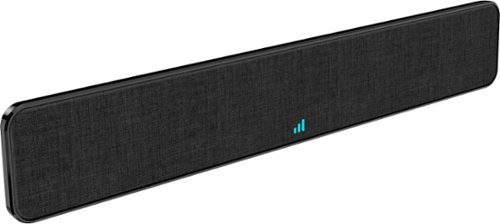
The Core Innovations ANT800BAR Indoor TV Antenna Bar allows you to access HDTV channels up to 80 miles away, free of charge. The signal indicator displays reception strength for peak viewing potential, and the omni-directional bar design provides connectivity in all directions. Enjoy content in up to 4K full HD where supported.
Customer Rating

4
Stylish and Functional
on October 20, 2021
Posted by: Aaronxx7
from central new york
Before buying this antenna or any antenna you should look online at either of the two websites Core Innovations recommends (dtv.gov/maps and www.tvfool.com) or do an online search for "over the air channel maps" .
With the right map you can see how many DTV or Over The Air channels are available in your area, and in what direction to point your antenna for the best reception. Most good maps will also tell you the distance from your location to the broadcasting signals so you know if the signal is even reachable.
In my area most of the channels are located to the south and north of me. So the ANT800BAR will work pretty well for me, as these signals are less than 80 miles away. The antenna is multidirectional so it will pick up the North and South channels at the same time. There are a handful of channels that are to the east of me, and while these channels do come in for me, they get a little pixelated from time to time. I have not mounted my antenna to the wall, just in case any of the channels to the East have something I really want to watch without the occasional pixilation.
The ANT800BAR also makes it pretty easy to find the best antenna direction with it's light up signal meter. It shows 1 to 3 bars of signal for worst to best reception status. It helped that I knew what direction to point my antenna based on the maps, but it was even easier using the signal meter on the antenna to find the best angle.
All the channels to the north and south of me come in great with HD clarity, and sound, if the show originally supported it. A lot of channels show older shows that were never recorded in HD formats, so they look a little blurry and are either stretched to fill the screen or have thick wallpaper type borders to the right and left of the show. But at least on those channels all the commercials come in crystal clear in HD with a widescreen format, sometimes the food looks so good from those commercials you would think you could smell it. When the signal broadcasted is in full HD, it looks just as good or better than cable tv.
There are no buttons or fancy switches, this is pretty much just a plug and play device, aside from the correct positioning. The antenna does come with an attached coax cable of about 9ft in length, and a power cord with adapter. The power cord is for the internal signal amplifier, and led signal status bars. I wasn't able to get an answer from Core's tech support service as to what decibel the signal is boosted at. The antenna can work without the power adapter, but it will not be able to pull in the longer distance channels, and you will not get the signal status leds.
The antenna has a nice design as it does not look like the ugly old antennas we grew up with. The ANT800BAR looks just like a sound bar, and will not distract from today's newer high tech TV's and other video equipment. When mounted to the wall, you can flip the antenna up, and swivel it from right to left on the wall, but it can not be angled in the right or left direction. It has a 3G/4G/5G LTE interference filter, to help restrict signal loss from cell phones.
Overall this is a pretty nice looking and good working antenna, if it could reach all 4 directions at the same time with max signal it would be perfect, but I don't think that's possible with an internal antenna.
Mobile Submission: False
I would recommend this to a friend!
Share this review:


0points
0of 0voted this as helpful.

The coolest coffee shop is right at home! The Mr. Coffee Single-Serve Iced and Hot Coffee Maker makes it easy to brew flavorful and refreshing iced coffee, or bold, pod-free hot coffee. When it comes to brewing coffee just the way you like it, the magic is in the measurements! This coffee machine~s easy-to-use measuring system and dual-sided scoop make brewing simple, and give you the perfect ratio of water and coffee and ice, for coffee that is always bold and flavorful~never watered down. To create iced coffee, the perfect concentration of hot coffee is brewed directly over ice. Want coffee in a hurry? No problem. The machine brews in under 4 minutes. Make up to 16 oz. of bold, pod-free hot coffee, or 22 oz. of iced coffee, with the single-serve reusable filter. Brew directly into the reusable tumbler, or your favorite mug, and enjoy!
Customer Rating
4
Quick Hot or Iced Coffee
on October 20, 2021
Posted by: Aaronxx7
from central new york
If you really enjoy fresh brewed iced coffee then this is the machine for you. The Mr. Coffee Single-serve Iced and Hot Coffee Maker advertises fresh brewed coffee in under 4 minutes. I timed a cup of 16oz hot coffee, and it finished in 3minutes. The Cold brew is about 10oz of water and brews in 2minutes and 45 seconds.
The machine is designed to use grounds and comes with a very nice reusable filter. The filter mesh is tight enough to not let any grounds through, and seems pretty durable. However, I would take a little caution in cleaning it, as to not try to force cleaning utensils or brushes too hard against the mesh. The brew basket and reusable coffee filter are the only parts recommended for dishwasher cleaning.
The machine also has a built-in storage spot for the coffee scoop, so you can always find it when you need it. The scoop has two separate measuring cups, one for hot brews, and one for cold brews. The cold brew scoop is twice as large as the hot brew to accommodate the added water the melted ice will make. The scoop has measurement instructions on it for how many of which scoops to use per amount of brewed coffee/ounces desired.
I like that this machine uses grounds, I have too many coffee machines that use pods, and I used to hate being limited by what kind of pods and flavors we could use. I know that both pod and ground coffee can also use the creamers and liquid flavor additives, but I like the versatility of buying the different grounds.
The iced coffee actually brews hot, but at a lower temperature than the hot brew. So just be aware it will melt most of the ice in the tumbler, I usually have an inch or two of ice remaining at the top of the cup after everything is finished. The iced brew usually keeps a temperature of about 42 to 45 degrees Fahrenheit. With no lid, my iced coffee maintained a 42 degree temperature for over 40 minutes. If you like your iced coffee freezing cold with tons of ice still in the cup, I would recommend brewing the cold brew as normally directed but without the ice in the cup first. Once the brewing is finished take the coffee and let it cool off either on the table or fridge for a bit. Once that is closer to room temp, then add all your ice and other additives for that super chilled iced coffee, with ice from top to bottom.
The cold brew button usually produces coffee at about 150 to 154 degrees Fahrenheit. So it might take a bit to cool off naturally, alternatively you could make it extra strong and put some ice in as you are waiting for it to cool off, before filling the whole cup with extra ice, if you still prefer the top to bottom tier of ice.
The hot brewed coffee usually reaches a temperature closer to 180 degrees Fahrenheit, so just a word of caution before that first sip.
The design of the coffee maker is pretty simple with just 2 buttons, one for hot and one for cold brew. The basket, filter and water reservoir sit underneath a flip top lid. The water reservoir has tiered measurement markings making it very easy to see what ounce coffee you can make. The drip tray lifts out for easy cleaning, and the unit is fairly compact. The unit is pretty light at just over 5lbs, so it is easy to pull out from under the cabinets to add water or coffee.
It measures approximately; 9.5" deep, 5.75" wide, 13" tall, and 17" tall with the lid up.
Overall this is a pretty nice coffee maker trying to marry the best of both worlds at an inexpensive price. It's a pretty nice machine, simple and to the point with some nice features, like the reusable filter, attachable scoop and insulated tumbler. It also makes great tasting coffee too.
I have included some pictures of the iced brew without using actual coffee to make it easier to see the remaining ice, in the normal cold brew process. If you don't need a cup filled top to bottom with ice, you can get a nice iced coffee in under 3minutes!
Mobile Submission: False
I would recommend this to a friend!


Share this review:


+9points
9of 9voted this as helpful.
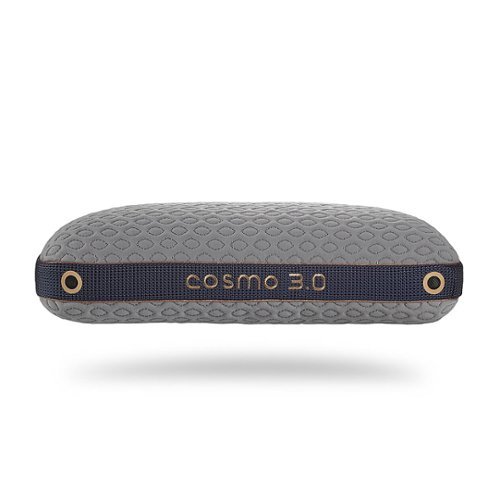
High-Low Performance Pillows. Available in 2 PillowID sizes for a personal fit and affordable comfort
Customer Rating
5
Great for keeping cool at night
on October 8, 2021
Posted by: Aaronxx7
from central new york
The Bedgear Cosmo pillow comes in 4 sizes/thickness builds for different sized people. If you are not sure which size pillow will be best for you, try checking out the mfgr website and answering a few questions in their "Find Your Fit" survey, there they will recommend the best build for you.
Bedgear offers 3 different types of cooling pillows, The Glacier , Cosmo and Flow. The Cosmo is a combination of the other 2 pillows utilizing both their cool to touch and air flow technologies compiled with 2 separate levels of firmness. Making the Cosmo pillow the most versatile pillow they make.
The Cosmo 1,2 and 3 are dual chamber pillows. The separate chambers consist of different materials to achieve different levels of firmness. The firmer side is built from a solid piece of memory foam. While the softer side is a fill of shredded materials. The 2 different firmness levels make this pillow great for virtually any kind of sleeping position.
I personally prefer sleeping on my side, but typically swap between my back, stomach and side throughout the night. Now I can just flip the pillow over for the desired firmness and position I am sleeping in. It's much easier to use just one pillow for this instead of trying to rifle through the different pillows I would normally sleep with. Using just one pillow on the bed also reduces the build up of heat trapped by a pile of pillows around my head.
I personally prefer sleeping on my side, but typically swap between my back, stomach and side throughout the night. Now I can just flip the pillow over for the desired firmness and position I am sleeping in. It's much easier to use just one pillow for this instead of trying to rifle through the different pillows I would normally sleep with. Using just one pillow on the bed also reduces the build up of heat trapped by a pile of pillows around my head.
The Cosmo 3.0 pillow is designed for full sized individuals that tend to either sweat while sleeping or have difficulty sleeping because of reverberated body heat that
gets trapped in standard pillows and bedding.
gets trapped in standard pillows and bedding.
The Ver-Tex cover features instant cooling technology, making every part of the pillow that you just touch feel cold.
This silky-smooth cover is designed to reduce overheating to keep you cool all night long. The cover is made from a silk-like fabric knitted with near-metallic fibers, to help dissipate and deflect heat. Metals have been used as efficient heat sinks for years, so it makes sense that someone finally found a way to infuse it with fabrics to create a type of heat sink cover. A person loses 7 to 10 percent of their body heat through their head, but when you are sleeping it feels like it's over 50 percent. Which is why the Ver-Tex cover is so refreshing while trying to sleep.
This silky-smooth cover is designed to reduce overheating to keep you cool all night long. The cover is made from a silk-like fabric knitted with near-metallic fibers, to help dissipate and deflect heat. Metals have been used as efficient heat sinks for years, so it makes sense that someone finally found a way to infuse it with fabrics to create a type of heat sink cover. A person loses 7 to 10 percent of their body heat through their head, but when you are sleeping it feels like it's over 50 percent. Which is why the Ver-Tex cover is so refreshing while trying to sleep.
The Cosmo pillows have Air-X mesh panels with air vents.
The mesh panels and air vents are on all four sides to provide continuous airflow both in and around the pillow. This helps hot air escape the pillow for a more comfortable sleep. The Cosmo 3.0 has a total of ten vents around the pillow. The Air-X is a 3D fabric technology that is made up of spring-like yarns engineered to create a type of air pocket. These pockets make it possible for air to pass through the fabric with ease, creating a breathing type action whenever you move the pillow. Hot air can easily be expelled as cool surrounding air then gets sucked back in.
The mesh panels and air vents are on all four sides to provide continuous airflow both in and around the pillow. This helps hot air escape the pillow for a more comfortable sleep. The Cosmo 3.0 has a total of ten vents around the pillow. The Air-X is a 3D fabric technology that is made up of spring-like yarns engineered to create a type of air pocket. These pockets make it possible for air to pass through the fabric with ease, creating a breathing type action whenever you move the pillow. Hot air can easily be expelled as cool surrounding air then gets sucked back in.
The internal parts of the pillow are mainly made from Bedgear's React Foam, React technology is made with breathable, conforming foam that responds to the pressures and movements of your body, sculpting itself to your precise shape. The foam has an open cell construction that allows for airflow and prevents heat buildup, so you don’t wake up in the middle of the night feeling overheated. The firmer side of the pillow has their React Foam Crown, which is a full size piece of foam specially designed to keep the air flow going. The softer side of the pillow is a shredded React Blend fill. This fill is made up of small pieces of the React Foam mixed with silk-like fibers, to keep the cooling effects possible.
Every part of this pillow is designed to maximize air flow through not only the cover, but all of its internal parts. Making this pillow extremely effective at keeping you cool through most of the night. Now, obviously this pillow does not have an internal fan or power supply to keep the temperature regulated throughout the entire night, and once you actually fall asleep, your movements will be reduced, hence the airflow through the pillow will be reduced. I have noticed that the pillow is definitely cool every time I lay down, and stays cool for a long time. However, your head can still end up feeling warm in the middle of the night and at morning time, if you are not moving throughout the night. But it's still not nearly as bad as a traditional pillow.
The cover is removable and washable, but no cleaning is suggested for the inside and chambers of the pillow. I found it feels better to just use the pillow as is, and not try to find a pillow case thin enough to make use of all the cooling features of the pillow, especially seeing as how the cover is washable. Overall I am very pleased with the pillow. I was a little nervous about the weight of the pillow, as it is the heaviest pillow I have ever owned, but the weight seems to have no negative effects on how I sleep or use the pillow. The dual chambers are also a huge convenience, I love flipping the pillow over feeling the newly chilled side, as I prop my head up on the firmer side to watch TV, and then flipping it back over to the softer side to actually fall asleep. So far everything has kept its shape and has shown no signs of wear. Everything about this pillow feels like it is made from the highest quality products available.
Mobile Submission: False
I would recommend this to a friend!
Share this review:


-1point
0of 1voted this as helpful.
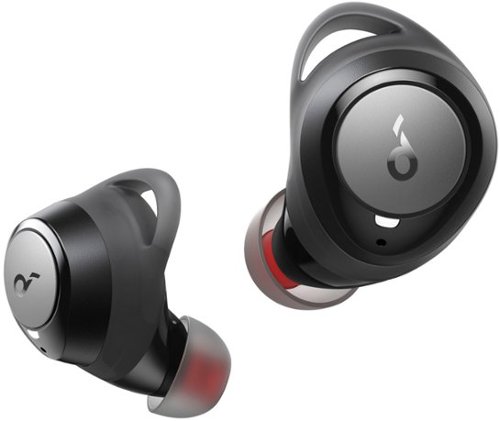
Choose between 22 different EQs to tailor your listening experience. Edit and save multiple sound profiles to match the genre, song, and environment. Enjoy 10 hours of listening from a single charge, and when you~re short on time, charge for 10 minutes to get 2 hours of playtime. Charge the case using the included USB-C cable or place it on a wireless charging pad to charge the case wirelessly. Life Dot 2S true wireless earbuds are protected against sweaty workouts, sudden rainstorms, and spilled drinks thanks to their IPX7-rated waterproof protection. The true wireless earbuds have silicone EarWings to ensure they stay securely in your ears. Use the Soundcore app to set the button profiles, customize your sound, and much more. Easily pair with your device and automatically connect with the last paired device next time you use your true wireless earbuds. Life Dot 2S is equipped with 2 microphones for clear calls. Switch to single earbud mode when making calls or listening to music while still maintaining awareness of the world around you. The charging case easily slides into your bag or pocket.
Customer Rating
5
Amazing Sound and Comfort
on October 6, 2021
Posted by: Aaronxx7
from central new york
The Life Dot 2S earbuds are amazingly comfortable, and put out a sound
quality high enough to rival competitors of 3 times the price.
.
quality high enough to rival competitors of 3 times the price.
.
The 8mm triple-layer dynamic drivers deliver 40% more bass and 100% more
treble for an incredibly rich audio experience. The soundcore app has 22
preset EQ options, for increased bass, treble, and specific audio styles.
The app even lets you save your own EQ customized preferences. Even without
the bass boost on the bass is very evident in these buds, however once the
bass boost EQ is selected it feels as if you are in a club with the bass
pounding through you. All of the audio channels are very intense and
surprisingly clear even at high volumes.
treble for an incredibly rich audio experience. The soundcore app has 22
preset EQ options, for increased bass, treble, and specific audio styles.
The app even lets you save your own EQ customized preferences. Even without
the bass boost on the bass is very evident in these buds, however once the
bass boost EQ is selected it feels as if you are in a club with the bass
pounding through you. All of the audio channels are very intense and
surprisingly clear even at high volumes.
Because of the intensity of these earbuds I found myself typically
listening at a volume of 25 percent. I was only able to reach a volume of
80% without feeling like I was going to hurt my ears with the higher
volume. The rubber eartips on these buds actually create a certain level of
exterior noise cancelation as well. It doesn't completely block everything
out, but it does a pretty good job at keeping most interfering noises out.
listening at a volume of 25 percent. I was only able to reach a volume of
80% without feeling like I was going to hurt my ears with the higher
volume. The rubber eartips on these buds actually create a certain level of
exterior noise cancelation as well. It doesn't completely block everything
out, but it does a pretty good job at keeping most interfering noises out.
The ear buds can even be used independently of each other to better keep
track of what's going on around you( keeping one ear open), and extend your
overall battery use of the buds. They are advertised for 40 hours of play,
using the case every ten hours to charge the buds, before having to find an
additional charging source ,ie. a wall or car charger. The case can even be
charged though any wireless phone charging pad you might already have.
If you are on a long trip and really need more than 40 hours of usage, you
could try using just one bud at a time, hence doubling your total usage
to 80 potential hours. Both buds can be used independently for music,
movies or phone calls.
track of what's going on around you( keeping one ear open), and extend your
overall battery use of the buds. They are advertised for 40 hours of play,
using the case every ten hours to charge the buds, before having to find an
additional charging source ,ie. a wall or car charger. The case can even be
charged though any wireless phone charging pad you might already have.
If you are on a long trip and really need more than 40 hours of usage, you
could try using just one bud at a time, hence doubling your total usage
to 80 potential hours. Both buds can be used independently for music,
movies or phone calls.
Each bud has a button for the typical audio options on earbuds. You can
change around the button assignments through the app, but can not add new
or customized actions. The app also helps to keep track of the battery
levels. The buds announce their battery status every time you put them on,
but it is not the actual percentage, it's just a description of "high",
"medium" and "low" type of alerts.
change around the button assignments through the app, but can not add new
or customized actions. The app also helps to keep track of the battery
levels. The buds announce their battery status every time you put them on,
but it is not the actual percentage, it's just a description of "high",
"medium" and "low" type of alerts.
The dot 2S comes with different size ear tips and wings to be able to
accommodate virtually any ear size. Once the correct size is selected, the
lightweight design and flexibility of the eartips and wings make these buds
go unnoticed in your ear. The design also helps keep these in your ear, not
once did it feel like they were going to fall out of my ear, no matter what
I was doing.
accommodate virtually any ear size. Once the correct size is selected, the
lightweight design and flexibility of the eartips and wings make these buds
go unnoticed in your ear. The design also helps keep these in your ear, not
once did it feel like they were going to fall out of my ear, no matter what
I was doing.
The Dot2S is also IPX-7 rated to protect the buds from sweat rain, or
accidental submergence in water up to 1 meter for up to 30 minutes.
accidental submergence in water up to 1 meter for up to 30 minutes.
The charging case is small but still seems a lil bulkier than what I'd
prefer. The case offers quick charging , just 10 minutes will get you 2
hours of playback. The case itself can be charged with either
wireless charging pads or an USB C cable.
prefer. The case offers quick charging , just 10 minutes will get you 2
hours of playback. The case itself can be charged with either
wireless charging pads or an USB C cable.
Overall the sound quality and fit of these earbuds is simply amazing,
especially when you consider the price.I still can't believe how good these
earbuds sound.
Even though they are not advertised to work with Dolby Atmos, the 3D sound
capabilities of these earbuds is very similar. The directional audio is
very precise.
especially when you consider the price.I still can't believe how good these
earbuds sound.
Even though they are not advertised to work with Dolby Atmos, the 3D sound
capabilities of these earbuds is very similar. The directional audio is
very precise.
Mobile Submission: True
I would recommend this to a friend!
Share this review:


-1point
0of 1voted this as helpful.

The Oster Pulverizing Power Blender with High-Speed Motor is perfect for creating delicious and nutritious smoothies, frozen drinks, sauces, and more. This blender features a premium metallic finish, and a powerful 800-watt motor with ice-crushing power. It effortlessly takes ice from cubed to crushed in seconds. Its durable 6-cup Boroclass glass jar is thermal shock-resistant, shatter-resistant, and dishwasher-safe for easy cleanup. This versatile Oster blender has a Crush Pro 4 stainless steel blade, as well as 8 speeds (including Stir, Mix, Chop, Blend, Liquify, Puree, and Pulse) to easily pulverize and chop a wide variety of ingredients for all your kitchen needs. It includes a convenient 2-ounce filler cap that has built-in markings for easy measuring and pouring of ingredients. This blender is built to last. It is designed with an all-metal drive for increased durability and also comes with a 3-year satisfaction guarantee.
Customer Rating
5
Quietest Blender I've used
on September 28, 2021
Posted by: Aaronxx7
from central new york
The Pulverizing Power Blender has an 800 watt motor with an all metal drive and stainless steel blade, making it capable of crushing ice and any other foods in seconds.
The motor is not only powerful, but it's actually pretty quiet compared to other blender models, it sounds about 50% quieter than the more expensive blender I got about a year ago.
Not only is this blender powerful and quiet, it's very stylish with a metallic finish for the base and real glass pitcher that is thermal shock, shatter resistant, and dishwasher safe. The center cap on the lid can be removed to add more ingredients and can be used as a small measuring cup. The cup and lid press down firmly making a watertight seal. As with all blenders, if there is not enough liquid to support all the ingredients then things do not flow and mix properly causing only the portion around the blade to get blended. Here is where the water tight lid comes into play, instead of diluting your mix, lift the whole pitcher off the base and tilt it on it's side and shake the ingredients around (make sure to hold the lid closed, just in case). This way you can get everything blended without adding unnecessary additives. The pitcher swivels slightly on the base to unlock or lock it in place.
The pitcher holds 6 cups, and the blender has 8 different speed settings for various levels of chopping and pureeing. There are some tips included in the instructions for the best ways to load the blender and chop ice for minimal complication. Obviously no matter how good the blender is, you can still overload the device or jam the blades, so it is actually helpful to read the tips.
There isn't much else to say about this blender, it sounds and works great, we had no problems making shakes, and smoothies. The puree feature even broke down the tiny berry seeds from strawberries, blackberries and raspberries. Something my other blender never did, so it was a nice surprise to actually have a "smooth" smoothie. The chopping features work well to break down vegetables for salsas and soups, just make sure you are light on the pulses and shakeup or manually mix your ingredients for best results. For the price I am very impressed with the quality and performance of this blender!
Mobile Submission: False
I would recommend this to a friend!
Share this review:


0points
0of 0voted this as helpful.
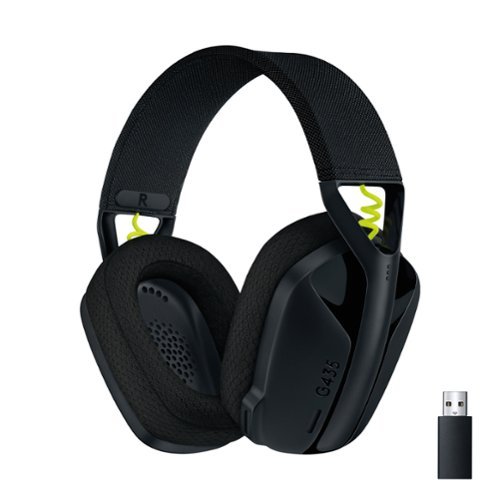
Play doesn~t end when the game does. You play games, play music, and play with friends. It~s who you are. All the time. That~s why we designed the G435 Headset for every aspect of your life. The combo of gaming-grade LIGHTSPEED wireless and Bluetooth give you the freedom to wirelessly connect to your PC, phone and other devices. Its 40 mm drivers deliver incredible sound while the dual beamforming mics eliminate the mic arm and background noise. Play never ends with G435.
Customer Rating
5
Lightest Headset Ever!
on September 28, 2021
Posted by: Aaronxx7
from central new york
The G435 headset might not have some of the bells and whistles of other more expensive headsets, but what it does have it excels at.
The G435 has to be the lightest headset I've ever owned. At 5.8 ounces it seriously is almost completely unnoticeable, while wearing. The ear cuffs are a nice lightweight comfortable foam that also helps to absorb exterior sounds. The foam is breathable and keeps your ears from getting too hot during long periods of use.
The G435 also saves some weight by not needing an extending or protruding microphone arm. The dual beamforming mics pull sounds from the front of the unit while cancelling out sounds from the back and sides. The mics are hidden inside 2 slots on the front of the left ear cup. The placement of the mics really does help for capturing virtually only your vocal audio. I tried placing the headset on backwards while talking, and it was almost impossible to hear me. With the headset worn correctly the audio comes through loud and clear.
The 40mm speakers pump out a ton of sound while keeping the ear cups light and compact. The headset is so light that it's very surprising how good everything sounds and works. The G435 puts out incredible 3D sound , and is compatible with Dolby Atmos, Windows Sonic, and Tempest 3D AudioTech. I used the headset on my PS5 and cellphone. The 3D audio from the PS5 sounded excellent with very precise sound direction. It was very easy to pinpoint all audio effects like shots fired, explosions, and footsteps. With Dolby Atmos enabled through my cellphone music and movies sound absolutely incredible. There is enough bass and volume to really enjoy the sound effects and music.
There are no built-in EQ profiles, but the audio frequencies and balances can be adjusted by most of the connecting devices. The headset is plug and play with any device that has a USB port on it, simply plug in the USB adapter and everything is good to go. To connect using the Bluetooth feature, turn on the headset and then hold the mute button for about 2 seconds, then complete the pairing procedure on the connecting device. You can also hold the mute button to switch the audio back to the USB adapter. The headset can be used wirelessly on anything with a USB or Bluetooth audio option. The only thing missing is the 3.5mm audio jack, so if you are looking for a wired connection, that won't happen here.
Logitech made this headset with gamers in mind, with the ultra lightweight design, foam ear cuffs and 18 hour battery length, making it completely possible to game all day with these on. Plus, the G435 uses a Lightspeed wireless connection to reduce audio lag to a minimum with a maximum range of 33ft.
The look of the G435 is very slim, and currently comes in three different color options. The ear cups are very slender and compact, the whole design looks like it would be for a small child, but is built to fit full size adults. The ear cups fit snugly around all ear sizes. The headband is framed with lightweight durable plastic and covered with a thin comfortable fabric. The headband is expandable through a slide on the outer part of the ear cups. The headset is also made from 22% recycled materials and Logitech also participates in Carbon Neutral and Responsible Packing programs to help make a difference in our environment.
Overall this headset is the most comfortable and lightweight headset I have ever used. The buttons are easy to feel and differentiate while wearing, so there is no need to keep removing the headset to physically look for the button you want. The 3D audio is awesome with crisp clear sounds for games and videos. It easily connects to my phone and sounds nice and clear during phone calls. The virtual boom mics also work better than expected with in game chat audio and calls sounding loud and clear on the other end. For the price and purpose the G435 is top notch.
Mobile Submission: False
I would recommend this to a friend!
Share this review:


-1point
0of 1voted this as helpful.
Aaronxx7's Review Comments
Aaronxx7 has not submitted comments on any reviews.
Aaronxx7's Questions
Aaronxx7 has not submitted any questions.
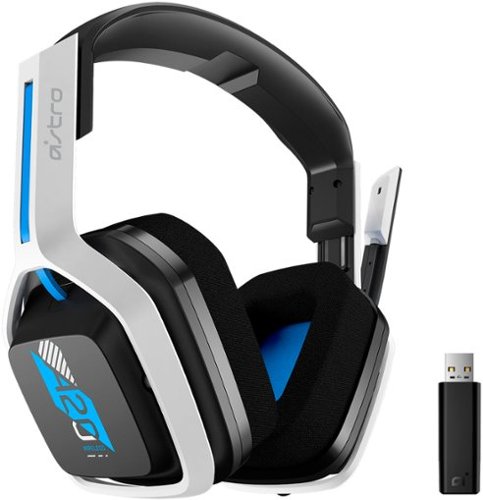
The A20 Wireless headset Gen 2 is designed to give you gaming audio freedom on several levels. Its 2.4 GHz signal provides an extended wireless range and with the flip-to-mute microphone you can easily choose if you want to be heard or not. Additionally, the headset~s long lasting comfort and battery life allow you to game through those marathon sessions.
Does everything come in the box for it to work correctly with the ps5 or do i need the purchase the hdmi adapter on astro website that is sold separately?
yes, the included dongle will work on the PS5
5 years, 11 months ago
by
Aaronxx7
The A20 Wireless headset Gen 2 is designed to give you gaming audio freedom on several levels. Its 2.4 GHz signal provides an extended wireless range and with the flip-to-mute microphone you can easily choose if you want to be heard or not. Additionally, the headset~s long lasting comfort and battery life allow you to game through those marathon sessions.
Do you need to update the headset when you get it in order to use it
no, you do not need to update it before use.
It's plug and play
It's plug and play
5 years, 11 months ago
by
Aaronxx7
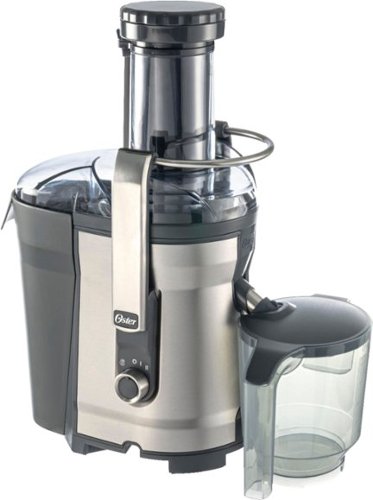
Juicing at home means great nutrition and delicious drinks whenever you want them, and saving money, too. Now we've made it easier than ever to turn healthy fruits and vegetables into delicious, colorful, vitamin-packed juices right at home, with faster cleaning and more convenience. With patented auto-clean technology, this Oster Self-Cleaning Juice Extractor rinses and scrubs hard-to-clean pulp and fiber from the filter in just seconds, for hands-free cleanup. This versatile Oster juicer has an extra-large food chute that fits most whole fruits and vegetables~that means less prep work for you. The power-performance, 1000-watt dual-speed motor easily extracts both soft and hard ingredients in seconds. The convenient drip-stopper nozzle prevents dripping after juicing, and the stainless steel locking arm ensures the juicer works only when locked and secure. The parts are BPA-free and dishwasher-safe.
What are the dimensions of the juicer unit fully assembled? I looked for this information in the "specs" section but it isn't listed.
The overall width and depth are about 7.5" x 11.5", and the height is 18.5"
5 years, 11 months ago
by
Aaronxx7

Brew coffee at your leisure with this Breville Vertuo Next Classic espresso machine. Centrifusion technology with spin rates of up to 7000 rpm ensure thorough coffee extraction, and the included 12 Vertuo coffee capsules introduce you to a variety of coffee flavors. This Breville Vertuo Next Classic espresso machine is Bluetooth-enabled for easy updates, installation and synchronizing with the Nespresso mobile app.
Does this machine with Bluetooth auto brew?
No, the wireless feature is for updating software only (at this time)
6 years ago
by
Aaronxx7

Power disturbances can cause equipment damage and lessen your electronic devices lifespan. During power disturbances, you also risk losing connection to your critical devices. Ensure you keep connected to what matters the most with APC Back-UPS.
What replacement battery does the UPS take?
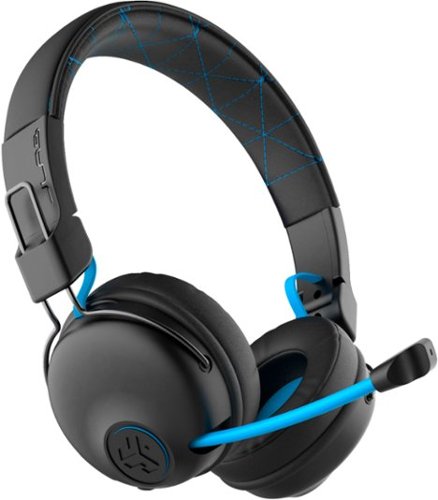
Hear all your games in high-quality sound with this JLab Play wireless gaming headset. With an increased mid to high frequency response and super-low 60 ms latency, this headset is able to deliver clear vocals and enhance spatial awareness without lag. JLab~s Play wireless gaming headset delivers over 22 hours of playtime and compatibility with PCs, consoles and mobile devices to handle every session.
where is the micro phone? can it be used for a call center?
the microphone pulls out of the right earphone.
It could probably be used in a call center, if your phone base has a 3.5mm headphones plug
It could probably be used in a call center, if your phone base has a 3.5mm headphones plug
6 years, 1 month ago
by
Aaronxx7
Hear all your games in high-quality sound with this JLab Play wireless gaming headset. With an increased mid to high frequency response and super-low 60 ms latency, this headset is able to deliver clear vocals and enhance spatial awareness without lag. JLab~s Play wireless gaming headset delivers over 22 hours of playtime and compatibility with PCs, consoles and mobile devices to handle every session.
Is it compatible with ps4 & xbox?
yes, with the included aux cable you can plug it into your controller
- no third party wireless devices can connect wirelessly to the console, because Sony , Microsoft and Nintendo do not allow it
- no third party wireless devices can connect wirelessly to the console, because Sony , Microsoft and Nintendo do not allow it
6 years, 1 month ago
by
Aaronxx7
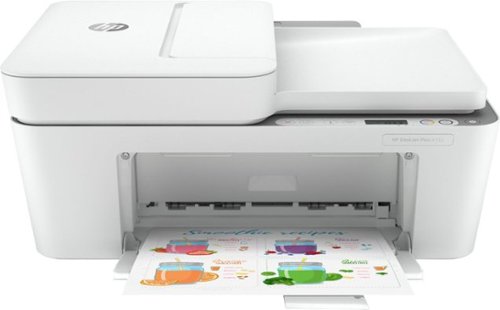
Reliability meets modern multitasking with the HP DeskJet Plus 4155 all-in-one printer. Designed to save you time, this all-in-one printer helps you quickly tackle print, scan, and copy jobs with the 35-page automatic document feeder. Send secure faxes from virtually anywhere with your smartphone. With HP Instant Ink, this wireless printer automatically orders ink and delivers it straight to your door with up to 50% savings on ink (subscription required). Get better range and fast, reliable connections using dual-band Wi-Fi with self-reset. Set up your color printer in a few easy steps, then connect, and print from any device using the HP Smart app. The HP Smart app also lets you scan and share your documents to Dropbox, Google Drive, e-mail, or the cloud.
Is this printer compatible with an Acer Chromebook?
yes, it should be, as this works with Android devices.
6 years, 2 months ago
by
Aaronxx7
Reliability meets modern multitasking with the HP DeskJet Plus 4155 all-in-one printer. Designed to save you time, this all-in-one printer helps you quickly tackle print, scan, and copy jobs with the 35-page automatic document feeder. Send secure faxes from virtually anywhere with your smartphone. With HP Instant Ink, this wireless printer automatically orders ink and delivers it straight to your door with up to 50% savings on ink (subscription required). Get better range and fast, reliable connections using dual-band Wi-Fi with self-reset. Set up your color printer in a few easy steps, then connect, and print from any device using the HP Smart app. The HP Smart app also lets you scan and share your documents to Dropbox, Google Drive, e-mail, or the cloud.
how many pages will it print before needing to replace ink?
with standard sized ink cartridges, between 100 to 120 pages
6 years, 2 months ago
by
Aaronxx7
Reliability meets modern multitasking with the HP DeskJet Plus 4155 all-in-one printer. Designed to save you time, this all-in-one printer helps you quickly tackle print, scan, and copy jobs with the 35-page automatic document feeder. Send secure faxes from virtually anywhere with your smartphone. With HP Instant Ink, this wireless printer automatically orders ink and delivers it straight to your door with up to 50% savings on ink (subscription required). Get better range and fast, reliable connections using dual-band Wi-Fi with self-reset. Set up your color printer in a few easy steps, then connect, and print from any device using the HP Smart app. The HP Smart app also lets you scan and share your documents to Dropbox, Google Drive, e-mail, or the cloud.