


Aaronxx7's stats
- Review count185
- Helpfulness votes779
- First reviewDecember 16, 2015
- Last reviewAugust 28, 2026
- Featured reviews0
- Average rating4.8
Reviews comments
- Review comment count0
- Helpfulness votes0
- First review commentNone
- Last review commentNone
- Featured review comments0
Questions
- Question count0
- Helpfulness votes0
- First questionNone
- Last questionNone
- Featured questions0
- Answer count97
- Helpfulness votes133
- First answerMarch 10, 2018
- Last answerSeptember 28, 2021
- Featured answers0
- Best answers6
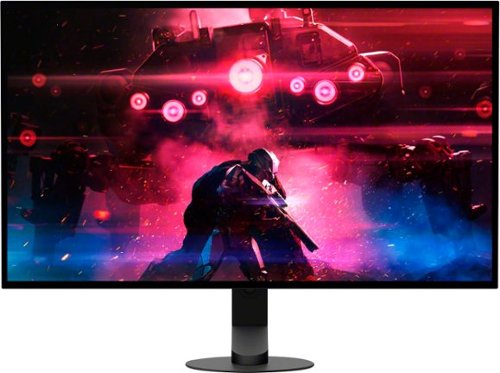
Unleash game changing performance with a 480Hz refresh rate, ultra-fast up to 0.03 ms response time, and stunning 1440p QHD resolution, built for peak precision. Developed in collaboration with the Fnatic esports team, it~s designed to elevate your gameplay and give you a competitive edge in every match.
Customer Rating

5
Impressive visuals at Incredible speeds
on November 12, 2024
Posted by: Aaronxx7
The M10S has a sleek look to it with the ultra thin screen and minimalistic base.
Assembly was a breeze, it took less than a minute once out of the box.
No tools are needed, just twist the head of the screw in the base into the
adjustable stand. Once together, the monitor quickly clips into place in seconds,
and then you are done.
Assembly was a breeze, it took less than a minute once out of the box.
No tools are needed, just twist the head of the screw in the base into the
adjustable stand. Once together, the monitor quickly clips into place in seconds,
and then you are done.
The back of the monitor is a little bulky because of all the connections and the
cooling system, but it helps to balance the weight of everything and give the
monitor a solid feeling. There are three USB plugs, but only one is capable of powering
other devices like a sound bar, or other accessories.
cooling system, but it helps to balance the weight of everything and give the
monitor a solid feeling. There are three USB plugs, but only one is capable of powering
other devices like a sound bar, or other accessories.
There are also 2 HDMI ports and one Display Port. Display Ports offer
a higher bandwidth over HDMI, which can allow for greater resolutions and refresh rates.
However, a good HDMI cable is still good enough to utilize the 480hz refresh rate,
impressive colors and resolution.
a higher bandwidth over HDMI, which can allow for greater resolutions and refresh rates.
However, a good HDMI cable is still good enough to utilize the 480hz refresh rate,
impressive colors and resolution.
In general the Sony INZONE M10S Gaming Monitor has a beautiful display.
The colors are some of the most vibrant colors I have seen, mixed with the
widest spectrum of darks and deepest blacks out there.
The colors are some of the most vibrant colors I have seen, mixed with the
widest spectrum of darks and deepest blacks out there.
OLED screens can achieve these impressive visuals because of their unique ability
to turn off individual pixels independently of adjacent cells. Other types of monitors have to rely
on a separate light source behind the screen and pixels to make things illuminate, because of
this, it's difficult to get a true black as it can't completely turn off.
to turn off individual pixels independently of adjacent cells. Other types of monitors have to rely
on a separate light source behind the screen and pixels to make things illuminate, because of
this, it's difficult to get a true black as it can't completely turn off.
OLEDs have impressive viewing angles because each pixel can also create it's own light.
Typically an OLED can reach an 85 degree viewing angle, before noticing any degradation or distortion in the color or contrast.
Typically an OLED can reach an 85 degree viewing angle, before noticing any degradation or distortion in the color or contrast.
In addition OLED displays are safer for the naked eye because they emit 50% less harmful blue light
than conventional panels, which can help reduce eye fatigue. Most newer glasses come with blue
light blocking technologies, but not everyone wears glasses.
than conventional panels, which can help reduce eye fatigue. Most newer glasses come with blue
light blocking technologies, but not everyone wears glasses.
The Micro Lens Array+ technology further enhances the high contrast OLED images.
With VESA Certified DisplayHDR™ True Black 400 and up to 1300 Cd/m2 peak brightness.
MLA technology is used in OLED TVs to improve the efficiency of the OLED subpixels by
adding a layer of microscopic lenses on top, these lenses are used to help control and reshape the
light as needed.
With VESA Certified DisplayHDR™ True Black 400 and up to 1300 Cd/m2 peak brightness.
MLA technology is used in OLED TVs to improve the efficiency of the OLED subpixels by
adding a layer of microscopic lenses on top, these lenses are used to help control and reshape the
light as needed.
True Black standard requires a black-to-white response time of only 2 frames for OLEDs,
as opposed to 8 frames for LCDs. When the True Black standard was introduced in 2019,
True Black 400 was the entry level of the 3 options. However, the M10S seems to produce
a much higher level of quality then other Vesa Certified displays.
as opposed to 8 frames for LCDs. When the True Black standard was introduced in 2019,
True Black 400 was the entry level of the 3 options. However, the M10S seems to produce
a much higher level of quality then other Vesa Certified displays.
Typically a True Black 400 would only produce a color gamut of 95% DCI-P3, and
about a 480 Cd/m2 peak brightness. However the INZONE monitor uses the
The Micro Lens Array+ technology to reach a much higher standard.
about a 480 Cd/m2 peak brightness. However the INZONE monitor uses the
The Micro Lens Array+ technology to reach a much higher standard.
The M10S boasts an impressive color gamut of 98.5% DCI-P3 which is equivalent to about 1.07 Billion Colors, this is about 25% to 30% more colors than sRGB monitors with a much more impressive contrast ratio with a peak brightness of 1300 Cd/m2 .
The 480Hz refresh rate has an ultra-fast (up to) 0.03ms GtG response time.
GtG,or gray to gray, is a unit of measurement that measures how long it takes a
pixel to change from one shade of gray to another. GtG is considered to be the most
reliable specification for monitor response times. Currently 0.03ms is the fastest
response time held by the top end gaming monitors.
GtG,or gray to gray, is a unit of measurement that measures how long it takes a
pixel to change from one shade of gray to another. GtG is considered to be the most
reliable specification for monitor response times. Currently 0.03ms is the fastest
response time held by the top end gaming monitors.
NVIDIA G-SYNC compatible and Adaptive Sync/VRR keep the display from showing
tears and glitches or freezing and stuttering.
tears and glitches or freezing and stuttering.
The Variable Refresh Rate helps to create the least amount of input lag as possible
by making the monitor match the refresh rates created by the source input.
Without this, input lag and tears in the images can not only cause issues with the
visuals of your game, but could get you killed with delays in the action.
by making the monitor match the refresh rates created by the source input.
Without this, input lag and tears in the images can not only cause issues with the
visuals of your game, but could get you killed with delays in the action.
In addition to everything else the M10S can also be used in a 1:1 ratio for
competitive FPS gaming by adjusting/reducing the active screen size down to 24.5 inches,
with a max resolution of 1332p and up to 480Hz refresh rate.
competitive FPS gaming by adjusting/reducing the active screen size down to 24.5 inches,
with a max resolution of 1332p and up to 480Hz refresh rate.
FPS Pro mode, designed to simulate the image characteristics of TN panel LCD monitors
typically used in competitions. FPS Pro+ mode maximizes performance in battle by highlighting
colors mostly used for enemy outline (Red, Yellow, Purple) and leveraging the OLED's brightness
and contrast for better visibility.
typically used in competitions. FPS Pro+ mode maximizes performance in battle by highlighting
colors mostly used for enemy outline (Red, Yellow, Purple) and leveraging the OLED's brightness
and contrast for better visibility.
A big reason this monitor seems to have all the bells and whistles any gamer would want is because
it's development was heavily influenced by one of the top ten gaming teams in the world, Fnatic.
Fnatic has claimed more than 200 championship victories across 30 different games since its inception in 2004, and have been lending their expertise to the development of high quality gaming accessories for years.
it's development was heavily influenced by one of the top ten gaming teams in the world, Fnatic.
Fnatic has claimed more than 200 championship victories across 30 different games since its inception in 2004, and have been lending their expertise to the development of high quality gaming accessories for years.
Sony has also developed an app that can be downloaded from their website, to aid in adjusting all the
settings and preferences for the M10S monitor. You can even save your own app specific sync settings,
if you prefer to have individual settings for different games as opposed to using a global setting for all
your games and apps. It's much easier to use the INZONE app to change any of the monitor settings
vs using the buttons on the back of the monitor.
settings and preferences for the M10S monitor. You can even save your own app specific sync settings,
if you prefer to have individual settings for different games as opposed to using a global setting for all
your games and apps. It's much easier to use the INZONE app to change any of the monitor settings
vs using the buttons on the back of the monitor.
With all that said the actual performance of the monitor is simply incredible. When paired with a capable PC or Laptop it seems like you are capable of anything. The monitor still works great on consoles, but most console games max out at 60hz to 144hz refresh rates. Some games can go higher, but it is a select assortment, not like on the PC, where virtually everything can hit the higher refresh rates.
All the action is smooth with impressive detail. I didn't experience any glitching or tearing at all, no matter what setting I was using. The action was so clean in fact that I almost felt like I was cheating with being able to follow any moving object with extreme precision.
I would recommend this to a friend!
Share this review:


+1point
1of 1voted this as helpful.
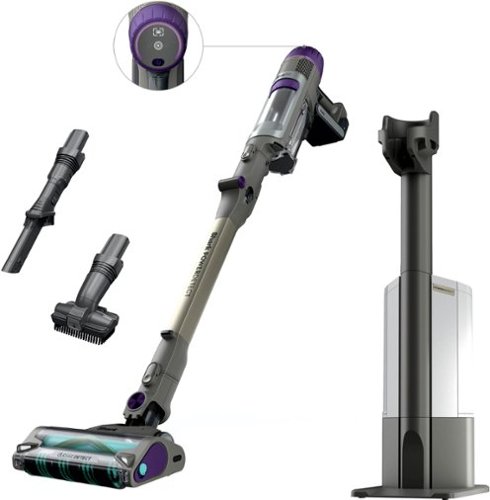
The Shark PowerDetect Clean & Empty (IP3251) system is the ultimate cordless solution for powerful, intelligent, whole-home deep cleaning. It features an Auto-Empty system that charges & empties your vacuum after every clean, reducing dust exposure by 1000x* vs. traditional emptying. PowerDetect is powered by Shark~s most powerful cordless suction** PLUS a redesigned DuoClean Detect nozzle with dirt-detecting intelligence and multi-directional cleaning, making it THE BEST debris cleaning*** of ANY cordless vacuum. While most vacuums push around debris in the back-stroke, the redesigned DuoClean Detect nozzle eliminates this problem by capturing more**** dirt, dust, and debris in forward AND reverse for faster cleaning*****. PowerDetect has an impressive 70min of runtime~~ and a MultiFlex wand for effortless under-furniture reach and flex storage. (*Based on third party-plume testing while emptying vs. Shark Navigator upright manual empty US/CAN NV130)(**Based on ASTM F558, measured at the hand vacuum, tested in Boost mode)(~Based on Geomean of ASTMF2607 and IEC62885-2 (5.3 & 5.5) vs cordless market)( ~vs. original DuoClean nozzle)( ~vs. Shark Stratos IZ862H)( ~~measured at the handvac in ECO mode)
Customer Rating
5
Very Versatile with Impressive Suction
on October 23, 2024
Posted by: Aaronxx7
The Shark Power Detect is your answer for the best all in one vacuum. It's cordless, and has a run time of up to 70 minutes, based on the mode and debris encountered.
It's extremely versatile. The vacuum head can be turned effortlessly at almost any angle needed without the user having to make any changes in your path.
The low profile vacuum head fits under most furniture and even has an extra bend point in the middle of the stick to get deep under furniture and other objects so that
manually moving everything in the room for a good clean is not necessary. The vacuum head also has lights on the front and back of the unit to easily spot debris in any area or lighting.
The low profile vacuum head fits under most furniture and even has an extra bend point in the middle of the stick to get deep under furniture and other objects so that
manually moving everything in the room for a good clean is not necessary. The vacuum head also has lights on the front and back of the unit to easily spot debris in any area or lighting.
The vacuum by itself is about 8lbs, and probably around 5lbs without the vacuum head. Making this very easy to cart around to use in different rooms, as well as vacuum your furniture and drapes. After I vacuum the floor, I just lift the unit up a little higher and pop it down on the couch. It works great at keeping the furniture clean and free of pet hair. It's just as easy to use this in the car with the different head attachments.
The vacuum head has two rollers that work in unison to pull debris in and push it up into the stick. The vacuum head has a kind of comb that the front roller spins against to
help keep strings and hair from winding around the roller. The comb actually works great, and it's easy to just wipe away the accumulated string and hair.
There is also a set of flexible fins located on the bottom back half of the vacuum head to help keep debris from getting tossed around while vacuuming on harder surfaces.
The fins also work to aid in capturing debris while vacuuming backwards.
The PowerDetect has sensors inside the vacuum to detect debris. The lights on the unit (on the vacuum head and main display) turn more of a purple to indicate heavy debris and get white once no more debris is detected. There are also sensors around the vacuum head to determine hard floor surfaces vs carpets and rugs, and then adjust the rollers and suction accordingly. The side sensors on the vacuum head detect wall edges and increase the vacuuming force to help pull dirt away from the wall and edges into the unit.
The suction is on par or better than most corded units. I actually pulled more debris from our rug with the IP3000 than our older corded upright. I used the corded unit first and then redid everything with the PowerDetect and was amazed that the PowerDetect still pulled additional dirt from the rug.
The Dock works great and is easy to slide the vacuum into and out of. The dock comes with one Odor Neutralizer Puck that helps to keep the recirculated air smelling fresh and clean. The Puck can easily be changed as it's located on the top of the unit.
When the vacuum is placed in the dock, it starts charging as well as empties the dust cup. You can turn off the auto empty feature if you don't want the noise at the time of docking the unit. The dock uses it's own vacuum suction to empty the dust cup, and then activates the Vacuum stick's suction power to shift the debris in the dust cup, and then reactivates it's own vacuum to grab the rest. The whole process is pretty quick at maybe 30 seconds and is very effective.
The dock kinda compacts the debris so it makes a quick exit when it comes time to empty the unit. The dock can hold at least 10 times the debris held in the dust cup.
Maintenance is pretty easy, especially as most of it is automatic, except for emptying the dock and cleaning the sponge filters.
Overall, this vacuum works great and can easily be used in so many ways and locations. The best part is that it does so much on it's own with adjusting the suction power and rollers to grab as much debris as possible. It even changes the lighting colors to let you know if an area has been cleaned enough or if more vacuuming is needed.
I am not only impressed with the vacuum's suction, but also the ease of use.
I would recommend this to a friend!
Share this review:


0points
0of 0voted this as helpful.
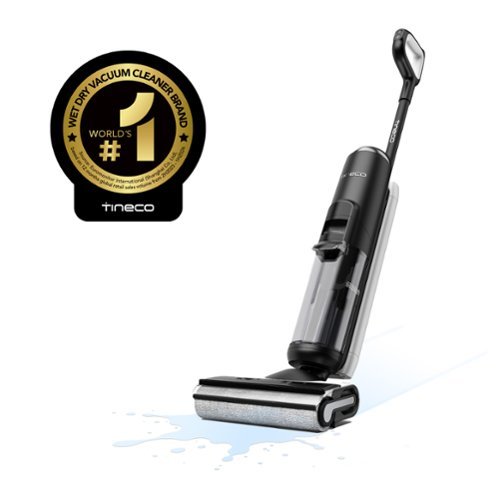
Revolutionize your cleaning with the Tineco FloorWasher FlashDry 6 Series, a cordless floor washer that combines vacuuming, mopping, self-cleaning, and self-drying in one powerful device. With iLoop Sense technology, it detects messes and optimizes suction and water flow, ensuring pristine results and extending the 35-minute runtime. FlashDry technology allows simultaneous washing, drying, and charging, offering a complete self-cleaning and drying cycle for utmost convenience. The Self-Propel Assist feature makes cleaning effortless, while dual-edge cleaning and a 38% larger tank reduce strain and refills. Clean smarter, not harder.
Customer Rating
5
Does a great job at maintaining clean floor
on September 9, 2024
Posted by: Aaronxx7
Tineco has been making floor cleaners since 1998, and been busy at work trying to bring as many features as possible to their line of quality vacuums and washers.
The Flashdry vacuum is a great choice for virtually any non-carpeted floor in your home. Even though this is marketed as a wet/dry vacuum it is not recommended to use this without water/solution in the system as it can lead to mechanical issues.
Because of it's design it is also not recommended to try to vacuum up large chunks of debris on your floor, like paperclips or shreds of paper and such. Which, these are all things that you would normally pickup by hand while using a regular vacuum cleaner anyway.
The vacuum works great for spilt cereal, small snacks, and general dirt tracked inside from shoes. Because of the thickness of the roller and the way the vacuum pulls debris from it, almost none of the stuff getting vacuumed up gets thrown around or pushed away, which can easily happen with other types of dry vacuums.
The best part of this design is that it uses edge to edge technology for better cleaning along the edges of walls. Plus the cleaning head is low enough to fit under our fridge door and cupboards.
The unit is a little over 20lbs and is somewhat compact so it doesn't take up too much space where ever you decide to store it.
The unit has a led display clearly placed at the top of the main section for easy viewing during use. The vacuum also has voice cues to indicate what mode you are in, or additional instructions. The volume and language can be changed by the button on the back of the handle above the speakers.(this can also be changed on the app)
The power and mode buttons are on the front of the handle. As soon as you power the unit on it's ready to go. Just tilt the handle downward in the vacuuming position and the motor kicks in. You can feel the vacuum pulling you forward right away. If you are not ready to move yet, simply pull it back towards you, or return the handle upright. It defaults to "Auto" mode, here it will auto sense how dirty an area is and then try to adjust the roller, solution, and suction used. The glowing ring around the LED display will change to red if it senses a dirty area, and then blend back to green once it is clean.
You can manually select the "Max" mode for spots that you feel need extra attention, or the "Suction" mode to try to dry wetter areas.
The display will indicate when the water/solution tanks need to be filled or emptied with the appropriate icon. This will also constantly show the unit's battery life and floor cleanliness.
Tineco uses it's proprietary term "iloop" to detect debris. It is unclear exactly what technology is being used hereto determine the amount of debris, but so far it seems to be pretty accurate. A lot of other machines use Piezoelectric sensors to measure resistance and detect different electrical impulses of the incoming air or water flow. I called Tineco, but they were unable to offer me any specifics about what sensors are being used. I even scoured the internet with no answers to be found.
While the vacuum roller does great at picking up loose debris, both solid and liquid. It does struggle a little bit with stuck on dried goop. A dried spot of jelly took me a few minutes to get up. A good portion of it was removed within the first couple passes, but I had to let the rest of it soak for a bit before it was completely removed. I did have a few stubborn spots of gunk on the floor that I actually needed to get down to and scrub a bit for them to come up, but with that amount of effort, I don't think probably any floor cleaner would have gotten it on its own.
They also mention not to use other solutions in the water tank but Tineco's because it might impede the actual performance based on the amount of surfactants, enzymes and foaminess. It is also not recommended to vacuum up other sudsy cleaners used on the floor for harder stains, as their foam could interfere with the suction to the dirty water tank.
The cleaner can run for about 30 to 40 minutes based on its need to increase power consumption for heavier debris areas. It only takes about 4.5 hours to fully charge the cleaner from dead status.
The base for the Flashdry unit not only charges the unit, but also creates an enclosure around the roller to aid in the self cleaning and drying cycle. If used properly and as recommended this floor cleaner will help keep your floors clean and odor free for a long time.
I personally love the ease of use for this in our kitchen, which is our highest traffic room. Before this vacuum I used to only wet clean the floor maybe once a month because of the effort involved. I would vacuum every week but I hated getting out the mop. The Flashdry wet vacuum is a dream come true.
IT vacuums and wet cleans the floor in the same effort, and does a pretty good job at both. We have 2 cats that add to the kitchen floor debris with their food and water dishes as well. This takes care of everything and doesn't get messed up with the cat hair either.
Cleaning the machine is pretty easy with the self cleaning base and pop out waste water tank. The waste water tank has a removable filter and solids separator. The solids can be knocked out into the trash can or wiped out with a napkin, and everything else can be rinsed down the sink. I must say that I actually prefer this way more than taking a bagless vacuum and dumping tons of dust into the trashcan, which ends up recirculating into the air anyway. With this vacuum everything is wet so no more floating dust coming back into the room while emptying it out.
So far this vacuum has worked great, It's so easy to use, and the floor dries so quickly after using it that I find myself grabbing for it every day.
I would recommend this to a friend!






Share this review:


0points
0of 0voted this as helpful.
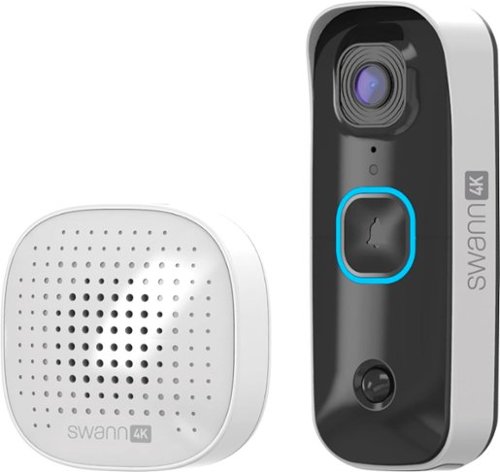
The SwannBuddy4K is a full-featured, easy-to-install wireless 4K video doorbell & chime unit. It can operate 100% wire-free with the rechargeable battery or connect to your existing doorbell wiring. See every detail with head-to-toe view and a super-wide 165~ viewing angle. True Detect senses heat & movement for reliable alerts. See in the dark up to 16ft or 5m with powerful infrared night vision & save 1000~s of clips locally. It~s security you can trust & fee free.
Customer Rating

3
Great Picture / but needs update
on July 20, 2024
Posted by: Aaronxx7
The Swann 4k Video doorbell has an excellent field of view. The ultra-wide 180° viewing angle
lets you see so much more than other security cameras. Because of the wide viewing angle
there is a bit of a fisheye look to the footage, but just at the edges. The Swann software works great at removing the fisheye distortion in the bulk of all the images, so that everything from the center of the image out to near the edges looks straight and normal without distortion. The wide viewing angle lets me see the full width of my front yard, eliminating the need for a secondary camera to complete the view. This viewing angle is also great at seeing more of anybody standing in front of the doorbell.
lets you see so much more than other security cameras. Because of the wide viewing angle
there is a bit of a fisheye look to the footage, but just at the edges. The Swann software works great at removing the fisheye distortion in the bulk of all the images, so that everything from the center of the image out to near the edges looks straight and normal without distortion. The wide viewing angle lets me see the full width of my front yard, eliminating the need for a secondary camera to complete the view. This viewing angle is also great at seeing more of anybody standing in front of the doorbell.
Lesser angled cameras might only see about a 3 foot vertical portion of the person at the front door. This doorbell gives you at least twice that, and offers a full view of the person at closer distances versus non wide angled cameras.
The 4K images are pretty clear in daylight and even at night. There is a lot of detail with images 25 feet away or closer. Items further than that do get kind of pixelated, but are still recognizable.
The doorbell comes with a built in storage slot for a micro SD card, 32gb is included. All recordings from the doorbell are stored there unless you pay for the optional online storage. You can access these stored videos through the Swann app. With the Swann app you can change some of the settings for the device and also view live videos. If someone rings the doorbell , the included wireless chime will ring as well as the app on your phone. Using your phone you can view the person at the door and talk to them through the app or send a pre-recorded message to
the person.
the person.
When using the app you can also view all the trigger times of any moment that the doorbell noticed some type of activity. I was unable to view footage for any of the trigger marks through the notification menu. I had to back out of that and go directly to the storage folder in the app. From here you can view any recorded video, but I noticed that not all triggers create a recording. I had more than twice as many triggers in the notification menu versus what was actually recorded in the storage folder.
You can go into the settings to change the trigger sensitivities and even outline sections in the field of view for the doorbell to focus on. I was unable to change how or what exactly triggered a recording. The doorbell does use infrared with a more advanced AI to help eliminate false triggers, but if that is the case, why show me trigger points with no recordings?
I used the doorbell for over a day on battery power, and it only used about 2 or 3 percent of the actual battery level. Installation of the unit is pretty easy and only takes a couple of minutes despite whether or not you are using a wired connection or just the batteries. Depending on where you mount the doorbell, you might need to place a wedge between the doorbell and the siding of your house, as most siding panels are slanted. There is nothing in the box to correct the angle, so keep that in mind before starting the install.
Oddly enough, you can install the doorbell upside down, because it does have a flip feature for the video both on the vertical and horizontal.
You can login into the app and connect to the camera at any time desired, but there is no 24/7 recording feature to be able to go back in time and view an actual time line. The only thing you can go back to view are triggered recordings.
While this doorbell does offer many features of similar video doorbells, the 2 best features are the picture quality and the no subscription needed service.
With that said, it does lack some features that others might want. While live viewing the camera through the app, the red LED ring around the doorbell button lights up. Any time a trigger happens the red LED lights up, and then turns blue before going dark again.
There is no way to change if or when the LEDs light up. Again, there is no 24/7 recording. There also seems to be no way to change why some triggers do not record videos. Plus it seems odd that you have to leave the trigger menu and go to the storage folder to view the associated recordings.
There is no way to change if or when the LEDs light up. Again, there is no 24/7 recording. There also seems to be no way to change why some triggers do not record videos. Plus it seems odd that you have to leave the trigger menu and go to the storage folder to view the associated recordings.
I believe all of these oddities could be fixed with a software update, as the hardware seems to be great. It's the app and associated features that need a bit of adjusting, in my opinion. So hopefully they will make these changes to give this a more user-friendly interface with more advanced features.
I would recommend this to a friend!
Share this review:


0points
0of 0voted this as helpful.

Swann's AllSecure4K+ Wireless Security System is always charged and always secure. The 100% wireless cameras setup in minutes using rechargeable battery power and offering crystal clear 4K color video day and night. Actively prevent unwanted activity with True Detect heat and motion-sensing to trigger recording, spotlights, sirens and mobile alerts. Engage in two-way talk, see what~s happening, arm and disarm the system using the Swann Security app. The 4K+ Power Hub has a charging bay, and a spare battery ensuring there is never any ~downtime~ - just hot swap the batteries to and from the cameras as needed. The spare battery also provides back-up power to the Hub for up to 5 hours in the event of an onsite power outage. Retain up to 2 years of clips at any time on the Hub~s large 1TB local hard drive plus cloud backup. Recording is always free and there are no monthly fees. The system is also expandable as you can connect up to 8 cameras to the 4K+ Power Hub if needed. There~s also offline mode, with the option to view on a TV or monitor and record without internet.
Customer Rating

4
Good for General Camera Security
on July 13, 2024
Posted by: Aaronxx7
This Swann 4K Wireless Security system is good for general use, but might not be what is needed for more strict applications.
The features are good with the 2 way audio, siren, light and email alert system. The base comes with a 64GB micro sd card that is capable of recording up to 195 hours of footage. The sd card can be swapped out for a larger card, and can probably hold a 1TB card, but I was unable to find specifics on this. The base also houses an extra battery pack for the cameras that doubles as emergency power to the base if the power is cut.
When plugged in the base keeps the spare battery charged all the time for a quick swap out of a dead camera battery. Luckily the batteries will die most likely at different times because of the amount of times each camera is triggered. I had one camera facing the street that died in 2 days because I did not set the camera angle to avoid the passing traffic, nor did I set up a trigger zone in the settings for that camera to only be triggered if an object enters the designated area of the cameras view. The other cameras are still over 90% full because they were not being constantly triggered.
The cameras can record at up to 4K resolution, but to be honest it still doesn't have the clarity of what you'd expect to see from a 4K video. Don't get me wrong, it's much better than a lot of other security cameras. You can at least make out some license plates if the vehicle is within 20 to maybe 25 ft from the camera. Facial features are also very good within that distance, but start to fade a bit past that. It would still be easy to get a general description as far as build, height, color of hair and stuff like that if needed for a police report.
The base can be hooked up to any monitor or TV with an HDMI cable. You can even download the app and keep an eye on everything remotely through your phone. The app works pretty good most of the time, although it is a bit buggy in that one of my cameras is frequently showing no feed.
Like I said, this system is a pretty good deterrent, but lacks some features that others might need. The cameras only record at up to 15fps, so that means anyone or anything moving very fast might not be recorded or you might only get a few partial clips of the object.
You also can not constantly live stream any or all of the cameras as they are battery powered. To conserve battery life they will automatically shutdown after 10 to 30 seconds of live viewing, and then you will have to click on the play button again to continue watching. Unless there are objects triggering the camera to stay on.
These cameras also only record "events" and do not offer a continuous timeline of recordings to be able to go back to, if you need to see for example, what car was parked in front of your house at 2pm on a Saturday, you will not be able to see this unless an "event" happened to be triggered at that time.
You can review all of the "events" recorded on any channel at any day for at least the past few weeks (this depends on the size of the SD card you are using. A larger card will allow more recordings.)
Setup was very easy. There is a paper template to use for drilling the holes for the base of the camera stand. Once the base is screwed to the wall or object, all you have to do is screw the rest of the stand onto the base, you can do this by hand. Because there are no wires and the cameras pretty much self sync with the base unit, set up only takes minutes. The toughest part is figuring out where to put these so you can get back to them easily enough to change out the batteries but not too easy so as anyone else can mess with them.
Overall, this is a good plug and play system that will alert you of most intruders and can be set to startle anyone as a combined alarm system when a camera is triggered. The video quality is good enough to see what is going on during the day or night, and will definitely help to secure your home.
I would recommend this to a friend!
Share this review:


0points
0of 0voted this as helpful.

Take performance anywhere with the sleek, powerful and ultra-portable Dell XPS 13, our thinnest and lightest XPS.
Customer Rating
5
Full Power in a Small Factor/Easy to take Anywhere
on April 15, 2024
Posted by: Aaronxx7
The Dell XPS 13 is a great lightweight laptop, built for portability. It weighs in at 2.6lbs and is only .60inches thick, and at 11.62" x 7.84"
it's almost the same size as a standard spiral paper notebook. The XPS 13 could easily fit inside a medium to large purse and virtually
any backpack or briefcase.
it's almost the same size as a standard spiral paper notebook. The XPS 13 could easily fit inside a medium to large purse and virtually
any backpack or briefcase.
Depending on the intensity of the usage, the battery could last for up to 18 hours, outlasting most trips. Charging from zero to 100% takes less than 1.5hrs with
the correct wattage charger. Chargers with less than 60W will still work but effect the rate of charge.
the correct wattage charger. Chargers with less than 60W will still work but effect the rate of charge.
The design is pretty stream lined with the function buttons and touchpad seamlessly hidden under the Gorilla Glass 3. The touchpad does use haptics and can be
tapped or pressed to activate a mouse button click. While there is no outline for the touchpad, one can define the edges of it with the spacebar, as it lines up
perfectly with the edges of that.
tapped or pressed to activate a mouse button click. While there is no outline for the touchpad, one can define the edges of it with the spacebar, as it lines up
perfectly with the edges of that.
The rest of the body is made from aluminum, which gives everything a lightweight but solid and durable feel.
Depending on what is going on with the laptop(starting or logged in), the top row of keys under the glass will light up as the "F" keys or they will actually
display the media shortcut functions, ie. volume, brightness,prt sc and etc. This feature can also be toggled by holding the "fn" key.
display the media shortcut functions, ie. volume, brightness,prt sc and etc. This feature can also be toggled by holding the "fn" key.
The Display has a locking hinge that opens to approximately 135 degrees. The LED FHD+ display looks pretty good. The colors look pretty vibrant although I
typically like to enable the blue light reduction features on all of my screens which generally offsets the colors slightly. The screen does offer HDR and different
color profiles to fit anyone's preference. The refresh rate is 120Hz with a 35ms response time. The brightness is 500nits with a contrast ratio of 2000:1
The display itself is not a touchscreen, although I must admit that I think all screens this small should have touch capabilities and open a full 360 degrees
for ease of use.
typically like to enable the blue light reduction features on all of my screens which generally offsets the colors slightly. The screen does offer HDR and different
color profiles to fit anyone's preference. The refresh rate is 120Hz with a 35ms response time. The brightness is 500nits with a contrast ratio of 2000:1
The display itself is not a touchscreen, although I must admit that I think all screens this small should have touch capabilities and open a full 360 degrees
for ease of use.
The performance is pretty solid with the i7 processor and 16GB LPDDR5X RAM, (upgradeable to 64GB LPDDR5X). I have had no issues with using this
for work or entertainment. The integrated GPU would probably be okay for a lot of web based games and downloaded games set at the lower performance
and display options. Just out of curiosity, I downloaded a Quake 2 demo and it played, but it was pretty glitchy as expected. Fortnite ran okay. Call of Duty Warzone was very
laggy, again as expected because this is not a gaming pc.
for work or entertainment. The integrated GPU would probably be okay for a lot of web based games and downloaded games set at the lower performance
and display options. Just out of curiosity, I downloaded a Quake 2 demo and it played, but it was pretty glitchy as expected. Fortnite ran okay. Call of Duty Warzone was very
laggy, again as expected because this is not a gaming pc.
Benchmarking tests showed favorable results for performance with most production apps, photo editing and digital content creation.
All the Microsoft Office apps ran very well. I was able to edit my 234sheet Excel spreadsheet without issues and I was even able to extract all my pages as individual .pdfs in less than 3.5minutes. It used to take my old desktop 15minutes or more to do the same thing. I also had no issues with Word or any of the other office apps.
All the Microsoft Office apps ran very well. I was able to edit my 234sheet Excel spreadsheet without issues and I was even able to extract all my pages as individual .pdfs in less than 3.5minutes. It used to take my old desktop 15minutes or more to do the same thing. I also had no issues with Word or any of the other office apps.
This does have WIFI 7 so downloads work very fast if you are connected to a similar speed network. The laptop does come pre-installed with the Killer app to help prioritize
and increase network speeds.
and increase network speeds.
The 13" screen might seem limiting at times, but don't worry, this laptop does support additional screens. Even though the device only has 2 ports on it, they are both Thunderbolt 4
ports. So you can plug in a multitude of various devices using a hub or USB C adapters. Through this option you can plug into your big screen TVs, monitors, or even portable display screens. While on the go they do make attachable screens that run off your own device's USB for power. I use a lot of apps running at the same time, so larger screens or additional screens are preferred for me. If you don't have access to additional screens, then the Windows Snap feature can help you to manage all your additional windows.
ports. So you can plug in a multitude of various devices using a hub or USB C adapters. Through this option you can plug into your big screen TVs, monitors, or even portable display screens. While on the go they do make attachable screens that run off your own device's USB for power. I use a lot of apps running at the same time, so larger screens or additional screens are preferred for me. If you don't have access to additional screens, then the Windows Snap feature can help you to manage all your additional windows.
The XPS 13 does come with a dedicated Copilot key to easily access AI features. From here either you can type, or hit the mic button to voice your requests and Copilot will do it's best to help you out with opening apps, checking the weather or assisting you in writing projects.
Additional features include a fingerprint sensor, backlit keys and 2 web cameras with infrared sensors for low to no light settings.
When under a heavy workload the bottom does get pretty hot, but the temp is usually negligible during general usage. The cooling fans are noticeable when they kick on but are relatively quiet.
Overall, this laptop is a great option for someone looking for a portable pc, it's so light and small it can be carried virtually anywhere. The AI based optimization software automatically fine-tunes your PC for the best performance, audio, video, and battery life possible. The keyboard uses full size keys for a better typing experience than most smaller devices. It's nice being able to keep everything on one device going from office to home or in between. I have a hub set up at home and work with additional displays, mice and printers for a seamless transition from work, travel and back home.
I would recommend this to a friend!






Share this review:


+1point
1of 1voted this as helpful.
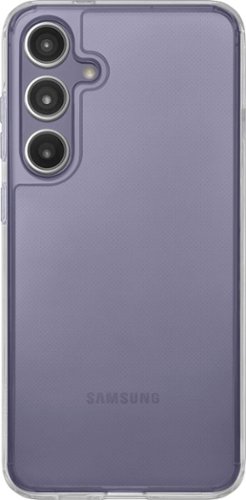
Protect your smartphone with the Insignia NS-24PHCC Clear Hard-Shell Case for Samsung Galaxy S24+. Its durable polycarbonate plastic protects your phone from everyday damage and drops up to 6 feet~without a bulky appearance. Because it~s compatible with wireless charging, you can freely charge your phone without the case or any cords getting in your way. And it has raised edges, letting you set your phone down without risking scratching your screen or camera lens. A clear, transparent design lets the original look of your device show through a combination of 2H UV coating and discoloration defense technology. Give your Samsung smartphone the protection it needs with this Insignia hard-shell case.
Customer Rating
5
Wireless Charging Phone Protection
on March 29, 2024
Posted by: Aaronxx7
Insignia has a wide variety of high quality products available through Best Buy.
I have bought and used dozens of their products, and have been pleased with their quality and price throughout the years. Insignia products usually offer similar features to the top name brand items, but at more affordable prices. This phone case is no exception to their high quality offerings. It offers great protection from accidental drops of up to 6 feet. It uses Polycarbonate, TPU which is softer than traditional Polycarbonate but not overly flexible like Silicone. This clear case also has a UV coating to protect the phone from harmful rays as well as keeping the case from discoloring too soon.
The case has a 2H rating to help keep it from getting scratched up from everyday use. The case is thick enough to protect the camera lenses from resting on flat surfaces when placed on its back. The front screen is also protected on flat surfaces because of the slightly raised edges. Keep in mind these edges only protect the glass on flat surfaces. If you drop your phone on gravel, or place it on other bumpy surfaces you could risk getting a scratch.
The best thing about this case is that it doesn't add a lot of unnecessary bulk or weight to the phone. Plus, wireless charging and NFC/Digital Wallet payments still work great.
The case goes on easily, and can be removed just as easily to clean it. The inside back of the case is textured to help prevent marks from the case on the back of your phone. The case has a smooth comfortable feel and doesn't feel too slippery like other smooth cases. The buttons are easy to press, and the charging port cut out is wide enough to accommodate even thicker coated charging cables.
I would recommend this to a friend!
Share this review:


0points
0of 0voted this as helpful.

The HP OfficeJet Pro 9135e delivers fast color printing, 500-sheet paper capacity, and duplex scanning and copying. It's AI-enabled to intuitively adapt to your workflow, with wireless and security features that keep your multifunction printer up to date and secure.
Customer Rating
5
Great for Small Businesses
on March 9, 2024
Posted by: Aaronxx7
This multi-function printer has everything a small business needs to get work done including fax, print, scan and copy.
If you subscribe to HP's Instant Ink program, you can also add remote printing and mobile faxing to the list, 2 features that are essential for anyone on the go.
With that stuff said, I'm going to get the cons out of the way right now. This printer does come with a notice that states that this printer only works with New or Reused(remanufactured) HP chipped ink cartridges. So, most likely 3rd party inks will be rejected by the printer. This is not a deterrent for me as I subscribe to the Instant Ink so that I can use those added features, which are more than worth it to me. A lot of other companies charge high prices to use their software and servers to print remotely, and subscribing to a VPN to get the same thing accomplished is sometimes just as pricey.
With the HP Smart app (available on PC, Android, and Apple) I can literally print from any device at any time to the specific printer I need, no matter my physical location. The HP Smart app can work with as many HP "print anywhere" capable printers that you own. Just make note that not all HP printers offer this feature. A list of the compatible printers can be found on their website. The list is important as for some reason it is not clear when buying some HP printers if this feature is available. Even HP's own support gets this wrong. I was directed to a few models by HP support that were not compatible
that I needed to point out to them that the "print anywhere" feature does not work with.
that I needed to point out to them that the "print anywhere" feature does not work with.
The second issue that I have come across is with the scanner. This issue, like the other is kind of moot. I have noticed that some print when scanned in the landscaped position at any resolution over 300dpi results in distorted words and symbols. (I will include a picture of the distortion.) I even tried turning off the enhanced scan features and got the same result.
This again is not a breaker for me as I hardly ever have a need to scan something like
that at a high resolution. The scanner and ADF scanner work great for everything else in portrait mode at any resolution with both text and images.
that at a high resolution. The scanner and ADF scanner work great for everything else in portrait mode at any resolution with both text and images.
The third issue is that the printer is capable of holding 500 papers, but the output tray only holds 100 standard papers. A lot of the jobs I send to the printer are over 100 pages. While this could be inconvenient, I did figure a work around. (I will include a picture.) If the printer is on a stand, you can let the output papers fall into a box. The box has to be butted up to the printer and the output tray can be extended out of the printer about an inch or two. The printed papers will slide off the tray into the box,
which can be retrieved at any point. Instead of standing by the printer waiting to grab the first 100 papers so the rest can print correctly without jamming. So far the box trick has worked great with no problems.
which can be retrieved at any point. Instead of standing by the printer waiting to grab the first 100 papers so the rest can print correctly without jamming. So far the box trick has worked great with no problems.
The next thing is more of a pet peeve. If you accidentally send the wrong print job to the printer, and it starts printing. The cancel feature is a bit hidden. You have to scroll on the LCD all the way to the right, which is past about 8 different icons to find the "Print Jobs" icon. Select that icon and then select the print job, and then press on the three lines for additional options and press cancel job. Unfortunately this takes a bit of time, and a few additional pages might print while you are navigating the menu icons.
With all the cons out of the way, this is still a great printer.
The 9135e has 2 separate paper trays capable of holding 250 pages each. The trays can be set to hold the same type of media or different.
The print quality is great at any level of dpi. I have printed and scanned a few examples of the three different quality options - 300dpi, 600dpi, and 1200dpi. Obviously the 1200dpi print gives the darkest print and finest lines, and is the closest to a laser print as this gets. However, the draft quality is a faster print and still looks great for all intensive purposes. Plus you will save a bit on ink at the lower dpi.
The 1.2ghz processor seems to work great, I have yet to see the printer lag down from lack of processing power. It has been very snappy to respond to all print jobs.
I printed two full page borderless photos on photo paper, both were printed at the finest quality and took approximately 1minute and 30seconds to print. The color is accurate and rich, with excellent clarity and definition. (scans of these at 1200dpi are attached)
Pretty much all other printing and scanning specs are as claimed by HP, and listed in the specs description for the printer.
Printing my larger print jobs on the draft setting yields print speeds closer to higher end and more expensive business printers.
Overall this printer has worked great. While it's not perfect, the pros definitely outweigh the cons.
I would recommend this to a friend!






Share this review:


0points
1of 2voted this as helpful.
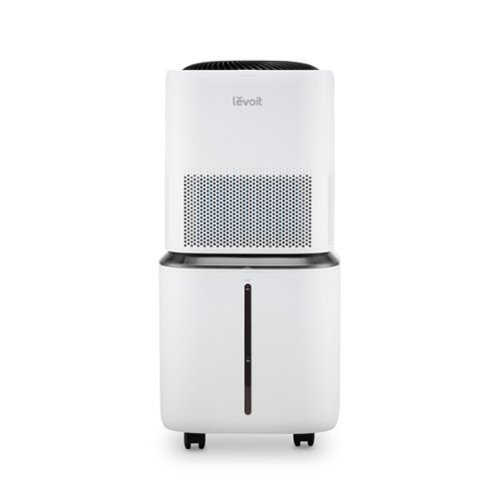
The Levoit Superior 6000S Smart Evaporative Humidifier is perfect for extra-large homes troubled by dry air. Evaporative technology quickly humidifies your space without wet mist that can damage furniture, while the included hose and built-in wick filters enable you to easily refill the tank with tap water from the sink. No matter where you are, adjust settings, create schedules, connect to voice assistants, and more with the VeSync app.
Posted by: Aaronxx7
The Levoit Superior 6000S Smart Evaporative Humidifier is by far the best humidifier I have ever owned.
It has a 6 gallon water tank. The water tank which is the base of the unit sits on top of 4 wheels, making it
easy to push anywhere around the floor. Filling the unit could not get any easier. All you have to do is push
the base over to any sink and attached the included funnel and hose. The funnel is a soft rubber that is easy to wrap
around any faucet. While the funnel will fit around a tub faucet, the funnel does not make an airtight enclosure and still
needs gravity to feed the water through the tube, so a tub faucet is not recommended as the height is not ideal.
It has a 6 gallon water tank. The water tank which is the base of the unit sits on top of 4 wheels, making it
easy to push anywhere around the floor. Filling the unit could not get any easier. All you have to do is push
the base over to any sink and attached the included funnel and hose. The funnel is a soft rubber that is easy to wrap
around any faucet. While the funnel will fit around a tub faucet, the funnel does not make an airtight enclosure and still
needs gravity to feed the water through the tube, so a tub faucet is not recommended as the height is not ideal.
The best feature of this humidifier is the way that it introduces the water into the air. It uses 4 separate wick filters
that sit above the water tank. Water is pulled from the bottom and trickled down over the filters. A lot of other humidifiers
place their filters in the water. This causes the filters to stay wet all the time, which not only breaks the filter down quicker
but can also lead to the growth of bacteria and mold. Filters that sit in the water also do not get the same coverage of
water across the filter area either, making this process less efficient. Levoit does not recommend using their humidifier
on slanted surfaces because of the way the water is distributed over the filters, plus the unit is on wheels.
that sit above the water tank. Water is pulled from the bottom and trickled down over the filters. A lot of other humidifiers
place their filters in the water. This causes the filters to stay wet all the time, which not only breaks the filter down quicker
but can also lead to the growth of bacteria and mold. Filters that sit in the water also do not get the same coverage of
water across the filter area either, making this process less efficient. Levoit does not recommend using their humidifier
on slanted surfaces because of the way the water is distributed over the filters, plus the unit is on wheels.
Levoit's filters last longer and stay cleaner because the humidifier has a dry feature specifically for the filters. You can
set the dry feature on or off, and even change it's setting on the unit, or through the app. Drying the filters helps to
prolong the filter's use and prevent mold and bacteria from growing.
set the dry feature on or off, and even change it's setting on the unit, or through the app. Drying the filters helps to
prolong the filter's use and prevent mold and bacteria from growing.
Because of the capacity and ease to fill this humidifier, I do use tap water. However, we have very hard water in
my area, so I also use a water treatment drop in. The manufacturer doesn't say that it is necessary, and doesn't
claim that you have to use distilled water either, but it just makes maintenance a bit easier.
my area, so I also use a water treatment drop in. The manufacturer doesn't say that it is necessary, and doesn't
claim that you have to use distilled water either, but it just makes maintenance a bit easier.
Unlike other cool water and warm mist humidifiers this evaporative humidifier doesn't leave surfaces around the
unit wet. I was constantly having to place towels around my other humidifiers to help collect the run off of the
falling mist. Neither my furniture nor my floor has gotten wet from using this humidifier, and I leave it running
all day and every night. I have dry eye syndrome so having this in my room definitely lessens the morning
symptoms. The winter months are typically worse for dry eye and my sinuses because of the natural lack of
moisture in the air. It is amazing how well this unit increases the humidity in the entire room, and not just in front
of it. Technically this could be used to maintain a whole floor of a house, but I use it just for my bedroom. I will
probably get a second one for the other parts of the house.
unit wet. I was constantly having to place towels around my other humidifiers to help collect the run off of the
falling mist. Neither my furniture nor my floor has gotten wet from using this humidifier, and I leave it running
all day and every night. I have dry eye syndrome so having this in my room definitely lessens the morning
symptoms. The winter months are typically worse for dry eye and my sinuses because of the natural lack of
moisture in the air. It is amazing how well this unit increases the humidity in the entire room, and not just in front
of it. Technically this could be used to maintain a whole floor of a house, but I use it just for my bedroom. I will
probably get a second one for the other parts of the house.
There are several different humidity settings that be activated through the app or the unit itself.
There are presets for "Auto Home" and "Auto Away" in which the unit has a specific humidity level and fan setting
that it uses for the current temperature in your home.
There are presets for "Auto Home" and "Auto Away" in which the unit has a specific humidity level and fan setting
that it uses for the current temperature in your home.
If you want a little more control, there is a regular auto mode that you can adjust the humidity level and fan speeds
of the unit, the unit will shut off temporarily when the target humidity is met.
of the unit, the unit will shut off temporarily when the target humidity is met.
It even has a sleep mode that lowers the fan and turns off the display lights.
It is very easy to use the app and connect the unit. All it takes is your wifi password, the app does all the rest for you.
With the app you can turn on or turn off the unit while away from the house, and even set the humidity level.
The app even makes it easier to change the settings from bed if you feel you need it a little more or less humid.
It is very easy to use the app and connect the unit. All it takes is your wifi password, the app does all the rest for you.
With the app you can turn on or turn off the unit while away from the house, and even set the humidity level.
The app even makes it easier to change the settings from bed if you feel you need it a little more or less humid.
I would recommend this to a friend!
Share this review:


+1point
1of 1voted this as helpful.
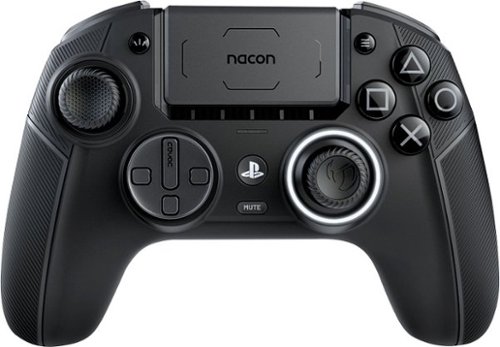
Boost your skills with the controller innovations from Nacon. Officially licensed for PlayStation, the Revolution 5 Pro delivers unmatched performance and reliability in a wireless game controller for PS5, PS4 and PC. Revolutionary features include magnetic Hall effect joysticks, adjustable trigger blockers, swappable D-pad designs, and Bluetooth audio.
Customer Rating
4
Great Concept, but needs some tweaking
on January 31, 2024
Posted by: Aaronxx7
I really had high hopes for this controller, because feature wise it sounds great and hardware wise it has addressed the biggest problem with the OEM PS5 controllers - stick drift.
I'm not saying it's a bad controller, just not what I was expecting.
Out of the box it's approximately 1 ounce heavier than the OEM PS5 controller and it's shaped more like an Xbox controller than a Playstation one. One ounce might not seem like a lot, because most of the time it's not. However the displacement of the weight is different. The PS5 controller holds most of the weight at the front, where the charging port is. The Nacon controller is heavier in the center and the handles. For some reason this weight distribution makes the controller feel heavier than it actually is or that there is more of an effort to hold it (if that makes any sense to you)This comparison is without the optional handle weights that come with the Nacon. For people that actually like the heavier controller feel, there are additional weights in the case that can easily be popped in and out of the handles in less than a minute. I usually game for a long time, so I opted for the lighter feel of no added weights. For people that absolutely love the design and feel of the OEM controller, this might take some adjusting to get used to. For people that love their PS5 but have been dying to use an Xbox controller, this is probably as close as you are going to get. There are some differences, the Nacon controller is a little broader around the trigger area and handles, and generally feels a little bulkier than the OEM Xbox controller and PS5 controller.
In comparison to the OEM PS5 controller this is a bit of a jump in the general feel of the two controllers. Even though it's not much bigger than the PS5 controller it feels awkward the first time you try to use it. especially with any game that uses the triggers. After just an hour of playing a FPS game the rigid triggers started to make my fingers hurt. The curve and design of the triggers is not as fluid as the PS5 ones. You can switch the buttons on the triggers for shorter quicker responses. That feature works good, ,just as described and is better for FPSs. The D-Pad like the thumb sticks can be swapped out for the 4 directional pad or the full round D-Pad. Both feel a bit odd, because the D-Pad itself sinks into the controller like an L3 click. The full round pad feels too clumsy to get accurate movements. The 4 directional D-Pad is slightly better but still hits that clumsy feel as it sinks when trying to run your finger across it from one direction to the next.
I play a variety of games, but currently I have been playing a lot of Call of Duty Mw3.In its "classic" setting the controller handles well for most things and is at its closest to the OEM controller, except for the thumbsticks. The thumbsticks use a different type of technology vs the traditional potentiometer thumbstick. The Nacon uses Hall Effect thumbsticks. They use magnets and electrical conductors as opposed to the traditional electrical resistance. The magnets have the advantage of no actual friction across the sensors. This idea may lead most people to believe this will last forever, but that is not the case as the bails and gimbal mechanisms do move and can wear over time. A good Hall Effect controller could easily last 2 to 3 times longer than a traditional controller in regards to stick drift.
The idea behind what they were trying to do with the thumbsticks was great ! However, it doesn't work that great for all games. The controller has a "Classic" mode and an "Advanced" mode. The classic mode is as close to the standard controller as possible. Even though the thumbsticks are more precise and fluid feeling, they lack that quick snap back feeling of an OEM controller. You can getused to it, but after playing MW3 all week, I still couldn't get my aiming and moving as quick and accurate as I could with the OEM controller. The Thumbsticks just feel spongy when trying to run and quickly aim at different targets. The Nacon controller also has 4 built-in thumbstick profiles designed for specific types of games (Driving, FPS, Arcade, and Infiltration). I tried the FPS mode on MW3 and it was okay for sniper rifles, and worked okay for single shot weapons but for quicker weapons like the SMGs and Assault Rifles, it was okay. for one or two close targets, but for more targets or targets of greater distances it would fail to reach them in time.
I tried the other 3 modes and there is a real noticeable difference in how the thumbsticks
react. I tried the Arcade mode and for some reason, my character kept turning indifferent directions than what I was pressing, so I was not sure what was going on there.The thumbsticks are very precise in their direction and responsiveness based on the profile. The having different levels of precision and responsiveness really help out in certain situations and games. The classic profile worked great on "For Honor".The Driving one worked good on Need For Speed, the 4th profile seemed way too slow for anything I would play. In addition to the 4 preset modes, you can create your own profile, but you would have to plug the controller into a PC and download the Nacon app. The App gives you a lot more options the way the controller can be used. I still wasn't happy with the results, so I thought I would try to add the metal rings to the thumbstick bases. The rings basically shorten the distance the thumbsticks travel, cancelling out dramatic moves in any direction. This did not help me as I was trying to get a closer feel to the OEM controller. I guess I could have used the rings and gone into the app and changed the dead zone areas. Maybe that would have been more effective. So , I will add that to my try list. I so much wanted this controller to have the feel of thePS5 controller without the stick issues.
react. I tried the Arcade mode and for some reason, my character kept turning indifferent directions than what I was pressing, so I was not sure what was going on there.The thumbsticks are very precise in their direction and responsiveness based on the profile. The having different levels of precision and responsiveness really help out in certain situations and games. The classic profile worked great on "For Honor".The Driving one worked good on Need For Speed, the 4th profile seemed way too slow for anything I would play. In addition to the 4 preset modes, you can create your own profile, but you would have to plug the controller into a PC and download the Nacon app. The App gives you a lot more options the way the controller can be used. I still wasn't happy with the results, so I thought I would try to add the metal rings to the thumbstick bases. The rings basically shorten the distance the thumbsticks travel, cancelling out dramatic moves in any direction. This did not help me as I was trying to get a closer feel to the OEM controller. I guess I could have used the rings and gone into the app and changed the dead zone areas. Maybe that would have been more effective. So , I will add that to my try list. I so much wanted this controller to have the feel of thePS5 controller without the stick issues.
The controller does not have a built-in mic. But does have a clip on mic that fits into the audio port, so you can use it just like a PS5 controller during chats. It also has built in bluetooth, so you can use virtually any headset you want with it. You can also use a combination of audio devices as long as they don't overlap features, ie,. a non mic bluetooth headset and the included mic adapter. But not a wired headset and a bluetooth headset. There are also built-in audio EQ presets that can easily be swapped to from the touchpad. You can even adjust the volume from the touchpad as well.
The charging port and cable seem to be of high quality, but again there is a give and take here. The charging port sits so deep into the controller that only the included cable will fit in thereto charge the controller, so make sure to carry this cable with the controller always. The deeper well for the charging port actually holds the cable into place so there is less sideways pull from the cable on the port, so this is a benefit to the longevity of the charging port and cable.( After some searching I was able to find another cable that would work to charge the controller)
Nacon was established by BigBen in 2019 and wants to be the leader in gaming
accessories and AA games. They have acquired several other gaming companies
to help them in their venture. With all their combined efforts they are coming up
with some good ideas, it's just the execution that needs some more work.
The controller is definitely usable, and offers a ton of different ways to alter the look,
feel and control of most everything and possibly with some more tinkering, or updates
I might be able to find that sweet spot in the settings that works the best for me.
accessories and AA games. They have acquired several other gaming companies
to help them in their venture. With all their combined efforts they are coming up
with some good ideas, it's just the execution that needs some more work.
The controller is definitely usable, and offers a ton of different ways to alter the look,
feel and control of most everything and possibly with some more tinkering, or updates
I might be able to find that sweet spot in the settings that works the best for me.
I would recommend this to a friend!






Share this review:


0points
0of 0voted this as helpful.
Aaronxx7's Review Comments
Aaronxx7 has not submitted comments on any reviews.
Aaronxx7's Questions
Aaronxx7 has not submitted any questions.
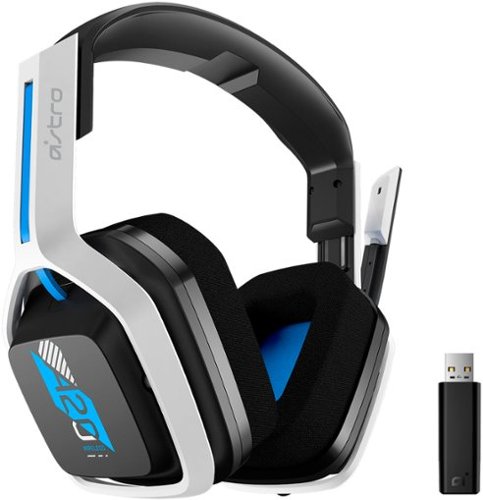
The A20 Wireless headset Gen 2 is designed to give you gaming audio freedom on several levels. Its 2.4 GHz signal provides an extended wireless range and with the flip-to-mute microphone you can easily choose if you want to be heard or not. Additionally, the headset~s long lasting comfort and battery life allow you to game through those marathon sessions.
Does everything come in the box for it to work correctly with the ps5 or do i need the purchase the hdmi adapter on astro website that is sold separately?
yes, the included dongle will work on the PS5
5 years, 11 months ago
by
Aaronxx7
The A20 Wireless headset Gen 2 is designed to give you gaming audio freedom on several levels. Its 2.4 GHz signal provides an extended wireless range and with the flip-to-mute microphone you can easily choose if you want to be heard or not. Additionally, the headset~s long lasting comfort and battery life allow you to game through those marathon sessions.
Do you need to update the headset when you get it in order to use it
no, you do not need to update it before use.
It's plug and play
It's plug and play
5 years, 11 months ago
by
Aaronxx7

Juicing at home means great nutrition and delicious drinks whenever you want them, and saving money, too. Now we've made it easier than ever to turn healthy fruits and vegetables into delicious, colorful, vitamin-packed juices right at home, with faster cleaning and more convenience. With patented auto-clean technology, this Oster Self-Cleaning Juice Extractor rinses and scrubs hard-to-clean pulp and fiber from the filter in just seconds, for hands-free cleanup. This versatile Oster juicer has an extra-large food chute that fits most whole fruits and vegetables~that means less prep work for you. The power-performance, 1000-watt dual-speed motor easily extracts both soft and hard ingredients in seconds. The convenient drip-stopper nozzle prevents dripping after juicing, and the stainless steel locking arm ensures the juicer works only when locked and secure. The parts are BPA-free and dishwasher-safe.
What are the dimensions of the juicer unit fully assembled? I looked for this information in the "specs" section but it isn't listed.
The overall width and depth are about 7.5" x 11.5", and the height is 18.5"
5 years, 11 months ago
by
Aaronxx7

Brew coffee at your leisure with this Breville Vertuo Next Classic espresso machine. Centrifusion technology with spin rates of up to 7000 rpm ensure thorough coffee extraction, and the included 12 Vertuo coffee capsules introduce you to a variety of coffee flavors. This Breville Vertuo Next Classic espresso machine is Bluetooth-enabled for easy updates, installation and synchronizing with the Nespresso mobile app.
Does this machine with Bluetooth auto brew?
No, the wireless feature is for updating software only (at this time)
6 years ago
by
Aaronxx7

Power disturbances can cause equipment damage and lessen your electronic devices lifespan. During power disturbances, you also risk losing connection to your critical devices. Ensure you keep connected to what matters the most with APC Back-UPS.
What replacement battery does the UPS take?
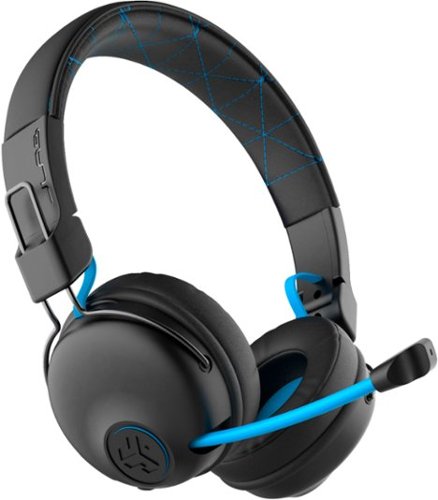
Hear all your games in high-quality sound with this JLab Play wireless gaming headset. With an increased mid to high frequency response and super-low 60 ms latency, this headset is able to deliver clear vocals and enhance spatial awareness without lag. JLab~s Play wireless gaming headset delivers over 22 hours of playtime and compatibility with PCs, consoles and mobile devices to handle every session.
where is the micro phone? can it be used for a call center?
the microphone pulls out of the right earphone.
It could probably be used in a call center, if your phone base has a 3.5mm headphones plug
It could probably be used in a call center, if your phone base has a 3.5mm headphones plug
6 years, 1 month ago
by
Aaronxx7
Hear all your games in high-quality sound with this JLab Play wireless gaming headset. With an increased mid to high frequency response and super-low 60 ms latency, this headset is able to deliver clear vocals and enhance spatial awareness without lag. JLab~s Play wireless gaming headset delivers over 22 hours of playtime and compatibility with PCs, consoles and mobile devices to handle every session.
Is it compatible with ps4 & xbox?
yes, with the included aux cable you can plug it into your controller
- no third party wireless devices can connect wirelessly to the console, because Sony , Microsoft and Nintendo do not allow it
- no third party wireless devices can connect wirelessly to the console, because Sony , Microsoft and Nintendo do not allow it
6 years, 1 month ago
by
Aaronxx7
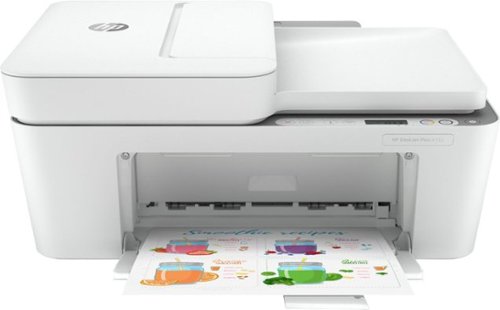
Reliability meets modern multitasking with the HP DeskJet Plus 4155 all-in-one printer. Designed to save you time, this all-in-one printer helps you quickly tackle print, scan, and copy jobs with the 35-page automatic document feeder. Send secure faxes from virtually anywhere with your smartphone. With HP Instant Ink, this wireless printer automatically orders ink and delivers it straight to your door with up to 50% savings on ink (subscription required). Get better range and fast, reliable connections using dual-band Wi-Fi with self-reset. Set up your color printer in a few easy steps, then connect, and print from any device using the HP Smart app. The HP Smart app also lets you scan and share your documents to Dropbox, Google Drive, e-mail, or the cloud.
Is this printer compatible with an Acer Chromebook?
yes, it should be, as this works with Android devices.
6 years, 2 months ago
by
Aaronxx7
Reliability meets modern multitasking with the HP DeskJet Plus 4155 all-in-one printer. Designed to save you time, this all-in-one printer helps you quickly tackle print, scan, and copy jobs with the 35-page automatic document feeder. Send secure faxes from virtually anywhere with your smartphone. With HP Instant Ink, this wireless printer automatically orders ink and delivers it straight to your door with up to 50% savings on ink (subscription required). Get better range and fast, reliable connections using dual-band Wi-Fi with self-reset. Set up your color printer in a few easy steps, then connect, and print from any device using the HP Smart app. The HP Smart app also lets you scan and share your documents to Dropbox, Google Drive, e-mail, or the cloud.
how many pages will it print before needing to replace ink?
with standard sized ink cartridges, between 100 to 120 pages
6 years, 2 months ago
by
Aaronxx7
Reliability meets modern multitasking with the HP DeskJet Plus 4155 all-in-one printer. Designed to save you time, this all-in-one printer helps you quickly tackle print, scan, and copy jobs with the 35-page automatic document feeder. Send secure faxes from virtually anywhere with your smartphone. With HP Instant Ink, this wireless printer automatically orders ink and delivers it straight to your door with up to 50% savings on ink (subscription required). Get better range and fast, reliable connections using dual-band Wi-Fi with self-reset. Set up your color printer in a few easy steps, then connect, and print from any device using the HP Smart app. The HP Smart app also lets you scan and share your documents to Dropbox, Google Drive, e-mail, or the cloud.