


cjviscito's stats
- Review count221
- Helpfulness votes667
- First reviewNovember 1, 2012
- Last reviewAugust 18, 2026
- Featured reviews0
- Average rating4.2
Reviews comments
- Review comment count0
- Helpfulness votes0
- First review commentNone
- Last review commentNone
- Featured review comments0
Questions
- Question count0
- Helpfulness votes0
- First questionNone
- Last questionNone
- Featured questions0
- Answer count23
- Helpfulness votes23
- First answerFebruary 8, 2010
- Last answerMay 27, 2021
- Featured answers0
- Best answers1

The Magnifica Start is designed for both simplicity and creativity to craft all your favorite coffee drinks at home. This one-touch automatic coffee & espresso machine features an easy to navigate design, making it the perfect machine for both beginners and aficionados. Easily craft all your favorite drinks at home including: lattes, iced lattes, iced coffee, iced macchiatos, and seasonal favorites like pumpkin spice lattes, peppermint mochas, and espresso martinis. The integrated grinder and brewing unit deliver the freshest espresso with a perfect grind, dose, tamp and brew every time, removing the guesswork and the mess. The one-touch display panel makes it easy to brew your favorite coffee drinks right at home. Easily froth milk and milk alternatives to craft your favorite drinks such as lattes, cappuccinos, and more. Clean up is simple thanks to our detachable, dishwasher-safe parts. The compact design and sleek interface make this the perfect machine for any space. Brew up your favorites or explore endless possibilities with Magnifica Start.
Customer Rating

4
Perfect Countertop Espresso Machine
on October 28, 2024
Posted by: cjviscito
I have to say that I have a guilty pleasure - I love a good cup of coffee and espressos. No matter when I'm out and about, I'm always down for a cup of coffee or espresso. To that end, the desire to pick up a solid at-home coffee machine that can do freshly ground espresso as well as coffee, or americanos, was a no-brainer.
For starters, I wanted something that could easily fit on a countertop and wouldn't require being stored, and wouldn't look out of place to be out all the time. The Magnifica is such a machine. At a size of 9.25" wide x 17" deep x 14" tall, it's not an insignificant machine, but it's also not as massive as some of the larger, at-home machines can be, so it was a nice compromise. It's certainly larger than a standard drip-carafe machine.
Now, more importantly, let's talk about how this makes a great cup of coffee. If you're familiar with the countertop coffee machines, like most, the Magnifica sports a removable water tank. The water tank has the option for a water filter, but we don't since we fill it with already filtered water. That helps decrease the frequency I need to descale or clean the water. I wouldn't recommend using tap water.
At the back of the tank, there's the bean bin where you pour in your desired beans. Since I'm an espresso fan, I fill the bin with espresso beans and set the desired intensity setting using the wheel inside the bean bin. Just something to note - with any coffee machine that has a built-in grinder... you're locked into those types of beans until you run through them all. It's not really easy or possible to swap beans out once you pour them in. So we usually pour in a smaller amount of beans when we want to make espressos, so that if we wanted to make regular coffee, we could without having to go through a whole bag of beans.
The espressos this thing makes taste great. There's also an option to make americanos, which I can't speak to because I'm not an americano fan, my wife is. I do also like the optional manual milk frother attachment on the front. It's nice to have the option to make cappuccinos after dinner, and the attachment is super easy to clean.
I also have to say that I appreciate that the water tray and used bean bin are all dishwasher safe. Getting the used bean bin clean can be a bit of a chore, so being able to toss it into the top rack is nice.
Bottom line - really like this machine, and glad I picked it up!
I would recommend this to a friend!
Share this review:


0points
0of 0voted this as helpful.

The Eye is moving~and it~s fallen onto our Mech Keys community. What began as a keycap set has now taken shape as a full board. Meet the Drop + The Lord of the Rings Black Speech Keyboard: a Mordor-inspired centerpiece poised to conquer your desktop. New to this build is a matching black aluminum case with custom artwork by OSHETART depicting the Eye of Sauron atop Barad-d~r. Beyond the aesthetics, the typing is scary-good, too, thanks to our Phantom Stabilizers paired with our Holy Panda X Switches for a tactile feel worthy of the Dark Lord himself. One does not simply walk into this keyboard.
Customer Rating
4
One Keyboard to Rule Them All
on October 21, 2024
Posted by: cjviscito
OK, let's be clear about one thing, you're getting this keyboard because you're a fan of Lord of the Rings who also happens to like a good mechanical keyboard. Since both apply to me, I had to pick this up.
Basic design out of the way, this is a standard 3/4 inverted-T keyboard. This is also a WIRED keyboard. There's a USB-C port on the back of the keyboard and a USB-C to USB-C cable in the box, so that means you can run the wire in a way that works best for you, and easily disconnect it if you want to swap it out for something, say, a little more work-oriented without dealing with a cable that's fastened to the keyboard itself.
The Escape, Space, Enter, and Arrow Keys all have 2 varieties, there's the basic gray ones that come pre-installed. Then there's the cool red ones they use in the images. You can use the key swapper tool that comes with it to easily swap out the keys based on what you want. Since I wanted to have the bright, red, Mordor-flavored keys, I immediately swapped out the gray ones for the red ones.
As far as typing and responsiveness, it's a nice gaming keyboard. I haven't seen any noticeable delay or issues. The keys have a satisfying, mechanical sound and feel that makes typing on it feel good. I'm not a mechanical keyboard enthusiast, so I'm not entirely sure, but the sound of the keys makes me think these are "brown" switches... but I could be wrong.
The only real issues I had with the keyboard is actually one of the coolest aspects of it. The keys are labeled using Tolkien's elvish lettering. They do have the English letters in smaller sizes, on the bottom left of the keys, but it's still written with an elvish flair. That makes reading the keys remarkably challenging as they're not backlit. It's a cool design choice, but the UX takes a hit if you can't tell what you're typing.
But again, let's be honest, you're getting this because you're a Lord of the Rings fan... and this is an awesome personal computing accessory for any fan... elf, orc, or human.
I would recommend this to a friend!
Share this review:


0points
0of 0voted this as helpful.
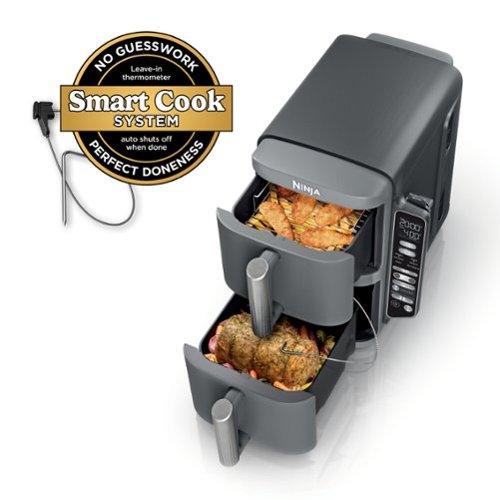
Meet the Ninja DoubleStack XL Smart 2-Basket Air Fryer, the only stacked 2-basket air fryer that can cook up to 4 foods at once. Designed for efficiency, versatility, and easier family-sized meals, Ninja~s stacked 10-QT design maximizes counter space while giving you the power and capacity of 2 air fryers in the footprint of 1. Only Ninja has DoubleStack Air Frying technology that delivers the optimal air flow and even heat required to cook 4 foods at once for crispy, golden perfection every time. Also included is Ninja~s Smart Cook System. Ninja's Smart Cook System allows you to achieve the perfect doneness at the touch of a button with the integrated Foodi Smart Thermometer~no guesswork required. Simply load your veggies onto the crisper plate, insert the stacked meal rack into the basket, and place your proteins on top to cook 2 different foods in one basket. Two 5-QT baskets allow you to simultaneously prepare different dishes, making multi-tasking in the kitchen a breeze. Cook more food in a smaller footprint~easily fits two 5-lb chickens or 5 lbs of wings in each drawer. Perfect for smaller kitchens, enjoy delicious homemade meals while keeping your countertops clear of clutter. * vs NINJA AF080 (power) and CHEFMAN 5QT Air Fryer
Customer Rating

5
Double-Decker Air Fryer
on October 21, 2024
Posted by: cjviscito
Over the past 2 years, we've really gotten into using an air fryer to help prepare meals. Since we've had one, we've made everything from wings, to fries, to nuggets, and anything else that you'd normally think you'd need a traditional fryer to make.
My wife has been wanting one that had 2 distinct bins, so we could make different things at the same time. If I want my 4-alarm buffalo chicken wings, and the kids want some taquitos, no worries now. We had one that was side-by-side, but it was massive and took up a lot of space in the cabinet and on the countertop, so my wife wanted to try this one out and so far, she's been really happy with it.
She likes the fact that it's vertical. She said it feels like it takes up less space on the counter top and in the cabinet. It's actually a little smaller than the older, side-by-side model one we had. The over all look and feel is clean and simple. The control panel is not super intuitive, but after a couple of times using it, she's comfortable.
She did note that the guide that came with it makes mention that if you're using both bins at the same time, that you'll need to add some extra time when cooking, which makes sense. She likes the fact that it cooks and cleans up well and easy. After use, the cooling down does make some noise, but there's not a lot of heat that comes off, which means it can safely be stored in the cabinet.
I would recommend this to a friend!
Share this review:


0points
0of 0voted this as helpful.
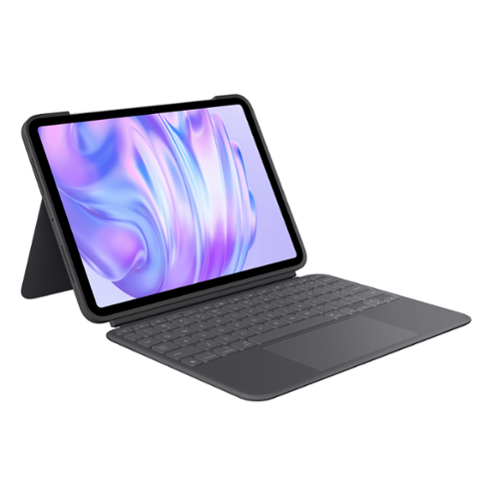
Type, sketch, view and read with the Combo Touch keyboard case. A flexible kickstand and a full-size, detachable keyboard give you multiple use modes for any task. Take iPad further with a bigger trackpad that gives you superior, intuitive tracking experience with familiar Multi-Touch gesture controls.
Customer Rating

3
Not as Good as my OG Combo Touch
on October 15, 2024
Posted by: cjviscito
I picked this up for my new 11" iPad Pro M2, because I had the original one on my 11" iPad Pro M1 and it was hands down the best keyboard combo case. So I figured since Logitech released an updated version, it's be a no-brainer to pick it up. Honestly though, I was disappointed, mostly due to the change in the materials.
First and foremost, because Apple changed the dimensions of the iPad Pros, I have to say this will only fit the most recent, 2024 M2 iPad Pros. For example, my M1 iPad Pro was too thick to even fit into the casing. So do not get this unless you have the latest, 2024 M2 iPad Pro 11" model.
My biggest gripe was not with the device itself, it behaved just like the original Logitech Combo Touch. The keyboard / trackpad part attaches to a strong magnet. The back part of the case includes a strong, magnetic kick stand to hold the iPad up like a laptop. The keys and trackpad are comfortable and responsive.
My biggest gripe was that the original model that worked on my M1 version was a textured material that made the case feel great to hold and carry. The newer version used a slick, soft, black material that made the case feel slippery. I also found the cover didn't snap shut on the newer version like it did on the older one. This is a rare misstep in Logitech, because it's been my experience that their accessories get better over time. Maybe it's just me, but I really preferred the more premium, textured feel of my original case compared to this newer one.
I would recommend this to a friend!
Share this review:


0points
0of 0voted this as helpful.

The Velox Mini Qi2 is a versatile dash & windshield phone holder that utilizes Qi2 technology for a powerful magnetic hold and fast wireless charge. Designed exclusively for Qi2-enabled devices including MagSafe compatible iPhones and cases, the Velox Mini Qi2 delivers up to 15W of power. Just tap your phone against the mount face and powerful magnets will hold it in place in perfect alignment. Securely install the Velox Mini Qi2 on your vehicle~s dashboard or windshield via a super strong, reusable suction cup base with sticky gel formula. A dashboard pad is included to protect you dash from any potential damage. The telescopic arm easily extends from 4~ to 6.75~ and pivots on a 260* arc to give you ultimate flexibility when installing the mount. A ball joint rotates and tilts so you can adjust the cradle for an ideal and safe viewing position in either portrait or landscape mode. A series of ventilation holes constructed around the mount help to dissipate heat and maintain airflow, while the anti-slip silicone finish offers added support and a gentle, scratch-free connection to your phone. Now it~s easier than ever to keep your phone powered up on the go!
Customer Rating

2
Really Wanted this to Work
on September 2, 2024
Posted by: cjviscito
I really wanted this to work - in theory, it should've been great for my wife's 2016 Honda Odyssey that doesn't have CarPlay. This was supposed to allow her to use Apple Maps directions while she was on the road. But sadly. this just didn't work out for her.
First off, she decided she didn't want anything hanging from her windshield and I don't blame her. We live in Texas where the median temperature in the summer is a brisk 101, so anything that's "stuck" to the windshield has a high probability of falling off. So we decided to try and mount it on the only piece of accessible dash trim we could find, between the steering wheel and A/C vent to the right of the steering wheel.
The next disappointment was in the "telescoping" arm. It only added like 2 or less inches, which didn't make it all that accessible for my wife to easily swap between music and maps. The degree of the arm is also managed by a screw bolt at the back that had an unusually high amount of torque, so it took an effort to loosen it up to even get her phone to a place where she would've wanted it to be.
Next, was the magnet. I'm not sure what happened, but the hold on this thing wasn't near as strong as something I'd expect to hold a phone into place. She has an iPhone 12 Pro, with a MagSafe case. Her phone solidly clicks onto her nightstand charger, or my MagSafe mount in my car. We hit a pot hole and her phone popped off the holder. After checking it when we got home, I found that her phone popped off with a minimal amount of effort.
I also was not a fan of the cable. The cable was permanently attached to the charging puck, while the other end was a USB-C. Since most cars that I would guess would be the target market for this kind of after market addition are armed with USB-A only ports, if that, iOttie was thoughtful enough to include a USB-C adapter for the cigarette lighter 12v port. That meant in our case, connecting the phone to the van could only be done over Bluetooth and not USB-A, which isn't a deal breaker, but it made it cumbersome when we were both in the car on a long trip and had to keep swapping cables and cords.
Like I said, I wish this would've worked, and I wish I would've liked it - the idea was solid, but the execution just created too many compromises and sub-par user experiences in our case.
No, I would not recommend this to a friend.
Share this review:


0points
0of 0voted this as helpful.

Enter a new era of mobile gaming with the power of a full-fledged pro console controller. The Kishi Ultra forges into new terrain as the greatest mobile controller ever created. Meticulously designed with console-class ergonomics, immersive haptics, and Razer Chroma RGB, the Kishi Ultra delivers a true console experience with zero compromise.
Customer Rating
5
Finally, a mobile phone game controller that works
on August 22, 2024
Posted by: cjviscito
This is the iPhone game controller I've been waiting for, and for a very basic reason. I always have some kind of case on my iPhone. Usually, it's a slimmer case, not one of those super big an bulky ones, but the cases add just enough extra size to the device that causes other game controllers to not work.
I'd have to remove my phone from my case whenever I want to game, which is super annoying. So I was hopeful that the Kishi Ultra would work, since it's adjustable enough to handle a tablet up to the size of an iPad mini. I snapped it onto my iPhone 15 Pro, still in its case, fired up Dead Cells and I was off and running!
There is also several sets of rubber bumpers that you can use to augment how the Kishi Ultra holds a device. Because I'm using it with a case, I simply remove the bumpers and the USB-C connector on the right of the device is long enough to connect with my phone.
I'm probably a dinosaur when it comes to gaming, because I prefer a physical keyboard or controller. I've never really warmed to ports of games that were clearly designed for a physical means of control, that were ported to a device that was touchscreen. The Kishi Ultra solves that for me, because I can snap it on, and the game immediately recognizes there's an external controller and plays just as well as I'd hope.
In terms of the controls, I was also happy to see there wasn't any kind of noticeable or detrimental lag. The buttons all feel great, with a little clicky play to them. There's your standard dual analog sticks, 8-direction D-Pad, left & right triggers, and 4-button layout. Razer also added smaller trigger buttons, so instead of pressing down on the analog sticks for L3 or R3, there's smaller trigger buttons next to the standard triggers.
When it comes to ports, there's a 3.5 headphone jack on the left, and a USB-C port on the right. The headphone jack works just like you'd expect a headphone jack to work. The USB-C port allows for pass thru charging, so you can charge your phone while you play. I haven't tried to see if I could hook it up to my computer or PlayStation as a wired external controller yet, but sounds like a fun thing to test.
The controller feels nice in the hands too, and I have to say that I appreciate the fact that Razer made this controller black. Although I love the look of white devices, when it comes to controllers, the white gets so dirty after a while. Plus, if I'm being picky, it also looks nice holding my black iPhone 15 Pro.
There's also an app you can download to adjust the RGB lighting and enable other things, but I was very happy to see that it worked right out of the box without requiring an additional app to even work.
I would recommend this to a friend!
Share this review:


0points
0of 0voted this as helpful.

Get ready to revolutionize your phone experience with the TORRAS Ostand Spin stand case. This innovative case goes beyond mere protection ~ it~s a game-changer for your viewing pleasure. Offering an extensive range of angles from 15~ to 85~ horizontally and 0~ to 85~ vertically, it gives you diverse and comfortable viewing options. Whether it~s movie nights, browsing, or video calls, finding your ideal viewing angle has never been easier. Crafted to seamlessly integrate into your phone without compromising style, the pivot stand maintains a discreet profile. Built to surpass military-grade drop protection standards, it safeguards your phone against accidental drops, thanks to the raised camera lip and screen bezel protection. Powerful neodymium magnets provide a firm magnetic grip and uninterrupted wireless experience. Seamless connectivity with all MagSafe accessories. Elevate your phone experience and spin your life the infinite way with the TORRAS Ostand Spin case ~ where versatility, protection, and convenience work together to redefine the way you use your phone.
Customer Rating
4
I liked it more than I expected
on July 24, 2024
Posted by: cjviscito
I’ve seen these kind of cases making the rounds, some friends had versions from different makers, and I honestly never thought I’d see the appeal. So I wasn’t set up to love this case or be blown away by the idea of a rotating stand built into the back, but after having used this case for over a week now, I have to say, I’m really liking it!
The case itself doesn’t add a noticeable amount of bulk compared to the case that I normally used, in fact, this one feels a bit sleeker. The camera bump on the back is nice and it’s big enough that I can set the phone down without the lenses touching whatever my phone is resting on. But that’s not the main appeal of this case, it’s the metal ring on the back.
The ring stand on the back of the case aligns with the MagSafe charging magnet between the phone and most magnetic accessories. Since the ring is made of metal, there’s a satisfying “click” when I place my phone on my MagSafe charger.
The stand it self is a nice feature because it provides a way to have your phone on a stand, as well as give you something to hold on to, giving you a more secure grip. For me, this thing was awesome at work where I usually watch videos during my downtime. Now, I can plug my phone into charge, kick out the stand an viola, portable side screen movies where I don’t have to piece together some odd lean-to support for my phone.
The only potential downside that I’ve seen personally is when you use this case on a Qi charger that’s not MagSafe. Because of the physics in how wireless charging works, there’s a build up of heat. That made the ring really hot, like concerningly hot for me. So I quickly made my mind up to never use a Qi charger, and stick with MagSafe or magnetic chargers. Using those, the ring doesn’t feel any warmer than room temperature.
I would recommend this to a friend!
Share this review:


0points
0of 0voted this as helpful.
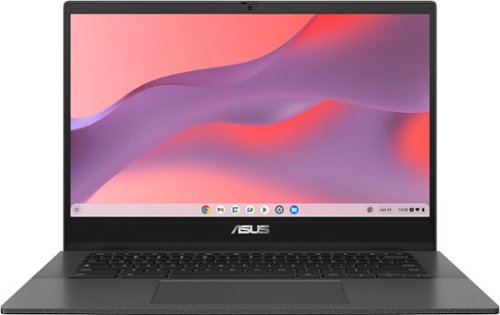
ASUS Chromebook CM14 is made for boosting productivity and having more fun ~ all day, every day. An efficient MediaTek Kompanio 520 processor and up to 15-hour battery life* gives you the freedom to stay productive throughout the day.
Customer Rating
4
Perfect Teen Laptop Option
on July 24, 2024
Posted by: cjviscito
My daughter got used to using a Chromebook at school, because our ISD issues them to all middle school age and up kids, and she’d been asking about getting a laptop for herself to use. Since she was familiar with ChromeOS and since I wasn’t about to spend a ton of cash on an overpowered laptop for what she needed, I picked up this new Asus 14” Chromebook and we haven’t been disappointed.
First off, if you’re new to the whole Chromebook thing, it’s essentially a barebones laptop that is made to run Google’s ChromeOS. Picture running an entire OS through a Chrome window and you’ll have some idea what it’s like. They’re great because they’re less expensive than a Windows or Mac laptop, and if you’re in Google’s ecosystem, then it’s a pretty relaxed experience.
My only concern was that I wanted to be able to log in with my own Google account as a local admin and then let my daughter log in with her ISD-issued Google account. Both of these worked flawlessly. I feel comfortable now that she can log into her school account and see all her Google classroom materials, emails, etc. Another nice thing is that because her school handles the permissions on what the students can and cannot access, I don’t have to worry about setting up a complicated permission list for her.
If she can access it at school, then she can get to it here. If not, then it won’t work, which is what I wanted. Within the first hour of getting it set up, she was already on a Google Chat call with some friends. As a teenage girl, she was very particular about how her new Chromebook would look and work, but she was pleasantly surprised. In her own words, “it looks and feels like a more expensive laptop”.
Now, let’s be clear - Chromebooks are not on the same level of performance and flexibility as a Windows laptop or MacBook. They’re designed to be power-efficient and have minimal local storage since everything is supposed to sync with your Google Drive. This is great because you can work on a document across multiple devices if needed. I think Chromebooks are great ideas for anyone who wants a low-cost device for basic web surfing, emails, or document editing.
If you’re someone who wants a bit more control over how the local machine behaves, a gamer, or anyone who doesn’t already use Google services, then a Chromebook would be a waste of money. But, if you’re my teenage daughter, she loves it!
I would recommend this to a friend!
Share this review:


0points
0of 0voted this as helpful.
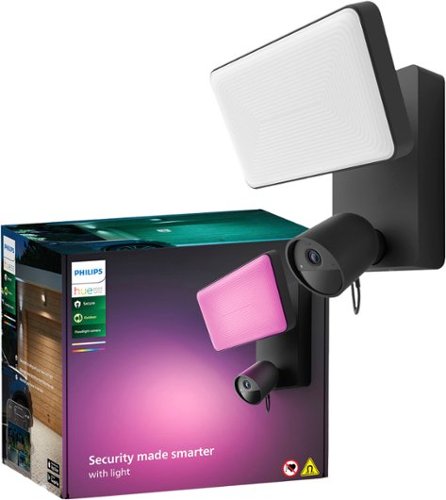
Get powerful, colorful light, an integrated 1080p camera with night vision, and the ability to see what~s going on and control the light right from the Philips Hue app. Mount it outside to monitor your home in real time ~ and then trigger an alarm to warn off potential intruders.
Customer Rating
4
Philips Hue Floodlight camera
on July 19, 2024
Posted by: cjviscito
The new Philips Hue Floodlight camera checked 3 boxes for me that were must-haves for the project of adding a floodlight camera over our driveway. Even though we live in a fairly nice and quiet neighborhood, there are still times when cars parked outside get broken into. So I was looking for a security light that:
- Offered 1080p video resolution
- Connected wired, no batteries
- Could integrate into my Homekit setup
- No subscription service required
- Connected wired, no batteries
- Could integrate into my Homekit setup
- No subscription service required
This camera checked all 3 of these for me, but there were some frustrations that I encountered along the way. It’s not a perfect setup, but it works really well all things considered.
First, the camera. I wanted something that would recored good, solid, 1080p resolution. I’m not live streaming my driveway or anything, so I didn’t need to go overboard with multiple cameras that all streamed 4K video to some kind of large receiver in the house. Out of the box, there’s 2 very basic pieces: the light with mounting plate, and the camera. The camera initially attaches by magnet, so you can pivot it around to get the angles just right. Philips also went above here with an included security cable that screws into the base of the camera, so it can’t just pop off. There’s also an accompanying power cable for the light, it draws its power from the light’s wiring.
Speaking of wires, something I both loved and hated about this was the wired setup. Incidentally, this isn’t a fault of Philips, I just had to go back and forth to get an electrician out to our house to install the jack for the camera because there was no existing camera mount. As much as I hate cords, and usually opt for cordless, I’ve been burned by battery powered security cameras whose batteries just cannot stand the Texas summer heat. Won’t name names, but another security system’s wireless camera’s batteries weren’t lasting a month after 1 Texas summer. So I knew I wanted something that could be hardwired in. This checks that, so now I never have to worry about climbing on a ladder, charging a ridiculous battery pack, none of that. So far, it’s been rock solid on the power front.
Since this is a Hue camera, I knew the light would integrate nicely with my existing Hue setup, and setting it up was pretty painless. If you’ve ever set up a smart home accessory or a Hue light or camera, then you know what you’re in for. Finally, whatever camera I picked needed to not have features locked out because of a subscription service. This camera is compatible with Hue’s Secure plan which does unlock some extra features like specified activity zones or video history. If you’re already a subscriber, these features are great value adds. Over time, Hue might get me to switch, but for now I’m happy with what I got.
OK, so here’s my rub with this thing. As with all Hue lights, you need the Hue Bridge to set this thing up. For the price they’re charing for the light, I would’ve liked to have seen Philips add a bridge in the box. So if you don’t already have a Hue bridge, that’s an additional $50 you’re going to have to invest. I’ve been a Hue user for years, so I already had one, but for someone just jumping into this ecosystem, I’d be upset to find out that the $350 light and camera I just bought required an additional $50 bridge to even work.
I would recommend this to a friend!
Share this review:


0points
0of 0voted this as helpful.
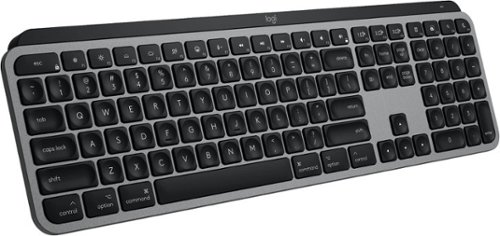
Introducing MX Keys S for Mac ~ a low-profile wireless keyboard with Mac-specific keys that offers a fast fluid precise typing experience, smart illumination, and customizable, time-saving Smart Actions and matching Space gray and Pale gray finishes that blend perfectly into your Apple setup.
Customer Rating
4
Perfect Full Sized Keyboard
on July 4, 2024
Posted by: cjviscito
I'm a fan of Logitech's accessories, and have been for years. I've had the Craft, which I loved but it wasn't compatible with Logitech's new Options+ software or Bolt receiver. So then went to the MX Mechanical Mini, which is awesome, but my job situation changed and began doing more data entry and analysis, so I wanted a keyboard that had the 10-key setup. So I went with the MX Keys S because I've had a great experience with my MX Master S3 mouse.
I love this keyboard! It's got a great balance of weight, sleek feel, and responsive keys. The main differences between the Mac versions and the PC version comes down to 2 main points:
- There are several keys that are reformatted for Mac specific OS commands
- There's no Bolt receiver in the box, Bluetooth is the only default connection option
- There's no Bolt receiver in the box, Bluetooth is the only default connection option
The lack of an included Bolt receiver is the only reason I docked a star off the review, and that's because the Mac's bluetooth is temperamental, no fault of Logitech here... but with the Bolt receiver, the connection is rock solid.
I've been using this keyboard for about a week now. I have a mixed environment set up, everything plugs into my monitor and I run a single USB-C cable to my personal Mac. When it's time to work, I simply unplug my personal Mac and plug in my work one. I also have a Windows gaming laptop that I use as well. The keyboard worked great on all devices, since the Bolt receiver I paired it with stays plugged into the monitor.
Even after a week of regular use, the keyboard's battery is still going strong. It does come with a single USB-C to USB-C for charging, but there's no power brick, so you'll need a power brick, or open USB-C port that supplies power to recharge the keyboard.
The typing experience is sublime. The keys have a convex top, that basically invites your finger tips to type with ease and certainty. If you're looking for a great Mac keyboard, then this is probably the best one to get!
I would recommend this to a friend!
Share this review:


0points
0of 0voted this as helpful.
cjviscito's Review Comments
cjviscito has not submitted comments on any reviews.
cjviscito's Questions
cjviscito has not submitted any questions.
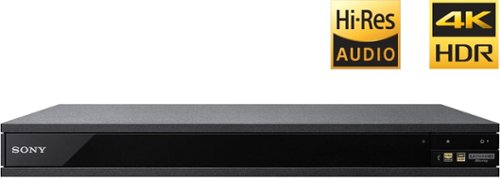
Experience immersive entertainment options with this Sony 4K Blu-ray player. Its Ultra HD resolution provides exceptionally detailed screen images with increased brightness and more realistic color, and its support of Dolby Atmos and DTS:X provides cinema-quality sound. This Sony 4K Blu-ray player supports high-resolution audio formats for more accurate music reproduction.
Can this Sony Player connect to a soundbar receiver with blue tooth?
According to the specs, yes, you should be able to pair a unit with a Bluetooth soundbar - but to be fair, I didn't try it.
9 years, 4 months ago
by
cjviscito
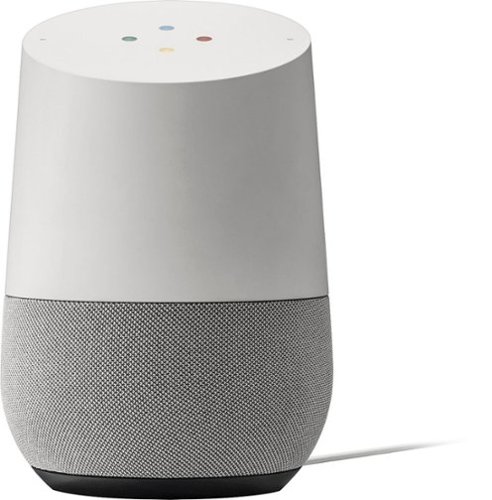
Simplify your everyday life with the Google Home, a voice-activated speaker powered by the Google Assistant. Use voice commands to enjoy music, get answers from Google and manage everyday tasks. Google Home is compatible with Android and iOS operating systems, and can control compatible smart devices such as Chromecast or Nest."
What other device is need to turn lights off in your home?
You need a smart switch. Home natively supports Philips Hue - but if you have a WeMo switch like I do, you need to rely on the IFTTT app and write some if-then guidelines.
9 years, 10 months ago
by
cjviscito
Which HDMI cable is the best? Audio Quest,Monster Cable,RocketFish
There's really no difference right now between HDMI cables. With Monster, you're paying for the brand and really nothing else when it comes to HDMI cables.
Best Buy has some cables that are online only and are a great value. No noticable difference between the value cable and a 3' Monster cable that I had.
Best Buy has some cables that are online only and are a great value. No noticable difference between the value cable and a 3' Monster cable that I had.
16 years, 7 months ago
by
cjviscito
Dallas, TX