


Batlacit's stats
- Review count272
- Helpfulness votes935
- First reviewFebruary 13, 2016
- Last reviewSeptember 29, 2026
- Featured reviews0
- Average rating4.5
Reviews comments
- Review comment count0
- Helpfulness votes0
- First review commentNone
- Last review commentNone
- Featured review comments0
Questions
- Question count0
- Helpfulness votes0
- First questionNone
- Last questionNone
- Featured questions0
- Answer count55
- Helpfulness votes101
- First answerSeptember 21, 2016
- Last answerJanuary 21, 2022
- Featured answers0
- Best answers11

The Hisense U8 Series is an award-winning TV that makes for the ultimate game-watching experience. It~s enhanced with Mini-LED Pro technology, reaching up to 5,000 nits peak brightness for even sharper contrasts, brighter lighting and more dramatic shadows. Soak up over a billion vibrant shades on your screen with QLED Color. The 165Hz Native Refresh Rate and Anti-Glare Low Reflection Pro panel technology helps you see it all clearly without any interference. And Dolby Atmos along with an up to 82W 4.1.2 Multi-Channel Audio System bring all the sounds of the cinema right to your living room.
Customer Rating

5
Stunning picture & Gaming Monitor Perks
on May 8, 2025
Posted by: Batlacit
"This TV is fantastic."
This is the thought that's been running through my head most of this week as I sit down to relax for the evening. I've written reviews for a lot of TVs at this point and, truth be told, most are positive for the simple reason that it's gotten pretty easy to produce an experience that most would consider acceptable. But in the time I've spent with it so far the U8 has genuinely impressed me in so many ways - going above and beyond what I've come to expect from the brand.
First, somewhat predictably, is the picture quality. Hisense has been making waves for a while for figuring out clever ways to improve the performance of LCD panels to get them a bit closer to OLED, and they've pulled out all the stops here. Active dimming, quantum dots, and a beautiful glossy finish all come together to produce a vibrant and colorful image that makes HDR content absolutely pop. And they've paired it with a straightforward and easy to use interface letting you fine tune the settings to meet your exact preferences (something that has historically been a bit hit or miss due the brand.)
And if that were all the U8 offered, I'd be perfectly fine giving it my recommendation. But what really makes it stand out are all the secondary perks. The U8 comes with a host of secondary features that read like a wish list of things I wish more manufacturers would pay attention to - starting with built in support for variable refresh rate input via a DisplayPort interface handily placed on the side where it's a bit more accessible than the rear mounted HDMI and audio ports. Gaming on this TV with my PC looks and feels better than anything else I've tried by a wide margin. And as if that weren't enough they even gave it a surprisingly decent sound system. The (admittedly somewhat chunky) case has enough room for a surround sound system of sorts complete with a subwoofer. While I can't say it really competes with a dedicated surround setup in terms of quality or immersion, it certainly beats most cheap soundbars and sets it apart as one of few TVs where external sound doesn't feel like a necessity.
There are a few downsides that some might find off-putting. To start, it's definitely not a subtle design. Personally I don't mind a larger case if it means getting better performance, but I know a lot of people prefer TVs to be nearly invisible when not in use and this will definitely never be that. It's thick and unashamed about it, with a very on-brand chunky pedestal base to match. Which segues into my next observation: the install process was a bear. This thing is tremendously heavy and getting it set up and into position with just two people resulted in a lot of pinched fingers. What's more it's quite picky. When I first started it up I was using the same HDMI cables I'd used for years with my old TV and the combination of MAT sound and HDR brought them to their knees almost immediately, resulting in frequent audio dropouts and visual glitches until I replaced then with ones that had more bandwidth (pinching my fingers a second time.) So, for many, this may not be a drop in replacement so much as the centerpiece for a whole rebuild of their home theater.
Still... This TV is fantastic. It's an easy recommendation to anyone with the space to spare.
I would recommend this to a friend!
Share this review:


0points
0of 0voted this as helpful.

The Crucial P510 offers powerfully fast Gen5 read/write speeds of 11,000/9,500MB/s, reducing load times while enhancing overall system responsiveness. Built for both laptops and desktops with an easy-to-install single-sided design and power-efficient architecture, the P510 offers lower energy consumption and is designed to support battery life. Backed by Micron~s 45-year reputation for quality and reliability, the Crucial P510 delivers top-tier performance that can boost everything from your workflow to your next game.
Customer Rating
5
Great storage drive for a gaming machine
on April 29, 2025
Posted by: Batlacit
The P510 is not the first PCIe 5 NVMe drive to hit the market. It is, however, one of very few affordable options for those not looking to spend an arm and a leg on their storage. I'll admit some concern when first installing it that this might have resulted in a compromised product, but I was pleasantly surprised to find a capable storage drive that offers a great deal of performance for its price.
To begin with, let's cover the drive's greatest strengths. Obviously, it is fast. Synthetic benchmarks clocked it at almost exactly its rated read speeds of 11Gb/s, which should (at least in theory) be a huge win for anyone hoping to make use of the DirectStorage architecture to improve responsiveness. What came as more of a surprise is that it doesn't get all that hot doing it either. Even without an integrated heatsink operating temperatures were only slightly higher than what I'd expect from a Gen 4 drive, making it one of very few good options for getting a PCIe Gen5 drive into a laptop.
That said, it is not entirely without some compromises. To start the drive does not include an onboard DRAM cache, meaning it's relying on system memory instead. While I can't say I've noticed this impacting performance in my time with the drive, there's no question that the same chips paired with a cache would do better - so it may not be the most future proof option out there. That said I'm also unsure how much it matters, because at the moment I have to admit that the massive disparity in performance under synthetic loads has shown up in real world use. In an attempt to give it a fair test I swapped this drive in for another 1TB Gen4 drive I'd been using to store my Steam library and while I did note a few improvements in load times, they were all quite minor. I really don't think this is a failing of the drive - more likely it's just that our development practices haven't quite caught up to the hardware specs yet (and may not for another few years.) So the only place you really get the effect of the improved speed is when you're doing large file transfers or streaming media over a LAN (which I do somewhat regularly, but then I'm a bit weird.)
Ultimately though, I would still give the P510 a recommendation. Even if we don't yet have the games to fully put it through its paces that's a situation that may well change within the drive's useful life, and you aren't getting any of the downsides you might get with a PCIe 5 drive that would normally make me question if it really made sense to include it in a build.
I would recommend this to a friend!
Share this review:


0points
0of 0voted this as helpful.
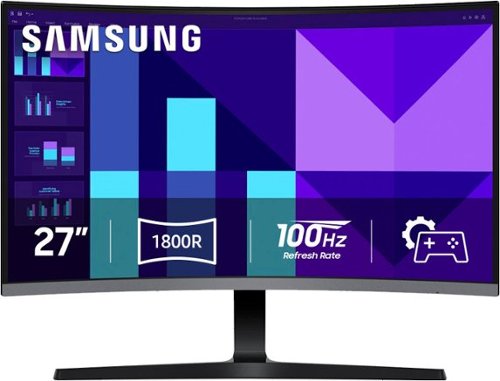
Samsung's 27" S3 FHD 100Hz Curved Monitor with Speakers provides an immersive viewing experience. The 1800R Curved Screen enhances depth perception and minimizes peripheral distractions, enabling greater focus. The 100Hz Refresh Rate reduces lag and motion blur when playing games, watching videos, or working on creative projects. Game Mode with optimizable settings allows color and image contrast to be instantly adjusted, filling the screen with every detail in view. Built-in Speakers free up desk space, minimize connections, and create a more efficient working environment for listening with ease. Eye Saver Mode with T~V-certified eye comfort technology reduces irritating screen flicker and minimizes excessive blue light, even during long sessions. Multiple Connectivity enables devices to be plugged straight into the monitor for a more convenient computing environment.
Customer Rating
5
Flashy Monitor for the Budget Conscious
on April 10, 2025
Posted by: Batlacit
Most of the curved monitors I've seen, particularly from the larger brands like Samsung, tend to target enthusiasts or professionals. More budget minded options do exist, but they tend to be fairly obvious about what they are. Samsung's latest attempts to address that by wrapping their latest lower spec'd curved display in a sleek, stylish package that should please anyone looking for a good deal.
The monitor's design goes out of its way to evoke the same design language of a lot of Samsung's last generation performance displays. The semi-rimless black and silver design is understated enough to blend in in an office setting while still boasting just enough aggressive angles to feel at home in a gaming setup. The 1800r curvature is ideal for close viewing, and while it's not quite large enough to fully immerse you in what you're doing it does significantly alleviate eye strain over long periods of use. Port selection is somewhat limited though - with just an HDMI and VGA at the back. It's a practical mix that should accommodate the vast majority of use cases, but I can't say it doesn't feel a little dated given far we are into the adoption of DisplayPort.
When it comes to actual performance, there's very little to complain about. It may not be Samsung's most impressive panel but colors are good, it doesn't pick up much glare, and the 100hz refresh rate is plenty responsive for daily use and the occasional gaming. The biggest issue is a pretty common one: it's a 27" FHD display. That's definitely pushing up against the limits of how big you can make a panel like that and still have it look good, so if you're the kind of person who likes to lean in to examine fine detail you may be disappointed when you start seeing pixels. It still looks fine when you're sitting at the proper distance, though, and can provide some excellent HD gaming experiences.
I would recommend this to a friend!
Share this review:


0points
0of 0voted this as helpful.
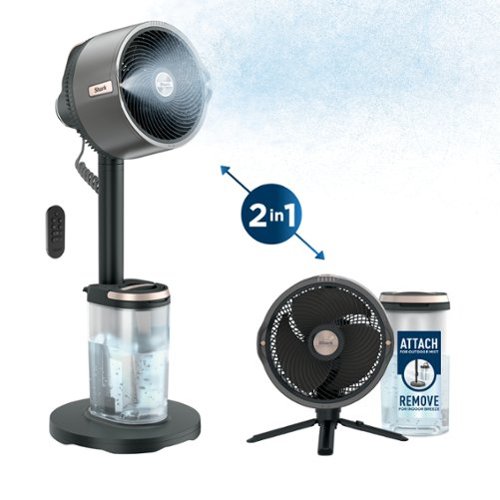
Introducing the Shark FlexBreeze Pro Mist indoor and outdoor fan with portable misting system ~ ultra-powerful, whisper-quiet, and perfect for any space in your home or beyond the backyard. With a 70 ft range and weather-resistant design, use it corded or cordless for ultimate flexibility from floor to tabletop. Enjoy up to 24 hours of cordless runtime at speed 1, six hours at speed 3, and two hours at max speed.
Posted by: Batlacit
Shark products are almost a meme at this point for how gleefully they will overengineer even relatively simple concepts. So it should come as no surprise that the FlexBreeze Pro Mist is perhaps the most complicated and feature rich electric fan I have ever seen. The sheer range of capabilities and operating modes that come with is such that even after almost a week spent playing with it I'm pretty confident there are more waiting to be discovered, which is both a blessing and a curse.
First let's drill into the positives. So long as you can find the space for it, there is pretty much no use case for a fan that this can't conceivably fill. It can cover a surprisingly large volume with as much or as little air as you might want, and seems consciously designed to be as invisible as possible while doing it. The motor is whisper quiet at lower modes and it offers a rather interesting party trick where it can pseudorandomly adjust its speeds to simulate the ebb and flow of a natural breeze, which I have to admit is surprisingly comfortable when you're just sitting inside reading while it rains outside. What's more the option to run it either from wall power or off of a generous internal battery means you never really need to worry about placement either. The optional mister also gains points for having most of the parts that are more likely to require maintenance or periodic cleaning easily accessible and, in some cases, completely replaceable - something that seems essential for a fan of this quality that will hopefully keep being used for many years to come. It hasn't really been hot enough yet for me to really put this function through its paces but even without it it's remarkably good at cooling things down, so I imagine on hot summer days it would be the height of luxury to set up at a barbeque or camp site.
That said there is one notable downside that needs to be addressed: bulk. Even in its smaller configuration, the fan is pretty awkward to place and move around. The addition of the battery makes the head a lot deeper than you'd usually expect for its radius, and the pedestal (while well built) has a very generous footprint that makes it clumsy to deal with, particularly if you're also carting around a full water tank. It's also got no provision to adjust the height of the pedestal, only to angle the fan. This can create some awkward scenarios where an obstacle forces you to point the head to the sky at which point you're not getting nearly as much air moving over people. It's certainly not something everyone's going to run into, but in my case it seemed to be almost exactly as tall as various bushes and lawn furniture so it did cause some annoyance. I don't think these are issues that would ever rise to the level of deal breakers for most, but I do think it's worth checking you can actually find the space for it before getting too excited.
Overall the fan is a very easy recommendation for a very particular kind of person. While it definitely works great both indoor and outdoors, I feel like it skews a bit further towards the latter use case. In my mind it's probably really going to shine for those who are perpetually outdoors in climates which seem determined to make the argument for air conditioning - where it could be a real game changer set up in a sunroom, patio, or backyard.
I would recommend this to a friend!
Share this review:


0points
0of 0voted this as helpful.

Trim, edge and shave any length of hair. Designed to cut hair, not skin. Philips Norelco OneBlade 360 Pro is a revolutionary hybrid styler that can trim, shave and create clean lines and edges, on any length of hair. Forget about using multiple steps and tools. OneBlade does it all. Philips Norelco OneBlade 360 has a revolutionary technology designed for facial styling and body grooming. It can trim, edge and shave any length of hair. Its dual protection system ~ a glide coating combined with rounded tips ~ makes shaving easier and comfortable. Its shaving technology features a fast-moving cutter (12000x per minute) so it's efficient - even on longer hairs. The innovative 360 Blade can flex in all directions to adjust to the curves of your face. The design enables constant skin contact and control. Easily trim and shave hard~to~reach areas ~ with few strokes and great comfort.* The versatile 20-length precision trimming comb offers length settings from 0.5 to 10 mm, giving you an even trim at exactly the length you want. OneBlade is 100% waterproof, so it is easy to clean, just rinse it under the tap.
Customer Rating
5
Best option for sensitive skin
on March 22, 2025
Posted by: Batlacit
The Philips OneBlade sits right at the intersection between electric and manual razors. With its small size and flexible head it offers significantly better control when trying to produce sharp edges or complicated styles than any other electric trimmer or shaver that I've tried, while still providing the skin protection and reduced fuss you just can't get with traditional safety razors. For someone like me who likes a close shave around my goatee but hates burning through disposable razor blade cartridges, it's the perfect solution for every day maintenance of my beard and as such I've been using OneBlade razors for a while.
The new Pro version doesn't seek to reinvent the wheel when compared to my older razor. It's still using basically the same tech to provide mostly the same experience. But it does feel like the design has "grown up" a bit, as they've put a lot of work into refining the experience. The first thing I noticed when unboxing it, for example, was the fact that this came with a charging stand rather than a simple charging cable. My old OneBlade wasn't the kind of thing that one would leave out on the bathroom counter - as soon as I was done with it, into the drawer it went. But this one was designed a bit more thoughtfully. It's not just a convenient travel accessory, it's a tool you'll likely be using every day and as such is designed for visibility. And that seems to exemplify most of the other improvements too. The improved blade design pivots on two axes rather than just one, making it much easier for it to follow the complex curves on your face and body. The new guards are much easier to install and remove from the blade, and are a bit more obvious in what they're meant to do. And the new, completely redesigned comb attachment is a gigantic step forward. While the old one was broadly functional it was very difficult to properly install, didn't offer much in the way of control, and tended to get stuck when trying to take it off. The new one addresses every complaint I've ever had about it. It secures not to the blade this time, but to the motor. This means no more getting stuck on the edges or having to risk bending the blade trying to pry it off. You can select between twenty different lengths, more than I think I've ever come across, and the mechanisms have all been redesigned to be much easier to keep free of stray hairs. As far as I'm concerned this one part alone might be worth the upgrade for anyone thinking of switching from their older razor.
I would recommend this to a friend!
Share this review:


0points
0of 0voted this as helpful.
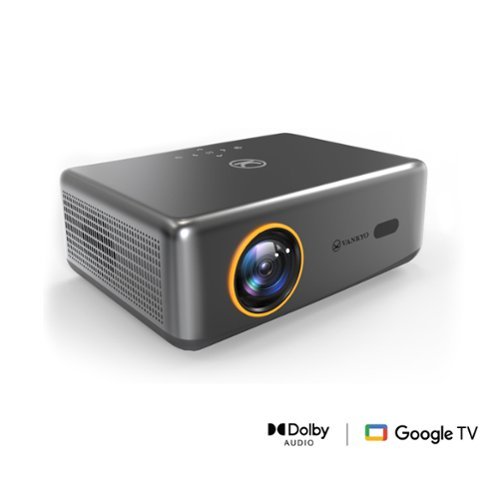
Introducing the performance V700 Neo: where innovation meets entertainment in the palm of your hand. Experience cinema-quality visuals with native 1080P resolution and 400 lumens brightness, bringing your favorite movies to life with breathtaking clarity. Say goodbye to extra devices~streaming content is seamlessly integrated, offering instant access to a plethora of entertainment options. With auto focus and auto keystone correction, enjoy hassle-free setup and consistently sharp, distortion-free images in any environment. Whether it's movie marathons, gaming nights, or professional presentations, the V700Neo redefines versatility and convenience, making every viewing experience an unforgettable journey.
Customer Rating
5
Great little projector
on February 27, 2025
Posted by: Batlacit
Small portable projectors don't have the greatest reputation. You tend to run into a lot of deceptive marketing covering up poor performance, lackluster image quality, and compromised software experiences. As such I was more than a little skeptical when firing up the V700 Neo - very much looking for the catch. much to my delight, however, there does not seem to be one. This is a surprisingly capable product that lives up to every promise it makes in regards to the experience it offers.
Initial setup is very simple owing to the fact that it's almost all automated. The projector automatically handles focus and some light keystone correction, with an option for manual control via the remote. Image quality is very good for a single LCD projector. The HD image is sharp and offers good contrast on both a gray projection screen and a smooth white wall. Brightness is enough to be usable in a moderately lit room, though as one might expect for best results you really want to use it in a darkened environment. Motion is very clear and great for watching every movie I tried. For gaming performance I'd describe it as... okay. There's definitely some lag that makes it less than ideal for twitchy games, but it's perfectly fine for more casual use. And the Google TV software provides access to everything you might need for streaming media in a very well laid out interface.
That said, there are a few downsides. Options for hooking up audio devices are pretty limited with no ARC support and just a standard barrel jack or BT connection for external speakers. The built in speakers aren't horrible, to be clear, but they also aren't exceptionally loud and can definitely be a bit overwhelmed by the sound of the cooling fan during normal use. It's also saddled with a large power brick, which is an awkward thing to have to work around if you plan to mount the projector somewhere for a home theater project. and the elevation adjustment is predictably poor, though at this point I'm starting to think that's just a requirement of anyone producing a small projector. I don't consider any of these to be dealbreakers, but it might be worth considering if you plan to make this the centerpiece of a larger project.
Overall, this is an easy recommendation (particularly at this price.) It's a great little projector to bring to events, serve as an occasional second TV, or to run a small home theater.
I would recommend this to a friend!
Share this review:


0points
0of 0voted this as helpful.

Audien Hearing's Atom Pro 2 is the most advanced in-ear hearing aid for the price. It has 4 listening modes, a wireless charging case that carries 3 additional charges, and a built-in UV sanitation light. Nearly invisible when worn with our patented Comfort+ design. Say goodbye to distracting background noise with the Atom Pro 2. Hear every word with crystal clarity and join any conversation with newfound confidence. Enjoy both the TV and conversations simultaneously for the ultimate convenience at your fingertips.
Customer Rating

4
An excellent - if somewhat basic - hearing aid
on February 6, 2025
Posted by: Batlacit
Right off the bat I feel it's important to make clear that over the counter hearing aids like the Atom Pro 2 are not going to deliver the exact same experience you'd get with a prescription device. Hearing loss is complicated and can come in a variety of different forms - and prescribed hearing aids can be tailored to address a wide range of different scenarios and presentations. The Atom Pro 2 takes a much simpler one-size-fits most approach, hoping to cover only the most common form of hearing loss.
Assuming that describes you, I think you might be rather impressed by the value proposition on display here. They're shockingly light weight, offer very good battery life, and come with a very wide range of cushions to allow for a good fit. Figuring out exactly how to seat them in a way that provides decent audio without having them fall out can be a bit of a trick, and there's certainly an adjustment period, but overall they're quite effective at amplifying ambient sound with minimal delay and good quality. While they weren't the greatest fit in my case for all day use (where the problem is more an inability to hear certain frequency ranges on one side) they were nonetheless helpful for intermittent use in cases such as trying to talk with someone in a noisier environment.
There is definitely a bit of a learning period, though, and a few sacrifices have been made for their size. One of the most obvious is the control scheme. Pretty much everything is controlled through a single button that you either tap or hold, which can be somewhat annoying as it means certain common tasks like mode switches can be fairly cumbersome. Additionally each hearing aid is controlled individually - which makes sense but also means you're likely going to be getting used to looking like you're putting both fingers in your ears. I don't know how common an issue this is with OTC hearing aids, but it seems like a bit of a missed opportunity compared to using an app.
I would recommend this to a friend!
Share this review:


+2points
2of 2voted this as helpful.

Keep your smartphone fully charged with the Insignia 7' USB-C to Right-Angle USB-C Braided Charging Cable. Featuring a unique 90~ right-angle connector, the cable will fit your workspace setup while preventing unnecessary cable strain. The angled connector is also ideal for using your smartphone or tablet in landscape mode while it~s charging. The 7 ft. black and dark gray braided cable provides enough length to reach from the wall outlet to the couch.
Customer Rating
5
Sturdy, lengthy charging cable
on January 28, 2025
Posted by: Batlacit
Charging cables aren't the most exciting product to shop for (assuming you're doing it right.) Let's face it: pretty much any option out there will generally be enough to get the job done for at least a while. But every now and then, one gets tired of cheap charging cables fraying or snapping and decides to splash out for something a bit more fancy and durable. This cable does a pretty good job of filling that niche. It's easy long enough to reach across the couch (or bed) when your phone needs charging. The nylon sheathing adds a bit of extra resistance to abrasion or twisting. And the right angle connector makes it a great pick for any situations where you don't have a ton of clearance around the charger (or the phone.) And as a bonus it's also got a sturdy silicone cable management system, allowing you to neatly roll it up for storage, managing slack, or throwing it into your bag. It handles fast charging very well, and in a pinch can even be used to provide power to larger devices like laptops. All in all, a good pick.
I would recommend this to a friend!
Share this review:


0points
0of 0voted this as helpful.
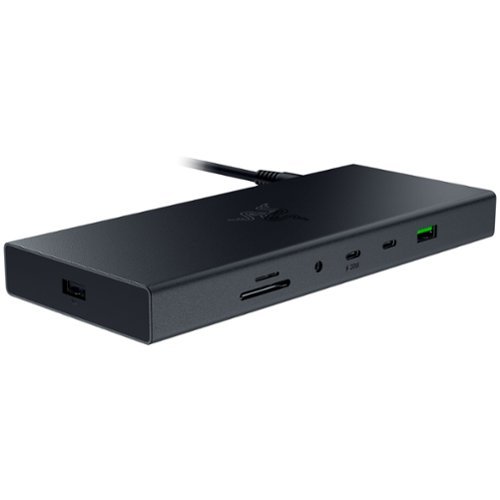
Transform your workspace into the ultimate place for gaming and productivity with the Razer USB 4 Dock. Powered by ultra-fast USB 4 connectivity, unify your desktop or mobile setup with a 14-port design featuring dual display output, continuous power delivery, and ultra-low latency for all your devices.
Customer Rating
5
Great option to get the desktop experience
on January 21, 2025
Posted by: Batlacit
As laptops continue to get larger, heavier, and more feature rich, the demand for good docking stations capable of delivering the desktop experience with one has grown at a rapid pace. The supply of good docking stations, unfortunately, has often struggled to keep up. Razer's latest offering, in a somewhat unusual turn for them, seems to be attempting to fix that with a fairly streamlined product which focuses on the fundamentals to deliver something that feels a step above what you can generally expect from such a product, but does still have some of the same limitations that come with it.
The first thing that stood out to me upon opening the box was the design. Given the manufacturer I fully expected no less than 3 programmable RGB zones and some aggressive "gamer" accents, but it's actually rather unassuming. It's a simple black box with only a single pinprick of light on the power button to draw attention, built to the scale one would expect from a large power bank. When not in use it completely disappears into the shadowed space behind my monitor, and doesn't do much more to draw attention to itself when it's plugged in either. It also has something that I think may be unique out of all the docking stations I've tried: a replaceable cable connecting it to your laptop. I'd estimate the cable it came with to be about six feet, which is more than enough for my use and probably about as long as you'd want to go to make sure signal degradation doesn't become an issue.
As far as performance, I'd give it high marks. There are tons of ports here, they all work, and it had no issue maintaining high resolutions or refresh rates when I tested it out on my big desk displays. That said, it did highlight a few issues with usability for me that might be worth considering. One of the big ones being that a lot of the ports are actually quite hard to locate. With no lighting or splashes of color to pick them out everything on the front of the device pretty much immediately vanished once I had it in place, and around the back there's just too much variety to navigate it by feel. I don't think this is necessarily a cause for concern, as part of the whole point of a docking station is to hook up everything you need once and then leave it for when you need it, but I can definitely see slightly older users with less than perfect vision being very frustrated by the amount of black-on-black here. The second thing to be aware of is that the power supply is limited to 180 watts - I assume mostly because that's all you can usually get through a long USB-C cable. Normally, I'd consider this to be more than enough for a docking station but because it is a Razer product I have to assume that a lot of the people buying it will be using it on a gaming laptop - and gaming laptops still tend to work best when getting fed something in the 200-250 watt range. If that's you, the good news is that there's nothing stopping you from plugging in your normal AC adapter and just running off that during heavy gaming sessions. And, for the record, I found that 180 watts was "good enough" for sessions lasting a few hours providing the battery already had some charge in it at the start. But we're still short of the dream of plugging in a single cable and being good for the rest of the day.
Overall despite the minor annoyances, this is still a very easy recommendation for me. Most docking stations are still rather underwhelming, and this one definitely is not. So long as you're aware of the friction points going in, I think you're likely to be very pleased.
I would recommend this to a friend!
Share this review:


0points
0of 0voted this as helpful.

Future-proofs your smart home with blazing-fast tri-band connectivity up to 14000 Mbps with Multi-Link Operation and 4096-QAM.
Customer Rating
5
Solid performance, easy setup
on January 7, 2025
Posted by: Batlacit
If you've got a large home with spotty WiFi coverage, a mesh router can be the next best thing to running ethernet. Unfortunately the market is a decidedly mixed bag with several options being unreliable, hard to set up, or lacking in key features necessary for advanced users. ASUS's latest effort is none of those things, to the point that it may actually be gratuitous overkill for the majority of home users.
Setup was refreshingly simple, particularly coming from an older ASUS router like I was. Using the mobile app I was able to backup the settings from my previous router, including all my static IP assignments and firewall rules, and with a single click immediately transfer them to the new system. This is a feature I never even would have thought to look for outside of a professional grade router, and was very much appreciated. Apart from that, there was really very little for me to do. The satellites are all paired out of the box, and while the firmware needed an update all that was required was a single button press in the app. The biggest time sink turned out to be having to run new cables to take advantage of the total of 9 ethernet ports for devices, and I was still completely done in well under an hour.
I imagine most will stop there, as the default configuration is more than sufficient for most use cases. I, however, did not. I spent the next day exploring some of the new features that come with the router and making various tweaks to address some long standing issues with my network, and I have to say was very pleased with the results I got. ASUS's front end gives you tons of tools to optimize your setup, including the ability to create multiple SSIDs to deal with, for example, older smart home devices that don't fully support the 5 or 6GHz bands. It's just been a few days, but being able to shunt these into a dedicated IoT network that only uses 2.4GHz has already greatly reduced some persistent issues I've been dealing with where devices would lose their connection several times throughout the day after trying and failing to switch to a different band. And while I don't have many devices that fully support the latest WiFi standards, with those that do the speed and range is really quite incredible. I've gone from feeling like I wasn't fully utilizing my fiber line to seeing it as my network's biggest bottleneck.
Really, the only qualification I have to give for my recommendation is that it feels very much like a prosumer product. And even if you're a networking professional, I doubt you'd need more than half the features the system comes with. Still, if you've been burned by other options before, there is an undeniable appeal to investing in an over the top solution. So for those who have been persistently plagued by weird WiFi failures, it might be worth taking a look. Because odds are there's something in its toolbox that will help you solve it.
I would recommend this to a friend!
Share this review:


0points
0of 0voted this as helpful.
Batlacit's Review Comments
Batlacit has not submitted comments on any reviews.
Batlacit's Questions
Batlacit has not submitted any questions.
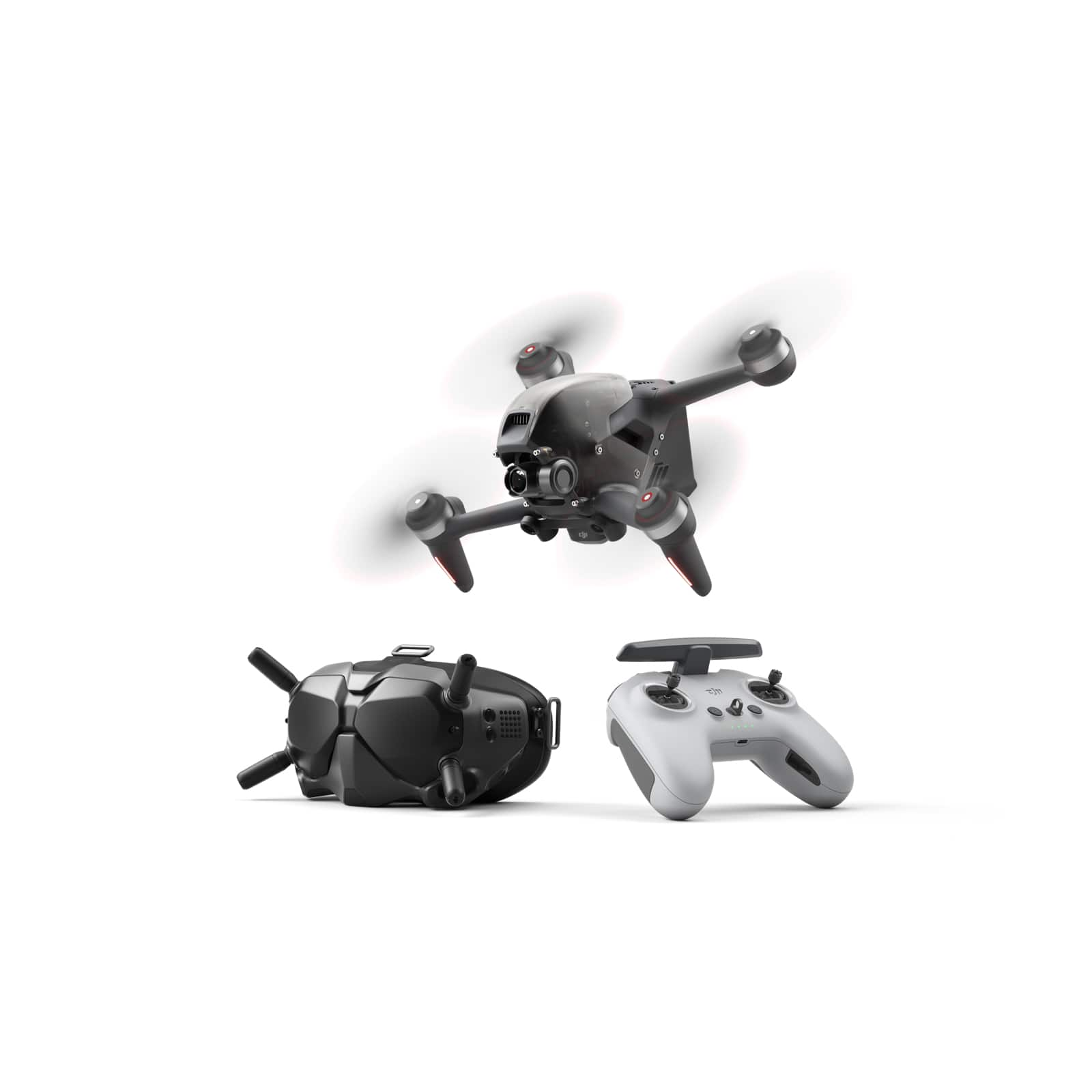
Fly through the sky in ways that seem impossible. We never lost our passion for flying, and with DJI FPV, those passions have turned imagination into reality. With this immersive and intuitive aerial platform, get ready to go into the beyond. Sleek and aerodynamic, the DJI FPV aircraft delivers powerful propulsion, battery life, and wind resistance, making this system as capable as it is visually stunning.
Is the headset stereo or is it 2D only?
It's strictly 2D. The screens don't actually take up all that much of your field of vision, so it's more like having a very big monitor floating in front of your face than actually being inside the drone.
5 years, 6 months ago
by
Batlacit

Bose Sport Open Earbuds are true wireless earbuds like you~ve never seen or heard before. What makes them truly unique is that they are the first workout headphones of their kind that combine exclusive Bose OpenAudio technology with an innovative open-ear headphone design to produce high-quality sound without covering your ears. This allows you to hear your music and the world around you for an unbelievable, full-sensory experience. The city. The surf. Your running buddy. Hear it all and your music at the same time with these entirely new, entirely open sport earbuds. Sound is what motivates, and Bose Sport Open Earbuds deliver. The exclusive Bose OpenAudio technology produces clear, consistent sound that~s more authentic and comfortable than bone conduction. In addition, acoustic spillage is minimal thanks to speaker placement that~s closer to the ear. A comfortable and secure fit is crucial when exercising. These sport earbuds were rigorously designed and tested to gently rest on your ears while staying put no matter how intense your workout. Bose Sport Open Earbuds also offer up to eight hours of play time (with daily charging), an advanced mic system for crystal-clear calls, and IPX4 sweat and weather resistance. Now you can combine the environment that invigorates you with the content that motivates you.
can one earbud be used at a time to either take/talk on phonecalls?
Yes, this works fine. Though weirdly audio quality seems much better when you use both.
5 years, 8 months ago
by
Batlacit
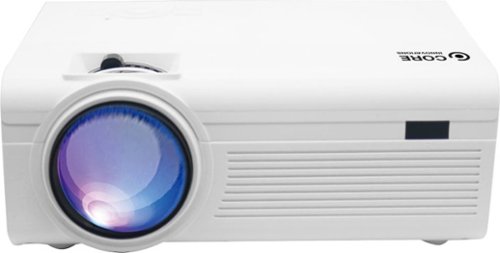
Upgrade your entertainment setup with the Core Innovations 150~ Home Theater Projector - White (CPJ600WHBY). With an adjustable screen size between 32~-150~, this projector is perfect for solo gaming marathons or an immersive movie night experience with the entire family. Stream videos, view photos or play your favorite games by linking your preferred device to this projector via numerous versatile connections, including HDMI, VGA, USB, Micro SD and AV.
Looking for dig projector for art projects. Is this good for photos off phone
I think that'll mostly depend on the art project. It can show photos, but the resolution is low enough that you're not going to get a ton of fine detail with them. It also needs to be pointed pretty much straight at the projection surface, as the keystone correction screws up the focus pretty badly.
5 years, 10 months ago
by
Batlacit
Upgrade your entertainment setup with the Core Innovations 150~ Home Theater Projector - White (CPJ600WHBY). With an adjustable screen size between 32~-150~, this projector is perfect for solo gaming marathons or an immersive movie night experience with the entire family. Stream videos, view photos or play your favorite games by linking your preferred device to this projector via numerous versatile connections, including HDMI, VGA, USB, Micro SD and AV.
Does this projector come with the cords needed to connect to a laptop or do I need to purchase it separately,
It does not - you'll need to provide your own cables. And batteries, if you want to use the remote.
5 years, 10 months ago
by
Batlacit

Supreme stereo sound, impressive comfort and extended cross-platform compatibility ~ that's the ROCCAT~ Elo X Stereo Wired Cross-Platform Gaming Headset for PC, Xbox, PlayStation~, Nintendo Switch & Mobile. Experience a weightless, dynamic fit thanks to a self-adjusting metal headband, superior memory foam ear cushions and ProSpecs~ Glasses Relief System for glasses wearers. Precision-tuned 50mm drivers produce crisp highs to thundering lows to help you seek out opponents with pitch-perfect stereo sound while a detachable noise-cancelling microphone featuring TruSpeak~ technology ensures your commands are heard perfectly with crystal-clear voice communication. Finally, the 3.5mm jack lets players go from PC to game console to mobile devices with ease.
Does it work for a Nintendo switch?
Yep, it'll work with anything with a 3.5mm headphone jack. The headset has a 3-pole combined headphone/mic plug attached to it and comes with a y-splitter that'll separate it out into discrete 2-pole connectors for the mic and headphones.
5 years, 11 months ago
by
Batlacit

Offering the ultimate true-wireless experience for any fitness-loving music lover, JLab Epic Air Sport ANC offers customized sound and active noise canceling plus industry-leading 70+ hours playtime. Transition from gym to calls or from work to a run, effortlessly, with features like wear-detect, movie mode, wireless charging and more.
1. Does leaving the buds in the charging case for long periods of time degrade the battery? 2. Is any operating system specific apps or drivers needed for use? My use case is running it off a Linux laptop without Windows installed
1. Technically, yes, but letting lithium batteries go unused for long periods of time is bad for them in general. Keeping them in the case is on the balance probably better for them than the alternative of letting them sit outside the case since it'll take longer for them to run completely dry, at which point they won't be able to accept a new charge.
2. Some of the proprietary features like the touch controls or EQ settings do require a mobile app to configure, but apart from that you shouldn't have any issues connecting it to your Linux machine as a generic audio device so long as you've kept the Bluetooth stack reasonably up to date.
2. Some of the proprietary features like the touch controls or EQ settings do require a mobile app to configure, but apart from that you shouldn't have any issues connecting it to your Linux machine as a generic audio device so long as you've kept the Bluetooth stack reasonably up to date.
6 years ago
by
Batlacit

Refreshed and ready to take its rightful spot atop a new generation of consoles, the Turtle Beach~ Stealth~ 600 Gen 2 is the successor to the best-selling wireless gaming headset for PS5~, PS4~ & PS4~ Pro. The Stealth~ 600 Gen 2 wireless gaming headset is enhanced with a host of upgrades, including a larger high-sensitivity flip-to-mute mic that delivers improved chat clarity and now seamlessly integrates into the headset when muted. The headband and hinge design have been reinforced for added long-term durability, and soft, glasses-friendly ear cushions provide plush comfort while refined 50mm speakers produce high-quality, immersive sound and are optimized to unleash the power of Sony 3D Audio on PS5~. A user-friendly audio preset button on the headset allows for easy access to customize audio, and gamers can still count on Turtle Beach~s Superhuman Hearing~ for an audio advantage on the battlefield. Finally, connectivity is made easy with the included, mini-USB Transmitter that wirelessly connects from your PlayStation~ console to headset.
would a usb type c to 3.5mm audio jack work for the headset so i could make it wired and will the mic still work as well?
No. it looks like the USB port is only wired for charging - audio either goes through the USB dongle or not at all.
6 years ago
by
Batlacit
Refreshed and ready to take its rightful spot atop a new generation of consoles, the Turtle Beach~ Stealth~ 600 Gen 2 is the successor to the best-selling wireless gaming headset for PS5~, PS4~ & PS4~ Pro. The Stealth~ 600 Gen 2 wireless gaming headset is enhanced with a host of upgrades, including a larger high-sensitivity flip-to-mute mic that delivers improved chat clarity and now seamlessly integrates into the headset when muted. The headband and hinge design have been reinforced for added long-term durability, and soft, glasses-friendly ear cushions provide plush comfort while refined 50mm speakers produce high-quality, immersive sound and are optimized to unleash the power of Sony 3D Audio on PS5~. A user-friendly audio preset button on the headset allows for easy access to customize audio, and gamers can still count on Turtle Beach~s Superhuman Hearing~ for an audio advantage on the battlefield. Finally, connectivity is made easy with the included, mini-USB Transmitter that wirelessly connects from your PlayStation~ console to headset.
Will this work with a PC?
Yes - though there are a few caveats. It doesn't respect system audio settings, so software volume controls are out and automatic gain control on the mic is hit or miss. But if you're willing to manually set the stuff up the user experience is decent.
6 years ago
by
Batlacit
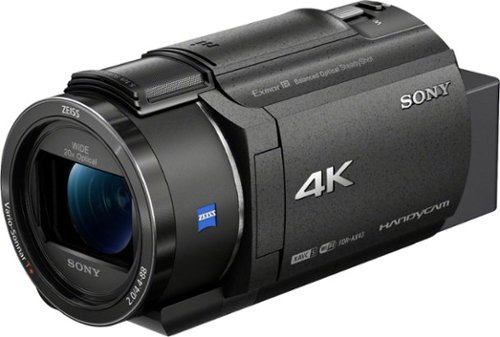
Capture high-quality videos with this Sony Handycam 4K camcorder. The 0.4-inch CMOS sensor delivers high-resolution 4K content with fast intelligent autofocus and enhanced audio, while the SteadyShot image stabilizer boasts clear detailed shots even at full zoom. This Sony Handycam 4K camcorder has a built-in Highlight Movie Maker that lets you create and share videos seamlessly.
Can I use a remote wireless microphone or lavalier microphone with this camera?
Yes - though depending on the exact model of mic it might require you to purchase some accessories that expands its input options. Out of the box it only supports external mics using a standard 3.5mm minijack.
6 years, 2 months ago
by
Batlacit
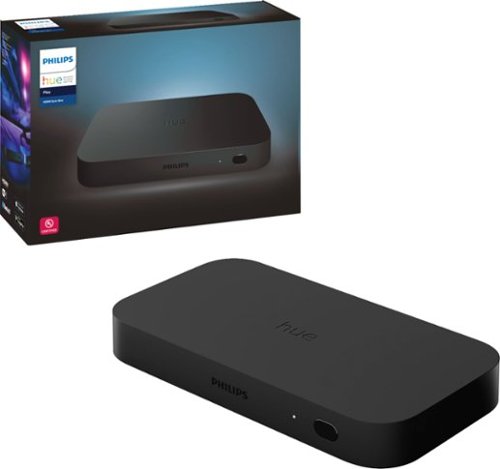
The Philips Hue HDMI Sync box adds premium surround lighting to your home theater by syncing your Hue smart lights with movies, music and video games. Watch, listen and play with more wonder and excitement as your lights dance, flash, dim and brighten with your screen. Requires Hue color capable lights and a Hue Bridge (sold separately).
Will this work with every generation of Hue bulbs?
Provided you've kept up with software updates, this should work with any Hue bulbs you may own.
6 years, 9 months ago
by
Batlacit