


nkpstudios's stats
- Review count249
- Helpfulness votes1,016
- First reviewJanuary 9, 2015
- Last reviewSeptember 17, 2026
- Featured reviews0
- Average rating4.3
Reviews comments
- Review comment count0
- Helpfulness votes0
- First review commentNone
- Last review commentNone
- Featured review comments0
Questions
- Question count0
- Helpfulness votes0
- First questionNone
- Last questionNone
- Featured questions0
- Answer count49
- Helpfulness votes64
- First answerSeptember 12, 2016
- Last answerAugust 6, 2021
- Featured answers0
- Best answers4
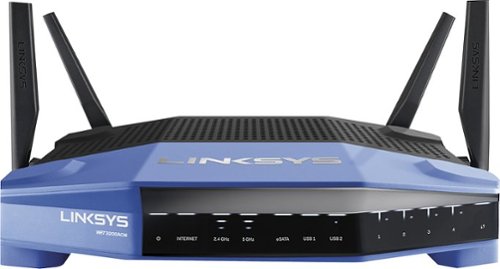
Connect your external wireless devices to the internet with this Linksys dual-band router. Two 5Ghz bands support both high-end gaming and low-end applications without compromising speed, and remote management lets you make adjustments from any location. This Linksys dual-band router has a sleek design that integrates easily into most workspaces.
Customer Rating

5
Great coverage/ease of use! No more WiFi issues
on November 1, 2016
Posted by: nkpstudios
from Frederick, MD
My first thoughts are Linksys has come a long way. I had been previously using a competitor's device to which I had NO problems with but I agreed to test this one to see where Linksys stands today with their technology. I last used Linksys in 2005 for my home networking needs because there was always trouble with setup and connectivity. So far, I have not seen the same issues I experienced in the past. I am trying to start fresh with this review and not take into account my antiquated experience with older Linksys routers. My overall experience thus far has been a great one. Setup was easy and performance is excellent. Very powerful transmission!
My Best Buy number: 0596454577
I would recommend this to a friend!
Share this review:


0points
0of 0voted this as helpful.
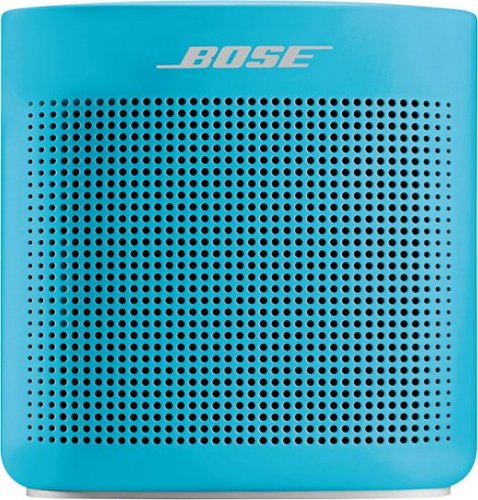
The SoundLink Color Portable Bluetooth speaker II was engineered to deliver bold sound wherever life takes you. From the pool to the park to the patio, its rugged, water-resistant design lets you enjoy the music you love in more places. Voice prompts make Bluetooth pairing easy. And up to 8 hours of listening per battery charge lets you keep your playlists playing.
Customer Rating
5
Wonderful Upgrade over first rendition!
on October 24, 2016
Posted by: nkpstudios
from Frederick, MD
This upgrade over the original Soundlink is perfect. I can't really find a negative with this. Battery life is acceptable with around 6-8 hours depending on volume. NFC paring is a plus for Android devices and laptops. They added water resistance and the build quality is superior to last year's release. Sound quality seems a bit better with the highs and bass is cleaner. Bose just keeps getting better and better with their device updates.
I LOVE THIS! I recommend to all who are in the market for a portable bluetooth speaker. Pay a little more and get the best.
My Best Buy number: 0596454577
I would recommend this to a friend!
Share this review:


-1point
0of 1voted this as helpful.
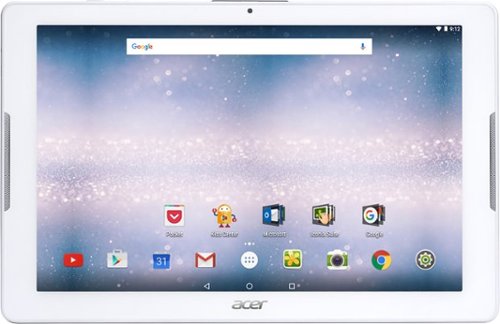
Browse the internet or play your favorite apps on this Acer tablet. It runs on an Android operating system and is powered by a quad-core 64-bit processor for full functionality. Google Mobile Services and Microsoft Office Suite are preloaded on this Acer tablet for out-of-the-box work or play capabilities, and DTS-HD Premium Sound lets you enjoy videos.
Customer Rating

2
Mediocre entry level tablet
on October 7, 2016
Posted by: nkpstudios
from Frederick, MD
Let me preface my review by saying this tablet is for the VERY entry level person who just wants to check email and maybe watch YouTube videos. I would even say this is a good tablet for children although the build quality isn't going to withstand many drops. This tablet leaves much to be desired for a tablet that launched in 2016. The specs are that of a tablet from the early 2000s. It has a pathetic MediaTek MT8163 processor clocked at 1.3GHz that is very laggy and underperforms. With 1GB of RAM you can see it struggle to go through your selections. Touch screen is sometimes not a responsive as other tablets I have used. Screen resolution is very basic at 1280 x 800. It is an LCD screen and you can see EVERY pixel in it. It runs Android 6.0 Marshmallow, but don't get excited as it struggles to do that with its specs I referenced above. It does have 32GB of onboard storage with an expandable micro SD card which is a plus for the tablet but that is about all I can say about it. The cameras are 5 megapixels for the back and 2 megapixels for the from and the photos look terrible. I won't beat this tablet up too much as it does have its market. If you want to game and just a snappy tablet search elsewhere.
My Best Buy number: 0596454577
No, I would not recommend this to a friend.
Share this review:


0points
0of 0voted this as helpful.
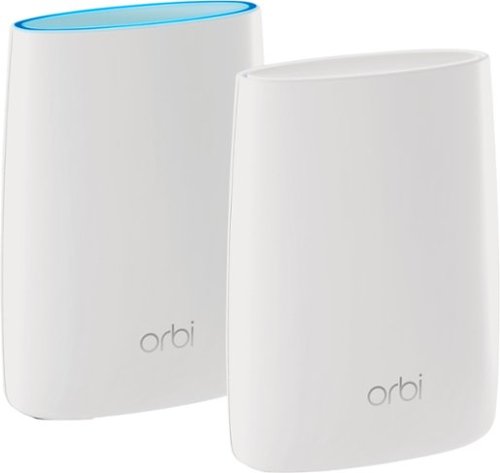
Orbi Whole Home WiFi System delivers up to 3.0Gbps high-performance WiFi. Sleek, modern design with high-gain internal antennas for up to 5,000 square feet of coverage. FastLane3 Technology creates a dedicated Tri-Band WiFi for seamless 4K streaming and gaming everywhere in your home. Keep a single WiFi name for uninterrupted connections as you move from room-to-room. Circle Smart Parental Controls runs on Orbi Routers for a smart way for families to manage content and time online, on any connected device. Provide internet access to guests without sharing your personal network password. Orbi is ready right out of the box and compatible with your ISP. Just use the Orbi app to get started with better WiFi, everywhere in minutes.
Customer Rating

4
WiFi done right w/ up to 4,000 sqft coverage
on September 26, 2016
Posted by: nkpstudios
from Frederick, MD
First, I must say this is now my favorite WiFi setup and should be the backbone for all homes with more than 15 connected devices. My home has over 25 connected devices from cameras and door bells to tablets and phones to door locks, lights, and washer/dryer. The overall experience with Orbi has been the best ever and that is saying a lot for me. I have worked with many wireless routers in my day (IT background) and dealt with mesh networks which can be troublesome for many. The Orbi is the way to go! It is for that person who just wants to make a WiFi network in their home and is intimidated by the task to the IT/Tech nerd, like me, who cares about customization and performance. Here we go...
Specs:
What's in the Box?
One (1) Orbi Router (RBR50)
One (1) Orbi Satellite (RBS50)
One (1) 2m Ethernet cable
Two (2) 12V/3.5A power adapters
Quick start guide
Warranty and support information card
One (1) Orbi Router (RBR50)
One (1) Orbi Satellite (RBS50)
One (1) 2m Ethernet cable
Two (2) 12V/3.5A power adapters
Quick start guide
Warranty and support information card
Physical Specifications
Dimensions: 6.67 x 2.36 x 8.99 in.
(169.5 x 60 x 228.4mm) each
Weight: 2.38lb (1.08kg) each
Dimensions: 6.67 x 2.36 x 8.99 in.
(169.5 x 60 x 228.4mm) each
Weight: 2.38lb (1.08kg) each
Wireless Connectivity:
• WiFi AC3000
- Band 1: 400Mbps @ 2.4GHz–256QAM
- Band 2: 1733Mbps @ 5GHz–256QAM
- Band 3: 867Mbps @ 5GHz–256QAM
• Simultaneous Tri-Band WiFi
- Tx/Rx 2x2 (2.4GHz) + 4x4 (5GHz) backhaul + 2x2 (5GHz)
- IEEE® 802.11b/g/n 2.4GHz–256QAM support
- IEEE® 802.11a/n/ac 5GHz–256QAM support
• WiFi AC3000
- Band 1: 400Mbps @ 2.4GHz–256QAM
- Band 2: 1733Mbps @ 5GHz–256QAM
- Band 3: 867Mbps @ 5GHz–256QAM
• Simultaneous Tri-Band WiFi
- Tx/Rx 2x2 (2.4GHz) + 4x4 (5GHz) backhaul + 2x2 (5GHz)
- IEEE® 802.11b/g/n 2.4GHz–256QAM support
- IEEE® 802.11a/n/ac 5GHz–256QAM support
Processor
• Powerful Quad-Core 710MHz processor
• Powerful Quad-Core 710MHz processor
Memory
• 4GB Flash and 512MB RAM
• 4GB Flash and 512MB RAM
Antenna
• Six (6) high performance internal antennas with high powered amplifiers
• Six (6) high performance internal antennas with high powered amplifiers
Beamforming
• Explicit Beamforming for 2.4GHz & 5GHz bands
• Explicit Beamforming for 2.4GHz & 5GHz bands
Ports
• Four (4) 10/100/1000Mbps Gigabit Ethernet ports
- 1 WAN & 3 LAN for Router, 4 LAN for Satellite
• One (1) 2.0 USB port each
• Four (4) 10/100/1000Mbps Gigabit Ethernet ports
- 1 WAN & 3 LAN for Router, 4 LAN for Satellite
• One (1) 2.0 USB port each
Light Switch
• On/Off LED light switch
• On/Off LED light switch
Looks:
The Orbi is the first router I have seen that doesn't look like a router or some piece of wireless equipment. It resembles something like an aroma diffuser or smart lamp. My only gripe is I wish it came in other colors, but who knows maybe that is in the works. It arrives in a well packaged box with easy to understand specs and details for setup.
Setup:
Setup is quick and easy to do and can be done on anything from a mobile device to the old fashioned hardwired method to a PC or laptop. I would say it exemplifies the words "Plug & Play". Basically, all you need to setup these devices is an internet browser and a wireless capable device. Once you open the box, you encounter one of the most aesthetically pleasing routers around. If this is your first rodeo, you can use the Quick Setup instructions. With your modem off, take the device labeled "router" (which has a port labeled "internet" surrounded by a yellow outline) and connect it like any other router to the modem. Power on your modem and once it is online turn on the router. It's that easy. Connect to the router's WiFi network using the credentials provided on the device like most other routers and you are connected with internet access. Too easy. Go to the router page and make any changes you'd like.
The next step is where the magic happens... take the "satellite" device and plug it up near the router and let it connect or "sync" automatically to the network. Once it is connected unplug it and move it to another floor or part of your house where you want to boost wireless coverage. You can verify the satellite is connected by going to the router page and clicking on "connected devices". Here you can see the router and satellite list of connected devices. That is all. Now you have a professional level mesh network... simple right? **You want to connect to the router admin page and do the firmware update. I recommend doing this to keep things running smoothly.**
Customization:
If you are like me, you want to change your network name and password to make things more secure and identifiable out of the other tons of WiFi networks in your area. Login and start doing your thing. Orbi has included many of the functions from the "Nighthawk" line of their routers for those who are interested in performance tweaks like QOS, traffic prioritization, port forwarding/triggering, and DMZ. It also has logging as well as parental controls using Open DNS. You can also customize wireless connectivity schedules to keep those people off the internet when they should be sleeping ;). I won't bore you with more reading about these settings. If you are wanting more info on customization you are probably well versed in that arena so I don't need to explain. Just get one!
If you are like me, you want to change your network name and password to make things more secure and identifiable out of the other tons of WiFi networks in your area. Login and start doing your thing. Orbi has included many of the functions from the "Nighthawk" line of their routers for those who are interested in performance tweaks like QOS, traffic prioritization, port forwarding/triggering, and DMZ. It also has logging as well as parental controls using Open DNS. You can also customize wireless connectivity schedules to keep those people off the internet when they should be sleeping ;). I won't bore you with more reading about these settings. If you are wanting more info on customization you are probably well versed in that arena so I don't need to explain. Just get one!
Performance:
The Orbi is a TriBand 802.11ac WiFi mesh system which means it is utilizing 2.4GHz and 5.0GHz frequencies. It has 2 bands in the 5.0GHz frequency range to go with the 2.4GHz band thus TriBand. It has 6 antennas in each device for maximum coverage up to 4,000 sqft. It can handle more devices since it has 2 "traffic controllers" directing traffic on the network rather than just one. So long to the days with 2 networks as it assigns the device to the band it will perform best. No more NetworkX2.4g and NetworkX5g to play with. It has beam forming, MIMO, and can support network speeds of up to 3 Gbps. It has 4GB flash memory and a half gig of RAM to perform at a high level. Auto detecting and auto sensing to simplify device connectivity and seamless roaming without looking connection like with range extenders. It supports all wireless standards at the time of this review with are Wireless-AC, Wireless-N, Wireless-G, Wireless-B, Wireless-A and is backwards compatible. It has USB for printer sharing or file sharing or to power a KEVO gateway like I do at my house. You can manage this system using the Netgear Genie app for those who want to manage this from a mobile device. This is just another plus. You can block devices and turn on access easily to get the kids off their devices and get their attention.
The Orbi is a TriBand 802.11ac WiFi mesh system which means it is utilizing 2.4GHz and 5.0GHz frequencies. It has 2 bands in the 5.0GHz frequency range to go with the 2.4GHz band thus TriBand. It has 6 antennas in each device for maximum coverage up to 4,000 sqft. It can handle more devices since it has 2 "traffic controllers" directing traffic on the network rather than just one. So long to the days with 2 networks as it assigns the device to the band it will perform best. No more NetworkX2.4g and NetworkX5g to play with. It has beam forming, MIMO, and can support network speeds of up to 3 Gbps. It has 4GB flash memory and a half gig of RAM to perform at a high level. Auto detecting and auto sensing to simplify device connectivity and seamless roaming without looking connection like with range extenders. It supports all wireless standards at the time of this review with are Wireless-AC, Wireless-N, Wireless-G, Wireless-B, Wireless-A and is backwards compatible. It has USB for printer sharing or file sharing or to power a KEVO gateway like I do at my house. You can manage this system using the Netgear Genie app for those who want to manage this from a mobile device. This is just another plus. You can block devices and turn on access easily to get the kids off their devices and get their attention.
Con:
Lack of colors, no WiFi guest network (in the works), and for some the price.
Lack of colors, no WiFi guest network (in the works), and for some the price.
My Best Buy number: 0596454577
I would recommend this to a friend!
Share this review:


+1point
1of 1voted this as helpful.
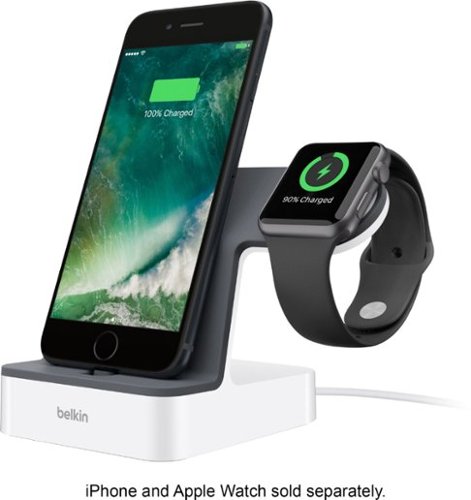
Power your Apple devices with this Belkin charge dock. It comes with a Lightning connector that charges iPhones and an integrated magnetic charger that provides Apple watches with more juice when needed. The single built-in cable of this Belkin charge dock lets you charge both devices simultaneously, saving you the inconvenience of using multiple cords.
Customer Rating
4
Best charger combo for Apple Watch/iPhone 5-newer
on September 12, 2016
Posted by: nkpstudios
from Frederick, MD
This is the best stand/dock I have used for charging my iPhone 6s+ and Apple Watch. No more third party bamboo charging stand with 2 cords to try to keep inside their spots. This is high quality, built to look and feel like an Apple product. It is officially licensed as an Apple product and you can see Belkin took time to perfect this design. It is solid and aesthetically pleasing.
Pros
-1 cord 2 chargers! Saves space on your wall and reduces cord mess.
-Charges both Apple Watch/iPhone 5 and newer at the same time.
-Has adjustable height for the charging dock so you can even use it with your case on!
-Hinged lightning connector so it will not break when you pull your phone forward. This is a pro and con.
-1 cord 2 chargers! Saves space on your wall and reduces cord mess.
-Charges both Apple Watch/iPhone 5 and newer at the same time.
-Has adjustable height for the charging dock so you can even use it with your case on!
-Hinged lightning connector so it will not break when you pull your phone forward. This is a pro and con.
Cons
-A bit pricey, but quality is there. You get what you pay for.
-Power block/cord is beefy.
-iPhone connector port takes practice to connect. I find myself having to line it up with my case on multiple times.
-Minor but still a con for me is the Watch dock should be a square with slightly rounded corners to minimize the "swivel effect". It is a semi-circle/square (if that makes sense).
-A bit pricey, but quality is there. You get what you pay for.
-Power block/cord is beefy.
-iPhone connector port takes practice to connect. I find myself having to line it up with my case on multiple times.
-Minor but still a con for me is the Watch dock should be a square with slightly rounded corners to minimize the "swivel effect". It is a semi-circle/square (if that makes sense).
Overall I recommend this product to anyone who is willing to fork out $$ for high quality chargers to save space and simplify life. Well done Belkin!
My Best Buy number: 0596454577
I would recommend this to a friend!
Share this review:


0points
0of 0voted this as helpful.
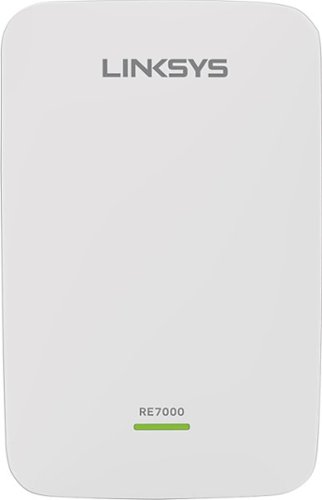
Prevent dead zones around your home with the help of this Linksys Wi-Fi range extender. It works with all types of Wi-Fi routers, and it uses multi-user MIMO for speed and efficiency. This Linksys Wi-Fi range extender can be used to create a different access point or to extend the field of the router~s connection.
Customer Rating
4
Great Coverage/Performance with a Glitch
on June 1, 2016
Posted by: nkpstudios
from Frederick, MD
I got this device to test in return for a fair review. I received the box and opened it up to find a very nice looking range extender. It is somewhat on the larger size measuring around 5" tall x 3" wide x 2" thick and feels rock solid. I am using it with my Linksys EA7500 router and it was a breeze to setup. It was just as easy as my router to setup using the extender.linksys.com page. Remember, I have only set this up using my Linksys ecosystem so don't know if it there are any hiccups when using other brands. This range extender is a great piece of technology. It offers 802.11r which allows "fast roaming" between the networks without losing connections. It is seamless when transferring and I haven't lost a connection yet. It does what it is supposed to do with advanced setting if needed.
On the other hand, during my testing of the unit, I did find a glitch that effects my DirecTV setup (GenieGO and Wireless Media Server). I am currently working with Linksys to find a solution on this and it is an ongoing problem. Once all my devices are connected to the extended network they work fine with the exception of the DirecTV system. It causes my TV to freeze and I have to reboot my box. There is no drop off in performance as far as the other devices connected to it as it matches the router's Mbps output which is great.
My Best Buy number: 0596454577
I would recommend this to a friend!
Share this review:


0points
0of 0voted this as helpful.
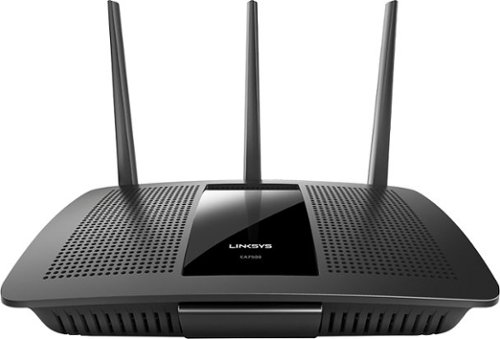
Your household wants to play, stream and work online all at once. With this Linksys router, you can do it all without buffering or other interruptions. Use the Smart Wi-Fi app to get started, control, and monitor your home network from anywhere.
Customer Rating
4
Linksys has changed! Great Value to Features.
on February 9, 2016
Posted by: nkpstudios
from Frederick, MD
Review 2/9/2016 (Initial Review)
My first thoughts are Linksys has come a long way. I received this device as part of BestBuy's Tech Insider program in return for an honest review. I had been previously using a competitor's device to which I had NO problems with but I agreed to test this one to see where Linksys stands today with their technology. I last used Linksys in 2005 for my home networking needs because there was always trouble with setup and connectivity. So far, I have not seen the same issues I experienced in the past. I am trying to start fresh with this review and not take into account my antiquated experience with older Linksys routers. My overall experience thus far has been a great one. I plan on updating this review as I encounter issues and new things I like about the router. And the review begins, here we go...
Price:
---------------------------------
This router is listed at $199 MSRP on the website. It was recently announced at CES 2016.
---------------------------------
This router is listed at $199 MSRP on the website. It was recently announced at CES 2016.
What's in the Box:
---------------------------------
-Linksys EA7500-AC1900 MU-MIMO Gigabit Router
-Quick Start Guide
-3 Antennas
-Ethernet Cable
-Power Adapter
-CD-ROM with Documentation
-Cardboard
---------------------------------
-Linksys EA7500-AC1900 MU-MIMO Gigabit Router
-Quick Start Guide
-3 Antennas
-Ethernet Cable
-Power Adapter
-CD-ROM with Documentation
-Cardboard
Specs for my Tech Nerds:
(straight off the Linksys Website)
---------------------------------
Wi-Fi for the AC1900 uses 3x3 MU-MIMO technology employing Dual-band (2.4 and 5GHz) Gigabit, 600+1300 Mbps for medium household supporting up to 12 wireless devices.
(straight off the Linksys Website)
---------------------------------
Wi-Fi for the AC1900 uses 3x3 MU-MIMO technology employing Dual-band (2.4 and 5GHz) Gigabit, 600+1300 Mbps for medium household supporting up to 12 wireless devices.
Network Standards:
802.11b
802.11a
802.11n
802.11ac
802.11g
802.11b
802.11a
802.11n
802.11ac
802.11g
Wi-Fi Speed:
AC1900 (N600 + AC1300)
AC1900 (N600 + AC1300)
Wi-Fi Bands:
2.4 and 5 GHz (simultaneous dual band)
2.4 and 5 GHz (simultaneous dual band)
Wi-Fi Range:
Medium Household
Medium Household
Number of Ethernet Ports:
1x Gigabit WAN port
4x Gigabit LAN ports
1x Gigabit WAN port
4x Gigabit LAN ports
Other Ports:
One(1) USB 3.0 port
One(1) USB 2.0 port
One(1) USB 3.0 port
One(1) USB 2.0 port
Power Antennas:
3x external, dual-band, detachable antennas
3x external, dual-band, detachable antennas
Processor:
1.4 GHz dual-core
1.4 GHz dual-core
LEDs:
Internet, Ethernet(1-4), Linksys Logo, WPS
Internet, Ethernet(1-4), Linksys Logo, WPS
Wireless Encryption:
Up to 128-bit encryption
Up to 128-bit encryption
Operation Modes:
Wireless Router
Access Point
Wired Bridge
Wireless Bridge
Wireless Router
Access Point
Wired Bridge
Wireless Bridge
Storage File System Support:
FAT
NTFS
HFS+
FAT
NTFS
HFS+
Dimensions (LxWxH):
257 x 184 x 56 mm (10.12 x 7.24 x 2.2 in.) without antennas
257 x 184 x 56 mm (10.12 x 7.24 x 2.2 in.) without antennas
Weight:
558 g (20.74 oz)
558 g (20.74 oz)
Security Features:
64/128-bit WEP
WPA2-Personal
WPA2-Enterprise
64/128-bit WEP
WPA2-Personal
WPA2-Enterprise
Regulatory Compliance:
FCC class B
FCC class B
Power Supply:
Input: 100-240V ~ 50-60Hz; Output: 12V, 3.5A
Input: 100-240V ~ 50-60Hz; Output: 12V, 3.5A
Setup:
---------------------------------
Setup was a breeze LITERALLY. No CD required just a computer and a web browser. Just like every other router, you connect the router to your modem, connect power, and go to the router setup page. I particularly like what Linksys has done with their router setup. Gone is the required CD that does everything for you. Now you register an account using linksyssmartwifi.com which allows you to administer your router from ANYWHERE you have internet. You don't even have to be on the router's network! There is an easy setup process for those who are "network challenged" and there are advanced options for the IT guru.
---------------------------------
Setup was a breeze LITERALLY. No CD required just a computer and a web browser. Just like every other router, you connect the router to your modem, connect power, and go to the router setup page. I particularly like what Linksys has done with their router setup. Gone is the required CD that does everything for you. Now you register an account using linksyssmartwifi.com which allows you to administer your router from ANYWHERE you have internet. You don't even have to be on the router's network! There is an easy setup process for those who are "network challenged" and there are advanced options for the IT guru.
The Hardware:
---------------------------------
There are 4 ethernet gigabit ports for LAN and 1 ethernet gigabit port for WLAN, 1 USB 3.0 port and 1 USB 2.0 port. The device itself looks great. It is a low key Black and grey device that doesn't attract attention like some of the prior blue and black Linksys devices. It has a 1.4GHz Dual Core Processor
---------------------------------
There are 4 ethernet gigabit ports for LAN and 1 ethernet gigabit port for WLAN, 1 USB 3.0 port and 1 USB 2.0 port. The device itself looks great. It is a low key Black and grey device that doesn't attract attention like some of the prior blue and black Linksys devices. It has a 1.4GHz Dual Core Processor
Highlights:
---------------------------------
-Media Prioritization (still testing, it is an ongoing review with updates to come)
WWM Support is Wi-Fi Multimedia (WMM). WMM is a wireless Quality of Service (QoS) feature that improves quality for audio, video and voice applications by prioritizing wireless traffic. Turning this ON will enable its functionality. QoS is used to set up priority to specific devices, services or applications within the network through the router. This helps in properly allocating bandwidth. The WMM Support feature can be configured under Media Prioritization for this routers or from the Administration tab. For instructional video visit http://www.linksys.com/us/support-article?articleNum=155136
---------------------------------
-Media Prioritization (still testing, it is an ongoing review with updates to come)
WWM Support is Wi-Fi Multimedia (WMM). WMM is a wireless Quality of Service (QoS) feature that improves quality for audio, video and voice applications by prioritizing wireless traffic. Turning this ON will enable its functionality. QoS is used to set up priority to specific devices, services or applications within the network through the router. This helps in properly allocating bandwidth. The WMM Support feature can be configured under Media Prioritization for this routers or from the Administration tab. For instructional video visit http://www.linksys.com/us/support-article?articleNum=155136
-Parental Controls
This allows parents/administrators to restrict on a network basis or on a per device basis. You can set different levels of restriction per device which is great. You can block websites, domains, or a specific device. You can also shut down internet access using the Internet Scheduling feature for those kids who want to stay up all night on their computer/cell phones.
This allows parents/administrators to restrict on a network basis or on a per device basis. You can set different levels of restriction per device which is great. You can block websites, domains, or a specific device. You can also shut down internet access using the Internet Scheduling feature for those kids who want to stay up all night on their computer/cell phones.
-Beamforming
Beamforming is a process that allows you to focus your WiFi signal. Simply put, when your router is sending out a WiFi signal, the signal gets wider and wider as it leaves the router decreasing losing strength in exchange for coverage.
Beamforming is a process that allows you to focus your WiFi signal. Simply put, when your router is sending out a WiFi signal, the signal gets wider and wider as it leaves the router decreasing losing strength in exchange for coverage.
-Advanced Security
You can safeguard your network with wireless WPA/WPA2 encryption and an SPI firewall. It also supports VPN.
You can safeguard your network with wireless WPA/WPA2 encryption and an SPI firewall. It also supports VPN.
- 3x3 AC MIMO
A 3x3 MIMO device with 3 antennas and radios is capable of transmitting and receiving via three streams. All these streams afford the device more bandwidth capacity when downloading and uploading data to and from the wireless network. The more bandwidth or the faster the devices’ speed on the network the better the performance for everyone overall who is connected to the same access point. An analogy I like to use often is that of 1 straw versus 3 straws in your drink. 3 straws in a drink will allow you to consume your beverage 3x faster than someone with only 1 straw in their drink. The same goes for wireless. Someone with a 3 stream MIMO device will get their data quicker and will allow others waiting in line to get their data much sooner than the 1 stream MIMO device.
A 3x3 MIMO device with 3 antennas and radios is capable of transmitting and receiving via three streams. All these streams afford the device more bandwidth capacity when downloading and uploading data to and from the wireless network. The more bandwidth or the faster the devices’ speed on the network the better the performance for everyone overall who is connected to the same access point. An analogy I like to use often is that of 1 straw versus 3 straws in your drink. 3 straws in a drink will allow you to consume your beverage 3x faster than someone with only 1 straw in their drink. The same goes for wireless. Someone with a 3 stream MIMO device will get their data quicker and will allow others waiting in line to get their data much sooner than the 1 stream MIMO device.
-Linksys Smart Wifi
Monitor and control your home network from anywhere through the Linksys Smart Wi-Fi website or mobile app The app needs work, but it shows some promise. You cannot reboot your router from the app as of today 2/9/2016 but I hope they change that while you can using the website. It provides a network map of all devices customizable with VERY LIMITED icons that sometimes get mixed up. I found myself correcting the icons I selected for my devices, but that isn't REALLY a big deal. There are a few apps you can use with your router that I have yet to test. The ones posted on the website at the moment are
Monitor and control your home network from anywhere through the Linksys Smart Wi-Fi website or mobile app The app needs work, but it shows some promise. You cannot reboot your router from the app as of today 2/9/2016 but I hope they change that while you can using the website. It provides a network map of all devices customizable with VERY LIMITED icons that sometimes get mixed up. I found myself correcting the icons I selected for my devices, but that isn't REALLY a big deal. There are a few apps you can use with your router that I have yet to test. The ones posted on the website at the moment are
-MU-MIMO
Latest Wireless-AC technology for simultaneously streaming and gaming on multiple devices.
Latest Wireless-AC technology for simultaneously streaming and gaming on multiple devices.
-1.4 GHZ Dual-Core Central Processing Unit (CPU)
Promotes simultaneous high-speed data processing.
Promotes simultaneous high-speed data processing.
-USB 3.0 Port
Add external storage and other devices to share content across your network via USB ports.
Add external storage and other devices to share content across your network via USB ports.
-Easy Setup
Installation is fast and easy. No CD required.
Installation is fast and easy. No CD required.
More to come as many of these features are still being tested for an accurate review.
My Best Buy number: 0596454577
What's great about it: Easy of use/setup, advanced settings, simultaneous 2.4 and 5 GHz bands, future proof AC standard, and looks great!
What's not so great: Linksys Smart Wifi App needs work, access only for up to 12 devices may be a problem for some.
I would recommend this to a friend!
Share this review:


+1point
1of 1voted this as helpful.
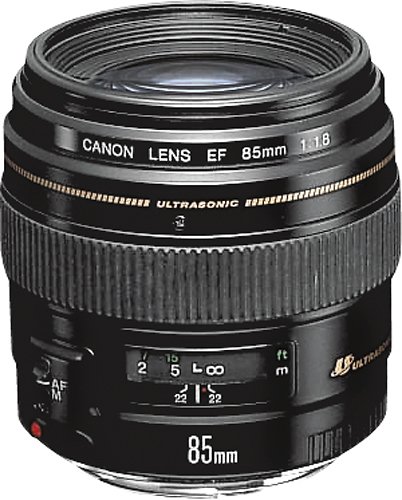
Canon EF 85mm f/1.8 USM Medium Telephoto Lens: Get sharp, clear photos with this Canon medium telephoto lens that delivers vibrant color and clarity with fast, quiet focusing. The 85mm focal length draws attention to your subject and transforms the background into a soft blur for professional-quality portraits and impeccably detailed close-up shots.
Customer Rating
5
Great value and quality!
on January 9, 2015
Posted by: nkpstudios
Verified Purchase:Yes
The Canon EF 85mm f/1.8 II USM lens is a moderate weight (15 oz), very well built lens. It does not come with the appropriate hood, the Canon ET-65 III. You get both a lens cap and a mount cap, all packed inside tight conformal foam to protect the lens during shipping. There's also a very brief manual and the usual warranty paperwork.
The lens offers AF and manual focus, and allows manual focus even when AF is set to on, a very useful feature for low-light and other challenging focus situations. This is a USM lens, and as a direct consequence focus is fast and precise, just as you'd expect.
The AF/Manual switch is in a reasonable location, close to the camera body. There is a range indication on the barrel of the lens behind a transparent window which serves to keep dust and debris out of the workings of the lens. Manual focus is controlled with a broad, easy to manage textured ring about mid-body on the lens. During focus, nothing external on the lens body moves or rotates, so there are no complications for using polarizing filters, and no concerns about the lens "pumping" air and so causing dust contamination in either the lens or camera with use.
The lens lacks any form of image stabilization. IS is showing up in more and more lenses, though for the price... perhaps this is one of the justifications for building IS into the camera body. I'm sure that this design wouldn't be anywhere near its current price point with IS added to the build. One last point is that since the lens is a fairly fast design, perhaps there is less overall need for IS (though that argument falls completely apart the first time you *do* need it!)
It takes a 58mm filter, though I highly recommend the use of the ET-65 III hood rather than a filter; filter use should be limited to polarizers, neutral density filters and so on, rather than keeping a filter on the lens with the idea of protecting it. Here's why: filters create a flat surface over the end of the lens that can (and often does) create low-level reflections. These are most apparent in low-light shots, but they are almost always there. In the case of a UV filter, no other benefit is gained (UV can't get through the lens system anyway) other than physical protection. The hood, however, keeps the lens out of harms way quite effectively, and it increases contrast and reduces flare at the same time by preventing light from entering the lens at high angles of attack. I have shot with both hoods and filters, and after decades of experience, I have to come down firmly on the side of hood technique. It only takes one shot ruined by a filter reflection to wake up to this reality; and hoods never, ever compromise an image. They're simply the best way to go. Finally, the hood for this lens is inexpensive, well worth the extra few dollars it costs.
Aperture is controlled by an 8-blade system. The available f-stops range from f/1.8 wide open to f/22.0 fully stopped down. MTF (sharpness) peaks at f/5.6, and vignetting is almost gone by that setting.
On my camera, an EOS 50D, resolution loss from diffraction effects begin at f/7.6, so in many ways, the "sweet spot" for this lens for me lands naturally at f/5.6. On a camera with a lesser sensel density such as the 40D, diffraction doesn't set in until higher f-stops, but you're beginning to lose sharpness from other effects, so I'd still call the sweet spot as f/5.6 (which also provides a fairly extensive depth of field) for shots where detail is the primary consideration.
For portraits, you'll want to go right for f/1.8 if lighting conditions allow in order to take advantage of the shallow and pleasing DOF isolation this lens is famous for; background blur is very soft yet very strong, while the in focus region remains deep enough to keep the important features of the face in focus from ear to nose. The loss of MTF at f/1.8 is noticeable, especially once you get a feel for how the lens performs at f/5.6, but in my opinion, the compromise is perfectly acceptable in a portrait context. There's another benefit as well; at 85mm, and especially on a crop body like the 40D or 50D, this lens allows you to get some distance from your subject which tends to make them more comfortable, while giving you the modest compression that is the hallmark of any telephoto lens. Portraits "pop" and backgrounds blur away with commendable speed. Head-and-shoulders work will put you at about eight feet, and as the lens can focus down to just under three feet, this gives you considerable control over framing without ever running into a limit imposed by the lens design.
This is also a truly excellent lens for not-very-wide field astrophotography, although at critical focus and maximum aperture, chromatic aberration will make itself felt on the brightest stars, which you will then have to compensate for. I have successfully used this lens to capture the the Orion nebula, Andromeda galaxy, Triangulum galaxy, and a number of other astro objects that range from the easy to the difficult, all using no more than a standard (non-tracking) tripod, this lens, and the EOS 50D. On a crop body, 85mm (136mm effective FOV) is definitely the place to be to compromise between star trailing and magnification, and the f/1.8 aperture allows fast enough exposures to eliminate trailing at ISO 1600 and above.
I carry this lens nested in a large camera bag (a Tamrac 5612 Pro 12, *highly* recommended); I rarely put the lens on the camera until I am ready to use it, and when I am done, I take it right back off, cap it, and bag it without wasting any time or motion. I do both the assembly and disassembly "blind" in the bag, using the bag top to shield the camera and lens from the wind and environment as best I can manage. The lens has a raised alignment dot that makes blind assembly practical. It's the size of the overall investment that drives this behavior, of course; both the camera and a lens like this deserves -- demands -- good care and that is just what I try to provide.
Physically speaking, this lens isn't as large as you might think. Canon did a great job of packing a lot of glass (nine elements in seven groups) into a decent form factor of 3" diameter by 2.8" long; even with the hood mounted, this lens provides a fraction of the intimidation factor of, for instance, the 70-200mm f/2.8L. But at 85mm, it can still "get in there" and catch a lot of action without forcing you to crop to extremes. It's light enough that you can shoot for quite a while before fatigue sets in, an issue that will rear its head in any situation that goes on a while, like a wedding or a play (and that low-light capability is great for stage work, where a flash annoys literally everyone.) Plus it is black, and so looks more like it is designed as part of the same camera system, unlike the L's with the white bodies. That's also less distracting in a dark theater.
I can honestly say that this is definitely one of my favorite lenses. I have a fair collection of primes to compare it to, some of which are L glass, and I've got some great L zooms as well; yet for portraits, I inevitably turn to this specific lens as it outperforms everything else I own in the successful shooting methodologies I find myself returning to over and over. Frankly, at the price, I think it is perfectly fair to characterize this lens as a "must-have"; if you're ever going to shoot a portrait, trust me, this is the lens you want (even over the 85mm f/1.2L, which has far too narrow a depth of field for most reasonable portraiture, though you can't beat it for light-gathering.) Like Canon's 100mm f/2.8 macro lens, the 85mm f/1.8 is one of those where you're left scratching your head as to why it doesn't have an "L" designation. It is an outstanding performer.
If Canon were to re-do this lens, I'd like to see them add image stabilization, and perhaps some modern anti-CA elements, as this is the one area where this lens occasionally bites the photographer in high-contrast situations. Until that day, though, this lens is unmatched by anything else in Canon's line for price/performance, and I can't imagine anyone ever regretting its purchase.
My Best Buy number: 0596454577
My Best Buy number: 0596454577
I would recommend this to a friend!
Share this review:


+59points
59of 59voted this as helpful.
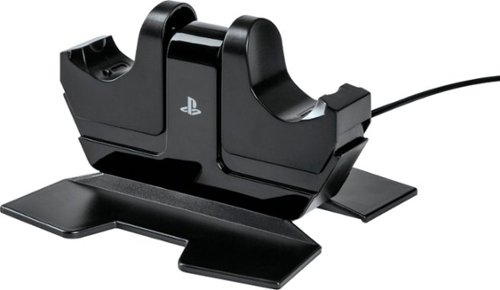
Charge and display your DUALSHOCK 4 wireless controllers with the officially licensed Charging Station for PlayStation 4. Charging is an ease - Simply place the DUALSHOCK 4 on either side of the station, and click down to see the LED base light up to indicate charging level. When fully charged, click down to release contact and simply leave the controller on the station. Feel confident your controllers are always ready to game as it charges on display alongside of your PS4 console
Customer Rating
4
No more wired charging
on January 9, 2015
Posted by: nkpstudios
Verified Purchase:Yes
This is the best charger on the market. It utilizes the port underneath the controller rather than the micro USB on top. The controller's light is the indicator of charging and when it is finished. Charging it will pulse amber and when it is full it will turn off. No trying to line up the port on the controller to charge is a breeze. Click down to charge, click down to separate the controller from the charger. No complaints and it is an OFFICIAL PS4 accessory.
My Best Buy number: 0596454577
My Best Buy number: 0596454577
I would recommend this to a friend!
Share this review:


0points
0of 0voted this as helpful.
nkpstudios's Review Comments
nkpstudios has not submitted comments on any reviews.
nkpstudios's Questions
nkpstudios has not submitted any questions.
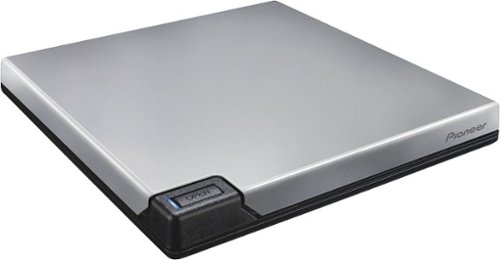
This Pioneer BDR-XD05S external drive allows you to archive up to 128GB of data on BD-R QL media and up to 100GB of data on BD-R TL media, plus supports DVD and CD formats, so you can burn your favorite movies and music to discs.
I GOT IT TO PLAY Blue Ray. what exactly do i need to do.i have a lenovo lavieZ.
Plug it in and use your favorite media player. You can use VLC Player or whatever other player you'd like.
9 years, 9 months ago
by
nkpstudios
This Pioneer BDR-XD05S external drive allows you to archive up to 128GB of data on BD-R QL media and up to 100GB of data on BD-R TL media, plus supports DVD and CD formats, so you can burn your favorite movies and music to discs.
will this drive work on usb 2.0?
does this drive, only work with a usb 3.0 pc input?
It will work with both. USB 3.0 is backwards compatible with USB 2.0 ports. I believe the only difference will be the drive performance. Read/Write speeds may be effected since there is a difference between USB 2.0/3.0 bus speeds..
9 years, 9 months ago
by
nkpstudios
This Pioneer BDR-XD05S external drive allows you to archive up to 128GB of data on BD-R QL media and up to 100GB of data on BD-R TL media, plus supports DVD and CD formats, so you can burn your favorite movies and music to discs.
is it compatible with Microsoft 10
This Pioneer BDR-XD05S external drive allows you to archive up to 128GB of data on BD-R QL media and up to 100GB of data on BD-R TL media, plus supports DVD and CD formats, so you can burn your favorite movies and music to discs.
Will this work with my 2015 iMac?
This Pioneer BDR-XD05S external drive allows you to archive up to 128GB of data on BD-R QL media and up to 100GB of data on BD-R TL media, plus supports DVD and CD formats, so you can burn your favorite movies and music to discs.
Does this work with Windows 10 Windows Media Player
Yes it is recognized just like any other CD Drive within Media Player.
9 years, 9 months ago
by
nkpstudios
Orbi Whole Home WiFi System delivers up to 3.0Gbps high-performance WiFi. Sleek, modern design with high-gain internal antennas for up to 5,000 square feet of coverage. FastLane3 Technology creates a dedicated Tri-Band WiFi for seamless 4K streaming and gaming everywhere in your home. Keep a single WiFi name for uninterrupted connections as you move from room-to-room. Circle Smart Parental Controls runs on Orbi Routers for a smart way for families to manage content and time online, on any connected device. Provide internet access to guests without sharing your personal network password. Orbi is ready right out of the box and compatible with your ISP. Just use the Orbi app to get started with better WiFi, everywhere in minutes.
I want to know if this will work with Dish Sattelite and a wireless internet card
Yes. If it is connected to your wireless network now then it will work with the Orbi
9 years, 11 months ago
by
nkpstudios
Orbi Whole Home WiFi System delivers up to 3.0Gbps high-performance WiFi. Sleek, modern design with high-gain internal antennas for up to 5,000 square feet of coverage. FastLane3 Technology creates a dedicated Tri-Band WiFi for seamless 4K streaming and gaming everywhere in your home. Keep a single WiFi name for uninterrupted connections as you move from room-to-room. Circle Smart Parental Controls runs on Orbi Routers for a smart way for families to manage content and time online, on any connected device. Provide internet access to guests without sharing your personal network password. Orbi is ready right out of the box and compatible with your ISP. Just use the Orbi app to get started with better WiFi, everywhere in minutes.
What type of features does the app have? Can you control devices in the way that EERO and Luma are marketing? I've had Netgear routers for years. But need a mesh system . Currently, the UI for these routers are very limited.
The app needs a refresh but it is the Netgear Genie app. You can do a search online for the interface.
9 years, 11 months ago
by
nkpstudios
Orbi Whole Home WiFi System delivers up to 3.0Gbps high-performance WiFi. Sleek, modern design with high-gain internal antennas for up to 5,000 square feet of coverage. FastLane3 Technology creates a dedicated Tri-Band WiFi for seamless 4K streaming and gaming everywhere in your home. Keep a single WiFi name for uninterrupted connections as you move from room-to-room. Circle Smart Parental Controls runs on Orbi Routers for a smart way for families to manage content and time online, on any connected device. Provide internet access to guests without sharing your personal network password. Orbi is ready right out of the box and compatible with your ISP. Just use the Orbi app to get started with better WiFi, everywhere in minutes.
What is the user interface / app like? Does it have the ability to control the setup and individual device control like the EERO and LUMA have? I currently have a R8000 and it won't cover the home and the interface does not provide much control over wor
I can't speak on EERO or LUMA as I have never used them. If you are a R8000 user then you know the interface is fairly simple and nothing flashy. You will be used to the interface. The Orbi logo replaces the Netgear Genie Logo. The mobile app is Netgear Genie so you probably know how to use that as well. I would say Netgear needs to do an app refresh, but it is functional. I have used almost all of the Nighthawk line and I can honestly say the Orbi system is the BEST Netgear product offering coverage/performance utilizing a mesh network. If you need better coverage then get an Orbi system as it will provide double the coverage and seamless WiFi roaming without sacrificing performance. These are the 2 major reasons to upgrade over your R8000. Performance is similar for both.
9 years, 11 months ago
by
nkpstudios
Power your Apple devices with this Belkin charge dock. It comes with a Lightning connector that charges iPhones and an integrated magnetic charger that provides Apple watches with more juice when needed. The single built-in cable of this Belkin charge dock lets you charge both devices simultaneously, saving you the inconvenience of using multiple cords.
Want to know if watch same as phone text or voice ??
I am unsure of your question because of the wording, but I will try to answer what I think you mean. If you are asking can you type a text on the Watch like on a phone, currently the answer is no. When watchOS3 is released it will do that but currently you can only select preloaded text responses or use voice to text. One good thing is the watch is smart enough to offer responses to questions as preloaded texts as well. For example if someone texts you:
What time do you want to meet? 3pm or 4pm?
The watch will have those two times as replies in addition to the preloaded/saved texts from your iPhone.
I hope this helps. With the WatchOS3 release looming it will be a great watch. Right now, it is a bit slow and clunky and you can tell it is Apple's first attempt at a smart watch.
What time do you want to meet? 3pm or 4pm?
The watch will have those two times as replies in addition to the preloaded/saved texts from your iPhone.
I hope this helps. With the WatchOS3 release looming it will be a great watch. Right now, it is a bit slow and clunky and you can tell it is Apple's first attempt at a smart watch.
10 years ago
by
nkpstudios