


nkpstudios's stats
- Review count249
- Helpfulness votes1,016
- First reviewJanuary 9, 2015
- Last reviewSeptember 17, 2026
- Featured reviews0
- Average rating4.3
Reviews comments
- Review comment count0
- Helpfulness votes0
- First review commentNone
- Last review commentNone
- Featured review comments0
Questions
- Question count0
- Helpfulness votes0
- First questionNone
- Last questionNone
- Featured questions0
- Answer count49
- Helpfulness votes64
- First answerSeptember 12, 2016
- Last answerAugust 6, 2021
- Featured answers0
- Best answers4
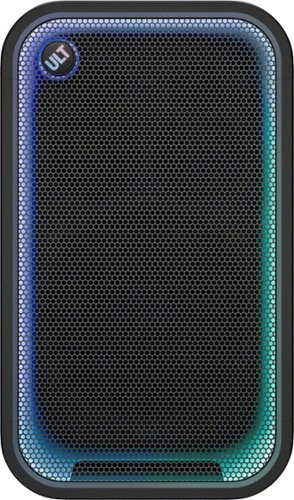
Co-created with professional hip-hop creators, the ULT TOWER 7 delivers powerful, ground-shaking sound built to power every party. Fine-tune the sound to suit the moment with multiple sound modes. The long-lasting battery,3 integrated handles and wheels make it easy to keep the party going wherever it takes you. From DJ sets and karaoke sessions 2 to larger gatherings, 360~ Party Sound and party lighting help make every occasion unforgettable.
Customer Rating

5
Here comes the BOOM! Party on wheels w/ a Battery
on September 17, 2026
Posted by: nkpstudios
Sony ULT Tower 7 is an amazing portable speaker that gets ANY party started. Whether you are a traveling musician, party host, karaoke enthusiast, a DJ at a wedding, or glampers and tailgaters on Sundays, this speaker is for you! The sound is huge, and the portability is unprecedented. Weighing in at around 50lbs, it is heavy enough to feel quality and sound while also light enough to move around and reposition. The ULT Tower 7 is the sweet spot of the lineup for less than half the price of the Maxx; it takes you to boomtown with its performance sitting comfortably between the Tower Maxx and Tower 5. It punches above its weight class and delivers loud, clean sound for its size and portability, with battery power.
Setup is easy, and you will know what to do, especially if you are buying this. Remove it from the box, open the flap on the back, and plug in the charging cable to get started. While charging, you should download the Sony SoundConnect app from the iOS App Store or Android Play Store, open it, and you will find the Sony ULT speaker to connect.
Connectivity and I/O
The ULT Tower 7 has all the interfaces you want to connect audio sources. The new ULT button gives you tactile controls to change EQ with a click and the ability to raise or lower volume with the twist of the ULT ring. With USB-A and USB-C available to connect your phone, thumb drive, or tablet, it doubles as a power bank to recharge devices on the go. Bluetooth for the everyday listener. There is an XLR and RCA port for musicians and mixers to tap into. Plug into the 1/4" jack for a mic, guitar, or a mixer, and you are a professional party starter and MC. Download the Sony SoundConnect app and get custom controls over EQ and lighting to set the mode and atmosphere right. I really love the versatility and portable nature of this, and Sony has really thought this through.
The ULT Tower 7 has all the interfaces you want to connect audio sources. The new ULT button gives you tactile controls to change EQ with a click and the ability to raise or lower volume with the twist of the ULT ring. With USB-A and USB-C available to connect your phone, thumb drive, or tablet, it doubles as a power bank to recharge devices on the go. Bluetooth for the everyday listener. There is an XLR and RCA port for musicians and mixers to tap into. Plug into the 1/4" jack for a mic, guitar, or a mixer, and you are a professional party starter and MC. Download the Sony SoundConnect app and get custom controls over EQ and lighting to set the mode and atmosphere right. I really love the versatility and portable nature of this, and Sony has really thought this through.
Sound Quality
On the front, there is a single 11" subwoofer to handle the bass, and it does an excellent job!. You can feel your clothes vibrate, and sometimes the room shakes depending on the song. It rumbles, offering tight and clean bass. Handling the mids, there are 2 midrange drivers, and for the highs you have 4 tweeters (2 front and 2 rear-facing) to fill the room. Highs are crispy and fill the room with a 360 feel, while lows rumble and shake like a live concert. Mids are pronounced, and voices are separated in a soundstage like nothing you have heard in a battery-operated portable speaker. This really does the job and the lighting effects make a boring room naturally interesting.
On the front, there is a single 11" subwoofer to handle the bass, and it does an excellent job!. You can feel your clothes vibrate, and sometimes the room shakes depending on the song. It rumbles, offering tight and clean bass. Handling the mids, there are 2 midrange drivers, and for the highs you have 4 tweeters (2 front and 2 rear-facing) to fill the room. Highs are crispy and fill the room with a 360 feel, while lows rumble and shake like a live concert. Mids are pronounced, and voices are separated in a soundstage like nothing you have heard in a battery-operated portable speaker. This really does the job and the lighting effects make a boring room naturally interesting.
Build Quality
This speaker case is built like a tank constructed of ABS plastic and metal for the speaker grill looking like DJ speakers but with rounded corners (I like better). There is even IPX4 splash protection against spills and rain in outdoor events. A weather sealed rubber door protects the connections to ensure longevity if you get caught in unfortunate circumstances. This can be treated like professional gear without a case. No need to baby this thing! I only wish there was reinforcement on the corners of metal or rubber caps/pads to help with it falling or impacts.
This speaker case is built like a tank constructed of ABS plastic and metal for the speaker grill looking like DJ speakers but with rounded corners (I like better). There is even IPX4 splash protection against spills and rain in outdoor events. A weather sealed rubber door protects the connections to ensure longevity if you get caught in unfortunate circumstances. This can be treated like professional gear without a case. No need to baby this thing! I only wish there was reinforcement on the corners of metal or rubber caps/pads to help with it falling or impacts.
There are 4 knurled handles on each side on top and bottom that are easy to grip and also wheels to roll it around hard surfaces. There is a handle around the back that can be used like luggage to wheel but it is not as thick and easy to grip like the side handles. I would love to see a retractable handle like carry on luggage to help reduce the wrist strain and angle. The box is built solid and feels like it could take a beating. There is IPX4 splash rating which is a first for the Sony ULT line. There are pads on the side to allow for vertical or horizontal orientation.
Lighting and Mood
The lights are my favorite upgrade on this release. Instead of obnoxious lights on the front of the speakers, there is a multifunctional LED light strip. The LED strip goes around the perimeter of the speaker and doubles as the volume bar indicator when you turn the ULT knob. It compliment the music with a subtle light that calms or it can be tied to the beat. In app, there are options to customize and set to a single color or make it reactive to the beat. I love this part of it and instead of the tacky LEDs found in previous builds.
The lights are my favorite upgrade on this release. Instead of obnoxious lights on the front of the speakers, there is a multifunctional LED light strip. The LED strip goes around the perimeter of the speaker and doubles as the volume bar indicator when you turn the ULT knob. It compliment the music with a subtle light that calms or it can be tied to the beat. In app, there are options to customize and set to a single color or make it reactive to the beat. I love this part of it and instead of the tacky LEDs found in previous builds.
Battery Life
Battery life is monstrous, rated around 30 hours depending on volume level and light usage. I in my testing I clocked around 15 hrs. with lights and maybe 75% volume. For more endurance, click the lights button and turn them off, and activate the stamina button on the back. You can plug this in and use it while charging and unplug when ready to move the party outside without extension cords. A quick 15min charge got me about 3.5 hours playtime before it goes dead.
Battery life is monstrous, rated around 30 hours depending on volume level and light usage. I in my testing I clocked around 15 hrs. with lights and maybe 75% volume. For more endurance, click the lights button and turn them off, and activate the stamina button on the back. You can plug this in and use it while charging and unplug when ready to move the party outside without extension cords. A quick 15min charge got me about 3.5 hours playtime before it goes dead.
Things to Know
-Super simple controls and the layout is perfect and intuitive.
-Uses Auracast so it's not backwards compatible.
-Not backwards compatible with previous ULT speakers like ULT Tower 9 and 10 via Party Connect.
-Nowhere to put the charging cord. Don't lose it because it isn't one you can find anywhere.
-Super simple controls and the layout is perfect and intuitive.
-Uses Auracast so it's not backwards compatible.
-Not backwards compatible with previous ULT speakers like ULT Tower 9 and 10 via Party Connect.
-Nowhere to put the charging cord. Don't lose it because it isn't one you can find anywhere.
Things I Would Like to See
-HDMI would be nice to connect to TV or Laptop for ARC audio interface
-Add a place to store the charging cable.
-Add 3.5mm headphone jack for even more connectivity to laptops and older devices.
-Add the same knurled handle type along the back or even a luggage style retractable handle.
-Add a physical 7 or 10 band physical EQ to the back.
-HDMI would be nice to connect to TV or Laptop for ARC audio interface
-Add a place to store the charging cable.
-Add 3.5mm headphone jack for even more connectivity to laptops and older devices.
-Add the same knurled handle type along the back or even a luggage style retractable handle.
-Add a physical 7 or 10 band physical EQ to the back.
Final Thoughts
The Sony ULT Tower 7 party speaker is an excellent addition to anyone's party setup. DJs, tailgaters, sports teams, wedding MCs, karaoke afficionados, and pool parties are all going to love this speaker. If you have the money, this is the best value and performance since it offers versatility with both battery or wired. It is small enough to take with you and move around. The sound quality is amazing for the size, and battery life is ample for a jam session. This is a buy and I would recommend this to everyone who can stomach the price tag.
The Sony ULT Tower 7 party speaker is an excellent addition to anyone's party setup. DJs, tailgaters, sports teams, wedding MCs, karaoke afficionados, and pool parties are all going to love this speaker. If you have the money, this is the best value and performance since it offers versatility with both battery or wired. It is small enough to take with you and move around. The sound quality is amazing for the size, and battery life is ample for a jam session. This is a buy and I would recommend this to everyone who can stomach the price tag.
I would recommend this to a friend!
Share this review:


0points
0of 0voted this as helpful.
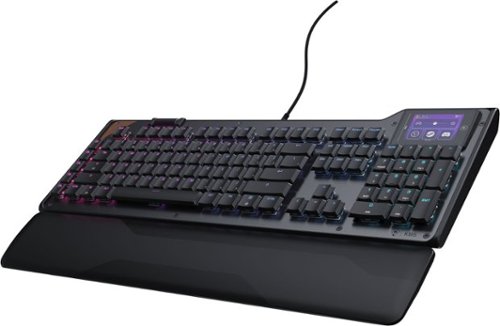
The Turtle Beach Command Series KB5 full-size mechanical keyboard puts total control at your fingertips with a 2.4~ Command Touch Display that lets you customize profiles, trigger macros, and monitor key system stats while staying immersed in the game. Titan low-profile mechanical switches that actuate at just 1.2mm deliver fast, precise input. Premium double~shot PBT keycaps maintain a clean matte finish for a superior tactile feel. Additional textured WASD keys add enhanced grip and control. Pre~lubed switches, tuned stabilizers, and true 8K wired polling deliver smooth, ultra~responsive keystrokes, while five dedicated macro keys and a top~mounted clickable volume barrel provide fast, intuitive control. A low~profile, aluminum~reinforced chassis paired with a detachable palm rest ensures lasting comfort and durability. The KB5 isn~t just a keyboard, it~s your ultimate command center built for gaming, streaming, and beyond.
Customer Rating

4
Premium Board w Stiff Wristrest and Super low Prof
on September 13, 2026
Posted by: nkpstudios
The Turtle Beach KB5 is a full-size, versatile keyboard for gamers, productivity users, and content creators alike. There is something for everyone to like here, especially the little touch-enabled, programmable screen. The whole keyboard screams premium, from the aluminum top plate with a copper accent to the LCD in the top-right corner. It will grow on you once you learn the software and unlock its full capabilities. It comes with a nice braided USB cable with Type-A on one end and Type-C on the other. The adjustable feet sit at very low angles, so you will need to get used to the aggressive low profile. If you like a higher angle on your board, this very acute angle won't suit you even on the highest setting. A cheap plastic wrist rest is included and snaps into the bottom, keeping it together. Overall, it has a nice presentation and feels premium for gamers everywhere.
Setup Experience
Unboxing and setup are easy, like any other keyboard. Remove the keyboard and instantly you will say Wow, that's cool. Take the USB cable and keyboard out of the box and soft sleeves, download the Swarm II software, and update the hardware for the latest experience. The touchscreen makes it easy to get to the download page by tapping the download icon on the homepage to unlock the full feature set - a nice touch. The key spacing feels tight and sounds very quiet for mechanical switches without the traditional clicks many will miss. A nice scroll barrel adorns the left side with a column of 5 macro keys to make your own. The RGB lighting looks nice, but it's extremely dim compared to what I expected. Even at full brightness, I often want more.
Unboxing and setup are easy, like any other keyboard. Remove the keyboard and instantly you will say Wow, that's cool. Take the USB cable and keyboard out of the box and soft sleeves, download the Swarm II software, and update the hardware for the latest experience. The touchscreen makes it easy to get to the download page by tapping the download icon on the homepage to unlock the full feature set - a nice touch. The key spacing feels tight and sounds very quiet for mechanical switches without the traditional clicks many will miss. A nice scroll barrel adorns the left side with a column of 5 macro keys to make your own. The RGB lighting looks nice, but it's extremely dim compared to what I expected. Even at full brightness, I often want more.
Typing Experience and Performance
Overall, I want to love the feel of this keyboard. It is fast and requires minimal effort to activate a key. The keycap height reminds me of a laptop, around a 1/4 inch tall - not my favorite because it leads to typos for me when typing quickly. I like the font but I am not a fan of the division symbol on the number pad where I am used to the slash. The wrist rest is not comfortable, feels like something they could have added padding to and made it a little higher so it feels more premium. Overall, the keyboard is low-profile and premium, with a low angle and minimal key travel. Gaming with this is lightning fast and the macros are sweet after configuration.
Overall, I want to love the feel of this keyboard. It is fast and requires minimal effort to activate a key. The keycap height reminds me of a laptop, around a 1/4 inch tall - not my favorite because it leads to typos for me when typing quickly. I like the font but I am not a fan of the division symbol on the number pad where I am used to the slash. The wrist rest is not comfortable, feels like something they could have added padding to and made it a little higher so it feels more premium. Overall, the keyboard is low-profile and premium, with a low angle and minimal key travel. Gaming with this is lightning fast and the macros are sweet after configuration.
The Touch Screen
The touchscreen is a nice touch… you see what I did there? It isn't obnoxious and just large enough to do things. Holding down the touchscreen only allows for one touch at a time. For example, to increase the volume, tap once to increase by 2 rather than hold, which works for small changes in the media center section. Not many widgets. The timer widget maxes out at 10 mins. The range is 1-10 mins to set. I'm not sure what that is about, but let's set it up to a maximum of over an hour. I can see this being good for productivity or even limiting gaming time to take breaks. Maybe even trying to speedrun a level too! There are very few widgets; hopefully that changes, or they'll let the community create their own in the future.
The touchscreen is a nice touch… you see what I did there? It isn't obnoxious and just large enough to do things. Holding down the touchscreen only allows for one touch at a time. For example, to increase the volume, tap once to increase by 2 rather than hold, which works for small changes in the media center section. Not many widgets. The timer widget maxes out at 10 mins. The range is 1-10 mins to set. I'm not sure what that is about, but let's set it up to a maximum of over an hour. I can see this being good for productivity or even limiting gaming time to take breaks. Maybe even trying to speedrun a level too! There are very few widgets; hopefully that changes, or they'll let the community create their own in the future.
Software/Firmware
The update process was strange. The out-of-the-box software update took over 20 minutes total. Swarm 2 had to be updated within the software after downloading directly from their site. Then the KB5 update took about 10-15 minutes to update the firmware, which was strange. It created a small drive partition, then deleted itself after it was completed. I haven't seen this way done before and I found it quite strange. After the keyboard reboots itself, you still need to unplug it before it can finalize the update.
The update process was strange. The out-of-the-box software update took over 20 minutes total. Swarm 2 had to be updated within the software after downloading directly from their site. Then the KB5 update took about 10-15 minutes to update the firmware, which was strange. It created a small drive partition, then deleted itself after it was completed. I haven't seen this way done before and I found it quite strange. After the keyboard reboots itself, you still need to unplug it before it can finalize the update.
Things to Know
-The keyboard randomly causes the lighting to turn off.
-Takes time to "boot"
-You have to go into the software and update brightness. There is no way to change brightness like on other keyboards with a Fn key combo or dedicated brightness button.
-Quite annoying to have to open Swarm II every time you need to make adjustments and there are no ways to macro program for it in the options.
-The keyboard randomly causes the lighting to turn off.
-Takes time to "boot"
-You have to go into the software and update brightness. There is no way to change brightness like on other keyboards with a Fn key combo or dedicated brightness button.
-Quite annoying to have to open Swarm II every time you need to make adjustments and there are no ways to macro program for it in the options.
Final Thoughts
The TB KB5 keyboard RGBs are not bright at all. I find even at 100% they are still very dark. The key spacing is very tight and I often have typos when typing fast due to the low profiles of the key caps. The keys are mechanical and quiet, with actuation height extremely low so they work fast. It will take some getting used to if you are into the mechanical clicky feel and the software leaves a lot to be desired. Not a fan of the Swarm software and lack of dedicated keyboard settings macros for brightness and effects you find in other keyboards. It is a quiet speedster board with fast keys and does everything you need it to, but for me I miss the clicking and tactile feel of traditional keys over the Titan switches used here.
The TB KB5 keyboard RGBs are not bright at all. I find even at 100% they are still very dark. The key spacing is very tight and I often have typos when typing fast due to the low profiles of the key caps. The keys are mechanical and quiet, with actuation height extremely low so they work fast. It will take some getting used to if you are into the mechanical clicky feel and the software leaves a lot to be desired. Not a fan of the Swarm software and lack of dedicated keyboard settings macros for brightness and effects you find in other keyboards. It is a quiet speedster board with fast keys and does everything you need it to, but for me I miss the clicking and tactile feel of traditional keys over the Titan switches used here.
No, I would not recommend this to a friend.
Share this review:


0points
0of 0voted this as helpful.
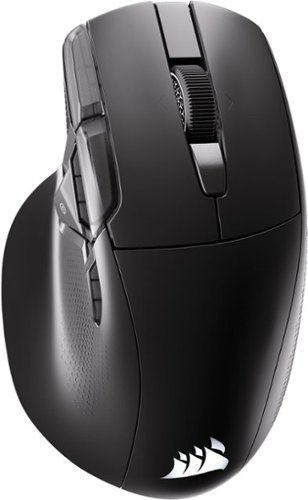
One button summons infinite control. The NIGHTSWORD v2 WIRELESS SD is the first gaming mouse with a dedicated Stream Deck Launch Button, bringing your Virtual Stream Deck instantly to your screen. Summon a personalized on-screen shortcut panel built around whatever you play, create or get done, and extend that same control across 8 programmable buttons. Up to 8,000Hz hyper-polling, a 33K DPI CORSAIR MARKSMAN S sensor and optical switches rated for 100 million clicks keep every input sharp and precise. Up to 170 hours of battery life and three ways to connect keep you in the game, your way.
Customer Rating
4
Excellent High Spec Mouse... Software not so much.
on September 13, 2026
Posted by: nkpstudios
The Corsair Nightsword V2 Wireless SD is the perfect ergonomic mouse built for streaming, gaming, and productivity. It has 11 remappable buttons with optical switches rated at over 100 million clicks, 8k polling, and the 33k DPI iCUE Marksman S sensor, so your inputs are precise no matter what you use it for. It boasts tri-mode connectivity for the most adaptable setup covering you on the go or in hardcore gamer mode. Use Bluetooth on one PC for productivity tasks or mobile work setups, move to a wired USB setup if you game in high-performance setups, or use the included USB dongle for fast, zero-lag wireless gameplay comparable to a wire.
For me, this is the most comfortable gaming/work mouse from Corsair I've used to date. It fills out the palm and fingers land in natural shape and you can easily find buttons without looking. I love the included USB C to USB A dongle dock that has a solid metal clip to attach to your mouse mat/pad or clip to your bookbag pocket so you don't have to search when needed. Overall, this is an excellent mouse for my gaming and productivity needs. I would have liked to see the inclusion of grip stickers for a more customized feel, but the finishes and textures are good enough.
Battery life is excellent, rated up to 170 hours depending on RGB usage and polling speed. This is plenty for me, and it has a built-in rechargeable battery so you never have to search for AA's again! I get through a whole week of regular productivity/work and an entire weekend of long gaming sessions (like 5 hours for 2 days) with RGB on. If you turn off RGB I am sure you will get even longer! No gripes here, you get more than enough playing time on a single charge.
Love
+ Tri-Mode with rechargable battery (USB, Wireless 2.4GHz, and Bluetooth)
+ Love the thumb rest and ergonomic shape. Wish there was a pinky rest too and it would be perfect.
+ The grip and finish feels nice but if you get clammy or sweat while gaming, it can become slippery.
+ Love the plethora of buttons that are all mappable. I simply use the SD button as another modifier like the CRTL button to make selecting multiple files without touching the keyboard when in "work" mode. Make it a sniper button to drop DPI in gaming.
+ Tri-Mode with rechargable battery (USB, Wireless 2.4GHz, and Bluetooth)
+ Love the thumb rest and ergonomic shape. Wish there was a pinky rest too and it would be perfect.
+ The grip and finish feels nice but if you get clammy or sweat while gaming, it can become slippery.
+ Love the plethora of buttons that are all mappable. I simply use the SD button as another modifier like the CRTL button to make selecting multiple files without touching the keyboard when in "work" mode. Make it a sniper button to drop DPI in gaming.
Could Use Some Work
-Software has no way to configure via Bluetooth. It is ONLY accessible via web browser and not compatible with iCUE.
-Only recognized via USB for configuration. Lose the dongle, USB cable is the only way to connect and configure.
-No infinite scroll. Would love to see this added to balance the weight distribution.
-Software has no way to configure via Bluetooth. It is ONLY accessible via web browser and not compatible with iCUE.
-Only recognized via USB for configuration. Lose the dongle, USB cable is the only way to connect and configure.
-No infinite scroll. Would love to see this added to balance the weight distribution.
It's a great mouse, but the software feels beta. To activate your streaming functionality, just download the StreamDeck software and select the Nightsword to get more macros but doing so makes the mouse quite confusing. I found it is better to not use the StreamDeck fuctionality since I have a stream deck. The mouse introduces a mouse menu which creates a virtual streamdeck that becomes an annoyance for me. If you stream, you must likely have a stream deck so this is basically an extra button. Software is clunky and doesn't seem ready for primetime in my opinion. It is an excellent high spec mouse with many buttons, but if you own a streamdeck already, I found myself just skipping the SD button all together.
I would recommend this to a friend!
Share this review:


0points
0of 0voted this as helpful.

ASUS ROG STRIX X870E-E GAMING WIFI7 NEO AMD ATX motherboard with 18+2+2 power stages, DDR5 with NitroPath DRAM Technology and AEMP, PCIe 5.0 Ready, four M.2 slots, Wi-Fi 7, Dual USB4, Dynamic OC Switcher, advanced AI tuning with AI Cache Boost and DIY-friendly Q-design with robust thermals.
Customer Rating
4
STRIX lineup is evolving!
on July 18, 2026
Posted by: nkpstudios
After just a year, I am upgrading my build again from a competitors X870 "ICE" board and I must say I love this STRIX board and the additional functionality and I/O it provides. The ROG Strix line has always been one of my favorite boards after the Crosshair Hero line and this one takes the cake. The gap between the two lines are closing and the aesthetics, upgrades, extra USBs and RGBs, and the addition of the Q connectors really enhance the overall experience.
Enter the ROG Strix X870E Gaming WiFi 7 Neo in all its glory. I love the aggressive angles and touch of RGB covering the I/O shield board making it stylish while keeping it from overkill. The beautiful "pixelated" LEDs make the board captivating with the light staying on even while the PC is off. This is configurable and you can turn it off if you like. Everything needed is included in the box along with the cool stickers everyone is used to getting.
Enter the ROG Strix X870E Gaming WiFi 7 Neo in all its glory. I love the aggressive angles and touch of RGB covering the I/O shield board making it stylish while keeping it from overkill. The beautiful "pixelated" LEDs make the board captivating with the light staying on even while the PC is off. This is configurable and you can turn it off if you like. Everything needed is included in the box along with the cool stickers everyone is used to getting.
Assembly is like all MoBos however the inclusion of the Q connectors here rendition makes installation easy for noobs to nerds due the toolless design. The alignment of ports, headers, and connectors on the outside edge are plentiful and well thought out. There are a plethora of heatshields for 5 M.2 slots and plates to make it look sleek and aggressive. I would have like to see CPU reinforcement for this price but I know that is what separates their top tier from the others. While this is their strategy, lesser quality competitors are including it in boards half the price so maybe this should be changed in the future lineup.
Looking around the board, you see some of the 18+2+2 VRM power stages, AM5 socket, 4 DDR5 UDIMM slots supporting up to 256GB clocked up to 9600 MT/s depending on CPU and OC settings. There is one PCIe 5.0x16 for GPU, a few other PCIe, Wi-Fi 7, 2 USB-C 4.0 with PD and Display port! In the networking sector, you get MediaTek since Intel is the only driver made stable for the Marvell option I love more. So much to see, review the specs yourself, I won't do anymore listing of them. VRM and power management will make you drool if you are an over-clocker and enjoy squeezing everything out of the system.
My build easily took my AM5 Ryzen 9 9950X, 128GB DDR5 Crucial memory in dual channel, with RTX 5090 without a hiccup and runs perfectly without any issues once memory was trained. Speeds for the drives are blazing fast and run well at Gen 4 or 5. Drives, RAM, and CPU all play well together. These same components ran slightly faster on this board vs my last x870 ICE board. I loved the BIOS upgrade to 64MB for futureproof larger BIOS files. They upgraded the UI so it is scalable for higher resolution displays. There were a plethora of options and I still am learning what this thing can do and what each feature is all about. The BEST part of all is this BIOS has the ability to pre-install the Wifi driver and Asus DriverHub so you don't need to keep up with downloads from support pages. You get right to the connectivity and the drivers are ready to load with the latest and greatest. I love Armory Crate and all the AI features for making things simpler for those who aren't tech heavy in Overclocking.
Things I love:
BIOS is 64 MB and has ability to preinstall WI-FI driver and ASUS DriverHub
Love the board aesthetics with the RGB lighting ROG logo covering the I/O and cooling for VRM.
Multiple USB4 with PD and Displayport
Overclocks are stable and maintained without issues.
Superb build quality filled with solid heatsinks and Q connectors tool-less installs.
Tons of places for M.2 drives and lots of heatsinks keeping things cool.
Robust BIOS and support for HiRes displays.
BIOS is 64 MB and has ability to preinstall WI-FI driver and ASUS DriverHub
Love the board aesthetics with the RGB lighting ROG logo covering the I/O and cooling for VRM.
Multiple USB4 with PD and Displayport
Overclocks are stable and maintained without issues.
Superb build quality filled with solid heatsinks and Q connectors tool-less installs.
Tons of places for M.2 drives and lots of heatsinks keeping things cool.
Robust BIOS and support for HiRes displays.
Things to know:
Top tier with respect to I/O, namely USB and M.2 slots.
It's a bit pricey. Especially without the inclusion of 10GB LAN.
Futureproof BIOS with larger storage for upgrades on chip.
Must pay attention to bifurcation and CPU combo for limitations.
No bracket for reinforcing the CPU backplate.
My verdict
I completely recommend this to any enthusiast or gamer who loves tweaking and reliable stable overclocks to maximize FPS and rip through basic PC tasks for productivity. This is a beast and more than capable of handling any build you have in mind. If you have all other ASUS products, this will look amazing with everything including the new AIO connector.
Top tier with respect to I/O, namely USB and M.2 slots.
It's a bit pricey. Especially without the inclusion of 10GB LAN.
Futureproof BIOS with larger storage for upgrades on chip.
Must pay attention to bifurcation and CPU combo for limitations.
No bracket for reinforcing the CPU backplate.
My verdict
I completely recommend this to any enthusiast or gamer who loves tweaking and reliable stable overclocks to maximize FPS and rip through basic PC tasks for productivity. This is a beast and more than capable of handling any build you have in mind. If you have all other ASUS products, this will look amazing with everything including the new AIO connector.
I would recommend this to a friend!





Share this review:


0points
0of 0voted this as helpful.
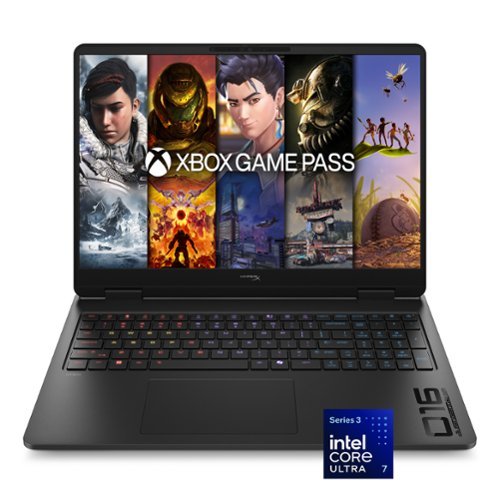
Speed beyond power, victory beyond doubt. Our new HyperX OMEN 16, is engineered specifically to give gamers the competitive advantage. A new high polling rate keyboard and OMEN AI combined with a NVIDIA RTX GPU and the latest Intel processor for a perfect blend of speed and powe.
Customer Rating
4
Excellent all-around performer needing upgrades
on July 9, 2026
Posted by: nkpstudios
The HyperX Omen O16 is a well-rounded mid-tier at best, with LOTS of room for you to upgrade in SSD and RAM. The computer is kind of on the CHONKIER side, but average weight for gaming laptops in the 16-inch range. The Intel EVO line of chips is as efficient as they come on battery power for the perfect mix of speed and power. This package comes running Win11 Home, on a 16" 2K IPS display @ 165Hz refresh, an i7 Ultra 356H CPU, an RTX 5060 GPU with 8GB VRAM, a 512GB gen4 NVME, a 70070mWh battery, and an upgradeable 16GB DDR5-5600 DRAM (single stick + 1 slot unsoldered). The power supply is massive and power-hungry, drawing power from a 330 W AC adapter.
Build and Setup 4/5
This package offers a unique value proposition for all those gamers on a budget. With DLSS and other AI software, it tries to make up for the difference. However, in my testing, 16GB just isn't enough, and it would often hang during setup. Additional RAM is a MUST and should be the first upgrade/purchase for all buyers. I love the stealth-like aesthetics of the total blackout in silky-smooth matte plastic. The display bezels are thick, and there is a HUGE fan intake underneath that keeps things running without much thermal throttling. Aesthetics are right where you want them for those who like minimalism. All branding is subdued in black with subtle touches of gray for OMEN and HyperX on the interior. Not too much RGB to waste battery for a good compromise on flash vs performance. The body is mostly a fingerprint magnet that looks great at first, but once you touch it, have a microfiber cloth if you like your stuff clean! In all, EXCELLENT job on the design HyperX! There is also self-cleaning fan tech, which I haven't used yet, but I look forward to trying it in the future if things get dusty.
This package offers a unique value proposition for all those gamers on a budget. With DLSS and other AI software, it tries to make up for the difference. However, in my testing, 16GB just isn't enough, and it would often hang during setup. Additional RAM is a MUST and should be the first upgrade/purchase for all buyers. I love the stealth-like aesthetics of the total blackout in silky-smooth matte plastic. The display bezels are thick, and there is a HUGE fan intake underneath that keeps things running without much thermal throttling. Aesthetics are right where you want them for those who like minimalism. All branding is subdued in black with subtle touches of gray for OMEN and HyperX on the interior. Not too much RGB to waste battery for a good compromise on flash vs performance. The body is mostly a fingerprint magnet that looks great at first, but once you touch it, have a microfiber cloth if you like your stuff clean! In all, EXCELLENT job on the design HyperX! There is also self-cleaning fan tech, which I haven't used yet, but I look forward to trying it in the future if things get dusty.
Performance 4/5
The 512GB NVME 2.0 Gen4 from SK Hynix and is blazing fast but I would say UPGRADE to at least 1 TB if you are gaming heavy in your library and not much cloud gaming. My benchmark on Crystal DiskMark scores were exceptional running fast at 6977.93 MB/s READ and 5020.25 MB/s WRITE. RAM is Samsung memory E-Die snappy 5600 DRAM and runs amazing, but we need another stick to make 32GB if you want a good experience overall. I believe 32GB should be standard now, but with the RAM crisis, I understand why not. FPS was just average barely hitting 50fps in Fortnite on higher settings.
The 512GB NVME 2.0 Gen4 from SK Hynix and is blazing fast but I would say UPGRADE to at least 1 TB if you are gaming heavy in your library and not much cloud gaming. My benchmark on Crystal DiskMark scores were exceptional running fast at 6977.93 MB/s READ and 5020.25 MB/s WRITE. RAM is Samsung memory E-Die snappy 5600 DRAM and runs amazing, but we need another stick to make 32GB if you want a good experience overall. I believe 32GB should be standard now, but with the RAM crisis, I understand why not. FPS was just average barely hitting 50fps in Fortnite on higher settings.
Connectivity and I/O 4/5
I love the selection of I/O but wish there were a few more ports. On each side, you have USB-A for the keyboard and mouse, with one 10Gbps signaling rate USB-A on the rear to support your streaming setup, right next to the RealTek RTL8168/8111 RJ45 gigabit Ethernet port, for neat cable management. Wireless is handled by an Intel WiFi 7 (2x2) BE211 @ 320 MHz for blazing-fast speeds. There is 1 HDMI 2.1 and 1 USB Type-C 10Gbps signaling rate supporting Power Delivery 3.0, DisplayPort 1.4, and HP Sleep and Charge with 1 Headphone/microphone combo and 1 AC Smart pin rounding out the I/O. It advertises InstantPair with OMEN products, but there is no InstantPair. I tried it with my HyperX Pulsefire Saga Pro and after further reading, OMEN only added InstantPair to the MAX model. Be prepared to use the dongle or go bluetooth, that is a glaring mistake I found in the marketing.
I love the selection of I/O but wish there were a few more ports. On each side, you have USB-A for the keyboard and mouse, with one 10Gbps signaling rate USB-A on the rear to support your streaming setup, right next to the RealTek RTL8168/8111 RJ45 gigabit Ethernet port, for neat cable management. Wireless is handled by an Intel WiFi 7 (2x2) BE211 @ 320 MHz for blazing-fast speeds. There is 1 HDMI 2.1 and 1 USB Type-C 10Gbps signaling rate supporting Power Delivery 3.0, DisplayPort 1.4, and HP Sleep and Charge with 1 Headphone/microphone combo and 1 AC Smart pin rounding out the I/O. It advertises InstantPair with OMEN products, but there is no InstantPair. I tried it with my HyperX Pulsefire Saga Pro and after further reading, OMEN only added InstantPair to the MAX model. Be prepared to use the dongle or go bluetooth, that is a glaring mistake I found in the marketing.
Keyboard and Typing Experience 3/5
The keyboard is a large 4-zone RGB board, covering almost the entire chassis, with a huge touchpad in the center.
I love the font, it is a fresh feel and easily read. The keys are responsive and not mechanical. They feel like a higher quality membrane keyboard if you can imagine that. Key spacing feels cramped due to the inclusion of a number pad in this form factor, but the stroke is satisfying. The numpad is very rare on 16-inch gaming laptops these days so if you do work on this you will appreciate that if you are a numbers person. The RGB’s are beautiful and bright, and they are zoned off so you can do different things separately or the entire keyboard as one in the BEST software implementations for RGB and Gaming hub. Response time is great due to the 8000Hz polling rate. I love the font and how HyperX Omen software handles everything and one of the best experiences hands down.
The keyboard is a large 4-zone RGB board, covering almost the entire chassis, with a huge touchpad in the center.
I love the font, it is a fresh feel and easily read. The keys are responsive and not mechanical. They feel like a higher quality membrane keyboard if you can imagine that. Key spacing feels cramped due to the inclusion of a number pad in this form factor, but the stroke is satisfying. The numpad is very rare on 16-inch gaming laptops these days so if you do work on this you will appreciate that if you are a numbers person. The RGB’s are beautiful and bright, and they are zoned off so you can do different things separately or the entire keyboard as one in the BEST software implementations for RGB and Gaming hub. Response time is great due to the 8000Hz polling rate. I love the font and how HyperX Omen software handles everything and one of the best experiences hands down.
Display and Visuals 3/5
The display is made by BOE, nothing exciting. It gets bright and crispy, with inaccurate, sometimes washed-out colors. Budget gamers may like it as part of the budget-friendly compromise. Contrast is average with all colors appearing decent. Overall images are nice but nothing exciting to report out of a basic IPS display aside from 165Hz refresh rate. Color gamut representation is weak with the most basic sRGB barely 66% supported. Below there is a list of supported color spaces for those who need to know. There is NO color accuracy to any standard (see below). I would go with OLED if I could do it again.
The display is made by BOE, nothing exciting. It gets bright and crispy, with inaccurate, sometimes washed-out colors. Budget gamers may like it as part of the budget-friendly compromise. Contrast is average with all colors appearing decent. Overall images are nice but nothing exciting to report out of a basic IPS display aside from 165Hz refresh rate. Color gamut representation is weak with the most basic sRGB barely 66% supported. Below there is a list of supported color spaces for those who need to know. There is NO color accuracy to any standard (see below). I would go with OLED if I could do it again.
Color Gamuts Supported:
SRGB 66.297%
AdobeRGB 49.147%
DCI-P3 48.872%
BT.2020 35.063%
SRGB 66.297%
AdobeRGB 49.147%
DCI-P3 48.872%
BT.2020 35.063%
Essentially, if you are one who needs your panel to also be color accurate but chooses to also game, this isn't for you. If you do video or photo work on the go, this isn't for you unless you have an external monitor. There are no licenses or certifications for calibration on the IPS panel. AMD Freesync is supported but not NVIDIA Vsync which is senseless being there is RTX 5060 inside. Another sacrifice to keep pricing down.
Things to Know
-No color accuracy. Not even sRGB is 100% covered which is the most basic of all.
-LOTS of typos - The keyboard layout is tight, but with practice I will adjust.
-Inconsistent Branding - HyperX, OMEN, then HP Support Assistant? Gamers notice the little things, it cheapens the feel of a NEW HyperX line by not masking the HP name completely.
-During testing, standby battery drain was higher than expected. Power off when not needed during times of extended battery needs or inability to charge.
-16GB RAM is not enough. 16GB is just enough to run your PC. Idling, just running Windows, I was sitting anywhere between 70%-87% RAM usage, 11GB/15GB used, and there wasn't a game even loaded yet! Buy RAM day one, lagging is real RAM is the bottleneck here.
-The RAM is not soldered so you can upgrade both sticks!
-Power supply is HUGE and still rocks HP branding (Booooooo).
-Not a fan of Ads in Omen Gaming Hub
-No color accuracy. Not even sRGB is 100% covered which is the most basic of all.
-LOTS of typos - The keyboard layout is tight, but with practice I will adjust.
-Inconsistent Branding - HyperX, OMEN, then HP Support Assistant? Gamers notice the little things, it cheapens the feel of a NEW HyperX line by not masking the HP name completely.
-During testing, standby battery drain was higher than expected. Power off when not needed during times of extended battery needs or inability to charge.
-16GB RAM is not enough. 16GB is just enough to run your PC. Idling, just running Windows, I was sitting anywhere between 70%-87% RAM usage, 11GB/15GB used, and there wasn't a game even loaded yet! Buy RAM day one, lagging is real RAM is the bottleneck here.
-The RAM is not soldered so you can upgrade both sticks!
-Power supply is HUGE and still rocks HP branding (Booooooo).
-Not a fan of Ads in Omen Gaming Hub
Verdict 4/5
Should you get it? Not quite sure, for a few hundred more you can go up the line and get 1TB SSD and OLED panel for instant performance. I would say look at the higher offerings and go for the Transcend or Maxx versions if you are already in at this price point if you want to get the best OMEN experience out the box. This is a recommendation for a mid-tier budget option for those who don't play heavy AAA titles as this.
Should you get it? Not quite sure, for a few hundred more you can go up the line and get 1TB SSD and OLED panel for instant performance. I would say look at the higher offerings and go for the Transcend or Maxx versions if you are already in at this price point if you want to get the best OMEN experience out the box. This is a recommendation for a mid-tier budget option for those who don't play heavy AAA titles as this.
No, I would not recommend this to a friend.






Share this review:


+1point
1of 1voted this as helpful.
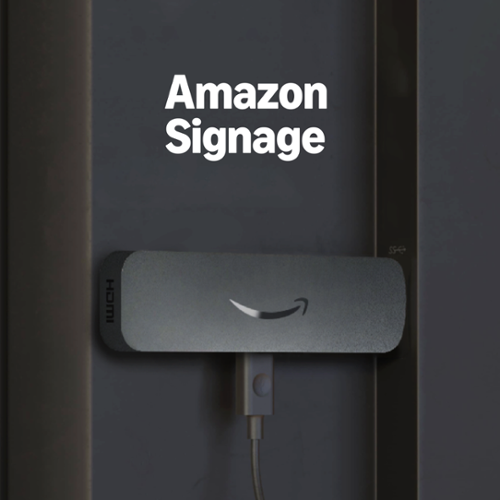
Professional digital signage: The Amazon Signage Stick auto-launches your CMS in kiosk mode for seamless, unattended operation.
Customer Rating
5
Major Signage Industry Disruption INCOMING!
on June 24, 2026
Posted by: nkpstudios
SEE YA, expensive proprietary signage and software! Bye, annoying manual updating procedures for separate locations and time-consuming location drives and USB drive updates. Instead, say hello to time and gas savings! If you like to work smart and efficiently, you will see this will pay for itself should you fall into any of the above. Enter the Amazon Signage Stick, which came to disrupt the signage world forever with a simple, intuitive way to manage screens in your place of business. Restauraunt menus, product sales and event marketing just to name a few are all simple and fast to handle. Digital advertising screens in all your stores can be managed remotely using your favorite CMS and everything refreshed in less than 30 seconds of pushing an update. All this brings to any TV or screen with an HDMI port, saving you more money on equipment costs by converting old screens into signage. There is also the fact it boots into kiosk mode so there is no way to tamper with the display or watch streaming apps like with a Firestick.
I love how everything is very familiar from the remote control to the installation you can handle this no problem. The "hardest" part is to link your CMS to your account. You just need to make sure you have an active subscription and you'll be able to use this stick. That is the only downside is once you pay $99 you must have an active subscription to a CMS in order for this to work. Everything works wonderfully from your CMS site. You can activate and update all new signage with the press of a button and in under a few seconds the stick downloads the changes from the CMS provider you use. Now, you can schedule signage around sales and holidays or update menu items and prices without needing to pay for each individual change. Set your content schedule, load it in for the year and be done! I highly recommend this for all who are operating signage or just need the ability to change screens without being physically there.
Things to know
Must have active subscription to one of 25 major supported CMS.
Must have Amazon Account to link/register devices in Signage app.
Device looks like Firestick but boots into signage only.
If you have Firestick, mark your remotes because they look the same as quick glance.
Must have active subscription to one of 25 major supported CMS.
Must have Amazon Account to link/register devices in Signage app.
Device looks like Firestick but boots into signage only.
If you have Firestick, mark your remotes because they look the same as quick glance.
I would recommend this to a friend!
Share this review:


0points
0of 0voted this as helpful.
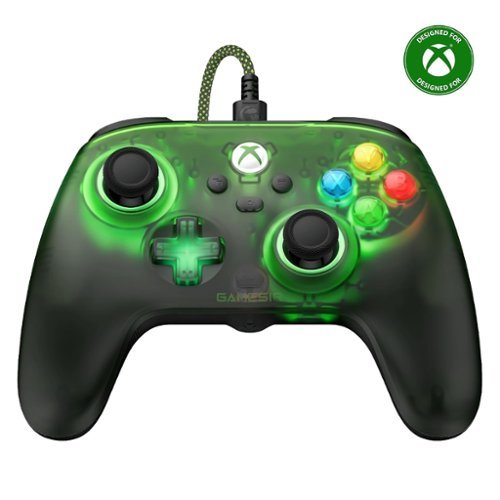
Embrace elegance and comfort with the GameSir T7 Pro Retro Green, featuring a retro look familiar to many gamers. Its semi-transparent design and dynamic RGB lighting create a mesmerizing visual experience. Shine with the T7 Pro Retro Green and elevate your gaming setup!
Customer Rating
5
GameSir Gaming Starter Kit
on May 28, 2026
Posted by: nkpstudios
You, GameSir, have created the perfect entry-level controller for PC Gamers to get started and dip their feet into the world of Hall Effect sticks. With the nostalgic retro green Xbox lighting, you'll be reminded of the XB1 glory days. Everything feels solid and buttons are responsive. For the price, you cannot beat this offering.
The T7 Pro W is extremely simple and easy to setup. Just remove the controller and long hi quality braided USB cable, plug it in, and you'll hear it connect to your USB indicating it was recognized. The light in the controllers will turn on, and you know you are good to go. You can adjust brightness and turn the lighting on and off in app. If you want to customize, go to the MS Store and download and get the Gamesir Nexus app to make it truly yours. This works well with Steam and Xbox Game Pass along with PC gaming. There is an extra set of buttons you can program to whatever you like. This controller is simply everything you need at the right price. VERDICT IS… YES, especially for your 1st ever!
The T7 Pro W is extremely simple and easy to setup. Just remove the controller and long hi quality braided USB cable, plug it in, and you'll hear it connect to your USB indicating it was recognized. The light in the controllers will turn on, and you know you are good to go. You can adjust brightness and turn the lighting on and off in app. If you want to customize, go to the MS Store and download and get the Gamesir Nexus app to make it truly yours. This works well with Steam and Xbox Game Pass along with PC gaming. There is an extra set of buttons you can program to whatever you like. This controller is simply everything you need at the right price. VERDICT IS… YES, especially for your 1st ever!
I would recommend this to a friend!
Share this review:


0points
0of 0voted this as helpful.
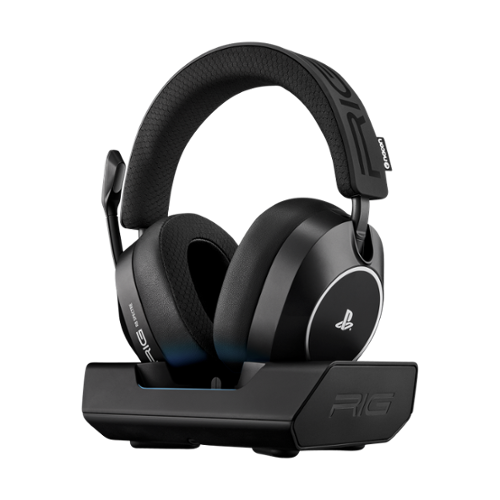
Studio-grade audio meets wireless freedom with the R8 SPECTRE PRO HS, officially licensed for PlayStation~5. Hear the RIG R-SERIES difference with graphene drivers custom-tuned for competitive gaming, delivering ultra-low distortion audio optimized for Tempest 3D on PlayStation 5. Take calls while gaming by seamlessly mixing Bluetooth voice audio over low-latency 2.4GHz game sound. Control your audio experience using the RIG Navigator app available for Android and iPhone. The broadcast-grade boom microphone captures your voice and blocks out background noise, with full bandwidth 16 bit / 48 kHz voice capture and enhanced noise-rejection technology. Settle in for marathon gaming sessions with up to 60 hours of battery life and a comfortable memory foam headband and ear cushions. Dock your headset in the dedicated base station with RGB effects and stay charged between gaming sessions. The R8 SPECTRE PRO. Wireless Game Audio Built Different.
Customer Rating
4
The Graphene Hits Different!
on May 14, 2026
Posted by: nkpstudios
Nacon has delivered what Sony needed… an officially licensed flagship PS5 headset that hits the sweet spot between performance and value. With up to 60 hours of battery life, ultralight breathable design, and custom graphene 40mm drivers optimized for Tempest 3D audio, the RIG R8 Spectre PRO HS punches well above its price point. If you're buying your first PS5 headset or looking to upgrade without breaking the bank, this deserves serious consideration.
First Impressions & Unboxing
The unboxing experience is clean and straightforward with minimal waste. The official PlayStation branding takes center stage while RIG's branding stays subtle. It looks just right and you immediately recognize the quality in your hands. After powering them on and a soothing voice confirms they're ready to pair.
Everything you need comes in the box: the headset, base station dock with RGB lighting, cables, and swappable battery. Setup is effortless - plug the base station into your PlayStation and everything automatically links at 2.4 GHz. You can alternate between 3 modes with the mode switch button (Dual, Game, and Bluetooth).
The unboxing experience is clean and straightforward with minimal waste. The official PlayStation branding takes center stage while RIG's branding stays subtle. It looks just right and you immediately recognize the quality in your hands. After powering them on and a soothing voice confirms they're ready to pair.
Everything you need comes in the box: the headset, base station dock with RGB lighting, cables, and swappable battery. Setup is effortless - plug the base station into your PlayStation and everything automatically links at 2.4 GHz. You can alternate between 3 modes with the mode switch button (Dual, Game, and Bluetooth).
Sound Quality - The Graphene Difference
One word: graphene. These 40mm drivers deliver explosive Hi-Fi audio with less than 0.5% total harmonic distortion. They sound significantly bigger than their size suggests, with virtually no distortion even at high volumes. The clarity and soundstage are superb - highs and mids remain crisp while the bass stays clean and defined.
For FPS players who rely on spatial awareness and 3D audio positioning, these perform like nothing else at this price point. I own headsets at nearly double the price that can't match the R8's 3D audio performance. The Tempest 3D optimization on PlayStation 5 is exceptional, making these my new go-to for competitive shooters. They've replaced my Pulse Elite headphones as daily drivers.
The enhanced audio directionality and localization in games, especially FPS titles, is the best Tempest 3D implementation I've experienced.
One word: graphene. These 40mm drivers deliver explosive Hi-Fi audio with less than 0.5% total harmonic distortion. They sound significantly bigger than their size suggests, with virtually no distortion even at high volumes. The clarity and soundstage are superb - highs and mids remain crisp while the bass stays clean and defined.
For FPS players who rely on spatial awareness and 3D audio positioning, these perform like nothing else at this price point. I own headsets at nearly double the price that can't match the R8's 3D audio performance. The Tempest 3D optimization on PlayStation 5 is exceptional, making these my new go-to for competitive shooters. They've replaced my Pulse Elite headphones as daily drivers.
The enhanced audio directionality and localization in games, especially FPS titles, is the best Tempest 3D implementation I've experienced.
Connectivity & Features
The base station connects via 2.4 GHz for lag-free gaming audio. The headset also supports Bluetooth connectivity for a hybrid "dual mode" solution, though with limitations:
What works: You can answer phone calls while gaming - your girlfriend's call or that pizza order won't interrupt your session.
What doesn't: You cannot stream Bluetooth audio (music, podcasts) simultaneously with game audio. Switch to Bluetooth mode and you lose game audio. True simultaneous multipoint connectivity is only found in headsets double this price.
Download the RIG Navigator app (iOS/Android) to unlock the headset's full potential. Without it, you get a flat audio profile with limited functionality. The app lets you switch between audio profiles optimized for FPS versus single-player cinematic experiences without interrupting your game.
PC Compatibility: These work great on PC using the same USB dongle, with all sound controlled through the app.
The Dock & Build Quality
The base station feels substantial, constructed from heavy materials with rubber feet for stability. Built-in cable management helps keep your setup tidy. The RGB lighting is a nice touch, though it feels unnecessary since it doesn't sync with PS5 or PC - more of a "gamers need RGB somewhere" checkbox than a meaningful feature.
The headset itself features quality materials throughout. The memory foam ear cups are plush and customizable, and the overall design screams Sony quality with subtle RIG undertones. Everything feels worthy of the official PlayStation license.
The base station connects via 2.4 GHz for lag-free gaming audio. The headset also supports Bluetooth connectivity for a hybrid "dual mode" solution, though with limitations:
What works: You can answer phone calls while gaming - your girlfriend's call or that pizza order won't interrupt your session.
What doesn't: You cannot stream Bluetooth audio (music, podcasts) simultaneously with game audio. Switch to Bluetooth mode and you lose game audio. True simultaneous multipoint connectivity is only found in headsets double this price.
Download the RIG Navigator app (iOS/Android) to unlock the headset's full potential. Without it, you get a flat audio profile with limited functionality. The app lets you switch between audio profiles optimized for FPS versus single-player cinematic experiences without interrupting your game.
PC Compatibility: These work great on PC using the same USB dongle, with all sound controlled through the app.
The Dock & Build Quality
The base station feels substantial, constructed from heavy materials with rubber feet for stability. Built-in cable management helps keep your setup tidy. The RGB lighting is a nice touch, though it feels unnecessary since it doesn't sync with PS5 or PC - more of a "gamers need RGB somewhere" checkbox than a meaningful feature.
The headset itself features quality materials throughout. The memory foam ear cups are plush and customizable, and the overall design screams Sony quality with subtle RIG undertones. Everything feels worthy of the official PlayStation license.
Comfort & Fit
For the most part, these are comfortable, lightweight, and breathable - far more so than my leatherette-padded premium headset. The memory foam ear cups don't get hot or uncomfortable during long sessions.
However, I have fit issues. On my head, they don't seal properly around my ears, causing sound leakage under my earlobe. The clamping pressure seems insufficient, likely due to the headband's shape. Your mileage may vary depending on head shape, but it's worth testing the fit before committing.
The 60-hour battery life easily handles marathon gaming sessions, and the ability to buy and swap a fully charged battery makes this nearly foolproof for extended use.
Microphone
The mic delivers compressed, clear audio quality. While it should be know that while using monitoring, it creates some hiss. The mic is positioned on the right side, which can get in the way for right-handers who snack while gaming. Note that it's non-removable and there's no 3.5mm jack option.
For the most part, these are comfortable, lightweight, and breathable - far more so than my leatherette-padded premium headset. The memory foam ear cups don't get hot or uncomfortable during long sessions.
However, I have fit issues. On my head, they don't seal properly around my ears, causing sound leakage under my earlobe. The clamping pressure seems insufficient, likely due to the headband's shape. Your mileage may vary depending on head shape, but it's worth testing the fit before committing.
The 60-hour battery life easily handles marathon gaming sessions, and the ability to buy and swap a fully charged battery makes this nearly foolproof for extended use.
Microphone
The mic delivers compressed, clear audio quality. While it should be know that while using monitoring, it creates some hiss. The mic is positioned on the right side, which can get in the way for right-handers who snack while gaming. Note that it's non-removable and there's no 3.5mm jack option.
Notable Features & Quirks
Impressive:
R8 ear cup .STL files available for download on RIG's website - make your own custom ear cups with a 3D printer
Swappable battery system for unlimited gaming
Works seamlessly on both PS5 and PC
R8 ear cup .STL files available for download on RIG's website - make your own custom ear cups with a 3D printer
Swappable battery system for unlimited gaming
Works seamlessly on both PS5 and PC
Missing/Disappointing:
No PC app available
No chat/game mix slider on the headset itself
No button on the base or headset for quick EQ/profile changes
Included USB cable is short (3ft) - you'll need to find a longer one
No charging slot for a spare battery in the base station
Ear shells can pop out during adjustments if you grab the ear cups instead of the headband
RGB feels like an unnecessary gimmick
No PC app available
No chat/game mix slider on the headset itself
No button on the base or headset for quick EQ/profile changes
Included USB cable is short (3ft) - you'll need to find a longer one
No charging slot for a spare battery in the base station
Ear shells can pop out during adjustments if you grab the ear cups instead of the headband
RGB feels like an unnecessary gimmick
Bottom Line
The RIG R8 Spectre PRO HS is the best value under $180 for PS5 gaming, period. The graphene drivers deliver exceptional sound quality with industry-leading Tempest 3D performance, especially for competitive FPS players. The 60-hour battery life, swappable battery system, and lightweight breathable design make these ideal for extended sessions. The fit issues may be deal-breakers for some, and the lack of certain convenience features (chat mix slider, spare battery charging) feels like missed opportunities. The Bluetooth functionality is limited compared to premium headsets, and you'll need the mobile app to unlock full customization. Despite these limitations, if you want official PlayStation branding, phenomenal spatial audio, and marathon-ready battery life without spending $300+, these are your headphones. FPS players in particular will appreciate the competitive edge the 3D audio provides. Just make sure they fit your head properly before committing so those with larger craniums, these aren't for you.
The RIG R8 Spectre PRO HS is the best value under $180 for PS5 gaming, period. The graphene drivers deliver exceptional sound quality with industry-leading Tempest 3D performance, especially for competitive FPS players. The 60-hour battery life, swappable battery system, and lightweight breathable design make these ideal for extended sessions. The fit issues may be deal-breakers for some, and the lack of certain convenience features (chat mix slider, spare battery charging) feels like missed opportunities. The Bluetooth functionality is limited compared to premium headsets, and you'll need the mobile app to unlock full customization. Despite these limitations, if you want official PlayStation branding, phenomenal spatial audio, and marathon-ready battery life without spending $300+, these are your headphones. FPS players in particular will appreciate the competitive edge the 3D audio provides. Just make sure they fit your head properly before committing so those with larger craniums, these aren't for you.
Best for: FPS players, long gaming sessions, PS5/PC users wanting official Sony quality at mid-tier pricing
Skip if: You need perfect fit guarantee, want simultaneous Bluetooth music streaming while gaming, or require physical controls for audio mixing
Skip if: You need perfect fit guarantee, want simultaneous Bluetooth music streaming while gaming, or require physical controls for audio mixing
I would recommend this to a friend!
Share this review:


0points
0of 0voted this as helpful.
![Norton - 360 Deluxe (5 Device) + LifeLock Select Antivirus Internet Security + Scam Protection + Identity Protection + VPN - Android, Apple iOS, Mac OS, Windows [Digital]](https://pisces.bbystatic.com/prescaled/500/500/image2/BestBuy_US/images/products/f7c6da0f-d19c-4705-8daa-61d25cb7b635.jpg)
Norton 360 with LifeLock Select helps you protect yourself and the ones you love from scams and malware, data exposure, credit card theft, and financial loss. Get access to our industry-leading identity theft protection, advanced AI scam protection, a VPN, and parental controls to better protect your children online. If something does go wrong, rest easy knowing you~re covered by our Million Dollar Protection Package.*
Customer Rating
4
Excellent Performance, Frustrating LifeLock Signin
on January 12, 2026
Posted by: nkpstudios
Norton 360 Deluxe with LifeLock combines solid antivirus protection with identity monitoring, but the forced LifeLock activation during setup is a serious problem that costs this product a star.
Performance
I'll start with the good news… Norton has fixed its bloatware problem. The software runs lean and doesn't tax your system resources anymore. I tested this on gaming laptops ranging from 16GB to 64GB of RAM, with both AMD and Intel processors. Even during full scans, I never saw performance drops or bottlenecking while gaming. RAM and CPU usage stayed negligible whether the software was actively scanning or just running in the background. The interface is clean and everything's contained within the main app instead of opening random browser windows for every feature (except LifeLock). It's responsive and well-organized, though you'll quickly notice which features require upgrading to Ultimate Plus or Advanced if you only bought the Select tier.
I'll start with the good news… Norton has fixed its bloatware problem. The software runs lean and doesn't tax your system resources anymore. I tested this on gaming laptops ranging from 16GB to 64GB of RAM, with both AMD and Intel processors. Even during full scans, I never saw performance drops or bottlenecking while gaming. RAM and CPU usage stayed negligible whether the software was actively scanning or just running in the background. The interface is clean and everything's contained within the main app instead of opening random browser windows for every feature (except LifeLock). It's responsive and well-organized, though you'll quickly notice which features require upgrading to Ultimate Plus or Advanced if you only bought the Select tier.
Setup
Here's where I need to vent, because the setup process has a dealbreaker issue. Installation starts normally after you purchase your subscription, create a Norton account, enter your activation code. The software downloads the latest version from Norton's servers and installs quickly. So far, so good… then you hit the LifeLock wall. NORTON FORCES YOU TO FULLY ACTIVATE LIFELOCK during installation. There's no "skip for now" button. No "I'll set this up later" option. You cannot access your antivirus software, you know, the thing you actually paid for until you've entered your Social Security number and completed the LifeLock registration. Let me be clear about why this is a problem: wherever you're installing this software is where you'll be entering your SSN. On a coffee shop's public WiFi? You're entering your SSN there. On your work network? SSN goes through there. Visiting family and using their connection? Hope you trust their router security. I installed this at a hotel during a work trip and had to make the choice between entering my most sensitive personal information over hotel WiFi or not getting the antivirus protection I'd already paid for. That's unacceptable and costs a full STAR off the review. In a world where data breaches happen constantly and SSN theft is a genuine threat, forcing customers to enter this information multiple times (yes, multiple times during activation and to check it) just to unlock antivirus software they've purchased is backwards. Some customers might already have identity monitoring elsewhere. Some might want to activate LifeLock later in a secure environment. Norton doesn't give you that choice.
The old forced credit card entry was annoying but this is worse.
Here's where I need to vent, because the setup process has a dealbreaker issue. Installation starts normally after you purchase your subscription, create a Norton account, enter your activation code. The software downloads the latest version from Norton's servers and installs quickly. So far, so good… then you hit the LifeLock wall. NORTON FORCES YOU TO FULLY ACTIVATE LIFELOCK during installation. There's no "skip for now" button. No "I'll set this up later" option. You cannot access your antivirus software, you know, the thing you actually paid for until you've entered your Social Security number and completed the LifeLock registration. Let me be clear about why this is a problem: wherever you're installing this software is where you'll be entering your SSN. On a coffee shop's public WiFi? You're entering your SSN there. On your work network? SSN goes through there. Visiting family and using their connection? Hope you trust their router security. I installed this at a hotel during a work trip and had to make the choice between entering my most sensitive personal information over hotel WiFi or not getting the antivirus protection I'd already paid for. That's unacceptable and costs a full STAR off the review. In a world where data breaches happen constantly and SSN theft is a genuine threat, forcing customers to enter this information multiple times (yes, multiple times during activation and to check it) just to unlock antivirus software they've purchased is backwards. Some customers might already have identity monitoring elsewhere. Some might want to activate LifeLock later in a secure environment. Norton doesn't give you that choice.
The old forced credit card entry was annoying but this is worse.
User Experience and Usage
Solid protection Norton is known for but ALSO with constant upsells. Norton catches malware, ransomware, spyware, and phishing attempts in real-time without being intrusive. The firewall runs quietly, and the included password manager and cloud backup for Windows, are genuinely useful additions. The email protection deserves special mention. Norton runs as an Outlook plugin and has caught numerous phishing attempts, automatically quarantining suspicious emails before I even saw them. For Gmail, it scans and tags messages as safe, which gives peace of mind when you're dealing with invoices or messages from companies you work with automatically tagging them as SAFE in Green. It's legitimately helpful for spotting increasingly sophisticated scam emails. Download the Norton 360 mobile app for your phone and tablet to extend protection to malware apps, spam calls, text phishing, and email scams on the go. Pop-ups about driver updates, performance improvements, VPN upgrades, and privacy tools appear regularly. Everything Norton has to sell you will be visible in the interface with prompts to upgrade. It's not aggressive enough to be intrusive, but you'll know you're on the budget tier.
Solid protection Norton is known for but ALSO with constant upsells. Norton catches malware, ransomware, spyware, and phishing attempts in real-time without being intrusive. The firewall runs quietly, and the included password manager and cloud backup for Windows, are genuinely useful additions. The email protection deserves special mention. Norton runs as an Outlook plugin and has caught numerous phishing attempts, automatically quarantining suspicious emails before I even saw them. For Gmail, it scans and tags messages as safe, which gives peace of mind when you're dealing with invoices or messages from companies you work with automatically tagging them as SAFE in Green. It's legitimately helpful for spotting increasingly sophisticated scam emails. Download the Norton 360 mobile app for your phone and tablet to extend protection to malware apps, spam calls, text phishing, and email scams on the go. Pop-ups about driver updates, performance improvements, VPN upgrades, and privacy tools appear regularly. Everything Norton has to sell you will be visible in the interface with prompts to upgrade. It's not aggressive enough to be intrusive, but you'll know you're on the budget tier.
Who is it for and not for?
Families benefit most from this setup. Not everyone in a household recognizes phishing attempts at the same speed, and scam emails are getting more convincing. Having automated protection that flags suspicious links before someone clicks saves headaches. The core security features are solid and familiar … real-time protection, firewall, password manager, cloud backup. These all work smoothly without needing additional third-party software, which simplifies things.
SOMETHING TO THINK ABOUT: if you don't need LifeLock's identity monitoring (maybe you already have credit monitoring through your bank or another service), buy Norton 360 without the LifeLock bundle and save yourself money and hassle. The antivirus protection itself is top-tier, and you won't have to deal with the forced SSN entry nonsense.
Families benefit most from this setup. Not everyone in a household recognizes phishing attempts at the same speed, and scam emails are getting more convincing. Having automated protection that flags suspicious links before someone clicks saves headaches. The core security features are solid and familiar … real-time protection, firewall, password manager, cloud backup. These all work smoothly without needing additional third-party software, which simplifies things.
SOMETHING TO THINK ABOUT: if you don't need LifeLock's identity monitoring (maybe you already have credit monitoring through your bank or another service), buy Norton 360 without the LifeLock bundle and save yourself money and hassle. The antivirus protection itself is top-tier, and you won't have to deal with the forced SSN entry nonsense.
Final Verdict
Norton has improved significantly in performance and integration. The antivirus works well, runs efficiently, and doesn't bog down your system. The email scam detection is genuinely useful, and the interface is clean but the mandatory LifeLock activation during setup is just bad. Requiring your SSN multiple times before you can even use the antivirus you purchased is a terrible implementation that prioritizes Norton's bundling strategy over customer security and privacy. The software itself deserves 4 stars but setup process knocks it down to 3. Norton is respected across the industry for good reason, but this LifeLock activation requirement needs to change. Until then, I'd recommend buying Norton 360 without LifeLock unless you specifically need the identity monitoring and can install it somewhere secure.
Norton has improved significantly in performance and integration. The antivirus works well, runs efficiently, and doesn't bog down your system. The email scam detection is genuinely useful, and the interface is clean but the mandatory LifeLock activation during setup is just bad. Requiring your SSN multiple times before you can even use the antivirus you purchased is a terrible implementation that prioritizes Norton's bundling strategy over customer security and privacy. The software itself deserves 4 stars but setup process knocks it down to 3. Norton is respected across the industry for good reason, but this LifeLock activation requirement needs to change. Until then, I'd recommend buying Norton 360 without LifeLock unless you specifically need the identity monitoring and can install it somewhere secure.
No, I would not recommend this to a friend.






Share this review:


0points
0of 0voted this as helpful.
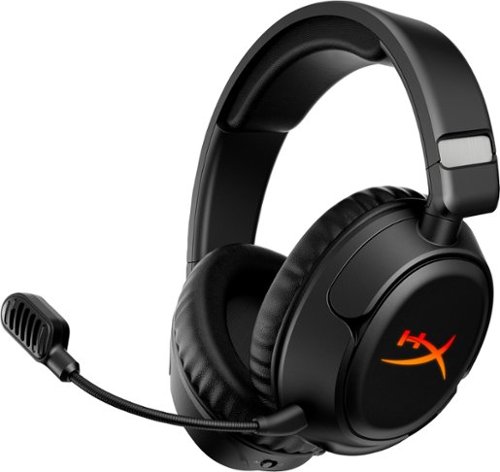
The HyperX Cloud Flight 2 lights up every match with full-panel RGB paired with magnetic ear-cup plates you can pop off and swap in seconds ~ no tools, no downtime. Change the look, save one lighting profile onboard, and match your headset to your playstyle, rank, or stream setup. Designed for endurance, turn the lighting off to conserve battery and keep going with up to 100 hours~ of 2.4GHz gameplay or 150 hours~ via Bluetooth~. Instant Pair~ support lets you connect to select OMEN laptops without a dongle, while a simple switch toggles between 2.4GHz wireless and Bluetooth modes. Stay comfortable through every round with plush memory foam ear cushions, 90~ rotating earcups, and steel sliders built to withstand daily wear. The angled 50mm drivers deliver immersive, game-optimized sound. Use the detachable 10mm boom mic for clear communications or go boomless with the built-in mic when you~re off duty. Onboard controls for audio, microphone, media, and lighting put you in control with convenience ~ no menus, no distractions. Whether you're gaming, streaming music or videos, browsing Twitch, or completing assignments, the HyperX Cloud Flight 2 keeps you comfortable and stylish with all-day comfort and customizable RGB.
Customer Rating
4
Can great hardware overcome bad software?
on January 7, 2026
Posted by: nkpstudios
I continue to be shocked and amazed by striking balance of value and aesthetics HyperX is able to provide in their headsets. The Cloud Flight 2 Wireless is possibly the new mid-tier closed-back king for the price! Hyper X is known for good headsets and this one doesn't disappoint. Excellent sound quality, comfortable fit, large sound stage, and long battery life are what this is all about. Compatible with PC, PS5, PS4, Nintendo Switch, Mac, Mobile, this is more than a basic headset so it is time HP steps it up with their software to match the quality of the hardware!
What do you Get?
Out of the box, you get the wireless headset with steel reinforcement in the band, detachable boom mic, USB wireless dongle, USB-C to USB-A adapter, USB-C charge cable, quick start guide and 2 year warranty. Fit is extremely comfortable and balanced on a memory foam headband and earcups. They are soft and provide the perfect clamping force so I can play for hours over an entire weekend. These 50mm drivers REALLY bring games to life and can double as headphone for your mobile phone to listen to music, videos, or games. Connect to both your game and also your favorite Bluetooth device and switch between them easily. Even though it has both 2.4GHz and Bluetooth, it is not simultaneous multi connection so you will need to decide on one or the other connection. The easy toggle physical sliding switch and volume wheel for unmistakable controls make this one of my favorites.
Out of the box, you get the wireless headset with steel reinforcement in the band, detachable boom mic, USB wireless dongle, USB-C to USB-A adapter, USB-C charge cable, quick start guide and 2 year warranty. Fit is extremely comfortable and balanced on a memory foam headband and earcups. They are soft and provide the perfect clamping force so I can play for hours over an entire weekend. These 50mm drivers REALLY bring games to life and can double as headphone for your mobile phone to listen to music, videos, or games. Connect to both your game and also your favorite Bluetooth device and switch between them easily. Even though it has both 2.4GHz and Bluetooth, it is not simultaneous multi connection so you will need to decide on one or the other connection. The easy toggle physical sliding switch and volume wheel for unmistakable controls make this one of my favorites.
User Experience and Sound
I really like how these headphones sit on my head, they really are comfortable. At default settings, the sound profile is quiet flat but lows and mids get muddled together. In games, footsteps are tough to hear sometimes getting lost in the sounds of the environment but the soundstage is large bass is boomy while highs are clean and sharp. To my ears, when listening to music the bass bleeds over into the mids sounding like cheaper speakers. I wish they were cleaner in the low end but it can be adjusted some in EQ. They get loud, so loud my ears vibrate and tickle lol on some notes. It should be know that if you have larger ears, you will feel pressure and the speaker touching your ear.
The major downside here is that you NEED the software to get the best out of these. NGENUITY software is horrible and REALLY holds back the overall experience. Functions and There is no way to change EQ settings on the headset so you are restricted. It didn't save my preset every time so that was disappointing. The biggest issue is the problem with software after the PC is sleeping or hibernating. Any time it goes to sleep, after you sign back in you've get lost connected and the software freezes. I needed to force close with ALT F4 then reopen the software and turn on the headphones again for things to recognize again.
I really like how these headphones sit on my head, they really are comfortable. At default settings, the sound profile is quiet flat but lows and mids get muddled together. In games, footsteps are tough to hear sometimes getting lost in the sounds of the environment but the soundstage is large bass is boomy while highs are clean and sharp. To my ears, when listening to music the bass bleeds over into the mids sounding like cheaper speakers. I wish they were cleaner in the low end but it can be adjusted some in EQ. They get loud, so loud my ears vibrate and tickle lol on some notes. It should be know that if you have larger ears, you will feel pressure and the speaker touching your ear.
The major downside here is that you NEED the software to get the best out of these. NGENUITY software is horrible and REALLY holds back the overall experience. Functions and There is no way to change EQ settings on the headset so you are restricted. It didn't save my preset every time so that was disappointing. The biggest issue is the problem with software after the PC is sleeping or hibernating. Any time it goes to sleep, after you sign back in you've get lost connected and the software freezes. I needed to force close with ALT F4 then reopen the software and turn on the headphones again for things to recognize again.
After getting things working and applying a V shaped EQ, things clean up pretty nicely and brings out cleaner tighter sound. There is not much clarity for music but they do sound pretty good for gamer headphones. Hyper X makes some quality mics and you have two to choose from: boom or in-headset. Both offer quality sound with the boom offering a fuller voice capture with onboard mic having excellent sound too. I find myself not using the boom just to avoid the mic in my face. The removable boom mic sounds excellent with depth and the built-in mic sounds above average but sounds small and tinny. Noise canceling in the mic works somewhat but overall these are excellent and you won't sound like the worst mic in the lobby. An LED signals when you’re muted or active with the boom mic, and an audible notification indicates status in both boom and boomless options.
Things to know:
Available in White or Black
Large ears will be a squeeze because they are angled drivers.
Very boomy and bassy for music. Sound needs tweaking in EQ with NGENUITY software.
NGENUITY software or basic flat sound.
90 degree rotating ear cups fold flat.
Press and hold Power + Mic Mute on L ear cup to turn off RGB.
Steel sliders for solidified headband.
Available in White or Black
Large ears will be a squeeze because they are angled drivers.
Very boomy and bassy for music. Sound needs tweaking in EQ with NGENUITY software.
NGENUITY software or basic flat sound.
90 degree rotating ear cups fold flat.
Press and hold Power + Mic Mute on L ear cup to turn off RGB.
Steel sliders for solidified headband.
Things I'd like see
=More customizable RGB effects with custom magnetic plates
=Better software and features
=Onboard EQ controls
=Add 3.5mm headphone jack
=More customizable RGB effects with custom magnetic plates
=Better software and features
=Onboard EQ controls
=Add 3.5mm headphone jack
In summary, the Cloud Flight 2 Wireless is a headset I want to love more than I actually do. The hardware is excellent and the price is right, but the software experience keeps it from being an easy recommendation for everyone. If you're techy enough to deal with NGENUITY's quirks and willing to invest time in EQ adjustments, you'll be rewarded with a very capable headset at an excellent price with 50mm drivers. But if you want something that just works out of the box without fuss, you might want to look elsewhere or wait to see if HP improves the software situation.
No, I would not recommend this to a friend.





Share this review:


0points
0of 0voted this as helpful.
nkpstudios's Review Comments
nkpstudios has not submitted comments on any reviews.
nkpstudios's Questions
nkpstudios has not submitted any questions.
Only @ Best BuyListen to music with this sweat- and dust-resistant wireless Jabra Elite headset. It connects via USB, mini-jack or Bluetooth, and a powerful microphone lets you use voice commands with your mobile device. This Jabra Elite headset reduces background noise and has a built-in motion sensor that lets you track fitness efforts.
Ohter than water resist rating, Is the fit better than the 65T.?
Only @ Best BuyListen to music with this sweat- and dust-resistant wireless Jabra Elite headset. It connects via USB, mini-jack or Bluetooth, and a powerful microphone lets you use voice commands with your mobile device. This Jabra Elite headset reduces background noise and has a built-in motion sensor that lets you track fitness efforts.
Can an owner of the original non active 65t comment on the fit and stability difference with the active version? Curious if that and the extra IP rating is worth a look, or negligible.
I have both. They fit exactly the same. The only difference between the two are the IP56 rating and the black rubberized finish on the Actives. The Actives also have motion sensors in them but you cannot feel any difference between the two. If you have $20 to spare, it is well worth buying the Actives over the Elites for peace of mind with extra water resistance and motion sensors.
8 years, 3 months ago
by
nkpstudios
Only @ Best BuyListen to music with this sweat- and dust-resistant wireless Jabra Elite headset. It connects via USB, mini-jack or Bluetooth, and a powerful microphone lets you use voice commands with your mobile device. This Jabra Elite headset reduces background noise and has a built-in motion sensor that lets you track fitness efforts.
Can I use these earbuds separately? Ex. The left earbuds for phone calls without the use of the right earbud
Only @ Best BuyListen to music with this sweat- and dust-resistant wireless Jabra Elite headset. It connects via USB, mini-jack or Bluetooth, and a powerful microphone lets you use voice commands with your mobile device. This Jabra Elite headset reduces background noise and has a built-in motion sensor that lets you track fitness efforts.
The images for this product and description are for the regular non active 65t's. Not the active. According to Jabra's website the actives only come in blue/copper and have an IP rating of 65. Specifically... what is this product?
Obviously, if you read the description this is an exclusive colorway for BestBuy. This is evident by the "Only @ Best Buy" banner under the model number. They are exactly the same as the ones posted on the Jabra website with only the color/finish being different.
8 years, 3 months ago
by
nkpstudios

Enjoy superior sound and voice quality with these Jabra Elite wireless headphones. Integrated controls let you answer calls, adjust the volume or pause music with the touch of a button, while the included carrying case doubles as a charging station. External ambient noise keeps you aware of your surroundings, while a background noise filter delivers crisp, clear voice calls. With Bluetooth connectivity, these Jabra Elite wireless headphones are easy to pair to a mobile device.
When will the other colors be available?
Titanium and Black are the ONLY options announced. If you are looking for the same look but other color, you are looking at the Elite Active 65t.
8 years, 7 months ago
by
nkpstudios
Enjoy superior sound and voice quality with these Jabra Elite wireless headphones. Integrated controls let you answer calls, adjust the volume or pause music with the touch of a button, while the included carrying case doubles as a charging station. External ambient noise keeps you aware of your surroundings, while a background noise filter delivers crisp, clear voice calls. With Bluetooth connectivity, these Jabra Elite wireless headphones are easy to pair to a mobile device.
When answering phone calls, is it stereo or mono?
If you have both buds in and turned on, it will be stereo. You can use only the right one as a mono option.
8 years, 7 months ago
by
nkpstudios
Enjoy superior sound and voice quality with these Jabra Elite wireless headphones. Integrated controls let you answer calls, adjust the volume or pause music with the touch of a button, while the included carrying case doubles as a charging station. External ambient noise keeps you aware of your surroundings, while a background noise filter delivers crisp, clear voice calls. With Bluetooth connectivity, these Jabra Elite wireless headphones are easy to pair to a mobile device.
Any idea when these will be available again?
Stay in touch with this 15.6-inch Samsung notebook computer. Its Bluetooth capability connects it to Bluetooth devices for wire-free convenience, and its built-in webcam facilitates video conferencing. This Samsung notebook computer has 12GB of DDR4 RAM and an Intel Core i7 processor for speed, and it has a 1TB hard drive to hold plenty of files.
Is the screen matte or glossy? I'd like to use it outside and in bright sun. My old HP laptop is so reflective that it is almost impossible to use outside! Hoping this one is better??
It is a glossy screen. It is highly reflective and can cause issues with outdoor use.
8 years, 9 months ago
by
nkpstudios
Everything you love about Google, for work and play. Google Pixelbook is the first laptop with the Google Assistant* built in. Its super thin, 4-in-1 design includes a long-lasting battery and 7th Gen Intel~ Core~** processor. It also comes with all the apps you already know and love including Youtube, Infinite Painter, Google Play Movies, Evernote, Slack, Lightroom, Google Photos and many more***.*Google Assistant requires Internet connection.**Intel and Intel Core are trademarks of Intel Corporation in the U.S. and/or other countries.***Availability and performance of certain apps and services may vary by region. Subscriptions(s) may be required, and additional terms, conditions and/or charges may apply. Pixelbook and Pixelbook Pen are optimized for selected apps and services only.
Why bother with the I7, when every review has the I5 running Chromium "ridiculously fast"? Ditto for RAM: Running small footprint apps instead of fully-fledged software begs the question, "What app needs 16GB?" The SSD upgrade I-get, but not for $700
You are ABSOLUTELY correct in your assessment. The only reason you would want to go to the i7 or 16GB is if you want to run Windows10 or Linux. As a Chromebook, the base model at $999 is OVERKILL for ChromeOS.
8 years, 9 months ago
by
nkpstudios
Keep your focus on the road with this Garmin Speak voice service device. Amazon Alexa is integrated and takes voice commands, so you can keep your hands on the wheel, and it connects to your vehicle's stereo system to provide spoken turn-by-turn directions. This Garmin Speak voice service device is compact, so it doesn't obstruct your view.
Does the GPS work if I’m out of my cellular network I drive in rural areas that sometimes has no network. Connectivity I have to rely solely on GPS satellites .
No, this uses your cell signal for some reason. Based on your scenario, pass on this.
8 years, 10 months ago
by
nkpstudios