
Customer reviews from epson.com
Epson - Refurbished Good - EcoTank ET-3958 Wireless All-in-One Color Supertank Inkjet Printer - White
Average customer rating

4.1
(159 Reviews)

Rating breakdown 159 reviews
5 Stars
105
4 Stars
12
3 Stars
12
2 Stars
6
1 Star
24
62%of customers recommend this product.
(
25 out of
40)
Customer Reviews for Epson - Refurbished Good - EcoTank ET-3958 Wireless All-in-One Color Supertank Inkjet Printer - White
Posted by: Steve L
from Tampa, FL
Verified Purchase:Yes
I like this printer! I especially like the ink tank system. Much better than cartridges.
I would recommend this to a friend!
Quality

5
Value

4
Written by a customer while visiting epson.com

Posted by: Thrun
Verified Purchase:Yes
It was difficult to set up with my mac. Every time I change paper is have to restart printer, computer and modem. The display screen on the computer is too small and it requires too many steps to make changes. I think the printer is designed to work with a smartphone or table. Bottom line, it's been a frustrating experience
Quality

3
Response from epson.comBy Joseph, The Epson Team, March 30, 2026
Hi Thrun, we are sorry to hear you are having issues with your Epson printer. Your ET-3950 includes free technical telephone support for the life of your product. Our Epson Support Team would be happy to help you and can be reached at (562) 276-4382; Hours: Monday – Friday, 7 a.m. to 4 p.m. (PT). Sincerely, Joseph – The Epson Team.
Written by a customer while visiting epson.com
Posted by: GWHY
Verified Purchase:Yes
Loving this printer. The double sided document feed for the scanner is a big time saver for me.
I would recommend this to a friend!
Quality
5
Value
5
Written by a customer while visiting epson.com
Customer Rating

5
No Regrets ! If you’re thinking about it , stop and do it
on March 15, 2026
Posted by: Jason R
Verified Purchase:Yes
Amazing buy, exactly what I was looking for in a printer. Truthfully their isn’t one thing it can’t do it’s truly a workhorse for whatever you need.
I would recommend this to a friend!
Quality
5
Value
5
Written by a customer while visiting epson.com
Customer Rating

1
Defective right out of the box.
on March 10, 2026
Posted by: Candi00
from Kansas
I have loved my ET-5800 and the ET-16650 that I upgraded to three years ago. I wanted a separate printer to just print packing inserts for the orders I receive as a small business owner. I don't really need anything fancy and it doesn't need to be pigment ink like my other printer...but I do need it to actually function correctly. My ET-3958 arrived today and I spent 3 hours just trying to get it to print without looking like a car ran over the piece of paper. It leaves black smudges everywhere. These are not ink smears from what I printed...these are just random black smudges like there is something dirty in the machine that is getting on the paper. I did print guide cleaning, printhead cleaning, print quality adjustment, printhead adjustment...nothing worked. And trying to print auto duplex which was the main thing I wanted in a printer...the end of the back page ghosts like the paper moved while it was printing. I've never had such a horrible experience right out of the box...with my previous Epson printers or any other brand. This printer is defective.
No, I would not recommend this to a friend.
Quality

1
Value
1
Response from epson.comBy Joseph, The Epson Team, March 16, 2026
Hi Candi00, we are sorry to hear you are having issues with your Epson printer. Your ET-3958 includes a 1-year limited warranty plus free technical support for the life of your product. Our Epson Support Team would be happy to hear from you and can be reached at (562) 276-4382; Hours: Monday – Friday, 7 a.m. to 4 p.m. (PT). Sincerely, Joseph – The Epson Team.
Written by a customer while visiting epson.com
Customer Rating

2
on December 16, 2025
Posted by: JoePrint
Loses it's IP address almost daily. Printer errors every other print job, have to reboot. That's why the in lasts so long, it's never available to print anything. Not to mention how excruciatingly slow it is.
Response from epson.comBy Joseph, The Epson Team, December 19, 2025
Hi JoePrint, we apologize about the disappointing experience you are having with your Epson printer's Wi-Fi connection. Your ET-3950 includes free technical support for the life of your product. Please call and let our Epson Support Team assist. Our support number is (562) 276-4382. Our support hours of operation are Monday – Friday, 7 a.m. to 4 p.m. (PT). We’re here to help. Sincerely, Joseph – The Epson Team.
Written by a customer while visiting epson.com
Customer Rating
1
Don't buy this printer until reading
on November 26, 2025
Posted by: MM01
I bought this printer a couple weeks ago and nothing but trouble. The printer itself works fine as long as you are willing to reboot it after any period of inactivity that exceeds 10 or 15 minutes. This is not due to the sleep function but wifi connectivity. I followed all trouble shooting advice - re-installed firmware, rebooting my wifi router, and much more. I have an older WF-4740 that works just fine in the same location - connects just fine but this printer reports weak signal and wrong password (sometimes). I suggest avoiding the trouble. Epson makes good products but somehow has missed on this one.
No, I would not recommend this to a friend.
Quality
1
Value
1
Response from epson.comBy Joseph, The Epson Team, November 26, 2025
Dear MM01, we appreciate your business and are sorry to hear you are not completely satisfied with your purchase. Your Epson ET-3950 includes free technical support for the life of your product. Please reach out to our Epson Support Team for assistance at (562) 276-4382; Hours: Monday – Friday, 7 a.m. to 4 p.m. (PT). We’re here to help. Sincerely, Joseph
Written by a customer while visiting epson.com
Customer Rating
5
WHAT AN UPGRADE!!!
on November 19, 2025
Posted by: Rudy01
from Florida
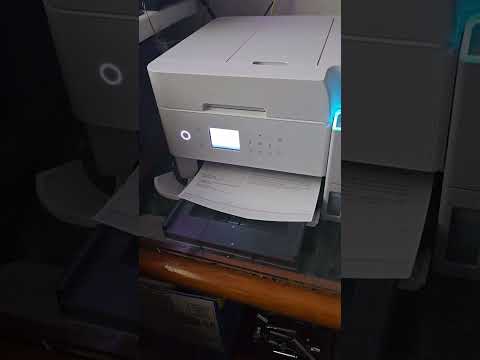
I received the ET-3950 as a replacement for my previous model ET-3850 because they were out of stock. Boy! What a huge difference! In addition of being able to print on both sides, The ET-3950 when the user clicks on the PRINT depending on the software being used, The ET-3950 tray emerges out and prints the page. The bad news, you have to press the retract button on the panel to close it, The good news, the chances of bumping into the printer tray (depending where your printer is placed) are at a very low percentage. Last but not least the ink levels are still at 98% full and I've been using the printer for five months now.
I would recommend this to a friend!
Quality
5
Value
5
(click to see the video)

Written by a customer while visiting epson.com