
Customer reviews from epson.com
Epson - Expression Photo XP-8800 Wireless Color All-in-One Inkjet Printer - Black
Average customer rating

4.7
(47 Reviews)

Rating breakdown 47 reviews
5 Stars
35
4 Stars
10
3 Stars
1
2 Stars
0
1 Star
1
97%of customers recommend this product.
(
35 out of
36)
Customer Reviews for Epson - Expression Photo XP-8800 Wireless Color All-in-One Inkjet Printer - Black
Customer Rating

5
Great addition to my home office
on December 1, 2024
Posted by: Liz 123
from Staten Island. NY
This is a review for the Epson Expression Photo XP-8800 Wireless Printer that I received free of charge to do a beta test and review. Compact, high quality unit, SUPER easy, great value, fast print and good color. I will say that I had concerns regarding color print quality and that it might be messy to refill. I'll put your mind at ease - impressive color print quality, speed and adding ink couldn't be easier! Overall I couldn't be happier with the end result. The cost, functions, ease of use and low ongoing ink cost are 100% worth it in my opinion. Happy with this printer. Very easy set up, connected without a problem and prints great!! I've had it for a few months now and have printed several things and it prints great each time. Ink also seems to last pretty long. I'm still using the sample ink cartridges that comes with it and like I said, i've printed quite a few things from it.
I can say that I would highly recommend the XP-8800 to anyone looking for a great, fast and do all printer that is efficient on ink as well. Once setup the printer is great. It is definitely fast enough for all of your printing needs that the ink still looks sharp after many uses. I've printed a variety of documents in black and white, using regular printing paper, which I prefer and have had no paper jams and the copies are excellent. Photos are perfect, scanning to a computer requires the scanning app but works very well. And, copying is effortless.
It is very, very fast to print from your PC or directly from your iPhone (it works flawlessly with iPhone AirPrint where you can print directly from apps!) The scan feature is excellent, you can have it email the scan or save it directly to a network drive. It prints extremely high quality, you can easily print pictures, flyers, etc from it.
I highly recommend this printer, this is how printing should be, hassle free, always on demand and not having to worry about it, it just works.
I highly recommend this printer, this is how printing should be, hassle free, always on demand and not having to worry about it, it just works.
I would recommend this to a friend!
Quality

5
Value
5
Written by a customer while visiting epson.com

Customer Rating
5
Great Compact Multifunction Printer
on December 1, 2024
Posted by: ChrisR678
This is a review for the Epson Expression Photo XP-8800 Wireless Printer that I received free of charge to do a beta test and review.
This is a great compact printer for home or even home office use. The printer was packaged well without excessive use of plastics or cardboard and just the right amount of packing foam to keep it well secured. After unpacking and removing all the protective tape, initial setup took about 10-15 minutes following the included quick setup guide. You can download an app for phone/tablet that will give you step by step instructions, follow along the setup instructions on the printer screen or via software on the computer. Most of initial setup was for loading the ink cartridges and the printer priming itself. It is a 6 color printer which provides excellent photo prints but may be a negative for some due to the cost of ink cartridges.
The pinter is very compact for a machine that can scan, copy and print. It's geared more towards photo printing but could be used as a home/small office printer, but due to the small size, there is no automatic document feeder and the paper tray capacity is low. There are 2 paper trays though; 1 tray is geared for your usual printing (i.e. letter sized paper, envelopes, etc) the other tray is for your specialty media i.e. photo paper. It can also print direct to printable CDs and DVDs but that's not something I will probably ever do.
Scanning and copying work great. Quality and speed will of course depend on your settings and the source material as well as the media you are using if copying - from my experience its comparable to other printers I have used. Photo prints look as good, if not better compared to having them printed professionally. Draft quality for a 4x6 takes around 10 seconds - printing at best quality takes around a minute (probably less) but yields the professional quality print.
Overall, what t I like most about this printer is the quality of the prints and the small footprint of the unit. The output tray is motorized and extends out when printing but then can be retracted when not in use. Retracting the output tray can be done manually or by pressing a button on the touch screen. It would be great if the tray would automatically retract when the printer sleeps or turns off. Maybe this isn't a feature due to concerns of the motor being stressed out but if that is not a concern, then it would be nice to add this feature in a software/firmware update.
Quality
5
Value

4
Written by a customer while visiting epson.com
Customer Rating
5
Very versatile for such a small machine!
on December 1, 2024
Posted by: sman200788
from Fenton, MI
This is a review for the Epson Expression Photo XP-8800 Wireless Printer that I received free of charge to do a beta test and review. It has been a very impressive little machine! I wasn't sure what to expect from something that was so compact, but it is very feature rich for its size.
The machine has multiple paper trays, so you can always keep some 4x6 photo paper loaded and ready so that you don't have to fiddle with taking the regular paper out, changing the guides, changing the settings on the printer, etc. This was a pretty handy feature. Additionally, there is a rear/top single sheet paper tray that follows a more direct paper path for heavier cardstock and things that cant conventionally go through the machine.
I was also pleasantly surprised that it "just worked" with my new computer, I have a Surface Laptop that has Windows 11 for ARM devices and finding print drivers for other printer/scanners has been frustrating at best, but Windows picked up this new device immediately and it worked perfectly. A very pleasant surprise.
The front covers and output tray extend automatically when you go to print, which was a bit of a surprise the first time I went to print and the front of it popped open! You can either leave it open, push it close, or press the output tray button on the screen and it will retract on its own. I personally will be leaving it open 99% of the time, as I am not really too short on space, but if you have a crowded work area you can close it back up when not printing to save valuable desk real estate.
The machine powers up quickly, and time to first print is very minimal, which is something you can't take for granted now days. Regular office type work looks great, text is crisp and clear, and the machine is very speedy. But, pair this machine with some decent inkjet photo paper to really let this thing shine! I have only used 4x6 photos so far, but the quality is fantastic! The prints are beautifully saturated, borderless, and look like they came from a pro.
I have had no jam events, and all of the inks are separate-so you aren't wasting any like on those multi-color cartridges. I am normally a "I don't read the manual" kind of person, but as it was just a single sheet I gave it a once over and decided to try setting this machine up with the Android App (there is also an iPhone app), per the recommendation instead of connecting it to a computer first. It was relatively painless, and aside from waiting for the ink system to prime after installing the cartridges, it was up in running in less than 10 minutes.
My only issue occurred during setup, when the machine was scanning for WiFi networks, ours was not detected. After a bit of fiddling around with it I discovered the issue. Our network is setup as "mixed mode" mean that the 2.4ghz and 5ghz networks share the same name. This is just fine, but the printer can only connect to 2.4ghz, and since ours was broadcasting as both 2.4 and 5, the printer just didn't show it. There was an option to type the network name and password in manually, and once I did that, it connected immediately and has been fine ever since. I was even able to print from my phone without issue on multiple occasions.
Overall, if you are someone who prints/scans for homework, regular stuff around the house, etc, but also wants to be able to do some fantastic quality borderless photo prints, this machine is a great option and worth considering!
I would recommend this to a friend!
Quality
5
Value
5
Written by a customer while visiting epson.com
Customer Rating
5
Such A Great Printer
on December 2, 2024
Posted by: harleytexas
from Texas
This is a review for the Epson Expression Photo XP-8800 Wireless Printer that I received free of charge to do a beta test and review. I received this printer to test out and see how well it worked. I have been using printers for many many years and was interested in how it stacked up compared to others that I have used in the past.
First thing that I noticed about it was just how heavy it is and the quality of the printer, not plasticy and cheap feeling like so many others out there, It was an easy setup and in no time, I was off and running...or printing I guess. Using the touch screen was so easy and a delight compared to the screens that I've used before that had some functionality, but not as much as this one.
The printing was fast and clear and clean on pictures and paper. The dual tray for the paper and photo paper was a great idea. I was printing out pictures from my phone using the app, which was so easy and they looked great.
I was impressed with this printer and will tell everyone that this is a great item to get for all your printing needs.
First thing that I noticed about it was just how heavy it is and the quality of the printer, not plasticy and cheap feeling like so many others out there, It was an easy setup and in no time, I was off and running...or printing I guess. Using the touch screen was so easy and a delight compared to the screens that I've used before that had some functionality, but not as much as this one.
The printing was fast and clear and clean on pictures and paper. The dual tray for the paper and photo paper was a great idea. I was printing out pictures from my phone using the app, which was so easy and they looked great.
I was impressed with this printer and will tell everyone that this is a great item to get for all your printing needs.
Quality
5
Value
5
Written by a customer while visiting epson.com
Customer Rating
5
Versatile and convenient paper and photo printer!
on December 2, 2024
Posted by: Chris K
from North Port, Florida
This is a review for the Epson Expression Photo XP-8800 Wireless Printer that I received free of charge to do a beta test and review.
The set-up for this printer, and most of the newer Epson printers, is a snap with the Epson Smart Panel App. The walk through of the set-up was idiot proof, trust me. The whole set up took about 20 minutes, but it was easy.
I like that the photo printer still has a built-in scanner and copier for regular use and is versatile to handle different sizes of plain paper and photo paper. The printer is convenient and easy to operate.
Through the Epson Smart Panel app, you can easily select, edit/adjust photos, and print them. The printing of the photographs is extremely quick. Mine average between 10 and 15 seconds to print, start to finish.
The set-up for this printer, and most of the newer Epson printers, is a snap with the Epson Smart Panel App. The walk through of the set-up was idiot proof, trust me. The whole set up took about 20 minutes, but it was easy.
I like that the photo printer still has a built-in scanner and copier for regular use and is versatile to handle different sizes of plain paper and photo paper. The printer is convenient and easy to operate.
Through the Epson Smart Panel app, you can easily select, edit/adjust photos, and print them. The printing of the photographs is extremely quick. Mine average between 10 and 15 seconds to print, start to finish.
I would recommend this to a friend!
Quality
5
Value
5
Written by a customer while visiting epson.com
Customer Rating
5
Delivers on all fronts
on December 2, 2024
Posted by: Dee48
from York,Sc
This is a review for the Epson Expression Photo XP-8800 Wireless Printer that I received free of charge to do a beta test and review.
The setup process was seamless, and I had no issues connecting the printer to my Wi-Fi network. The printer's compact design makes it perfect for small spaces, and the 4.3-inch touchscreen display makes it easy to navigate and select print options.
The print quality is exceptional, with vivid colors and sharp details. I've printed several photos, including some with intricate details, and the XP-8800 has handled them with ease. The printer also supports borderless printing up to 8x10 inches, which is a great feature for photographers.
In addition to its impressive print quality, the XP-8800 also offers a range of convenient features, including wireless printing from mobile devices, automatic two-sided printing, and a built-in SD card slot.
Overall, I'm extremely satisfied with the Epson Expression Photo XP-8800 wireless printer. Its exceptional print quality, compact design, and convenient features make it an excellent choice for photographers and crafty individuals alike.
I would recommend this to a friend!
Quality
5
Value
5
Written by a customer while visiting epson.com
Customer Rating
5
Amazing photo quality and super fast all-in-one.
on December 2, 2024
Posted by: Rafters
from Maryland
“This is a review for the Epson Expression Photo XP-8800 Wireless Printer that I received free of charge to do a beta test and review.”
I received this printer and was very excited to use it. I was interested to see how it worked having two separate trays inside the printer, one for photo paper and one for regular printer paper. I was also interested to see how the printer operated with the paper tray being able to close back into the printer. The six different ink colors were unique as well. I was anxiously awaiting it to arrive.
The printer was boxed securely with easy to follow instructions. I am an Epson user and already had the apps installed on my iPhone and the programs on my MacBook Pro. Setup was a breeze with the Epson Smart Panel app on my iPhone. Setup only took a few minutes and after a brief firmware update I was ready to print.
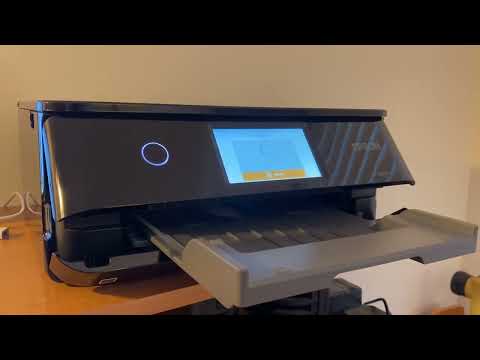
First I tried a photo to see how fast it would print and to see the overall quality. The photo printed in seconds. It was really impressive how the output tray moved out before printing. After installing the Smart Panel app on my families devices, everyone was off to printing their favorite photos. The quality was AMAZING. Super impressed. This will definitely be our go-to photo printer.
Document printing from our phones and computer was a breeze as well. It automatically selected the printer paper tray and printed super-fast. Dinner time came around and I didn't want to get pasta sauce on my new Benny Blanco cookbook, so I copied the two recipe pages, one in black and white and one in color. The color copy looked as good as the page in the book!
Overall, this is a great printer for documents and especially photos. Don't overlook the scanner and copier as well. Epson did a phenomenal job with this device. I highly recommend the XP-8800!
I would recommend this to a friend!
Quality
5
Value
5
(click to see the video)

Written by a customer while visiting epson.com
Customer Rating
5
Really sleek printer
on December 2, 2024
Posted by: Jazzyjuggz10
from Beaufort, SC
This is a review for the Epson Expression Photo XP-8800 Wireless Printer that I received free of charge to do a beta test and review.
I am super impressed with this printer! It has an automatic push out of the printed paper holder and door, that just comes out when you are printing something. The printer is really fancy looking and sleek. And actually prints full page images with no borders which is amazing! The setup on the app was very quick and intuitive as well, no struggling needed.
I am super impressed with this printer! It has an automatic push out of the printed paper holder and door, that just comes out when you are printing something. The printer is really fancy looking and sleek. And actually prints full page images with no borders which is amazing! The setup on the app was very quick and intuitive as well, no struggling needed.
I would recommend this to a friend!
Quality
5
Value
5
Written by a customer while visiting epson.com