


CriticalEye's stats
- Review count134
- Helpfulness votes480
- First reviewOctober 22, 2014
- Last reviewAugust 1, 2026
- Featured reviews0
- Average rating4.1
Reviews comments
- Review comment count0
- Helpfulness votes0
- First review commentNone
- Last review commentNone
- Featured review comments0
Questions
- Question count0
- Helpfulness votes0
- First questionNone
- Last questionNone
- Featured questions0
- Answer count22
- Helpfulness votes12
- First answerMarch 11, 2018
- Last answerOctober 21, 2021
- Featured answers0
- Best answers1
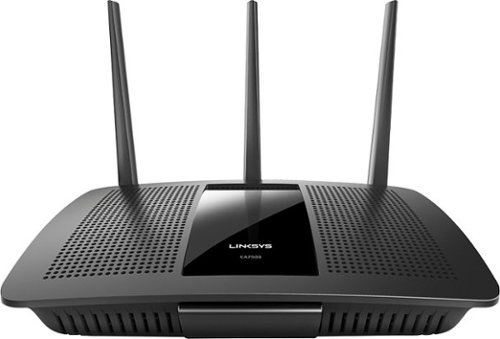
Your household wants to play, stream and work online all at once. With this Linksys router, you can do it all without buffering or other interruptions. Use the Smart Wi-Fi app to get started, control, and monitor your home network from anywhere.
Customer Rating

3
Great router if you can get past nightmare setup!
on June 21, 2016
Posted by: CriticalEye
Product Model Description:
Linksys EA7500 Next-Gen Max-Stream AC1900 MU (Multi-User)-MIMO (Multiple Input & Multiple Output) Dual-Band Wi-Fi (Wireless-Fidelity) Gigabit Router (1.9 Gbps)
Linksys EA7500 Next-Gen Max-Stream AC1900 MU (Multi-User)-MIMO (Multiple Input & Multiple Output) Dual-Band Wi-Fi (Wireless-Fidelity) Gigabit Router (1.9 Gbps)
Intro:
Based on the initial installation instructions from the quick-start sheet, I thought this would be a snap, as the guide appeared to be pretty cut & dried. As a precaution I downloaded & read the PDF manual to better prepare for setup & installation. Unfortunately, the installation did not proceed according to the instructions, AT ALL.
Based on the initial installation instructions from the quick-start sheet, I thought this would be a snap, as the guide appeared to be pretty cut & dried. As a precaution I downloaded & read the PDF manual to better prepare for setup & installation. Unfortunately, the installation did not proceed according to the instructions, AT ALL.
Setup Nightmare:
Warning!: If you have a modem/router or gateway, you'll likely need extra IT assistance. This router did not work with our DSL carrier-provided modem/router in accordance w/the Linksys instructions. And, yes, we knew to place our modem in a 'bridged' mode & to use our ISP/DSL connection settings on the router. But we were still forced to make multiple IT support calls to our DSL carrier, as we continued to suffer incessant router disconnects over several days. Other than the unit's generic flashing Linksys light, there was no diagnostic indicator as to WHY the connection was being repeatedly lost.
Warning!: If you have a modem/router or gateway, you'll likely need extra IT assistance. This router did not work with our DSL carrier-provided modem/router in accordance w/the Linksys instructions. And, yes, we knew to place our modem in a 'bridged' mode & to use our ISP/DSL connection settings on the router. But we were still forced to make multiple IT support calls to our DSL carrier, as we continued to suffer incessant router disconnects over several days. Other than the unit's generic flashing Linksys light, there was no diagnostic indicator as to WHY the connection was being repeatedly lost.
Ruling Out Other Variables:
Eventually, our DSL carrier even made an on-site service call & performed comprehensive diagnostic tests, but found no faults or errors w/our DSL line. (On background, U-verse is still not available on our particular street; we don't want a tacky satellite mounted on our roof; & we'll never again suffer w/our local cable provider, the abysmal Cox Communications.)
Eventually, our DSL carrier even made an on-site service call & performed comprehensive diagnostic tests, but found no faults or errors w/our DSL line. (On background, U-verse is still not available on our particular street; we don't want a tacky satellite mounted on our roof; & we'll never again suffer w/our local cable provider, the abysmal Cox Communications.)
Resolution:
In the end, we performed yet another manual firmware update to the router & reset it to factory defaults. Though this didn't work in multiple previous attempts using the recommended auto-update feature & power cycle--the router, inexplicably, has worked flawlessly ever since the last reset several weeks ago.
In the end, we performed yet another manual firmware update to the router & reset it to factory defaults. Though this didn't work in multiple previous attempts using the recommended auto-update feature & power cycle--the router, inexplicably, has worked flawlessly ever since the last reset several weeks ago.
2 More Cons:
-Unfortunately, the WPS (Wi-Fi Protected Setup) would not work w/our newer networked HP printer, which required manually entering the long tedious password.
-Belkin failed to include a packing slip in/on the box of their Linksys router. This is minor but basic.
-Unfortunately, the WPS (Wi-Fi Protected Setup) would not work w/our newer networked HP printer, which required manually entering the long tedious password.
-Belkin failed to include a packing slip in/on the box of their Linksys router. This is minor but basic.
Some Pros:
-Generally, the Linksys Smart Wi-Fi Interface software & website are very good & easy to navigate. The ease w/which one can add other devices & view settings, etc., is a huge improvement over our older carrier-issued modem/router user interface. There are options, however, that only an IT expert can help with; so the avg. user likely would be lost w/those.
-Range is very good on both bands (2.4GHz & 5GHz).
-Stability: We have only 7 wireless devices connected at this moment, including PCs, printers, tablets, & cell phones, & all are receiving strong, reliable signals at good speed from the router.
-Generally, the Linksys Smart Wi-Fi Interface software & website are very good & easy to navigate. The ease w/which one can add other devices & view settings, etc., is a huge improvement over our older carrier-issued modem/router user interface. There are options, however, that only an IT expert can help with; so the avg. user likely would be lost w/those.
-Range is very good on both bands (2.4GHz & 5GHz).
-Stability: We have only 7 wireless devices connected at this moment, including PCs, printers, tablets, & cell phones, & all are receiving strong, reliable signals at good speed from the router.
Future:
We're looking forward to trying out the new Linksys EA9500-AC5400 Max-Stream Tri-Band Wi-Fi Gigabit Router (MU-MIMO) which we hope will incorporate some needed improvements over the EA7500.
We're looking forward to trying out the new Linksys EA9500-AC5400 Max-Stream Tri-Band Wi-Fi Gigabit Router (MU-MIMO) which we hope will incorporate some needed improvements over the EA7500.
My Best Buy number: 2172893138
No, I would not recommend this to a friend.

Share this review:


+1point
1of 1voted this as helpful.

This Sony BDPS7200 Blu-ray player features UHD 4K upscaling. To build a complete 3D home theater system, we recommend you purchase a 3D TV, 3D glasses designed for the TV, high-speed HDMI cable and an A/V receiver that is compatible with 3D products.
Customer Rating
3
Good, but could be better
on December 2, 2014
Posted by: CriticalEye
Verified Purchase:Yes
Cheap build quality & feel, especially the flimsy disc drawer. If the player doesn't like the disc (even when Blu-ray disc is for the proper region & clean w/o scratch/blemish), then the player totally freezes, & no remote control function key can unfreeze it. Can't even turn off the player to reset it when it freezes; must 1st UNPLUG it from the power source & then reconnect. This 'freeze' has occurred w/2 different Blu-ray discs, but several other Blu-ray discs have played fine. The Fast Forward & Fast Rewind functions aren't nearly as user friendly or precise as the Click Shuttle Wheel & JOG function on our 14yr old Sony DVP-C675D DVD Player & Remote. The HDMI link between the Sony BDP-s7200 Blu-Ray Disc Player & our Sony X900B 4K TV provides a good picture.
My Best Buy number: 2172893138
My Best Buy number: 2172893138
I would recommend this to a friend!
Share this review:


+2points
7of 12voted this as helpful.
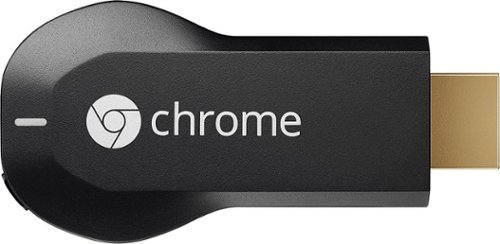
Google Chromecast: Easily stream your favorite apps and media to your TV via Wi-Fi with Chromecast. Use the included USB cable to plug the Chromecast into your TV, and control streaming content using your compatible smartphone, tablet or computer.
Customer Rating

4
Enjoy viewing your smartphone content on your TV
on October 22, 2014
Posted by: CriticalEye
Verified Purchase:Yes
Via Chromecast, we enjoy viewing photos & watching videos on our home theater TV that are cast straight from our laptop & smartphones. And more Chromecast apps are coming online every month.
Note: TechRadar reported on 10/17/14 that Google Chromecast '2' is on its way based upon Google's latest FCC filing. Reportedly, although the new Chromecast will support 5GHz Wi-Fi, the tests carried out by the FCC were all at the 2.4GHz band, keeping the Wi-Fi speed to 802.11n rather than the faster 802.11ac option. We shall see.
My Best Buy number: 2172893138
My Best Buy number: 2172893138
I would recommend this to a friend!
Share this review:


+2points
2of 2voted this as helpful.

Protect your A/V components from power surges with this Panamax MR4300 9-outlet surge protector, which features a 1575-joule rating to keep your equipment safe. The 8' cable and low-profile design allow flexible placement.
Customer Rating
4
Good basic surge protection & line management
on October 22, 2014
Posted by: CriticalEye
Verified Purchase:Yes
The Panamax MR4300 is ideal for small home theater systems. It's a line conditioner & power protector all in one. While there's really not much that can save your a/v system from a direct lightning strike, you certainly can protect your sensitive a/v electronics from damaging power spikes & from minor daily current fluctuations that harm your components' performance over time. Why would you NOT protect the considerable investment you've made in your a/v system? This power management unit can safeguard up to 9 components at once. It also provides a protected front-panel USB charger for your smartphone, tablet, or other portable device. 2 front-panel lamps illuminate your equipment rack when making adjustments. The aesthetically pleasing low-profile design of the unit makes it look like another a/v component in your rack/cabinet. $5,000,000 limited lifetime connected equipment protection policy & lifetime product warranty.
My Best Buy number: 2172893138
My Best Buy number: 2172893138
I would recommend this to a friend!
Share this review:


+5points
5of 5voted this as helpful.
CriticalEye's Review Comments
CriticalEye has not submitted comments on any reviews.
CriticalEye's Questions
CriticalEye has not submitted any questions.
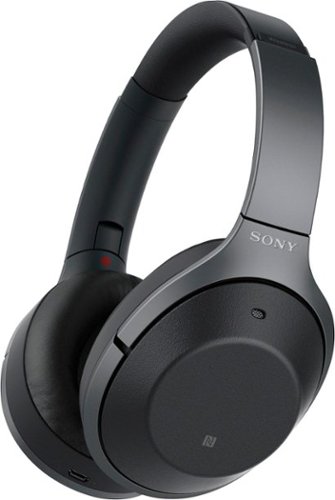
Listen to your playlist in peace with these Sony headphones. They have a 40mm dome driver to deliver the full depth of audio, and the noise cancelling feature minimizes outside disturbances for a better listening experience. These Sony headphones have a battery life of up to 30 hours for extended jam sessions.
How long does it take before your ears get sweaty in these? I looked at the store and it looks like the cushions are made of fake leather...
I've used them for an hour or so at a time, but surprisingly never feel sweaty. They're the most comfortable headphones I have, but the suction gets a bit too strong after about 15 min. You have to give them a quick lift from your ears to relieve the pressure. Understandable though & worth it for the excellent noise canceling. Hope that helps.
8 years, 7 months ago
by
CriticalEye
Listen to your playlist in peace with these Sony headphones. They have a 40mm dome driver to deliver the full depth of audio, and the noise cancelling feature minimizes outside disturbances for a better listening experience. These Sony headphones have a battery life of up to 30 hours for extended jam sessions.
How many people have these Sony 1000X MK2 and have had problems with the cracking on the band? I really want them but I'm not sure if they are gonna break easily!
I've had a pair for about 5 months. Haven't had any issues with cracking. They're just a beautiful as the day I received them. I do take pretty good care of them, but I have had others in the past break down over time. Hope that helps.
8 years, 7 months ago
by
CriticalEye