


CraigB's stats
- Review count198
- Helpfulness votes2,810
- First reviewFebruary 11, 2013
- Last reviewAugust 11, 2026
- Featured reviews0
- Average rating4.2
- Review comment count7
- Helpfulness votes6
- First review commentNovember 29, 2013
- Last review commentJanuary 31, 2017
- Featured review comments0
Questions
- Question count0
- Helpfulness votes0
- First questionNone
- Last questionNone
- Featured questions0
- Answer count43
- Helpfulness votes54
- First answerMarch 24, 2015
- Last answerNovember 6, 2021
- Featured answers0
- Best answers7
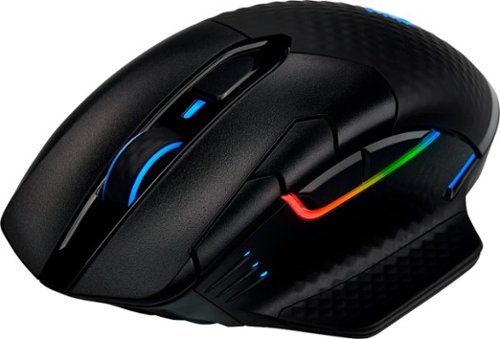
Get a handle on every battle with this DARK CORE RGB PRO SE Bluetooth gaming mouse. The contoured design and interchangeable side grips let you play in comfort, while programmable buttons and a customizable optical sensor give you complete control. This DARK CORE RGB PRO SE Bluetooth optical gaming mouse offers up to 24 hours of battery life and Qi wireless charging for intense gaming sessions.
Customer Rating

3
Nice mouse needing refinement
on January 28, 2020
Posted by: CraigB
from Texas
Pros
Smooth and precise tracking
Comfortable
Qi charging capable
Physical, fast wireless, and Bluetooth connections
Braided USB-C for charging/data cable
Includes separate sniper mode
Interchangeable side grip
On board memory for storing up to 3 profiles
Lighting profile can be used to indicate system temps
Micro switches have a solid feel
Mouse has storage for USB dongle
Smooth and precise tracking
Comfortable
Qi charging capable
Physical, fast wireless, and Bluetooth connections
Braided USB-C for charging/data cable
Includes separate sniper mode
Interchangeable side grip
On board memory for storing up to 3 profiles
Lighting profile can be used to indicate system temps
Micro switches have a solid feel
Mouse has storage for USB dongle
Cons
iCue software is not very intuitive
Saving profiles didn’t seem to save them to the mouse
Doesn’t support light linking
Hard to distinguish individual buttons
Placement of sensitivity buttons leads to accidental clicks
No OSD for mode changes
Battery level only shown as tray icon
Battery level only has low, medium, and high
iCue doesn’t prompt for automatic download
No automatic game profiles
iCue software is not very intuitive
Saving profiles didn’t seem to save them to the mouse
Doesn’t support light linking
Hard to distinguish individual buttons
Placement of sensitivity buttons leads to accidental clicks
No OSD for mode changes
Battery level only shown as tray icon
Battery level only has low, medium, and high
iCue doesn’t prompt for automatic download
No automatic game profiles
Design
The Dark Core RBG Pro SE is latest generation of Corsair’s highest end wireless gaming mice. The latest iteration includes Qi wireless gaming that is compatible with any Qi charger, but more importantly their companion gaming mousepad. The specs state 128 grams but this one came in at 140-142 grams depending on side grip. The charging/data cable now uses USB-C instead of Micro-USB. The side grip is interchangeable between sleek and offering a finger rest. Underneath the side grip is a storage bay for the high-speed wireless USB dongle. Operation is through hardwired USB-C cable, High speed Slipstream wireless, or Bluetooth. On the underside of the mouse is a mode switch where you can choose off, Bluetooth, or high-speed wireless operation with hardwired mode switching automatically when plugged in. This is nice because you can then use the same mouse for regular work without a dongle and then switch to high speed on your gaming system. The profile is a medium height arch which decent compromise to allow the most popular grips with good comfort. The finger rest is particularly helpful if you use a claw grip. The back half of the mouse has a soft, textured surface to improve comfort and grip. In front of the thumb rest are three LED lights that indicate DPI mode and two configurable buttons. On the left click mouse button there are also two more configurable buttons.
The Dark Core RBG Pro SE is latest generation of Corsair’s highest end wireless gaming mice. The latest iteration includes Qi wireless gaming that is compatible with any Qi charger, but more importantly their companion gaming mousepad. The specs state 128 grams but this one came in at 140-142 grams depending on side grip. The charging/data cable now uses USB-C instead of Micro-USB. The side grip is interchangeable between sleek and offering a finger rest. Underneath the side grip is a storage bay for the high-speed wireless USB dongle. Operation is through hardwired USB-C cable, High speed Slipstream wireless, or Bluetooth. On the underside of the mouse is a mode switch where you can choose off, Bluetooth, or high-speed wireless operation with hardwired mode switching automatically when plugged in. This is nice because you can then use the same mouse for regular work without a dongle and then switch to high speed on your gaming system. The profile is a medium height arch which decent compromise to allow the most popular grips with good comfort. The finger rest is particularly helpful if you use a claw grip. The back half of the mouse has a soft, textured surface to improve comfort and grip. In front of the thumb rest are three LED lights that indicate DPI mode and two configurable buttons. On the left click mouse button there are also two more configurable buttons.
Usage and Performance
The instructions say to plug it in hardwired first for initial configuration. But, out of the box it works if you just plug in the USB dongle. That said, unlike other brands, it doesn’t prompt to download their custom iCue software. This is good in the fact that you can get straight to using it. The bad is if you didn’t read the instructions or already know, all the advanced settings and profile setup is done through iCue. It would have been nice if, like other mice, on initial install on a new system it prompted you to install the configuration software. It’s not a deal breaker but just not as refined as one would think for what should be a high-end device. That said, without configuration the profile button switches between a couple of lighting profiles and the buttons on the side of the left mouse click button still work to change DPI mode. Operation is smooth and precise with no perceptible lag. A quick flick to the side to shoot and the mouse stops where you stop without overshooting. The slight texture also means if you tend to lift while moving you should have a good amount of grip to do so confidently. The main issue is the button profiles don’t make it easy to determine which button you are touching which leads to more accidental button presses. The DPI mode is a perfect example of this.
The instructions say to plug it in hardwired first for initial configuration. But, out of the box it works if you just plug in the USB dongle. That said, unlike other brands, it doesn’t prompt to download their custom iCue software. This is good in the fact that you can get straight to using it. The bad is if you didn’t read the instructions or already know, all the advanced settings and profile setup is done through iCue. It would have been nice if, like other mice, on initial install on a new system it prompted you to install the configuration software. It’s not a deal breaker but just not as refined as one would think for what should be a high-end device. That said, without configuration the profile button switches between a couple of lighting profiles and the buttons on the side of the left mouse click button still work to change DPI mode. Operation is smooth and precise with no perceptible lag. A quick flick to the side to shoot and the mouse stops where you stop without overshooting. The slight texture also means if you tend to lift while moving you should have a good amount of grip to do so confidently. The main issue is the button profiles don’t make it easy to determine which button you are touching which leads to more accidental button presses. The DPI mode is a perfect example of this.
To get really get to the capabilities of this mouse you need to install the iCue software. When you launch it after installing it looks slick, but unfortunately it seems looks came first. All the functions are there, but it seems they didn’t take a lot of time thinking of how to organize things and make the software simple to use. You can create macros but there is no obvious way to assign them after creation. After digging, you might find the menu has an option to go to support and you can browse their support website. There is a macro section but then part the instructions says macros aren’t supported without a keyboard which is strange if true because why would the mouse options have macro setup. Furthermore, when trying to map a macro to a mouse button it never seemed to work. In short, if macro activation is supported via the mouse setup of such functions is far from intuitive. Furthermore, there isn’t any sort of indication or default OSD that indicates mode changes or Macro activations.
Another oddity is that there is a sniper mode in the DPI settings. This seems great because you can put very low DPI to allow precise aiming while sniping. What is strange is the DPI mode switch buttons don’t toggle through sniping mode. There also isn’t a pre-configured button for it. With further digging in the help you will find that sniper mode requires to map it to a button. That just seems a bit strange to go so far as to create the option for a DPI profile built in but not have at least a default mapping. It also further gives the feeling that the hardware is good, but the software just feels unfinished.
Finally, when it comes to storing profiles, just when you think you have them stored on the mouse you might find yourself out of luck again. According to the specs, the mouse can store up to 3 profiles that don’t require iCue. It could be the confusion with the software but in use once the profiles were “saved” and the mouse was moved to a new computer it was like starting all over again. At least the positive part of this is the default profile isn’t horrible, but the process just doesn’t feel intuitive. On research, it seems others have had similar issues with older versions asking on different sites. Seasoned users have either pointed them to Youtube videos or other forums so it would seem this confusion isn’t isolated. Apparently, there is also an option to auto switch light and mouse profiles automatically when launching a game but this goes back to needing to do more research. Other gaming mice offer to automatically install the companion software and even auto search for games and even offer default game profiles and well as allow you to download and share from others. Corsair might have allowed loading shared profiles, but they don’t make it straightforward to find if they do.
Final Thoughts
The Corsair Dark Core RBG SE has a name to match its design, complicated. On the hardware front, it’s a solid mouse besides the button profile issue. It’s hard to comment on individual grip styles, weights, and button activations but the mouse feels well built. If you are a PC gamer and have tweaked every aspect of your system from voltages to clocks speeds until just shy of the point of failure or thermal overload, programming the Dark Core is just another thing to figure out. The big question is if the hardware draws you enough to warrant figuring out the configuration when more intuitive options exist.
The Corsair Dark Core RBG SE has a name to match its design, complicated. On the hardware front, it’s a solid mouse besides the button profile issue. It’s hard to comment on individual grip styles, weights, and button activations but the mouse feels well built. If you are a PC gamer and have tweaked every aspect of your system from voltages to clocks speeds until just shy of the point of failure or thermal overload, programming the Dark Core is just another thing to figure out. The big question is if the hardware draws you enough to warrant figuring out the configuration when more intuitive options exist.
Mobile Submission: False
I would recommend this to a friend!


Share this review:


+1point
5of 9voted this as helpful.
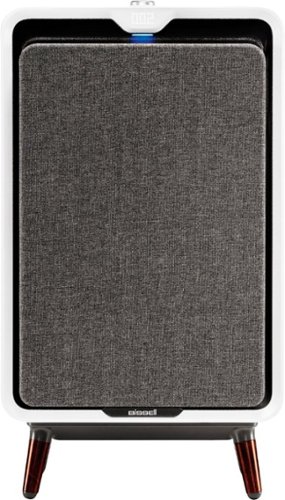
The BISSELL~ air320 Air Purifier is part of the BISSELL lineup of premium lifestyle air purifiers that join form and function in your home. The air320 is designed with clean lines, smooth edges, modern legs, a discreet cord wrap, and a fabric filter that fit into the design of almost any home. Beneath the unique design is a powerful machine you'd expect from BISSELL - a trusted brand in homecare. The washable fabric pre-filter on the front of the machine is part of this air purifier's 3 stage filtration. This filtration system also includes a pleated high efficiency filter to capture hair, dust, pollen, and dander and an activated carbon filter to capture home odors, pet odors, and volatile organic compounds. The air320 is controlled by a soft-touch dial that allows users to adjust the fan speed. The air320 can accommodate large rooms like bedrooms, living area, basements, and dining rooms. It is tested to the AHAM standard to have a Smoke CADR of 199 for rooms up to 308 sq. ft., making it great for bedrooms, living areas, basements, and dining rooms. You~ve trusted BISSELL to clean and care for the floors and surfaces in your home. Now, let us clean your air! Plus, every purchase of this product helps save pets! BISSELL~ proudly supports BISSELL Pet Foundation~ and its mission to help save homeless pets. When you buy a BISSELL product, you help save pets, too. We~re proud to design products that help make pet messes, odors and pet homelessness disappear.
Customer Rating

4
Attractive and simple to use
on December 20, 2019
Posted by: CraigB
from Texas
Pros
Looks more like a piece of furniture
Quiet most of the time
Automatic mode adjusts speed based on need
Automatic night mode turns off lights in the dark
No back intake means you can put it flush against a wall
Looks more like a piece of furniture
Quiet most of the time
Automatic mode adjusts speed based on need
Automatic night mode turns off lights in the dark
No back intake means you can put it flush against a wall
Cons
Very loud on high
Only measures PM2.5
No timer
Very loud on high
Only measures PM2.5
No timer
Design
The Bissell Air320 departs from most purifiers that tend to look very functional and don’t really blend into your décor or others that mimic the style of a fan. Instead, the Air320 looks more like a piece of furniture with design cues from furniture of the 1960-1970s. The legs are rounded with a faux wood finish to continue the furniture theme. A single dial with a button in the center controls everything with an oversized dot matrix display hidden in the plastic on the front that indicates the PM2.5 levels. Also included is a hidden color changing light the creates a glow directly under the display with the color indicating the general air quality going from green to red. The fan has 5 speeds as well as an auto mode. Included is a PM2.5 sensor which can measure fine particles but there is no mention of a PM10 sensor to measure dust, mold, and pollen. Air is pulled into the mesh fabric on the front and filtered air exits from the top. This design means you can put the unit flush against a wall without impeding operation. It also has a cord organizer built into the back to keep things tidy. The overall build feels sturdy.
The Bissell Air320 departs from most purifiers that tend to look very functional and don’t really blend into your décor or others that mimic the style of a fan. Instead, the Air320 looks more like a piece of furniture with design cues from furniture of the 1960-1970s. The legs are rounded with a faux wood finish to continue the furniture theme. A single dial with a button in the center controls everything with an oversized dot matrix display hidden in the plastic on the front that indicates the PM2.5 levels. Also included is a hidden color changing light the creates a glow directly under the display with the color indicating the general air quality going from green to red. The fan has 5 speeds as well as an auto mode. Included is a PM2.5 sensor which can measure fine particles but there is no mention of a PM10 sensor to measure dust, mold, and pollen. Air is pulled into the mesh fabric on the front and filtered air exits from the top. This design means you can put the unit flush against a wall without impeding operation. It also has a cord organizer built into the back to keep things tidy. The overall build feels sturdy.
Performance and Operation
Overall operation is very simple. There are no smartphone controls or WiFi to set up. Just press the button in the middle to turn in on and then turn the dial to set the fan speed. Nothing else is needed. On low, the unit is barely audible and can be easily drowned out by regular noises in a room. On high, you will likely hear if even over a very loud TV. Thankfully you only hear the sound of air rushing, but it is still noticeable. If you keep it on one speed you could probably just tune it out after time but on auto the change can be quite abrupt. If it is anywhere near where you are cooking and is set to auto, you will know withing a few minutes if any smoke, fumes, or anything else is floating in your room as it goes into turbo for a few minutes to clean things up. Even in a 30x22 room it only takes between 15-30 minutes to get levels under control once no more pollutants are added. At that point, the pollution levels drop low enough for the automatic mode to drop the speed down to more tolerable levels. There is a bit of a tradeoff in moving so much air in a short time but it seems quite effective in taking care of even large rooms. In most cases, the filter can keep the room clean enough that running on full speed is rare. The only downside is the effectiveness of auto mode for allergies is questionable because it sets filter speed based on measurements. If you are expecting this to automatically sense dust, mold, and pollen it would seem unlikely as it doesn’t measure that particle size. Unfortunately, other measurement tools have not shown that not enough of the pollen has been making its way into the house lately to do a proper test even though several trees are pollinating currently. That said, if your only hang-up is a PM10 for other allergens you can always run it on manual since the filter media itself is capable of handling it. The main question is how effective auto mode actually is.
The digital readout and color light to indicate air quality are straightforward and make it easy to tell the overall air quality even from across the room without adding too much information. A thoughtful touch is when the room goes dark it turns off all lighting and displays. This is helpful for bedtime, but it would also be helpful to include a timer function to allow scheduled mode changes. It’s hard to justify running a purifier when you away from the house all day. Remembering to turn it off an on again will likely lead to someone forgetting. It would also be nice to have a way to set it to force a lower maximum speed at bedtime. Most people would likely be willing to wait a little longer to get fully cleaned air at bedtime if it meant not listening to a jet engine in their room for up 15-30 minutes or longer depending on there is more being added to the room. Although its nice to make things as simple as possible, these additional features would make it more likely to be used regularly as well as make it more effective.
Overall operation is very simple. There are no smartphone controls or WiFi to set up. Just press the button in the middle to turn in on and then turn the dial to set the fan speed. Nothing else is needed. On low, the unit is barely audible and can be easily drowned out by regular noises in a room. On high, you will likely hear if even over a very loud TV. Thankfully you only hear the sound of air rushing, but it is still noticeable. If you keep it on one speed you could probably just tune it out after time but on auto the change can be quite abrupt. If it is anywhere near where you are cooking and is set to auto, you will know withing a few minutes if any smoke, fumes, or anything else is floating in your room as it goes into turbo for a few minutes to clean things up. Even in a 30x22 room it only takes between 15-30 minutes to get levels under control once no more pollutants are added. At that point, the pollution levels drop low enough for the automatic mode to drop the speed down to more tolerable levels. There is a bit of a tradeoff in moving so much air in a short time but it seems quite effective in taking care of even large rooms. In most cases, the filter can keep the room clean enough that running on full speed is rare. The only downside is the effectiveness of auto mode for allergies is questionable because it sets filter speed based on measurements. If you are expecting this to automatically sense dust, mold, and pollen it would seem unlikely as it doesn’t measure that particle size. Unfortunately, other measurement tools have not shown that not enough of the pollen has been making its way into the house lately to do a proper test even though several trees are pollinating currently. That said, if your only hang-up is a PM10 for other allergens you can always run it on manual since the filter media itself is capable of handling it. The main question is how effective auto mode actually is.
The digital readout and color light to indicate air quality are straightforward and make it easy to tell the overall air quality even from across the room without adding too much information. A thoughtful touch is when the room goes dark it turns off all lighting and displays. This is helpful for bedtime, but it would also be helpful to include a timer function to allow scheduled mode changes. It’s hard to justify running a purifier when you away from the house all day. Remembering to turn it off an on again will likely lead to someone forgetting. It would also be nice to have a way to set it to force a lower maximum speed at bedtime. Most people would likely be willing to wait a little longer to get fully cleaned air at bedtime if it meant not listening to a jet engine in their room for up 15-30 minutes or longer depending on there is more being added to the room. Although its nice to make things as simple as possible, these additional features would make it more likely to be used regularly as well as make it more effective.
Final Thoughts
The Bissell Air320 is an attractive and simply designed purifier with just enough to help without causing confusion for those less technically inclined. No need to expect calls from the grandparents asking how to use it. The main question is if it is overly simplistic for your purposes. If you mainly need a purifier that can move a lot of air and clean a larger space, the Air320 could potentially fit the bill.
The Bissell Air320 is an attractive and simply designed purifier with just enough to help without causing confusion for those less technically inclined. No need to expect calls from the grandparents asking how to use it. The main question is if it is overly simplistic for your purposes. If you mainly need a purifier that can move a lot of air and clean a larger space, the Air320 could potentially fit the bill.
Mobile Submission: False
I would recommend this to a friend!


Share this review:


+10points
10of 10voted this as helpful.

Build your muscles anywhere at any time with this lightweight Gorilla Bow travel resistance trainer. The compact, lightweight design ensures easy portability, and compatibility with a huge range of exercises helps tone muscle groups across your body. This Gorilla Bow travel trainer includes free video tutorials to get you started.
Customer Rating
4
Resistance bands like free weights
on November 20, 2019
Posted by: CraigB
from Texas
Pros
Bow is made of thick metal
Finish feels durable
Bow can be broken down into 3 parts
Doesn’t require connecting to a door
Feels more like free weights
Allows more traditional movements like free weights
Allows a lot more weight than traditional bands
Bow is made of thick metal
Finish feels durable
Bow can be broken down into 3 parts
Doesn’t require connecting to a door
Feels more like free weights
Allows more traditional movements like free weights
Allows a lot more weight than traditional bands
Cons
Can be heavy for some
Still large when broken down
Travel bag not included even though it’s a travel kit
Instructional videos are separated and mostly repetitive intro
Instructional videos often have poor audio quality
Include bands only go up to 110 pounds
Can be heavy for some
Still large when broken down
Travel bag not included even though it’s a travel kit
Instructional videos are separated and mostly repetitive intro
Instructional videos often have poor audio quality
Include bands only go up to 110 pounds
Design
The bow is made of heavy gauge aluminum and feels very sturdy. Two buttons used to lock the ends of the bow in place. When the ends are locked in the, the bow feels like it is a single piece. Unlike cheaper products, this feels like it was built to last. One thing to keep in mind is if you want to take a flight with the bow and put it in your check-in baggage. Expect to dedicate nearly 6 pounds of your luggage weight to the bow. Included are four bands with max out at 110 pounds total. If you typically exercise with more weight, your going to need to purchase additional bands. Although this model is called the travel bow, a carrying case is not included but is available for purchase. For exercises where you need wrap the bands around your body, a sleeve is included so you don’t have to worry about pinching yourself. The sleeve can also be used to protect the bands when you stand on them.
The bow is made of heavy gauge aluminum and feels very sturdy. Two buttons used to lock the ends of the bow in place. When the ends are locked in the, the bow feels like it is a single piece. Unlike cheaper products, this feels like it was built to last. One thing to keep in mind is if you want to take a flight with the bow and put it in your check-in baggage. Expect to dedicate nearly 6 pounds of your luggage weight to the bow. Included are four bands with max out at 110 pounds total. If you typically exercise with more weight, your going to need to purchase additional bands. Although this model is called the travel bow, a carrying case is not included but is available for purchase. For exercises where you need wrap the bands around your body, a sleeve is included so you don’t have to worry about pinching yourself. The sleeve can also be used to protect the bands when you stand on them.
Usage
If you have exercised with free weights before, the bow design can be a bonus as it is far more straightforward on how free weight movements translate to bands. An example is you can duplicate a bench press by putting the bands behind your back and pushing away from your body with the bow. Much simpler than a band setup that mounts to a door. It also feels much more natural and closer to free weights, including requiring you to pay attention to form and left/right balance. Although the progressive nature of the bands has a different feel, it’s still nice to have a relatively compact package mimic free weights much closer. The resistance ramp-up seems much quicker than traditional bands, possibly because they are shorter, leading to a more natural feel.
If you have exercised with free weights before, the bow design can be a bonus as it is far more straightforward on how free weight movements translate to bands. An example is you can duplicate a bench press by putting the bands behind your back and pushing away from your body with the bow. Much simpler than a band setup that mounts to a door. It also feels much more natural and closer to free weights, including requiring you to pay attention to form and left/right balance. Although the progressive nature of the bands has a different feel, it’s still nice to have a relatively compact package mimic free weights much closer. The resistance ramp-up seems much quicker than traditional bands, possibly because they are shorter, leading to a more natural feel.
From a hardware standpoint, the Gorilla Bow is well built. The website also appears well designed. If there is any criticism to levy against the Gorilla Bow, it would be the video tutorials. There are a small number of workouts for beginners on their YouTube channel, but the majority is dedicated to single exercises. This would seem helpful for more experience people just looking for a quick tutorial on form, but the issue is each video spends about three quarters of the time explaining who the person is and what they are going to demonstrate. Instead of forcing experienced people to fast forward through, the videos should either quickly get to the technique or just put all of them in one video. Where the channel really comes up short is workout routines for beginners. Another issue with the videos is often the speech is recorded with the built-in microphone on the camera making them hard to understand. This issue is made worse by the fact that the background music further drowns out what they are trying to say. Thankfully, the instructional booklet on their website has a workout routine for beginners and quick explanation for experienced people.
Final Thoughts
Overall, the Gorilla Bow is well built. YouTube video issues aside, the Travel Gorilla bow is a solid product that blends the advantages of two different types of workout equipment into a small package. Whether you are new to exercise or have been using free weights for years, the Gorilla Travel Bow can serve you well.
Overall, the Gorilla Bow is well built. YouTube video issues aside, the Travel Gorilla bow is a solid product that blends the advantages of two different types of workout equipment into a small package. Whether you are new to exercise or have been using free weights for years, the Gorilla Travel Bow can serve you well.
Mobile Submission: False
I would recommend this to a friend!


Share this review:


+7points
7of 7voted this as helpful.
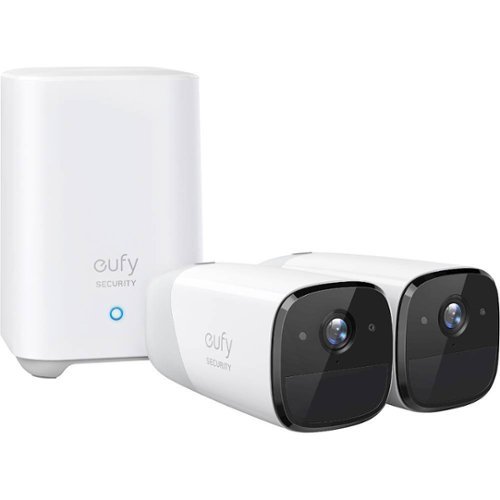
eufy eufyCam 2, 2-Camera Surveillance System: See everything that happens around your home in 1080p HD with this eufy eufyCam 2 kit. Quick and easy to set up, two wireless cameras and a home base provide all that you need to get started, while smart integration ensures you can easily connect to other smart devices. This eufy eufyCam 2 kit provides 365 days of use from a single charge for continuous observation.
Customer Rating

5
Smart cameras, without the subscription
on November 13, 2019
Posted by: CraigB
from Texas
Pros
Responsive company very open to feedback
No subscriptions required to enable smart features
Local recording means minimal internet requirements
Planned USB storage expansion option
Planned solar panel early 2020
Planned Geofencing by the end of 2019
Fast app launch time
Quick app notifications
Person and face detection directly on camera
Option to only alert for people while still recording motion
Extremely long battery life
Excellent speaker and microphone quality
Easy setup process
Base station speaks instructions very clearly
Base station is both wired and wireless
RTSP and storage to NAS options
Night vision is easily improved by a small amount of supplemental lighting
Nest home hub integration
Responsive company very open to feedback
No subscriptions required to enable smart features
Local recording means minimal internet requirements
Planned USB storage expansion option
Planned solar panel early 2020
Planned Geofencing by the end of 2019
Fast app launch time
Quick app notifications
Person and face detection directly on camera
Option to only alert for people while still recording motion
Extremely long battery life
Excellent speaker and microphone quality
Easy setup process
Base station speaks instructions very clearly
Base station is both wired and wireless
RTSP and storage to NAS options
Night vision is easily improved by a small amount of supplemental lighting
Nest home hub integration
Cons
Video compression artifacts reduce image quality
Video quality varies based on varying wireless conditions
Initial recording is pixelated
Delay in motion recording means sometimes recordings are missed
Ghosting sometimes occur with night vision
Screw mount feels weak and has no slot to angle camera higher
3-piece screw mount seems overly complicated
Sometimes detection motion detection fails to record people
Night vision isn’t very far without supplemental lighting
Audio recordings affected by small amounts of wind
Video compression artifacts reduce image quality
Video quality varies based on varying wireless conditions
Initial recording is pixelated
Delay in motion recording means sometimes recordings are missed
Ghosting sometimes occur with night vision
Screw mount feels weak and has no slot to angle camera higher
3-piece screw mount seems overly complicated
Sometimes detection motion detection fails to record people
Night vision isn’t very far without supplemental lighting
Audio recordings affected by small amounts of wind
Security cameras for home use have become increasingly popular in the past few years. The first goal was to make them more affordable than the ones used by businesses. They were complicated to install and not user-friendly. Next came wireless and battery power options to make installation simpler and more flexible. They either required strong Wi-Fi everywhere or frequently recharges. Then came smart cameras requiring a subscription to enable full functionality. At each stage in the evolution of home security cameras there seemed to be a big gotcha in the design that, even though you might have bought them, made you wish they would improve the design. The Eufycam 2 is the latest version from Anker that tries to find that perfect balance between price and features that we want.
Design and Features
The cameras are wireless, and the base station also has a Wi-Fi option to allow optimal placement. The batteries claim to have a 1-year battery life, which is noticeable when you feel their weight. In contrast, the base station is barely larger than a large coffee cup. Included is an ethernet jack and a USB port, which Anker says they plan to offer a USB expansion dongle in early 2020. Included are both magnetic bases, better suited to indoor use, and screw in bases, which are ideal for outdoor mounting. The magnetic bases feel sturdy but the screw in bases have a 3-piece design with parts feeling less substantial. Furthermore, adjustment is limited as there is no slot like generic mounts that allow placement up to 90 degrees from the mounting bracket.
The cameras are wireless, and the base station also has a Wi-Fi option to allow optimal placement. The batteries claim to have a 1-year battery life, which is noticeable when you feel their weight. In contrast, the base station is barely larger than a large coffee cup. Included is an ethernet jack and a USB port, which Anker says they plan to offer a USB expansion dongle in early 2020. Included are both magnetic bases, better suited to indoor use, and screw in bases, which are ideal for outdoor mounting. The magnetic bases feel sturdy but the screw in bases have a 3-piece design with parts feeling less substantial. Furthermore, adjustment is limited as there is no slot like generic mounts that allow placement up to 90 degrees from the mounting bracket.
As of November 12, Anker added RTSP functionality and the ability to store clips directly to a NAS. If you have a way to plug the cameras into USB power while keeping them safe from the elements, Anker says they can operate in a continuous recording mode. One would assume this would mean this is using RTSPS or a NAS as continuous recording would quickly fill up the integrated 16GB eMMC. Geofencing and an iPad version of the app are slated for release before the end of 2019. A web management portal is slated for release early January 2020 as well. Furthermore, Anker has stated they plan to develop a solar panel for Eufycam early 2020. Even if nothing else stood out about Eufycam, one thing should. Anker is serious about making Eufycam a strong contender. They are very open to feedback, are accessible and easy to contact, and are rapidly improving the product.
Performance
The range of the cameras will vary wildly based on your local conditions, but with the base station using Wi-Fi, you shouldn’t have any problems installing cameras anywhere in the average sized home. Being wireless and battery powered does come with some caveats. Fast motion can sometimes be missed as the object has left the frame by the time the camera has turned fully on from its lower power mode. This is a tradeoff with battery powered cameras and Anker has worked to try to alleviate that some by start recording as soon as possible, which results in the start of recordings being more block with lighting being less accurate and audio a bit strange. Shortly after leaving low power mode the cameras will settle down and things will clear up. This is not unique to Eufycam.
The range of the cameras will vary wildly based on your local conditions, but with the base station using Wi-Fi, you shouldn’t have any problems installing cameras anywhere in the average sized home. Being wireless and battery powered does come with some caveats. Fast motion can sometimes be missed as the object has left the frame by the time the camera has turned fully on from its lower power mode. This is a tradeoff with battery powered cameras and Anker has worked to try to alleviate that some by start recording as soon as possible, which results in the start of recordings being more block with lighting being less accurate and audio a bit strange. Shortly after leaving low power mode the cameras will settle down and things will clear up. This is not unique to Eufycam.
As part of the tradeoff for wireless convenience, sometimes videos can show some compression artifacts or slight signal issues. Regardless, the system adjusts things to make sure they work reliably even if not always at max quality. The result is a clear picture with good color balance and clarity during the day and respectable night vision for battery powered cameras that can be easily improved with a little bit of lighting. Some occasional ghosting, where people partially disappeared or appeared in parts, occurred when someone quickly moved in sight of the camera and there wasn’t enough light. People are recognizable up to about 60 feet in daylight and around 10-15 feet at night. You can still see them beyond 10-15 feet, but you might not be able to recognize them depending on overall lighting.
The human and face detection really comes in handy for reducing false alerts. You can configure multiple motion detection boxes in the app but without the AI you would still be notified of simple things like swaying branches. By keeping processing local, not only to you improve privacy, but recognition is very fast and doesn’t even need a fast connection. By keeping processing and recording local, you also avoid the problem of cloud cameras that require a fast internet connection. Unlike cloud based smart cameras, detection and classification is near instantaneous. This can come in handy as you won’t have wait for the video to upload and get processed before you get notified a person is in your back yard. The AI will also take a snapshot of the first face it sees but Anker states they are working to optimize this as well. One could hope this means it will eventually take snapshots of everyone recognized.
What is even more surprising is how good the audio quality is for conversations. While breezes can affect the quality of audio recordings easily, conversations are very clear and crisp. Once you get the hang of how to use the app, it is quite easy to hold a conversation with someone standing in front of the camera and for them to clearly understand you. Other wireless cameras have struggled with this. The camera speaker is not only loud enough to conversation but also work as an alarm. You can set the cameras to sound an alarm based on motion or if a camera is moved, such as when someone is tampering with it.
A bonus feature is Alexa and Google Assistance integration. Although support for other smart platforms would be nice, it is still nice to be able to ask Google to show a camera on your Nest Hub or Chromecast device just using your voice. Launch times are noticeably slower than when viewing video via the app. Hopefully this is just a matter of Anker optimizing their software in future releases.
Final Thoughts
Anker might be a relative newcomer to the security camera space but the commitment to constant improvement shows they are serious about getting your business. There are still some slight rough edges in operation and future promises but judging based on their 2 firmware updates and the app updates that have been installed in the 5 days of ownership it seems like Anker will be one of those companies to follow through. If you are looking for the convenience of fully wireless security cameras, don’t like paying subscriptions to keep features working, and don’t like charging cameras frequently, then you should give the Eufycam 2 a serious look. Anker has done a commendable job of minimizing the limitations of the technology to offer a convenient solution.
Anker might be a relative newcomer to the security camera space but the commitment to constant improvement shows they are serious about getting your business. There are still some slight rough edges in operation and future promises but judging based on their 2 firmware updates and the app updates that have been installed in the 5 days of ownership it seems like Anker will be one of those companies to follow through. If you are looking for the convenience of fully wireless security cameras, don’t like paying subscriptions to keep features working, and don’t like charging cameras frequently, then you should give the Eufycam 2 a serious look. Anker has done a commendable job of minimizing the limitations of the technology to offer a convenient solution.
Mobile Submission: False
I would recommend this to a friend!


Share this review:


+10points
13of 16voted this as helpful.
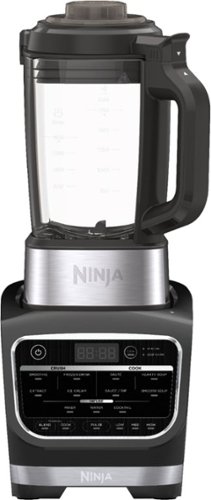
Meet the Ninja Foodi Cold & Hot Blender. Combines high-speed crushing with a precision-heat cooking blender to go beyond smoothies and frozen drinks to cook soups and sauces and create concentrates for flavored waters and cocktails.
Customer Rating
5
Versatile Blender that Cooks
on October 25, 2019
Posted by: CraigB
from Texas
Pros
Can blend ice very smooth
Makes ice cream without fuss
Can make smooth and hearty soups
Has a keep warm function after cooking
Has built in heating element
Cleans up quick and easily
Easy to use after you get the hang of it
Beeps to warn you before blending
Automatically mixes soups while cooking
Can blend ice very smooth
Makes ice cream without fuss
Can make smooth and hearty soups
Has a keep warm function after cooking
Has built in heating element
Cleans up quick and easily
Easy to use after you get the hang of it
Beeps to warn you before blending
Automatically mixes soups while cooking
Cons
Heavy
Manually cooking options don’t include periodic mixing
Cleaning doesn’t get all areas clean
Base of picture cannot get wet
Heavy
Manually cooking options don’t include periodic mixing
Cleaning doesn’t get all areas clean
Base of picture cannot get wet
Design
The Ninja Foodi Cold & Hot Blender has the distinct styling that is instantly recognizable if you have used other Ninja Kitchen products. The controls are use the same membrane style buttons to make cleanup easy and include a status display to let you know what mode, or time, you have the blender set. You would be forgiven for thinking this is a run of the mill blender as it looks pretty much like any blender until you realize the base of the glass pitcher is much thicker than normal. The reason for this is inside the base of the pitcher is a heating element. In the past, blenders that cooked with use the friction of the blade to heat up the ingredients quickly but always leave you with a smooth soup. The Foodi instead slows the process down a bit to allow the option of cooking hearty soups. The pitcher is not dishwasher safe and even shouldn’t get the base wet due to the heating elements. This is possibly why included in the feature set is a clean function.
The Ninja Foodi Cold & Hot Blender has the distinct styling that is instantly recognizable if you have used other Ninja Kitchen products. The controls are use the same membrane style buttons to make cleanup easy and include a status display to let you know what mode, or time, you have the blender set. You would be forgiven for thinking this is a run of the mill blender as it looks pretty much like any blender until you realize the base of the glass pitcher is much thicker than normal. The reason for this is inside the base of the pitcher is a heating element. In the past, blenders that cooked with use the friction of the blade to heat up the ingredients quickly but always leave you with a smooth soup. The Foodi instead slows the process down a bit to allow the option of cooking hearty soups. The pitcher is not dishwasher safe and even shouldn’t get the base wet due to the heating elements. This is possibly why included in the feature set is a clean function.
Usage and Performance
Initially it can seem a bit confusing how you use it. It helps you use a couple of the recipes in the included book first to get a better hang of it. Once you understand how the process works, operation is simple and straightforward. If you are making a soup that has aromatic ingredients, like diced onions, you can put them in first and use a 5-minute sauté option. This heats up the ingredients and blends them slightly. Once you are ready to start the actual soup, you just dump in your ingredients and press either hearty or smooth. The main difference is smooth blends the soup while mixing and the hearty option mostly only stirs the soup. Hearty also skips the final blend at the end of cooking. In both cases, it will beep a few times just before the stirring occurs to warn you. This is particularly helpful when you have your face down near the picture to check on the results as sometimes it can push out steam when the mixing occurs. In most cases, the soup takes a maximum of 35 minutes. You can continue to let it cook if the soup isn’t done but that is rarely the case. Even with raw meats, like cubed chicken, they are fully cooked in the 35 minutes. Once you understand how to adapt your recipes it becomes very convenient. You don’t have to watch over this and watch for burning or even worry about stirring. There is also a manual cook option where you can set your own temperature to low, medium, or high but this option is completely manual. Ideally it would have been nice if you the manual options could be set so that once you enter them, you don’t have to check back and it would stir for you, end the cook at the set time, and switch to warm automatically. Unfortunately, in manual mode it is fully manual in every way. This means even stirring requires you to manual pulse the blades for a brief time. It’s still convenient but seems like a bit of a missed opportunity.
Initially it can seem a bit confusing how you use it. It helps you use a couple of the recipes in the included book first to get a better hang of it. Once you understand how the process works, operation is simple and straightforward. If you are making a soup that has aromatic ingredients, like diced onions, you can put them in first and use a 5-minute sauté option. This heats up the ingredients and blends them slightly. Once you are ready to start the actual soup, you just dump in your ingredients and press either hearty or smooth. The main difference is smooth blends the soup while mixing and the hearty option mostly only stirs the soup. Hearty also skips the final blend at the end of cooking. In both cases, it will beep a few times just before the stirring occurs to warn you. This is particularly helpful when you have your face down near the picture to check on the results as sometimes it can push out steam when the mixing occurs. In most cases, the soup takes a maximum of 35 minutes. You can continue to let it cook if the soup isn’t done but that is rarely the case. Even with raw meats, like cubed chicken, they are fully cooked in the 35 minutes. Once you understand how to adapt your recipes it becomes very convenient. You don’t have to watch over this and watch for burning or even worry about stirring. There is also a manual cook option where you can set your own temperature to low, medium, or high but this option is completely manual. Ideally it would have been nice if you the manual options could be set so that once you enter them, you don’t have to check back and it would stir for you, end the cook at the set time, and switch to warm automatically. Unfortunately, in manual mode it is fully manual in every way. This means even stirring requires you to manual pulse the blades for a brief time. It’s still convenient but seems like a bit of a missed opportunity.
Besides making smoothies and crushed ice, which is does quite well, you can also make ice cream. The bonus is just how quickly it makes homemade ice cream. Of course, the kids will still find it hard to wait but you would be hard pressed to make it from scratch any faster and kids really seem to enjoy watching the process happen. There is an extra step of letting some ingredients cool in your freezing first as well as a post blend freeze but the whole process is still quick. There is no need for salt ice or stir for hours. If there was anything to consider a downsize in the process, it would be the small batch sizes. Even this isn’t much of a downside as you can quickly follow up with another batch or even use the opportunity to make more than one flavor. The one elusive part of making ice cream so far is obtaining the buttery smooth. Using the included recipes, the ice cream is smoother than regular homemade ice cream but still not quite the buttery smooth of some brands you can buy at the grocery store. Hopefully this is just a matter of finding the right recipe but regardless, making ice cream from scratch this quick and easy makes it worth it.
Cleanup is easier than you first might think. The pitcher cannot get wet the clean function is like having a build in dishwasher. The key is to run the cleaning cycle right after you are done and before food hardens. You put water up the to the specified line and add a few drops of soup. It will start with an initial mix to get the soup bubbled up and then it heats up the water just like a dishwasher. You can walk away and six minutes later the process is done. The process isn’t flawless and sometimes doesn’t clean the lid and hardened foods will require using the included cleaning brush but overall, it’s much easier than other options.
This convenience and versatility do come at a cost. By including a built-in heating element into the pitcher, it had to be made of glass. The glass picture by itself is already heavy but including the heating element makes it even heavier. For some, this can present a problem because when you are dealing with a hot soup the only acceptable place to grab is on the handle. Your instinct is to support it picture with two hands to pour but that is asking to get burned. The manual even warns against holder anywhere except on the handle. If you have weak arms or wrists, it might be best to test weight in the store to see if you can use it one handed. Hopefully Ninja will come up with a solution to this in future versions.
Final Thoughts
The Ninja Foodi Cold & Hot Blender is one of those kitchen items that might make you wonder if is even worth it in the beginning. It wouldn’t be a surprise was to wonder why a blender is making soups and cheese dips. If you are the type who loves soups, cheese dips, or homemade ice cream you will find this blender is surprisingly useful and convenient.
The Ninja Foodi Cold & Hot Blender is one of those kitchen items that might make you wonder if is even worth it in the beginning. It wouldn’t be a surprise was to wonder why a blender is making soups and cheese dips. If you are the type who loves soups, cheese dips, or homemade ice cream you will find this blender is surprisingly useful and convenient.
Mobile Submission: False
I would recommend this to a friend!


Share this review:


+25points
28of 31voted this as helpful.
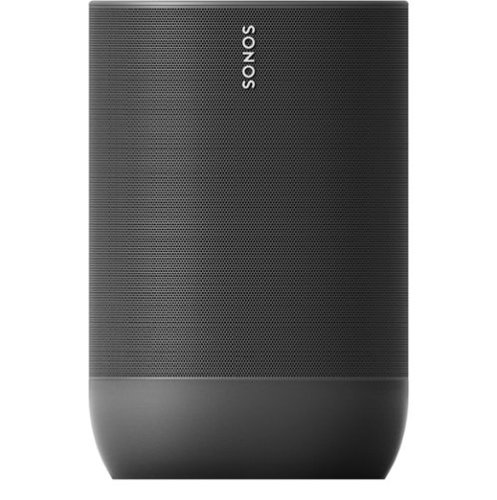
Play your favorite tunes anywhere with this weatherproof and drop-resistant Sonos Move portable speaker. The Trueplay automatic tuning adapts and balances the sound based on where you are and what you're listening to. This Sonos Move portable speaker incorporates built-in support for Wi-Fi, Bluetooth, Airplay and the Sonos app to let you stream audio from a smart device.
Customer Rating
5
Big sound in a small package
on October 11, 2019
Posted by: CraigB
from Texas
Pros
Surprising sound range and bass from a small speaker
Sleek and secure carrying handle
Supports Bluetooth and Wi-Fi streaming
Charging rings makes charging easy
Backup USB-C for charging without ring
Water, dust, and drop resistant
Supports Google Assistant and Alexa
Includes automatic Trueplay tuning
Battery is replaceable when it wears out
Sturdy feel
Surprising sound range and bass from a small speaker
Sleek and secure carrying handle
Supports Bluetooth and Wi-Fi streaming
Charging rings makes charging easy
Backup USB-C for charging without ring
Water, dust, and drop resistant
Supports Google Assistant and Alexa
Includes automatic Trueplay tuning
Battery is replaceable when it wears out
Sturdy feel
Cons
Volume up and down button graphics the same
Volume buttons don’t light up
Midrange slightly weak
Tons of options get complicated with limited instructions
Battery indicator only shows up when the battery is low
Volume up and down button graphics the same
Volume buttons don’t light up
Midrange slightly weak
Tons of options get complicated with limited instructions
Battery indicator only shows up when the battery is low
For fans of Sonos that have been wanting a portable speaker, Sonos finally answered with the Move. The Move is a portable speaker offering a ton of features and is targeting higher end customers.
Design and Features
The design is understated. If you have seen other Sonos speakers and how the style is very simple, then you get the idea. The matte black color is a little different than the rest of the lineup. Early reports say they chose the particular shade of black to help keep the speaker cooler in the sun but it’s still black so only time will tell if this is true. It’s IP56 water and dust resistant for use outdoors. It has a downward firing tweeter, mid-range woofer, and far field microphones. It’s just a little under 10 inches tall and has capacitive microphone mute, play/pause, volume up, and volume down button on top. Inside the carrying handle, which is handy considering its weight, are a power button, Bluetooth/Wi-Fi button, and Join Button. Inside the front of the speaker grill is a power and battery indicator, which only seems to light up when the battery is low. You charge it via a charging cradle, but Sonos mercifully realized we don’t want to carry that on the go and included a USB-C charging port on the back as well. No need to bring another charger in your car. A nice touch is that the battery is replaceable. The specifications say it lasts for 900 charges or about 3 years. After that point, you can purchase a replacement and install it yourself. If you would like to have portable stereo sound, the Move can be paired with one more Move. It will not pair with any other Sonos speaker. It supports too many streaming services and protocols to list. More than likely it will support your favorites.
The design is understated. If you have seen other Sonos speakers and how the style is very simple, then you get the idea. The matte black color is a little different than the rest of the lineup. Early reports say they chose the particular shade of black to help keep the speaker cooler in the sun but it’s still black so only time will tell if this is true. It’s IP56 water and dust resistant for use outdoors. It has a downward firing tweeter, mid-range woofer, and far field microphones. It’s just a little under 10 inches tall and has capacitive microphone mute, play/pause, volume up, and volume down button on top. Inside the carrying handle, which is handy considering its weight, are a power button, Bluetooth/Wi-Fi button, and Join Button. Inside the front of the speaker grill is a power and battery indicator, which only seems to light up when the battery is low. You charge it via a charging cradle, but Sonos mercifully realized we don’t want to carry that on the go and included a USB-C charging port on the back as well. No need to bring another charger in your car. A nice touch is that the battery is replaceable. The specifications say it lasts for 900 charges or about 3 years. After that point, you can purchase a replacement and install it yourself. If you would like to have portable stereo sound, the Move can be paired with one more Move. It will not pair with any other Sonos speaker. It supports too many streaming services and protocols to list. More than likely it will support your favorites.
Performance and Usage
Sound quality can be very subjective, but it’s hard to argue with the fact that the Sonos Move sounds like a much larger speaker than it is. Depending on the room it is placed in, the amount of bass it can generate can be surprising. Even when compared to larger portable speakers, the sound output was not only louder, but more refined. The automatic Truetone is supposed to adjust the sound based on the area. Although it was difficult to recognize any difference with it on or off, the speaker was able maintain good quality sound even outdoors. Of course, there are limits to what you can do in such a small package. You aren’t going to be getting any hard-hitting bass and mid tones seem slightly muted but mid-bass and highs were good. Overall, the sound quality is quite pleasant for such a small package. People are often surprised when you show them that this little speaker is what they are listening to.
Sound quality can be very subjective, but it’s hard to argue with the fact that the Sonos Move sounds like a much larger speaker than it is. Depending on the room it is placed in, the amount of bass it can generate can be surprising. Even when compared to larger portable speakers, the sound output was not only louder, but more refined. The automatic Truetone is supposed to adjust the sound based on the area. Although it was difficult to recognize any difference with it on or off, the speaker was able maintain good quality sound even outdoors. Of course, there are limits to what you can do in such a small package. You aren’t going to be getting any hard-hitting bass and mid tones seem slightly muted but mid-bass and highs were good. Overall, the sound quality is quite pleasant for such a small package. People are often surprised when you show them that this little speaker is what they are listening to.
Although it was hard to tell how well the microphones worked for automatic Truetone, its safe to say they worked very well for the integrated assistant role. Google Assistant had no problems hearing commands clearly and responding correctly.
Overall, the Sonos Move is well thought out and feels like a quality product. Like every product, it still has room for improvement. The app feels overly simple to start where it doesn’t initially even help you set up your preferred assistant. Once you dig deeper, you will find many options broken down into confusing sections with options buried several layers deep within. There is the option to download the manual from the website, but it seems like some careful planning and renaming of options could do a lot to improve navigation. In other areas, it’s just assumed you know features and they don’t tell you about them while labeling buttons with non-standard graphics. For example, volume up and down or both a set of four squares. This means the two buttons look identical and unlike the mic and play/pause button, the volume buttons don’t light up. Something else you likely won’t realize unless you dig through the manual is swiping left or right between the volume buttons will skip forward or back a track. Once you know it, it’s not a big deal but a small adjustment to the graphics or even a single page graphic in the app could fix this.
Final Thoughts
Sonos has never been known to be a budget brand or the ultimate of high-end audio but rather somewhere in the middle. Of course, if you are a Sonos fan and want a portable speaker, the Move will provide the same type of experience you love. If you are in the market for a portable speaker and you value compact size with good sound and build quality, thoughtful features, and don’t mind spending a little extra for it then the Move is also worth checking out.
Sonos has never been known to be a budget brand or the ultimate of high-end audio but rather somewhere in the middle. Of course, if you are a Sonos fan and want a portable speaker, the Move will provide the same type of experience you love. If you are in the market for a portable speaker and you value compact size with good sound and build quality, thoughtful features, and don’t mind spending a little extra for it then the Move is also worth checking out.
Mobile Submission: False
I would recommend this to a friend!


Share this review:


+4points
6of 8voted this as helpful.
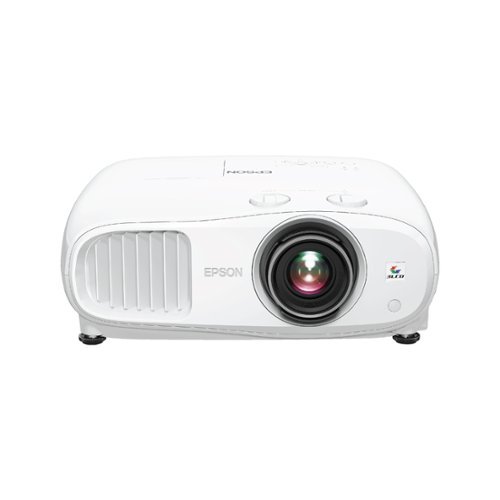
Enjoy an immersive entertainment experience with this Epson Home Cinema 4K projector. The three-chip design with 3LCD technology delivers high-quality visuals, while the built-in dual 10W speakers produce crisp sound. This Epson Home Cinema 4K projector has HDMI and USB ports for connecting a wide variety of devices, and Bluetooth connectivity lets you play media files from your mobile device.
Customer Rating
5
4K quality projector with all the essentials
on October 9, 2019
Posted by: CraigB
from Texas
Pros
Quiet
Large speakers for a projector
Bright enough to combat ambient light
Crisp image
HDR is subtle but helpful
3D Capable
Good contrast range for a projector
Includes extra powered USB port for streaming devices
Can be paired with Bluetooth speakers
Minimal dynamic iris pumping
Verified no rainbow effect
Quiet
Large speakers for a projector
Bright enough to combat ambient light
Crisp image
HDR is subtle but helpful
3D Capable
Good contrast range for a projector
Includes extra powered USB port for streaming devices
Can be paired with Bluetooth speakers
Minimal dynamic iris pumping
Verified no rainbow effect
Cons
Style is hard to hide with décor
Slow HDCP negotiation
High power usage
WiFi not included
HDMI Link (CEC) doesn’t seem to work
Style is hard to hide with décor
Slow HDCP negotiation
High power usage
WiFi not included
HDMI Link (CEC) doesn’t seem to work
Its been a few years in the making but high quality 4K projectors are finally affordable for the average person. The Home Cinema 3800 is a mid-range 4K projector from Epson’s 2019 lineup that promises the features we want for a price we can afford.
Design and Features
The Home Cinemas 3800 is a rather large, bulky design to accommodate the large bulb and cooling fan. It isn’t styled to blend in with your décor like some projectors today so if this is important to you, a vented enclosure might be needed. The design helps to keep costs down and keep fan noise to a minimum. A dust filter is included on the cooling intake which is a nice touch to keep dust from reducing the quality of the picture. To further keep costs under control, it isn’t truly a native 4K projector but rather simulated 4K with a technique called pixel shifting. It is a marketing spin to call it 4K, but the result is hard to distinguish from the real thing. Dynamic Iris is included, which is a way to increase the contrast ratio in certain scenes which is the reason for the inflated 100,000:1 contrast ratio. ANSI contrast, which is a more accurate representation of performance, is not listed. That said, the true contrast ratio seems very respectable for the class. There are manual controls for horizontal and vertical lens shift to help minimize the need to distort your image with keystone adjustments. In the back you get two HMDI 2.0 ports with HDCP 2.2, a VGA port, and a USB power port to power your streaming stick or other USB powered device. Built in are some surprisingly large and loud speakers if you want to use it in a portable scenario. It can be also paired with Bluetooth speakers to enhance sound further although it would not be in surround sound. If you are looking for a more premium home theater experience, it would be best to have the HDMI pass through a home stereo first to provide true surround sound to go with the big screen. Included is a feature called HMDI Link, which the manual states at HDMI-CEC but during usage it would never communicate with other CEC compatible devices. Casting video via smartphone apps is built in but requires the purchase of the Wi-Fi dongle, not included. 3D capability is included but the purchase of a dongle and 3D glasses is required.
The Home Cinemas 3800 is a rather large, bulky design to accommodate the large bulb and cooling fan. It isn’t styled to blend in with your décor like some projectors today so if this is important to you, a vented enclosure might be needed. The design helps to keep costs down and keep fan noise to a minimum. A dust filter is included on the cooling intake which is a nice touch to keep dust from reducing the quality of the picture. To further keep costs under control, it isn’t truly a native 4K projector but rather simulated 4K with a technique called pixel shifting. It is a marketing spin to call it 4K, but the result is hard to distinguish from the real thing. Dynamic Iris is included, which is a way to increase the contrast ratio in certain scenes which is the reason for the inflated 100,000:1 contrast ratio. ANSI contrast, which is a more accurate representation of performance, is not listed. That said, the true contrast ratio seems very respectable for the class. There are manual controls for horizontal and vertical lens shift to help minimize the need to distort your image with keystone adjustments. In the back you get two HMDI 2.0 ports with HDCP 2.2, a VGA port, and a USB power port to power your streaming stick or other USB powered device. Built in are some surprisingly large and loud speakers if you want to use it in a portable scenario. It can be also paired with Bluetooth speakers to enhance sound further although it would not be in surround sound. If you are looking for a more premium home theater experience, it would be best to have the HDMI pass through a home stereo first to provide true surround sound to go with the big screen. Included is a feature called HMDI Link, which the manual states at HDMI-CEC but during usage it would never communicate with other CEC compatible devices. Casting video via smartphone apps is built in but requires the purchase of the Wi-Fi dongle, not included. 3D capability is included but the purchase of a dongle and 3D glasses is required.
Performance
From the moment you turn it on, you will notice that start is fairly quick. Unlike older projectors, the Home Cinema 3800 reaches what appears to be full brightness within about 15 seconds of being powered on. Although the brightness is listed as 3000 lumens, you must consider that this brightness rating is for a larger screen than compact projectors. Even on standard cinema mode you can comfortably see the image just projecting on a white wall with ambient light. Of course, this is not ideal because your black levels suffer greatly, but the fact that it can overcome this at all is surprising. On max brightness the difference is even more noticeable. Add in a fabric screen and the simulated 4K starts to show its strength. It’s good from the perspective that you get a sharper image on a larger screen, but it also had the side effect of showing you that it’s time to upgrade your screen. The sharper image will help you notice if you have a cheap screen as it makes stretch marks and blemishes stand out. If you were thinking to go cheap and skip the screen, don’t. You won’t be able to realize the clarity without a smooth, even surface a projector screen affords. If possible, a dedicated media room or at least darker walls will help increase quality even further. With ambient light and a good screen, a 145 inch screen is very possible. This projector has the brightness to overpower ambient light, but if you have light walls, get ready for that brightness to cause a slight washout effect on the edges as the bright projected image causes more ambient light.
From the moment you turn it on, you will notice that start is fairly quick. Unlike older projectors, the Home Cinema 3800 reaches what appears to be full brightness within about 15 seconds of being powered on. Although the brightness is listed as 3000 lumens, you must consider that this brightness rating is for a larger screen than compact projectors. Even on standard cinema mode you can comfortably see the image just projecting on a white wall with ambient light. Of course, this is not ideal because your black levels suffer greatly, but the fact that it can overcome this at all is surprising. On max brightness the difference is even more noticeable. Add in a fabric screen and the simulated 4K starts to show its strength. It’s good from the perspective that you get a sharper image on a larger screen, but it also had the side effect of showing you that it’s time to upgrade your screen. The sharper image will help you notice if you have a cheap screen as it makes stretch marks and blemishes stand out. If you were thinking to go cheap and skip the screen, don’t. You won’t be able to realize the clarity without a smooth, even surface a projector screen affords. If possible, a dedicated media room or at least darker walls will help increase quality even further. With ambient light and a good screen, a 145 inch screen is very possible. This projector has the brightness to overpower ambient light, but if you have light walls, get ready for that brightness to cause a slight washout effect on the edges as the bright projected image causes more ambient light.
Although startup is quick, one thing you will notice is that when starting new content there is a lag before the image is shown. It doesn’t seem to matter the length of cable and seems to have more to do with slow HDCP negotiation. Often when you start a video the sound starts 2-5 seconds before the video starts. After the video is displayed, there is no perceivable lag which points more to the initial negotiation process being the hang-up. When Dynamic iris is used, scenes like Star Wars IV text crawl show up as inky black but as soon as the ships come in you will notice blacks shift to dark gray. Thankfully iris pumping is minimal, but if this bothers you then you can turn dynamic iris off for a consistent look. HDR is also included, which comes in handy in newer movies which use it. Projectors already struggle with contrast compared to traditional TVs. With HDR10 compatibility, scenes with a combination of light and dark are noticeably clearer than old movies. This means flesh tones look natural even with bright backgrounds instead of washed out. In darker scenes faces have improved brightness and contrast. With what Epson called 3LCD technology they claim to have no rainbow effect which is common with projectors. This can be verified with a camera set to a suitably high shutter speed. From 1/800 to 1/1500 of a second you can verify Epson’s claim as you don’t see any individual colors but only the vertical scan line as the whole image refreshes with each color. No need to worry about friends with more discerning vision complaining of nausea with this unit. As a bonus, using the projector for fast action scenes or even gaming exhibited no significant motion blur or ghosting. Of this won’t compete with an ultra-high refresh rate monitor but most gamers would find the big screen gaming suitably responsive.
Final Thoughts
Some options might require optional upgrades and it doesn’t have fancy new features like lasers but what it does do good is focus on the essentials of image quality. If you are in the market for 4K quality projector and want one in the sweet spot between price, performance, and essential features the Epson Home Cinema 3800 is a worthy contender.
Some options might require optional upgrades and it doesn’t have fancy new features like lasers but what it does do good is focus on the essentials of image quality. If you are in the market for 4K quality projector and want one in the sweet spot between price, performance, and essential features the Epson Home Cinema 3800 is a worthy contender.
Mobile Submission: False
I would recommend this to a friend!


Share this review:


+6points
8of 10voted this as helpful.
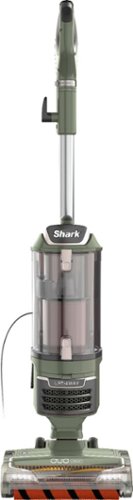
This Lift-Away upright vacuum has DuoClean to deep-clean carpets and directly engage floors for a polished look. The self-cleaning brushroll means no hair wrap, and Lift-Away lets you clean above the floor with the push of a button.
Customer Rating
4
No more cleaning hair off the roller
on September 5, 2019
Posted by: CraigB
from Texas
Pros
Cleans carpet and hard floors well
Powerful brush roller
Air filters are washable
Dust bin is surprising large
Dust bin is very easy to empty
Suction is adjustable
Powerhead is lower profile to fit under most furniture
Self-cleaning brush roll really stays clean and free of hair
LED headlights are surprisingly handy
HEPA filters have shown to work well in independent tests
Vacuum section separates to allow cleaning in smaller spaces
Cleans carpet and hard floors well
Powerful brush roller
Air filters are washable
Dust bin is surprising large
Dust bin is very easy to empty
Suction is adjustable
Powerhead is lower profile to fit under most furniture
Self-cleaning brush roll really stays clean and free of hair
LED headlights are surprisingly handy
HEPA filters have shown to work well in independent tests
Vacuum section separates to allow cleaning in smaller spaces
Cons
Heavy for the size
All the separate buttons are confusing
No bristle tool included
Plastic feels flimsy in places
Holders for tools on vacuum are tight but don’t hold tools well
Putting wand back is clumsy
Small wheels that support brush roll section feel flimsy
Heavy for the size
All the separate buttons are confusing
No bristle tool included
Plastic feels flimsy in places
Holders for tools on vacuum are tight but don’t hold tools well
Putting wand back is clumsy
Small wheels that support brush roll section feel flimsy
Design
The Share Rotator Lift-Away DuoClean Pro has looks to match the name. The design, although not as bold as previous designs, still looks very complicated. There are no less than 12 buttons and levers to access different modes and features. While some brands have endeavored to simplify the design and make a sleek looking vacuum, Shark has seemingly taken the approach that people enjoy buttons and levers and the “As Seen on TV” look. This isn’t to say that a vacuum must be a work of art, but more that Shark’s design certainly focuses first on features. The vacuum section detaches so that you can carry it separately using just the vacuum wand. The roller base has two rollers, one a material almost like a duster and the other a traditional brush bar but with the bristles spaced further apart. The back has two sturdy feeling wheels, but the front includes two tiny rubberized wheels that seem very fragile and are unchanged from the style that users complained fell apart from previous models. Only time will tell if this latest version lasts. Included are a smaller brush assembly, crevice tool, and hard surface nozzle. Strangely, the vacuum only has onboard storage for two of the three tools. The design and placement seem an afterthought as they click in hard but fall out easily with one even protruding out and getting in the way of the cord wrap. The main vacuum area has a HEPA filter, foam filter, and large particle screen. The manual states no service interval for the filters but rather instructs you to wash them. If they hold up over time this can be a great costs savings.
The Share Rotator Lift-Away DuoClean Pro has looks to match the name. The design, although not as bold as previous designs, still looks very complicated. There are no less than 12 buttons and levers to access different modes and features. While some brands have endeavored to simplify the design and make a sleek looking vacuum, Shark has seemingly taken the approach that people enjoy buttons and levers and the “As Seen on TV” look. This isn’t to say that a vacuum must be a work of art, but more that Shark’s design certainly focuses first on features. The vacuum section detaches so that you can carry it separately using just the vacuum wand. The roller base has two rollers, one a material almost like a duster and the other a traditional brush bar but with the bristles spaced further apart. The back has two sturdy feeling wheels, but the front includes two tiny rubberized wheels that seem very fragile and are unchanged from the style that users complained fell apart from previous models. Only time will tell if this latest version lasts. Included are a smaller brush assembly, crevice tool, and hard surface nozzle. Strangely, the vacuum only has onboard storage for two of the three tools. The design and placement seem an afterthought as they click in hard but fall out easily with one even protruding out and getting in the way of the cord wrap. The main vacuum area has a HEPA filter, foam filter, and large particle screen. The manual states no service interval for the filters but rather instructs you to wash them. If they hold up over time this can be a great costs savings.
Usage and Performance
Initially understanding what buttons and levers to push and switch can get confusing. Probably the most commonly forgotten button would be the button that turns the rollers from carpet to hard floor and wand. Fortunately, regardless of if you forget to turn on or off, the most you would be left would might be a less than clean surface. Over time, the options become easier to remember and might even prove somewhat handy. In regular vacuuming, the brush roller section is short enough to get under most areas. Your main limitation would be that you can only go as deep as the waste bin allows, as this motor requires it to be attached to use the brush rollers. To use the power roller independently would require the powered lift-away versions. The rollers have at first what sounds like a gimmick in what is called Zero-M but in the end is probably the most standout feature. If you have kids with long hair or pets, Zero-M is your savior. Even with two dogs that shed heavily, a wife with long hair that sheds, and a kid that also has long hair the Zero-M technology meant not once were the rollers covered in hair that needed to be cut off. Even with most waste bins full of mainly hair, the rollers have always stayed clean. Suction is very good and can be adjusted via a little, adjustable leak, sliding door near the handle. It’s a simple and effective idea to change suction power. In most cases though, suction works just find on maximum with the rollers effectively keep the carpet in place while extracting dust and dirt. At first glance you might wonder why in the world do you need lights on the front of a vacuum. Is it for vacuuming in the dark? After using it for a time you will realize it is in fact stranger that more vacuums don’t already have. First, regardless of how well lit a room there are always dark spots and this helps you see the dust bunnies you missed. Even more helpful is on hard floors. Those lights shine at just the right angle where you can easily see if any dust is left after you are done. The over design is very maneuverable and easily tilts around corners with easy which is great for most. Even though the design is mostly plastic, so as a word of caution for those with weak wrist you may wish to check the weight first. For the ones who tried to use the vacuum but had weaker wrists the weight meant a simple turn caused the vacuum to turn to a side and stay there. They didn’t have the strength to straighten it because of how the weight is distributed.
Initially understanding what buttons and levers to push and switch can get confusing. Probably the most commonly forgotten button would be the button that turns the rollers from carpet to hard floor and wand. Fortunately, regardless of if you forget to turn on or off, the most you would be left would might be a less than clean surface. Over time, the options become easier to remember and might even prove somewhat handy. In regular vacuuming, the brush roller section is short enough to get under most areas. Your main limitation would be that you can only go as deep as the waste bin allows, as this motor requires it to be attached to use the brush rollers. To use the power roller independently would require the powered lift-away versions. The rollers have at first what sounds like a gimmick in what is called Zero-M but in the end is probably the most standout feature. If you have kids with long hair or pets, Zero-M is your savior. Even with two dogs that shed heavily, a wife with long hair that sheds, and a kid that also has long hair the Zero-M technology meant not once were the rollers covered in hair that needed to be cut off. Even with most waste bins full of mainly hair, the rollers have always stayed clean. Suction is very good and can be adjusted via a little, adjustable leak, sliding door near the handle. It’s a simple and effective idea to change suction power. In most cases though, suction works just find on maximum with the rollers effectively keep the carpet in place while extracting dust and dirt. At first glance you might wonder why in the world do you need lights on the front of a vacuum. Is it for vacuuming in the dark? After using it for a time you will realize it is in fact stranger that more vacuums don’t already have. First, regardless of how well lit a room there are always dark spots and this helps you see the dust bunnies you missed. Even more helpful is on hard floors. Those lights shine at just the right angle where you can easily see if any dust is left after you are done. The over design is very maneuverable and easily tilts around corners with easy which is great for most. Even though the design is mostly plastic, so as a word of caution for those with weak wrist you may wish to check the weight first. For the ones who tried to use the vacuum but had weaker wrists the weight meant a simple turn caused the vacuum to turn to a side and stay there. They didn’t have the strength to straighten it because of how the weight is distributed.
Attachments can be used by detaching the handle with or without the tube and pressing on the desired attachment. Although the design works, it seems refinement of design was last on the list as the attachments look like they have a soft rubber press fit. In reality, it’s a hard piece of plastic tubing you jamb into another. It doesn’t grab much or go very deep. There is no attachment clip so a little caution is advised when cleaning behind things. You might accidentally bump off the attachment and have to fish it out. Beyond that, they do their job as well as anything other vacuum with little fuss as you would expect. That said, a brush tip on the crevice tool would have been nice. After having lights on the brush roller, you will find yourself wishing a light was on the wand as well, but to get that you have to upgrade to the powered lift-away or Apex series. If you have areas where you need to lift the vacuum and want to use the wand, such as the stairs, the lift-away function can be very handy. If you don’t have stairs you likely won’t find many uses for that feature and find rolling the unit area more convenient.
If your brush roller overheats, there is a warning light to let you know you need to take a break and let cool but with the Zero-M it’s doubtful those situations would come often. The clear dust bin means it’s easy to tell when it’s full and emptying is very easy. Of course, an open dust bin is nothing new but what is nice is the base of the dust bin has not ledges to catch dust as you dump it out. Just press the latch and let the bottom open and everything falls out easily. This might sound strange, but a surprising number of canister vacuums like to include an awkward ledge on where you empty causing a handy place for things to catch on their way out.
After all of this information about how the Rotator Lift-Away is a bit complicated and unrefined it all comes down to one big question. Does it work? The answer is absolutely. Once you get used to the complexities, you will find this rarely requires a second pass on hard floors and does a good job of getting most junk out of your carpet with hair being its specialty. Emptying the waste bin is hardly a chore so you can finish fast with little fuss once you get used to it. Regardless of if it was small bits or big pieces it always seemed to be picked up. With the rollers being direct drive, you get a clean path with no missed strip in the middle of your carpet stripes.
Final Thoughts
The real question is what are your priorities in vacuum. If you want a filter free vacuum with a highly refined operation, this one isn’t for you. If complexity is less of a concern and you value good performance on carpets and hard floors, prefer HEPA filtration, and most importantly are tired of cleaning brush rollers of hair you should give this one look.
The real question is what are your priorities in vacuum. If you want a filter free vacuum with a highly refined operation, this one isn’t for you. If complexity is less of a concern and you value good performance on carpets and hard floors, prefer HEPA filtration, and most importantly are tired of cleaning brush rollers of hair you should give this one look.
Mobile Submission: False
I would recommend this to a friend!


Share this review:


+26points
32of 38voted this as helpful.

G815 is a new class of mechanical gaming keyboard with tactile low-profile GL switches fully customizable per-key, LIGHTSYNC RGB technology. Set LIGHTSYNC to react to in-game action, audio and even your screen color. With a sleek, impossibly-thin yet durable and sturdy design, G815 brings gamers to a higher dimension of play. Programmable G-keys let you create and execute complex actions simply and intuitively. Volume wheel and media keys give you fast, easy control over video, audio, and streaming.
Customer Rating
5
Metal low profile without sacrificing the switches
on August 20, 2019
Posted by: CraigB
from Texas
Pros
Long key travel
Fast actuation, only 1.5mm
Satisfying click when activated
Light feel to key travel
Full RGB effects per key
RGB effects can change automatically per game
Five programmable keys and four macro keys
Game mode button disables your problem keys
Adjustable brightness
Low profile for mechanical keyboard
Media keys and volume scroll wheel
USB Passthrough
Metal top plate makes for a rigid build
Long key travel
Fast actuation, only 1.5mm
Satisfying click when activated
Light feel to key travel
Full RGB effects per key
RGB effects can change automatically per game
Five programmable keys and four macro keys
Game mode button disables your problem keys
Adjustable brightness
Low profile for mechanical keyboard
Media keys and volume scroll wheel
USB Passthrough
Metal top plate makes for a rigid build
Cons
Concave on keys too subtle
Smooth finish on keys allows fingers to drift easier
F and J tabs on the small size to quickly find your position
Programmable keys hard to tell from main keys on the left
Concave on keys too subtle
Smooth finish on keys allows fingers to drift easier
F and J tabs on the small size to quickly find your position
Programmable keys hard to tell from main keys on the left
Design
The Logitech G815 has a plastic base with a metal top plate which allows the low-profile design to retain a surprising amount of rigidity. The main portion of the keyboard is a standard size and layout so nothing to mess up your muscle memory. Keys have a slight concave to help with locating. The switches are mechanical with a light and satisfying click when activated. Activation distance is 1.5mm and the total travel distance is 3.0mm. The keys sit above the deck, so the lighting effects are visible from the sides and anything that falls between the keys is easy to find. The configurable backlight for each key also gets very bright if you want so you should have no trouble seeing it even in a bright room or barely visible in a dark room. To the left of the main keyboard are five programmable buttons. To the top left of the keyboard are three macro buttons and a macro record button which you can set to change the function of the programmable keys on the fly or do things such as change your lighting profile. To the right of the macro keys are a joystick key and backlight key with 5 brightness levels. To the far right above the number pad are media keys for back, play/pause, forward, and mute. Directly above the media keys is a large scroll wheel to allow quick volume changes. Included is a USB passthrough port which Logitech doesn’t seem to specify which revision. The port has no indications of USB 3, so it is most likely USB 2. The USB cable is thick and braided and requires 2 USB, one for the keyboard and the other for the passthrough.
The Logitech G815 has a plastic base with a metal top plate which allows the low-profile design to retain a surprising amount of rigidity. The main portion of the keyboard is a standard size and layout so nothing to mess up your muscle memory. Keys have a slight concave to help with locating. The switches are mechanical with a light and satisfying click when activated. Activation distance is 1.5mm and the total travel distance is 3.0mm. The keys sit above the deck, so the lighting effects are visible from the sides and anything that falls between the keys is easy to find. The configurable backlight for each key also gets very bright if you want so you should have no trouble seeing it even in a bright room or barely visible in a dark room. To the left of the main keyboard are five programmable buttons. To the top left of the keyboard are three macro buttons and a macro record button which you can set to change the function of the programmable keys on the fly or do things such as change your lighting profile. To the right of the macro keys are a joystick key and backlight key with 5 brightness levels. To the far right above the number pad are media keys for back, play/pause, forward, and mute. Directly above the media keys is a large scroll wheel to allow quick volume changes. Included is a USB passthrough port which Logitech doesn’t seem to specify which revision. The port has no indications of USB 3, so it is most likely USB 2. The USB cable is thick and braided and requires 2 USB, one for the keyboard and the other for the passthrough.
Usage and Performance
Macro keys and programmable keys are nothing new. What is different, that not all gaming keyboards have, is the ability to set macro and programmable keys to switch function based on the game you play. If you prefer specific key combinations between games, you add your game to G-Hub and when you launch your game then all presets will switch automatically to your preferred setup. If you create a Logi account, you can also save them to the cloud, so it follows you to any compatible peripherals. If you aren’t sure of how you want your keyboard setup, or you are looking for inspiration, you can also use G-Hub to download profiles that other games have shared and quickly try their layout.
Macro keys and programmable keys are nothing new. What is different, that not all gaming keyboards have, is the ability to set macro and programmable keys to switch function based on the game you play. If you prefer specific key combinations between games, you add your game to G-Hub and when you launch your game then all presets will switch automatically to your preferred setup. If you create a Logi account, you can also save them to the cloud, so it follows you to any compatible peripherals. If you aren’t sure of how you want your keyboard setup, or you are looking for inspiration, you can also use G-Hub to download profiles that other games have shared and quickly try their layout.
The joystick button is one of the more interesting keys that makes you wonder why no one thought to create it sooner. If you have ever been in the middle of an intense game and accidentally hit the wrong key, such as the Windows key, then you will love the joystick, button. In G-Hub, you configure which keys you want to disable during gaming. The exact keys you wish to disable is up to you, but when you press the joystick button it will disable the keys you configured. No more worrying of accidental button press brining up the Windows menu in the heat of battle. Another feature that is surprisingly helpful is the volume scroll wheel. At first glace you might wonder why it is so large. During gameplay this can come in handy. When moving around from a loud battle to an area where you need to hear the slight footstep you can change the volume easily on the fly without even looking down as it is very easy to find.
As with any modern gaming keyboard it is becoming increasingly difficult to perceive any lag and the G815 is no exception. With each click of the keyboard you can have confidence that you won’t get a missed tap. Double taps occur only when you choose and not on their own. Just like any keyboard with extra keys, the programmable keys take some adjustment as their layout and placement is just a slightly larger gap. Any further and they might be out of range of your fingers. This of course isn’t exclusive to the G815 and it would be nice if either there was a stop you could feel on the keys or maybe even nubs with different markings to help you get the hang of where each one is specifically located. These features could potentially help reduce the adjustment phase.
Of course, no product is perfect so you might be wondering what the downsides are. This is more of a personal preference, but the keys have a smooth finish making it easy for your fingers to drift. It is good to make quick movements smoother, but you might find you fingers slipping in between keys slightly until you get your muscle memory adapted. The locating nubs are also smaller, so it takes a little more work to keep your placement precise to prevent accidental button presses. A slightly textured finish and taller tabs could give that extra edge to keep your actions precise. Also, if you have become accustomed to gaming keyboards that have an extra nub on the S key to help you quickly locate the center of WASD, you are out of luck on the G815. Of course, these are minor gripes that become even less important with good muscle memory, but it would be nice if future generations adopted some of these concepts.
Final Thoughts
It’s nice to see the gaming keyboard market getting refined to the point to where it’s getting harder to recommend one over the other. This means the consumer benefits in the end by having more choices. The G815 checks all the boxes that a gamer would want and adds a few extra features some may not have even realized would be helpful. It’s nice to see Logitech still managing to find a way to add extra value to a pretty well-defined market. The Logitech G815 is easy to recommend. If you don’t like the clicky style keys, they even offer linear and tactile to suit your taste. You can even go wireless by choosing the G915 if you wish with the only sacrifice being a little more from your wallet. If you are in the market for a gaming keyboard, the G815 should be on your short list.
It’s nice to see the gaming keyboard market getting refined to the point to where it’s getting harder to recommend one over the other. This means the consumer benefits in the end by having more choices. The G815 checks all the boxes that a gamer would want and adds a few extra features some may not have even realized would be helpful. It’s nice to see Logitech still managing to find a way to add extra value to a pretty well-defined market. The Logitech G815 is easy to recommend. If you don’t like the clicky style keys, they even offer linear and tactile to suit your taste. You can even go wireless by choosing the G915 if you wish with the only sacrifice being a little more from your wallet. If you are in the market for a gaming keyboard, the G815 should be on your short list.
Mobile Submission: False
I would recommend this to a friend!


Share this review:


+6points
6of 6voted this as helpful.
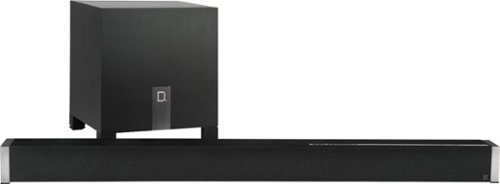
Boost your home theater's audio capabilities with this Definitive Technology Studio Advance sound bar system. The 5.1 channel system offers virtual surround sound and supports 4K and HDR content for your enjoyment. This Definitive Technology Studio Advance sound bar system has Chromecast built in to let you stream music wirelessly and control the speakers with Google Assistant voice commands.
Customer Rating
5
The soundbar for audiophiles
on August 13, 2019
Posted by: CraigB
from Texas
Pros
Soundbar handles everything but the lows
Subwoofer can potentially pressurize a small to medium room
Virtual surround is realistic for a single sound source
Solid build construction
Fast startup when using Chromecast
Good tonal balance for its size
Neutral listening position
Soundbar handles everything but the lows
Subwoofer can potentially pressurize a small to medium room
Virtual surround is realistic for a single sound source
Solid build construction
Fast startup when using Chromecast
Good tonal balance for its size
Neutral listening position
Cons
Wall mount doesn’t slide to match studs
Limited adjustment of levels, bass and center
Slightly elevated sibilance
Wall mount doesn’t slide to match studs
Limited adjustment of levels, bass and center
Slightly elevated sibilance
Considering what type of people this soundbar is targeting, it must be said this review comes from more of a novice audiophile with no technical equipment to do extensive testing or specialized room. Before reading further, it should be known that if your primary focus is on precise placement of sound effects in movies, you are better served by a traditional 5.1 setup with discrete speakers in each location. If your primary interest is in audio clarity, you value a clean and simple setup, and you don’t want to spend the money on a high end 5.1 setup or larger with separate speakers and independent amplifier targeted at audiophiles, then this review hopefully will be of some help.
Design
From opening the box you will notice that this soundbar isn’t targeting the average person. It isn’t some super slim soundbar with a tiny subwoofer box. It is a respectable large subwoofer and a thick, boxy, heavy soundbar with black anodized aluminum endcaps. It has some real weight to it and feels more substantial than the plastic boxes you are used to. Inputs are on in the center of the back. It has one toslink port, one aux port, and four HDMI ports, three if you use the preferred HDMI ARC option. It can either be placed on a surface or wall mounted. With an included IR blaster, it can pass the IR signal to your other components if they are blocked. The remote is surprisingly sparse. It has a soft touch matte black finish to help with grip with flat buttons. The only controls you have are to select an input, change volume, change center channel, change bass level, and select from three preset EQ levels. The preset EQs are music, night, and movie.
From opening the box you will notice that this soundbar isn’t targeting the average person. It isn’t some super slim soundbar with a tiny subwoofer box. It is a respectable large subwoofer and a thick, boxy, heavy soundbar with black anodized aluminum endcaps. It has some real weight to it and feels more substantial than the plastic boxes you are used to. Inputs are on in the center of the back. It has one toslink port, one aux port, and four HDMI ports, three if you use the preferred HDMI ARC option. It can either be placed on a surface or wall mounted. With an included IR blaster, it can pass the IR signal to your other components if they are blocked. The remote is surprisingly sparse. It has a soft touch matte black finish to help with grip with flat buttons. The only controls you have are to select an input, change volume, change center channel, change bass level, and select from three preset EQ levels. The preset EQs are music, night, and movie.
Setup
Installation is straightforward if you are setting this on the top of an entertainment center. Just choose the desired height and attach the included magnetic standoffs. If you wall mounting, the screw holes are 32” apart to match standard housing studs. Although thoughtful, it is rather rigid in implementation. Often, the studs aren’t exactly centered on the location where your TV is mounted so you can’t use the studs for a solid mount but instead must use anchors. An improvement on this design would be that instead of using two independent isolator discs to use an isolating bar that can be mounted to the studs and then the soundbar can be mounted anywhere on the bar. This would also permit minor adjustments if your measurements or level are slightly off. Included is a paper template to makes accurate placement and level easy.
After choosing your exact connection setup, setting up on Wi-Fi is easy. Just add the device via the Google Home app. It’s worth noting that Chromecast and Bluetooth steaming are the only options. There is no Play-Fi, AirPlay, or other option for music streaming so higher resolution audio would need to come from an HDMI source.
Installation is straightforward if you are setting this on the top of an entertainment center. Just choose the desired height and attach the included magnetic standoffs. If you wall mounting, the screw holes are 32” apart to match standard housing studs. Although thoughtful, it is rather rigid in implementation. Often, the studs aren’t exactly centered on the location where your TV is mounted so you can’t use the studs for a solid mount but instead must use anchors. An improvement on this design would be that instead of using two independent isolator discs to use an isolating bar that can be mounted to the studs and then the soundbar can be mounted anywhere on the bar. This would also permit minor adjustments if your measurements or level are slightly off. Included is a paper template to makes accurate placement and level easy.
After choosing your exact connection setup, setting up on Wi-Fi is easy. Just add the device via the Google Home app. It’s worth noting that Chromecast and Bluetooth steaming are the only options. There is no Play-Fi, AirPlay, or other option for music streaming so higher resolution audio would need to come from an HDMI source.
Performance
For a Chromecast audio source, this soundbar has a near instantaneous response. If you haven’t used Chromecast before, some devices have a delay before the music you cast starts playing. From the moment you choose to cast to the Studio Advance to the point at which you are streaming music is rarely more than 1 second which is a refreshing change. Although streaming sources are limited, having a Chromecast device has advantages in that it doesn’t require another proprietary app. Firmware updates are automatic with no need to open the app. Startup when watching TV is also fast only taking a 2-3 seconds. This convenience comes a slight cost as the standby mode uses nearly as much power as when turned on. During testing, the soundbar used 10 watts on standby and 10 to 14 during usage. The subwoofer does at least go into a deeper standby if left alone using 0 watts when left alone for extended periods and between 10 watts on initial standby and average usage and up to 18 watts during times of heavier bass usage. It isn’t a lot but it’s worth keeping track of as you add additional Chromecast devices to your setup. The less that sleep fully, the more it will have an impact on your electric bill.
For a Chromecast audio source, this soundbar has a near instantaneous response. If you haven’t used Chromecast before, some devices have a delay before the music you cast starts playing. From the moment you choose to cast to the Studio Advance to the point at which you are streaming music is rarely more than 1 second which is a refreshing change. Although streaming sources are limited, having a Chromecast device has advantages in that it doesn’t require another proprietary app. Firmware updates are automatic with no need to open the app. Startup when watching TV is also fast only taking a 2-3 seconds. This convenience comes a slight cost as the standby mode uses nearly as much power as when turned on. During testing, the soundbar used 10 watts on standby and 10 to 14 during usage. The subwoofer does at least go into a deeper standby if left alone using 0 watts when left alone for extended periods and between 10 watts on initial standby and average usage and up to 18 watts during times of heavier bass usage. It isn’t a lot but it’s worth keeping track of as you add additional Chromecast devices to your setup. The less that sleep fully, the more it will have an impact on your electric bill.
Sound Quality
Overall quality does set the Studio Advance apart from others, but the sound quality is where it really sets itself apart. It must be noted that there are other soundbars that can produce more positional sound for movies because of wireless surrounds but what sets the Studio Advance apart is tonal quality and overall sound reproduction. Using larger drivers in the main soundbar affords the Studio Advance the ability to use the soundbar itself for more than just highs. You get respectable midrange and up where it belongs instead of down on the floor like other designs. In fact, even if you unplug the subwoofer you can still get respectable sound. Try that with other ultra slim soundbars and the audio suddenly sounds like it is coming out of a tin can.
Overall quality does set the Studio Advance apart from others, but the sound quality is where it really sets itself apart. It must be noted that there are other soundbars that can produce more positional sound for movies because of wireless surrounds but what sets the Studio Advance apart is tonal quality and overall sound reproduction. Using larger drivers in the main soundbar affords the Studio Advance the ability to use the soundbar itself for more than just highs. You get respectable midrange and up where it belongs instead of down on the floor like other designs. In fact, even if you unplug the subwoofer you can still get respectable sound. Try that with other ultra slim soundbars and the audio suddenly sounds like it is coming out of a tin can.
Overall sound quality seems relatively neutral with only minor coloring. Probably the most noticeable shortcoming is a bit of elevated sibilance. Depending on the artist and volume, occasionally the s sounds can be a bit harsh. Fortunately, this seemed rare and even within songs exhibiting it, it was very brief. Overall perspective seems neither laid back nor forward unless you change the volume of the center channel. The soundstage, although on the smaller side, is quite good for a single soundbar solution. With all sounds coming from one place this is quite challenging so the fact that it can produce any soundstage is impressive. You can hear respectable placement of instruments, but some reverberation is lost in the process. Although lacking reverberation, it doesn’t sound flat but more that the recording was in a sound room versus an auditorium with hard walls. The macrodynamics are better than most, and certainly better than other soundbars, with the drum sounds having a proper amount of power you would expect as if you were there. If the drummer hits the stick on the side of the drum you hear a distinct impact with the nuances of the wood hitting the side of the metal on the drum and the sharp sound that come with it. The microdynamics are similarly better than most with subtle details of plucking a guitar string including the initial strong sound followed by hearing if the guitarist ran their finger across the string or how the note gradually fades away as the energy of the string dissipates. If they strum the string and then stop it, you can even hear their hand stop it and even if they are wearing a ring and it hits the wood of the guitar. During vocals, you can hear subtle breath control and sometimes even other aspects of how they control their voice with a good enough recording giving you more of a sense of a live performance.
Of course, there is a good chance at some point you will want to watch movies with the Studio Advance and it doesn’t disappoint. Going back to keeping expectations in check, the surround sound is a virtual 5.1 surround. That said, positional audio is impressive considering the only speakers are directly in front. On some movies, like Bourne Legacy, you question how you are hearing sounds from locations where there are no speakers. In the beginning where the drone blows up the cabin you hear the initial explosion and feel the energy of the explosion and then realize that the sound is coming from all around. The impact of such an effect varies from one movie to the next but the fact that it can do this at all is very impressive. If the room isn’t too large and you have the doors closed, the subwoofer can mildly pressurize the room giving more impact to the scenes. The same happens when they first turn on the game system in Jumanji: Welcome to the Jungle. As the drum sounds increase in intensity the room begins to rumble and you can feel your body shaking as if you are in the movie. It can do this in a 16x18 room with the doors closed but it is unlikely it could do this in much larger of a room. The fact that it is cable of such a feat at all in such a small package is a bit surprising. What also nice is because of the overall range of the soundbar, you aren’t left with dialog coming from the subwoofer on the floor. This translates to male voices being much more audible without turning up the volume unlike lesser systems.
Final Thoughts
It seems Definitive Technology had a very specific group in mind when they created the Studio Advance. Once could argue that better sound could be had from other systems, but it would be much harder to argue that better sound could come from a similar sized system. The Studio Advance would make a great addition as soundbar in the bedroom for an audiophile who is spoiled by their main system or someone who demands great sound in a compact package.
It seems Definitive Technology had a very specific group in mind when they created the Studio Advance. Once could argue that better sound could be had from other systems, but it would be much harder to argue that better sound could come from a similar sized system. The Studio Advance would make a great addition as soundbar in the bedroom for an audiophile who is spoiled by their main system or someone who demands great sound in a compact package.
Mobile Submission: False
I would recommend this to a friend!


Share this review:


+13points
13of 13voted this as helpful.
CraigB's Review Comments
Watch your favorite movies, TV shows and sporting events in crisp 1080p resolution with this Samsung UN65FH6001FXZA HDTV, which features Clear Motion Rate 240 to preserve picture detail during fast-action sequences.
Overall5 out of 5
5 out of 5This is an awesome TV for the cost
By Korom
from Raleigh, NC
First, this is a fantastic monitor. If you have a receiver for your HDMI switching and watch TV with the sound through that receiver then this is the PERFECT TV for you. I use it with my Denon e300 receiver, all my HDMI inputs go into the receiver with one HDMI cable going to the TV. Minimal fuss and muss. The picture quality is truly incredible for a LCD TV, the blacks are very very good, almost as good as my Panasonic Plasma but its understandable that its not that good as LCD cannot show true black like a plasma can. I checked 3 bars for the sound quality but honestly I never used the internal speakers. I gave this 5 stars and would have given it 6 stars if I could have (on a 5 star scale) because the picture quality is just that good.
Bottom line: Fantastic TV for the price.

CraigB
Texas
An LED TV is a type of LCD TV
November 29, 2013
Folks. For those of you telling this reviewer that he is talking about the wrong TV because he calls it an LCD, it is an LCD. LED TV's are still LCD TV's. The difference is the backlight behind the LCD is LED's instead of CCFL(fluorescent). Both still have and LCD screen that you actually look at up front.
+2points
2of 2voted this comment as helpful.
Microsoft Band 2 (Large): Keep track of your health and fitness goals throughout the day by monitoring your heart rate, steps taken, calories burned, sleep quality, hours slept and other helpful metrics. Just pair with your Windows Phone, Apple iOS or Android device via Bluetooth to receive alerts at a glance.Discover how the technology of Microsoft Band 2 can assist you in a healthy, productive lifestyle. Learn more ~
Overall5 out of 5
5 out of 5Best fitness tracker for the money
By CraigB
from Texas
When choosing high end fitness bands, my choices went back and forth between the Microsoft Band 2 and the Fitbit Surge. Fitbit has been in the business for fitness wearables for longer but I chose the Band 2 for what I felt was better value for my money. I purchased during a $50 off sale making it even more attractive and $50 less than the Surge. My main phone for this review is a Lumia 1520 with Windows 10 Mobile. I assume others will write reviews of the phone for other platforms and that is where this review starts. This fitness wearable is by far the most compatible. It supports iOS, Android, and Windows Phone/Mobile. Fitbit does as well but support for Windows Mobile is more limited. Comparing it to the Surge, it has more customizability, color screen, and a partially metal build. It feels more premium than the Surge. The metal does have 2 downsides. The first is that the finish used shows scratches extremely easily. See included picture. The second is that sweat and soap cause a foul smell very quickly requiring regular cleaning.
The Band 2 can be worn in two positions. The first is with the screen facing outwards like a watch. I tried this but it felt uncomfortable and viewing the screen was awkward particularly considering the screen doesn’t have a vertical view. This leads me to my preferred position which is with the screen facing inwards. It is much more natural to view and operate. It also feels more comfortable and is in fact the recommended way to wear the device. If there was any concern it is that wearing it inward the screen is always contacting surfaces when you lay your arms down. It uses gorilla glass but it still concerns me that I might scratch the screen. Every fitness wearable wasn’t completely comfortable to wear for one reason or another but this one starts to feel about like a watch after an adjustment period. Before you get the size right you might put it a place that binds you wrist or hits a nerve. I also learned it can get the heart rate just fine without tightening it down so far you hit nerves. Just like a watch it will take some fiddling to find your perfect tightness. Fortunately, the latching mechanism feels strong and has more adjustments than a tradition watch as well giving you more flexibility. Just make sure you use the sizing guide on the size of the box to choose the correct size. It shows wrists sizes with the wrist sideways.
Now the big question is how it works for tracking vitals. I haven’t worked with VO2 Max so I can’t comment on that but after getting the fit correct, the heart rate seems pretty close. Checking manual it was usually within about 10BPM or less from actual. Tracking steps seems a little different. It is difficult to verify but it seems to be a little high on the number of steps sometimes compared to my old hip worn pedometer. It just seems like I can reach 5,000 steps fairly easily. I am not a runner so I have not tested the GPS but I have read that some units have come from the factory with a bad GPS. What’s really nice is with all the vitals it gathers, more than just heart rate, it should be a fairly accurate color estimate. It has guided workouts you can add but I used the generic color tracking and added my own workout types to track. You can add things like HIT and weight training for your own purposes but it uses all the sensors to estimate the color burn instead of estimating based on the workout type. I feel this is more accurate but cannot verify. When you start workout mode, by default the screen stays on showing your workout time and heart rate. I suspect it is not as accurate as a chest band but it seems pretty good. After your workout is done you can see the entire workout on your phone or the website with your heart rate the entire time and your max marked. If there was any gripe it would be that you can’t have it vibrate when you hit your target or max heart rate. That would have been a great feature but, who knows. Maybe they will add it in the future. You can even use the website to compare your vitals to others in your height, weight, and age category. It’s all anonymous and very informative.
When not working out it still tracks your heart rate all the time but the other useful time to check is when you are sleeping. It can detect your sleep but if it gets it wrong you can only delete the time, not edit. You are better off starting your sleep tracking yourself. While sleeping, it will monitor you and in when you wake up you can see what your resting heart rate was overnight to get an even better picture of your health. It also has a smart alarm you can activate. If you want to wake up at a set time, just set the alarm and it will vibrate to wake you up. What I really like is if you activate the smart alarm and set it for 7:30am it will wake you up somewhere between 7:00am and 8:00am when you are most awake. That means you don’t wake up to an alarm feeling like you haven’t rested. You can even set the strength of the vibration.
Since this is a little bit of a smart watch you can add some apps. Since the phone doesn’t have any memory though, expect to only have them work when around your phone. It can control music on your phone and even use voice recognition with Cortana. I am running a prerelease build of the phone software so on occasion the connection dropped but it wasn’t hard to get back. I have found the notifications actually quite nice. I can leave the phone in one place in the house and still get notifications and respond to basic texts. I can also connect my phone to the stereo and change tracks and turn the volume up or down. It’s a standard feature for a smart watch but this is a fitness wearable and much cheaper than a smart watch. There are even some extra apps you can add and some third part utilizes to customize it further but if you want a smart watch more you might want to go that route. If you want a smart fitness tracker, this thing is hard to beat.
Pros
Solid (premium) build quality. It often gets looks and people asking what it is
Tracks more vitals than any other fitness wearable
Comfortable after figuring out your preferred fitment
Bright, sharp screen with auto brightness
Smart Alarm
Customizable workouts
Workout coaches
Customizable with smart watch type features
Solid latching mechanism
Good battery life for its functionality (2 days with no GPS and auto on screen)
Fast charge time (30 minutes to 80%)
Gorilla glass screen
Works on iOS, Android, Windows Mobile, and Web. The web is the most feature rich
Integrates with Health Vault
Constant heart rate
Portal to compare health
Rich sleep stats including restful sleep, times awake, resting heartrate, and recovery
Solid (premium) build quality. It often gets looks and people asking what it is
Tracks more vitals than any other fitness wearable
Comfortable after figuring out your preferred fitment
Bright, sharp screen with auto brightness
Smart Alarm
Customizable workouts
Workout coaches
Customizable with smart watch type features
Solid latching mechanism
Good battery life for its functionality (2 days with no GPS and auto on screen)
Fast charge time (30 minutes to 80%)
Gorilla glass screen
Works on iOS, Android, Windows Mobile, and Web. The web is the most feature rich
Integrates with Health Vault
Constant heart rate
Portal to compare health
Rich sleep stats including restful sleep, times awake, resting heartrate, and recovery
Cons
Cannot change band because electronics are built in
Metal area is a trap for sweat and soap requiring regular cleaning to prevent odor
Cannot change screen orientation
Awkward wearing screen outward
Metal finish is easy to scratch
No build in memory to bring music and store GPS while leaving phone behind for a time
Water resistant instead of waterproof
Possible to scratch screen with it facing downward
Sync is a bit slow
Cannot change band because electronics are built in
Metal area is a trap for sweat and soap requiring regular cleaning to prevent odor
Cannot change screen orientation
Awkward wearing screen outward
Metal finish is easy to scratch
No build in memory to bring music and store GPS while leaving phone behind for a time
Water resistant instead of waterproof
Possible to scratch screen with it facing downward
Sync is a bit slow
CraigB
Texas
Additional Findings
January 9, 2016
I just wanted to add an extra observations to my original review.
For those of you who want to view the display outside in sunlight, it doesn't seem to get that bright. For me that is not a big deal because outside exercises are typically the type where I don't use real time tracking but if you are the type who needs to read the display in direct sunlight, you might find it difficult. I will be checking further and report back if I find anything because indoors it is so bright that I wonder if I have done something wrong in the setup. Even with this finding I still feel it is the best for the money.
Also, if you happen to swap between phones or get a new phone you will have to factor reset the band. I periodically switch phones and discovered this. The system is designed to easily replace your band while using the same phone but if you move the band to any phone, even one that was restored from a backup of your original you will have to factory reset the band and set it back up. Not a huge deal because little is actually stored on the phone.
One other huge bonus for Windows Phone/Mobile users. If for some reason you either forget or choose not to wear your band and have a Lumia that is capable you can use it to augment your Band. Sometimes for different reasons I don't want to wear my band and only need to track steps. If I just keep my Lumia 950 in my pocket, it will track my steps and add them to what the band couldn't track. That particular feature is one I really love. The only caveat to that is while it updates the steps on the app and portal, the extra steps from your phone don't get transferred back to your band. This means if you took 2,000 steps with your band and phone and an additional 5,000 with only your Lumia the app will report 7,000 steps total which is correct but your band will continue to report 2,000 steps. Minor quibble though for a great additional feature for Windows Phone fans.
0points
0of 0voted this comment as helpful.
ecobee ecobee3 Programmable Touch-Screen Wi-Fi Thermostat: Maintain a comfortable home with this programmable thermostat, which is Apple~ HomeKit-enabled, so you can control the temperature remotely using your compatible device. Home IQ helps you conserve energy.
Overall 1 out of 5
1 out of 5cant set custom temps..sensors are glitchy
By annaj
i was trying to get this thermostat to set 4 or 5 different temps automaticly per day. an ecobee tech couldnt help me get this done on my web portal account . the sensors dont read the occupancy after being in the room for hours like being in a bedroom all night when u wake up the sensor will read unoccupied or sitting in the living room all day the same thing will happen after a few hours. a regular programable thermostat would have been a better choice.
CraigB
Texas
Did you try IFTTT
February 7, 2016
I was just wondering if you have looked into IFTTT to set those custom automatic temps. I haven't tried your exact scenario but the Ecobee3 can be connected to an IFTTT account to extend it's functionality.
0points
0of 0voted this comment as helpful.
Your household wants to play, stream and work online all at once. With this Linksys router, you can do it all without buffering or other interruptions. Use the Smart Wi-Fi app to get started, control, and monitor your home network from anywhere.
Overall5 out of 5
5 out of 5Solid router with good range and speed
By CraigB
from Texas
I am posting this review after about a week of use. If I find anything more significant after posting I will add it as a reply to my original post. Be sure to check there for additions.
I needed to upgrade my WiFi because the internet service in my area was about to be upgraded to exceed the capacity of my current wireless N solution. This router seems as if it was marketed towards moderate power users as well as people with less technical skills who need an upgrade. Packaging is minimal the same as most routers today. It comes with a CD for documentation but it is not used for setup. This is a good thing because as an AC router most people upgrading to this would have newer devices, few of which have an optical drive.
I needed to upgrade my WiFi because the internet service in my area was about to be upgraded to exceed the capacity of my current wireless N solution. This router seems as if it was marketed towards moderate power users as well as people with less technical skills who need an upgrade. Packaging is minimal the same as most routers today. It comes with a CD for documentation but it is not used for setup. This is a good thing because as an AC router most people upgrading to this would have newer devices, few of which have an optical drive.
For the non-technical
This is not very hard to set up. You plug power into the only spot it fits. There are three antennas that screw into very noticeable spots on the back. And the internet plug is clearly labeled. The instructions tell you what to do in a few steps to get the device to take care of the rest. It also has the wireless already set up if you are afraid to do it and even comes with a sticker with the information so you will know what the password is to get on the WiFi. It already has a guest WiFi too but there is a separate login so someone can’t just borrow your internet without you giving them the password. If you feel more comfortable there are apps for iPhones and Android phones to control the device. Speed and range are very good but if you can it is always recommended to install it as close to the center of your house and avoid metal. The router can pretty much take care of itself after that and it shouldn’t require any further work.
This is not very hard to set up. You plug power into the only spot it fits. There are three antennas that screw into very noticeable spots on the back. And the internet plug is clearly labeled. The instructions tell you what to do in a few steps to get the device to take care of the rest. It also has the wireless already set up if you are afraid to do it and even comes with a sticker with the information so you will know what the password is to get on the WiFi. It already has a guest WiFi too but there is a separate login so someone can’t just borrow your internet without you giving them the password. If you feel more comfortable there are apps for iPhones and Android phones to control the device. Speed and range are very good but if you can it is always recommended to install it as close to the center of your house and avoid metal. The router can pretty much take care of itself after that and it shouldn’t require any further work.
For the technical people
If you are looking for a device with tons of granular settings, this might not be the device. Of course the power users I am referring to would probably be better suited sticking with the WRT series. I doubt this device will ever see an aftermarket firmware. It attempts to have a clean interface but that means it will feel slower than a power user router for some settings changes as transitions and animations run their course. Setting changes that require a reboot happen nearly as fast as the fastest routers out there. Although the stock firmware attempts to look fancy and simple it still has a decent amount of settings for all but the most extreme power users. The antennas use a standard connection so if you wanted to upgrade to larger ones later that is possible. Hardwired speed has been very good. I’m just a casual gamer but this hasn’t slowed me down at all and I cannot tell the different hardwired from my old gaming router. Wireless speed is actually very good as well although I was never able to achieve the 1300Mbps link speed advertised even right next to the unit. I maxed out at 900Mbps and it is possible that is related to my AC devices. My old router would drop down to the 39Mpbs on the opposite side of my house whereas this one can maintain at least 177Mpbs and often more.
If you are looking for a device with tons of granular settings, this might not be the device. Of course the power users I am referring to would probably be better suited sticking with the WRT series. I doubt this device will ever see an aftermarket firmware. It attempts to have a clean interface but that means it will feel slower than a power user router for some settings changes as transitions and animations run their course. Setting changes that require a reboot happen nearly as fast as the fastest routers out there. Although the stock firmware attempts to look fancy and simple it still has a decent amount of settings for all but the most extreme power users. The antennas use a standard connection so if you wanted to upgrade to larger ones later that is possible. Hardwired speed has been very good. I’m just a casual gamer but this hasn’t slowed me down at all and I cannot tell the different hardwired from my old gaming router. Wireless speed is actually very good as well although I was never able to achieve the 1300Mbps link speed advertised even right next to the unit. I maxed out at 900Mbps and it is possible that is related to my AC devices. My old router would drop down to the 39Mpbs on the opposite side of my house whereas this one can maintain at least 177Mpbs and often more.
So far during my ownership the stability of this device has reminded me of the old Linksys routers how even the cheap ones never locked up. I’m hoping it stays this way. If you want to change settings, you can do so the standard way most technical people do via the IP address or it has a built in URL. Thankfully it doesn’t require some odd application for initial setup. Unlike standard routers, this one is cloud connected when you choose so meaning remote access is passed via the cloud. It does support some dynamic DNS options but they seem more to push you towards connection via their cloud. Fortunately, this is optional except if you want to take advantage of the built in USB ports and access files remotely. I don’t have a spare drive to test right now so unfortunately I could not test the NAS performance. It does have a very basic QoS which allows you to set up to 3 services or devices as high priority but that’s pretty much it. It has some newer options but then oddly has more old services, such as Real Player and Rhapsody.
Pros
Large, replaceable antennas
Great Range
Reliable
Gigabit Ports
Fast Processor
Status lights can be turned off
Decent amount of features for all but the heavy power users
Doesn’t require a special application for setup or CD
Has USB ports for attaching a hard drive
Offers automatic firmware upgrades to keep security up. Good for keeping non power users safe (Can be turned off)
Documentation is thorough if you need help. You just click help on the top bar
Major changes that require a restart are almost unnoticeable to users as it restarts fast
Has WiFi secured by default and requires a password to be configured during setup. This is good if you are buying one for family and just want it secure without needing to help them. It even has a handy sticker with device specific WiFi passwords so someone can’t just look up a default WiFi password for the unit and borrow internet.
Large, replaceable antennas
Great Range
Reliable
Gigabit Ports
Fast Processor
Status lights can be turned off
Decent amount of features for all but the heavy power users
Doesn’t require a special application for setup or CD
Has USB ports for attaching a hard drive
Offers automatic firmware upgrades to keep security up. Good for keeping non power users safe (Can be turned off)
Documentation is thorough if you need help. You just click help on the top bar
Major changes that require a restart are almost unnoticeable to users as it restarts fast
Has WiFi secured by default and requires a password to be configured during setup. This is good if you are buying one for family and just want it secure without needing to help them. It even has a handy sticker with device specific WiFi passwords so someone can’t just look up a default WiFi password for the unit and borrow internet.
Cons
Interface tries too hard to be attractive slowing it down with animations
Only supports 2 Dynamic DNS providers.
QoS settings seem to cater to power users but offer little customization
QoS rule changes require moving service or devices boxes around and the interface jumps quickly between sections. This often causes you to accidentally move something you didn’t intend to.
Included “Apps” are of limited usefulness and only work on iOS and Android which leaves out anything Windows (No Windows 10 Universal Apps) and no Mac. No configuring your router with touch, like via a Surface, using a Windows App.
Interface tries too hard to be attractive slowing it down with animations
Only supports 2 Dynamic DNS providers.
QoS settings seem to cater to power users but offer little customization
QoS rule changes require moving service or devices boxes around and the interface jumps quickly between sections. This often causes you to accidentally move something you didn’t intend to.
Included “Apps” are of limited usefulness and only work on iOS and Android which leaves out anything Windows (No Windows 10 Universal Apps) and no Mac. No configuring your router with touch, like via a Surface, using a Windows App.
Final Notes
Higher end units near this price point I have owned have had large aluminum heatsinks to dissipate heat. This one has one very small heatsink. I suspect heat stress will be higher on this unit and might be why this case has such a large open cavity you can easily see straight through the vent holes. I suspect longevity will be lower but only time will tell. So the unit has not felt very warm so fingers crossed.
Higher end units near this price point I have owned have had large aluminum heatsinks to dissipate heat. This one has one very small heatsink. I suspect heat stress will be higher on this unit and might be why this case has such a large open cavity you can easily see straight through the vent holes. I suspect longevity will be lower but only time will tell. So the unit has not felt very warm so fingers crossed.
CraigB
Texas
Longer term observations
February 22, 2016
Adding to my original review I have found some new observations to add to this router. I switched to using it as an access point, which takes a little digging, and found out that once you do so you lose a lot of features that should still work but are removed. For example, as an access point you get no guest networks. You can only have 1 2.5GHz WiFi and 1 5GHz. All features such as WMM and QoS are completely gone. Remote administration is turned off. I have also experienced an odd condition where my Xbox One cannot connect using the exact same key as my old router that my Xbox was connected to. I have also experienced 1 lockup where the unit just completely stopped responding and had to be power cycled. Over all it's still a good router but it feels like it could use a little more firmware refinement.
0points
0of 0voted this comment as helpful.
Microsoft Band 2 (Large): Keep track of your health and fitness goals throughout the day by monitoring your heart rate, steps taken, calories burned, sleep quality, hours slept and other helpful metrics. Just pair with your Windows Phone, Apple iOS or Android device via Bluetooth to receive alerts at a glance.Discover how the technology of Microsoft Band 2 can assist you in a healthy, productive lifestyle. Learn more ~
Overall5 out of 5
5 out of 5Best fitness tracker for the money
By CraigB
from Texas
When choosing high end fitness bands, my choices went back and forth between the Microsoft Band 2 and the Fitbit Surge. Fitbit has been in the business for fitness wearables for longer but I chose the Band 2 for what I felt was better value for my money. I purchased during a $50 off sale making it even more attractive and $50 less than the Surge. My main phone for this review is a Lumia 1520 with Windows 10 Mobile. I assume others will write reviews of the phone for other platforms and that is where this review starts. This fitness wearable is by far the most compatible. It supports iOS, Android, and Windows Phone/Mobile. Fitbit does as well but support for Windows Mobile is more limited. Comparing it to the Surge, it has more customizability, color screen, and a partially metal build. It feels more premium than the Surge. The metal does have 2 downsides. The first is that the finish used shows scratches extremely easily. See included picture. The second is that sweat and soap cause a foul smell very quickly requiring regular cleaning.
The Band 2 can be worn in two positions. The first is with the screen facing outwards like a watch. I tried this but it felt uncomfortable and viewing the screen was awkward particularly considering the screen doesn’t have a vertical view. This leads me to my preferred position which is with the screen facing inwards. It is much more natural to view and operate. It also feels more comfortable and is in fact the recommended way to wear the device. If there was any concern it is that wearing it inward the screen is always contacting surfaces when you lay your arms down. It uses gorilla glass but it still concerns me that I might scratch the screen. Every fitness wearable wasn’t completely comfortable to wear for one reason or another but this one starts to feel about like a watch after an adjustment period. Before you get the size right you might put it a place that binds you wrist or hits a nerve. I also learned it can get the heart rate just fine without tightening it down so far you hit nerves. Just like a watch it will take some fiddling to find your perfect tightness. Fortunately, the latching mechanism feels strong and has more adjustments than a tradition watch as well giving you more flexibility. Just make sure you use the sizing guide on the size of the box to choose the correct size. It shows wrists sizes with the wrist sideways.
Now the big question is how it works for tracking vitals. I haven’t worked with VO2 Max so I can’t comment on that but after getting the fit correct, the heart rate seems pretty close. Checking manual it was usually within about 10BPM or less from actual. Tracking steps seems a little different. It is difficult to verify but it seems to be a little high on the number of steps sometimes compared to my old hip worn pedometer. It just seems like I can reach 5,000 steps fairly easily. I am not a runner so I have not tested the GPS but I have read that some units have come from the factory with a bad GPS. What’s really nice is with all the vitals it gathers, more than just heart rate, it should be a fairly accurate color estimate. It has guided workouts you can add but I used the generic color tracking and added my own workout types to track. You can add things like HIT and weight training for your own purposes but it uses all the sensors to estimate the color burn instead of estimating based on the workout type. I feel this is more accurate but cannot verify. When you start workout mode, by default the screen stays on showing your workout time and heart rate. I suspect it is not as accurate as a chest band but it seems pretty good. After your workout is done you can see the entire workout on your phone or the website with your heart rate the entire time and your max marked. If there was any gripe it would be that you can’t have it vibrate when you hit your target or max heart rate. That would have been a great feature but, who knows. Maybe they will add it in the future. You can even use the website to compare your vitals to others in your height, weight, and age category. It’s all anonymous and very informative.
When not working out it still tracks your heart rate all the time but the other useful time to check is when you are sleeping. It can detect your sleep but if it gets it wrong you can only delete the time, not edit. You are better off starting your sleep tracking yourself. While sleeping, it will monitor you and in when you wake up you can see what your resting heart rate was overnight to get an even better picture of your health. It also has a smart alarm you can activate. If you want to wake up at a set time, just set the alarm and it will vibrate to wake you up. What I really like is if you activate the smart alarm and set it for 7:30am it will wake you up somewhere between 7:00am and 8:00am when you are most awake. That means you don’t wake up to an alarm feeling like you haven’t rested. You can even set the strength of the vibration.
Since this is a little bit of a smart watch you can add some apps. Since the phone doesn’t have any memory though, expect to only have them work when around your phone. It can control music on your phone and even use voice recognition with Cortana. I am running a prerelease build of the phone software so on occasion the connection dropped but it wasn’t hard to get back. I have found the notifications actually quite nice. I can leave the phone in one place in the house and still get notifications and respond to basic texts. I can also connect my phone to the stereo and change tracks and turn the volume up or down. It’s a standard feature for a smart watch but this is a fitness wearable and much cheaper than a smart watch. There are even some extra apps you can add and some third part utilizes to customize it further but if you want a smart watch more you might want to go that route. If you want a smart fitness tracker, this thing is hard to beat.
Pros
Solid (premium) build quality. It often gets looks and people asking what it is
Tracks more vitals than any other fitness wearable
Comfortable after figuring out your preferred fitment
Bright, sharp screen with auto brightness
Smart Alarm
Customizable workouts
Workout coaches
Customizable with smart watch type features
Solid latching mechanism
Good battery life for its functionality (2 days with no GPS and auto on screen)
Fast charge time (30 minutes to 80%)
Gorilla glass screen
Works on iOS, Android, Windows Mobile, and Web. The web is the most feature rich
Integrates with Health Vault
Constant heart rate
Portal to compare health
Rich sleep stats including restful sleep, times awake, resting heartrate, and recovery
Solid (premium) build quality. It often gets looks and people asking what it is
Tracks more vitals than any other fitness wearable
Comfortable after figuring out your preferred fitment
Bright, sharp screen with auto brightness
Smart Alarm
Customizable workouts
Workout coaches
Customizable with smart watch type features
Solid latching mechanism
Good battery life for its functionality (2 days with no GPS and auto on screen)
Fast charge time (30 minutes to 80%)
Gorilla glass screen
Works on iOS, Android, Windows Mobile, and Web. The web is the most feature rich
Integrates with Health Vault
Constant heart rate
Portal to compare health
Rich sleep stats including restful sleep, times awake, resting heartrate, and recovery
Cons
Cannot change band because electronics are built in
Metal area is a trap for sweat and soap requiring regular cleaning to prevent odor
Cannot change screen orientation
Awkward wearing screen outward
Metal finish is easy to scratch
No build in memory to bring music and store GPS while leaving phone behind for a time
Water resistant instead of waterproof
Possible to scratch screen with it facing downward
Sync is a bit slow
Cannot change band because electronics are built in
Metal area is a trap for sweat and soap requiring regular cleaning to prevent odor
Cannot change screen orientation
Awkward wearing screen outward
Metal finish is easy to scratch
No build in memory to bring music and store GPS while leaving phone behind for a time
Water resistant instead of waterproof
Possible to scratch screen with it facing downward
Sync is a bit slow
CraigB
Texas
Band split after serveral months
May 23, 2016
As others who have discovered after owning the Band 2 for a while, the band itself tends to split. Even if you are gentle the rubberized material just doesn't seem to hold up. The good news in my case is I leave reasonably close to a Microsoft Store. I brought it to them and as always they took great care of me. The assistant store manager was the one who assisted me and he said that Microsoft is aware of the problem and is already working to fix the issue. I had the same problem with the first generation Type Cover for the Surface. Back then they took care of me and ultimately Microsoft corrected the issue. It's unfortunate this kind of thing gets through but at least it doesn't seem to be a hassle to get it resolved.
0points
0of 0voted this comment as helpful.
Enjoy powerful performance with this compact HP Pavilion Wave computer. The Intel i3 processor provides fast data handling, while the 1TB hard drive lets you store plenty of files. This HP Pavilion Wave computer has 8GB of RAM to run the latest applications and four USB ports for connecting multiple accessories.
Overall3 out of 5
3 out of 5Still can't get the speaker/microphone to work.
By Murphdad013
from New York , ny
The HP help line is terrible and Best Buy was no help at all. In fact I spoke directly ....finally...with someone at HP who said that my Paviliion Wave needed an external microphone headset for montonaccess Cortona. WRONG!!!!
CraigB
Texas
It has a built in microphone
January 16, 2017
I own this unit and it has a built in microphone. I use it for Cortana regularly. Sounds like the support person got it wrong.
0points
0of 0voted this comment as helpful.
Arlo Pro takes the worrying out of life with the 100% Wire-Free indoor/outdoor home monitoring system. Arlo Pro includes rechargeable batteries, motion and sound-activated alerts, 2-way audio, a 100+ decibel siren, and 7 days of free cloud HD video recordings. Arlo covers every angle to help keep you safe and protected.
Overall4 out of 5
4 out of 5Good system with lots of potential
By CraigB
from Texas
Pros
Extremely Quick setup (A 2 camera system takes roughly 30 minutes)
Very easy set up. It comes with basic instructions but the app nicely walks you through each step
No need to run wires
Compact
Discreet cameras easily blend in with lighter color homes
Good daytime video quality for the price
Includes microphone and speaker
Flexible mounting options. Included option is easy but other fixed mounts can be used
Large rechargeable batteries
Motion trigger is supposed to get an update to determine if the motion is by a person
All devices get regular security updates. Even the cameras get updated wirelessly. Nice considering cameras are a new target for hackers.
Inanimate objects don’t seem to cause false motion triggers
Standard external hard drive can be used for local storage
Basic plan included for free
Easily expandable
Extremely Quick setup (A 2 camera system takes roughly 30 minutes)
Very easy set up. It comes with basic instructions but the app nicely walks you through each step
No need to run wires
Compact
Discreet cameras easily blend in with lighter color homes
Good daytime video quality for the price
Includes microphone and speaker
Flexible mounting options. Included option is easy but other fixed mounts can be used
Large rechargeable batteries
Motion trigger is supposed to get an update to determine if the motion is by a person
All devices get regular security updates. Even the cameras get updated wirelessly. Nice considering cameras are a new target for hackers.
Inanimate objects don’t seem to cause false motion triggers
Standard external hard drive can be used for local storage
Basic plan included for free
Easily expandable
Cons
Support for Windows is poor for the new touchscreen devices.
No Windows app for Windows 8 and 10 devices of any size.
Video quality, mainly night time, is probably not good enough for legal purposes.
Night video quality makes recognition near impossible past approximately 10 feet
Easy to steal or move regardless of mounting
Camera speaker is not very loud
Provided screws use too fine of a thread and the metal head strips out easy
All videos are public if someone can intercept your emails on the way to your inbox. (Email delivery by design is not encrypted so if someone intercepts your emails on the way they can see any of your videos with audio)
Recording time is fixed so even if motion or sound is still occurring you can miss recording
Web interface has some bugs such as freezing on zoom, Live play button disappears, and touch doesn’t work.
Sound recording doesn’t occur until a few seconds after video recording
At least one camera exhibited a noticeable “ticking clock” sound when recording audio
Connecting them hardwired defeats the weatherproofing
Instructions do not give tutorial about advanced features but rather let you discover them
No organizer for hard drive recordings
Dependent on good upload internet speeds. The more cameras you have, the faster the upload speed you need. This can be a limiting factor for some.
Long lag time to start live viewing even with very fast connection
Support for Windows is poor for the new touchscreen devices.
No Windows app for Windows 8 and 10 devices of any size.
Video quality, mainly night time, is probably not good enough for legal purposes.
Night video quality makes recognition near impossible past approximately 10 feet
Easy to steal or move regardless of mounting
Camera speaker is not very loud
Provided screws use too fine of a thread and the metal head strips out easy
All videos are public if someone can intercept your emails on the way to your inbox. (Email delivery by design is not encrypted so if someone intercepts your emails on the way they can see any of your videos with audio)
Recording time is fixed so even if motion or sound is still occurring you can miss recording
Web interface has some bugs such as freezing on zoom, Live play button disappears, and touch doesn’t work.
Sound recording doesn’t occur until a few seconds after video recording
At least one camera exhibited a noticeable “ticking clock” sound when recording audio
Connecting them hardwired defeats the weatherproofing
Instructions do not give tutorial about advanced features but rather let you discover them
No organizer for hard drive recordings
Dependent on good upload internet speeds. The more cameras you have, the faster the upload speed you need. This can be a limiting factor for some.
Long lag time to start live viewing even with very fast connection
Setup was very easy, particularly for a security camera system. The entire process is achieved by following the steps one by one as the app tells you. Install the app, set up your Arlo account, plug in the base unit to power and internet, sync the cameras, hang the cameras, and you’re done. A two camera system only took approximately 30 minutes. The kit includes metal bases, screws, and wall anchors but the screws are small and easy to strip. The metal bases work with a strong magnet included inside the camera. Although convenient, the metal bases allow someone to easily steal or move these expensive cameras so placement is important. Netgear offers screw in mounts for a more rigid and secure mounting. The entire hardware and software process has had a lot of thought put into making it easy. There are no complicated router changes needed to be made at all or complicated programming. Oddly some features, like changing the recording quality, must be done on a regular computer for which there is no app.
There is one strange feature omission from Netgear. This system has a Pro designation and yet support for regular, more modern computers, is limited. Businesses by and large use Windows computers and the most popular type of Windows computers selling today are Windows 2-in-1 convertibles with touchscreens this trend is forecasted to increase and yet this system is barely even useable by any touchscreen Windows device. This is also odd because what better way to check out a security video than on a large screen. You are forced to use a browser to view videos which the experience varies based on browser. Simple things like moving a slider don’t work because the website doesn’t work with touch. Browser administration has other bugs, such as the Live Video button disappearing. If this was an app you wouldn’t have to worry about how the end user’s choice of browser affects the experience. Not having a Universal Windows app is a missed opportunity. I have seen a large increase in clients that are buying Windows 2-in-1 systems instead of desktops or Android/iOS tablets for their primary system. A Windows Universal app they could support such systems, or any other form factor of Windows for that matter. Imagine if the app was on Xbox One in your living room and you want to check on things outside. Just say “Hey Cortana, open Arlo” and you could see your video feed or videos quickly and easily from the convenience of your couch on a big screen. That would be great. If you have smaller Windows devices, the website is unusable. It tries to get you to use an app that doesn’t exist. Oddly enough if you have a link to a shared video the same website will serve you the video in a mobile optimized format. Smaller Windows devices and Windows Mobile devices are left unsupported. Future updates and app releases could easily alleviate this but for now Windows support is poor.
The base unit comes with a Sync/Siren button, network port, and two USB ports for storage. The siren is loud and sounds like newer smoke alarms. It can be trigger locally, by the app, or via configurable rules such as motion or audio sensing. You can switch the base unit to modes for recording for motion and/or audio, no recording, or armed or disarmed based using Geofencing. You can also define your own custom modes allowing specific cameras and audio for each to be on or off. Due to battery restrictions, there is no continuous recording. Recording time from motion is a default of 5 seconds regardless of if the motion continues. Cameras include built in IR for night vision, motion sensor, microphone, and speaker and are weatherproof assuming the charging plug cover is on. One large difference with the Pro version is the inclusion of large rechargeable batteries which should last quite a long time between charging. When video is recorded, it is uploaded via your internet connection to your account meaning a good upload internet speed is important. Videos are stored in a calendar format and can be viewed, shared, or deleted from the interface.
Overall performance when factoring in the price for features was good. Shuddering and lag was minimal with surprisingly good wireless range. Remote viewing of live video is reasonably quick although it still took several seconds and is highly dependent on your internet upload speed. Audio took about 2 seconds to start every time after a motion trigger recording or manual live viewing and had a slightly audible tick-tock sound. The built-in speaker is barely audible at max volume. As with all security systems, there is a loss of some detail to do recording compression. Daytime recordings show signs of video compression but subjects are still reasonably recognizable at approximately 25 feet. Nighttime viewing brings recognition down to approximately 10-15 feet before subjects hard to recognize. Although not official, friends in law enforcement said it is not good for legal purposes as they must have a definitive, recognizable face to use the video. Motion detection was generally good but people moving fast could often elude the recording. Due to the fixed recording time, the system could also miss recording an event if it ran past the configured time.
A big concern is the video sharing feature. Arlo by default emails you anytime it records. It conveniently sends you a screenshot of what it recorded. However; the email sends a direct link to the video that can be viewed without logging in. This would be even more concerning if you had cameras in your house. By definition, is sent unsecured between providers. Although the industry is trying to improve that, you should always assume your emails have no encryption when sent to you. This means that it is possible and relatively easy for criminals to eavesdrop and see your videos with audio without ever knowing your account info. The good thing is that is easy to remedy turning off the feature that emails you when it records a video. That way the link to the video won’t be sent out on the web unsecured and your videos are still stored in the cloud without being shared openly. Hopefully, Netgear will remedy this in the future.
Overall, it is a nice system for the price point when compared to the competition. Compared to legacy DVR and NVR security camera systems this makes the whole process a lot more accessible for the average consumer. As long as you keep your expectations in line it is a nice system. All security camera systems, particularly ones costing less than $2,500 have limitations.
Overall, it is a nice system for the price point when compared to the competition. Compared to legacy DVR and NVR security camera systems this makes the whole process a lot more accessible for the average consumer. As long as you keep your expectations in line it is a nice system. All security camera systems, particularly ones costing less than $2,500 have limitations.
A standout feature, even comparing to high end systems, is this system will automatically get updates for security. Anyone who watched the news in late 2016 saw that the biggest hack was perpetrated using devices, such as camera systems, that weren’t updated. That is something still lacking in the “professional” security camera world. You also won’t have to hire someone to come pull wiring through your house or small business. Cameras can be placed wherever you can mount a base. If for some reason, such as poor signal, the place doesn’t work they are easy to move. It not be a real high definition security camera system but it also costs nowhere near as much. Just be sure you can accept the Cons before buying. The overall system is well thought out and with continued improvement of the listed cons this could be the best system for nearly any price.
CraigB
Texas
New developments after extended use
January 31, 2017
I have discovered some new elements to the system with more use.
The first is that I did find a way to adjust video quality via the app and not just the website. It turns out the way it is displayed is as one of 3 choices instead of a slider.
Next is that the cameras only work with Netgear's proprietary charger. Even though it uses USB both the manual an other say it only works with the Netgear one.
Finally I discovered that the motion detection does sometimes act strange. I purchase one additional camera and for some reason no matter the sensitivity of the motion it records a motion even every 30 seconds at night. I have observed that it seems to happen more if my neighbor has a light on but even that is not consistent.
+4points
4of 4voted this comment as helpful.
CraigB's Questions
CraigB has not submitted any questions.
Play games or program tech solutions on the wide 23-inch screen of this HP LED HD monitor. The antiglare flatscreen offers views from any angle, and the 1920 x 1080 display offers super-sharp images. This HP LED HD monitor has HDMI and VGA inputs, letting you connect a variety of peripherals and devices.
Wanting to purchase 3 of these. Join them for iracing online is that possible and what's easiest way?

That will be a challenge because the back of the monitor has no VESA mount and the stand is proprietary.
9 years, 8 months ago
by
CraigB
Play games or program tech solutions on the wide 23-inch screen of this HP LED HD monitor. The antiglare flatscreen offers views from any angle, and the 1920 x 1080 display offers super-sharp images. This HP LED HD monitor has HDMI and VGA inputs, letting you connect a variety of peripherals and devices.
Can the monitor orientation rotate to a portrait view and can an adapter allow it to be compatible with an iPad?
No it cannot. The stand only includes the ability to tilt.
9 years, 8 months ago
by
CraigB
Play games or program tech solutions on the wide 23-inch screen of this HP LED HD monitor. The antiglare flatscreen offers views from any angle, and the 1920 x 1080 display offers super-sharp images. This HP LED HD monitor has HDMI and VGA inputs, letting you connect a variety of peripherals and devices.
I have a window xp will this montier work
Windows XP would not be an issue. It would be what monitor plug(s) your computer has. It does include an older style VGA plug so I suspect you would be ok. If you want to be sure, take a picture of the back of your computer and bring it to the store and the staff could verify what you have to be safe.
9 years, 8 months ago
by
CraigB
Dell Inspiron 3650 Desktop: Multitask without sacrificing speed with this computer's high-speed wireless connectivity and 12GB memory for fast computing. Store plenty of music, videos and games with the expansive 1TB hard drive.
Will this desktop support this graphic card? https://m.newegg.com/Product/index?sdtid=9141847&SID=4cf74706860511e691e4e6dd8bcd7d810INT&AID=10440897&PID=1225267&nm_mc=AFC-C8Junction&cm_mmc=AFC-C8Junction-_-cables-_-na-_-na&itemnumber=N82E16814126100
Doubtful. The included power brick is 150 Watts and the one with a custom Radeon card uses a 180 Watt power brick. You would have to somehow modd the card to fit in the space which isn't a traditional slot and also purchase the 180 Watt brick and finally verify the card uses a maximum of 30 Watts. Overall I wouldn't recommend it.
9 years, 10 months ago
by
CraigB
Dell Inspiron 3650 Desktop: Multitask without sacrificing speed with this computer's high-speed wireless connectivity and 12GB memory for fast computing. Store plenty of music, videos and games with the expansive 1TB hard drive.
Can I use an expansion slot to use dedicated video card to bypass the integrated video card ? Thanks
Dell Inspiron 3650 Desktop: Multitask without sacrificing speed with this computer's high-speed wireless connectivity and 12GB memory for fast computing. Store plenty of music, videos and games with the expansive 1TB hard drive.
Can this be upgraded to Windows 10 Professional?
Yes. It's costs $99 and be purchase directly in Windows without reinstalling.
9 years, 10 months ago
by
CraigB
Dell Inspiron 3650 Desktop: Multitask without sacrificing speed with this computer's high-speed wireless connectivity and 12GB memory for fast computing. Store plenty of music, videos and games with the expansive 1TB hard drive.
Can I add 2nd hard drive to this unit?
Only if you swapped out the original with a smaller 2.5". The factory base model comes with a 3.5" which takes up the whole space whereas the higher end model has 2 of the 2.5" drives.
9 years, 10 months ago
by
CraigB
Dell Inspiron 3650 Desktop: Multitask without sacrificing speed with this computer's high-speed wireless connectivity and 12GB memory for fast computing. Store plenty of music, videos and games with the expansive 1TB hard drive.
how big is the power supply is it at least 400 watts are over
150 Watts for the base model and 180 Watts for the model with the SSD and Radeon card. It's a separate power brick. This is not a case for mods really.
9 years, 10 months ago
by
CraigB
Dell Inspiron 3650 Desktop: Multitask without sacrificing speed with this computer's high-speed wireless connectivity and 12GB memory for fast computing. Store plenty of music, videos and games with the expansive 1TB hard drive.
Can I transfer my existing MS Word/Excel or does it require MS 365?
It depends on your exact licensing. An OEM license that might have come with your old computer won't transfer. However; a retail copy can.
9 years, 10 months ago
by
CraigB
ecobee ecobee3 Programmable Touch-Screen Wi-Fi Thermostat: Maintain a comfortable home with this programmable thermostat, which is Apple~ HomeKit-enabled, so you can control the temperature remotely using your compatible device. Home IQ helps you conserve energy.
Does this device work with Samsung Smartthings?
I checked the Smartthings website and while they have a long list of compatible products, this one isn't on the list so I would like to know for sure before purchasing it.
Not directly but you can through adding the additional programming via the Smartthings Lab I believe it is called. I was looking into it myself and a company/person has made an addon module to support Ecobee3 but claims that since the development is ongoing and complex they ask for a minimum $15 contribution to get his/her code. https://github.com/yracine/device-type.myecobee The other option is to connect the two via IFTTT but that won't allow you to directly control your Ecobee via Smartthings but rather trigger actions based on events. If you want direct control via the app the only thing I found is to pony up the $15 for the code. I'm thinking about doing that myself.
10 years, 6 months ago
by
CraigB