


CraigB's stats
- Review count198
- Helpfulness votes2,810
- First reviewFebruary 11, 2013
- Last reviewAugust 11, 2026
- Featured reviews0
- Average rating4.2
- Review comment count7
- Helpfulness votes6
- First review commentNovember 29, 2013
- Last review commentJanuary 31, 2017
- Featured review comments0
Questions
- Question count0
- Helpfulness votes0
- First questionNone
- Last questionNone
- Featured questions0
- Answer count43
- Helpfulness votes54
- First answerMarch 24, 2015
- Last answerNovember 6, 2021
- Featured answers0
- Best answers7
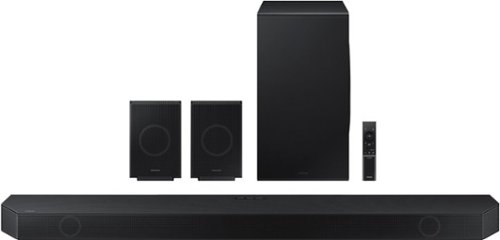
Experience our greatest of all time-level audio synchronized with your TV~s speakers* and customized to your living space. With intelligently tuned, 11.1.4 Ch. True Dolby Atmos Sound, the Q990D stands above the rest.
Customer Rating

5
Great sound with little fuss
on April 19, 2024
Posted by: CraigB
Pros
Clear dialog
Well balanced, slightly bright audio
Smooth bass
Realistic Atmos positional audio in a good room
HDMI 2.1 for 4K 120Hz passthrough
SpaceFit Sound Pro optimizes for room automatically
Private rear sound is great for nighttime listening
SmartThings integration
Includes integrated SmartThings Hub
Hub includes support for Matter
Quick and easy setup
Well built
Clear dialog
Well balanced, slightly bright audio
Smooth bass
Realistic Atmos positional audio in a good room
HDMI 2.1 for 4K 120Hz passthrough
SpaceFit Sound Pro optimizes for room automatically
Private rear sound is great for nighttime listening
SmartThings integration
Includes integrated SmartThings Hub
Hub includes support for Matter
Quick and easy setup
Well built
Cons
Subwoofer struggles when pushed
Can’t reproduce dynamic bass
Sound might be too bright for some
Slightly weak midtones
Limited equalizer in some modes
HDMI passthrough doesn’t always switch automatically
Display too compact too read
Design style not for everyone
Subwoofer struggles when pushed
Can’t reproduce dynamic bass
Sound might be too bright for some
Slightly weak midtones
Limited equalizer in some modes
HDMI passthrough doesn’t always switch automatically
Display too compact too read
Design style not for everyone
The Samsung Q990D at first seems to be a modest upgrade from the previous Q990C, which is good considering the previous generation well received. The design still has the angular design of the previous generation consisting of an all metal and plastic. There is no cloth anywhere. Depending on your taste, it might seem modern or overly aggressive looking. Taking it out of the box the soundbar feels heavy and well built. The subwoofer and satellites are connected wirelessly and only need to be plugged into power. The included remote is a small with dark text. It is not backlit or very easy to feel controls. It seems to be intended to be a secondary form of control. The soundbar can be controlled directly via the SmartThings app. There is a dot matrix display behind the front speaker grill, but it is small and hard to read from any distance from the soundbar.
Setup 9/10
You can tell the Q990D was intended to take a lot of the complexity out of a home theater setup. If you aren’t going to mount it to the wall all you need to do is plug in the speakers and you are ready to go. There is no tuning needed as they are set to calibrate automatically if left in the default setup. You do have EQ options which default to a simple bass and trouble adjustment. Additional EQ options are available in standard mode but some modes limit EQ options. The standard mode leaves the sound as is. The other modes adjust the sound to give a more surround sound effect but straight out of the box the sound needs little tweaking. Setting up the soundbar in the SmartThings app allows you to configure additional options such as Chromecast, Airplay, or configure it as a SmartThings Hub with Matter support.
You can tell the Q990D was intended to take a lot of the complexity out of a home theater setup. If you aren’t going to mount it to the wall all you need to do is plug in the speakers and you are ready to go. There is no tuning needed as they are set to calibrate automatically if left in the default setup. You do have EQ options which default to a simple bass and trouble adjustment. Additional EQ options are available in standard mode but some modes limit EQ options. The standard mode leaves the sound as is. The other modes adjust the sound to give a more surround sound effect but straight out of the box the sound needs little tweaking. Setting up the soundbar in the SmartThings app allows you to configure additional options such as Chromecast, Airplay, or configure it as a SmartThings Hub with Matter support.
Atmos Performance 9/10
Like previous models, movies are where this soundbar shines, assuming you have the right room for it. The room it is being used in is near ideal being a rectangular shape with a flat 10-foot ceiling. The only two issues it is has is a door that is at a 45-degree angle and a ceiling fan and both those do hamper the performance slightly. When trying out surround affects it sounds like the right front channel is coming from about 4 feet to the right of the soundbar. Similarly, the top center right channel sounds just like it is coming from a place where there is no speaker. However, the left side of the room has that angled door. This causes the left from channel to not sound quite as distinct or far to the left and the top center left channel to also not sound as distinct. Height was also less distinct with the ceiling fan but still good. It is still a surprise that it can do it at all. If your room isn’t the ideal shape recommended for Atmos it isn’t going to work miracles. Furthermore, while impressive, don’t expect this to be as impressive as a full Atmos system with speakers all around you. Overall, the result is impressive enough to make you question if it is worth it to go through all the hassle and complication of a full discrete Atmos system with separate speakers.
Like previous models, movies are where this soundbar shines, assuming you have the right room for it. The room it is being used in is near ideal being a rectangular shape with a flat 10-foot ceiling. The only two issues it is has is a door that is at a 45-degree angle and a ceiling fan and both those do hamper the performance slightly. When trying out surround affects it sounds like the right front channel is coming from about 4 feet to the right of the soundbar. Similarly, the top center right channel sounds just like it is coming from a place where there is no speaker. However, the left side of the room has that angled door. This causes the left from channel to not sound quite as distinct or far to the left and the top center left channel to also not sound as distinct. Height was also less distinct with the ceiling fan but still good. It is still a surprise that it can do it at all. If your room isn’t the ideal shape recommended for Atmos it isn’t going to work miracles. Furthermore, while impressive, don’t expect this to be as impressive as a full Atmos system with speakers all around you. Overall, the result is impressive enough to make you question if it is worth it to go through all the hassle and complication of a full discrete Atmos system with separate speakers.
Movies 9/10
Previous generations of this soundbar were great for movies and the Q990D is the same. In standard mode it plays the surround just as intended in the movies but if you like a little extra immersion, you can choose Adaptive Surround. While exactly how it works is a little vague, Adaptive Surround seems to take certain types of audio that would only play through the soundbar and play them through the surrounds as well. It brings the sound all around you but sometimes it goes a little too far and pipes the dialog of a person right in front you on the screen to every speaker in the room making it sound as if the person is talking around you. It really depends on your taste, but if you prefer a more natural sound then Standard works best. While the soundbar already sounds a bit bright, if you still have trouble hearing dialog it has two addional methods to help you hear what they are saying. First there is the traditional “Voice Enhancement” which ruins the rest of sound to favor dialog heavily. Unless you really have a hard time hearing dialog it is best to leave this setting off. If the natural tuning leaves you struggle still the “Active Voice Amplifier” is going to produce a more natural effect. It does still degrade the sound slightly but far better than old methods but in our family the default EQ does a nice job of making dialog understandable without sacrificing other sounds. While the highs are strong, the mids are slightly weak. While it is only slight, it makes deeper voices less pronounced but also removes some of the impact from certain action sounds in movies. That said, weaker mids generally seem common in soundbars, the result on the Q990D is minimal. The subwoofer is well matched to the setup and blends nicely with smooth bass that can also rumble in action scenes. The one place it is weak is in impactful bass. The sub just isn’t big enough to produce the hard thump without some distortion. Most people wouldn’t even notice it happening as it is subtle and normal in this size of system, but it doesn’t hold back some potential of the system.
Previous generations of this soundbar were great for movies and the Q990D is the same. In standard mode it plays the surround just as intended in the movies but if you like a little extra immersion, you can choose Adaptive Surround. While exactly how it works is a little vague, Adaptive Surround seems to take certain types of audio that would only play through the soundbar and play them through the surrounds as well. It brings the sound all around you but sometimes it goes a little too far and pipes the dialog of a person right in front you on the screen to every speaker in the room making it sound as if the person is talking around you. It really depends on your taste, but if you prefer a more natural sound then Standard works best. While the soundbar already sounds a bit bright, if you still have trouble hearing dialog it has two addional methods to help you hear what they are saying. First there is the traditional “Voice Enhancement” which ruins the rest of sound to favor dialog heavily. Unless you really have a hard time hearing dialog it is best to leave this setting off. If the natural tuning leaves you struggle still the “Active Voice Amplifier” is going to produce a more natural effect. It does still degrade the sound slightly but far better than old methods but in our family the default EQ does a nice job of making dialog understandable without sacrificing other sounds. While the highs are strong, the mids are slightly weak. While it is only slight, it makes deeper voices less pronounced but also removes some of the impact from certain action sounds in movies. That said, weaker mids generally seem common in soundbars, the result on the Q990D is minimal. The subwoofer is well matched to the setup and blends nicely with smooth bass that can also rumble in action scenes. The one place it is weak is in impactful bass. The sub just isn’t big enough to produce the hard thump without some distortion. Most people wouldn’t even notice it happening as it is subtle and normal in this size of system, but it doesn’t hold back some potential of the system.
A handle feature included with the soundbar is called Private Rear Sound. While most soundbars have a night mode, this one goes a step further. With the private rear surround is turns off the forward speakers and subwoofer and only plays audio through the rear surrounds allowing you to watch movies at night in bed without disturbing others. It works better than night mode because audio is close and clear instead of distant and quiet.
Music 7/10
Older versions of this soundbar were said to have great performance in movies but poor performance in music. While our family hasn’t had a chance to try the older version, the Q990D is a solid choice for music. It isn’t as good as it is for movies but it still, pleasant to play music on. The slightly bright tuning gives more of a presence to vocals but on occasion can sound slightly harsh. An example is Adele’s Hello. The Q990D really does a great job of reproducing the emotion in her voice but at the higher notes it can feel uncomfortable. This is more an audiophile critique whereas most people would think her voice sounds amazing on the Q990D. Overall, for such small speaker they do a very good job, but music still takes a back seat to movies. Just like in movies the subwoofer is well blended into the overall package and produces smooth, clean bass except for dynamic bass, such as a quick thump.
Older versions of this soundbar were said to have great performance in movies but poor performance in music. While our family hasn’t had a chance to try the older version, the Q990D is a solid choice for music. It isn’t as good as it is for movies but it still, pleasant to play music on. The slightly bright tuning gives more of a presence to vocals but on occasion can sound slightly harsh. An example is Adele’s Hello. The Q990D really does a great job of reproducing the emotion in her voice but at the higher notes it can feel uncomfortable. This is more an audiophile critique whereas most people would think her voice sounds amazing on the Q990D. Overall, for such small speaker they do a very good job, but music still takes a back seat to movies. Just like in movies the subwoofer is well blended into the overall package and produces smooth, clean bass except for dynamic bass, such as a quick thump.
Final Thoughts
Samsung has created a well rounded Atmos soundbar setup with the Q990D. While it has room for improvement it does a great job of being a well-rounded surround setup for most. If you are in the market for a premium Dolby Atmost soundbar that is great for movies as well as good for gaming while being simple to setup and use, then the Samsung Q990D is worth serious consideration.
Samsung has created a well rounded Atmos soundbar setup with the Q990D. While it has room for improvement it does a great job of being a well-rounded surround setup for most. If you are in the market for a premium Dolby Atmost soundbar that is great for movies as well as good for gaming while being simple to setup and use, then the Samsung Q990D is worth serious consideration.
I would recommend this to a friend!





Share this review:


+6points
6of 6voted this as helpful.
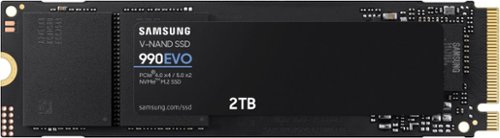
Fast speeds. Power efficiency. Temperature control. It~s everything you want in a storage device. It's compatible with the latest PCIe 4.0 x4 and PCIe 5.0 x2 interfaces, and boasts improved performance compared to 970 EVO Plus.
Posted by: CraigB
Pros
Consistent Speed
Single sided design can fit smaller chassis
Customizable with Samsung Magician
Encryption support
5-year warranty
Dual PCIe 4x4 and 5x2 modes
Consistent Speed
Single sided design can fit smaller chassis
Customizable with Samsung Magician
Encryption support
5-year warranty
Dual PCIe 4x4 and 5x2 modes
Cons
PCIe Gen 5 offers no advantage
Write speeds lower than advertised
No DRAM
PCIe Gen 5 offers no advantage
Write speeds lower than advertised
No DRAM
The Samsung 990 Evo is mainly a spec bump from the previous 980 Evo. Targeted at the budget crowd it doesn’t have DRAM and performance, while respectable, is on the lower end. It is a PCIe 5x2 capable drive, but it doesn’t add any real benefit as the rated speed is well withing the PCIe 4x4 specs. The single sided chip design comes in handy where space is a premium such as in an Ultrabook. Samsung claims the sticker serves as a heat spreader. In testing, idle temps have been stable but a bit on the high side hovering between 49-52C. However, stress testing by writing a 1TB test file did not cause any notable change in temps suggesting the sticker might be helping.
CrystalDiskMark shows Performance is consistently 200-500MBs slower than the rated write speeds. Read speeds have varied from about 150MBs below the rated speed to 100MBs above. Interestingly, Samsung Magician benchmarks report even slower speeds with both read and write speeds below spec. While it is unlikely you will notice the difference, it is a bit of a surprise to see a Samsung SSD test below the rated speed. Like retail Samsung SSDs, the 990 Evo is compatible with the Magician software allowing easy OS migration as well as over provision the drive for reliability or turning off power saving for maximum performance. The drive also supports encryption which is nice if you are installing it in a laptop.
Overall, the 990 Evo is not a standout SSD but still good, nonetheless. Considering Samsung’s track record over the years with SSDs this drive will likely be consistent and reliable for years to come. It also comes with a 5-year warranty to back it up. It would make a good upgrade for an Ultrabook or a budget gaming system. If you are looking for a budget SSD with decent performance, the Samsung 990 Evo could be a good fit.
I would recommend this to a friend!


Share this review:


0points
0of 0voted this as helpful.

Ring~s best battery-powered doorbell camera, loaded with cutting-edge features. Battery Doorbell Pro delivers Head-to-Toe HD+ Video, super-precise 3D Motion Detection with Bird's Eye View that shows you where visitors went on an overhead map of your property, and more.
Customer Rating

4
Good but still room for improvement
on March 20, 2024
Posted by: CraigB
Pros
Works with battery and hardwired
Includes wedge kit
Works with existing hardwired chime
Ecosystem of accessories available
IR adjusts so faces aren’t over exposed
Pre-roll records before event
Can announce on Amazon Echo devices
Shows video on Echo Show when doorbell pressed
Excellent voice quality when noise cancelling isn’t active
Works with battery and hardwired
Includes wedge kit
Works with existing hardwired chime
Ecosystem of accessories available
IR adjusts so faces aren’t over exposed
Pre-roll records before event
Can announce on Amazon Echo devices
Shows video on Echo Show when doorbell pressed
Excellent voice quality when noise cancelling isn’t active
Cons
Noise cancellation sometimes cancels out voices
Parts pouches make it easy to lose parts
Installation instructions are vague on what parts to use
Slow trickle charging when hardwired
Still loses power when battery removed while hardwired
5 second pre-roll is pixelated and poor quality
Doesn’t capture fast motion clearly due to pixelated pre-roll
Rarely detects packages
Shows current video and not event video on Echo Show
Motion Alert option not available even hardwired while showing it
No video is saved if there is an internet outage or no subscription
Nearly every feature requires a subscription
No HomeKit support
Noise cancellation sometimes cancels out voices
Parts pouches make it easy to lose parts
Installation instructions are vague on what parts to use
Slow trickle charging when hardwired
Still loses power when battery removed while hardwired
5 second pre-roll is pixelated and poor quality
Doesn’t capture fast motion clearly due to pixelated pre-roll
Rarely detects packages
Shows current video and not event video on Echo Show
Motion Alert option not available even hardwired while showing it
No video is saved if there is an internet outage or no subscription
Nearly every feature requires a subscription
No HomeKit support
The Ring Battery Doorbell Pro is more evolutionary than revolutionary. Specs wise it seems nearly identical to the older Doorbell Pro 2 but with a battery and improved IR. Out of the box it looks nearly identical to previous Ring battery style doorbells with subtle changes like the camera, IR lights, and light right around the button look slightly different. Each seems slightly larger than previous generations with the ring light around the doorbell button being more visible from the street. In the past you would get the different faceplate covers in the box, then it was changed to you could get one extra for free, but now other faceplates are an extra cost if you want to change. The wedge kit is now included in the box. While battery powered, you can opt to hardwire the doorbell. If you go this route, it uses the doorbell wiring to trickle charge the battery so if there are enough events the battery could still drain. The doorbell will not operate without a charged battery even if hardwired.
Installation 7/10
There are multiple installation options available with hardware included. Parts for most options are available in the kit. The instructions are shown in the app based on what mounting method you choose but it doesn’t say much in the paperwork in the box. This could leave some confused. Furthermore, even in the app the instructions for using the wedge indicate using screws that are too long. The mounting hardware is also in pouches made of a waxy paper than is held closed by a flap meaning extra care should be taken not to lose parts. It feels like they went a bit too far reducing waste while creating these pouches. Unlike some Ring doorbells you don’t need to install any parts in your doorbell chime if mounting hardwired. You just make sure the doorbell transformer has the proper rating. Strangely the installation process didn’t offer any guidance on the hardware process and initially the mechanical chime wasn’t ringing. After digging through the app, it was discovered there is a section to choose what type of hardwired chime you have. You can choose manual or attempt to auto detect. Once set up, the original doorbell rang correctly. It’s strange that this seemed buried even though this is a battery powered doorbell.
There are multiple installation options available with hardware included. Parts for most options are available in the kit. The instructions are shown in the app based on what mounting method you choose but it doesn’t say much in the paperwork in the box. This could leave some confused. Furthermore, even in the app the instructions for using the wedge indicate using screws that are too long. The mounting hardware is also in pouches made of a waxy paper than is held closed by a flap meaning extra care should be taken not to lose parts. It feels like they went a bit too far reducing waste while creating these pouches. Unlike some Ring doorbells you don’t need to install any parts in your doorbell chime if mounting hardwired. You just make sure the doorbell transformer has the proper rating. Strangely the installation process didn’t offer any guidance on the hardware process and initially the mechanical chime wasn’t ringing. After digging through the app, it was discovered there is a section to choose what type of hardwired chime you have. You can choose manual or attempt to auto detect. Once set up, the original doorbell rang correctly. It’s strange that this seemed buried even though this is a battery powered doorbell.
Configuration 7/10
Basic configuration is straightforward as the wizard walks you through the process. You can choose basic motion detection or smart alerts. Smart alerts are slower but attempt to reduce nuisance alerts by only alerting you to things like people or packages. The configuration gives a lot of flexibility but can also be a bit confusing. For example, you can set multiple motion zones but it doesn’t allow you to define what the zone does when creating it. If you want to create a zone to watch for packages you must go to the Smart Alerts section and choose package alerts before it allows you to create a package zone. This split process just makes things more confusing. At times the organization feels as if features were just tacked on to an existing menu with no thought to organization. Some aspects feel clean and well sorted out while others feel oddly out of place.
Basic configuration is straightforward as the wizard walks you through the process. You can choose basic motion detection or smart alerts. Smart alerts are slower but attempt to reduce nuisance alerts by only alerting you to things like people or packages. The configuration gives a lot of flexibility but can also be a bit confusing. For example, you can set multiple motion zones but it doesn’t allow you to define what the zone does when creating it. If you want to create a zone to watch for packages you must go to the Smart Alerts section and choose package alerts before it allows you to create a package zone. This split process just makes things more confusing. At times the organization feels as if features were just tacked on to an existing menu with no thought to organization. Some aspects feel clean and well sorted out while others feel oddly out of place.
Included Features 3/10
The only features available without a subscription are doorbell alerts, answer the doorbell, and live view. Smart motion alerts, recording, Smart Responses, mode settings, video history, and video pre-roll require a subscription. Included is a 30-day trial to the Protect plan.
The only features available without a subscription are doorbell alerts, answer the doorbell, and live view. Smart motion alerts, recording, Smart Responses, mode settings, video history, and video pre-roll require a subscription. Included is a 30-day trial to the Protect plan.
Video Quality 7/10
Years ago, the quality of the Battery Doorbell Pro would have been excellent, but cameras have improved, and Ring is now average quality. Videos are sharpened appropriately without being over sharpened and videos are well exposed day and night with HDR doing a good job of keeping both light and dark areas well exposed. Compression artifacts are limited, and overall image quality is good. At night the IR will default to try to expose the face properly without overexposing it. When placed near light brick or stone it can cut down on the glare nicely to keep anyone at your door properly exposed. The overall quality is an improvement over previous generations but still has room to improve. It would have been nice to finally see 4K equivalent video for more detail. While the pre-roll feature is nice to have the quality is almost useless as it just gives you an extremely blurry 5 second clip before the event. For faster events, such as package drop-off, sometimes the entire clip is in the blurry pre-roll. Furthermore, while you do get head to toe coverage you don’t get full coverage. Ironically Amazon drivers often place packages under the doorbell instead of across from it in view. With the current field of view, it can’t see packages directly below.
Years ago, the quality of the Battery Doorbell Pro would have been excellent, but cameras have improved, and Ring is now average quality. Videos are sharpened appropriately without being over sharpened and videos are well exposed day and night with HDR doing a good job of keeping both light and dark areas well exposed. Compression artifacts are limited, and overall image quality is good. At night the IR will default to try to expose the face properly without overexposing it. When placed near light brick or stone it can cut down on the glare nicely to keep anyone at your door properly exposed. The overall quality is an improvement over previous generations but still has room to improve. It would have been nice to finally see 4K equivalent video for more detail. While the pre-roll feature is nice to have the quality is almost useless as it just gives you an extremely blurry 5 second clip before the event. For faster events, such as package drop-off, sometimes the entire clip is in the blurry pre-roll. Furthermore, while you do get head to toe coverage you don’t get full coverage. Ironically Amazon drivers often place packages under the doorbell instead of across from it in view. With the current field of view, it can’t see packages directly below.
Audio Quality 8/10
Audio quality seems to have improved further. The speaker in the doorbell is very clear making it easy for anyone at the door to understand what was said. It is also very clear and loud for the Smart Responses. While the speaker is great, the microphone is closer to good. It does pick up speech nicely but often it comes in too quiet, and the noise cancellation sometimes is a bit heavy handed. It will cancel out points of the person speaking at the door but keep the echo created at the entryway. Thankfully this is an easy fix by asking the person at the door to step forward and speak a little louder, but Ring still has some refinement on this front. Overall, it is still likely the best audio quality out of a Ring camera so far.
Audio quality seems to have improved further. The speaker in the doorbell is very clear making it easy for anyone at the door to understand what was said. It is also very clear and loud for the Smart Responses. While the speaker is great, the microphone is closer to good. It does pick up speech nicely but often it comes in too quiet, and the noise cancellation sometimes is a bit heavy handed. It will cancel out points of the person speaking at the door but keep the echo created at the entryway. Thankfully this is an easy fix by asking the person at the door to step forward and speak a little louder, but Ring still has some refinement on this front. Overall, it is still likely the best audio quality out of a Ring camera so far.
Alerts 6/10
While admittedly some of the initial issue with alerts were user error, some alert issues persist. Alerts for a person at the door have been reliable with the only caveat being that when video is displayed on any Echo Show it just brings up the live view and misses the event that triggered the alert. When someone drops an item off at the door the Echo’s will announce and then bring up a live video of the front door with no one there. Ideally this should bring up the pre-roll first to show what triggered the event. Using Smart Alerts to alert for packages has been a disappointment. After verifying the package zone has been created, is active, and sensitivity is set to maximum package alerts only work about 10% of the time even missing an Amazon delivery box with the Amazon logo pointed squarely at the doorbell. Even deleting the zone and adding it back hasn’t improved package detection so far.
While admittedly some of the initial issue with alerts were user error, some alert issues persist. Alerts for a person at the door have been reliable with the only caveat being that when video is displayed on any Echo Show it just brings up the live view and misses the event that triggered the alert. When someone drops an item off at the door the Echo’s will announce and then bring up a live video of the front door with no one there. Ideally this should bring up the pre-roll first to show what triggered the event. Using Smart Alerts to alert for packages has been a disappointment. After verifying the package zone has been created, is active, and sensitivity is set to maximum package alerts only work about 10% of the time even missing an Amazon delivery box with the Amazon logo pointed squarely at the doorbell. Even deleting the zone and adding it back hasn’t improved package detection so far.
Battery Changes 9/10
If you need to use the doorbell solely on battery the process for removing/changing batteries is relatively quick. There is a torx screw on bottom that is called a security screw that holds the faceplate on. Remove the single screw and the battery can be removed by pressing a single button. While it would be nice if Ring uses a key or something quicker and more secure the process is reasonably quick and easy. If you don’t want to wait for the battery to charge you can purchase spare batteries.
If you need to use the doorbell solely on battery the process for removing/changing batteries is relatively quick. There is a torx screw on bottom that is called a security screw that holds the faceplate on. Remove the single screw and the battery can be removed by pressing a single button. While it would be nice if Ring uses a key or something quicker and more secure the process is reasonably quick and easy. If you don’t want to wait for the battery to charge you can purchase spare batteries.
Final Thoughts
If you are looking for a video doorbell that integrates well with other platforms, don’t like subscriptions, or want local video storage then this doorbell is not for you. If you like Amazon products, are ok with a subscription, want a battery powered video doorbell solution that is well supported, and like the idea of an entire ecosystem of accessories that are designed to complement each other and build out your home security then the Ring Battery Doorbell Pro could be a good fit for you.
If you are looking for a video doorbell that integrates well with other platforms, don’t like subscriptions, or want local video storage then this doorbell is not for you. If you like Amazon products, are ok with a subscription, want a battery powered video doorbell solution that is well supported, and like the idea of an entire ecosystem of accessories that are designed to complement each other and build out your home security then the Ring Battery Doorbell Pro could be a good fit for you.
I would recommend this to a friend!






Share this review:


+1point
1of 1voted this as helpful.
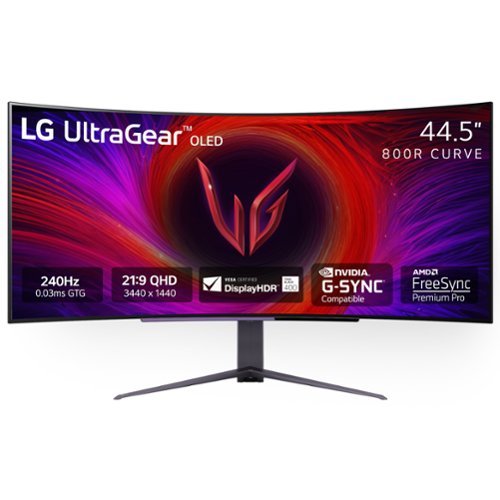
Experience stunning performance with the huge 45~ curved WQHD LG UltraGear OLED gaming monitor. How huge is this UltraGear? The 45" with a 21:9 aspect ratio has more screen area than a 49" gaming monitor with a 32:9 aspect ratio- more screen for a more captivating experience. The OLED screen is certified VESA DisplayHDR True Black 400 which enables gamers to experience HDR in games as developers intended. The screen displays stunning, rich black levels and bright, deep color contrast for the on-screen visuals gamers crave. Stay a step ahead of the competition with an ultra-fast refresh rate up to 240Hz and .03ms response time that will bring you into the game like never before~. And with the steep and dramatic 800R curve, you~ll feel enveloped in the action. This UltraGear's built-in speakers and multiple connectivity options including USB Type-C make this UltraGear, the ultra-essential screen for your battlestation setup.
Posted by: CraigB
Pros
Excellent anti-glare coating
No color shift off angle
Bright enough for use in a well-lit room
Built in speakers
Aspect ratio good for games and productivity
Usable for productivity work
Decent games support for the aspect ratio
Easy to adjust stand
Light for the size
Good color accuracy with factory calibration
Supports PIP and split screen
No perceivable lag
Stays cool
Integrated tools to prevent/ reduce chances of burn-in
Excellent anti-glare coating
No color shift off angle
Bright enough for use in a well-lit room
Built in speakers
Aspect ratio good for games and productivity
Usable for productivity work
Decent games support for the aspect ratio
Easy to adjust stand
Light for the size
Good color accuracy with factory calibration
Supports PIP and split screen
No perceivable lag
Stays cool
Integrated tools to prevent/ reduce chances of burn-in
Cons
Low PPD at normal viewing distance
Pixel arrangement not as good for productivity
Anti-glare matt finish reduces quality and contrast
Screen wobbles on stand
Old stand included instead of new compact stand
Limited color options for accent lights and no integration
Built in speakers lack range
Low PPD at normal viewing distance
Pixel arrangement not as good for productivity
Anti-glare matt finish reduces quality and contrast
Screen wobbles on stand
Old stand included instead of new compact stand
Limited color options for accent lights and no integration
Built in speakers lack range
The LG UltraGear 45 45GS95QE-B has been updated from the R model to now include DisplayHDR True Black 400, integrated speakers, and specifies an updated low-profile stand although this unit included the old-style stand. The monitor has support for DisplayPort over USB-C allowing a single connection to your system for audio, video, USB, and power while displaying at native resolution and 240Hz. The USB-C port power delivery wattage is not listed but it can charge a laptop. On the back are two USB-A ports to connect accessories. Audio passthrough is also supported via a headphone jack on the bottom of the monitor. Thankfully, unlike recent trends with monitors requiring a remote, all functions of the UltraGear 45 are controlled via onscreen menu via a joystick on the bottom of the monitor.
A common concern brought up with OLED monitors is burn-in. Some reports state that LG’s 2-year warranty covers burn-in, but the included warranty pamphlet did not specify one way or another if this was included. That said, in the monitor controls there are options to prevent/reduce the odds of burn in such as pixel shifting, integrated screen saver, and pixel cleaning.
Setup 8/10
Basic setup is very easy, particularly for the size. You just remove the stand from the box and with a single captured nut you lock the base into the stand. After that you slot the monitor into the mount, and it locks into place. Thankfully the screen itself is light for the size but still feels sturdy so lifting into place is relatively easy. This is likely due in part to the large external power brick. The stand can be adjusted for height, tilt, and rotation.
Basic setup is very easy, particularly for the size. You just remove the stand from the box and with a single captured nut you lock the base into the stand. After that you slot the monitor into the mount, and it locks into place. Thankfully the screen itself is light for the size but still feels sturdy so lifting into place is relatively easy. This is likely due in part to the large external power brick. The stand can be adjusted for height, tilt, and rotation.
Picture Quality 8/10
The matt anti-glare coating has both pros and cons. It helps reject ambient light from the room well. It also allows the OLED to show truer black in a well-lit room versus a glossy OLED. The downside is it does reduce how vibrant the colors are a bit just like any anti-glare coating. The effect is not as severe as on an IPS panel but still noticeable. That said, if you want to use this screen from time to time in a bright room it is worth the tradeoff. Colors seem pretty accurate, but it also depends on which profile you use. The specs state it comes factory calibrated but can also be calibrated using a special tool available separately but for the majority of uses the color accuracy is very good.
The matt anti-glare coating has both pros and cons. It helps reject ambient light from the room well. It also allows the OLED to show truer black in a well-lit room versus a glossy OLED. The downside is it does reduce how vibrant the colors are a bit just like any anti-glare coating. The effect is not as severe as on an IPS panel but still noticeable. That said, if you want to use this screen from time to time in a bright room it is worth the tradeoff. Colors seem pretty accurate, but it also depends on which profile you use. The specs state it comes factory calibrated but can also be calibrated using a special tool available separately but for the majority of uses the color accuracy is very good.
Speakers 7/10
Overall, it is nice for LG to include speakers in the monitor this year. For those of you who either don’t have speakers yet or prefer a clean aesthetic the built-in speakers do a passable job. They won’t wow you with their range, but they do get very loud. In fact, with the amount of space they occupy in the shell you would think the range would be far better. If you choose the use the built-in speakers you can also take advantage of the audio passthrough via a headphone jack on the bottom of the monitor.
Overall, it is nice for LG to include speakers in the monitor this year. For those of you who either don’t have speakers yet or prefer a clean aesthetic the built-in speakers do a passable job. They won’t wow you with their range, but they do get very loud. In fact, with the amount of space they occupy in the shell you would think the range would be far better. If you choose the use the built-in speakers you can also take advantage of the audio passthrough via a headphone jack on the bottom of the monitor.
Lighting 5/10
For those who don’t care about RGB lighting, the effects can be turned off. If you are the type who likes RGB lighting, you will find the options limited. The lighting effects aren’t controllable via the PC and don’t sync with any apps. Your options are Off, cycling, or one of 4 static color presets you can adjust. The effect shows on the back and a bottom firing Led. It looks nice but the overall effect is very simple.
For those who don’t care about RGB lighting, the effects can be turned off. If you are the type who likes RGB lighting, you will find the options limited. The lighting effects aren’t controllable via the PC and don’t sync with any apps. Your options are Off, cycling, or one of 4 static color presets you can adjust. The effect shows on the back and a bottom firing Led. It looks nice but the overall effect is very simple.
Productivity 6/10
It’s no surprise that a gaming focused OLED wouldn’t be the best for productivity work. The pixel arrangement still isn’t fully supported by Windows or Mac and the PPD (Pixels Per Degree) for the normal usage distance is not the best meaning for productivity work you will see the pixels even sitting 40 inches from the screen and if you sit closer you will see color fringing. With some adjustments, and maybe using a third-party tool, you can minimize the effects, but overall text will still seem less sharp. That said, when the monitor is the right distance away and adjusted correctly it is usable. If you need to do some light productivity work or basic graphics work that requires some color accurate work, it can do a passable job.
It’s no surprise that a gaming focused OLED wouldn’t be the best for productivity work. The pixel arrangement still isn’t fully supported by Windows or Mac and the PPD (Pixels Per Degree) for the normal usage distance is not the best meaning for productivity work you will see the pixels even sitting 40 inches from the screen and if you sit closer you will see color fringing. With some adjustments, and maybe using a third-party tool, you can minimize the effects, but overall text will still seem less sharp. That said, when the monitor is the right distance away and adjusted correctly it is usable. If you need to do some light productivity work or basic graphics work that requires some color accurate work, it can do a passable job.
Content Consumption 7/10
While the screen is a large OLED and does have an overall nice picture it is unlikely most would want to have binge sessions of their favorite show sitting in front of this monitor. It is perfectly fine for shorter periods but sitting in front of a monitor this curved just looking straight ahead just isn’t its strong point. There are no real complaints about picture quality as it is very nice. The issue is just the curve feels far more natural for active use. That said, if that doesn’t bother you then the only real downsize are the black bars on the left and right side since most content isn’t offered for the aspect ratio. However, if you are able to watch the true theatrical release, then the 21:9 aspect ratio becomes a positive because you can watch the unaltered theatrical release in the native aspect ratio.
While the screen is a large OLED and does have an overall nice picture it is unlikely most would want to have binge sessions of their favorite show sitting in front of this monitor. It is perfectly fine for shorter periods but sitting in front of a monitor this curved just looking straight ahead just isn’t its strong point. There are no real complaints about picture quality as it is very nice. The issue is just the curve feels far more natural for active use. That said, if that doesn’t bother you then the only real downsize are the black bars on the left and right side since most content isn’t offered for the aspect ratio. However, if you are able to watch the true theatrical release, then the 21:9 aspect ratio becomes a positive because you can watch the unaltered theatrical release in the native aspect ratio.
Gaming 9/10
It’s no surprise that an UltraGear would do better for gaming. The anti-glare screen means you can game in a brighter room or switch to a darker room and the matt finish is hardly noticeable. The good thing is that the downsides for OLEDs in productivity work don’t matter for gaming. While text in apps was somewhat pixelated and blurry, in games it was sharp throughout. LG also touted at launch that this screen stays cool unlike some other OLEDs during gameplay. Maybe it is in part because the power brick is separate of the monitor or some other feature but during extended use there was no significant heat coming off the screen. Hopefully this also helps with longevity.
It’s no surprise that an UltraGear would do better for gaming. The anti-glare screen means you can game in a brighter room or switch to a darker room and the matt finish is hardly noticeable. The good thing is that the downsides for OLEDs in productivity work don’t matter for gaming. While text in apps was somewhat pixelated and blurry, in games it was sharp throughout. LG also touted at launch that this screen stays cool unlike some other OLEDs during gameplay. Maybe it is in part because the power brick is separate of the monitor or some other feature but during extended use there was no significant heat coming off the screen. Hopefully this also helps with longevity.
While the low PPI results in a low PPD which is less-than-ideal for productivity, the tradeoff works better for gaming. The low PPD isn’t noticeable in game quality and translates to overall high FPS without having to spring for the latest top end GPU.
What is noticeable is the fast response time. Between the near instant response time and 240Hz refresh rate it makes games that seemed hard almost easy by comparison. Before it seemed like Doom Eternal is challenging on Hurt Me Plenty. Well, it turns out some of the challenge was the old 60Hz panel because now Nightmare feels like what Hurt Me Plenty did before. The high contrast ratio is also useful for in games like Halo Infinite making dark areas easily viewable without blowing out the light areas. Surprisingly there were a fair number of games that were able to handle the 21:9 aspect natively without the need for black bars on the side or causing a fisheye effect when gaming, like Minecraft can do with some ultra-wide screens. That said, if you set your field of view too high, you sit too close, and you move to fast get ready to feel a little sick. The 800R curve also contributes to that as well as adding an echo to your voice. The wide field of view takes some getting used to as our family discovered so if it is your first time take it slow.
Final Thoughts
The LG UltraGear 45GS95QE-B shines as a gaming monitor and does a respectable job as a productivity monitor. You can’t fully fault the productivity shortcomings on the monitor as OLED monitors for productivity just haven’t caught up to IPS yet. That said if you are in the market for an ultra-widescreen curved monitor that can handle some productivity work but puts the focus first on gaming, then this monitor is worth serious consideration.
The LG UltraGear 45GS95QE-B shines as a gaming monitor and does a respectable job as a productivity monitor. You can’t fully fault the productivity shortcomings on the monitor as OLED monitors for productivity just haven’t caught up to IPS yet. That said if you are in the market for an ultra-widescreen curved monitor that can handle some productivity work but puts the focus first on gaming, then this monitor is worth serious consideration.
I would recommend this to a friend!






Share this review:


+2points
3of 4voted this as helpful.

The new Alienware m16 R2 gaming laptop is designed to be 15% smaller than the previous generation, with more efficient airflow, making it ideal for gaming and more, wherever you go.
Customer Rating
4
Great System, Ok Screen
on February 28, 2024
Posted by: CraigB
Pros
Sturdy chassis
No deck flex
Heat is well isolated from the dark only getting warm
More compact design
Metal outer shell
Fast SSD
Upgradable SSD, RAM, and Wi-Fi
Dual SSD slots
Wi-Fi 7 support with Intel Chip
Very nice typing experience
Good trackpad
Subdued design
Stealth mode keeps things cool and quite for basic tasks
Relatively small power adapter
Ethernet jack
Fast screen with no perceivable lag
No need to restart for MUX switch
Sturdy chassis
No deck flex
Heat is well isolated from the dark only getting warm
More compact design
Metal outer shell
Fast SSD
Upgradable SSD, RAM, and Wi-Fi
Dual SSD slots
Wi-Fi 7 support with Intel Chip
Very nice typing experience
Good trackpad
Subdued design
Stealth mode keeps things cool and quite for basic tasks
Relatively small power adapter
Ethernet jack
Fast screen with no perceivable lag
No need to restart for MUX switch
Cons
Trackpad rattles making it feel cheap
Fans very loud during heavy tasks
Mediocre speakers
Display is too dim
Poor contrast ratio of screen
Poor webcam
Heat exhausts to the sides on your hand when using a mouse
All USB-A ports on right side
Slow to wake from sleep
Trackpad rattles making it feel cheap
Fans very loud during heavy tasks
Mediocre speakers
Display is too dim
Poor contrast ratio of screen
Poor webcam
Heat exhausts to the sides on your hand when using a mouse
All USB-A ports on right side
Slow to wake from sleep
The Alienware M16 R2 is the successor to the M16 R1 which had the unusual design with the “Thermal Shelf” which is Dells word for the unique protrusion at the back of the older series. With the M16 R2 they have removed the thermal shelf, which reduces cooling slightly meaning you can’t get the highest tier GPUs, but it also shrinks the overall footprint of the laptop significantly. The bezels of the screen have also been greatly reduced for an overall more appealing design. Finally, the keyboard has been pushed more to the back allowing for a larger trackpad and more space for a wrist rest. The function keys on the top of the keyboard also serve the purpose of controlling Performance Mode, Stealth Mode, as well as screen and keyboard brightness. Volume controls are on the right side of the keyboard arranged vertically. Taking the laptop out of the box you immediately notice the reduced footprint. While still on the heavy side it doesn’t feel excessively heavy for a gaming laptop. It also feels very sturdy with no hint of chassis or deck flex. Screen hinge is tight as well as the screen has minimal flex. The outer shell is metal but has a coating on the bottom that makes it feel somewhat like plastic. The deck has the same soft texture finish that Dell also uses on their XPS lineup. It feels comfortable to your wrists, but it does tend to show marks from oil on your skin. With the matt finish they are bit hard to clean off. Thankfully they are only visible at certain angles. For the ports Dell put the USB-C, Thunderbolt, and HDMI on the back which is nice. However, the USB-A for a mouse or other peripherals is on the ride side where most users will have their mouse. Left-handed might be happy but then they also put the ethernet jack to the middle left instead of the back which would make more sense.
Included in the box is a 240-watt power adapter. This means you can run turbo for both the CPU and GPU simultaneously. For the output the power adapter is also quite compact for the output, so you don’t need to sacrifice performance or portability. The only downside is because of the power draw of the system Dell opted not to offer USB-C charging support meaning you are going to have to bring one more power adapter in your bag. Thankfully the reduce footprint and reduced weight for the specs make the whole package far more portable than previous generations.
Display 6/10
Let’s start by highlighting the odd compromises. On paper the display seems pretty good but maybe a little on the dim side for modern upper midrange gaming laptops. In practice you will likely never take it off max brightness even in a dark room. This isn’t an HDR display either so expect gaming with dark scenes to be hard to make out details. If you like slow paced games like Minecraft, the RTX4070 will easily handle nearly any texture pack but the screen will make textures look washed out and colors hard to discern. Contrast is similarly sacrificed as well. In games like Doom Eternal the reds just don’t look as vivid as you expect. This of course also extends to work. If you do any creative work with colors, expect to be underwhelmed as the display just doesn’t have range. However, if you mostly play fast-paced games and mostly in the dark the tables turn. The display doesn’t show the slightly bit of lag or ghosting. While Doom Eternal didn’t look the most vivid it played buttery smooth. The same went for Halo Infinite. While this is marked as an all-around laptop, the screen says it is more an FPS gaming laptop. If that is your wheelhouse then you might find the responsiveness worth the tradeoff.
Let’s start by highlighting the odd compromises. On paper the display seems pretty good but maybe a little on the dim side for modern upper midrange gaming laptops. In practice you will likely never take it off max brightness even in a dark room. This isn’t an HDR display either so expect gaming with dark scenes to be hard to make out details. If you like slow paced games like Minecraft, the RTX4070 will easily handle nearly any texture pack but the screen will make textures look washed out and colors hard to discern. Contrast is similarly sacrificed as well. In games like Doom Eternal the reds just don’t look as vivid as you expect. This of course also extends to work. If you do any creative work with colors, expect to be underwhelmed as the display just doesn’t have range. However, if you mostly play fast-paced games and mostly in the dark the tables turn. The display doesn’t show the slightly bit of lag or ghosting. While Doom Eternal didn’t look the most vivid it played buttery smooth. The same went for Halo Infinite. While this is marked as an all-around laptop, the screen says it is more an FPS gaming laptop. If that is your wheelhouse then you might find the responsiveness worth the tradeoff.
Speakers 4/10
The other weak area for the M16 R2 is the speakers. They are both quiet and lack range. There is no bass at all and midtones are underrepresented. The highs are good and so voices and positional audio is decent but not a standout. They get the job done but they are not what you expect from an upper midrange gaming laptop.
The other weak area for the M16 R2 is the speakers. They are both quiet and lack range. There is no bass at all and midtones are underrepresented. The highs are good and so voices and positional audio is decent but not a standout. They get the job done but they are not what you expect from an upper midrange gaming laptop.
Webcam 6/10
It seems webcams on laptops are still not a high priority in 2024. While it is a 1080P webcam it has a lot of noise in anything but bright light and overall has a soft appearance. That said, it gets the job done and as a bonus works with Windows Hello. It might work for a start if your are streamer but separate webcam should be on your list of upgrades.
It seems webcams on laptops are still not a high priority in 2024. While it is a 1080P webcam it has a lot of noise in anything but bright light and overall has a soft appearance. That said, it gets the job done and as a bonus works with Windows Hello. It might work for a start if your are streamer but separate webcam should be on your list of upgrades.
Cooling 8/10
Cooling is both a good and a bad and may explain why not much was put into the speakers. In Performance mode the fan profile favors maximum cooling, and they can shed lots of heat. The system is automatically overlocked. You will get higher performance while keeping heat in check, but it is loud. At full tilt the family could hear the M16 R2 running from the next room. It wouldn’t have mattered how good the speakers are because the fans all full tilt require headphones. It is mostly a loud air rushing sound, but one thing Dell has not mastered yet is bearing whine. If you have more sensitive ears, you can hear fan bearing whine as well as a slight subtle whistle as the air exhausts. It also shoots that air straight out to the left and right which can get your hands pretty toasty. That said, if maximum stable performance is your goal the fans can handle the job. The good thing is on stealth mode the M16 R2 is extremely quiet for such a beefy gaming laptop. The colors switch to plain white and the fan profile favors silence, and it shows. Performance drops but still holds outs well for short bursts.
Cooling is both a good and a bad and may explain why not much was put into the speakers. In Performance mode the fan profile favors maximum cooling, and they can shed lots of heat. The system is automatically overlocked. You will get higher performance while keeping heat in check, but it is loud. At full tilt the family could hear the M16 R2 running from the next room. It wouldn’t have mattered how good the speakers are because the fans all full tilt require headphones. It is mostly a loud air rushing sound, but one thing Dell has not mastered yet is bearing whine. If you have more sensitive ears, you can hear fan bearing whine as well as a slight subtle whistle as the air exhausts. It also shoots that air straight out to the left and right which can get your hands pretty toasty. That said, if maximum stable performance is your goal the fans can handle the job. The good thing is on stealth mode the M16 R2 is extremely quiet for such a beefy gaming laptop. The colors switch to plain white and the fan profile favors silence, and it shows. Performance drops but still holds outs well for short bursts.
Keyboard 10/10
While not a perfect keyboard, it comes extremely close. The keys have good travel with a distinct activation point and linear movement. The deck feels solid with no noticeable flex and the heat seems to be well isolated from your hands. Spacing feels very similar to a standard keyboard to adjust time is short. Typing is fast and accurate and so far, there hasn’t been a hint of ghosting. Even though it is a gaming first laptop the responsiveness of the keyboard works equally well for business. The typing experience would be considered respectable even if this was an independent keyboard. The keycaps are visible without backlighting and the backlighting is uniform with no visible hot or cold spots.
While not a perfect keyboard, it comes extremely close. The keys have good travel with a distinct activation point and linear movement. The deck feels solid with no noticeable flex and the heat seems to be well isolated from your hands. Spacing feels very similar to a standard keyboard to adjust time is short. Typing is fast and accurate and so far, there hasn’t been a hint of ghosting. Even though it is a gaming first laptop the responsiveness of the keyboard works equally well for business. The typing experience would be considered respectable even if this was an independent keyboard. The keycaps are visible without backlighting and the backlighting is uniform with no visible hot or cold spots.
Trackpad 8/10
The trackpad is good but feels a bit cheap. It has a semi smooth server, so your finger doesn’t glide silky smooth like some, but movement is very good overall. While it does not indicate it is a precision touchpad it feels very much like one. The main thing that degrades the experience is the rattle. When you tap to click the touchpad rattles. It doesn’t rattle like something was assembled wrong but like the mechanism allows too much play. It in no way affects the functionality but it does take away from the feeling of quality.
The trackpad is good but feels a bit cheap. It has a semi smooth server, so your finger doesn’t glide silky smooth like some, but movement is very good overall. While it does not indicate it is a precision touchpad it feels very much like one. The main thing that degrades the experience is the rattle. When you tap to click the touchpad rattles. It doesn’t rattle like something was assembled wrong but like the mechanism allows too much play. It in no way affects the functionality but it does take away from the feeling of quality.
Battery Life 7/10
Intel made a lot of noise about the new CPU chiplet design being more power efficient, but Intel still is last when it comes to laptop battery life. The best the M16 R2 could do was near 6 hours of battery life on stealth just typing. There wasn’t a chance to test the exact time but after 4 hours of usage the battery life each time would indicate the system could last overall about 6 hours to slightly less. It is ok battery life for a gaming rig but doesn’t seem like an improvement over prior generations. Gaming battery life would be harder to pin to a specific timeframe as it really depends on what game it is. That said, it is safe to say if the game can’t run on the iGPU then battery life will be extremely short.
Intel made a lot of noise about the new CPU chiplet design being more power efficient, but Intel still is last when it comes to laptop battery life. The best the M16 R2 could do was near 6 hours of battery life on stealth just typing. There wasn’t a chance to test the exact time but after 4 hours of usage the battery life each time would indicate the system could last overall about 6 hours to slightly less. It is ok battery life for a gaming rig but doesn’t seem like an improvement over prior generations. Gaming battery life would be harder to pin to a specific timeframe as it really depends on what game it is. That said, it is safe to say if the game can’t run on the iGPU then battery life will be extremely short.
MUX without reboot 10/10
The RTX4070 supports Nvidia Advanced Optimus which in short means there is no need to reboot to use discrete graphics directly. You can leave it on default or choose manually which apps use the iGPU vs the dGPU. When you launch a game set to the dGPU there will be about a 3 second hang on launch and the game will run straight via the GPU without a reboot. At first it seemed like something was wrong but after learning what it was doing this is far better than requiring a restart. When docked you don’t even need to worry about that. One of the USB-C ports is also a Thunderbolt port with direct access to the dGPU.
The RTX4070 supports Nvidia Advanced Optimus which in short means there is no need to reboot to use discrete graphics directly. You can leave it on default or choose manually which apps use the iGPU vs the dGPU. When you launch a game set to the dGPU there will be about a 3 second hang on launch and the game will run straight via the GPU without a reboot. At first it seemed like something was wrong but after learning what it was doing this is far better than requiring a restart. When docked you don’t even need to worry about that. One of the USB-C ports is also a Thunderbolt port with direct access to the dGPU.
Final Thoughts
The Alienware M16 R2 is a good system that could have been that could have been near perfect with a more modern screen and better speakers. It really depends on how important those features are to you as the rest of the system is solid. If your main focus is a compact laptop that focus first on maximum performance and FPS over other specs but would like something that can get work done too then the Alienware M16 R2 could be a good fit for you.
The Alienware M16 R2 is a good system that could have been that could have been near perfect with a more modern screen and better speakers. It really depends on how important those features are to you as the rest of the system is solid. If your main focus is a compact laptop that focus first on maximum performance and FPS over other specs but would like something that can get work done too then the Alienware M16 R2 could be a good fit for you.
I would recommend this to a friend!






Share this review:


+4points
4of 4voted this as helpful.
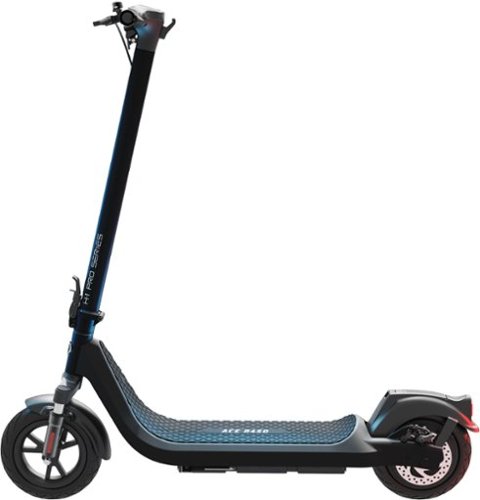
The H-1 Pro Series Ace R450 is built with the same durable aluminum alloy frame as the Ace R350, but gets an upgraded 450W motor, a larger battery, higher top speed, and extended range. The Ace R450~s 450W motor gives it the extra power it needs to be able to reach a top speed of 20 mph and accelerate with more oomph. The dual front shocks absorb impacts while riding, adding to your riding comfort. With the 10~ self-sealing tube tires, flat tires are a thing of the past. Get up to 25.6 miles of range for those longer distance rides. View your current speed, speed mode, battery level, odometer, and more from the premium LED display. Ace R450 is a welcome enhancement to the already solid platform its based upon.
Posted by: CraigB
Pros
Sturdy build
Folds compact
Long range
Integrated lights and reflectors
Handles up to 264 pounds
Smooth ride with larger tires
Self sealing tires
Front wheel has shocks to absorb bumps
Can be locked via the app to deter theft
Can be shared with others via the app
Light for the size
Sturdy build
Folds compact
Long range
Integrated lights and reflectors
Handles up to 264 pounds
Smooth ride with larger tires
Self sealing tires
Front wheel has shocks to absorb bumps
Can be locked via the app to deter theft
Can be shared with others via the app
Light for the size
Cons
Slow charging at 8 hours
Battery pack unprotected on bottom
Instructions recommend avoiding any bumps or water
Folding handle locks slightly loose
Plastic rattle in back when motor starts
Headlight could be brighter
No rear shock absorber
Battery level only visible via the app
Footpad a little too short for larger feet
States can be locked and unlocked anywhere remotely but requires Bluetooth
No foot brake option
Single brake locks rear wheel easily
Slow charging at 8 hours
Battery pack unprotected on bottom
Instructions recommend avoiding any bumps or water
Folding handle locks slightly loose
Plastic rattle in back when motor starts
Headlight could be brighter
No rear shock absorber
Battery level only visible via the app
Footpad a little too short for larger feet
States can be locked and unlocked anywhere remotely but requires Bluetooth
No foot brake option
Single brake locks rear wheel easily
The Hover-1 H1 Ace Pro R450 appears to be a more budget oriented version of the Boss R500 model with only a rear brake versus dual and 50 watts less power. This does not seem to hinder performance as the range is 1.6 miles longer than the Boss model while keeping the same speed.
Setup 9/10
Out of the box setup is very simple. The only assembly is to install the handlebars using 6 hex head screws using the included wrench. In case you lose any screws there is an extra set included. Most screws were easy to install but one screw hole was slightly misaligned, and the threads had burrs making screwing in initially difficult. After clearing out the debris final assembly was simple. While not required, you can connect the scooter to the app. This allows you to easily change settings of the scooter without remembering how many times to press the power button. Furthermore, you can lock the scooter to discourage theft. You can also use the app to share access to the scooter with others so they can also lock and unlock the scooter. It would be nice if the scooter could be locked and unlocked automatically via the app but there is no indication the app can do this. The website states it can be locked and unlocked remotely from anywhere, but this appears to be a typo as you must be withing Bluetooth range to control it. You must create a Hover-1 account if you wish to use the app. If you prefer not to use the app you lose the locking function, checking the battery level, and checking your rides and location of the scooter. The critical options can be changed by clicking the power button either 2, 3 or 4 times quickly. That said, it would be nice if there was a separate mode and select button, so you don’t have to remember if an option is a long or short press and how many presses it is.
Out of the box setup is very simple. The only assembly is to install the handlebars using 6 hex head screws using the included wrench. In case you lose any screws there is an extra set included. Most screws were easy to install but one screw hole was slightly misaligned, and the threads had burrs making screwing in initially difficult. After clearing out the debris final assembly was simple. While not required, you can connect the scooter to the app. This allows you to easily change settings of the scooter without remembering how many times to press the power button. Furthermore, you can lock the scooter to discourage theft. You can also use the app to share access to the scooter with others so they can also lock and unlock the scooter. It would be nice if the scooter could be locked and unlocked automatically via the app but there is no indication the app can do this. The website states it can be locked and unlocked remotely from anywhere, but this appears to be a typo as you must be withing Bluetooth range to control it. You must create a Hover-1 account if you wish to use the app. If you prefer not to use the app you lose the locking function, checking the battery level, and checking your rides and location of the scooter. The critical options can be changed by clicking the power button either 2, 3 or 4 times quickly. That said, it would be nice if there was a separate mode and select button, so you don’t have to remember if an option is a long or short press and how many presses it is.
Charging 6/10
Charging is via an adapter than has a barrel jack and a single status light. The light is red when charging and green when charged. You aren’t supposed to leave it on the charger once fully charged but there is no way to look on the screen of the scooter to see the current level of charge to get an idea of how long is left. If the battery is dead, be ready to wait. A full charge takes approximately 8 hours.
Charging is via an adapter than has a barrel jack and a single status light. The light is red when charging and green when charged. You aren’t supposed to leave it on the charger once fully charged but there is no way to look on the screen of the scooter to see the current level of charge to get an idea of how long is left. If the battery is dead, be ready to wait. A full charge takes approximately 8 hours.
Usage and Performance 8/10
Using the scooter is straightforward. You just unlock the handlebars from the lock on the base and then lift and latch the bar in place. You do have to be careful to ensure the latch is fully locked upright as sometimes it can feel secured only to find the handles become loose when operating because the latch wasn’t fully secured. Thankfully it doesn’t take long to get used to but it’s worth noting that you must pay attention, so it doesn’t come loose. Even when correctly latched there is a small amount of play in the handle. The integrated screen displays mode, speed and distance. If you mount your phone the app can display battery percentage, speed, distance, location, as well as quickly toggle modes. Depending on how you set it up you can require a kickstart or have the throttle work from standstill. If enabled, you can use cruise control by holding the throttle at a speed for 6 seconds. Once engaged it will maintain that speed unless the brakes are used. Regarding brakes, unlike some scooters the R450 has no brake with foot option. It only brakes via the handle and it is quite sensitive. While the brakes are good, simplifying the design to a single rear brake means it is easy to lock up the rear tire trying to slow down quickly.
Using the scooter is straightforward. You just unlock the handlebars from the lock on the base and then lift and latch the bar in place. You do have to be careful to ensure the latch is fully locked upright as sometimes it can feel secured only to find the handles become loose when operating because the latch wasn’t fully secured. Thankfully it doesn’t take long to get used to but it’s worth noting that you must pay attention, so it doesn’t come loose. Even when correctly latched there is a small amount of play in the handle. The integrated screen displays mode, speed and distance. If you mount your phone the app can display battery percentage, speed, distance, location, as well as quickly toggle modes. Depending on how you set it up you can require a kickstart or have the throttle work from standstill. If enabled, you can use cruise control by holding the throttle at a speed for 6 seconds. Once engaged it will maintain that speed unless the brakes are used. Regarding brakes, unlike some scooters the R450 has no brake with foot option. It only brakes via the handle and it is quite sensitive. While the brakes are good, simplifying the design to a single rear brake means it is easy to lock up the rear tire trying to slow down quickly.
Riding is easy but slightly unstable requiring a short acclimation period. Tight turns are more challenging as it likes to tip quickly if you get too aggressive. Once you get the hang of it the ride is very smooth even with only the front tire having shocks. In Sport mode it goes fast enough to where some may question if it is too fast. Some members of our family refuse to go above standard mode and prefer to stick to Eco. The R450 handles small bumps without a problem but the instructions on how cable it is contradict themselves a bit. First is says to use caution on bumps or wet roads. Later in the instructions it says to avoid bumpy or wet areas suggesting you may cause damage to the scooter. It leaves you wondering if you might damage the scooter if there is just a little water on the road or not. Operating range is 32 to 104 degrees Fahrenheit. While it is unlikely many people would ride a scooter below freezing a good portion of the US has extended periods in the summer of over 104 which would take some care not to cause damage to the scooter. Most likely this is because the heat could damage the battery. To protect the battery, you must also take care what surfaces you are going over or if you bring it up and down stairs. The battery pack is slung below the deck and only has a small strip of metal in the center with the rest housed in plastic. If you get too careless bringing it up and down stairs you could damage the plastic housing of the battery. For most this isn’t likely an issue but if you have more careless family members you might need to make sure they use caution. One other thing to note is that for larger family members with shoe sizes of about a 9 or larger you will need to turn your feet to the sides a bit to fit them on the deck. While it is an adult scooter and can handle plenty of weight, the deck is more of a medium length. There is still plenty of room for stability, but you just can’t get your feet to sit fully on the deck straight.
Final Thoughts
The Ace Pro R450 is a well-built scooter with sensible sacrifices to create a more affordable adult scooter without losing anything that degrades the experience. The only small gripe is when the motor hums a certain way some plastic on the deck vibrates. Beyond that minor gripe, the R450 feels solid and is fun to use. If they could add a future update to allow auto locking when out of Bluetooth range, it would make the overall package even more refined. If you are looking for a mid-range adult scooter for fun or a short work commute, the R450 is a good option.
The Ace Pro R450 is a well-built scooter with sensible sacrifices to create a more affordable adult scooter without losing anything that degrades the experience. The only small gripe is when the motor hums a certain way some plastic on the deck vibrates. Beyond that minor gripe, the R450 feels solid and is fun to use. If they could add a future update to allow auto locking when out of Bluetooth range, it would make the overall package even more refined. If you are looking for a mid-range adult scooter for fun or a short work commute, the R450 is a good option.
I would recommend this to a friend!






Share this review:


0points
0of 0voted this as helpful.

Experience absolute power and precision that blows you away with the Razer Nommo V2 Pro~a fully-loaded, full-range speaker system and wireless subwoofer combo. Amplified by THX Spatial Audio and Razer Chroma RGB, set the stage for a cinematic audio-visual experience primed for your battlestation.
Customer Rating
4
Nice sound with some quirks
on January 11, 2024
Posted by: CraigB
Pros
Strong bass
Clean highs
Good simulated center channel
Lighting enhances gameplay
Lighting syncs with other Razer products
More setup options versus their soundbar option
Easy wireless setup
Realistic spatial audio
Also offers Bluetooth connectivity
Strong bass
Clean highs
Good simulated center channel
Lighting enhances gameplay
Lighting syncs with other Razer products
More setup options versus their soundbar option
Easy wireless setup
Realistic spatial audio
Also offers Bluetooth connectivity
Cons
Only two input options
No stereo jack
Lighting effects don’t match with game
Limited manual lighting controls
Speakers enter sleep mode sometimes even when in use
Speakers don’t automatically wake from sleep
No Bluetooth adjustments
Fixing randomly sleep mode means manually turning speakers on/off
Controls are only on puck which can get lost, such as switching inputs
Puck has limited control options
Subwoofer randomly disconnects when off/asleep
Only two input options
No stereo jack
Lighting effects don’t match with game
Limited manual lighting controls
Speakers enter sleep mode sometimes even when in use
Speakers don’t automatically wake from sleep
No Bluetooth adjustments
Fixing randomly sleep mode means manually turning speakers on/off
Controls are only on puck which can get lost, such as switching inputs
Puck has limited control options
Subwoofer randomly disconnects when off/asleep
The Razer Nommo V2 Pro is the top tier in the lineup of gaming speakers for those who prefer individual speakers versus their soundbar option. Razer did a nice job packaging every nicely with everything protected and held in place with thick foam. In fact, they did such a good job the whole family missed the control puck when it was first unboxed. The first thing that stands out is just how big the speakers are. Unlike most gaming speakers these have some heft to them. For smaller desk setups it might be challenging to find space. Similarly, the subwoofer is large. There are no controls, input jacks, or output jacks on the speakers. The speakers are only controlled via the wireless puck or via Synapse.
Setup 9/10
Basic setup is extremely easy. Just plug the speakers into power and the USB-A cord into the computer. The speakers are USB-C but the included cord is USB-C to USB-A. You can place the subwoofer anywhere since it is wireless. Similarly, the control puck just needs the batteries installed and you are up and running. All components are paired wirelessly from the factory. The first time you plug them in they turn on automatically and are ready to go. You can pair Bluetooth devices by switching modes using the control puck. While easy to do, the downside is without the small and easy to lose wireless puck, functionality of the speakers is limited. If you are prone to losing things on your desk, you may wish to tape the control puck down.
Basic setup is extremely easy. Just plug the speakers into power and the USB-A cord into the computer. The speakers are USB-C but the included cord is USB-C to USB-A. You can place the subwoofer anywhere since it is wireless. Similarly, the control puck just needs the batteries installed and you are up and running. All components are paired wirelessly from the factory. The first time you plug them in they turn on automatically and are ready to go. You can pair Bluetooth devices by switching modes using the control puck. While easy to do, the downside is without the small and easy to lose wireless puck, functionality of the speakers is limited. If you are prone to losing things on your desk, you may wish to tape the control puck down.
Controls and Customizability 6/10
The puck can be used to turn the RGB lights on and off, but all other lighting controls are done via Synapse. In Bluetooth mode the only lighting option you have is on and off. Any EQ settings in Bluetooth mode would need to be done via the Bluetooth source if available on the playback device. In Synapse, you can customize the general lighting effects like breathing, spectrum cycling, etc., similar to other Razer products. With compatible games it automatically chooses the lighting effect unless overridden. There is no option to create custom lighting profiles per game when overridden. You can have the lighting effects match other Razer products that use Synapse. You have a 10 band EQ to adjust the sound and a THX Spatial audio off/on option. Spatial audio reduces bass slighting in favor of a larger soundstage and placement of sounds.
The puck can be used to turn the RGB lights on and off, but all other lighting controls are done via Synapse. In Bluetooth mode the only lighting option you have is on and off. Any EQ settings in Bluetooth mode would need to be done via the Bluetooth source if available on the playback device. In Synapse, you can customize the general lighting effects like breathing, spectrum cycling, etc., similar to other Razer products. With compatible games it automatically chooses the lighting effect unless overridden. There is no option to create custom lighting profiles per game when overridden. You can have the lighting effects match other Razer products that use Synapse. You have a 10 band EQ to adjust the sound and a THX Spatial audio off/on option. Spatial audio reduces bass slighting in favor of a larger soundstage and placement of sounds.
One oddity worth mentioning is the power saving mode. Like all speakers the Nommo V2 Pro has an automatic power save mode. What is odd is it only applies to powering off. The instructions don’t make it clear but when they fall asleep for any reason you must manually turn them back on with puck. What is even more strange is in some games, such as Forza and Halo, the speakers would time out and fall asleep as if they were not in use. This is understandably frustrating if you are in the middle of a firefight. The only way around this is to completely turn off the auto power off function and manually turn the speakers on and off. It is uncertain if Razer can improve this via updates but as it stands, your best bet is to have them be fully manual.
Lighting 4/10
Of course, with this being Razer you must talk about the lighting. The promotional materials make you think the effect is going to do something to immerse you more into the game, but it is more of the regular Razer lighting. While the effect is nice as a wall wash it doesn’t really add to the gameplay, at least currently. For example, there is a profile for Halo Infinite. When launching Halo the speakers changes to flashing white. Your first thought might be the speakers would change colors based on possible muzzle flash or what the background scenery is to create more immersion. In reality, no matter what was happening in the game, the speakers just flashed white somewhat like lighting. This just seems like a missed opportunity. Hopefully Razer is still polishing the way this works and eventually the effects will be more dynamic and based on gameplay.
Of course, with this being Razer you must talk about the lighting. The promotional materials make you think the effect is going to do something to immerse you more into the game, but it is more of the regular Razer lighting. While the effect is nice as a wall wash it doesn’t really add to the gameplay, at least currently. For example, there is a profile for Halo Infinite. When launching Halo the speakers changes to flashing white. Your first thought might be the speakers would change colors based on possible muzzle flash or what the background scenery is to create more immersion. In reality, no matter what was happening in the game, the speakers just flashed white somewhat like lighting. This just seems like a missed opportunity. Hopefully Razer is still polishing the way this works and eventually the effects will be more dynamic and based on gameplay.
Sound Performance 8/10
Out of the box sound quality is decent. Bass is heavy and almost boomy but adds impacts to games. It can easily fill a medium sized room. By default the mids are slightly weak but still reasonable. Even with adjustment the bass feels a bit boomy but not offensively so. With adjustment the overall range is respectable but not outstanding. Games feel dynamic and music feels lively. With so much bass it’s so surprise that bass heavy music does with the Nommo V2 Pros. What is more of a surprise is acoustic is represented well. If you are away from the speakers then they sound better with Spatial audio off, but sitting in front of them the Spatial effects provide a sense of depth and soundstage. Spatial Audio is where having two discreet speakers helps. You can adjust each speaker to create your sweet spot for spatial effects to match your seating position. There is a distinct spot where the spatial effect is strongest and where it drops off sharply. Sitting in the sweet spot, in-games sounds have good placement. The simulated center channel is very good. The left and ride side are distinct with a modest amount of sound placement behind. Placement of sounds is stronger to the front and sides compared to the back, but the overall effect gives you a good idea where sounds are coming from without headphones or speakers all around you. The only downside is the speaker stands aren’t adjustable themselves. This means that if you sit higher or lower than normal you can’t just point the speakers up or down to move the sweet spot. You either need to move yourself up or down or prop up the speakers higher. It’s a minor inconvenience but it would have been nice if the speaker stands at least could adjust vertical tilt.
Out of the box sound quality is decent. Bass is heavy and almost boomy but adds impacts to games. It can easily fill a medium sized room. By default the mids are slightly weak but still reasonable. Even with adjustment the bass feels a bit boomy but not offensively so. With adjustment the overall range is respectable but not outstanding. Games feel dynamic and music feels lively. With so much bass it’s so surprise that bass heavy music does with the Nommo V2 Pros. What is more of a surprise is acoustic is represented well. If you are away from the speakers then they sound better with Spatial audio off, but sitting in front of them the Spatial effects provide a sense of depth and soundstage. Spatial Audio is where having two discreet speakers helps. You can adjust each speaker to create your sweet spot for spatial effects to match your seating position. There is a distinct spot where the spatial effect is strongest and where it drops off sharply. Sitting in the sweet spot, in-games sounds have good placement. The simulated center channel is very good. The left and ride side are distinct with a modest amount of sound placement behind. Placement of sounds is stronger to the front and sides compared to the back, but the overall effect gives you a good idea where sounds are coming from without headphones or speakers all around you. The only downside is the speaker stands aren’t adjustable themselves. This means that if you sit higher or lower than normal you can’t just point the speakers up or down to move the sweet spot. You either need to move yourself up or down or prop up the speakers higher. It’s a minor inconvenience but it would have been nice if the speaker stands at least could adjust vertical tilt.
Final Thoughts
Overall, the Razer Nommo V2 Pro are very nice speakers that do a respectable job as both gaming and music speakers. Sound quality is not top tier but close after EQ adjustments. The main gripe is the power save function. If Razer could enhance the in-game functionality of the lighting to enhance gameplay, this package could be hard to beat even with the quirks. If you are in the market for gaming speakers with excellent spatial audio, decently well-rounded audio quality, and like the idea of RGB lighting effects then the Razer Nommo V2 Pro is worth considering.
Overall, the Razer Nommo V2 Pro are very nice speakers that do a respectable job as both gaming and music speakers. Sound quality is not top tier but close after EQ adjustments. The main gripe is the power save function. If Razer could enhance the in-game functionality of the lighting to enhance gameplay, this package could be hard to beat even with the quirks. If you are in the market for gaming speakers with excellent spatial audio, decently well-rounded audio quality, and like the idea of RGB lighting effects then the Razer Nommo V2 Pro is worth considering.
I would recommend this to a friend!






Share this review:


0points
0of 0voted this as helpful.
Denon Perl Pro True Wireless Earbuds let you create a personalized sound profile via Masimo AAT for audio that is perfectly tuned to you. Add in CD-quality sound from Qualcomm aptX lossless technology and spatial audio from Dirac Virtuo for an unrivaled wireless audio experience. Confidently take calls with best-in-class voice audio. Use the Denon Perl Pro app to create your profile and fully customize your listening experience. And with eight hours of earbud battery life-plus 32 additional hours from the case and wireless case charging-you can keep the music going all day.
Posted by: CraigB
Pros
Excellent sound quality after tuning
Tunes audio to the way you hear
EQ in addition to custom tuning
Smooth, tight bass
Clean highs without harshness
Comfortable for extended usage
Light for size
Ear wings keep earbuds secure
Long range Bluetooth
Multipoint Bluetooth
Easy to use controls
Customizable controls
Customizable auto-pause behavior
Excellent battery life
Good microphone
Good ANC
USB and Qi Charging
aptX lossless audio on supported phones
Excellent sound quality after tuning
Tunes audio to the way you hear
EQ in addition to custom tuning
Smooth, tight bass
Clean highs without harshness
Comfortable for extended usage
Light for size
Ear wings keep earbuds secure
Long range Bluetooth
Multipoint Bluetooth
Easy to use controls
Customizable controls
Customizable auto-pause behavior
Excellent battery life
Good microphone
Good ANC
USB and Qi Charging
aptX lossless audio on supported phones
Cons
Most popular phones don’t support aptX
Social mode causes your voice to sound muffled
Using controls creates thump sound on eardrum
Might be too large for some
Earbuds hard to remove from case
Volume too limited on social mode
Earbuds never seem to be fully charged and one charges differently
App keeps asking to agree to legal agreements on every launch
App requires you to opt into marketing
App requires too much personal information for headphones
Most popular phones don’t support aptX
Social mode causes your voice to sound muffled
Using controls creates thump sound on eardrum
Might be too large for some
Earbuds hard to remove from case
Volume too limited on social mode
Earbuds never seem to be fully charged and one charges differently
App keeps asking to agree to legal agreements on every launch
App requires you to opt into marketing
App requires too much personal information for headphones
The Denon Perl Pros are earbuds are larger than most earbuds but thankfully they are designed to be low profile. Included in the box are several ear tips, including one pair of foam, and two sets of ear wings that help secure the earbuds in your ears. While the overall diameter is large, they are very low profile. The outer disk on each earbud is a touchpad which has four options for control from a single tap up to four taps. While it has default options for single and double tap all controls can be customized. Multipoint Bluetooth is available for up to two devices simultaneously. The behavior for how audio is switched is customizable. Auto pause behavior is also customizable where you can choose to pause when one or both earbuds is removed or not to auto pause at all.
Setup 9/10
While you can pair them via Bluetooth and begin using them straight away you won’t be able to customize the audio or settings without going through the Denon Headphones app. Unfortunately, the app requires registration to begin. Beyond that you are required to provide your email, name, and age as well as opt into marketing emails. It will not continue if you do not agree to these. During setup the earbuds provide audio prompts as they guide you through tuning the earbuds to your ears. While the initial voice is pleasant, you cannot change the volume so if you have decent hearing, you might find the first stage of the setup painful as it plays ear piercing sounds. After the tuning is complete you can compare the earbuds with and without your personalized profile. While the customized sound does sound better, it almost seems like Denon artificially sets the default EQ poorly to make your customized sound seem even better than it already is. After custom tuning you can also try out social mode, spatial mode, and immersion mode. Social mode and spatial audio are only on/off. Immersion is customizable but essentially adds or removes bass. After creating your custom tune, you can still customize the EQ if you prefer to color the sound beyond what your ears hear best. The earbuds can store multiple tuning profiles for different users and the settings seems to be stored directly on the earbuds. This way if you would like to share them with a family member and they have their own Denon account they can still access their custom profile on the earbuds. You can also switch between them just to see how each person hears different.
While you can pair them via Bluetooth and begin using them straight away you won’t be able to customize the audio or settings without going through the Denon Headphones app. Unfortunately, the app requires registration to begin. Beyond that you are required to provide your email, name, and age as well as opt into marketing emails. It will not continue if you do not agree to these. During setup the earbuds provide audio prompts as they guide you through tuning the earbuds to your ears. While the initial voice is pleasant, you cannot change the volume so if you have decent hearing, you might find the first stage of the setup painful as it plays ear piercing sounds. After the tuning is complete you can compare the earbuds with and without your personalized profile. While the customized sound does sound better, it almost seems like Denon artificially sets the default EQ poorly to make your customized sound seem even better than it already is. After custom tuning you can also try out social mode, spatial mode, and immersion mode. Social mode and spatial audio are only on/off. Immersion is customizable but essentially adds or removes bass. After creating your custom tune, you can still customize the EQ if you prefer to color the sound beyond what your ears hear best. The earbuds can store multiple tuning profiles for different users and the settings seems to be stored directly on the earbuds. This way if you would like to share them with a family member and they have their own Denon account they can still access their custom profile on the earbuds. You can also switch between them just to see how each person hears different.
Usage 9/10
The case holds the earbuds in with strong magnets. The earbuds are unlikely to fall out of the case accidentally. In fact, you might find removing them from the case is a bit harder than it needs to be as they sit down into the case without any real way to put your finger underneath them or grip them from above to remove them. There is just a tiny gap where you can jamb your finger to wedge them out. It would have been ice if Denon included an area that would easily fit your finger to get underneath or even had the earbuds sit a little higher in the base instead of flush. Putting them in your ears is simple once you get the hang of it. You push them in and then turn to lock them in place. For some you might need to gently pull back on your earlobe while turning to get a better lock of the ear wing at the back of your year. Once you have them in, they feel very comfortable. Since they are low profile, they don’t put a lot of pressure on your ear canal and the ear wing keeps them from wiggling around. They are also light enough to not feel distracting. This is the longest I have ever been able to wear a pair of earbuds without feeling pain or any discomfort. Controls are simple and easy using anywhere from 1 to 4 taps on either the left or right earbud. The areas you tap are very sensitive and so far, haven’t been affected by sweat. There are two downsides for the controls. First is when you tap them, it creates a loud thump sound on your eardrum. Second is that successive taps are registered slowly meaning you can’t do a quick double tap to change songs.
The case holds the earbuds in with strong magnets. The earbuds are unlikely to fall out of the case accidentally. In fact, you might find removing them from the case is a bit harder than it needs to be as they sit down into the case without any real way to put your finger underneath them or grip them from above to remove them. There is just a tiny gap where you can jamb your finger to wedge them out. It would have been ice if Denon included an area that would easily fit your finger to get underneath or even had the earbuds sit a little higher in the base instead of flush. Putting them in your ears is simple once you get the hang of it. You push them in and then turn to lock them in place. For some you might need to gently pull back on your earlobe while turning to get a better lock of the ear wing at the back of your year. Once you have them in, they feel very comfortable. Since they are low profile, they don’t put a lot of pressure on your ear canal and the ear wing keeps them from wiggling around. They are also light enough to not feel distracting. This is the longest I have ever been able to wear a pair of earbuds without feeling pain or any discomfort. Controls are simple and easy using anywhere from 1 to 4 taps on either the left or right earbud. The areas you tap are very sensitive and so far, haven’t been affected by sweat. There are two downsides for the controls. First is when you tap them, it creates a loud thump sound on your eardrum. Second is that successive taps are registered slowly meaning you can’t do a quick double tap to change songs.
Music Quality 10/10
Music quality is where these earbuds shine. After tuning, the earbuds provide a richness of sound that sounds closer to what you would get with a large home sound system. Highs are clean and clear with no discernable harshness. Mid tones are smooth and rich. The bass is clean and tight but also can hit hard if you want it to. In fact, on some songs with Immersion set to maximum the bass gave a slight illusion that you were feeling it and not just hearing it almost like sub audible bass does on a good home system. Thankfully it is fully adjustable so regardless of your preference for bass, or lack thereof, you won’t feel left out. With acoustic music you can hear more detail in the instruments and vocals sound crisp and clear with subtle details such as breath control being audible. The Spatial audio effect gives a slight echo effect and gives more of a sense of depth. On some songs there is a sense of a soundstage which is unexpected from earbuds.
Music quality is where these earbuds shine. After tuning, the earbuds provide a richness of sound that sounds closer to what you would get with a large home sound system. Highs are clean and clear with no discernable harshness. Mid tones are smooth and rich. The bass is clean and tight but also can hit hard if you want it to. In fact, on some songs with Immersion set to maximum the bass gave a slight illusion that you were feeling it and not just hearing it almost like sub audible bass does on a good home system. Thankfully it is fully adjustable so regardless of your preference for bass, or lack thereof, you won’t feel left out. With acoustic music you can hear more detail in the instruments and vocals sound crisp and clear with subtle details such as breath control being audible. The Spatial audio effect gives a slight echo effect and gives more of a sense of depth. On some songs there is a sense of a soundstage which is unexpected from earbuds.
Calls and Social Mode 6/10
While listening to the music is a top tier experience, social mode and call quality is not quite as high end. When social mode is activated, maximum volume is limited to approximately 60% of the normal maximum meaning your music will sound too quiet. If you turn social mode back off, the volume will jump up substantially. For example, if you have them at a louder volume when in social mode and turn it off you may find the volume quickly jumps to excessively loud. It seems like Denon was attempting to make it easier to hear outside sounds in social mode by reducing volume but it would be better if the volume stayed at a single setpoint so there would be no abrupt changes. Furthermore, in social mode the microphones do a decent job of passing through outside sounds, but they do sound slightly compressed. Where the social mode falls apart is when you speak. While your high tones are passed through correctly, certain tones you can hear resonate through your skull. It’s not unlike when you try to talk with earplugs in and your voice drones in your head. Other earbuds have a way to compensate for this and hopefully Denon will be able to improve this with a future firmware update. As it stands now, speaking in social mode is subpar. The same microphones are used for calls and show some similar weak points. When speaking to others they reported that it sounded clear but hollow with voices sounding distant. However, speakers did report that ambient sounds were less prominent compared to speech making speech easier to hear overall.
While listening to the music is a top tier experience, social mode and call quality is not quite as high end. When social mode is activated, maximum volume is limited to approximately 60% of the normal maximum meaning your music will sound too quiet. If you turn social mode back off, the volume will jump up substantially. For example, if you have them at a louder volume when in social mode and turn it off you may find the volume quickly jumps to excessively loud. It seems like Denon was attempting to make it easier to hear outside sounds in social mode by reducing volume but it would be better if the volume stayed at a single setpoint so there would be no abrupt changes. Furthermore, in social mode the microphones do a decent job of passing through outside sounds, but they do sound slightly compressed. Where the social mode falls apart is when you speak. While your high tones are passed through correctly, certain tones you can hear resonate through your skull. It’s not unlike when you try to talk with earplugs in and your voice drones in your head. Other earbuds have a way to compensate for this and hopefully Denon will be able to improve this with a future firmware update. As it stands now, speaking in social mode is subpar. The same microphones are used for calls and show some similar weak points. When speaking to others they reported that it sounded clear but hollow with voices sounding distant. However, speakers did report that ambient sounds were less prominent compared to speech making speech easier to hear overall.
ANC 8/10
Active Noise Cancelling does a respectable job of blocking out unwanted sounds. The effect is further improved by the fact that the earbuds seal very well inside the ear canal blocking out sounds. While not the strongest ANC ever used, it has been able to block out the sound of a fan, water running, car traffic, and even most of the sound of a helicopter passing overhead at a low altitude. While it doesn’t completely block out other voices, it does greatly reduce them to where if you worked in a busy environment with other people, it would be easy to ignore background conversations but still be able to tell if someone is trying to speak with you. Between the natural sound blocking and ANC the Perl Pros work very good for helping to block out unwanted sounds to focus.
Active Noise Cancelling does a respectable job of blocking out unwanted sounds. The effect is further improved by the fact that the earbuds seal very well inside the ear canal blocking out sounds. While not the strongest ANC ever used, it has been able to block out the sound of a fan, water running, car traffic, and even most of the sound of a helicopter passing overhead at a low altitude. While it doesn’t completely block out other voices, it does greatly reduce them to where if you worked in a busy environment with other people, it would be easy to ignore background conversations but still be able to tell if someone is trying to speak with you. Between the natural sound blocking and ANC the Perl Pros work very good for helping to block out unwanted sounds to focus.
Battery 10/10
While Denon focuses on sound quality being the standout feature of the Perl Pro, the battery life is also a standout feature. The longest stretch of continuous usage so far was over 3 hours at a reasonable volume. After removing the earbuds there was no discomfort in the ear and checking the battery both earbuds were sitting at 80%. There is also a Low Power mode that can help improve battery life further. The one strange thing observed was recharging in the case. Since the first usage, the earbuds never seem to have the same battery remaining out of the case. One earbud can be at 100% while the other is at 70%. It might be something intentional with battery charging or it might be the two small charge pins didn’t fully line up while placing back in the case. So far both earbuds have had ample battery life for each session, but it is unclear why this is happening.
While Denon focuses on sound quality being the standout feature of the Perl Pro, the battery life is also a standout feature. The longest stretch of continuous usage so far was over 3 hours at a reasonable volume. After removing the earbuds there was no discomfort in the ear and checking the battery both earbuds were sitting at 80%. There is also a Low Power mode that can help improve battery life further. The one strange thing observed was recharging in the case. Since the first usage, the earbuds never seem to have the same battery remaining out of the case. One earbud can be at 100% while the other is at 70%. It might be something intentional with battery charging or it might be the two small charge pins didn’t fully line up while placing back in the case. So far both earbuds have had ample battery life for each session, but it is unclear why this is happening.
Final Thoughts
The Denon Perl Pros are a good overall set of earbuds with a solid feature set. While others might beat them in certain features, they are hard to beat when it comes to music quality. If you want a quality set of earbuds that value music quality above all else, the Denon Perl Pros are a solid offering.
The Denon Perl Pros are a good overall set of earbuds with a solid feature set. While others might beat them in certain features, they are hard to beat when it comes to music quality. If you want a quality set of earbuds that value music quality above all else, the Denon Perl Pros are a solid offering.
I would recommend this to a friend!






Share this review:


0points
0of 0voted this as helpful.
The Roomba Combo j9+ robot is the ultimate in vacuuming and mopping with 100% more powerful suction* and an Auto-Retract Mopping System that lifts its mop pad up onto the robot to keep carpets fresh and dry. Dirt Detective, powered by iRobot OS, will automatically clean the dirtiest rooms first. While the new Clean Base Auto-Fill Dock delivers up to 60 days of debris-emptying and 30 days of refilling water or solution for totally independent cleaning. All in a premium design that you won't want to hide away.
Customer Rating
4
Evolutionary but not revolutionary
on November 15, 2023
Posted by: CraigB
Pros
Attractive base station
Relatively quiet even on max power
Long battery life
Usually cleans carpets very good
Automatically empties dust bin
Automatically refills water tank
Large water tank
No odors from mop cleaner on base
Rollers resistant to hair
Side brush seems to be stronger than older designs
Camera can log and ask you what to do around objects
Shows you where it missed and offers to go back after you tidy up
Learns what to avoid based on what you tell it
Keeps track of the dirtiest areas of the home
Suggests extra cleaning in dirty areas
Has dirt sensor and can focus more cleaning on areas found
Dust bin and base station full sensors take out the guesswork
Works with some cleaning solutions
Attractive base station
Relatively quiet even on max power
Long battery life
Usually cleans carpets very good
Automatically empties dust bin
Automatically refills water tank
Large water tank
No odors from mop cleaner on base
Rollers resistant to hair
Side brush seems to be stronger than older designs
Camera can log and ask you what to do around objects
Shows you where it missed and offers to go back after you tidy up
Learns what to avoid based on what you tell it
Keeps track of the dirtiest areas of the home
Suggests extra cleaning in dirty areas
Has dirt sensor and can focus more cleaning on areas found
Dust bin and base station full sensors take out the guesswork
Works with some cleaning solutions
Cons
AI doesn’t always recognize obstacles
Sometimes vacuum dust bin sensor fails to know it is full
Misses vacuuming carpet where rooms transition diagonally
Doesn’t always vacuum straight
Sometimes randomly stops vacuuming and goes to another part
Sometimes starts vacuuming in the middle of the carpet
If hair clogs roller, it cuts the roller
Can’t navigate in dark or dim rooms
Careful navigation is missing from previous models
Bumps into furniture and walls regularly
Too tall to clean under kickboards
AI doesn’t always recognize obstacles
Sometimes vacuum dust bin sensor fails to know it is full
Misses vacuuming carpet where rooms transition diagonally
Doesn’t always vacuum straight
Sometimes randomly stops vacuuming and goes to another part
Sometimes starts vacuuming in the middle of the carpet
If hair clogs roller, it cuts the roller
Can’t navigate in dark or dim rooms
Careful navigation is missing from previous models
Bumps into furniture and walls regularly
Too tall to clean under kickboards
The Roomba Combo J9+ looks to be a combination of several previous Roomba models. It does omit the VSLAM navigation and instead relies on the front camera and a floor sensor. The camera does have a light, but it is only bright enough for obstacle avoidance and not navigation. The J9+ completely lifts the mop to the top of the robot so it can’t get the carpet wet.
Setup 9/10
Setup is straightforward. If you have had a Roomba before you will find the experience very familiar. You will need to create a Roomba account to set things up if you don’t have one. During setup there are several screens you will go through where the app shows you features of the Combo J9+. To use the advance features, it will need to map your house. It doesn’t have lidar to do this, so it goes around looking at your house and bumping into walls and furniture. In some cases, it bumped into the same wall multiple times almost like it was unsure if it was real. It also got stuck under a chair during the initial mapping. The two mapping options are to tell it to vacuum everywhere or do an initial mapping. Choosing the initial mapping is supposed to be quicker as it just goes around learning the walls and furniture. If you do the quick mapping it doesn’t initially mark where carpets are. After the map is created it tries to figure out where your rooms are. It does a decent job of this but more than likely you will need to make changes. Next it asks for room names. In some cases, it was able to correctly suggest a name. The process was quick and simple.
Setup is straightforward. If you have had a Roomba before you will find the experience very familiar. You will need to create a Roomba account to set things up if you don’t have one. During setup there are several screens you will go through where the app shows you features of the Combo J9+. To use the advance features, it will need to map your house. It doesn’t have lidar to do this, so it goes around looking at your house and bumping into walls and furniture. In some cases, it bumped into the same wall multiple times almost like it was unsure if it was real. It also got stuck under a chair during the initial mapping. The two mapping options are to tell it to vacuum everywhere or do an initial mapping. Choosing the initial mapping is supposed to be quicker as it just goes around learning the walls and furniture. If you do the quick mapping it doesn’t initially mark where carpets are. After the map is created it tries to figure out where your rooms are. It does a decent job of this but more than likely you will need to make changes. Next it asks for room names. In some cases, it was able to correctly suggest a name. The process was quick and simple.
Navigation 7/10
Navigation has been hit or miss but it seems to be improving. Remembering to make sure there is enough light in the room helps. It still takes getting used to the fact that you must make sure there is a light on in any room you want it to vacuum. The bathroom is usually dark even during the day. From time to time, it can get a little confused if there isn’t a light on. It seems to use the floor sensor as a backup but if the light is too low then navigation consistency seems to degrade. It doesn’t typically get lost but just starts going diagonally through some areas almost like it is searching for something. Even with good light the navigation logic is unusual. Sometimes it will go to the center of an area and start cleaning from the middle and then clean the other half by moving diagonally to the other section. Maybe this is on purpose to try to catch grime that vacuuming the same way each time would miss but it is unexpected. If you like straight lines on your carpet, then the J9+ is hit or miss. One thing it does very well is finding a way to what seems like a blocked area. In one case, the normal path to a space was blocked by items sitting on the floor. The Roomba noticed the blockage and decided to take a shortcut under furniture to get where it wanted to go. Diagonal room transitions seem to confuse it. The main bedroom has a door to the bathroom that is at a 45-degree angle. The Roomba currently will not vacuum a small wedge of carpet in the that transition. It has been changing strategy so hopefully this will improve.
Navigation has been hit or miss but it seems to be improving. Remembering to make sure there is enough light in the room helps. It still takes getting used to the fact that you must make sure there is a light on in any room you want it to vacuum. The bathroom is usually dark even during the day. From time to time, it can get a little confused if there isn’t a light on. It seems to use the floor sensor as a backup but if the light is too low then navigation consistency seems to degrade. It doesn’t typically get lost but just starts going diagonally through some areas almost like it is searching for something. Even with good light the navigation logic is unusual. Sometimes it will go to the center of an area and start cleaning from the middle and then clean the other half by moving diagonally to the other section. Maybe this is on purpose to try to catch grime that vacuuming the same way each time would miss but it is unexpected. If you like straight lines on your carpet, then the J9+ is hit or miss. One thing it does very well is finding a way to what seems like a blocked area. In one case, the normal path to a space was blocked by items sitting on the floor. The Roomba noticed the blockage and decided to take a shortcut under furniture to get where it wanted to go. Diagonal room transitions seem to confuse it. The main bedroom has a door to the bathroom that is at a 45-degree angle. The Roomba currently will not vacuum a small wedge of carpet in the that transition. It has been changing strategy so hopefully this will improve.
AI Features and Obstacle Avoidance 8/10
After additional cleaning sessions it starts to learn more of your house and where the dirty spots are. It updates the dirty zones with each vacuuming to help you see if some areas are consistently dirtier. A surprise for our family is the area near the dishwasher seemed to be one area and it suggested adding a cleaning zone. After thinking about it, the counter above the dishwasher is where the family assembles their breakfast. During the process of learning your house you can opt in for picture review. What it does then is take snapshots of what the AI isn’t sure about. It recognized cords but got caught on paper and twine. When done, it presents you with the pictures where you can train the AI. You can also choose “Start Tidy Up”. You review items it skipped and pick them up. It will go back and finish cleaning those areas. This Roomba has the P.O.O.P guarantee which hopefully is never needed but good to have. The guarantee says if the J9+ ever vacuums pet waste they will replace your unit. It’s nice piece of mind. Our old Roomba was never quite the same after an incident with our new puppy.
After additional cleaning sessions it starts to learn more of your house and where the dirty spots are. It updates the dirty zones with each vacuuming to help you see if some areas are consistently dirtier. A surprise for our family is the area near the dishwasher seemed to be one area and it suggested adding a cleaning zone. After thinking about it, the counter above the dishwasher is where the family assembles their breakfast. During the process of learning your house you can opt in for picture review. What it does then is take snapshots of what the AI isn’t sure about. It recognized cords but got caught on paper and twine. When done, it presents you with the pictures where you can train the AI. You can also choose “Start Tidy Up”. You review items it skipped and pick them up. It will go back and finish cleaning those areas. This Roomba has the P.O.O.P guarantee which hopefully is never needed but good to have. The guarantee says if the J9+ ever vacuums pet waste they will replace your unit. It’s nice piece of mind. Our old Roomba was never quite the same after an incident with our new puppy.
Vacuuming 9/10
Carpet vacuuming has always been a strong point for Roomba. Surprisingly the J9+ seems to be doing as well as its top predecessor while doing so far quieter. The overall noise level is a standout feature of the J9+. Of course, it is still noisy but previous Roomba models were distracting even when vacuuming in another room. The J9+ is barely audible from one room away. In the same room you can hold a conversation, but it would still be a distraction. Based on sound it seems like the suction might be on the lower side but even if that is true the carpet cleaning has not suffered. Maybe it is because it seems to make overlapping passes on the carpet instead. While it does have a dirt sensor, which is great to find heavy spots, so far it hasn’t needed to go back on an area. Resistance to hair tangling isn’t listed as a feature but the rollers look the same as previous models that claimed to resist hair tangles. Overall, it does a good job of resisting tangles but if you wait too long between vacuuming the hair does wrap around the roller and cut it. Most of the time the main maintenance that needs to be done is cleaning hair off the end of the rollers every few days. They have a little pocket on either side where it directs hair and traps it.
Carpet vacuuming has always been a strong point for Roomba. Surprisingly the J9+ seems to be doing as well as its top predecessor while doing so far quieter. The overall noise level is a standout feature of the J9+. Of course, it is still noisy but previous Roomba models were distracting even when vacuuming in another room. The J9+ is barely audible from one room away. In the same room you can hold a conversation, but it would still be a distraction. Based on sound it seems like the suction might be on the lower side but even if that is true the carpet cleaning has not suffered. Maybe it is because it seems to make overlapping passes on the carpet instead. While it does have a dirt sensor, which is great to find heavy spots, so far it hasn’t needed to go back on an area. Resistance to hair tangling isn’t listed as a feature but the rollers look the same as previous models that claimed to resist hair tangles. Overall, it does a good job of resisting tangles but if you wait too long between vacuuming the hair does wrap around the roller and cut it. Most of the time the main maintenance that needs to be done is cleaning hair off the end of the rollers every few days. They have a little pocket on either side where it directs hair and traps it.
Mopping 7/10
The mop is a simple design which wets the floor directly instead of the mop. There are three water nozzles just behind the carpet rollers that drop water just in front of the mop. When mopping begins, it starts with 3 wet lines and doesn’t mop between them. After some time, the mop becomes saturated, and the entire mop cleans. If you choose the Smart Scrub feature, it primes the pad more and scrubs in a back-and-forth motion. This causes the mop to get saturated much faster and work sooner. It makes you wonder how it keeps water off the rollers when it goes back and forth since the vacuum is still running. Thankfully, so far it has stayed dry. Currently, only the Bona cleaning solutions are approved for use. While it is nice that a cleaning solution works it would be even better if more cleaning solutions were approved. Using just water and a single pass only cleans the most basic stains and sometimes leaves streaks. With Smart Scrub enabled is helps for more stuck in stains but it isn’t a miracle and will still not get the hardest stains. That said, it handles regular stains just fine.
The mop is a simple design which wets the floor directly instead of the mop. There are three water nozzles just behind the carpet rollers that drop water just in front of the mop. When mopping begins, it starts with 3 wet lines and doesn’t mop between them. After some time, the mop becomes saturated, and the entire mop cleans. If you choose the Smart Scrub feature, it primes the pad more and scrubs in a back-and-forth motion. This causes the mop to get saturated much faster and work sooner. It makes you wonder how it keeps water off the rollers when it goes back and forth since the vacuum is still running. Thankfully, so far it has stayed dry. Currently, only the Bona cleaning solutions are approved for use. While it is nice that a cleaning solution works it would be even better if more cleaning solutions were approved. Using just water and a single pass only cleans the most basic stains and sometimes leaves streaks. With Smart Scrub enabled is helps for more stuck in stains but it isn’t a miracle and will still not get the hardest stains. That said, it handles regular stains just fine.
Base Station 9/10
The first thing you will notice is there is no mop cleaner. As a pet owner, this is a good thing. Our previous mopping robot would clean the pads. This meant dirty pet water would stay in the cleaning tray. It would smell like pet hair and sewer requiring regular disinfection of the mop cleaner. It also meant that if the dirty base cleaned the mop, the mop would clean the house spreading the smell. With this base station all you need to do is have a few extra mop heads. Just swap out with a fresh one when it finishes and toss the old one in the laundry. The base station stays odor free, and the mops get a better cleaning in the wash. The water tank is very large. About the only criticism of the base station is it would be nice if the dust bag was larger. The bag is a drawer that only uses about 1/3 of the space it is in. For pet owners a larger dust bag would be icing on the cake. While emptying is still loud, compared to previous models it is much quieter.
The first thing you will notice is there is no mop cleaner. As a pet owner, this is a good thing. Our previous mopping robot would clean the pads. This meant dirty pet water would stay in the cleaning tray. It would smell like pet hair and sewer requiring regular disinfection of the mop cleaner. It also meant that if the dirty base cleaned the mop, the mop would clean the house spreading the smell. With this base station all you need to do is have a few extra mop heads. Just swap out with a fresh one when it finishes and toss the old one in the laundry. The base station stays odor free, and the mops get a better cleaning in the wash. The water tank is very large. About the only criticism of the base station is it would be nice if the dust bag was larger. The bag is a drawer that only uses about 1/3 of the space it is in. For pet owners a larger dust bag would be icing on the cake. While emptying is still loud, compared to previous models it is much quieter.
Final Thoughts
The Roomba Combo J9+ is more of an evolutionary rather than revolutionary step in the Roomba line. It still has some quirks, like not using LIDAR, but it is a solid update to the Roomba line that offers a lot in a compact, and attractive, solution. It is quieter, cleans better, and adds some useful features to an already solid lineup.
The Roomba Combo J9+ is more of an evolutionary rather than revolutionary step in the Roomba line. It still has some quirks, like not using LIDAR, but it is a solid update to the Roomba line that offers a lot in a compact, and attractive, solution. It is quieter, cleans better, and adds some useful features to an already solid lineup.
I would recommend this to a friend!






Share this review:


+6points
6of 6voted this as helpful.

Make everyday entertainment epic with the Epson EpiqVision Ultra LS650 Smart Streaming Laser Projector. Whether watching movies and TV shows or gaming with the whole family, the Epson EpiqVision Ultra LS650 delivers an immersive experience for everyone with amazing 4K PRO-UHD (1) picture quality. The larger-than-life display size up to 120" provides a front-row seat to all the action and the convenient ultra short throw design allows the projector to be placed close to the wall for easy viewing. Perfect for your living room, the Epson EpiqVision Ultra LS650 features advanced 3-chip 3LCD technology to produce crisp, clear and colorful images~even in brightly lit environments. And, with the Epson Setting Assistant app (2), projector setup is faster and easier than ever.
Customer Rating
4
Sharp picture with better contrast
on November 13, 2023
Posted by: CraigB
Pros
Bright picture even with ambient light
Good colors out of the box on cinema
Sharp picture
HDR10 Support
Built in Android TV, not a cheap dongle
Processor for Android TV seems quick
Chromecast support
Sensor turns off light if blocked to prevent eye damage
Good speakers after adjustment
eARC support
Fast startup
Quiet for normal brightness
Long laser life based on maximum brightness
No rainbow effect
Low latency
60Hz refresh for casual gaming
Simple setup
Remote doesn’t have advertising buttons
Bright picture even with ambient light
Good colors out of the box on cinema
Sharp picture
HDR10 Support
Built in Android TV, not a cheap dongle
Processor for Android TV seems quick
Chromecast support
Sensor turns off light if blocked to prevent eye damage
Good speakers after adjustment
eARC support
Fast startup
Quiet for normal brightness
Long laser life based on maximum brightness
No rainbow effect
Low latency
60Hz refresh for casual gaming
Simple setup
Remote doesn’t have advertising buttons
Cons
Not true 4K (1080P with pixel shift)
Dynamic mode creates overly cold tones
Cinema mode drops brightness noticeably
Brightness slider doesn’t seem to change much
Fan emits high pitch sound at higher speeds
While setup is easy it is still manual
Built in Android TV is out of date
Requires more distance from wall than others in its class
Adjusting focus can trigger screen to turn off
Speaker EQ boomy on default setting
Needs special screen to fully utilize
Only basic settings
Not true 4K (1080P with pixel shift)
Dynamic mode creates overly cold tones
Cinema mode drops brightness noticeably
Brightness slider doesn’t seem to change much
Fan emits high pitch sound at higher speeds
While setup is easy it is still manual
Built in Android TV is out of date
Requires more distance from wall than others in its class
Adjusting focus can trigger screen to turn off
Speaker EQ boomy on default setting
Needs special screen to fully utilize
Only basic settings
The Epson EH-LS650B is a more affordable version of the EH-LS800. It loses 400 lumens, 30 inches of screen size, and a slightly slower response time for a more slightly lower price. Not all is lower end, as it gains eARC support and the ability to automatically switch to an active HMDI port versus always starting to Android TV. Included in the box is the projector, remote, and power cord. The remote is simplified with buttons intended to navigate Android TV and a few configuration buttons. The remote has two separate setup buttons. One for Android TV settings and one for projector settings. The primary buttons don’t light up but are made of a plastic that glows in the dark. You’ll need to supply your own HDMI cable.
Setup
Setup is manual but straightforward. Ideally, you place the projector at the correct distance and height for your screen. It does have a software keystone adjustment that can also be slightly assisted via the app, but adjustments are very limited and more so withing the app. It would be nice if it had a fully automatic setup as many new projectors do. Like keystone, focus and height are adjusted manually. Unlike keystone, there is an electronic option. Height is adjusted by turning the front feet and focus is via a focus lever behind a door on the right side. The placement of the focus lever on the right side is slightly awkward as you can easily trigger the eye safety sensor adjusting focus as it its on the top right near the focus lever. You have the option to place the projector either in front or back of the screen. Both options are for placing below and it is not intended to be ceiling mounted. Once hardware setup is complete, the rest is quick. Android TV boots up quickly and it only takes a few steps to setup. Whatever processor they are using for Android TV seems reasonably quick as the interface doesn’t lag like some devices. Unlike some projectors, the Android TV is integrated instead of offered through a separate low powered dongle. If you don’t want to use the integrated setup, you can plug your favorite TV box into one of the other HDMI ports and the projector will auto switch to that port on startup bypassing the integrated Android TV. With eARC you can also install multiple devices that you can switch between with your AV receiver.
Setup is manual but straightforward. Ideally, you place the projector at the correct distance and height for your screen. It does have a software keystone adjustment that can also be slightly assisted via the app, but adjustments are very limited and more so withing the app. It would be nice if it had a fully automatic setup as many new projectors do. Like keystone, focus and height are adjusted manually. Unlike keystone, there is an electronic option. Height is adjusted by turning the front feet and focus is via a focus lever behind a door on the right side. The placement of the focus lever on the right side is slightly awkward as you can easily trigger the eye safety sensor adjusting focus as it its on the top right near the focus lever. You have the option to place the projector either in front or back of the screen. Both options are for placing below and it is not intended to be ceiling mounted. Once hardware setup is complete, the rest is quick. Android TV boots up quickly and it only takes a few steps to setup. Whatever processor they are using for Android TV seems reasonably quick as the interface doesn’t lag like some devices. Unlike some projectors, the Android TV is integrated instead of offered through a separate low powered dongle. If you don’t want to use the integrated setup, you can plug your favorite TV box into one of the other HDMI ports and the projector will auto switch to that port on startup bypassing the integrated Android TV. With eARC you can also install multiple devices that you can switch between with your AV receiver.
Speakers
Ideally with a projector giving you a big screen you want to have big sound to match. However, for a basic or portable setup the projector’s integrated speakers do quite well. Out of the box the sound from the speakers is on the boomy side with the bass overpowering dialog. Thankfully you can fix this by turning off a setting called Bass Extension. There is also a dialog boost function to further improve speech. The nice part is if you need to use the integrated speakers, they are also in front instead of behind like a traditional long throw projector.
Ideally with a projector giving you a big screen you want to have big sound to match. However, for a basic or portable setup the projector’s integrated speakers do quite well. Out of the box the sound from the speakers is on the boomy side with the bass overpowering dialog. Thankfully you can fix this by turning off a setting called Bass Extension. There is also a dialog boost function to further improve speech. The nice part is if you need to use the integrated speakers, they are also in front instead of behind like a traditional long throw projector.
Picture Quality
First, if you didn’t already know, this projector is technically 1080P. It creates the effect of 4K with what is called pixel shifting. Some say this effect produces a less sharp image than true 4K but the design means it is impossible for it to create a rainbow effect. Standard laser projectors often create a rainbow effect which can make those sensitive to the effect feel sick. In testing the overall result was very sharp once the focus was properly adjusted and of course there was no rainbow effect which seems like a worthwhile tradeoff. While it has support for HDR10, it does not have support for Dolby Vision. Overall, this might not be a significant issue as HDR on the LS650 is subtle. This is in part because of contrast. Laser projectors have far better contrast than traditional projectors, but they still aren’t at the level of OLED screens. Traditional LCD projectors products slightly gray whites on an ambient light rejecting screen. This projector was able to product extremely bright whites without any issue. In fact, it could reproduce blueish whites where it would make you question of the screen was gray.
First, if you didn’t already know, this projector is technically 1080P. It creates the effect of 4K with what is called pixel shifting. Some say this effect produces a less sharp image than true 4K but the design means it is impossible for it to create a rainbow effect. Standard laser projectors often create a rainbow effect which can make those sensitive to the effect feel sick. In testing the overall result was very sharp once the focus was properly adjusted and of course there was no rainbow effect which seems like a worthwhile tradeoff. While it has support for HDR10, it does not have support for Dolby Vision. Overall, this might not be a significant issue as HDR on the LS650 is subtle. This is in part because of contrast. Laser projectors have far better contrast than traditional projectors, but they still aren’t at the level of OLED screens. Traditional LCD projectors products slightly gray whites on an ambient light rejecting screen. This projector was able to product extremely bright whites without any issue. In fact, it could reproduce blueish whites where it would make you question of the screen was gray.
Dark areas exhibited no light bleed from light areas and edges were sharp. As far as how dark the blacks would get depended more on the ambient light in the room and how well the screen could reject it. That said, even with a basic ALR screen the blacks were a good dark gray versus more of the light to medium gray with a traditional projector.
By default, the projector is set to dynamic which produces whites with a blueish tone and oversaturated colors. Snow appears a blueish white. Some colors would glow and lose all texture such as red or neon. Skin tones looked cold and pale. If you like overly punchy colors this might work fine. If you like a more natural look then the Cinema mode is far better as it produces a more accurate picture. You do sacrifice somewhere near 1000 lumens of brightness to get that more color accurate picture, but it is worth it. If you want more than the basic adjustments for color, you are out of luck. The LS650 is designed to keep things simple so you get basic tone and sharpness adjustments but not much else. Thankfully the Cinema mode is reasonably good to where most people would be satisfied with that simple change.
It’s worth noting that there are now QLED TV’s at 98 inches in the same class as the LS650 that have deep blacks, bright colors, true 4K, and 120Hz refresh rates. For the LS650 to compete with them you need to have a good ALR screen. While the QLED wins out on contrast, the projector wins out on no reflections. The gap is closing between the two technologies quickly. The LS650 still doesn’t approach the contrast of an OLED screen, but projectors don’t create a mirror for lights in the room. The other advantage the LS650 has over an OLED screen is it can go up to a 120” in size. OLED screens over 100” haven’t hit the regular consumer market currently. If you have a way to get it further from the wall, the LS650 can go larger. This is where the compromise comes in to make the LS650 a more affordable version of the LS800. At the same distance from the wall that the LS650 creates a 120” screen, its big brother creates a 150” screen.
Performance
The LS650 is rated to handle up to 60Hz at 4K. This should mean at least casual gaming is possible. The response time seems to vary from different sources, but most seem to agree it is somewhere in the middle of the 20ms range. That said, at 60Hz fast paced FPS games aren’t going to be very enjoyable. Trying a classic like Halo Reach on Firefight was a little too much. Motion felt delayed and uncomfortable to play for long periods. After some digging it was discovered that for gameplay you should change the Image Processing to Fast instead of Fine. That said, it is evident the LS650 wasn’t intended for serious gameplay but more for casual family gaming and for that purpose it works quite well. If you love to play RPG, strategy games, or casual action games this could be a great option with so much screen real estate to see everything clearly.
The LS650 is rated to handle up to 60Hz at 4K. This should mean at least casual gaming is possible. The response time seems to vary from different sources, but most seem to agree it is somewhere in the middle of the 20ms range. That said, at 60Hz fast paced FPS games aren’t going to be very enjoyable. Trying a classic like Halo Reach on Firefight was a little too much. Motion felt delayed and uncomfortable to play for long periods. After some digging it was discovered that for gameplay you should change the Image Processing to Fast instead of Fine. That said, it is evident the LS650 wasn’t intended for serious gameplay but more for casual family gaming and for that purpose it works quite well. If you love to play RPG, strategy games, or casual action games this could be a great option with so much screen real estate to see everything clearly.
Noise and Heat
The LS650 is rated as having a maximum of 36db which should mean it is inaudible from normal listening difference. While this might be true from an absolute volume, this might be more noticeable if you still have good hearing. This is because, while the volume isn’t high there is a high-pitched tone that is very noticeable from a distance. The fan emits a high-pitched bearing sound you can easily hear. Thankfully this only happens above approximately 70% brightness and there is little noticeable change in brightness from 60% to 100%. This means you can leave it set to about 60% and things stay nice and quiet. A surprising benefit of a laser projector is less heat. At a brightness that would cause a traditional bulb projector to turn into a small space heater, the LS650 uses less power and puts out far less heat with the exhaust fan barely warm.
The LS650 is rated as having a maximum of 36db which should mean it is inaudible from normal listening difference. While this might be true from an absolute volume, this might be more noticeable if you still have good hearing. This is because, while the volume isn’t high there is a high-pitched tone that is very noticeable from a distance. The fan emits a high-pitched bearing sound you can easily hear. Thankfully this only happens above approximately 70% brightness and there is little noticeable change in brightness from 60% to 100%. This means you can leave it set to about 60% and things stay nice and quiet. A surprising benefit of a laser projector is less heat. At a brightness that would cause a traditional bulb projector to turn into a small space heater, the LS650 uses less power and puts out far less heat with the exhaust fan barely warm.
Final Thoughts
While the traditional TVs are becoming larger and more competitive with projectors, projectors still hold some advantages. If you prefer the largest screen, low glare and reflections, and prefer not to hang a slab of glass on your wall then a projector is a good choice. First, if you don’t care about eARC or booting straight to the integrated Android TV or want a bigger screen then the big brother LS800 might be your choice. If a screen of 120” or smaller is what you are looking for with eARC support that boot straight to your preferred source and want to save some money, then the Epson EpiqVision EH-LS650 is a solid option.
While the traditional TVs are becoming larger and more competitive with projectors, projectors still hold some advantages. If you prefer the largest screen, low glare and reflections, and prefer not to hang a slab of glass on your wall then a projector is a good choice. First, if you don’t care about eARC or booting straight to the integrated Android TV or want a bigger screen then the big brother LS800 might be your choice. If a screen of 120” or smaller is what you are looking for with eARC support that boot straight to your preferred source and want to save some money, then the Epson EpiqVision EH-LS650 is a solid option.
I would recommend this to a friend!






Share this review:


+5points
5of 5voted this as helpful.
CraigB's Review Comments
Watch your favorite movies, TV shows and sporting events in crisp 1080p resolution with this Samsung UN65FH6001FXZA HDTV, which features Clear Motion Rate 240 to preserve picture detail during fast-action sequences.
Overall5 out of 5
5 out of 5This is an awesome TV for the cost
By Korom
from Raleigh, NC
First, this is a fantastic monitor. If you have a receiver for your HDMI switching and watch TV with the sound through that receiver then this is the PERFECT TV for you. I use it with my Denon e300 receiver, all my HDMI inputs go into the receiver with one HDMI cable going to the TV. Minimal fuss and muss. The picture quality is truly incredible for a LCD TV, the blacks are very very good, almost as good as my Panasonic Plasma but its understandable that its not that good as LCD cannot show true black like a plasma can. I checked 3 bars for the sound quality but honestly I never used the internal speakers. I gave this 5 stars and would have given it 6 stars if I could have (on a 5 star scale) because the picture quality is just that good.
Bottom line: Fantastic TV for the price.

CraigB
Texas
An LED TV is a type of LCD TV
November 29, 2013
Folks. For those of you telling this reviewer that he is talking about the wrong TV because he calls it an LCD, it is an LCD. LED TV's are still LCD TV's. The difference is the backlight behind the LCD is LED's instead of CCFL(fluorescent). Both still have and LCD screen that you actually look at up front.
+2points
2of 2voted this comment as helpful.
Microsoft Band 2 (Large): Keep track of your health and fitness goals throughout the day by monitoring your heart rate, steps taken, calories burned, sleep quality, hours slept and other helpful metrics. Just pair with your Windows Phone, Apple iOS or Android device via Bluetooth to receive alerts at a glance.Discover how the technology of Microsoft Band 2 can assist you in a healthy, productive lifestyle. Learn more ~
Overall5 out of 5
5 out of 5Best fitness tracker for the money
By CraigB
from Texas
When choosing high end fitness bands, my choices went back and forth between the Microsoft Band 2 and the Fitbit Surge. Fitbit has been in the business for fitness wearables for longer but I chose the Band 2 for what I felt was better value for my money. I purchased during a $50 off sale making it even more attractive and $50 less than the Surge. My main phone for this review is a Lumia 1520 with Windows 10 Mobile. I assume others will write reviews of the phone for other platforms and that is where this review starts. This fitness wearable is by far the most compatible. It supports iOS, Android, and Windows Phone/Mobile. Fitbit does as well but support for Windows Mobile is more limited. Comparing it to the Surge, it has more customizability, color screen, and a partially metal build. It feels more premium than the Surge. The metal does have 2 downsides. The first is that the finish used shows scratches extremely easily. See included picture. The second is that sweat and soap cause a foul smell very quickly requiring regular cleaning.
The Band 2 can be worn in two positions. The first is with the screen facing outwards like a watch. I tried this but it felt uncomfortable and viewing the screen was awkward particularly considering the screen doesn’t have a vertical view. This leads me to my preferred position which is with the screen facing inwards. It is much more natural to view and operate. It also feels more comfortable and is in fact the recommended way to wear the device. If there was any concern it is that wearing it inward the screen is always contacting surfaces when you lay your arms down. It uses gorilla glass but it still concerns me that I might scratch the screen. Every fitness wearable wasn’t completely comfortable to wear for one reason or another but this one starts to feel about like a watch after an adjustment period. Before you get the size right you might put it a place that binds you wrist or hits a nerve. I also learned it can get the heart rate just fine without tightening it down so far you hit nerves. Just like a watch it will take some fiddling to find your perfect tightness. Fortunately, the latching mechanism feels strong and has more adjustments than a tradition watch as well giving you more flexibility. Just make sure you use the sizing guide on the size of the box to choose the correct size. It shows wrists sizes with the wrist sideways.
Now the big question is how it works for tracking vitals. I haven’t worked with VO2 Max so I can’t comment on that but after getting the fit correct, the heart rate seems pretty close. Checking manual it was usually within about 10BPM or less from actual. Tracking steps seems a little different. It is difficult to verify but it seems to be a little high on the number of steps sometimes compared to my old hip worn pedometer. It just seems like I can reach 5,000 steps fairly easily. I am not a runner so I have not tested the GPS but I have read that some units have come from the factory with a bad GPS. What’s really nice is with all the vitals it gathers, more than just heart rate, it should be a fairly accurate color estimate. It has guided workouts you can add but I used the generic color tracking and added my own workout types to track. You can add things like HIT and weight training for your own purposes but it uses all the sensors to estimate the color burn instead of estimating based on the workout type. I feel this is more accurate but cannot verify. When you start workout mode, by default the screen stays on showing your workout time and heart rate. I suspect it is not as accurate as a chest band but it seems pretty good. After your workout is done you can see the entire workout on your phone or the website with your heart rate the entire time and your max marked. If there was any gripe it would be that you can’t have it vibrate when you hit your target or max heart rate. That would have been a great feature but, who knows. Maybe they will add it in the future. You can even use the website to compare your vitals to others in your height, weight, and age category. It’s all anonymous and very informative.
When not working out it still tracks your heart rate all the time but the other useful time to check is when you are sleeping. It can detect your sleep but if it gets it wrong you can only delete the time, not edit. You are better off starting your sleep tracking yourself. While sleeping, it will monitor you and in when you wake up you can see what your resting heart rate was overnight to get an even better picture of your health. It also has a smart alarm you can activate. If you want to wake up at a set time, just set the alarm and it will vibrate to wake you up. What I really like is if you activate the smart alarm and set it for 7:30am it will wake you up somewhere between 7:00am and 8:00am when you are most awake. That means you don’t wake up to an alarm feeling like you haven’t rested. You can even set the strength of the vibration.
Since this is a little bit of a smart watch you can add some apps. Since the phone doesn’t have any memory though, expect to only have them work when around your phone. It can control music on your phone and even use voice recognition with Cortana. I am running a prerelease build of the phone software so on occasion the connection dropped but it wasn’t hard to get back. I have found the notifications actually quite nice. I can leave the phone in one place in the house and still get notifications and respond to basic texts. I can also connect my phone to the stereo and change tracks and turn the volume up or down. It’s a standard feature for a smart watch but this is a fitness wearable and much cheaper than a smart watch. There are even some extra apps you can add and some third part utilizes to customize it further but if you want a smart watch more you might want to go that route. If you want a smart fitness tracker, this thing is hard to beat.
Pros
Solid (premium) build quality. It often gets looks and people asking what it is
Tracks more vitals than any other fitness wearable
Comfortable after figuring out your preferred fitment
Bright, sharp screen with auto brightness
Smart Alarm
Customizable workouts
Workout coaches
Customizable with smart watch type features
Solid latching mechanism
Good battery life for its functionality (2 days with no GPS and auto on screen)
Fast charge time (30 minutes to 80%)
Gorilla glass screen
Works on iOS, Android, Windows Mobile, and Web. The web is the most feature rich
Integrates with Health Vault
Constant heart rate
Portal to compare health
Rich sleep stats including restful sleep, times awake, resting heartrate, and recovery
Solid (premium) build quality. It often gets looks and people asking what it is
Tracks more vitals than any other fitness wearable
Comfortable after figuring out your preferred fitment
Bright, sharp screen with auto brightness
Smart Alarm
Customizable workouts
Workout coaches
Customizable with smart watch type features
Solid latching mechanism
Good battery life for its functionality (2 days with no GPS and auto on screen)
Fast charge time (30 minutes to 80%)
Gorilla glass screen
Works on iOS, Android, Windows Mobile, and Web. The web is the most feature rich
Integrates with Health Vault
Constant heart rate
Portal to compare health
Rich sleep stats including restful sleep, times awake, resting heartrate, and recovery
Cons
Cannot change band because electronics are built in
Metal area is a trap for sweat and soap requiring regular cleaning to prevent odor
Cannot change screen orientation
Awkward wearing screen outward
Metal finish is easy to scratch
No build in memory to bring music and store GPS while leaving phone behind for a time
Water resistant instead of waterproof
Possible to scratch screen with it facing downward
Sync is a bit slow
Cannot change band because electronics are built in
Metal area is a trap for sweat and soap requiring regular cleaning to prevent odor
Cannot change screen orientation
Awkward wearing screen outward
Metal finish is easy to scratch
No build in memory to bring music and store GPS while leaving phone behind for a time
Water resistant instead of waterproof
Possible to scratch screen with it facing downward
Sync is a bit slow
CraigB
Texas
Additional Findings
January 9, 2016
I just wanted to add an extra observations to my original review.
For those of you who want to view the display outside in sunlight, it doesn't seem to get that bright. For me that is not a big deal because outside exercises are typically the type where I don't use real time tracking but if you are the type who needs to read the display in direct sunlight, you might find it difficult. I will be checking further and report back if I find anything because indoors it is so bright that I wonder if I have done something wrong in the setup. Even with this finding I still feel it is the best for the money.
Also, if you happen to swap between phones or get a new phone you will have to factor reset the band. I periodically switch phones and discovered this. The system is designed to easily replace your band while using the same phone but if you move the band to any phone, even one that was restored from a backup of your original you will have to factory reset the band and set it back up. Not a huge deal because little is actually stored on the phone.
One other huge bonus for Windows Phone/Mobile users. If for some reason you either forget or choose not to wear your band and have a Lumia that is capable you can use it to augment your Band. Sometimes for different reasons I don't want to wear my band and only need to track steps. If I just keep my Lumia 950 in my pocket, it will track my steps and add them to what the band couldn't track. That particular feature is one I really love. The only caveat to that is while it updates the steps on the app and portal, the extra steps from your phone don't get transferred back to your band. This means if you took 2,000 steps with your band and phone and an additional 5,000 with only your Lumia the app will report 7,000 steps total which is correct but your band will continue to report 2,000 steps. Minor quibble though for a great additional feature for Windows Phone fans.
0points
0of 0voted this comment as helpful.
ecobee ecobee3 Programmable Touch-Screen Wi-Fi Thermostat: Maintain a comfortable home with this programmable thermostat, which is Apple~ HomeKit-enabled, so you can control the temperature remotely using your compatible device. Home IQ helps you conserve energy.
Overall 1 out of 5
1 out of 5cant set custom temps..sensors are glitchy
By annaj
i was trying to get this thermostat to set 4 or 5 different temps automaticly per day. an ecobee tech couldnt help me get this done on my web portal account . the sensors dont read the occupancy after being in the room for hours like being in a bedroom all night when u wake up the sensor will read unoccupied or sitting in the living room all day the same thing will happen after a few hours. a regular programable thermostat would have been a better choice.
CraigB
Texas
Did you try IFTTT
February 7, 2016
I was just wondering if you have looked into IFTTT to set those custom automatic temps. I haven't tried your exact scenario but the Ecobee3 can be connected to an IFTTT account to extend it's functionality.
0points
0of 0voted this comment as helpful.
Your household wants to play, stream and work online all at once. With this Linksys router, you can do it all without buffering or other interruptions. Use the Smart Wi-Fi app to get started, control, and monitor your home network from anywhere.
Overall5 out of 5
5 out of 5Solid router with good range and speed
By CraigB
from Texas
I am posting this review after about a week of use. If I find anything more significant after posting I will add it as a reply to my original post. Be sure to check there for additions.
I needed to upgrade my WiFi because the internet service in my area was about to be upgraded to exceed the capacity of my current wireless N solution. This router seems as if it was marketed towards moderate power users as well as people with less technical skills who need an upgrade. Packaging is minimal the same as most routers today. It comes with a CD for documentation but it is not used for setup. This is a good thing because as an AC router most people upgrading to this would have newer devices, few of which have an optical drive.
I needed to upgrade my WiFi because the internet service in my area was about to be upgraded to exceed the capacity of my current wireless N solution. This router seems as if it was marketed towards moderate power users as well as people with less technical skills who need an upgrade. Packaging is minimal the same as most routers today. It comes with a CD for documentation but it is not used for setup. This is a good thing because as an AC router most people upgrading to this would have newer devices, few of which have an optical drive.
For the non-technical
This is not very hard to set up. You plug power into the only spot it fits. There are three antennas that screw into very noticeable spots on the back. And the internet plug is clearly labeled. The instructions tell you what to do in a few steps to get the device to take care of the rest. It also has the wireless already set up if you are afraid to do it and even comes with a sticker with the information so you will know what the password is to get on the WiFi. It already has a guest WiFi too but there is a separate login so someone can’t just borrow your internet without you giving them the password. If you feel more comfortable there are apps for iPhones and Android phones to control the device. Speed and range are very good but if you can it is always recommended to install it as close to the center of your house and avoid metal. The router can pretty much take care of itself after that and it shouldn’t require any further work.
This is not very hard to set up. You plug power into the only spot it fits. There are three antennas that screw into very noticeable spots on the back. And the internet plug is clearly labeled. The instructions tell you what to do in a few steps to get the device to take care of the rest. It also has the wireless already set up if you are afraid to do it and even comes with a sticker with the information so you will know what the password is to get on the WiFi. It already has a guest WiFi too but there is a separate login so someone can’t just borrow your internet without you giving them the password. If you feel more comfortable there are apps for iPhones and Android phones to control the device. Speed and range are very good but if you can it is always recommended to install it as close to the center of your house and avoid metal. The router can pretty much take care of itself after that and it shouldn’t require any further work.
For the technical people
If you are looking for a device with tons of granular settings, this might not be the device. Of course the power users I am referring to would probably be better suited sticking with the WRT series. I doubt this device will ever see an aftermarket firmware. It attempts to have a clean interface but that means it will feel slower than a power user router for some settings changes as transitions and animations run their course. Setting changes that require a reboot happen nearly as fast as the fastest routers out there. Although the stock firmware attempts to look fancy and simple it still has a decent amount of settings for all but the most extreme power users. The antennas use a standard connection so if you wanted to upgrade to larger ones later that is possible. Hardwired speed has been very good. I’m just a casual gamer but this hasn’t slowed me down at all and I cannot tell the different hardwired from my old gaming router. Wireless speed is actually very good as well although I was never able to achieve the 1300Mbps link speed advertised even right next to the unit. I maxed out at 900Mbps and it is possible that is related to my AC devices. My old router would drop down to the 39Mpbs on the opposite side of my house whereas this one can maintain at least 177Mpbs and often more.
If you are looking for a device with tons of granular settings, this might not be the device. Of course the power users I am referring to would probably be better suited sticking with the WRT series. I doubt this device will ever see an aftermarket firmware. It attempts to have a clean interface but that means it will feel slower than a power user router for some settings changes as transitions and animations run their course. Setting changes that require a reboot happen nearly as fast as the fastest routers out there. Although the stock firmware attempts to look fancy and simple it still has a decent amount of settings for all but the most extreme power users. The antennas use a standard connection so if you wanted to upgrade to larger ones later that is possible. Hardwired speed has been very good. I’m just a casual gamer but this hasn’t slowed me down at all and I cannot tell the different hardwired from my old gaming router. Wireless speed is actually very good as well although I was never able to achieve the 1300Mbps link speed advertised even right next to the unit. I maxed out at 900Mbps and it is possible that is related to my AC devices. My old router would drop down to the 39Mpbs on the opposite side of my house whereas this one can maintain at least 177Mpbs and often more.
So far during my ownership the stability of this device has reminded me of the old Linksys routers how even the cheap ones never locked up. I’m hoping it stays this way. If you want to change settings, you can do so the standard way most technical people do via the IP address or it has a built in URL. Thankfully it doesn’t require some odd application for initial setup. Unlike standard routers, this one is cloud connected when you choose so meaning remote access is passed via the cloud. It does support some dynamic DNS options but they seem more to push you towards connection via their cloud. Fortunately, this is optional except if you want to take advantage of the built in USB ports and access files remotely. I don’t have a spare drive to test right now so unfortunately I could not test the NAS performance. It does have a very basic QoS which allows you to set up to 3 services or devices as high priority but that’s pretty much it. It has some newer options but then oddly has more old services, such as Real Player and Rhapsody.
Pros
Large, replaceable antennas
Great Range
Reliable
Gigabit Ports
Fast Processor
Status lights can be turned off
Decent amount of features for all but the heavy power users
Doesn’t require a special application for setup or CD
Has USB ports for attaching a hard drive
Offers automatic firmware upgrades to keep security up. Good for keeping non power users safe (Can be turned off)
Documentation is thorough if you need help. You just click help on the top bar
Major changes that require a restart are almost unnoticeable to users as it restarts fast
Has WiFi secured by default and requires a password to be configured during setup. This is good if you are buying one for family and just want it secure without needing to help them. It even has a handy sticker with device specific WiFi passwords so someone can’t just look up a default WiFi password for the unit and borrow internet.
Large, replaceable antennas
Great Range
Reliable
Gigabit Ports
Fast Processor
Status lights can be turned off
Decent amount of features for all but the heavy power users
Doesn’t require a special application for setup or CD
Has USB ports for attaching a hard drive
Offers automatic firmware upgrades to keep security up. Good for keeping non power users safe (Can be turned off)
Documentation is thorough if you need help. You just click help on the top bar
Major changes that require a restart are almost unnoticeable to users as it restarts fast
Has WiFi secured by default and requires a password to be configured during setup. This is good if you are buying one for family and just want it secure without needing to help them. It even has a handy sticker with device specific WiFi passwords so someone can’t just look up a default WiFi password for the unit and borrow internet.
Cons
Interface tries too hard to be attractive slowing it down with animations
Only supports 2 Dynamic DNS providers.
QoS settings seem to cater to power users but offer little customization
QoS rule changes require moving service or devices boxes around and the interface jumps quickly between sections. This often causes you to accidentally move something you didn’t intend to.
Included “Apps” are of limited usefulness and only work on iOS and Android which leaves out anything Windows (No Windows 10 Universal Apps) and no Mac. No configuring your router with touch, like via a Surface, using a Windows App.
Interface tries too hard to be attractive slowing it down with animations
Only supports 2 Dynamic DNS providers.
QoS settings seem to cater to power users but offer little customization
QoS rule changes require moving service or devices boxes around and the interface jumps quickly between sections. This often causes you to accidentally move something you didn’t intend to.
Included “Apps” are of limited usefulness and only work on iOS and Android which leaves out anything Windows (No Windows 10 Universal Apps) and no Mac. No configuring your router with touch, like via a Surface, using a Windows App.
Final Notes
Higher end units near this price point I have owned have had large aluminum heatsinks to dissipate heat. This one has one very small heatsink. I suspect heat stress will be higher on this unit and might be why this case has such a large open cavity you can easily see straight through the vent holes. I suspect longevity will be lower but only time will tell. So the unit has not felt very warm so fingers crossed.
Higher end units near this price point I have owned have had large aluminum heatsinks to dissipate heat. This one has one very small heatsink. I suspect heat stress will be higher on this unit and might be why this case has such a large open cavity you can easily see straight through the vent holes. I suspect longevity will be lower but only time will tell. So the unit has not felt very warm so fingers crossed.
CraigB
Texas
Longer term observations
February 22, 2016
Adding to my original review I have found some new observations to add to this router. I switched to using it as an access point, which takes a little digging, and found out that once you do so you lose a lot of features that should still work but are removed. For example, as an access point you get no guest networks. You can only have 1 2.5GHz WiFi and 1 5GHz. All features such as WMM and QoS are completely gone. Remote administration is turned off. I have also experienced an odd condition where my Xbox One cannot connect using the exact same key as my old router that my Xbox was connected to. I have also experienced 1 lockup where the unit just completely stopped responding and had to be power cycled. Over all it's still a good router but it feels like it could use a little more firmware refinement.
0points
0of 0voted this comment as helpful.
Microsoft Band 2 (Large): Keep track of your health and fitness goals throughout the day by monitoring your heart rate, steps taken, calories burned, sleep quality, hours slept and other helpful metrics. Just pair with your Windows Phone, Apple iOS or Android device via Bluetooth to receive alerts at a glance.Discover how the technology of Microsoft Band 2 can assist you in a healthy, productive lifestyle. Learn more ~
Overall5 out of 5
5 out of 5Best fitness tracker for the money
By CraigB
from Texas
When choosing high end fitness bands, my choices went back and forth between the Microsoft Band 2 and the Fitbit Surge. Fitbit has been in the business for fitness wearables for longer but I chose the Band 2 for what I felt was better value for my money. I purchased during a $50 off sale making it even more attractive and $50 less than the Surge. My main phone for this review is a Lumia 1520 with Windows 10 Mobile. I assume others will write reviews of the phone for other platforms and that is where this review starts. This fitness wearable is by far the most compatible. It supports iOS, Android, and Windows Phone/Mobile. Fitbit does as well but support for Windows Mobile is more limited. Comparing it to the Surge, it has more customizability, color screen, and a partially metal build. It feels more premium than the Surge. The metal does have 2 downsides. The first is that the finish used shows scratches extremely easily. See included picture. The second is that sweat and soap cause a foul smell very quickly requiring regular cleaning.
The Band 2 can be worn in two positions. The first is with the screen facing outwards like a watch. I tried this but it felt uncomfortable and viewing the screen was awkward particularly considering the screen doesn’t have a vertical view. This leads me to my preferred position which is with the screen facing inwards. It is much more natural to view and operate. It also feels more comfortable and is in fact the recommended way to wear the device. If there was any concern it is that wearing it inward the screen is always contacting surfaces when you lay your arms down. It uses gorilla glass but it still concerns me that I might scratch the screen. Every fitness wearable wasn’t completely comfortable to wear for one reason or another but this one starts to feel about like a watch after an adjustment period. Before you get the size right you might put it a place that binds you wrist or hits a nerve. I also learned it can get the heart rate just fine without tightening it down so far you hit nerves. Just like a watch it will take some fiddling to find your perfect tightness. Fortunately, the latching mechanism feels strong and has more adjustments than a tradition watch as well giving you more flexibility. Just make sure you use the sizing guide on the size of the box to choose the correct size. It shows wrists sizes with the wrist sideways.
Now the big question is how it works for tracking vitals. I haven’t worked with VO2 Max so I can’t comment on that but after getting the fit correct, the heart rate seems pretty close. Checking manual it was usually within about 10BPM or less from actual. Tracking steps seems a little different. It is difficult to verify but it seems to be a little high on the number of steps sometimes compared to my old hip worn pedometer. It just seems like I can reach 5,000 steps fairly easily. I am not a runner so I have not tested the GPS but I have read that some units have come from the factory with a bad GPS. What’s really nice is with all the vitals it gathers, more than just heart rate, it should be a fairly accurate color estimate. It has guided workouts you can add but I used the generic color tracking and added my own workout types to track. You can add things like HIT and weight training for your own purposes but it uses all the sensors to estimate the color burn instead of estimating based on the workout type. I feel this is more accurate but cannot verify. When you start workout mode, by default the screen stays on showing your workout time and heart rate. I suspect it is not as accurate as a chest band but it seems pretty good. After your workout is done you can see the entire workout on your phone or the website with your heart rate the entire time and your max marked. If there was any gripe it would be that you can’t have it vibrate when you hit your target or max heart rate. That would have been a great feature but, who knows. Maybe they will add it in the future. You can even use the website to compare your vitals to others in your height, weight, and age category. It’s all anonymous and very informative.
When not working out it still tracks your heart rate all the time but the other useful time to check is when you are sleeping. It can detect your sleep but if it gets it wrong you can only delete the time, not edit. You are better off starting your sleep tracking yourself. While sleeping, it will monitor you and in when you wake up you can see what your resting heart rate was overnight to get an even better picture of your health. It also has a smart alarm you can activate. If you want to wake up at a set time, just set the alarm and it will vibrate to wake you up. What I really like is if you activate the smart alarm and set it for 7:30am it will wake you up somewhere between 7:00am and 8:00am when you are most awake. That means you don’t wake up to an alarm feeling like you haven’t rested. You can even set the strength of the vibration.
Since this is a little bit of a smart watch you can add some apps. Since the phone doesn’t have any memory though, expect to only have them work when around your phone. It can control music on your phone and even use voice recognition with Cortana. I am running a prerelease build of the phone software so on occasion the connection dropped but it wasn’t hard to get back. I have found the notifications actually quite nice. I can leave the phone in one place in the house and still get notifications and respond to basic texts. I can also connect my phone to the stereo and change tracks and turn the volume up or down. It’s a standard feature for a smart watch but this is a fitness wearable and much cheaper than a smart watch. There are even some extra apps you can add and some third part utilizes to customize it further but if you want a smart watch more you might want to go that route. If you want a smart fitness tracker, this thing is hard to beat.
Pros
Solid (premium) build quality. It often gets looks and people asking what it is
Tracks more vitals than any other fitness wearable
Comfortable after figuring out your preferred fitment
Bright, sharp screen with auto brightness
Smart Alarm
Customizable workouts
Workout coaches
Customizable with smart watch type features
Solid latching mechanism
Good battery life for its functionality (2 days with no GPS and auto on screen)
Fast charge time (30 minutes to 80%)
Gorilla glass screen
Works on iOS, Android, Windows Mobile, and Web. The web is the most feature rich
Integrates with Health Vault
Constant heart rate
Portal to compare health
Rich sleep stats including restful sleep, times awake, resting heartrate, and recovery
Solid (premium) build quality. It often gets looks and people asking what it is
Tracks more vitals than any other fitness wearable
Comfortable after figuring out your preferred fitment
Bright, sharp screen with auto brightness
Smart Alarm
Customizable workouts
Workout coaches
Customizable with smart watch type features
Solid latching mechanism
Good battery life for its functionality (2 days with no GPS and auto on screen)
Fast charge time (30 minutes to 80%)
Gorilla glass screen
Works on iOS, Android, Windows Mobile, and Web. The web is the most feature rich
Integrates with Health Vault
Constant heart rate
Portal to compare health
Rich sleep stats including restful sleep, times awake, resting heartrate, and recovery
Cons
Cannot change band because electronics are built in
Metal area is a trap for sweat and soap requiring regular cleaning to prevent odor
Cannot change screen orientation
Awkward wearing screen outward
Metal finish is easy to scratch
No build in memory to bring music and store GPS while leaving phone behind for a time
Water resistant instead of waterproof
Possible to scratch screen with it facing downward
Sync is a bit slow
Cannot change band because electronics are built in
Metal area is a trap for sweat and soap requiring regular cleaning to prevent odor
Cannot change screen orientation
Awkward wearing screen outward
Metal finish is easy to scratch
No build in memory to bring music and store GPS while leaving phone behind for a time
Water resistant instead of waterproof
Possible to scratch screen with it facing downward
Sync is a bit slow
CraigB
Texas
Band split after serveral months
May 23, 2016
As others who have discovered after owning the Band 2 for a while, the band itself tends to split. Even if you are gentle the rubberized material just doesn't seem to hold up. The good news in my case is I leave reasonably close to a Microsoft Store. I brought it to them and as always they took great care of me. The assistant store manager was the one who assisted me and he said that Microsoft is aware of the problem and is already working to fix the issue. I had the same problem with the first generation Type Cover for the Surface. Back then they took care of me and ultimately Microsoft corrected the issue. It's unfortunate this kind of thing gets through but at least it doesn't seem to be a hassle to get it resolved.
0points
0of 0voted this comment as helpful.
Enjoy powerful performance with this compact HP Pavilion Wave computer. The Intel i3 processor provides fast data handling, while the 1TB hard drive lets you store plenty of files. This HP Pavilion Wave computer has 8GB of RAM to run the latest applications and four USB ports for connecting multiple accessories.
Overall 3 out of 5
3 out of 5Still can't get the speaker/microphone to work.
By Murphdad013
from New York , ny
The HP help line is terrible and Best Buy was no help at all. In fact I spoke directly ....finally...with someone at HP who said that my Paviliion Wave needed an external microphone headset for montonaccess Cortona. WRONG!!!!
CraigB
Texas
It has a built in microphone
January 16, 2017
I own this unit and it has a built in microphone. I use it for Cortana regularly. Sounds like the support person got it wrong.
0points
0of 0voted this comment as helpful.
Arlo Pro takes the worrying out of life with the 100% Wire-Free indoor/outdoor home monitoring system. Arlo Pro includes rechargeable batteries, motion and sound-activated alerts, 2-way audio, a 100+ decibel siren, and 7 days of free cloud HD video recordings. Arlo covers every angle to help keep you safe and protected.
Overall4 out of 5
4 out of 5Good system with lots of potential
By CraigB
from Texas
Pros
Extremely Quick setup (A 2 camera system takes roughly 30 minutes)
Very easy set up. It comes with basic instructions but the app nicely walks you through each step
No need to run wires
Compact
Discreet cameras easily blend in with lighter color homes
Good daytime video quality for the price
Includes microphone and speaker
Flexible mounting options. Included option is easy but other fixed mounts can be used
Large rechargeable batteries
Motion trigger is supposed to get an update to determine if the motion is by a person
All devices get regular security updates. Even the cameras get updated wirelessly. Nice considering cameras are a new target for hackers.
Inanimate objects don’t seem to cause false motion triggers
Standard external hard drive can be used for local storage
Basic plan included for free
Easily expandable
Extremely Quick setup (A 2 camera system takes roughly 30 minutes)
Very easy set up. It comes with basic instructions but the app nicely walks you through each step
No need to run wires
Compact
Discreet cameras easily blend in with lighter color homes
Good daytime video quality for the price
Includes microphone and speaker
Flexible mounting options. Included option is easy but other fixed mounts can be used
Large rechargeable batteries
Motion trigger is supposed to get an update to determine if the motion is by a person
All devices get regular security updates. Even the cameras get updated wirelessly. Nice considering cameras are a new target for hackers.
Inanimate objects don’t seem to cause false motion triggers
Standard external hard drive can be used for local storage
Basic plan included for free
Easily expandable
Cons
Support for Windows is poor for the new touchscreen devices.
No Windows app for Windows 8 and 10 devices of any size.
Video quality, mainly night time, is probably not good enough for legal purposes.
Night video quality makes recognition near impossible past approximately 10 feet
Easy to steal or move regardless of mounting
Camera speaker is not very loud
Provided screws use too fine of a thread and the metal head strips out easy
All videos are public if someone can intercept your emails on the way to your inbox. (Email delivery by design is not encrypted so if someone intercepts your emails on the way they can see any of your videos with audio)
Recording time is fixed so even if motion or sound is still occurring you can miss recording
Web interface has some bugs such as freezing on zoom, Live play button disappears, and touch doesn’t work.
Sound recording doesn’t occur until a few seconds after video recording
At least one camera exhibited a noticeable “ticking clock” sound when recording audio
Connecting them hardwired defeats the weatherproofing
Instructions do not give tutorial about advanced features but rather let you discover them
No organizer for hard drive recordings
Dependent on good upload internet speeds. The more cameras you have, the faster the upload speed you need. This can be a limiting factor for some.
Long lag time to start live viewing even with very fast connection
Support for Windows is poor for the new touchscreen devices.
No Windows app for Windows 8 and 10 devices of any size.
Video quality, mainly night time, is probably not good enough for legal purposes.
Night video quality makes recognition near impossible past approximately 10 feet
Easy to steal or move regardless of mounting
Camera speaker is not very loud
Provided screws use too fine of a thread and the metal head strips out easy
All videos are public if someone can intercept your emails on the way to your inbox. (Email delivery by design is not encrypted so if someone intercepts your emails on the way they can see any of your videos with audio)
Recording time is fixed so even if motion or sound is still occurring you can miss recording
Web interface has some bugs such as freezing on zoom, Live play button disappears, and touch doesn’t work.
Sound recording doesn’t occur until a few seconds after video recording
At least one camera exhibited a noticeable “ticking clock” sound when recording audio
Connecting them hardwired defeats the weatherproofing
Instructions do not give tutorial about advanced features but rather let you discover them
No organizer for hard drive recordings
Dependent on good upload internet speeds. The more cameras you have, the faster the upload speed you need. This can be a limiting factor for some.
Long lag time to start live viewing even with very fast connection
Setup was very easy, particularly for a security camera system. The entire process is achieved by following the steps one by one as the app tells you. Install the app, set up your Arlo account, plug in the base unit to power and internet, sync the cameras, hang the cameras, and you’re done. A two camera system only took approximately 30 minutes. The kit includes metal bases, screws, and wall anchors but the screws are small and easy to strip. The metal bases work with a strong magnet included inside the camera. Although convenient, the metal bases allow someone to easily steal or move these expensive cameras so placement is important. Netgear offers screw in mounts for a more rigid and secure mounting. The entire hardware and software process has had a lot of thought put into making it easy. There are no complicated router changes needed to be made at all or complicated programming. Oddly some features, like changing the recording quality, must be done on a regular computer for which there is no app.
There is one strange feature omission from Netgear. This system has a Pro designation and yet support for regular, more modern computers, is limited. Businesses by and large use Windows computers and the most popular type of Windows computers selling today are Windows 2-in-1 convertibles with touchscreens this trend is forecasted to increase and yet this system is barely even useable by any touchscreen Windows device. This is also odd because what better way to check out a security video than on a large screen. You are forced to use a browser to view videos which the experience varies based on browser. Simple things like moving a slider don’t work because the website doesn’t work with touch. Browser administration has other bugs, such as the Live Video button disappearing. If this was an app you wouldn’t have to worry about how the end user’s choice of browser affects the experience. Not having a Universal Windows app is a missed opportunity. I have seen a large increase in clients that are buying Windows 2-in-1 systems instead of desktops or Android/iOS tablets for their primary system. A Windows Universal app they could support such systems, or any other form factor of Windows for that matter. Imagine if the app was on Xbox One in your living room and you want to check on things outside. Just say “Hey Cortana, open Arlo” and you could see your video feed or videos quickly and easily from the convenience of your couch on a big screen. That would be great. If you have smaller Windows devices, the website is unusable. It tries to get you to use an app that doesn’t exist. Oddly enough if you have a link to a shared video the same website will serve you the video in a mobile optimized format. Smaller Windows devices and Windows Mobile devices are left unsupported. Future updates and app releases could easily alleviate this but for now Windows support is poor.
The base unit comes with a Sync/Siren button, network port, and two USB ports for storage. The siren is loud and sounds like newer smoke alarms. It can be trigger locally, by the app, or via configurable rules such as motion or audio sensing. You can switch the base unit to modes for recording for motion and/or audio, no recording, or armed or disarmed based using Geofencing. You can also define your own custom modes allowing specific cameras and audio for each to be on or off. Due to battery restrictions, there is no continuous recording. Recording time from motion is a default of 5 seconds regardless of if the motion continues. Cameras include built in IR for night vision, motion sensor, microphone, and speaker and are weatherproof assuming the charging plug cover is on. One large difference with the Pro version is the inclusion of large rechargeable batteries which should last quite a long time between charging. When video is recorded, it is uploaded via your internet connection to your account meaning a good upload internet speed is important. Videos are stored in a calendar format and can be viewed, shared, or deleted from the interface.
Overall performance when factoring in the price for features was good. Shuddering and lag was minimal with surprisingly good wireless range. Remote viewing of live video is reasonably quick although it still took several seconds and is highly dependent on your internet upload speed. Audio took about 2 seconds to start every time after a motion trigger recording or manual live viewing and had a slightly audible tick-tock sound. The built-in speaker is barely audible at max volume. As with all security systems, there is a loss of some detail to do recording compression. Daytime recordings show signs of video compression but subjects are still reasonably recognizable at approximately 25 feet. Nighttime viewing brings recognition down to approximately 10-15 feet before subjects hard to recognize. Although not official, friends in law enforcement said it is not good for legal purposes as they must have a definitive, recognizable face to use the video. Motion detection was generally good but people moving fast could often elude the recording. Due to the fixed recording time, the system could also miss recording an event if it ran past the configured time.
A big concern is the video sharing feature. Arlo by default emails you anytime it records. It conveniently sends you a screenshot of what it recorded. However; the email sends a direct link to the video that can be viewed without logging in. This would be even more concerning if you had cameras in your house. By definition, is sent unsecured between providers. Although the industry is trying to improve that, you should always assume your emails have no encryption when sent to you. This means that it is possible and relatively easy for criminals to eavesdrop and see your videos with audio without ever knowing your account info. The good thing is that is easy to remedy turning off the feature that emails you when it records a video. That way the link to the video won’t be sent out on the web unsecured and your videos are still stored in the cloud without being shared openly. Hopefully, Netgear will remedy this in the future.
Overall, it is a nice system for the price point when compared to the competition. Compared to legacy DVR and NVR security camera systems this makes the whole process a lot more accessible for the average consumer. As long as you keep your expectations in line it is a nice system. All security camera systems, particularly ones costing less than $2,500 have limitations.
Overall, it is a nice system for the price point when compared to the competition. Compared to legacy DVR and NVR security camera systems this makes the whole process a lot more accessible for the average consumer. As long as you keep your expectations in line it is a nice system. All security camera systems, particularly ones costing less than $2,500 have limitations.
A standout feature, even comparing to high end systems, is this system will automatically get updates for security. Anyone who watched the news in late 2016 saw that the biggest hack was perpetrated using devices, such as camera systems, that weren’t updated. That is something still lacking in the “professional” security camera world. You also won’t have to hire someone to come pull wiring through your house or small business. Cameras can be placed wherever you can mount a base. If for some reason, such as poor signal, the place doesn’t work they are easy to move. It not be a real high definition security camera system but it also costs nowhere near as much. Just be sure you can accept the Cons before buying. The overall system is well thought out and with continued improvement of the listed cons this could be the best system for nearly any price.
CraigB
Texas
New developments after extended use
January 31, 2017
I have discovered some new elements to the system with more use.
The first is that I did find a way to adjust video quality via the app and not just the website. It turns out the way it is displayed is as one of 3 choices instead of a slider.
Next is that the cameras only work with Netgear's proprietary charger. Even though it uses USB both the manual an other say it only works with the Netgear one.
Finally I discovered that the motion detection does sometimes act strange. I purchase one additional camera and for some reason no matter the sensitivity of the motion it records a motion even every 30 seconds at night. I have observed that it seems to happen more if my neighbor has a light on but even that is not consistent.
+4points
4of 4voted this comment as helpful.
CraigB's Questions
CraigB has not submitted any questions.
Discover incredible sound and playback from this Pioneer Elite 9.2-channel network A/V receiver. The unit supports 4K video and incredible multidimensional audio so that you can enjoy movies, TV shows and everyday media with a cinema-style experience. This Pioneer Elite 9.2-channel network A/V receiver works with Google Assistant to play on vocal command.
Does the Pioneer vsxlx-303 have a Blue lighted standby power button? I see that the vsxlx-503 has a Blue lighted standby power button.
It doesn't have a Bluetooth light or button but there is a blue light showing when it is in standby for network or wireless.

7 years, 10 months ago
by
CraigB
Handle storage demands with this Western Digital SATA solid-state drive. Its 560MB/s read speed and 530MB/s write speed are suitable for intensive applications, and its 2.5-inch form factor fits most desktops and laptops. The solid-state drive has no moving parts, making the drive resistant to shock to protect your data. Includes the WD SSD Dashboard to keep track of the drive's status.
Does this fit in all macbooks?
It might fit but not all SSDs play well with Macbooks. Usually it takes someone being the first to try and see if it works and if all features, such as trim, are supported. Unless you know how to check for trim on a Mac or feel like taking a leap of faith your best bet is to check the Mac forums to see if someone with experience has already verified the drive.
7 years, 11 months ago
by
CraigB
Only at Best BuyMonitor the exterior of your home with this Lorex active deterrence DVR security system. An eight-channel 4K Ultra HD DVR records and plays back crisp, high-quality video, while the remote-triggered siren and bright LED light work to scare off intruders. With color night vision, the cameras included with this Lorex active deterrence DVR security system provide a clear look at your property even in low lighting conditions.
hmm.. NO PoE ? .. does this run on regular old school BnC connections ??? if soooooo..... i have old lorex 720p cameras on BnC right now ... wonder if i can just order cameras and swap out ??? thanks for the help for whoever answers these questions
It uses a Siamese cable with the standard bnc connections. Swapping cameras is unlikely to work. The cameras are still analog but use a newer MPX protocol which requires a support DVR and cables. Also, certain features of the camera, such as the light and siren, only work on compatible DVRs.
8 years ago
by
CraigB
Only at Best BuyMonitor the exterior of your home with this Lorex active deterrence DVR security system. An eight-channel 4K Ultra HD DVR records and plays back crisp, high-quality video, while the remote-triggered siren and bright LED light work to scare off intruders. With color night vision, the cameras included with this Lorex active deterrence DVR security system provide a clear look at your property even in low lighting conditions.
Does this camera have tots of false positive motion alarms? Does it have thermal sensing for motion ?
It uses frame comparison for motion detection with a sensitivity setting. There is no PIR(thermal) motion detection included.
8 years ago
by
CraigB

Step up your game with this 15.6-inch Acer Nitro 5 gaming laptop. The high-performance AMD Radeon RX 560X graphics card provides powerful gaming performance and detailed graphics that look great on the Full HD display. This Acer Nitro 5 gaming laptop features an AMD Ryzen 5 processor for a smooth and responsive user experience.
I just finished with a chat session with Acer support, who informed me this unit ONLY supports DDR4-2400, NOT 2666. This unit comes with 2666, but runs at 2400 according to CPUZ. Which is contrary to what TeamAcer has stated here. Acer needs to clarify.
HWInfo is reporting mine memory is running at 2666. Makes me wonder if their documentation is just wrong. Maybe a last minute revision.
8 years ago
by
CraigB
The only purifying fan to clean a whole room properly*. We design our purifying fans to go beyond test chamber conditions and focus on real home conditions ~ this is more than just having an efficient filter.*Dyson engineers and research concluded that to clean an entire room properly, you need to sense pollution events automatically; capture ultrafine pollutants; and project cleaner air around the room using Air Multiplier technology. Only the Dyson purifying fan is designed and tested to do all of this.**Dyson technology helps create a cleaner, healthier home - Our vacuums and purifiers are scientifically proven to capture particles as small as allergens and bacteria.
How often do you need to replace filters
This is dependent on how often the purifier runs and how dirty your air is. It has a built in monitor that indicates the remaining filter life of both filters. The best way to maximize life is to keep in on automatic as it will only run when it is needed based on air measurements.
8 years, 4 months ago
by
CraigB

Add music to your day with these Sony wireless headphones. Their noise cancelling technology uses artificial intelligence to adapt to your environment and reduce background sounds for enjoyable listening. The Quick Charging battery on these over-ear Sony wireless headphones provides up to 35 hours of playback for convenience.
Is the Sony better than the Bose quiet ll When it come s to noised
That's more subjective but they do cancel low frequency droning noises well. Typically Bose is considered top rated on noise cancelling quality but these do a nice job. They don't cancel out sharp noises like a gunshot or higher pitched sounds like talking which is typical for active noise cancelling. An example be if you have a fan blowing on you it would cancel out the low droning sound of the motor but you would hear the sound of the airflow.
8 years, 4 months ago
by
CraigB

Enjoy superior sound and voice quality with these Jabra Elite wireless headphones. Integrated controls let you answer calls, adjust the volume or pause music with the touch of a button, while the included carrying case doubles as a charging station. External ambient noise keeps you aware of your surroundings, while a background noise filter delivers crisp, clear voice calls. With Bluetooth connectivity, these Jabra Elite wireless headphones are easy to pair to a mobile device.
Are they water and sweat resistant? Also what is the difference between these and Jabra Sport? A Thanks
The Elite are IP55 rated and the Active or IP56 rating so just a little better for water resistance. The active also have motion tracking for workouts. Both offer a 2 year warranty for dust and water if you register them via the app.
8 years, 6 months ago
by
CraigB
Enjoy superior sound and voice quality with these Jabra Elite wireless headphones. Integrated controls let you answer calls, adjust the volume or pause music with the touch of a button, while the included carrying case doubles as a charging station. External ambient noise keeps you aware of your surroundings, while a background noise filter delivers crisp, clear voice calls. With Bluetooth connectivity, these Jabra Elite wireless headphones are easy to pair to a mobile device.
hi. can you control the volume from the buds?. what does the multi function button control?
The left earbud has volume up and down and skip track and repeat track. A quick tape on one of the two buttons is for volume and a long press is for changing tracks.
8 years, 6 months ago
by
CraigB
Enjoy superior sound and voice quality with these Jabra Elite wireless headphones. Integrated controls let you answer calls, adjust the volume or pause music with the touch of a button, while the included carrying case doubles as a charging station. External ambient noise keeps you aware of your surroundings, while a background noise filter delivers crisp, clear voice calls. With Bluetooth connectivity, these Jabra Elite wireless headphones are easy to pair to a mobile device.
How long does the battery last in a single charge
The listing is 5 hours. You can get an additional 2 charges out of the case for a total of a rating of 15 hours.
8 years, 6 months ago
by
CraigB