


vrs99's stats
- Review count220
- Helpfulness votes1,302
- First reviewJanuary 3, 2014
- Last reviewAugust 7, 2026
- Featured reviews0
- Average rating4.6
- Review comment count5
- Helpfulness votes6
- First review commentJuly 11, 2015
- Last review commentJuly 18, 2017
- Featured review comments0
Questions
- Question count0
- Helpfulness votes0
- First questionNone
- Last questionNone
- Featured questions0
- Answer count45
- Helpfulness votes47
- First answerDecember 31, 2013
- Last answerJanuary 17, 2022
- Featured answers0
- Best answers1
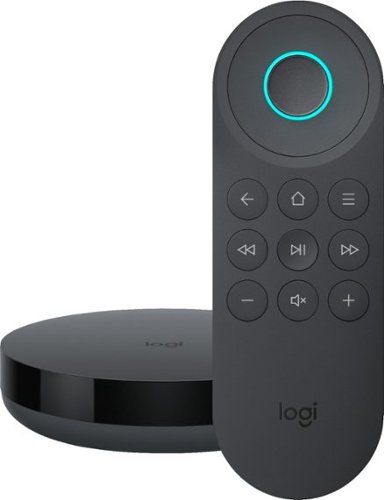
Simplify device management with this Logitech Harmony Express smart universal remote control. Amazon Alexa is built in, letting you issue voice commands to access entertainment, ask questions and a host of other features. This Logitech Harmony Express smart universal remote control lets you change TV channels, open apps on tablets and tackle numerous other tasks.

Posted by: vrs99
from TN
The Harmony Express is Logitech’s new entry and attempt to simplify managing your entertainment center with Alexa built into the heart of the system. A voice driven remote that relies on only nine buttons and your voice.
Setup from the phone app is straight forward and easy enough and should have your system setup within thirty minutes. If when you scan any devices do not show up you can enter the devices manually and add to the system. Simple enough. If you have HDMI CEC Control on in your TV, receiver or other devices you may need to turn that function off as the Express does not appear to be compatible.
Alexa responses well to voice commands and executes quickly but you most know the specific commands as with all Alexa devices. Have a had mixed bag of results with the remote. What it does it does well, but for instance it gets frustrating trying to turn on my Nvidia Shield with voice command. When it works it is fine, when doesn’t, well it just doesn’t.
Really like the ability to jump directly to broadcasts/channels with voice command, that is very nice. But cannot get Netflix, Prime, etc. to operate from my Smart TV or Nvidia Shield with the remote but this may simply be a compatibility issue with my equipment?
Harmony Express and Alexa have some interesting ideas, but the system has not made watching TV or other devices easier for me on my system. Had hopes of the Express solving my usage of three controllers on a typical day, and in some things ways it is successful, but I am continually going to other controllers.
Believe user’s experience and equipment will depend upon personal preferences. Feel that Express based on Alexa is a work in progress that will only get better as the interface of the remote and Alexa matures.
Some will love the Express depending upon their equipment, setup, services and of course their own comfort zone. For me using voice is nice, but I want control and prefer having my buttons available for controlling the whole system.
Mobile Submission: False
No, I would not recommend this to a friend.
Share this review:


0points
0of 0voted this as helpful.
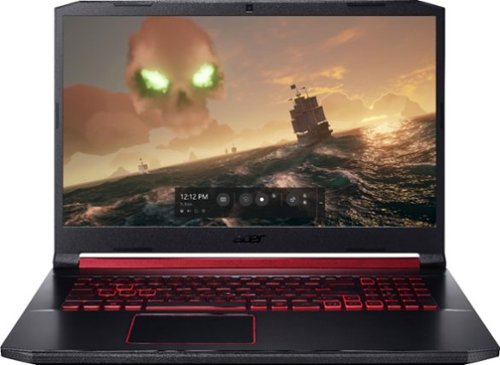
Acer Nitro 5 Laptop: Experience immersive multimedia with this Acer Nitro 5 gaming laptop. The 8GB of RAM and Intel Core i5 processor support multitasking, and the 512GB solid-state drive offers quick data access and ample storage. This Acer Nitro 5 gaming laptop features an NVIDIA GeForce GTX 1650 graphics card that renders crystal-clear images on the 17.3-inch Full HD display.
Customer Rating

4
Delivers on the Fun Factor Brilliantly
on June 26, 2019
Posted by: vrs99
from TN
First impressions, nice design and comes loaded with well spec’d hardware at a reasonable price. Lots of venting and powerful adjustable cooling fans. Speakers are set towards the front sides and fire outward, nice. Easily accessible bottom panel for accessing system for upgrading, cool.
When I first opened the laptop found a 17.3” screen with small bezels and the nicest keyboard I have every used on any laptop, big Kudos. Keyboard has adjustable light level backlit keys which comes defaulted to turn off the backlighting when idle after 30 seconds and turn back on at the touch of any key to save battery life.
Benchmarks for the Nitro's 9th gen i5-9300H comparisons show the i5-9300H to be 12% faster than the 7th Gen i7-7700HQ (the de facto 7th gen mobile gaming CPU) and 18% slower than the 8th gen i7-8750H mobile gaming CPU. Great numbers compared to its bigger brother i7 and i8 mobile processors of the previous two gens, offering exceptional performance per-core value.
Based on GPU benchmarking the Nitro 5’s GTX 1650 4GB falls right in the middle between a GTX 1050 Ti and a 1060 6GB. This is a solid choice of GPU for the Nitro 5 bringing the latest tech into play in a strong value gaming laptop.
Wi-Fi is rock solid on the Nitro, in fact best results I have had in my house ever, running 780Mbps from one side of the house to the other and 866Mbps halfway across the house. Typically, our (very up to date) laptops will vary in the connection Mbps speed but the Acer maintains the connection speeds with no drops in connection speed, highly impressive! If you are gaming on wi-fi you will love the connection.
Good Stuff:
- Western Digital PC 512Gb SN520 NVMe SSD, supporting PCIe Gen3 x2
Read 1729MBs Write 1455MBs (tested with CrystalDiskMark)
- Two M.2 SSD slots and a dedicated HDD slot
- Upgradable to 32Gb memory
- Lots of ports including USB-C 3.1
- Wired Ethernet
- 17.3” IPS screen with appealing colors – gaming is fantastic
- Western Digital PC 512Gb SN520 NVMe SSD, supporting PCIe Gen3 x2
Read 1729MBs Write 1455MBs (tested with CrystalDiskMark)
- Two M.2 SSD slots and a dedicated HDD slot
- Upgradable to 32Gb memory
- Lots of ports including USB-C 3.1
- Wired Ethernet
- 17.3” IPS screen with appealing colors – gaming is fantastic
NitroSense utility is included which monitors system temps, manages cooling, power plan, and a few other advanced options. Handy utility for gamers.
Believe from initial testing battery life on basic usage will last 5-6 hours and would not expect more than a couple hours of hard intense gaming. Keeping in mind gaming laptops are not known for long battery life while powering all the fun technology inside. Full charge from 14% was quick.
The Nitro 5 is a solid choice with an excellent implementation of spec’d equipment to bring a very strong product together at a very reasonable price.
Delivers brilliantly on the fun factor in the gaming department.
Mobile Submission: False
I would recommend this to a friend!


Share this review:


+48points
75of 102voted this as helpful.
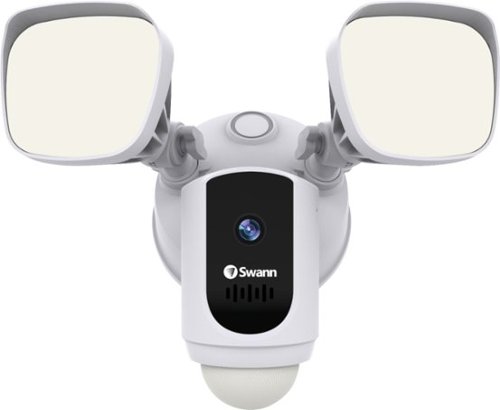
Protect your home or business with this Swann 1080p Wi-Fi floodlight security camera. The Full HD resolution lets you review captured footage in stunning detail, while the floodlight ensures that subjects are illuminated. This Swann 1080p Wi-Fi floodlight security camera includes a siren and two-way audio for scaring off trespassers and potential intruders.
Customer Rating
4
Full Feature Wi-Fi Security Camera/Floodlight
on June 17, 2019
Posted by: vrs99
from TN
To start I think the Swann Wi-Fi Floodlight Security system is a good system, it is in fact the system I have been looking for to mount from my backyard deck for quite some time. It hits on every feature I was looking for in a HD camera floodlight system, and at great price. Fact is I was surprised at the pricing when comparing to other security camera/floodlights in the market.
The mobile app that installs and manages the system is intuitive and simple to operate. After installing the Swann system to my back deck and downloading the app to my mobile I had the system up and running in minutes. Could not be easier.
The setup of the system provides a highly flexible range of settings for lighting and siren duration after motion detection.
The app includes a full mobile user manual which is thorough, and I suggest reading the guide to the get the most out of the Swann. Personally, I do not care for reading long manuals on my handheld, so I checked, and the User Manual PDF was on their website under support, nice to have the manual in hand.
Lighting from the floodlights lights up my large backyard brilliantly and recordings provide good facial recognition at medium settings which I have decided to implement at this time due to storage capacity and medium range wi-fi connection signal to my closest router. For 1080p HD you should have a strong Wi-Fi signal. System is rated at seven days local storage to SD card and you receive two days of storage on their cloud. 30 days of cloud storage is available with subscription.
Siren when set to high is not very loud and it cannot be heard in the adjoining room of the house, certainly my neighbor would never notice if it activated. It should get an intruder’s attention along with the illumination of the flood lamps, but do not expect it to wake you up in the middle of the night.
One security issue I have is if I want to turn on the siren or floodlights manually with the app it takes about 30 seconds or better for the app to load on my phone.
Overall the Swann is a solid implementation of a security camera/floodlight system which I believe will serve us well for years in keeping our family safe.
Mobile Submission: False
I would recommend this to a friend!

Share this review:


+8points
10of 12voted this as helpful.
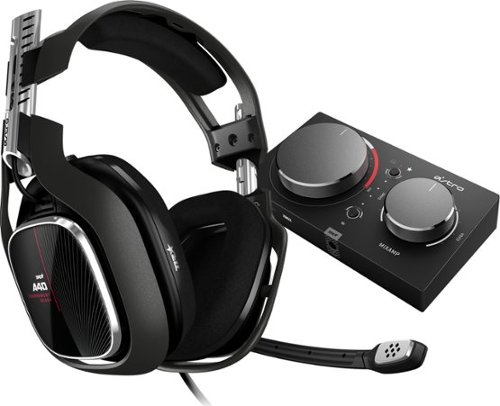
The ASTRO A40 TR Headset + MixAmp Pro TR for Xbox One, PC and Mac is the premier audio solution for esports athletes, content creators and streamers. It meets esports athletes~ rigorous standards for audio fidelity, comfort and durability. The MixAmp Pro TR features Dolby Audio processing and enables lag and interference-free delivery of game sound and voice communication. The A40 TR arrives as an open-back headset featuring a swappable precision mic and customizable Speaker Tags.
Customer Rating

5
Cutting Edge Gaming Environment
on June 12, 2019
Posted by: vrs99
from TN
The cream of the crop gaming headphones just got reloaded with the 4th generation of the tournament ready Astro Gaming A40 + Mixamp Pro.
The headphones came well packaged and documented in a sturdy “supply drop” style box. Setting up took only a few minutes without the need for downloading extra drivers.
The A40 is designed for “marathon gaming sessions" and are “lightweight, comfortable and built to last.” They are easily upgradable with the ability to add Mod Kits which feature synthetic leather noise-isolating ear cushions, a voice isolating mic, a padded headband, and closed-back speaker tags. They also support Dolby Atmos and Windows Sonic on the PC which gives you a competitive edge with full 3D positional audio.
The Mixamp Pro is an exponential upgrade from the original Mixamp, featuring 1 full-size optical, micro USB, aux, stream, and even 2 daisy chain ports. The two dials on the top of the Mixamp control the volume and the sound balance between your game’s sound and your teammates’ voices. Two buttons control the switch from Dolby Surround Sound to stereo and the four different equalizer presets which are customizable in the Astro Command Center software.
Sound quality is the best I ever heard from headphones even with Dolby Atmos off. Music doesn’t sound great but is better than all other headphones I’ve tried. The A40 headphones are exceptionally comfortable but when I use them for 2 hours my ears start to get sore. The bottom of the headphone rests on my lower ear lobe, suggest if you are looking at the headphones to try before you buy.
Microphone sounds crystal clear with a customizable noise gate in the Command Center Software. The only problem I have with the microphone is when I breathe it picks it up and I must move the microphone down a bit.
Overall, if you’re looking for a top of the line, portable gaming headset the Astro A40 is a winner.
Mobile Submission: False
I would recommend this to a friend!
Share this review:


+3points
3of 3voted this as helpful.
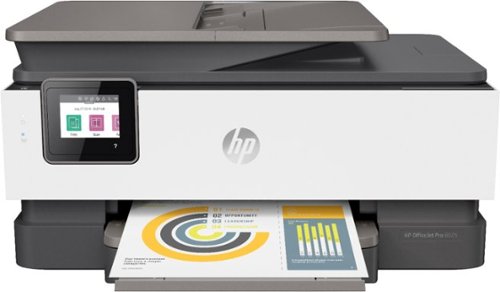
Security threats are on the rise, and they can target any networked printer. The latest generation of HP OfficeJet printers have best-in-class security built right in. And if things go wrong, they can heal themselves. The productive smart printer that doesn't just print, it produces. Help save time with Smart Tasks shortcuts, get automatic two-sided printing, and Borderless Print. Print and scan from your phone, Save up to 50% on ink with HP Instant Ink.
Customer Rating
4
Great All-in-One for Home or Small Business
on May 26, 2019
Posted by: vrs99
from TN
HP has changed style from the standard black All-in-One (AIO) printers to a three-tone color scheme of white, dark grey and light grey. The new décor is very pleasing to the eye, fits nicely in our son’s room.
The size is perfect for a home office or home print station (SOHO) compared to a large office AIO. The HP Officejet Pro 8025 is a very capable AIO as well, printing, copying, scanning and photo printing performed brilliantly for a package this size. The 8025 will perform well in a small office that has less demanding printing jobs. Have connected the printer to all our home devices and will use as a backup to our larger HP AIO office printer if needed.
The size is perfect for a home office or home print station (SOHO) compared to a large office AIO. The HP Officejet Pro 8025 is a very capable AIO as well, printing, copying, scanning and photo printing performed brilliantly for a package this size. The 8025 will perform well in a small office that has less demanding printing jobs. Have connected the printer to all our home devices and will use as a backup to our larger HP AIO office printer if needed.
Photo Printing knocked my socks off, lovely rich colors and definition of a ceremony picture we had taking of our kid. Very nice.
Panel
- Flip up design for easy viewing, nice.
- Bit small but adequate 2.7” Touchscreen.
- Easy navigation – full explanation on downloadable user guide.
- Tap on the “?” on the home screen will bring up a help screen which includes “How to Videos”, to cool.
- Flip up design for easy viewing, nice.
- Bit small but adequate 2.7” Touchscreen.
- Easy navigation – full explanation on downloadable user guide.
- Tap on the “?” on the home screen will bring up a help screen which includes “How to Videos”, to cool.
App
- HP Smart assists you in the setup, scanning, printing, sharing, and managing the HP printer. Share documents and images simply through email, text messages, cloud and social media services, i.e. Google Drive, Facebook, iCloud, and Dropbox.
- Android app is full featured for printer management.
- Printing from Android, Chrome devices and iOS.
- Google drive printing - kid loves this feature for printing school projects/papers from home or school.
- Supports Print from Anywhere.
- HP Smart assists you in the setup, scanning, printing, sharing, and managing the HP printer. Share documents and images simply through email, text messages, cloud and social media services, i.e. Google Drive, Facebook, iCloud, and Dropbox.
- Android app is full featured for printer management.
- Printing from Android, Chrome devices and iOS.
- Google drive printing - kid loves this feature for printing school projects/papers from home or school.
- Supports Print from Anywhere.
Networking
- Almost to simple to add to network. Windows 10 PC’s can scan the network and install printer and launch app if you want.
- Connections: 1 Ethernet; 1 Wireless 802.11b/g/n; 1 RJ-11 Fax.
- Was the simplest, easiest and quickest network setup of any printer I have used.
-
Full feature faxing (with contacts) scanning and copying capabilities.
- Almost to simple to add to network. Windows 10 PC’s can scan the network and install printer and launch app if you want.
- Connections: 1 Ethernet; 1 Wireless 802.11b/g/n; 1 RJ-11 Fax.
- Was the simplest, easiest and quickest network setup of any printer I have used.
-
Full feature faxing (with contacts) scanning and copying capabilities.
Paper capacity is impressive for small office printer:
- Paper handling input, standard 225-sheet input tray, 35-sheet ADF
- Paper handling output, standard 60-sheet output tray
- Legal paper
- Envelopes
- Photo papers
- Double sided duplexing
- Paper handling input, standard 225-sheet input tray, 35-sheet ADF
- Paper handling output, standard 60-sheet output tray
- Legal paper
- Envelopes
- Photo papers
- Double sided duplexing
Monthly duty cycle 20,000 pages
4 print cartridges (1 each black, cyan, magenta, yellow)
4 print cartridges (1 each black, cyan, magenta, yellow)
The HP 8025 is rated with the best for cost of operation, that is Big Plus in a smaller footprint printer!
The HP Officejet Pro 8025 gives you the features and capabilities that are found in much larger AIO systems for less cost and fits nicely into any SOHO environment.
Mobile Submission: False
I would recommend this to a friend!


Share this review:


+59points
87of 115voted this as helpful.
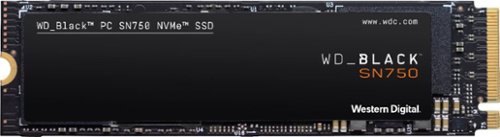
Upgrade compatible PC systems with the WD_Black SN750 internal SSD. Read speeds of up to 3,470MB/s offer improved load times, while the M.2 form factor means you can directly plug into the motherboard without extra cabling. Compared to typical 2.5-inch SSDs, this WD_Black SSD fits double the storage density on a single-sided drive, making it suitable for portable builds.
Customer Rating
5
Gamers and High Performance Driven Users Wanted!
on May 20, 2019
Posted by: vrs99
from TN
The WD-Black SN750 provides a ton of speed for a little Pocket Money. The latest version of Western Digital’s gaming SSD comes with updated firmware that boosts its performance.
The WD-Black SN750 is a 500GB Internal PCI Express 3.0 x4 (NVMe) M.2. 2280 3D TLC NAND Solid State Drive.
The WD-Black SN750 package also includes an updated SSD Dashboard software package which is top notch stuff.
Notable Dashboard Features:
- Provides drive cloning
- Gaming Mode
- In-depth Status Reporting
- Performance charting
- Full set of Drive Tool Utilities
- Settings options
- Gaming Mode
- In-depth Status Reporting
- Performance charting
- Full set of Drive Tool Utilities
- Settings options
Crystal Disk Mark 6.0.2 x64 reported:
Sequential Read: 3496.915 MB/s
Sequential Write: 2609.302 MB/s
Sequential Write: 2609.302 MB/s
These numbers were consistent (this is the average) through a dozen test runs. Strong numbers in the top tier of the latest SSD drive offerings on the market.
The test computer:
SSD WDS500G3X0C-00SJG0
SSD Driver 10.0.17763.1 (WinBuild. 160101.0800)
Motherboard ASUS Maximus IX Code
Chipset Z270
CPU i7-7700K
Bios American Megatrends 1301
OS Windows 10 Pro
Build 10.0.17763
GPU Nvidia GeForce GTX 1070 Founders Edition
SSD WDS500G3X0C-00SJG0
SSD Driver 10.0.17763.1 (WinBuild. 160101.0800)
Motherboard ASUS Maximus IX Code
Chipset Z270
CPU i7-7700K
Bios American Megatrends 1301
OS Windows 10 Pro
Build 10.0.17763
GPU Nvidia GeForce GTX 1070 Founders Edition
The test computer is a couple generations old and I wonder if the Sequential Write numbers may have been a bit better on a newer chipset? This I will find out when our next gaming laptop arrives with 9th generation tech.
Do not believe you can find more bang for the buck on the market, high marks for performance and capacity at a very low entry price. In fact, you would pay significantly more for a small performance bump that is virtually indistinguishable. Includes Five Year Warranty to boot.
The WD-Black SN750 is aimed directly at gamers and performance driven users, and it delivers solid numbers through extended testing.
If you are looking for Top Shelve Performance from a Solid company with a Brilliant History in drive manufacture and like to keep some of your money in your own pocket, then the SN750 should be one of the easiest decisions you will ever make.
Game On!
Mobile Submission: False
I would recommend this to a friend!


Share this review:


+10points
12of 14voted this as helpful.
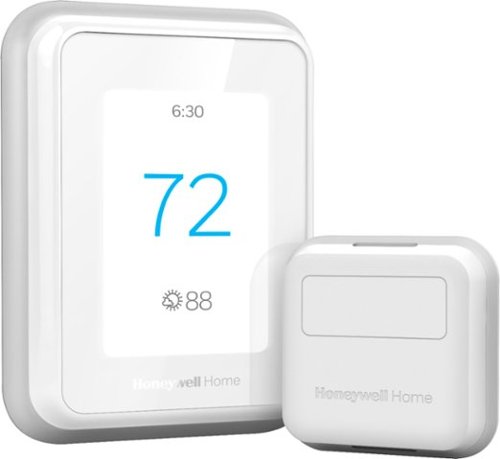
Adjust the temperature of almost any room in your home with just a few simple taps on your smartphone with this Honeywell Home T9 smart thermostat with sensor. The intuitive interface and touch-screen design make this thermostat quick and easy to use. This Honeywell Home T9 smart thermostat features geofencing technology, so you can conserve energy while you're gone and enjoy a comfortable temperature once you return.
Customer Rating
5
Advanced - Smart - Brilliant Design
on April 22, 2019
Posted by: vrs99
from TN
This is my third Honeywell Wi-Fi capable thermostat, dating back several years. All have performed extremely well and are well designed. The T9 is a brilliant evolution of the Honeywell series.
The drop-down menus are well laid out and understandable, an impressive improvement in the T9 system. Configuring personal preferences, system priorities, scheduling, device sensors, Wi-Fi, and beyond are easily accessible and intuitive. You can even see the future forecast for your area in the menu. Kudos Honeywell.
Installation and setup from basics to Wi-Fi worked flawlessly, simple and smooth. Like that.
The new T9 model changes the shape of Honeywell Smart Thermostats in more ways than one, first the shape has a new face lift. Rather than being a horizontal unit the T9 is vertically shaped, which makes sense when using the touch screen interface and scrolling through menus. Like the aesthetics, looks nice on the wall.
Love the new sensors and the ability to mange your whole home from sensors throughout the home. The sensor system can detect which rooms are being used and throughout the day will adjust the climate control to operate more efficiently. Like the ability to select a priority room for climate management and have the temp and humidity read out on the thermostat screen.
Myriad of ways to control and monitor the system from the phone/tablet app or your PC as well as integrating with either Alexa, Google Home, Cortana, and more. The T9 uses Geofencing, which in a nutshell means it knows when you are coming and going by monitoring your phone and can adjust your system automatically.
Additional features that stand out:
- Does not require a C-Wire.
- Includes Wi-Fi 5 GHz.
- Indoor humidity sensing.
- Honeywell usage reports.
- Does not require a C-Wire.
- Includes Wi-Fi 5 GHz.
- Indoor humidity sensing.
- Honeywell usage reports.
The T9 is by far the best designed and engineered thermostat that I have ever used, Honeywell hit a home-run with the T9.
Mobile Submission: False
I would recommend this to a friend!


Share this review:


+8points
10of 12voted this as helpful.
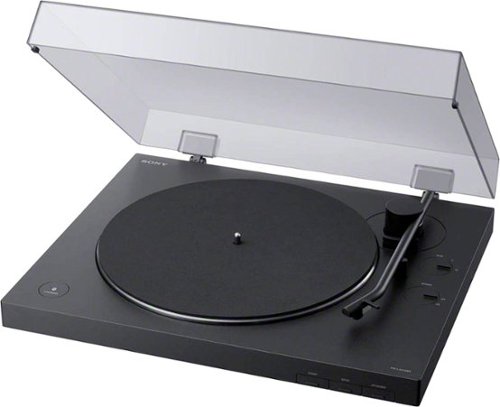
Enjoy timeless vinyl in modern quality with this Sony wireless turntable. Bluetooth connectivity pushes high-quality audio to wireless speakers and headphones, while a built-in phono audio output ensures wired devices can be connected as well. A minimalist design simplifies use of this Sony wireless turntable to a single button press, and two operating speeds allow for customizable playback.
Customer Rating
4
Retro meets the Future! Good Price Point.
on April 8, 2019
Posted by: vrs99
from TN
You may have not noticed but music on LP vinyl is coming back with a vengeance, a new age of listeners has fallen in love with the wide range of sounds that only vinyl can reproduce.
If you are curious about the new/retro wave in music and the hoopla you may be hearing from your kid and their friends (like me) you will need a good turntable to see what is causing the commotion.
Recall my first high end turn table time and the sheer joy of the music that flowed from its needle, but times have changed with the advent of new tech. Today’s turntables seem to have perfected the tech of bringing out the very best from the LP.
The Sony PS-LX310BT turntable delivers the tunes and adds the latest in technology bringing Bluetooth ability to stream your music to any room in your home as well as direct wiring to your receiver/amp. Add USB for ripping digital copies of your vinyl to your computer and onto other devices and you have a winner.
One feature I appreciate is the built in Pre-amp, allowing to select wiring directly to a dedicated receiver/amp or using the pre-amp to plug directly into speakers. Good stuff.
Highlight Features on this machine:
• Streaming to headphones, wireless speakers and soundbars.
• Pre-amp
• Anti-Skid
• Auto Return
• USB ripping
• Aluminum platter and tone arm
• Diamond stylus (needle)
• Gain switch (low, med, high)
• Bluetooth
• RCA wired connection
• Duster cover which protects against acoustic pressure from speakers
• Streaming to headphones, wireless speakers and soundbars.
• Pre-amp
• Anti-Skid
• Auto Return
• USB ripping
• Aluminum platter and tone arm
• Diamond stylus (needle)
• Gain switch (low, med, high)
• Bluetooth
• RCA wired connection
• Duster cover which protects against acoustic pressure from speakers
If you are missing the days of old when music came through crisp, clear and deep and as most have a wired music life you can now wed the two with the Sony.
Plus, the Sony turntable looks great in the living room.
Mobile Submission: False
I would recommend this to a friend!


Share this review:


+2points
2of 2voted this as helpful.
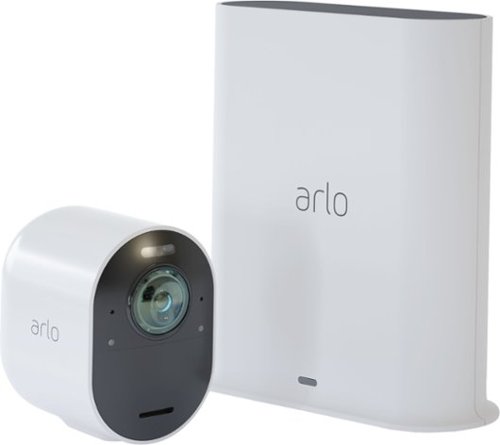
Safeguard your home with this Arlo security camera system. Its 4K resolution provides maximum clarity so you don't miss a single detail, and a siren is integrated so you can fend off intruders either remotely or while at home. This Arlo security camera system is weather-resistant, so it's functional rain or shine.
Customer Rating
4
Excellent Security Camera for Home and Away
on April 5, 2019
Posted by: vrs99
from TN
The new Arlo Ultra Security Camera and Hub are nice improvements from the previous Pro 2 series, adding 4K video, enhanced hub, spot light and an update mobile app along with other excellent features.
Setup was rather smooth with the mobile Arlo App, had my system up and running within an hour. The app walks you step by step through the whole process, from setting up the network connection to adding and placing cameras.
Covers all the bases in a security camera system. Clear crisp video monitoring and recording. Love the fact you can zoom the camera to read a license plate in the driveway. For me it is great for keeping an eye on the kid and Beagle on our football field size front and rear yards. We live on the edge of the city with ten acres, three acres being in yard and seven acres in woods, it is a big plus to have an excellent view of our surroundings.
Features that make the Arlo a leading security cameras system:
- “Noise-cancelling microphones that reduces distracting background noises like wind, rain and street activity, providing you clearer distortion-free sound.”
- Two-way microphones and speakers for clear conversation, fun when your friend watches your house for you!
- One-year Arlo smart 30 days of cloud storage.
- e911 service which will send police to your home with a touch of a button.
- Weather resistant in all seasons.
- Color night vision.
- Spotlight built into the camera.
- SD Storage.
- Good documentation (download).
- 180-degree view.
- Two-way microphones and speakers for clear conversation, fun when your friend watches your house for you!
- One-year Arlo smart 30 days of cloud storage.
- e911 service which will send police to your home with a touch of a button.
- Weather resistant in all seasons.
- Color night vision.
- Spotlight built into the camera.
- SD Storage.
- Good documentation (download).
- 180-degree view.
Have mixture Arlo Ultra and Pro2 cameras in my system, which work seamlessly together connected to the Arlo Ultra Hub. The hub is backward compatible with all Arlo wire-less cameras.
I keep my cameras plugged in so that I do not have to charge them weekly, so I have not tested the battery charge life. What I do like about the wire-less nature of the cameras is that it is simple to unplug them from the charging cable and place them in temporary locations.
Arlo is still using Adobe Flash; I believe they need make the move on to html for smoother operations on the PC. On a Windows 10 PC with Chrome you must enable Flash in Chrome and each time you want to view a camera feed must re-allow Flash Player within the interface to run. The mobile app does not require that extra exercise to view the camera feed.
Coupled with our home/garage security system the Arlo Ultra gives us an extra security layer that keeps us feeling comfortable at home and away.
Mobile Submission: False
I would recommend this to a friend!


Share this review:


+12points
14of 16voted this as helpful.
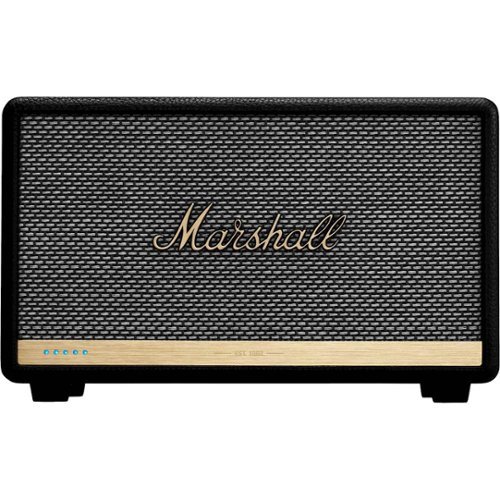
Listen to music the smart way with this black Acton II Voice speaker. It has three Class D amplifiers for high-quality sound and multi-room capabilities so you can listen wherever you are in your house. The built-in Amazon Alexa of this compact Acton II Voice speaker lets you control your playlist with your voice.
Customer Rating
5
The Marshall Legend Continues
on April 2, 2019
Posted by: vrs99
from TN
This is my second Marshall Bluetooth speaker and they continue to nail the design, quality and most importantly the Legendary Sound of Marshall. Love that they have continued with the Retro look of their amps, gorgeous stuff.
It is amazing that such rich tunes can be produced, apparently magically from a box of this dimension. The highs and mid-range are crisp and clean, and the bass is deep and true.
Spent the afternoon running through some classic Jethro Tull, mainly Ian Anderson’s first album “Stand Up.” Anderson’s music is typically more complex with more movements than you typically find, from his masterful flute to the acoustic to striking back with full rock n’ roll rifts the Acton II never missed a beat.
The music that flows and trumpets from the Acton II is no less than you expect from the Legend of Marshall.
Cool Highlight Features:
- Amazon Alexa built into the box.
- Wi-Fi for network connection.
- Marshall Bluetooth App “Customize your listening experience.”
- Spotify Connect.
- Bluetooth 5.0 “Multi-Host Functionality.”
- Pairing speakers with Alexa Eco-system.
- Amazon Alexa built into the box.
- Wi-Fi for network connection.
- Marshall Bluetooth App “Customize your listening experience.”
- Spotify Connect.
- Bluetooth 5.0 “Multi-Host Functionality.”
- Pairing speakers with Alexa Eco-system.
The extensive list of specs will not fit in my review easily, but I would encourage anyone searching for a speaker to take a close look. This speaker is very worthy of a place on the shelve in any room, or all your rooms. Looks good and sounds great.
Bottom-line, I have more Bluetooth speakers than I care to count, and all of them except my two Marshalls are sitting in a closet somewhere.
The Marshall’s are my go-to everyday system.
Mobile Submission: False
I would recommend this to a friend!


Share this review:


+2points
2of 2voted this as helpful.
vrs99's Review Comments

Upgrade your laptop's storage with this Samsung 850 PRO MZ-7KE512BW internal SATA III solid state drive, which offers a generous 512GB capacity for digital data. SED (Self-Encrypting Drive) technology controls access to private information.
Overall 1 out of 5
1 out of 5Crashed and Burned after 44 Days - Good Luck
By vrs99
Fast SSD - and Extra Fast to Crash in just 44 days. Of course it was on a Friday evening and cannot speak to Samsung until Monday. Cannot Chat with them as they do not offer Chat for SSD's.
Luckily it crashed two weeks after the 30 day return period to Best Buy. Guess it is a good thing they offer 10 year warranty? But have heard they will return a refurbished unit, which will not be good on 44 day old product. Must be living on the bleeding edge, should have stuck with the Toshiba, which I can't see a real life difference in speed.

vrs99
TN
After a Day of Wrestling with the SSD
July 11, 2015
After pulling every rabbit out of my hat I finally got the SSD going again. Have to completely reload OS, etc. starting at Windows 8. Not fun.
But I am "somewhat" happy that I was able to get the drive working. Not sure what happen to the drive, but have some suspicion of a setting in Magician (software system for the 850 Pro) which boosts speed?
+2points
2of 2voted this comment as helpful.

Only at Best BuyUpdate your portable technology kit with this HP Omen 17-inch laptop. Ideal for gaming, this machine combines a 7th generation Intel Core i7 processor with 12GB of DDR4 RAM for ultra-fast performance on the go. An island-style backlit keyboard equipped with dedicated macro keys makes this HP Omen 17-inch laptop easy to use in the dark.
Overall5 out of 5
5 out of 5Hp omen gaming laptop
By Martinezjorge7
I recently bought the 16 omen laptop and I was able to return mine and be able to upgrade the the newest one it has a better graphic card and an new design with a better cooling vent with a 1 tb hard drive
vrs99
TN
NO DVD
July 12, 2017
There is no DVD built, you would have to use external.
0points
0of 0voted this comment as helpful.

HP OMEN by HP Laptop: Power through the virtual landscape with this versatile HP Omen 15-inch laptop. Ideal for gaming, this machine packs a 7th generation Intel Core i7 processor and an NVIDIA GeForce GTX video card for superior graphics performance. The 1TB hard drive inside this HP Omen 15-inch laptop provides plenty for space for gaming profiles and other multimedia files.
Overall4 out of 5
4 out of 5Excellent laptop, but not the best value
By Xephyroth
from Colorado Springs, CO
This HP Omen is the 3rd gaming laptop I've ever owned, and it's undoubtedly the best one I've had the pleasure of using. However, this product isn't perfect out of the box.
FIRST IMPRESSION / UNBOXING:
Out of the box, the first thing that I noticed is that this laptop has impressive build quality. The sand-blasted brushing brings a pleasant aesthetic while also bringing solid weight and durability. It's not incredibly flashy, so it doesn't scream "gamer" like a lot of other laptops, but it definitely brings a touch of the "gamer" aesthetic without being overzealous. The notebook is also much thinner than I expected, as I've been used to much thicker gaming laptops, but I suppose the lack of an optical drive attributes to that. The power brick is fairly small and compact for a machine that's capable of entry/mid-level gaming.
Out of the box, the first thing that I noticed is that this laptop has impressive build quality. The sand-blasted brushing brings a pleasant aesthetic while also bringing solid weight and durability. It's not incredibly flashy, so it doesn't scream "gamer" like a lot of other laptops, but it definitely brings a touch of the "gamer" aesthetic without being overzealous. The notebook is also much thinner than I expected, as I've been used to much thicker gaming laptops, but I suppose the lack of an optical drive attributes to that. The power brick is fairly small and compact for a machine that's capable of entry/mid-level gaming.
DISPLAY:
Turning the display on, the 1080p IPS matte display is nice and bright, and viewing angles are decent without too much color shifting. Bezels aren't too large, and it's not something I noticed until just now while writing this review. While I'm used to Quad-HD and 4K resolutions, I was not displeased with this display in any fashion. The webcam is above the display and can record at 720p/30fps. Not the best, but not the worst webcam I've seen.
Turning the display on, the 1080p IPS matte display is nice and bright, and viewing angles are decent without too much color shifting. Bezels aren't too large, and it's not something I noticed until just now while writing this review. While I'm used to Quad-HD and 4K resolutions, I was not displeased with this display in any fashion. The webcam is above the display and can record at 720p/30fps. Not the best, but not the worst webcam I've seen.
KEYBOARD:
Typing on the keyboard is pleasant with the chiclet-style keys. It didn't take me too long to get used to the keyboard, having come from mechanical keyboards and MacBook Pro keyboards. The addition of the num-pad is certainly nice, as well. The keyboard is backlit red (as you'd expect with the Omen), but settings are very simplistic compared to other gaming laptops. The backlighting has 3 states: fully on, WASD on, or fully off. No, there are no fancy effects, and I wouldn't expect any at this price. I do find it a little bit surprising that you can't dim the backlighting, but I rarely dim the backlight on my keyboards, anyway, so it'd be a useless feature for me.
Typing on the keyboard is pleasant with the chiclet-style keys. It didn't take me too long to get used to the keyboard, having come from mechanical keyboards and MacBook Pro keyboards. The addition of the num-pad is certainly nice, as well. The keyboard is backlit red (as you'd expect with the Omen), but settings are very simplistic compared to other gaming laptops. The backlighting has 3 states: fully on, WASD on, or fully off. No, there are no fancy effects, and I wouldn't expect any at this price. I do find it a little bit surprising that you can't dim the backlighting, but I rarely dim the backlight on my keyboards, anyway, so it'd be a useless feature for me.
TRACKPAD:
Out of the box, the trackpad sensitivity was incredibly low for my personal taste. After making some adjustments to the Touchpad Settings in Windows 10, I found a sensitivity that worked well for me. The touchpad does not physically click, but there are left/right trackpad buttons. Initially, I did find the buttons to be awkwardly placed, but I actually got used to them fairly quickly. While the touchpad isn't the best I've ever used, it is pretty good, in my opinion. 2 and 3 finger gestures work, as well.
Out of the box, the trackpad sensitivity was incredibly low for my personal taste. After making some adjustments to the Touchpad Settings in Windows 10, I found a sensitivity that worked well for me. The touchpad does not physically click, but there are left/right trackpad buttons. Initially, I did find the buttons to be awkwardly placed, but I actually got used to them fairly quickly. While the touchpad isn't the best I've ever used, it is pretty good, in my opinion. 2 and 3 finger gestures work, as well.
SOUND:
The Bang & Olufsen speakers surprised me. They have good volume and a pleasant sound signature. However, they're bottom-firing, so when you put the laptop on your lap, the frequencies dampen and you lose a bit of treble/mid-range impact. Keep in mind, this is with the "B & O Play Experience" toggled on from the "Omen Audio" application. You'll definitely want to leave that on if you're using the speakers, or else the bass will disappear and will sound really anemic. I did notice some clipping at max volume when bass-heavy music was involved. Headphone jack works well as you'd expect, but doesn't promise anything fancy, so don't bother trying to drive headphones with high impedance. The built-in microphone array is good for video/voice chat session, but don't expect it to compete with a USB desktop microphone in terms of sound quality. For all casual purposes, it does just fine.
The Bang & Olufsen speakers surprised me. They have good volume and a pleasant sound signature. However, they're bottom-firing, so when you put the laptop on your lap, the frequencies dampen and you lose a bit of treble/mid-range impact. Keep in mind, this is with the "B & O Play Experience" toggled on from the "Omen Audio" application. You'll definitely want to leave that on if you're using the speakers, or else the bass will disappear and will sound really anemic. I did notice some clipping at max volume when bass-heavy music was involved. Headphone jack works well as you'd expect, but doesn't promise anything fancy, so don't bother trying to drive headphones with high impedance. The built-in microphone array is good for video/voice chat session, but don't expect it to compete with a USB desktop microphone in terms of sound quality. For all casual purposes, it does just fine.
PERFORMANCE:
This laptop comes with a 4-core / 8-thread Intel Core i7 processor. For most basic tasks, this is actually overkill. But for gamers, this is great, as more games are utilizing more threads. The GTX 1050 can play any older game at very high settings, and can still play many modern titles at medium / high settings at 1080p. 8GB of RAM is enough for most people, but individuals who multi-task with a lot of resource-intensive chrome tabs and extensions may find themselves wanting more. While the 1TB hard drive is rated for 7200RPM, I still find it unacceptable to not have the operating system installed on a Solid State Drive (SSD) for a machine at this price point. You will not be unlocking the full potential of this machine while your OS runs on a slow drive like this. Thankfully, the upgrade process is fairly simple. After consulting the service manual found on HP's support website, I unscrewed the 10 screws from the bottom of the laptop and removed the bottom panel by starting with the side closest to the display hinge. From there, you'll have access to the SATA drive bay, the M.2 SSD slot (unoccupied, but does support NVMe drives), and 2 RAM slots (with only 1 occupied). I suspect that each RAM slot supports up to 8GB, but I could not find any confirmation in any of the documents available on HP's support website.
This laptop comes with a 4-core / 8-thread Intel Core i7 processor. For most basic tasks, this is actually overkill. But for gamers, this is great, as more games are utilizing more threads. The GTX 1050 can play any older game at very high settings, and can still play many modern titles at medium / high settings at 1080p. 8GB of RAM is enough for most people, but individuals who multi-task with a lot of resource-intensive chrome tabs and extensions may find themselves wanting more. While the 1TB hard drive is rated for 7200RPM, I still find it unacceptable to not have the operating system installed on a Solid State Drive (SSD) for a machine at this price point. You will not be unlocking the full potential of this machine while your OS runs on a slow drive like this. Thankfully, the upgrade process is fairly simple. After consulting the service manual found on HP's support website, I unscrewed the 10 screws from the bottom of the laptop and removed the bottom panel by starting with the side closest to the display hinge. From there, you'll have access to the SATA drive bay, the M.2 SSD slot (unoccupied, but does support NVMe drives), and 2 RAM slots (with only 1 occupied). I suspect that each RAM slot supports up to 8GB, but I could not find any confirmation in any of the documents available on HP's support website.
I happened to have an unused SATA-based SSD, so I swapped that with the 1TB HDD and used the software that came with my SSD to transfer the OS from the HDD to the SSD. After this process, my HP Omen was substantially faster with booting the OS and running applications—a night & day difference.
BATTERY:
I haven't tested the battery life to an enormous extent, but enabling a battery estimation feature in the BIOS allows Windows 10 to report the estimated time (not just %) on battery. Depending on your brightness, power profile and workload, HP estimates 9 hours of mixed usage, and almost 7 hours of video playback. So far, I think that claim is accurate.
I haven't tested the battery life to an enormous extent, but enabling a battery estimation feature in the BIOS allows Windows 10 to report the estimated time (not just %) on battery. Depending on your brightness, power profile and workload, HP estimates 9 hours of mixed usage, and almost 7 hours of video playback. So far, I think that claim is accurate.
I/O:
The HP Omen doesn't support Thunderbolt 3, but all the USB ports support USB 3.1 (1 Type-C, 3 Type-A. There's also a gigabit ethernet jack, HDMI (HDCP 2.2, 4k@60Hz), and Mini DisplayPort. It also supports a full-size SD card which can be fully inserted into the laptop without sticking out. As mentioned before, it also sports a headphone and microphone jack.
The HP Omen doesn't support Thunderbolt 3, but all the USB ports support USB 3.1 (1 Type-C, 3 Type-A. There's also a gigabit ethernet jack, HDMI (HDCP 2.2, 4k@60Hz), and Mini DisplayPort. It also supports a full-size SD card which can be fully inserted into the laptop without sticking out. As mentioned before, it also sports a headphone and microphone jack.
CONCLUSION:
The HP Omen is a great laptop. It provides great features while also having room for a few upgrade. However, I do feel that an SSD should be included at this price—even a cheaper SATA-based M.2 or 2.5" drive would be fine. For a performance-oriented machine like this, skimping on the SSD is a poor decision on HP's part—especially at this price-point. I have seen competitor's laptops with the i7-7700HQ, GTX 1060, 16GB RAM, and 256GB SSD go on sale for cheaper. So in that regard, I do feel the HP Omen isn't providing as good a value, but it is objectively a good laptop—perhaps, just not as good a value when compared to other options around the same price.
The HP Omen is a great laptop. It provides great features while also having room for a few upgrade. However, I do feel that an SSD should be included at this price—even a cheaper SATA-based M.2 or 2.5" drive would be fine. For a performance-oriented machine like this, skimping on the SSD is a poor decision on HP's part—especially at this price-point. I have seen competitor's laptops with the i7-7700HQ, GTX 1060, 16GB RAM, and 256GB SSD go on sale for cheaper. So in that regard, I do feel the HP Omen isn't providing as good a value, but it is objectively a good laptop—perhaps, just not as good a value when compared to other options around the same price.
vrs99
TN
Support Manual web site?
July 14, 2017
Do you have the link to the HP Support Site that has the Support Manual?
Have been looking and must be in the wrong place - Thanks
0points
0of 0voted this comment as helpful.
HP OMEN by HP Laptop: Power through the virtual landscape with this versatile HP Omen 15-inch laptop. Ideal for gaming, this machine packs a 7th generation Intel Core i7 processor and an NVIDIA GeForce GTX video card for superior graphics performance. The 1TB hard drive inside this HP Omen 15-inch laptop provides plenty for space for gaming profiles and other multimedia files.
Overall5 out of 5
5 out of 5Zoom Zoom Zoom – Game On
By vrs99
from TN
This machine looks like it is going fast sitting on the desktop. The exhaust system vents on the back edges of the laptop brings to mind the tailpipes a supercar might be sporting. When it is cranking through benchmarking the cooling system and exhaust ports are doing a job, pushing volumes of hot air away from the machine.
The HP Omen is the most bang for the buck that I have ever seen in a laptop, this box is loaded with edgy technology. Not going through a list of specs, those are easy enough to find, what is impressive is that all techs are up to date, not last year’s stuff. Too many times have seen corners cut to save a dollar. Not here. Not one USB 2.0 in sight, which is surprising seeing that we just built beast of a desktop a month ago with the latest Z270 Kaby Lake i7 7700K, USB 2.0 ports still in use on an advanced motherboard. Kudos to HP.
Take a close look at the specs, you will find 802.11ac with a solid 866.7 Mbps connection. “Dual Force functionality splits traffic across two data streams, sending gaming traffic over the fastest connection available (typically wired), and all other traffic over WiFi.”
Other ports of interest (not a complete listing check the spec sheet):
1 USB 3.1 Type C
3 USB 3.1
Mini DisplayPort
3 USB 3.1
Mini DisplayPort
What I love is the fact you can purchase a HDD Omen model and then add your M.2 NVMe drive of choice, that is cool. If you are not yet familiar with M.2 NVMe you should take a look. In a word (or more) they are fast, about seven times that of a standard SSD.
What is interesting is that with the HDD the system boots up in 9 seconds, that is fully populated with my programs/anti-virus and all my files. Impressive. Being spoiled by SSD’s I must tip my hat to HP; this machine runs tremendously smooth with the 7200 RPM Hitachi HDD.
The Nvidia GeForce GTX 1050 (4 GB GDDR5 dedicated memory) discrete GPU ran through the Unigine Heaven Benchmark smoothly turning good numbers while the cooling system kept the GPU at a respectable 68 degrees. Notable, that with all the heavy iron under the hood the system manages the temp easily.
Ran my favorite game, Civilization VI through its paces today set on the highest graphic settings and it ran like a champ.
Looks, it has the looks, brushed aluminum case with an excellent finish. Nice touches all-around.
Know it is a way cool machine as my kid, the gamer in the house is explaining all the great and subtle reasons why it would be better for him to hang onto the machine. Yeah right!
What I am getting use to is the keyboard offset, a bit to the left to make room for the full size numeric pad, which is a nice touch. Keyboard is fine and well suited for heavy accurate work, or gaming for that matter.
Want a blistering rig in your hands at an excellent price point, one that can kick it at games and can be easily expanded, check out The Omen.
vrs99
TN
Maintenance and Service - Upgrade Manual
July 15, 2017
If you purchase the Omen and wish to upgrade memory or add M.2 SSD you can find the manual here:
http://h10032.www1.hp.com/ctg/Manual/c05533785
+3points
3of 3voted this comment as helpful.
HP OMEN by HP Laptop: Power through the virtual landscape with this versatile HP Omen 15-inch laptop. Ideal for gaming, this machine packs a 7th generation Intel Core i7 processor and an NVIDIA GeForce GTX video card for superior graphics performance. The 1TB hard drive inside this HP Omen 15-inch laptop provides plenty for space for gaming profiles and other multimedia files.
Overall5 out of 5
5 out of 5Zoom Zoom Zoom – Game On
By vrs99
from TN
This machine looks like it is going fast sitting on the desktop. The exhaust system vents on the back edges of the laptop brings to mind the tailpipes a supercar might be sporting. When it is cranking through benchmarking the cooling system and exhaust ports are doing a job, pushing volumes of hot air away from the machine.
The HP Omen is the most bang for the buck that I have ever seen in a laptop, this box is loaded with edgy technology. Not going through a list of specs, those are easy enough to find, what is impressive is that all techs are up to date, not last year’s stuff. Too many times have seen corners cut to save a dollar. Not here. Not one USB 2.0 in sight, which is surprising seeing that we just built beast of a desktop a month ago with the latest Z270 Kaby Lake i7 7700K, USB 2.0 ports still in use on an advanced motherboard. Kudos to HP.
Take a close look at the specs, you will find 802.11ac with a solid 866.7 Mbps connection. “Dual Force functionality splits traffic across two data streams, sending gaming traffic over the fastest connection available (typically wired), and all other traffic over WiFi.”
Other ports of interest (not a complete listing check the spec sheet):
1 USB 3.1 Type C
3 USB 3.1
Mini DisplayPort
3 USB 3.1
Mini DisplayPort
What I love is the fact you can purchase a HDD Omen model and then add your M.2 NVMe drive of choice, that is cool. If you are not yet familiar with M.2 NVMe you should take a look. In a word (or more) they are fast, about seven times that of a standard SSD.
What is interesting is that with the HDD the system boots up in 9 seconds, that is fully populated with my programs/anti-virus and all my files. Impressive. Being spoiled by SSD’s I must tip my hat to HP; this machine runs tremendously smooth with the 7200 RPM Hitachi HDD.
The Nvidia GeForce GTX 1050 (4 GB GDDR5 dedicated memory) discrete GPU ran through the Unigine Heaven Benchmark smoothly turning good numbers while the cooling system kept the GPU at a respectable 68 degrees. Notable, that with all the heavy iron under the hood the system manages the temp easily.
Ran my favorite game, Civilization VI through its paces today set on the highest graphic settings and it ran like a champ.
Looks, it has the looks, brushed aluminum case with an excellent finish. Nice touches all-around.
Know it is a way cool machine as my kid, the gamer in the house is explaining all the great and subtle reasons why it would be better for him to hang onto the machine. Yeah right!
What I am getting use to is the keyboard offset, a bit to the left to make room for the full size numeric pad, which is a nice touch. Keyboard is fine and well suited for heavy accurate work, or gaming for that matter.
Want a blistering rig in your hands at an excellent price point, one that can kick it at games and can be easily expanded, check out The Omen.
vrs99
TN
Adding M.2 SSD
July 18, 2017
Added a M.2 SSD to the Omen and nuked all the partitions on the HDD and added it back to the system. Day and Night performance. That is one aspect I like about this model is that it does not come with an installed M.2 drive, you can pick your own SSD ads capacity.
Screams with the new M.2 and have an additionally terabyte of storage on the HDD, whcih I use to sync my files to frequently before syncing with the NAS.
Great machine.
+1point
1of 1voted this comment as helpful.
vrs99's Questions
vrs99 has not submitted any questions.
Only at Best BuyUpdate your portable technology kit with this HP Omen 17-inch laptop. Ideal for gaming, this machine combines a 7th generation Intel Core i7 processor with 12GB of DDR4 RAM for ultra-fast performance on the go. An island-style backlit keyboard equipped with dedicated macro keys makes this HP Omen 17-inch laptop easy to use in the dark.
Is this laptop too heavy for college or university students?
Here is the link to the spec sheet - will answer many of your questions.
http://www8.hp.com/us/en/images/OMEN_Laptop_17_an013dx_tcm245_2468782_tcm245_2469233_tcm245-2468782.pdf
http://www8.hp.com/us/en/images/OMEN_Laptop_17_an013dx_tcm245_2468782_tcm245_2469233_tcm245-2468782.pdf
9 years, 2 months ago
by
vrs99
Only at Best BuyUpdate your portable technology kit with this HP Omen 17-inch laptop. Ideal for gaming, this machine combines a 7th generation Intel Core i7 processor with 12GB of DDR4 RAM for ultra-fast performance on the go. An island-style backlit keyboard equipped with dedicated macro keys makes this HP Omen 17-inch laptop easy to use in the dark.
Is this laptop VR ready?
Here is the link to the spec sheet - will answer many of your questions.
http://www8.hp.com/us/en/images/OMEN_Laptop_17_an013dx_tcm245_2468782_tcm245_2469233_tcm245-2468782.pdf
http://www8.hp.com/us/en/images/OMEN_Laptop_17_an013dx_tcm245_2468782_tcm245_2469233_tcm245-2468782.pdf
9 years, 2 months ago
by
vrs99
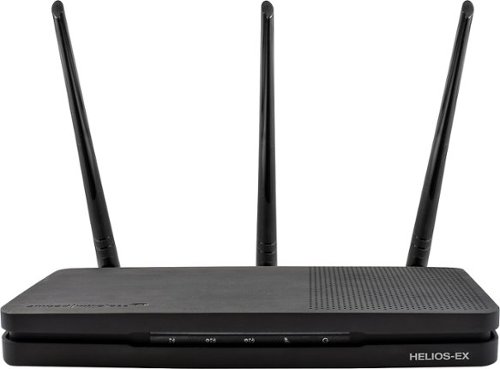
Add stability to your home network with the Amped Wireless HELIOS-EX Wi-Fi Extender. With DirectLink technology, it avoids signal loss by adding another 5GHz Wi-Fi channel to the standard setup, which it then uses strictly for receiving signal from the source. This Amped Wireless HELIOS-EX Wi-Fi Extender covers an area of up to 12,000 sq. ft. and includes four Gigabit network ports.
Can this extender be connected with a hard wire from my router? or does it have to get its signal wireless from the router and then broadcast the wireless signal to computers. Where the extender located will better if its signal can be hard wired
Typically if you want to use a wire you will run it from your computer to the box, and that you can do with this device.
9 years, 3 months ago
by
vrs99
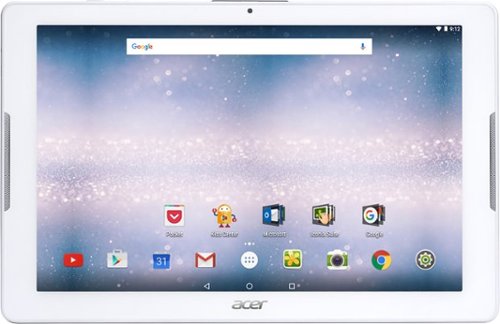
Browse the internet or play your favorite apps on this Acer tablet. It runs on an Android operating system and is powered by a quad-core 64-bit processor for full functionality. Google Mobile Services and Microsoft Office Suite are preloaded on this Acer tablet for out-of-the-box work or play capabilities, and DTS-HD Premium Sound lets you enjoy videos.
THIS Acer - Iconia One 10 - 10.1 - Tablet - 32gb - White IN SALE in best buy, IS NEW OR USED?
It is a new model. To be sure you can check to see if it is model B3-A30.
9 years, 11 months ago
by
vrs99
Which is better: AMD A8-Series or Intel® 4th Generation Core™ i3
I am going to purchase a new laptop and I've narrowed it down to either:the HP Pavilion 12-E017DX or the HP Pavilion 12-E019DX. The thing holding up my puchase it that I don't know what the diference is between the processors. I only use my laptop for general use...email, web surfing, facebook, etc. Can someone please tell me what the difference is and which one is better? Thanks
Personally without going and looking at the specs of the AMD card I would recommend going with the i3. The Intel chips are superior and deliver more performance for the price.
If you can stretch it go for the Haswell i5 which offers superior performance over the i3 and sips juice from the battery. Good Luck
If you can stretch it go for the Haswell i5 which offers superior performance over the i3 and sips juice from the battery. Good Luck
12 years, 8 months ago
by
vrs99
TN