


vrs99's stats
- Review count220
- Helpfulness votes1,302
- First reviewJanuary 3, 2014
- Last reviewAugust 7, 2026
- Featured reviews0
- Average rating4.6
- Review comment count5
- Helpfulness votes6
- First review commentJuly 11, 2015
- Last review commentJuly 18, 2017
- Featured review comments0
Questions
- Question count0
- Helpfulness votes0
- First questionNone
- Last questionNone
- Featured questions0
- Answer count45
- Helpfulness votes47
- First answerDecember 31, 2013
- Last answerJanuary 17, 2022
- Featured answers0
- Best answers1

GE Appliances is dedicated to providing the right solutions for rooms of any size. Our window air conditioners are designed to offer exceptional comfort while the features make products versatile and easy to use.This 6,000 BTU window air conditioner cools small rooms up to 250 square feet. Energy efficient cooling with 3 cooling and 3 fan speeds provide flexible and optimal home comfort. Electronic controls with included remote make it easy to adjust and manage your settings from anywhere in your room. This AC installs easily in a double hung window with included EZ Mount window kit and fixed chassis. Additional features like eco mode, power interruption restart, 24-hour on/off timer, and removable filter offer ease of use and maintenance.
Customer Rating

4
Cool Office comes in a small package
on April 23, 2020
Posted by: vrs99
from TN
First impression is that the unit is a little narrower from a typical 6000 BTU unit by about an inch, which can be handy in small window installations. Nice looking unit with a different take on the front air-return grill, rather being open slots from side to the grill is designed with small round vent openings.
Setup was a breeze with well laid out instructions. Believe it took us no longer than about thirty minutes from unpackaging to cool air.
Control panel is well laid out and easily understandable with all the typical settings
- Mode with ECO
- Fan Speed with Auto
- Delay On; Set unit to come on in 1 to 24 hours
- Delay Off; Set unit to turn off in 1 to 24 hours
- Temp and Delay increase + Decrease
- Mode with ECO
- Fan Speed with Auto
- Delay On; Set unit to come on in 1 to 24 hours
- Delay Off; Set unit to turn off in 1 to 24 hours
- Temp and Delay increase + Decrease
The GE A/C unit came well packaged with all the accessories you expect, Remote Control, well written User’s Manual, Side Curtains/Frames, foam for top window gasket and mounting hardware. Generous Power cord length.
Other thoughts:
- The airflow can be set only horizontally and not up and down
- Includes Subbase Water Plug. Like that in case you need to drain water from the case
- Noise level is typical. A 7 out of 10
- The airflow can be set only horizontally and not up and down
- Includes Subbase Water Plug. Like that in case you need to drain water from the case
- Noise level is typical. A 7 out of 10
Having a second GE A/C unit found that both the remotes control both A/C units. Should make for some fun dueling temperature settings with the wife!
Have installed the unit in a small office approximately 125 square feet and easily keeps the room comfortable. Does not require a long period of operation to cool the room, like that.
Well made unit, looks good in the office with respectable ambient noise level.
Bottom-line, good small area A/C unit with all the right features. Recommended.
Mobile Submission: False
I would recommend this to a friend!


Share this review:


+25points
37of 49voted this as helpful.
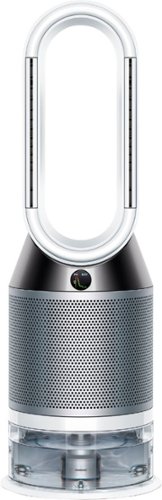
Automatically purifies and humidifies for a healthier environment. Hygienically removes 99.9% of bacteria in the water~. The Dyson Pure Humidify+Cool is a multi-functional machine for whole room air treatment - it purifies, humidifies and cools you. Its activated carbon and HEPA filters capture 99.97% of allergens and pollutants as small as 0.3 microns and Air Multiplier technology projects purified, humidified air throughout the room~. And with a hassle-free deep clean cycle, thoroughly eliminate mineral build-up and bacteria at the touch of a button. Dyson technology helps create a cleaner, healthier home - Our vacuums and purifiers are scientifically proven to capture particles as small as allergens and bacteria.
Posted by: vrs99
from TN
When the Dyson air purification system arrived was surprised at the size of the product container, fairly large and the unit stands at 36.4 inches. After assembling the unit in the middle of the living room floor was questioning how it would look with our furnishings. Only took a short time to see that we found the design to be spot on, my wife loves the look.
Seldom have I been more excited waiting for product to arrive than I was for the Dyson system. Have had HEPA filtering systems in my home for decades, appreciate having clean fresh air for my family’s health, comfort and well-being. Upon arrival and familiarizing myself with system I became even more enthusiastic having the advanced air purification and monitoring system in my home! Have never seen an air system this advanced and well suited for the needs of the modern home.
Seldom have I been more excited waiting for product to arrive than I was for the Dyson system. Have had HEPA filtering systems in my home for decades, appreciate having clean fresh air for my family’s health, comfort and well-being. Upon arrival and familiarizing myself with system I became even more enthusiastic having the advanced air purification and monitoring system in my home! Have never seen an air system this advanced and well suited for the needs of the modern home.
Setup was a breeze, less than half hour unboxing and assembling the few included parts and getting the system running and connected online with Wi-Fi the first time. Quite simple. Only caveat being the Quick Start Guide needs one or two small tweaks, that said setting up the unit with the quick start instructions was intuitive. Dyson does provide a Full User Guide online which is thorough and well thought out. The manual is much appreciated.
Dyson Link app is a Gem, it is in a word (or two) a truly amazing app with extraordinary system feedback of all system monitoring which I will list below and provides complete control of your air purification system. Kudos to the Dyson team.
Accessories/supplies include a remote with full system control, power connector with a generous length cable, and Includes three Descaling Kits for deep cleaning the system – “which are citric acid powder for removing mineral build up within the machine” during deep cleaning maintenance.
Good Stuff:
- Humidifier – no visible mist
- Evaporative cooling - can be turned off by reversing airflow
- Airflow in the room is excellent
- Alexa enabled
- Night Mode – quieter with dimmed display
- Sleep Timer
- Extremely quiet at all fan settings – believe this achieved with the Mixed Flow Impeller which is same tech used in jet engines
- 77 gallons per second air output
- Auto detects airborne particles and gases and reports in real time
- Removes gases from air and bacteria in humidifier water
- Humidifier – no visible mist
- Evaporative cooling - can be turned off by reversing airflow
- Airflow in the room is excellent
- Alexa enabled
- Night Mode – quieter with dimmed display
- Sleep Timer
- Extremely quiet at all fan settings – believe this achieved with the Mixed Flow Impeller which is same tech used in jet engines
- 77 gallons per second air output
- Auto detects airborne particles and gases and reports in real time
- Removes gases from air and bacteria in humidifier water
Monitoring - displayed on LCD and in Dyson Link app:
- Comprehensive indoor air quality analysis
a. Air Quality Index (AQI)
b. Temperature
c. Relative Humidity (RH)
d. Particulate Matter (PM2.5) – Includes smoke, bacteria and allergens
e. Particulate Matter (PM10) – Includes dust, mold and pollen
f. Volatile organic compounds (VOCs)
g. Nitrogen dioxide and oxidizing gases (NO2)
- Comprehensive indoor air quality analysis
a. Air Quality Index (AQI)
b. Temperature
c. Relative Humidity (RH)
d. Particulate Matter (PM2.5) – Includes smoke, bacteria and allergens
e. Particulate Matter (PM10) – Includes dust, mold and pollen
f. Volatile organic compounds (VOCs)
g. Nitrogen dioxide and oxidizing gases (NO2)
- Local Reporting for outdoor air quality
a. Air quality index (AQI)
b. Outdoor temperature
c. Relative humidity (RH)
d. Pollen report for dominate pollen levels – Grass and Tree are being reported on my system
a. Air quality index (AQI)
b. Outdoor temperature
c. Relative humidity (RH)
d. Pollen report for dominate pollen levels – Grass and Tree are being reported on my system
Literally amazed with the technology that Dyson has employed in their engineering, design and build quality of the system, and I am seldom this impressed with any tech applications.
Bottom-line the Dyson Pure Humidify + Cool system is the most comprehensive air system on the market and for me it means peace of mind knowing my family has clean air at home, and that is the real bottom-line.
Mobile Submission: False
I would recommend this to a friend!


Share this review:


+9points
9of 9voted this as helpful.
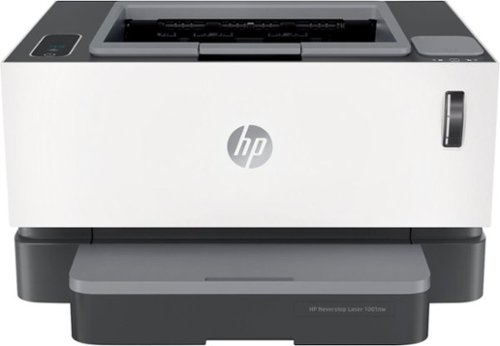
Don't worry about toner ~ with the HP Neverstop 1001nw Laser Printer get up to 7x more pages than inclass laser printers before your first toner reload and up to 5,000 pages of toner right out of the box. Features like fast black-and-white printing, easy mobile printing, and the HP Smart app ~ the first mobile print app to simplify scanning and reduce time. Get consistently superb prints and up to 2.5x more pages than in-class HP Toner cartridges with the Toner Reload Kit (sold separately). Stay connected from virtually anywhere with this monochrome laser printer's wireless networking. Plus, this all-in-one wireless printer has up to an 84% smaller environmental footprint, so you can get business done with the environment in mind.Prints up to 21 ISO ppm* in black.
Customer Rating

5
Great Design - Fast - Excellent Prinitng
on March 30, 2020
Posted by: vrs99
from TN
The HP Neverstop Laser printer arrived in quality packaging, typical HP. Upon taking the printer and accessories out discovered it to be very minimalist, the printer, USB cable, two documents, two paper management accessories and a power cable.
Printer Setup, seven basic steps, was quickly accomplished and as smooth as any printer I have setup. Only caveat is setting the paper-length guide in the paper input tray could be explained a bit more clearly, but once I got it was as simple as 1-2-3.
Connectivity, Network and Wi-Fi setup:
- Printer includes a RJ45 Ethernet port for wired. Ethernet 10/100 Base.
- Wi-Fi 802.11 B/G/N
- First attempted to use android phone with HP Smart app, could not get the Wi-Fi connected. Had same issue last time I attempted using HP Smart app from my Android device to setup up Wi-Fi.
- When app fails you are instructed to use a laptop or desktop to connect…. What if you just have a mobile?
- Switched to windows 10 laptop and HP Smart app no problem setting up Wi-Fi – very intuitive program, feature rich.
- Mobile Printing Support; Apple AirPrint, Google Cloud Print, HP Smart App, Wi-Fi Direct printing, and Mopria certified.
- Printer includes a RJ45 Ethernet port for wired. Ethernet 10/100 Base.
- Wi-Fi 802.11 B/G/N
- First attempted to use android phone with HP Smart app, could not get the Wi-Fi connected. Had same issue last time I attempted using HP Smart app from my Android device to setup up Wi-Fi.
- When app fails you are instructed to use a laptop or desktop to connect…. What if you just have a mobile?
- Switched to windows 10 laptop and HP Smart app no problem setting up Wi-Fi – very intuitive program, feature rich.
- Mobile Printing Support; Apple AirPrint, Google Cloud Print, HP Smart App, Wi-Fi Direct printing, and Mopria certified.
Operations and observations:
- Fast printer rated at 21 pages a minute.
- Typical noise level warming up new print job, after that smooth.
- Comes with 5000 pages worth of toner in the printer, ready to go out of the box.
- Cartridge free - refillable cartridge. This surprised me with experiences with messy older laser systems. Specs say it will save 60% on future toner reloads.
- 32mb of memory – not upgradeable.
- 150-page input tray with 100-page output tray.
- Duplex printing supported.
- Handles up 8.5x14” paper.
- 14-27 lb. paper
- Fast printer rated at 21 pages a minute.
- Typical noise level warming up new print job, after that smooth.
- Comes with 5000 pages worth of toner in the printer, ready to go out of the box.
- Cartridge free - refillable cartridge. This surprised me with experiences with messy older laser systems. Specs say it will save 60% on future toner reloads.
- 32mb of memory – not upgradeable.
- 150-page input tray with 100-page output tray.
- Duplex printing supported.
- Handles up 8.5x14” paper.
- 14-27 lb. paper
First impressions, I really like the printer’s size, simplicity and design for the intended role in a Home Office, Office or Students Desk. Power cord does not have Power Brick, big plus for me.
What is good, warms up quickly and print speeds are lighting quick, the print output is extraordinarily sharp. What is remarkable is so much great printing in such a small box. Love it.
Mobile Submission: False
I would recommend this to a friend!


Share this review:


0points
3of 6voted this as helpful.
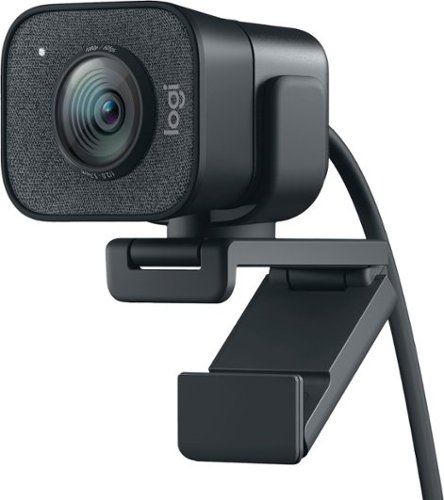
The Logitech StreamCam premium webcam streams and records in full 1080p HD resolution at 60 fps, delivering professional-quality results for YouTube videos and Twitch streaming. Create sharp, natural video with smooth motion and crisp details thanks to a premium glass lens and smart features like autofocus. The external computer camera's glass lens delivers vibrant, true-to-life image quality with crisp details. A 78-degree field of view keeps you upfront and center, while autofocus intelligently adjusts the lens in real-time soyou always stay in focus, even when you move toward or away from the camera. The live streaming webcam's intelligent exposure system adjusts the aperture and ISO speed in real-time to ensure accurate skin tones for a more natural, healthy look ~even in varying lighting conditions. With StreamCam, you can be confident that you~ll always look great.
Posted by: vrs99
from TN
After receiving the Logitech StreamCam Plus and going over the features and seeing the brilliant design and build I knew the StreamCam Plus was built for the Serious Streamer. When you open the box the first impression is quality, that comes with USB-C 3.1 cable along with monitor mount and tripod.
Mounting hardware works exceptionally well, tripod and mounting brackets are well thought out and sturdy. Impressed.
HD 1080P video sans 4K support is a slight let down for the price, however the main audience is streamers so this can be overlooked. The big pro is 60 fps recording, smooth video without stuttering.
The AI-driven facial tracking, smart autofocus, and exposure works very well and ensures that you always look your best. Full HD Vertical video support is way cool, simply turn the camera for enhanced viewing on smartphones.
The built-in microphone sounds good, but it picks up undesirable sounds. Using our Blue Yeti microphone when streaming works amazingly well with the StreamCam Plus.
Good Stuff:
- Picture quality
- 1080p/60fps = videos that pop
- Ease of use
- Lowlight performance
- Sharpness with abundance of detail
- Facial tracking
- Designed for the Media Creators
o Video Conferencing
o Live Stream Gaming
o Video Chatting
- Picture quality
- 1080p/60fps = videos that pop
- Ease of use
- Lowlight performance
- Sharpness with abundance of detail
- Facial tracking
- Designed for the Media Creators
o Video Conferencing
o Live Stream Gaming
o Video Chatting
Bottomline, the Logitech StreamCam Plus is an amazing camera for streaming with advanced improvements over the previous generation.
Mobile Submission: False
I would recommend this to a friend!


Share this review:


+6points
6of 6voted this as helpful.
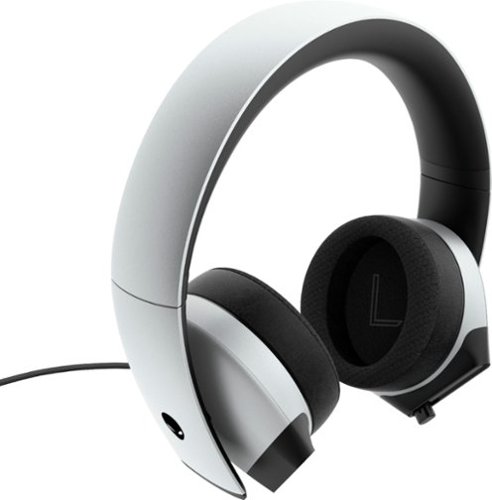
Enjoy outstanding sound clarity with this Dell Alienware gaming headset. The 7.1 stereo surround sound technology delivers a fully immersive listening experience, while the uni-directional noise-canceling retractable microphone blocks background noise for crisp, clear audio. This Dell Alienware gaming headset has earcups made of memory foam, sports fabric and leatherette combined with a cushioned headband for comfort during extended gaming sessions.
Customer Rating
4
Brilliant Looks - Sound - Comfort
on February 12, 2020
Posted by: vrs99
from TN
Alienware 510H gaming headset offers astonishing sound and comfort with a sleek, modern form factor. Without any tuning the headphones sound amazing right out of the box.
To start, the hi-res 50mm drivers can push sounds from 20Hz to 40KHz according to Alienware. My testing showed the headphones went as low as 15Hz. Impressive for gaming headphones.
The 7.1 surround sound immersed me in every game I tested, allowing me to hear the positions of enemies in all directions precisely.
The headphones are very comfy and provide excellent noise isolation with leatherette ear-cups. One slight issue is that the headphones tend to slide off my head when tilted back too far.
The built-in microphone sounds great with very good noise isolation. However, I have noticed that the microphone is a little stiff when pushing it in. Not a major inconvenience but worth mentioning.
Another great feature of the headset is the variety of cables it comes with. With a USB C, 3.5mm, and headphone/microphone splitter cables.
Love the Polar White color and design, quite different than other headphone gaming sets.
Overall, great sound quality, comfort, and refreshingly new design, the Alienware 510H gaming headset will put you a tier higher than your opponents.
Mobile Submission: False
I would recommend this to a friend!


Share this review:


0points
0of 0voted this as helpful.
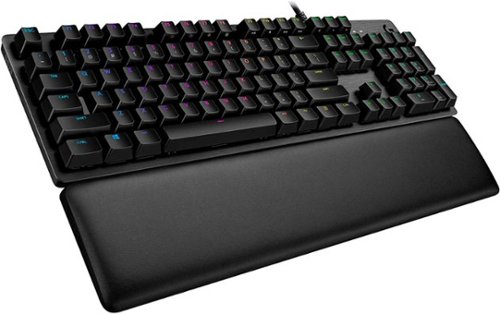
G513 is a high performance RGB mechanical gaming keyboard that features advanced technologies in a modern and sleek design. G513 includes full spectrum ~16.8M color RGB per key lighting with LIGHTSYNC technology, choice of mechanical switches, and a memory foam palmrest to deliver utmost comfort. G513 is the perfect blend of performance, advanced technologies and features, and unparalleled build quality and comfort.
Posted by: vrs99
from TN
The Logitech G513 Gaming Keyboard is full of features in a modern, sleek form-factor.
The keyboard comes with tactile, linear, or clicky switches. Have tried all the different keyboard switches and recommend the tactile switches for gaming.
It feels very sturdy with an aircraft-grade aluminum case. A favorite feature of the keyboard is the detached memory foam palm rest. Another big plus is the keyboard’s weight, it is sturdy and will not be slip-sliding around the deck in the heat of the battle.
G513 feels very premium and substantial. Hands feel especially comfortable, even in prolonged gaming sessions.
The possibilities are limitless with the Logitech GHUB software and the RGB with LIGHTSYNC Technology. LIGHTSYNC allows game-driven lighting effects and full spectrum per-key lighting control. One wish list item; Would be fun if it worked with ROG Aura.
Another nice touch are the included gaming keys. They have raised edges which cup your finger in the keys to prevent slippage. The keys are very ergonomic and comfortable.
Would have given five stars but there are a few minor drawbacks. First, there is no num lock light, even though there is a gaming mode and CAPS light, might be a nice touch if you could light up the Logo. Another, slightly less issue is the integrated USB port is 2.0 – USB 3.0 would be welcomed.
Overall, the 513 is an exceptionally well-rounded gaming keyboard with brilliant features Designed for the Win!
Overall, the 513 is an exceptionally well-rounded gaming keyboard with brilliant features Designed for the Win!
Mobile Submission: False
I would recommend this to a friend!


Share this review:


+1point
1of 1voted this as helpful.
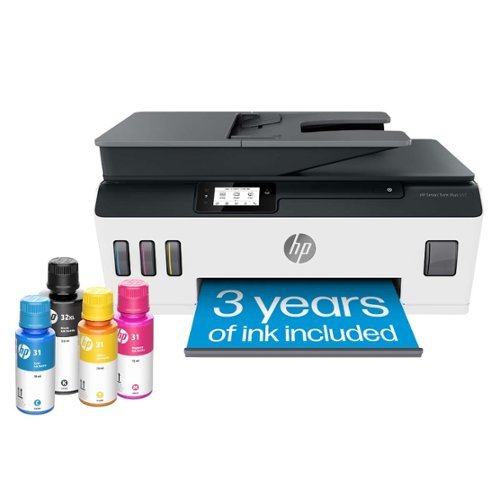
Whether you are a teacher or student, get back-to-school ready for the classroom with this HP Smart Tank wireless all-in-one printer! This high-quality ink tank printer with an automatic document feeder plus fax delivers up to 2 years of ink in bottles included in the box~. Get faster connections with dual-band Wi-Fi, and easy mobile printing with HP Smart app.
Customer Rating
4
Great Little Printer with LOW Operating Costs
on December 20, 2019
Posted by: vrs99
from TN
The HP Smart Tank Plus 651 All-in-One is my first look at a refillable ink reservoir printer system, and I am exceptionally impressed, it’s like where have you been all these years!
After receiving the 651 I went looking for a fitting place do add the printer to our network and found a spot in my kid’s room. The smaller footprint works exceptionally well in our application, a welcomed addition to our network. Perfect for the student who is hard at work.
Next follow the setup in the HP pictorial quick start guide which clearly illustrates/explains everything you need to get unpacked and preparing the printer for first-time use.
After filling ink reservoirs and installing two print heads (simple) - Download/install HP Smart App to PC or mobile device. Highly appreciate that you can use the app with a PC and not be tethered to a mobile or tablet.
On HP Smart app scroll screen to the “Add New Printer” option and continue with set up.
Joining the network was simple task using the settings on the printer’s Touch Screen. The printer does not have an Ethernet RJ-45 connection, I prefer to use a wired printer but most users today I am sure use Wi-Fi which connects simply.
Setting the up the Smart Tank 651 and getting on-line took about 30 minutes, simple, easy and straight forward.
All options you need are accessible through the 2.2” mono Touch Screen as well as through HP Smart App. The menus are setup intuitively on the printer, intuitive and easy to manage.
All printer settings are accessible in HP Smart, personally I prefer to manage the printer through the HP Smart app. Any info you need for the printer are easily located in HP Smart, an excellent program and has been a great addition to the HP printer line.
The new Smart Tank system I like, a lot. It is reducing the waste of materials and resources (planet friendly) and hopefully saves on ink expenses.
Did a little comparison shopping comparing the Smart Tank HP31 70ml bottle to the HP 951XL which holds 25ml. The price I found for the Smart Tank HP31 is $17.17 where the HP 951XL for our other HP Inkjet sells for $35, this could represent a very considerable savings in expenses, if these prices hold.
Good Stuff:
- Color Ink bottles are 70ml each
- Black Ink bottle is 125ml
- Color ink wells hold 70ml
- Black ink well holds 135ml
- All ink wells are transparent in the front showing ink levels – great idea
- Two Years ink included – “up to 6000 color pages or up to 8000 black pages” - Impressive
- 35-page auto feeder
- Fast Wi-Fi – dual band
- USB 2.0 LE
- ISO Print speed – Black 11ppm/Color 5ppm
- Mobile printing compatible with Hp Smart app, HP ePrint and AirPrint
- Scanning and sharing to the cloud
- Sheet capacity – 100 Letter/legal with 30 sheet output tray
- Small footprint
- Excellent output
- Black Ink bottle is 125ml
- Color ink wells hold 70ml
- Black ink well holds 135ml
- All ink wells are transparent in the front showing ink levels – great idea
- Two Years ink included – “up to 6000 color pages or up to 8000 black pages” - Impressive
- 35-page auto feeder
- Fast Wi-Fi – dual band
- USB 2.0 LE
- ISO Print speed – Black 11ppm/Color 5ppm
- Mobile printing compatible with Hp Smart app, HP ePrint and AirPrint
- Scanning and sharing to the cloud
- Sheet capacity – 100 Letter/legal with 30 sheet output tray
- Small footprint
- Excellent output
Designed for light workloads and would fit right in many offices, homes or student dorms.
Mobile Submission: False
I would recommend this to a friend!


Share this review:


+7points
7of 7voted this as helpful.
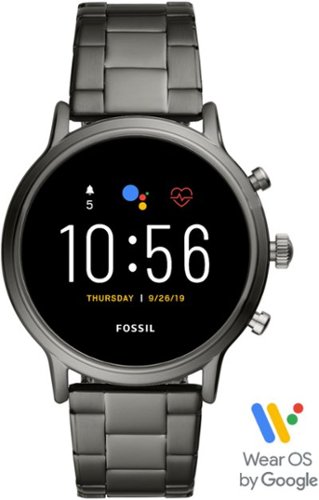
Train like a pro with this 44mm Fossil Carlyle HR smartwatch. Bluetooth functionality enables syncing with your smartphone, while the internal storage lets you work out with your favorite tunes. This swimproof Fossil Carlyle HR smartwatch features GPS to track your activity outdoors, and the heart monitor keeps tabs on your cardiac rate.
Customer Rating
4
Fossil - The New Generation
on December 9, 2019
Posted by: vrs99
from TN
When you open the Fossil box It is instantly obvious that the Fossil Gen 5 is a high-quality watch with a gorgeous wristband and clear detail to attention in the watch casing and face, stunning. This is a watch you will feel quite comfortable wearing into a boardroom or at play. Fossil has years of experience in fashion and it is displayed brilliantly in the Gen 5.
First impression wearing the Gen 5 was that it weighs slightly more than any watch I have owned previously, though after wearing a short time it is no longer perceptible.
Setup could not have been easier, has a pre-loaded on-screen tutorial to get you going.
After a few days was concerned about the battery life lasting 24 hours and was charging nightly. Then my kid walks by and suggests I turn the always on (the default setting) screen off. Duh. Amazing how the battery life of the Gen 5 increased. Has a great NFC charger, just pop under the bottom of the watch case, simple. With the always on display turned off you need only simply turn your wrist over to look at the watch face to display the screen.
Big factor for me is fitness, cardio, step count, etc. Still getting familiar with the fitness system which looks to have great potential. Would like to have the option of large on-screen Heartbeat and Steps displayed. The Cardiogram apps for the Gen 5 and phone are well thought out and executed, though feels as it needs improving. Real time syncing of steps and heartbeat on the watch and phone app would be a great addition.
Fitness Apps on Watch:
- Cardiogram
- Fit
- Fit Breath
- Fit Workout
- Cardiogram
- Fit
- Fit Breath
- Fit Workout
OK Google Search is especially convenient, “OK Google weather” and so on is quite handy on the run. One caveat is that voice command only works once, if you want to use OK Google a second time you must tap the microphone icon. That I do not get if the function it to make searching convenient. If I am driving and want the weather and then then directions, I would have to take my hands from the wheel to do the second search.
The Right Stuff:
- 8GB storage 1GB memory
- Phone calls
- Google Assistant
- Blue Tooth 4.2 Low Energy
- Wi-Fi
- Google Fit
- Android and iPhone compatible
- Wear OS operating system
- Calendar, email, contacts and social media connectivity
- Play Store – lots of apps
- Spotify Music App pre-loaded
- Bright vibrant display
- Battery saving modes
- Built in GPS
- Powered by Snapdragon Wear 3100 processor = Fast!
- 8GB storage 1GB memory
- Phone calls
- Google Assistant
- Blue Tooth 4.2 Low Energy
- Wi-Fi
- Google Fit
- Android and iPhone compatible
- Wear OS operating system
- Calendar, email, contacts and social media connectivity
- Play Store – lots of apps
- Spotify Music App pre-loaded
- Bright vibrant display
- Battery saving modes
- Built in GPS
- Powered by Snapdragon Wear 3100 processor = Fast!
A Brilliantly conceived smartwatch that is Engineered, Designed, Built and Equipped to go the distance.
Mobile Submission: False
I would recommend this to a friend!


Share this review:


-2points
1of 4voted this as helpful.
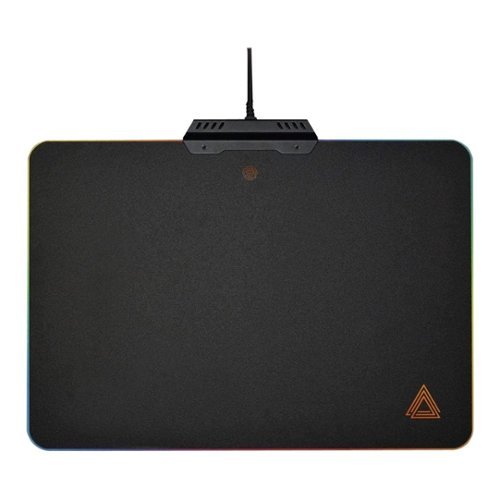
Experience smooth movements and quality tracking with this Lexip B5 LED gaming mouse pad. The metal construction provides durability and enhanced traction, while the customizable RGB lighting offers a personalized look. This Lexip B5 LED gaming mouse pad is lined with nonslip material to hold everything steady during intense gaming sessions.
Customer Rating
5
Lights, Action, Game On!
on November 29, 2019
Posted by: vrs99
from TN
The Lexip B5 Hard Gaming Mouse Pad is a fantastic mousepad with terrific RGB lighting.
This pad is very rigid and did not slide at all during my “Game on” testing. The size is just right to fit even on my cramped desk and be able to provide an excess range of motion for any game or application.
This mousepad performed exceedingly well in first-person shooters where there was extremely low drag and great tracking.
It has 9 pre-programmed RGB modes (6 static colors and 3 animations), which were easily accessible with the integrated button at the top of the mouse pad.
The 6-foot braided cable is a welcomed touch of quality on a busy gamer's desk. One slight negative is that a braided mouse cable makes a little noise when dragged across the mouse pad but is unnoticeable if sound is playing.
Overall, the sleek design, low drag, and metal construction make this mouse pad one of the best. Have used and tested many top gaming pads and the Lexip B5 is a solid winner
Lexip B5 Mousepad delivers flawless mouse control and advanced precision control in the heat of the battle while the edge lighting brings on heighten game immersion.
Mobile Submission: False
I would recommend this to a friend!


Share this review:


+1point
1of 1voted this as helpful.

Make your photos look amazing with Adobe Photoshop Elements 2020. The Adobe Sensei AI technology powers automated options to get a starting point for creative exploration, and the Guided Edits feature allows removing unwanted objects to achieve the result you want. Adobe Photoshop Elements 2020 lets you easily edit photos, make clips, and create memes to share on your favorite social websites.
Customer Rating
4
New AI Tools for Photoshop Elements
on November 7, 2019
Posted by: vrs99
from TN
Adobe Photoshop Elements 2020 is superb photo editing software and always ranks high in its genre. Photoshop Elements is geared towards consumers with many astonishing auto-creations and guided edits. Advanced Shutterbugs will also find very effective power tools for their studio.
Utilizing Auto Creations utilizing Adobe Sensei AI, Photoshop Elements automatically generates creations which you can see on the home screen. The same AI powers many other auto features inside the editing software.
New standout features include skin smoothing, auto photo colorization, one-click subject selection, auto object removal, and the ability to order prints and gifts using the integrated FUJUFILM Prints and Gifts service.
One feature that has great potential is the Auto Removal, in the right picture/setting it does a fantastic job of removing objects from the picture. Tested this in several pictures with remarkable results most the time, like removing a person from a background of buildings and trees. That test did result in some tearing in the grass background, the results however were stunning. Adobe has brought this technology a long way from the early days, 'almost' magic.
Not only effective but can be lots of fun is Perfect Portrait mode, where you can smooth the skin, slim down the subject along with other portrait enhancing tools. Smoothing the skin is excellent, slimming down (losing a few lbs.) the subject(s) is achieved by compressing the picture horizontally which works quite well.
If you are new to video editing or want to learn something new, there are 55 guided edits to assist you.
Photoshop Elements 2020 is a continued evolution of an already mature and capable picture editing package which has added some brilliant features to their product along with some stunning new AI capabilities.
Overall, Adobe Photoshop Elements is strong editing software with many beginner and expert features. It is easy to get started in photo editing and when you look deeper will find some pretty amazing tools.
Mobile Submission: False
I would recommend this to a friend!
Share this review:


+2points
2of 2voted this as helpful.
vrs99's Review Comments

Upgrade your laptop's storage with this Samsung 850 PRO MZ-7KE512BW internal SATA III solid state drive, which offers a generous 512GB capacity for digital data. SED (Self-Encrypting Drive) technology controls access to private information.
Overall 1 out of 5
1 out of 5Crashed and Burned after 44 Days - Good Luck
By vrs99
Fast SSD - and Extra Fast to Crash in just 44 days. Of course it was on a Friday evening and cannot speak to Samsung until Monday. Cannot Chat with them as they do not offer Chat for SSD's.
Luckily it crashed two weeks after the 30 day return period to Best Buy. Guess it is a good thing they offer 10 year warranty? But have heard they will return a refurbished unit, which will not be good on 44 day old product. Must be living on the bleeding edge, should have stuck with the Toshiba, which I can't see a real life difference in speed.

vrs99
TN
After a Day of Wrestling with the SSD
July 11, 2015
After pulling every rabbit out of my hat I finally got the SSD going again. Have to completely reload OS, etc. starting at Windows 8. Not fun.
But I am "somewhat" happy that I was able to get the drive working. Not sure what happen to the drive, but have some suspicion of a setting in Magician (software system for the 850 Pro) which boosts speed?
+2points
2of 2voted this comment as helpful.

Only at Best BuyUpdate your portable technology kit with this HP Omen 17-inch laptop. Ideal for gaming, this machine combines a 7th generation Intel Core i7 processor with 12GB of DDR4 RAM for ultra-fast performance on the go. An island-style backlit keyboard equipped with dedicated macro keys makes this HP Omen 17-inch laptop easy to use in the dark.
Overall5 out of 5
5 out of 5Hp omen gaming laptop
By Martinezjorge7
I recently bought the 16 omen laptop and I was able to return mine and be able to upgrade the the newest one it has a better graphic card and an new design with a better cooling vent with a 1 tb hard drive
vrs99
TN
NO DVD
July 12, 2017
There is no DVD built, you would have to use external.
0points
0of 0voted this comment as helpful.

HP OMEN by HP Laptop: Power through the virtual landscape with this versatile HP Omen 15-inch laptop. Ideal for gaming, this machine packs a 7th generation Intel Core i7 processor and an NVIDIA GeForce GTX video card for superior graphics performance. The 1TB hard drive inside this HP Omen 15-inch laptop provides plenty for space for gaming profiles and other multimedia files.
Overall4 out of 5
4 out of 5Excellent laptop, but not the best value
By Xephyroth
from Colorado Springs, CO
This HP Omen is the 3rd gaming laptop I've ever owned, and it's undoubtedly the best one I've had the pleasure of using. However, this product isn't perfect out of the box.
FIRST IMPRESSION / UNBOXING:
Out of the box, the first thing that I noticed is that this laptop has impressive build quality. The sand-blasted brushing brings a pleasant aesthetic while also bringing solid weight and durability. It's not incredibly flashy, so it doesn't scream "gamer" like a lot of other laptops, but it definitely brings a touch of the "gamer" aesthetic without being overzealous. The notebook is also much thinner than I expected, as I've been used to much thicker gaming laptops, but I suppose the lack of an optical drive attributes to that. The power brick is fairly small and compact for a machine that's capable of entry/mid-level gaming.
Out of the box, the first thing that I noticed is that this laptop has impressive build quality. The sand-blasted brushing brings a pleasant aesthetic while also bringing solid weight and durability. It's not incredibly flashy, so it doesn't scream "gamer" like a lot of other laptops, but it definitely brings a touch of the "gamer" aesthetic without being overzealous. The notebook is also much thinner than I expected, as I've been used to much thicker gaming laptops, but I suppose the lack of an optical drive attributes to that. The power brick is fairly small and compact for a machine that's capable of entry/mid-level gaming.
DISPLAY:
Turning the display on, the 1080p IPS matte display is nice and bright, and viewing angles are decent without too much color shifting. Bezels aren't too large, and it's not something I noticed until just now while writing this review. While I'm used to Quad-HD and 4K resolutions, I was not displeased with this display in any fashion. The webcam is above the display and can record at 720p/30fps. Not the best, but not the worst webcam I've seen.
Turning the display on, the 1080p IPS matte display is nice and bright, and viewing angles are decent without too much color shifting. Bezels aren't too large, and it's not something I noticed until just now while writing this review. While I'm used to Quad-HD and 4K resolutions, I was not displeased with this display in any fashion. The webcam is above the display and can record at 720p/30fps. Not the best, but not the worst webcam I've seen.
KEYBOARD:
Typing on the keyboard is pleasant with the chiclet-style keys. It didn't take me too long to get used to the keyboard, having come from mechanical keyboards and MacBook Pro keyboards. The addition of the num-pad is certainly nice, as well. The keyboard is backlit red (as you'd expect with the Omen), but settings are very simplistic compared to other gaming laptops. The backlighting has 3 states: fully on, WASD on, or fully off. No, there are no fancy effects, and I wouldn't expect any at this price. I do find it a little bit surprising that you can't dim the backlighting, but I rarely dim the backlight on my keyboards, anyway, so it'd be a useless feature for me.
Typing on the keyboard is pleasant with the chiclet-style keys. It didn't take me too long to get used to the keyboard, having come from mechanical keyboards and MacBook Pro keyboards. The addition of the num-pad is certainly nice, as well. The keyboard is backlit red (as you'd expect with the Omen), but settings are very simplistic compared to other gaming laptops. The backlighting has 3 states: fully on, WASD on, or fully off. No, there are no fancy effects, and I wouldn't expect any at this price. I do find it a little bit surprising that you can't dim the backlighting, but I rarely dim the backlight on my keyboards, anyway, so it'd be a useless feature for me.
TRACKPAD:
Out of the box, the trackpad sensitivity was incredibly low for my personal taste. After making some adjustments to the Touchpad Settings in Windows 10, I found a sensitivity that worked well for me. The touchpad does not physically click, but there are left/right trackpad buttons. Initially, I did find the buttons to be awkwardly placed, but I actually got used to them fairly quickly. While the touchpad isn't the best I've ever used, it is pretty good, in my opinion. 2 and 3 finger gestures work, as well.
Out of the box, the trackpad sensitivity was incredibly low for my personal taste. After making some adjustments to the Touchpad Settings in Windows 10, I found a sensitivity that worked well for me. The touchpad does not physically click, but there are left/right trackpad buttons. Initially, I did find the buttons to be awkwardly placed, but I actually got used to them fairly quickly. While the touchpad isn't the best I've ever used, it is pretty good, in my opinion. 2 and 3 finger gestures work, as well.
SOUND:
The Bang & Olufsen speakers surprised me. They have good volume and a pleasant sound signature. However, they're bottom-firing, so when you put the laptop on your lap, the frequencies dampen and you lose a bit of treble/mid-range impact. Keep in mind, this is with the "B & O Play Experience" toggled on from the "Omen Audio" application. You'll definitely want to leave that on if you're using the speakers, or else the bass will disappear and will sound really anemic. I did notice some clipping at max volume when bass-heavy music was involved. Headphone jack works well as you'd expect, but doesn't promise anything fancy, so don't bother trying to drive headphones with high impedance. The built-in microphone array is good for video/voice chat session, but don't expect it to compete with a USB desktop microphone in terms of sound quality. For all casual purposes, it does just fine.
The Bang & Olufsen speakers surprised me. They have good volume and a pleasant sound signature. However, they're bottom-firing, so when you put the laptop on your lap, the frequencies dampen and you lose a bit of treble/mid-range impact. Keep in mind, this is with the "B & O Play Experience" toggled on from the "Omen Audio" application. You'll definitely want to leave that on if you're using the speakers, or else the bass will disappear and will sound really anemic. I did notice some clipping at max volume when bass-heavy music was involved. Headphone jack works well as you'd expect, but doesn't promise anything fancy, so don't bother trying to drive headphones with high impedance. The built-in microphone array is good for video/voice chat session, but don't expect it to compete with a USB desktop microphone in terms of sound quality. For all casual purposes, it does just fine.
PERFORMANCE:
This laptop comes with a 4-core / 8-thread Intel Core i7 processor. For most basic tasks, this is actually overkill. But for gamers, this is great, as more games are utilizing more threads. The GTX 1050 can play any older game at very high settings, and can still play many modern titles at medium / high settings at 1080p. 8GB of RAM is enough for most people, but individuals who multi-task with a lot of resource-intensive chrome tabs and extensions may find themselves wanting more. While the 1TB hard drive is rated for 7200RPM, I still find it unacceptable to not have the operating system installed on a Solid State Drive (SSD) for a machine at this price point. You will not be unlocking the full potential of this machine while your OS runs on a slow drive like this. Thankfully, the upgrade process is fairly simple. After consulting the service manual found on HP's support website, I unscrewed the 10 screws from the bottom of the laptop and removed the bottom panel by starting with the side closest to the display hinge. From there, you'll have access to the SATA drive bay, the M.2 SSD slot (unoccupied, but does support NVMe drives), and 2 RAM slots (with only 1 occupied). I suspect that each RAM slot supports up to 8GB, but I could not find any confirmation in any of the documents available on HP's support website.
This laptop comes with a 4-core / 8-thread Intel Core i7 processor. For most basic tasks, this is actually overkill. But for gamers, this is great, as more games are utilizing more threads. The GTX 1050 can play any older game at very high settings, and can still play many modern titles at medium / high settings at 1080p. 8GB of RAM is enough for most people, but individuals who multi-task with a lot of resource-intensive chrome tabs and extensions may find themselves wanting more. While the 1TB hard drive is rated for 7200RPM, I still find it unacceptable to not have the operating system installed on a Solid State Drive (SSD) for a machine at this price point. You will not be unlocking the full potential of this machine while your OS runs on a slow drive like this. Thankfully, the upgrade process is fairly simple. After consulting the service manual found on HP's support website, I unscrewed the 10 screws from the bottom of the laptop and removed the bottom panel by starting with the side closest to the display hinge. From there, you'll have access to the SATA drive bay, the M.2 SSD slot (unoccupied, but does support NVMe drives), and 2 RAM slots (with only 1 occupied). I suspect that each RAM slot supports up to 8GB, but I could not find any confirmation in any of the documents available on HP's support website.
I happened to have an unused SATA-based SSD, so I swapped that with the 1TB HDD and used the software that came with my SSD to transfer the OS from the HDD to the SSD. After this process, my HP Omen was substantially faster with booting the OS and running applications—a night & day difference.
BATTERY:
I haven't tested the battery life to an enormous extent, but enabling a battery estimation feature in the BIOS allows Windows 10 to report the estimated time (not just %) on battery. Depending on your brightness, power profile and workload, HP estimates 9 hours of mixed usage, and almost 7 hours of video playback. So far, I think that claim is accurate.
I haven't tested the battery life to an enormous extent, but enabling a battery estimation feature in the BIOS allows Windows 10 to report the estimated time (not just %) on battery. Depending on your brightness, power profile and workload, HP estimates 9 hours of mixed usage, and almost 7 hours of video playback. So far, I think that claim is accurate.
I/O:
The HP Omen doesn't support Thunderbolt 3, but all the USB ports support USB 3.1 (1 Type-C, 3 Type-A. There's also a gigabit ethernet jack, HDMI (HDCP 2.2, 4k@60Hz), and Mini DisplayPort. It also supports a full-size SD card which can be fully inserted into the laptop without sticking out. As mentioned before, it also sports a headphone and microphone jack.
The HP Omen doesn't support Thunderbolt 3, but all the USB ports support USB 3.1 (1 Type-C, 3 Type-A. There's also a gigabit ethernet jack, HDMI (HDCP 2.2, 4k@60Hz), and Mini DisplayPort. It also supports a full-size SD card which can be fully inserted into the laptop without sticking out. As mentioned before, it also sports a headphone and microphone jack.
CONCLUSION:
The HP Omen is a great laptop. It provides great features while also having room for a few upgrade. However, I do feel that an SSD should be included at this price—even a cheaper SATA-based M.2 or 2.5" drive would be fine. For a performance-oriented machine like this, skimping on the SSD is a poor decision on HP's part—especially at this price-point. I have seen competitor's laptops with the i7-7700HQ, GTX 1060, 16GB RAM, and 256GB SSD go on sale for cheaper. So in that regard, I do feel the HP Omen isn't providing as good a value, but it is objectively a good laptop—perhaps, just not as good a value when compared to other options around the same price.
The HP Omen is a great laptop. It provides great features while also having room for a few upgrade. However, I do feel that an SSD should be included at this price—even a cheaper SATA-based M.2 or 2.5" drive would be fine. For a performance-oriented machine like this, skimping on the SSD is a poor decision on HP's part—especially at this price-point. I have seen competitor's laptops with the i7-7700HQ, GTX 1060, 16GB RAM, and 256GB SSD go on sale for cheaper. So in that regard, I do feel the HP Omen isn't providing as good a value, but it is objectively a good laptop—perhaps, just not as good a value when compared to other options around the same price.
vrs99
TN
Support Manual web site?
July 14, 2017
Do you have the link to the HP Support Site that has the Support Manual?
Have been looking and must be in the wrong place - Thanks
0points
0of 0voted this comment as helpful.
HP OMEN by HP Laptop: Power through the virtual landscape with this versatile HP Omen 15-inch laptop. Ideal for gaming, this machine packs a 7th generation Intel Core i7 processor and an NVIDIA GeForce GTX video card for superior graphics performance. The 1TB hard drive inside this HP Omen 15-inch laptop provides plenty for space for gaming profiles and other multimedia files.
Overall5 out of 5
5 out of 5Zoom Zoom Zoom – Game On
By vrs99
from TN
This machine looks like it is going fast sitting on the desktop. The exhaust system vents on the back edges of the laptop brings to mind the tailpipes a supercar might be sporting. When it is cranking through benchmarking the cooling system and exhaust ports are doing a job, pushing volumes of hot air away from the machine.
The HP Omen is the most bang for the buck that I have ever seen in a laptop, this box is loaded with edgy technology. Not going through a list of specs, those are easy enough to find, what is impressive is that all techs are up to date, not last year’s stuff. Too many times have seen corners cut to save a dollar. Not here. Not one USB 2.0 in sight, which is surprising seeing that we just built beast of a desktop a month ago with the latest Z270 Kaby Lake i7 7700K, USB 2.0 ports still in use on an advanced motherboard. Kudos to HP.
Take a close look at the specs, you will find 802.11ac with a solid 866.7 Mbps connection. “Dual Force functionality splits traffic across two data streams, sending gaming traffic over the fastest connection available (typically wired), and all other traffic over WiFi.”
Other ports of interest (not a complete listing check the spec sheet):
1 USB 3.1 Type C
3 USB 3.1
Mini DisplayPort
3 USB 3.1
Mini DisplayPort
What I love is the fact you can purchase a HDD Omen model and then add your M.2 NVMe drive of choice, that is cool. If you are not yet familiar with M.2 NVMe you should take a look. In a word (or more) they are fast, about seven times that of a standard SSD.
What is interesting is that with the HDD the system boots up in 9 seconds, that is fully populated with my programs/anti-virus and all my files. Impressive. Being spoiled by SSD’s I must tip my hat to HP; this machine runs tremendously smooth with the 7200 RPM Hitachi HDD.
The Nvidia GeForce GTX 1050 (4 GB GDDR5 dedicated memory) discrete GPU ran through the Unigine Heaven Benchmark smoothly turning good numbers while the cooling system kept the GPU at a respectable 68 degrees. Notable, that with all the heavy iron under the hood the system manages the temp easily.
Ran my favorite game, Civilization VI through its paces today set on the highest graphic settings and it ran like a champ.
Looks, it has the looks, brushed aluminum case with an excellent finish. Nice touches all-around.
Know it is a way cool machine as my kid, the gamer in the house is explaining all the great and subtle reasons why it would be better for him to hang onto the machine. Yeah right!
What I am getting use to is the keyboard offset, a bit to the left to make room for the full size numeric pad, which is a nice touch. Keyboard is fine and well suited for heavy accurate work, or gaming for that matter.
Want a blistering rig in your hands at an excellent price point, one that can kick it at games and can be easily expanded, check out The Omen.
vrs99
TN
Maintenance and Service - Upgrade Manual
July 15, 2017
If you purchase the Omen and wish to upgrade memory or add M.2 SSD you can find the manual here:
http://h10032.www1.hp.com/ctg/Manual/c05533785
+3points
3of 3voted this comment as helpful.
HP OMEN by HP Laptop: Power through the virtual landscape with this versatile HP Omen 15-inch laptop. Ideal for gaming, this machine packs a 7th generation Intel Core i7 processor and an NVIDIA GeForce GTX video card for superior graphics performance. The 1TB hard drive inside this HP Omen 15-inch laptop provides plenty for space for gaming profiles and other multimedia files.
Overall5 out of 5
5 out of 5Zoom Zoom Zoom – Game On
By vrs99
from TN
This machine looks like it is going fast sitting on the desktop. The exhaust system vents on the back edges of the laptop brings to mind the tailpipes a supercar might be sporting. When it is cranking through benchmarking the cooling system and exhaust ports are doing a job, pushing volumes of hot air away from the machine.
The HP Omen is the most bang for the buck that I have ever seen in a laptop, this box is loaded with edgy technology. Not going through a list of specs, those are easy enough to find, what is impressive is that all techs are up to date, not last year’s stuff. Too many times have seen corners cut to save a dollar. Not here. Not one USB 2.0 in sight, which is surprising seeing that we just built beast of a desktop a month ago with the latest Z270 Kaby Lake i7 7700K, USB 2.0 ports still in use on an advanced motherboard. Kudos to HP.
Take a close look at the specs, you will find 802.11ac with a solid 866.7 Mbps connection. “Dual Force functionality splits traffic across two data streams, sending gaming traffic over the fastest connection available (typically wired), and all other traffic over WiFi.”
Other ports of interest (not a complete listing check the spec sheet):
1 USB 3.1 Type C
3 USB 3.1
Mini DisplayPort
3 USB 3.1
Mini DisplayPort
What I love is the fact you can purchase a HDD Omen model and then add your M.2 NVMe drive of choice, that is cool. If you are not yet familiar with M.2 NVMe you should take a look. In a word (or more) they are fast, about seven times that of a standard SSD.
What is interesting is that with the HDD the system boots up in 9 seconds, that is fully populated with my programs/anti-virus and all my files. Impressive. Being spoiled by SSD’s I must tip my hat to HP; this machine runs tremendously smooth with the 7200 RPM Hitachi HDD.
The Nvidia GeForce GTX 1050 (4 GB GDDR5 dedicated memory) discrete GPU ran through the Unigine Heaven Benchmark smoothly turning good numbers while the cooling system kept the GPU at a respectable 68 degrees. Notable, that with all the heavy iron under the hood the system manages the temp easily.
Ran my favorite game, Civilization VI through its paces today set on the highest graphic settings and it ran like a champ.
Looks, it has the looks, brushed aluminum case with an excellent finish. Nice touches all-around.
Know it is a way cool machine as my kid, the gamer in the house is explaining all the great and subtle reasons why it would be better for him to hang onto the machine. Yeah right!
What I am getting use to is the keyboard offset, a bit to the left to make room for the full size numeric pad, which is a nice touch. Keyboard is fine and well suited for heavy accurate work, or gaming for that matter.
Want a blistering rig in your hands at an excellent price point, one that can kick it at games and can be easily expanded, check out The Omen.
vrs99
TN
Adding M.2 SSD
July 18, 2017
Added a M.2 SSD to the Omen and nuked all the partitions on the HDD and added it back to the system. Day and Night performance. That is one aspect I like about this model is that it does not come with an installed M.2 drive, you can pick your own SSD ads capacity.
Screams with the new M.2 and have an additionally terabyte of storage on the HDD, whcih I use to sync my files to frequently before syncing with the NAS.
Great machine.
+1point
1of 1voted this comment as helpful.
vrs99's Questions
vrs99 has not submitted any questions.
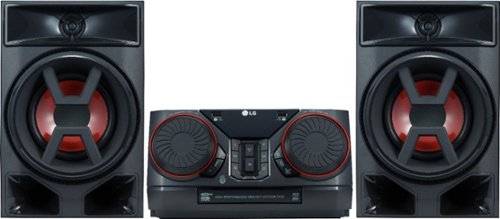
Enjoy room-filling audio in any living space with this LG Hi-Fi shelf system. Its two 150W speakers produce loud, detailed sound, and it streams music via Bluetooth when you pair it with an Android device. This LG Hi-Fi shelf system has an EQ function that optimizes the audio based on the music you're listening to.
how many cds does is play?
Enjoy room-filling audio in any living space with this LG Hi-Fi shelf system. Its two 150W speakers produce loud, detailed sound, and it streams music via Bluetooth when you pair it with an Android device. This LG Hi-Fi shelf system has an EQ function that optimizes the audio based on the music you're listening to.
Can this be connected to tv
It does connect with my LG TV via the LG Sound Sync/Bluetooth easily.
Would think that it would sync with any Bluetooth enabled TV but might need up to date version of Bluetooth.
If it does not remember Best Buy has generous return policy.
Would think that it would sync with any Bluetooth enabled TV but might need up to date version of Bluetooth.
If it does not remember Best Buy has generous return policy.
8 years, 1 month ago
by
vrs99
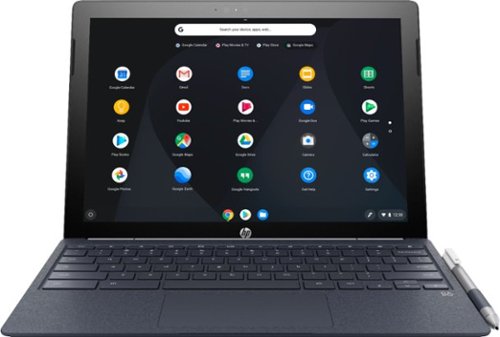
Run programs on this 12.3-inch HP Chromebook convertible laptop. Its detachable touch-screen display lets you enjoy brilliant 2K content, and you can write and draw on it with the included Active Pen. This HP Chromebook convertible laptop has 32GB of storage, and its Intel Core m3 processor and 4GB of RAM provide smooth performance.
I read in the specs "Built-in media reader for simple photo transfer. Supports select memory card formats." Does anyone know what formats are supported or not supported?
Run programs on this 12.3-inch HP Chromebook convertible laptop. Its detachable touch-screen display lets you enjoy brilliant 2K content, and you can write and draw on it with the included Active Pen. This HP Chromebook convertible laptop has 32GB of storage, and its Intel Core m3 processor and 4GB of RAM provide smooth performance.
Any info on this show stopper for me? (86) Access to the Google Play Store and related apps will be provided as part of a regular OS update. This feature might not be available at time of purchase;..
Your question is not clear. The Google Play Store is available with the first release of the unit.
8 years, 3 months ago
by
vrs99
Run programs on this 12.3-inch HP Chromebook convertible laptop. Its detachable touch-screen display lets you enjoy brilliant 2K content, and you can write and draw on it with the included Active Pen. This HP Chromebook convertible laptop has 32GB of storage, and its Intel Core m3 processor and 4GB of RAM provide smooth performance.
Does this computer have a camera in which I can use Skype?
Has both front and rear facing cameras, not positive but would bet that the camera will work with Skype.
If you cannot find an exact answer you could always take one and try it out. BB has a generous return policy.
If you cannot find an exact answer you could always take one and try it out. BB has a generous return policy.
8 years, 3 months ago
by
vrs99

Toshiba 4K UHD Fire TV Edition is a new generation of smart TVs featuring the Fire TV experience built-in and including a Voice Remote with Alexa. With true-to-life 4K Ultra HD picture quality and access to all the movies and TV shows you love, Toshiba Fire TV Edition delivers a superior TV experience that gets smarter every day. The Voice Remote with Alexa lets you do everything you'd expect from a remote~plus, easily launch apps, search for TV shows, play music, switch inputs, control smart home devices and more, using just your voice.
Will you be able to download Amazon Apps ? Like Silk browser,and downloader ?
Toshiba 4K UHD Fire TV Edition is a new generation of smart TVs featuring the Fire TV experience built-in and including a Voice Remote with Alexa. With true-to-life 4K Ultra HD picture quality and access to all the movies and TV shows you love, Toshiba Fire TV Edition delivers a superior TV experience that gets smarter every day. The Voice Remote with Alexa lets you do everything you'd expect from a remote~plus, easily launch apps, search for TV shows, play music, switch inputs, control smart home devices and more, using just your voice.
will there be a need to use a firestick or is it built into the tv already? is it wifi or ethernet?
Fire TV is built in.
Wi-Fi and Ethernet are both included.
Wi-Fi and Ethernet are both included.
8 years, 3 months ago
by
vrs99
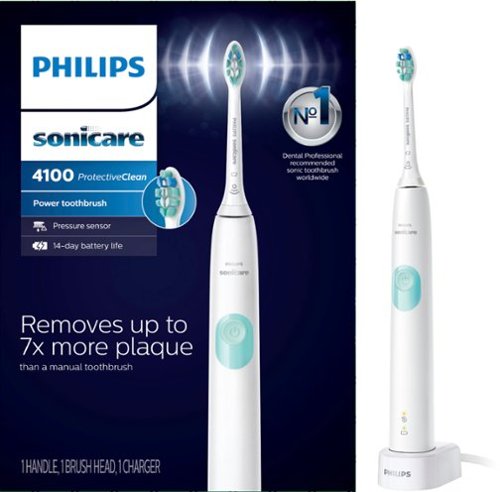
Philips Sonicare ProtectiveClean 4100 Plaque Control, Rechargeable electric toothbrush with pressure sensor, White Mint HX6817/01
is this item stocked in local stores
It is in stock at our Best Buy. Check their web-site it will tell you if they have it available for pickup.
8 years, 6 months ago
by
vrs99
Only at Best BuyUpdate your portable technology kit with this HP Omen 17-inch laptop. Ideal for gaming, this machine combines a 7th generation Intel Core i7 processor with 12GB of DDR4 RAM for ultra-fast performance on the go. An island-style backlit keyboard equipped with dedicated macro keys makes this HP Omen 17-inch laptop easy to use in the dark.
Does this laptop have an M.2 socket that supports an NVMe SSD? Also, is there an empty socket for ram expansion?
Here is the link to the spec sheet - will answer many of your questions.
http://www8.hp.com/us/en/images/OMEN_Laptop_17_an013dx_tcm245_2468782_tcm245_2469233_tcm245-2468782.pdf
The answers I am quite sure are yes as noted by the specs.
http://www8.hp.com/us/en/images/OMEN_Laptop_17_an013dx_tcm245_2468782_tcm245_2469233_tcm245-2468782.pdf
The answers I am quite sure are yes as noted by the specs.
9 years, 2 months ago
by
vrs99
Only at Best BuyUpdate your portable technology kit with this HP Omen 17-inch laptop. Ideal for gaming, this machine combines a 7th generation Intel Core i7 processor with 12GB of DDR4 RAM for ultra-fast performance on the go. An island-style backlit keyboard equipped with dedicated macro keys makes this HP Omen 17-inch laptop easy to use in the dark.
recently pre ordered this laptop I was so excited about it that after I put my order for it I didn't realize it didn't have a Solid state drive I'm very concerned that my laptop won't operate at it's best is there a way I can upgrade it by adding a SSD
Here is the link to the spec sheet - will answer many of your questions.
http://www8.hp.com/us/en/images/OMEN_Laptop_17_an013dx_tcm245_2468782_tcm245_2469233_tcm245-2468782.pdf
From what I understand the answer is yes and it is noted,
http://www8.hp.com/us/en/images/OMEN_Laptop_17_an013dx_tcm245_2468782_tcm245_2469233_tcm245-2468782.pdf
From what I understand the answer is yes and it is noted,
9 years, 2 months ago
by
vrs99