
Customer reviews from lg.com
LG - 65" Class B6 OLED AI 4K Smart webOS TV with Perfect Black, Vivid Color and Magic Remote (2026)
Average customer rating

4.6
(11 Reviews)

Rating breakdown 11 reviews
5 Stars
10
4 Stars
0
3 Stars
0
2 Stars
0
1 Star
1
Customer Reviews for LG - 65" Class B6 OLED AI 4K Smart webOS TV with Perfect Black, Vivid Color and Magic Remote (2026)
Customer Rating

5
Major upgrade
on October 6, 2026
Posted by: Jean paul Z
[This review was collected as part of a promotion.] I’ve been really impressed with the quality of this TV. The picture is incredibly sharp, the colors look vibrant, and everything just feels like a major upgrade from my previous TV. As a big soccer fan, one of my favorite things has been watching games on it. The movement looks smooth and clear, and the picture quality makes sports so much more enjoyable. I’m also a big action movie fan, and this TV has made movie nights at home feel like a completely different experience. The dark scenes, colors, and details look amazing, especially with action movies. Overall, I’m really happy with the TV and the upgrade in quality has been noticeable from day one.
Review submitted as part of a program that provides a purchase discount.
Written by a customer while visiting cohley.com

Customer Rating
5
Great Tv! Great picture quality and very light
on September 28, 2026
Posted by: Genevieve W
[This review was collected as part of a promotion.] I really love this TV, it's the largest TV that I've purchased for myself, and I was really surprised by how light and thin it is. My old TV was much smaller, but it made my room so hot. This TV doesn't really emit any heat, so I can watch TV for as long as I want, without having to block out sunlight or crank up the AC
I've been really enjoying the screensaver mode, it's nice to have the TV on in the background without having to watch anything, it just adds to the vibe of the room.
There's also a large variety of live channels to watch if you do enjoy live TV. I was really pleased with the selection of live anime channels to watch which can substitute for a subscription.
There's also a large variety of live channels to watch if you do enjoy live TV. I was really pleased with the selection of live anime channels to watch which can substitute for a subscription.
Lastly, I'm really happy with how sturdy and responsive the remote is. There isn't any lag when I use it, and I've dropped it a few times, and the back hasn't gone flying, which is really nice!
Review submitted as part of a program that provides a purchase discount.
(click to see the video)
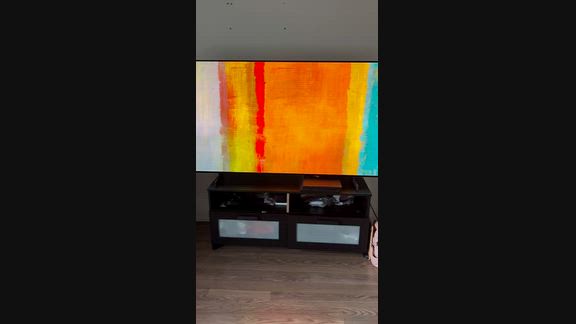
Response from cohley.comBy ^Rich, LG Digital Care Team, October 1, 2026
Hi Genevieve! We are thrilled to hear that your new OLED TV is bringing super crisp visuals, cool room-friendly energy, ambient screensaver vibes, and smooth channels to your setup! If you ever need any assistance in the future, please feel free to reach out to @LGUSSupport. #LifesGood ❤️
—Rich
—Rich
Written by a customer while visiting cohley.com
Customer Rating

1
Terrible tv
on September 17, 2026
Posted by: Bruhsky
This tv sucks. I have to unplug my hdmi cable multiple times to get it to register. Its slow, clunky and has a million settings. Good luck doing any simple thing on this tv. I wish I could refund it
Response from lg.comBy ^Rich, LG Digital Care Team, September 17, 2026
Hi Bruhsky, thanks for sharing your experience with your 65 Inch Class LG OLED AI B6 4K Smart TV 2026 model OLED65B6GUA. We understand you’ve been dealing with HDMI recognition and navigation concerns, and we appreciate you taking the time to let us know what’s been happening. We understand how important it is for your TV to respond quickly and detect your connected devices right away.
A few quick steps can help improve HDMI performance:
⦁ Try switching to another HDMI port to refresh the connection
⦁ Make sure the HDMI cable is firmly connected on both ends
⦁ Unplug the TV for about a minute to allow the system to reset
You can also review LG’s HDMI performance guide here for additional tips:
https://www.lg.com/us/support/help-library/lg-tv-troubleshooting-poor-hdmi-performance--20153258865666
If you need further assistance, feel free to email lgdigitalcare@lg.sprinklrsupport.com.
‑Rich
A few quick steps can help improve HDMI performance:
⦁ Try switching to another HDMI port to refresh the connection
⦁ Make sure the HDMI cable is firmly connected on both ends
⦁ Unplug the TV for about a minute to allow the system to reset
You can also review LG’s HDMI performance guide here for additional tips:
https://www.lg.com/us/support/help-library/lg-tv-troubleshooting-poor-hdmi-performance--20153258865666
If you need further assistance, feel free to email lgdigitalcare@lg.sprinklrsupport.com.
‑Rich
Written by a customer while visiting lg.com

Customer Rating
5
HOLY SMOKES this is huuge and I LOVE IT
on August 31, 2026
Posted by: Max R
[This review was collected as part of a promotion.] Look I have had lots of TVs. I am a movie buff for sure... and let me tell you The quality, the colors, the sounds... its like walking into a theater in your own home. The colors are so vibrant the sound -sounds so good just as if I am in the theatre. I have bought many sound bars before but this TV sounds 100x better than any expensive sound bar I got. I could not recommend this enough.
Review submitted as part of a program that provides a purchase discount.
Response from cohley.comBy ^Rich, LG Digital Care Team, September 5, 2026
Hey there, Max! Thanks for the lively rundown. Always great hearing your OLED is giving you that big‑screen, theater‑style experience you were hoping for. If you ever need anything later on, our friends at @LGUSSupport are ready to help.
#LifesGood ❤️
‑Rich
#LifesGood ❤️
‑Rich
Written by a customer while visiting cohley.com
Customer Rating
5
Insane Upgrade From Our Old TV
on August 25, 2026
Posted by: Meggan D
[This review was collected as part of a promotion.] Our old TV was over 10 years old, so we finally upgraded to the LG OLED AI B6 65-inch 4K Smart TV, and what a difference. The picture quality genuinely surprised me. The colors are so rich and vibrant, and the dark scenes actually look dark instead of grayish and washed-out like our old TV. Setup was super easy, nothing complicated, and even the smart apps were easy for everyone in the family to figure out. I didn't expect the TV to be this insanely thin either. It's already become the spot where we do family movie nights now. If your TV is getting up there in age like ours was, I'd say it's time. This one's been a great upgrade for us.
Review submitted as part of a program that provides a purchase discount.
Response from cohley.comBy ^Rich, LG Digital Care Team, August 28, 2026
Hey there, Meggan! Thanks for sharing your experience. Always great hearing your OLED is giving you that rich picture, easy setup and a fresh upgrade for family movie nights. If you ever need anything later on, our friends at @LGUSSupport are ready to help.
#LifesGood ❤️
‑Rich
#LifesGood ❤️
‑Rich
Written by a customer while visiting cohley.com
Customer Rating
5
Finally a TV That Handles Daylight Well
on August 25, 2026
Posted by: Mehmet serdar K
[This review was collected as part of a promotion.] Our old TV never looked sharp during the day — our living room gets a lot of direct sunlight, so the picture always looked washed out. Switching to this LG changed that right away. The picture is much sharper, colors look accurate, and we're not straining our eyes anymore during long watch sessions. Setup was quick too; we had it running in just a few minutes.
"Review submitted as part of a program that provides a purchase discount."
"Review submitted as part of a program that provides a purchase discount."
Response from cohley.comBy ^Rich, LG Digital Care Team, August 28, 2026
Hey there, Mehmet! Thanks for sharing your experience. Always great hearing your OLED is giving you that sharp daytime picture and a smooth setup right out of the box. If you ever need anything later on, our friends at @LGUSSupport are ready to help.
#LifesGood ❤️
‑Rich
#LifesGood ❤️
‑Rich
Written by a customer while visiting cohley.com
Customer Rating
5
Beautiful picture quality and a great upgrade
on August 25, 2026
Posted by: Olha K
[This review was collected as part of a promotion.] I’ve been really enjoying this LG OLED TV. The first thing I noticed was the picture quality — the colors look rich and vibrant, while the blacks are incredibly deep and make everything feel much more detailed. The screen is large and immersive, which makes movie nights at home feel much more special. I also appreciate how sleek and modern the TV looks in the room without feeling bulky. Setup was straightforward, and navigating through the smart features feels easy and intuitive. The picture remains clear and beautiful with different types of content, and overall it feels like a significant upgrade to our home entertainment setup. I’m very happy with the quality and the viewing experience so far.
Review submitted as part of a program that provides a purchase discount.
Review submitted as part of a program that provides a purchase discount.
Response from cohley.comBy ^Rich, LG Digital Care Team, August 28, 2026
Hi there, Olha! Thanks for sharing your experience. Always great hearing your OLED is giving you that rich picture, smooth setup and a sleek upgrade for your space. If you ever need anything later on, our friends at @LGUSSupport are ready to help.
#LifesGood ❤️
‑Rich
#LifesGood ❤️
‑Rich
Written by a customer while visiting cohley.com
Customer Rating
5
Obsessed!
on August 13, 2026
Posted by: Amini P
[This review was collected as part of a promotion.] We honestly love this 83-inch OLED TV. It’s by far the best TV we’ve ever owned, and it completely transformed our living room. We recently moved into our new home, so we wanted a TV that would really complete the space, and this was the perfect choice. We have it mounted above our fireplace, and one of my favorite things is how flat and seamless it sits against the wall. It gives the room such a clean, modern look and made the entire space feel so much more luxurious compared to the bulky TV we had before. The picture quality is incredibly clear. One of the coolest features is the remote—it makes navigating everything feel quick and easy, and it’s become one of those little things we appreciate every day. We mainly use the TV for family movie nights and everyday viewing. Setup was straightforward, and the smart features are easy to use. I would definitely recommend.
Review submitted as part of a program that provides a purchase discount.
Response from cohley.comBy ^Rich, LG Digital Care Team, August 20, 2026
Hello there, Amini! Thanks for the glowing review. Always great hearing your OLED is giving your space that clean, modern look while delivering the picture quality and everyday ease you were hoping for. If you ever need anything down the road, @LGUSSupport is here for you.
#LifesGood ❤️
‑Rich
#LifesGood ❤️
‑Rich
Written by a customer while visiting cohley.com