
Customer reviews from Cricut
Bundle - Cricut - StickerPix Print + Cut Essential, Powder Blue
Average customer rating

4.8
(135 Reviews)

Rating breakdown 135 reviews
5 Stars
124
4 Stars
5
3 Stars
2
2 Stars
1
1 Star
3
97%of customers recommend this product.
(
114 out of
117)
Customer Reviews for Bundle - Cricut - StickerPix Print + Cut Essential, Powder Blue

Posted by: Casual craft enthusiast
Verified Purchase:Yes
Absolutely love the machine, and there are many great things about it. Couldn't give it 5 stars because I really hope the Design Space app gets fixed soon.
Most features available with other machines are not available on this machine. There doesn't seem to be an easy workaround to get things into design for this machine so you are VERY limited in what and how you create.
Most features available with other machines are not available on this machine. There doesn't seem to be an easy workaround to get things into design for this machine so you are VERY limited in what and how you create.
Written by a customer while visiting Cricut

Posted by: Cricuteer
Verified Purchase:Yes
The price was higher than I thought it should be, but for the convenience of the pictures I bought it. The pictures did not come out as vibrant as store pictures. Having a second tray would be handy so that taking the photo paper out every time I want to make a sticker is very inconvenient . Pictures are corrupted if any finger prints get on the paper. Just another reason to have two trays. One for the photos, and on tray for the stickers. I don’t plan on using either papers all at once. Buying additional paper should be more economical. The question is do you make money on selling the machine or on the paper refills ?!
I would recommend this to a friend!
Written by a customer while visiting Cricut
Posted by: artsteve98
from Lees Summit
Verified Purchase:Yes
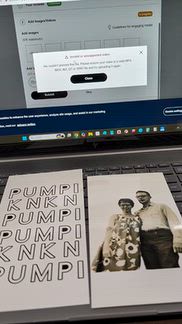
I made something for my 80 year old wife. When she wanted a modified version, I couldn't do a save as
xxx001. I bought both machines. I also couldn't take items from my files from cricut machines and copy
them to the new machines. Software STINKS!!!
xxx001. I bought both machines. I also couldn't take items from my files from cricut machines and copy
them to the new machines. Software STINKS!!!
No, I would not recommend this to a friend.
(click to see the video)
Response from CricutBy Cricut, Cricut, October 26, 2026
Hello,
We are sorry to hear about your frustration with Design Space and creating projects. If you have any other questions or need further help with these features, please contact Cricut Member Care.
We are sorry to hear about your frustration with Design Space and creating projects. If you have any other questions or need further help with these features, please contact Cricut Member Care.
Written by a customer while visiting Cricut
Customer Rating

2
Sad turn out
on October 19, 2026
Posted by: JustAGirlWhoLovesStickers
from New York
On the second print then cut, the VERY EXPENSIVE paper jammed. This machine and more so the paper is way too expensive to be jamming on the second print. This is very upsetting.
No, I would not recommend this to a friend.
Response from CricutBy Cricut, Cricut, October 22, 2026
Hello,
We appreciate you sharing your experience with us and we are sorry to hear about the issue with your machine. If you are still experiencing problems or have any questions, please contact Cricut Member Care directly.
We appreciate you sharing your experience with us and we are sorry to hear about the issue with your machine. If you are still experiencing problems or have any questions, please contact Cricut Member Care directly.
Written by a customer while visiting Cricut
Customer Rating

5
Great sticker machine!
on October 16, 2026
Posted by: MandyMo
from Frisco, TX
[This review was collected as part of a promotion.] Making Stickers Has Never Been Easier!
I make a LOT of stickers, so I was excited to try the Cricut StickerPix Print + Cut! I already have a Cricut machine and printer, but I love how convenient this makes the entire process. I can go from an idea to finished stickers in about 5–10 minutes!
The print quality has really impressed me, and I love how easy it is to create personalized stickers for journaling, gifts, and everyday projects. If you make stickers regularly, this machine is definitely worth considering!
I would recommend this to a friend!
Written by a customer while visiting Cricut
Customer Rating

3
Print and cut
on October 9, 2026
Posted by: Camayclev
It prints nice but if you want to use all of the features you have to upgrade your account and it's not the easiest task. You have to wait till your prescription ends then you have to redo it and someone said that you couldn't do it cuz the offer wasn't available. now they're on a credit thing. If you don't have enough credits .you can't buy more credits so all the features are not available only with credit.
I would recommend this to a friend!
Response from CricutBy Cricut, Cricut, October 9, 2026
Hello,
Thank you for sharing your experience with Print then Cut. We’re glad to hear you’re satisfied with the printing quality. We understand your concerns and appreciate your feedback, as it is important and will be shared with our team as we continue to review and improve the process for all members. If you need further assistance or have questions about your account, please consider reaching out to Cricut Member Care.
Thank you for sharing your experience with Print then Cut. We’re glad to hear you’re satisfied with the printing quality. We understand your concerns and appreciate your feedback, as it is important and will be shared with our team as we continue to review and improve the process for all members. If you need further assistance or have questions about your account, please consider reaching out to Cricut Member Care.
Written by a customer while visiting Cricut
Customer Rating
5
Trust me, you'll love it!
on October 9, 2026
Posted by: Shaymile
from Chicago, IL
Trust me, you'll love it!
I really was on the fence about if I needed this device. fter watching the demos on release day, I took the plunge and thought we'll see when it arrives and what a surprise! The ease of creating stickers within minutes was so worth it. The pictures are vibrant and it is so much fun. Yes, some may say you can do the same thing with the Print then Cut feature which is 100% true. This has definitely been so fun creating items that have went in my planner, on packaging and even sending cute designs to family/friends. If you have a Canon Selphy 1300/1500, the dye printing is the same technique. I must admit I was very surprised with how much I've loved using this device. The stickers stick very good and I have t had any issues with peeling.
I really was on the fence about if I needed this device. fter watching the demos on release day, I took the plunge and thought we'll see when it arrives and what a surprise! The ease of creating stickers within minutes was so worth it. The pictures are vibrant and it is so much fun. Yes, some may say you can do the same thing with the Print then Cut feature which is 100% true. This has definitely been so fun creating items that have went in my planner, on packaging and even sending cute designs to family/friends. If you have a Canon Selphy 1300/1500, the dye printing is the same technique. I must admit I was very surprised with how much I've loved using this device. The stickers stick very good and I have t had any issues with peeling.
I would recommend this to a friend!
Written by a customer while visiting Cricut
Customer Rating
5
Stickers in minutes
on October 8, 2026
Posted by: Sticky
[This review was collected as part of a promotion.] I bought this today and love it already. Stickers in minutes is great.
I would recommend this to a friend!
Written by a customer while visiting Cricut