
Customer reviews from epson.com
Epson - DS-530 II Large Format ADF Scanner - 600 dpi Optical - 30-bit Color - 24-bit Grayscale - 35 ppm (Mono) - 35 ppm - White
Average customer rating

4.8
(24 Reviews)

Rating breakdown 24 reviews
5 Stars
22
4 Stars
1
3 Stars
0
2 Stars
0
1 Star
1
100%of customers recommend this product.
(
16 out of
16)
Customer Reviews for Epson - DS-530 II Large Format ADF Scanner - 600 dpi Optical - 30-bit Color - 24-bit Grayscale - 35 ppm (Mono) - 35 ppm - White
Customer Rating

1
Overhyped
on March 20, 2025
Posted by: xxlt3xx
bought this for our accounts payable however the scan preview is a totally different print quality than the actual scan. I cant believe how bad the actual scan is its illegible if there is any gray on the receipt
Response from epson.comBy Joseph, The Epson Team, March 20, 2025
Hi xxlt3xx, we appreciate your business. Your DS-530 II includes a 3-Year Limited Warranty, plus free technical support for the life of your product. If you're facing a specific issue, our Epson Support Team would be happy to help and can be reached at (562) 276-4382. Hours: 7 a.m. - 4 p.m. (PT), Monday - Friday. We hope to hear from you soon. Cheers, Joseph– The Epson Team.
Written by a customer while visiting epson.com

Customer Rating

5
Perfect for the Home Business
on August 29, 2021
Posted by: LifeWithAnnaC
from New London, OH
Since I work from home for an agency, there are some things that I have to scan and get out to clients. It's sometimes a hassle to do that on my all-in-one printer, so having a separate document scanner helps.
The Epson DS-530 II Color Duplex Document Scanner is convenient, quick, and was so easy to set up. I had it scanning in less than 5 minutes. I love that it's not bulky so it does not take up much space at all. The document feeder closes down so that you can keep dust or debris out of the feeder and keep your scanner running nice. I do wish it was wi-fi enabled as I would not have to keep it directly plugged into my computer (I am a plug minimalist), but it works.
I tried it out scanning documents for my son's new job and it scanned both sides of his driver's license, SSID, and birth certificate without having to scan both sides of each separately. It gave me the option of saving either as a jpeg or pdf and if I wanted the document in color, greyscale, or black and white.
"This is a review for the Epson DS-530 II Color Document Scanner that I received free of charge to do a beta test and review."
I would recommend this to a friend!
Quality

5
Value
5
Written by a customer while visiting epson.com
Customer Rating
5
Awesome Scanner for the Intended Purpose
on September 2, 2021
Posted by: Kousaka_Haruka
from Southern California Region
First impressions: The unboxing of the scanner was straightforward and simple. The package arrived to my doorstep relatively undamaged. The product along with accessories were easy to remove from the box, and everything was connected to my computer within 10 minutes. The scanner is a nice modern, white color design that does not take up much footprint when closed up. Even with the rear feed tray and front trays extended, it does not take up an absurdly large amount of space.
Setup & Usage: The device is standard USB 3.0 Type B, WITHOUT WiFi capabilities. The Epson Scan & Document Capture software installation process was a relative breeze. The latest version of the software, the “Drivers and Utilities Combo Package Installer”, can be found under the product support page on the Epson website. My setup process was performed on Windows 10, so I am not able to comment on the software installation for MacOS users.
Scanning documents itself is fast and straightforward - just make sure you orient your documents correctly in the rear feed tray; documents go in with the front side and top being facing down. The scanner processes multi-page documents very quickly, with double sided capture working like a charm. Document Capture Pro was able to sense the sizes of my documents and receipts with ease, ranging from standard 8.5 x 11 letter size paper to long store receipts resembling the ones you get at CVS. The scanning software also allows you to choose a variety of document format outputs other than PDF, which is very convenient if you are scanning a picture vs. scanning text only documents. These settings can also be customized and saved as presets, for fast access and reuse in the future.
I would like to highlight the duplex functionality of the printer, which saves so much time compared to non-duplex scanners. The speed at which the scanner processes double sided documents is quite quick, with the limitation being how fast your computer and the Epson software can process the scans. As mentioned previously, make sure you insert the front side of your double sided page face down, otherwise, the page order will be scanned and processed in reverse. This is not an issue for a single page of double sided content as it can be easily corrected in Adobe Acrobat, but if you are scanning stack of documents, it is less than ideal to have everything the wrong direction.
Scan Quality: Being primarily a document scanner, the quality has been flawless on all my receipts and standard documents, with clear text that was easily processed by OCR and made editable in Adobe Acrobat. For color image scans, the color resolution and tones are slightly lacking, but for the most part, get the job done. Granted, this was not designed for scanning and digitizing photographs and artwork so if you are looking for a scanner that preserves image coloring with minimal tweaks to the software, I suggest looking elsewhere for something better suited for the job. See pictures for examples of quality.
For the time that I have used the machine for its intended designed purpose, it has outperformed the previous scanners that I have owned. I hope that the device continues to perform well into its service life, producing speedy, quality scans. I have not needed to contact customer service for any reason, and hope it stays that way. I give this product an unbiased, 5/5 stars so far.
My background is in Information Technology and Computer Engineering, so your experience with ease-of-setup may vary. The only really difficult part, is finding the download link to the software package, which can be easily accomplished if you know how to use Google. If not, then buying a scanner, quite frankly, may not have been the best move for you – may I suggest the local library with scanning capabilities on a computer and live support from the staff?
This is a review for the Epson DS-530 II Color Document Scanner that I received free of charge to do a beta test and review.
I would recommend this to a friend!
Quality
5
Value
5
Written by a customer while visiting epson.com
Customer Rating
5
Speedy scanning
on September 8, 2021
Posted by: Mama5
from La
This Epson DS-530 II color scanner is perfect for my small office. It's very compact allowing me to place it on my desk without it getting in the way. Setup was very easy, I only wish it were wireless. My favorite thing about this scanner is that I can load all of my documents in it at one time and it scans them all super fast saving me so much time and energy from scanning individually and waiting. The color quality is amazing and nothing comes out distorted when scanning. This scanner allows me to keep everything organize and scanned in as my documents come in. I am all over the place when it comes to hard paper copies of things because I can never keep track of them but this allows me stay organized and save everything important that I need for later use.
I have had no misfeed issues with this scanner. Everything has worked properly, speedy and effectively. If you are scanning tons of papers, receipts, documents on a daily basis this is the scanner I recommend. Pirtable, easy to use, speedy and great quality. This is a review for the Epson DS-530 II Color Document Scanner that I received free of charge to do a beta test and review.”
I have had no misfeed issues with this scanner. Everything has worked properly, speedy and effectively. If you are scanning tons of papers, receipts, documents on a daily basis this is the scanner I recommend. Pirtable, easy to use, speedy and great quality. This is a review for the Epson DS-530 II Color Document Scanner that I received free of charge to do a beta test and review.”
I would recommend this to a friend!
Quality
5
Value
5
Written by a customer while visiting epson.com
Customer Rating
5
What an amazing scanner!!!
on September 8, 2021
Posted by: OgNate760
from Bellingham, WA
The DS-530 II color duplex document scanner turned out to be great for someone like me who is a photographer. I purchased a ton of old photographs and I am happy to say the DS-530 really exceeded my expectations. Old photos from the 1940s were a breeze to scan and add to my collection. The DS-530 sped through stacks of photos and became a simple and efficient process. The quality was too notch. I also have been in the process of scanning all my documents to a digital copy Incase the original is lost or something. Usually with my older scanner I could only do a few at a time. I was also pleased with the ability to have the photos and documents added to my cloud storage easily as well. The smaller photos and documents were also easy for me to scan and upload. I was overall satisfied with the DS-530 II and how it handled my jobs. I definitely recommend it!!! “This is a review for the Epson DS-530 II Color Document Scanner that I received free of charge to do a beta test and review.”
I would recommend this to a friend!
Quality
5
Value
5
Written by a customer while visiting epson.com
Customer Rating
5
Very fast & great quality
on September 7, 2021
Posted by: Andrew B
from San Francisco, CA
Unboxing was quick and easy! There was a quick-start manual included that consisted of the basic steps of 1) unwrap, 2) plug it in, 3) download/install the software. The installation walks through the order in which to plug things in (power, then USB) and automatically detects the scanner and continues. The installer has a couple options as to which parts to install - it requires the drivers & document capture software, for example, but optionally lets you NOT install the manuals/updater/uninstaller if you'd like. Selecting everything says it will take 415.9MB of space.
The rest of the installation was a breeze. Launching the "Epson Scan 2" gives all sorts of options for quality, de-noise, brightness, etc. My favorite was the option to de-skew based on either the page or the content itself!
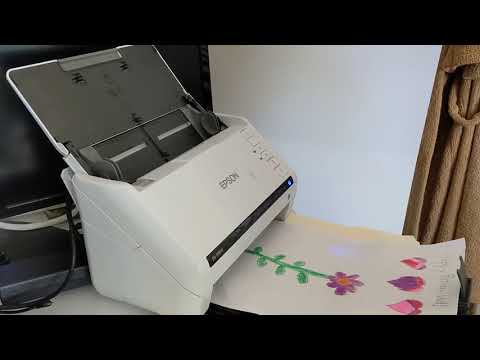
Scanning is VERY quick - I've included a video showing a scan at 600DPI, 300dpi, and 200dpi. The speed does not sacrifice quality, it's great & color-accurate.
The document-feeder works great, accurately separating pages & feeding them through quickly. The document-catcher tray slides out and even has a flip-up stop at the end to catch the papers as they come out so they aren't pushed off the end onto the floor.
In summary, it's an awesome scanner. It's quick, high-quality, and yet also compact - perfect to keep on the side of my desk.
I would recommend this to a friend!
Quality
5
Value
5
(click to see the video)

Written by a customer while visiting epson.com
Customer Rating
5
Awesome quality scanner that is quick
on September 8, 2021
Posted by: LacieLove
from Chester, VA
I was in need of a high quality scanner for my work at home job. I wanted one that I could scan from any of the devices I had in my house. So I was so blown away when I got this amazingly high quality scanner that I could use from any of my devices from my lap top to my cell phone.
It scans nice and quick. The quality of the scan is unbelievable. It has advanced paper feed technologies such as blank page removal, auto rotation, auto-cropping, Dirt Detection, and Paper Protection which is a huge plus. It helps me be more productive at work.
If you are looking for a scanner that is top notch that can scan from any of your devices, this is the scanner you want. You will not be disappointed.
This is a review for the Epson DS-530 II Color Document Scanner that I received free of charge to do a beta test and review.
I would recommend this to a friend!
Quality
5
Value
5
Written by a customer while visiting epson.com
Customer Rating
5
Super Scanner ultrarrapido.
on August 30, 2021
Posted by: Vicky63
from Brooksville Fl
I am very happy with this EPSON DS-530 II Color Document Scanner as it is very easy to install, configure and use. , for me it is the perfect solution since it is very fast and efficient (smart option). Now I can get the most out of my duty cycle as this scanner includes TWAIN and ISIS drivers for better integration with almost every document management system out there. In addition, this color scanner is very fast and safe for a super efficient work of my documents. Scan in color and I didn't get stuck even once ………………………………………………………………………………… This scanner does not have Wi-Fi, so you must be connected to a computer each time you need to scan. Also, keep in mind that each document must be face down at the time of processing. It has 5 buttons to its right in the following order. On -Double feed detection -Slow feed- Cancel and Start, in this scanner there is no margin of error and its function is duplex and it scans both sides automatically. Its size and weight are perfect, as well as its fast and safe shape, which makes this scanner of great quality and ultra-fast. This scanner was received free for testing and review.
I would recommend this to a friend!
Quality
5
Value
5
Written by a customer while visiting epson.com