
Customer reviews from lenovo.com
Lenovo - ThinkPad Compact USB Keyboard with TrackPoint - US English - Cable Connectivity - USB Interface - English (US) - Black
Average customer rating

4.2
(65 Reviews)

Rating breakdown 65 reviews
5 Stars
36
4 Stars
17
3 Stars
4
2 Stars
4
1 Star
4
82%of customers recommend this product.
(
37 out of
45)
Customer Reviews for Lenovo - ThinkPad Compact USB Keyboard with TrackPoint - US English - Cable Connectivity - USB Interface - English (US) - Black
Posted by: Thinkpadophile
from Alberta Canada
Verified Purchase:Yes
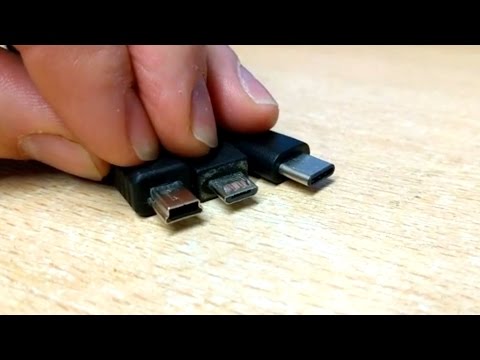
Well made, works great, feels like my Thinkpad, disappointed with the micro USB connector. I wasn't expecting the cord to be removable, I guess its a handy feature? However, the fact that it's 2020 and they are still making products with the micro USB connector is disappointing. I have had two other micro USB connectors fail in the past, let's hope this one is more resilient. It should have been USB-C.
I would recommend this to a friend!
(click to see the video)

Written by a customer while visiting lenovo.com

Customer Rating

4
Almost as good as the real ones...
on July 25, 2021
Posted by: Picante
from Montreal
Gender:Male
This keyboard provides the closest typing experience to that of the keyboards on high-end ThinkPad notebooks. However, there are a few points for improvement, so this comment is for the folks at Lenovo, should they be interested in improving their products and keeping their customer base:
1) Please use the same plastic materials and built quality as in the top line ThinkPad keyboards, and we'll happily pay for it. You already have the good parts, so why make a clone of your own products and compromise on quality? For mediocre keyboards and mice, there is already Logitech, so try to avoid ruining your brand as they did with their own.
2) Add the LED status indicators (again, as in the real ThinkPads). Being a wired keyboard, there is no reason to omit them.
3) Add the gaps every fourth Fn key (again, as in the real ThinkPads). Even if subtle, these gaps make a big difference in useability.
3) USB-C connector
4) Bonus point 1: backlight (nothing fancy, just the same as in a real Thinkpad). Again, being a wired keyboard, it should not be a big deal.
5) Bonus point 2: dual connectivity, i.e. wired USB + RF wireless (why two separate models?!)
I would recommend this to a friend!
Written by a customer while visiting lenovo.com

Posted by: Grass
from Nova Scotia
Verified Purchase:Yes
[This review was collected as part of a promotion.] This keyboard is awkward to use because of the mouse click buttons. I bought it trying to replicate my thinkpad typing experience but the default wrist location when typing due to mouse click buttons is much more awkward than I hoped and hard to go back and forth with any other keyboard. The provided usb cable is also quite short. I’m disappointed with my user experience and will probably resell.
No, I would not recommend this to a friend.
Response from lenovo.comBy Adrian_Lenovo, Customer Service, August 1, 2022
Lenovo appreciates all feedback and thank you for taking the time to rate and review our product! We apologize for any inconvenience. To better accommodate your needs, please consider more options on our website at https://www.lenovo.com/ca/en/pc.
Very Respectfully,
Adrian_Lenovo
Very Respectfully,
Adrian_Lenovo
Written by a customer while visiting lenovo.com
Posted by: LarryLondonOntario
from London, Ontario
Verified Purchase:Yes
This is a great keyboard if you want to work with exactly what is on your laptop. The only drawbacks are lack of backlit keys and I have not figured out how to easily switch the Fn and Ctrl keys like you can on the laptop.
I would recommend this to a friend!
Written by a customer while visiting lenovo.com
Customer Rating

1
Poor Quality. Unusable Keyboard. Keys stuck.
on September 17, 2021
Posted by: Cameron McKenzie
from Toronto, ON
Verified Purchase:Yes
Bought two keyboards. Both 'J' keys are stuck, so when you press any key, you get jjjjjjjjjjjjjjjj. I was always a big Thinkpad and Lenovo fan, but Lenovo quality has sunk to a new low.
No, I would not recommend this to a friend.
Response from lenovo.comBy Adrian_Lenovo, Customer Service, September 17, 2021
Lenovo appreciates all feedback and thank you for taking the time to rate and review our product! We apologize for your inconvenience. Also, please refer to our Technical Support at https://support.lenovo.com/ca/en/.
Very Respectfully,
Adrian_Lenovo
Very Respectfully,
Adrian_Lenovo
Written by a customer while visiting lenovo.com
Customer Rating

5
Excellent external keyboard for the trackpoint
on January 20, 2022
Posted by: A guy
Verified Purchase:Yes
[This review was collected as part of a promotion.] I mainly purchased this keyboard because I missed the trackpoint and placement of the mouse buttons below the keyboard on my work laptop. Unfortunately there are not many choices when it comes to keyboards with trackpoints. However, this shouldn't take away from the fact that this is still an excellent keyboard with deep travel for all the keys. It requires a cable connection from micro USB on the keyboard to USB-A on the computer, but this didn't bother me at all.
I would recommend this to a friend!
Written by a customer while visiting lenovo.com
Posted by: RTSE
from toronto
Verified Purchase:Yes
[This review was collected as part of a promotion.] Keyboard pointing stick takes some getting used to. Once I got the hang of it I don't want to use a mouse anymore as this keyboard allows me to put my hands on the keyboard all the time, especially for a touch typist. USB wired version does not require charging which I find is a plus for me. I don't see the need for wireless version of this keyboard as I won't be moving my keyboard all the time.
Written by a customer while visiting lenovo.com
Posted by: Dunkin
from Toronto
Verified Purchase:Yes
[This review was collected as part of a promotion.] For a small footprint on my desk, the spacing and placement of the keys do not feel cramped at all. the press and feel of the keys are great. being able to use the track point for scrolling or small cursor movements while typing is so nice to have on my desktop computer now too. 11/10
I would recommend this to a friend!
Written by a customer while visiting lenovo.com